3.6.3 跟做工作坊:搭建可复现的数据分析流水线
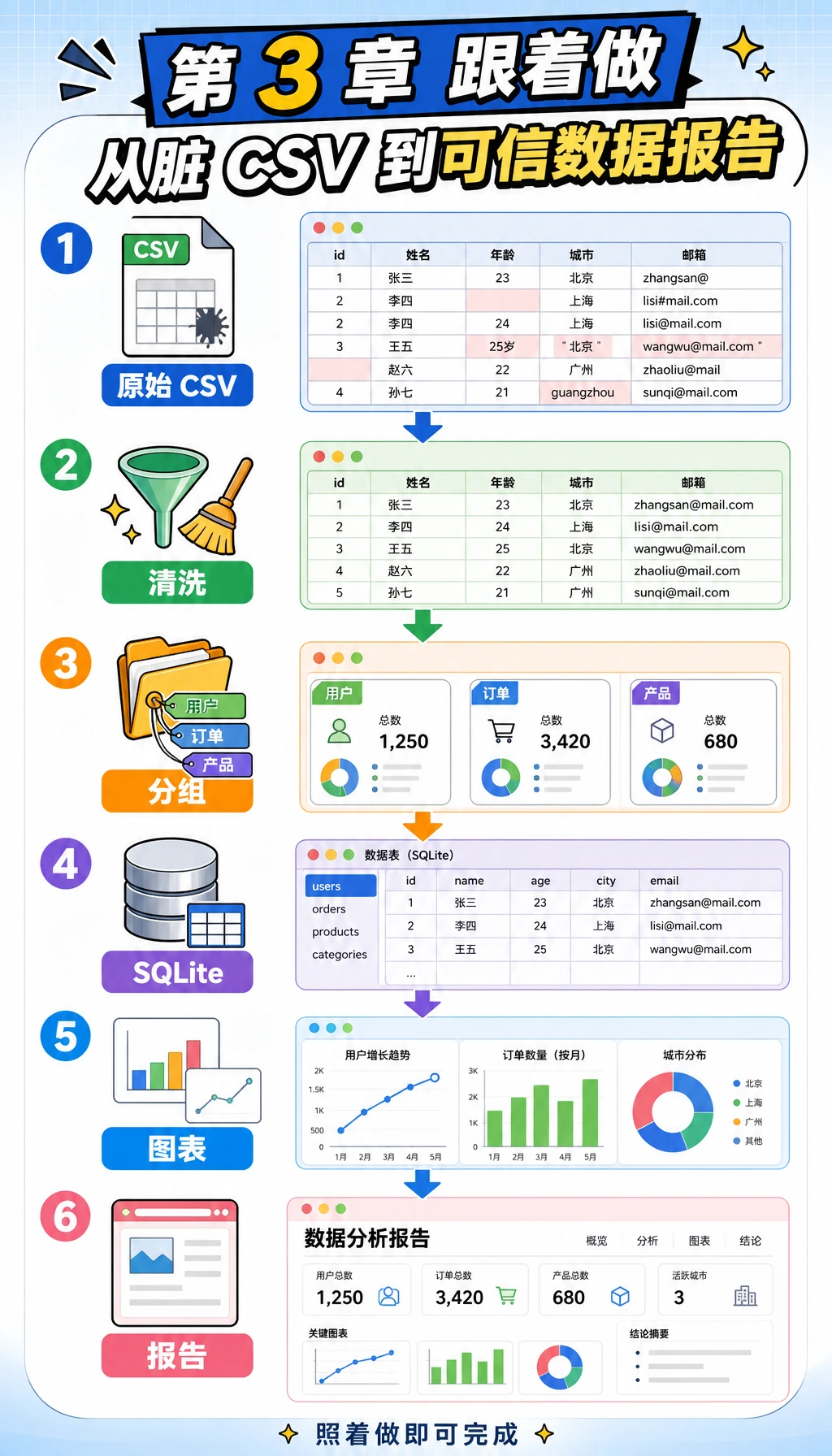
这一页是第 3 章的实操桥梁。你不会把 NumPy、Pandas、可视化和 SQL 当成零散知识点背,而是先完成一条能跑通的流程:脏 CSV → 干净表格 → 分组统计 → SQLite 查询 → 图表 → 报告证据。
你会做出什么
我们会搭建一个小型学习记录分析流水线。它不依赖外部包,只使用 Python 标准库,所以新电脑上也更容易先跑起来。等你学完 Pandas、Matplotlib 或 Notebook 后,可以把同一套步骤升级成更专业的版本。
完成后,你的文件夹里会有这些文件:
| 文件 | 含义 |
|---|---|
raw_learning_log.csv | 故意做脏的原始输入数据 |
clean_learning_log.csv | 用于分析的清洗后表格 |
cleaning_log.json | 每一条被丢弃记录及原因 |
learning_log.sqlite3 | 由清洗数据写入的 SQLite 数据库 |
topic_minutes.svg | 脚本生成的图表 |
report.html | 可以用浏览器打开的简易分析报告 |
Step 0:创建干净的练习文件夹
在终端运行下面的命令。如果你使用 Windows,可以在 PowerShell 里执行;如果 python3 不存在,就把它换成 python。
mkdir ch03-learning-log-workshop
cd ch03-learning-log-workshop
python3 --version
预期输出类似下面这样,版本号不同没关系。
Python 3.12.3
保持这个终端打开。后面的命令默认都在 ch03-learning-log-workshop 目录里执行。
Step 1:先看懂流水线,再写代码
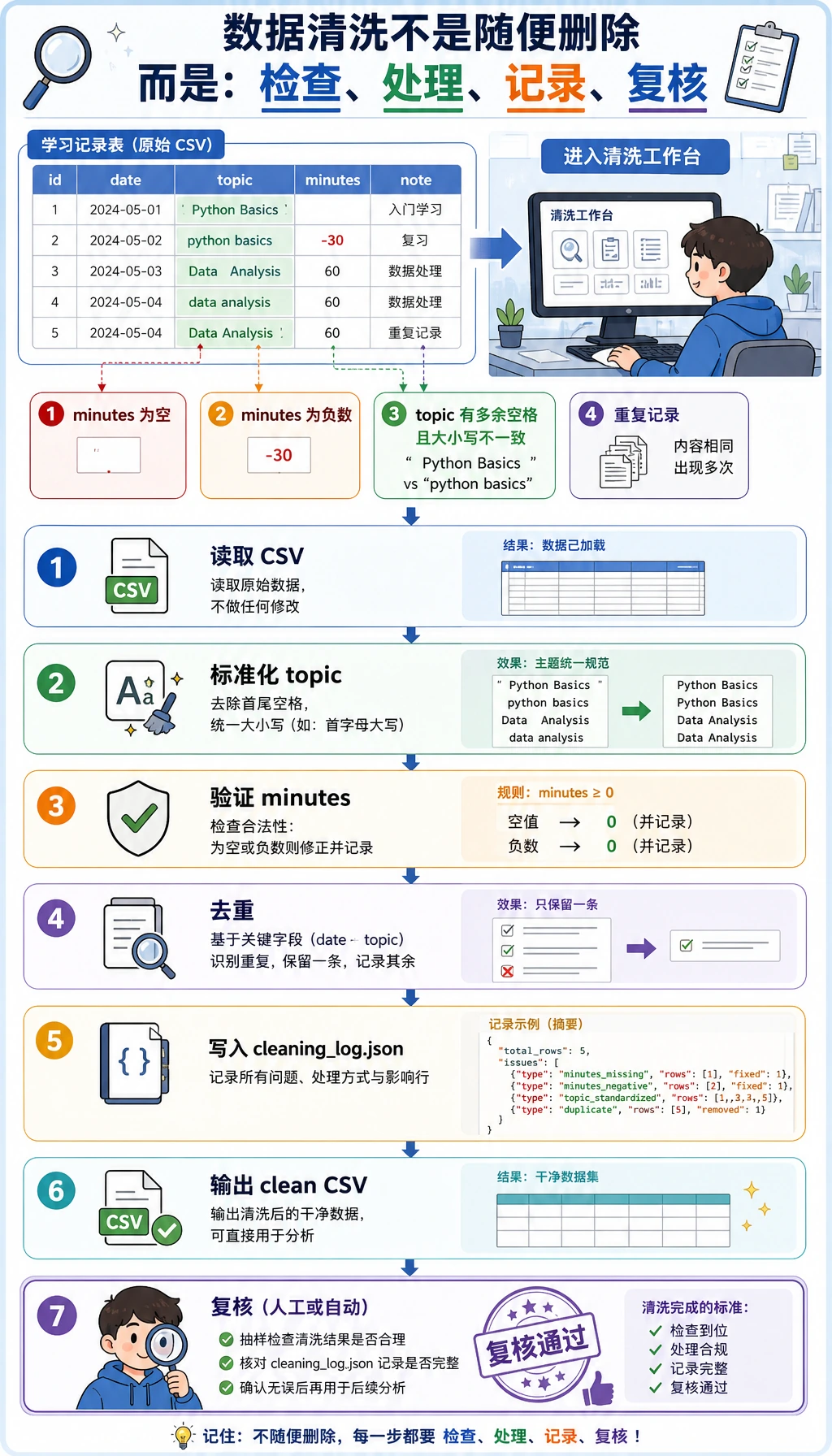
核心思路很简单:不要从原始数据直接跳到结论。可信的数据分析应该为每一次转换留下证据。
| 阶段 | 要问的问题 | 输出 |
|---|---|---|
| 生成输入 | 原始数据长什么样? | raw_learning_log.csv |
| 清洗 | 哪些行无效或重复? | clean_learning_log.csv、cleaning_log.json |
| 汇总 | 哪个主题投入时间最多? | 按主题分组后的统计结果 |
| 查询 | 同一份干净数据能否像数据库一样查询? | learning_log.sqlite3 |
| 可视化 | 哪个结果需要一眼看懂? | topic_minutes.svg |
| 报告 | 别人应该相信什么,又能检查什么? | report.html |
Step 2:创建可运行脚本
创建一个名为 learning_log_pipeline.py 的文件,然后粘贴下面完整脚本。
from __future__ import annotations

import csv
import html
import json
import sqlite3
from collections import defaultdict
from pathlib import Path
from statistics import mean

OUTPUT_DIR = Path("ch03_output")
RAW_CSV = OUTPUT_DIR / "raw_learning_log.csv"
CLEAN_CSV = OUTPUT_DIR / "clean_learning_log.csv"
DATABASE = OUTPUT_DIR / "learning_log.sqlite3"
CHART_SVG = OUTPUT_DIR / "topic_minutes.svg"
REPORT_HTML = OUTPUT_DIR / "report.html"
CLEANING_LOG = OUTPUT_DIR / "cleaning_log.json"

FIELDNAMES = ["date", "topic", "minutes", "status", "confidence", "note"]

RAW_ROWS = [
    {"date": "2026-05-01", "topic": "Python", "minutes": "45", "status": "completed", "confidence": "0.92", "note": "loops and conditions"},
    {"date": "2026-05-01", "topic": " pandas ", "minutes": "30", "status": "stuck", "confidence": "0.55", "note": "merge confusion"},
    {"date": "2026-05-02", "topic": "Python", "minutes": "60", "status": "completed", "confidence": "0.88", "note": "functions"},
    {"date": "2026-05-02", "topic": "SQL", "minutes": "35", "status": "completed", "confidence": "0.81", "note": "select and where"},
    {"date": "2026-05-03", "topic": "Pandas", "minutes": "", "status": "stuck", "confidence": "0.40", "note": "forgot to track time"},
    {"date": "2026-05-03", "topic": "Visualization", "minutes": "50", "status": "completed", "confidence": "0.76", "note": "bar chart"},
    {"date": "2026-05-04", "topic": "sql", "minutes": "-10", "status": "completed", "confidence": "0.70", "note": "timer entered backwards"},
    {"date": "2026-05-04", "topic": "Pandas", "minutes": "40", "status": "completed", "confidence": "0.66", "note": "groupby practice"},
    {"date": "2026-05-05", "topic": "Python", "minutes": "45", "status": "completed", "confidence": "0.82", "note": "list comprehension"},
    {"date": "2026-05-05", "topic": "Python", "minutes": "45", "status": "completed", "confidence": "0.82", "note": "list comprehension"},
    {"date": "2026-05-05", "topic": "RAG", "minutes": "25", "status": "stuck", "confidence": "0.50", "note": "chunking terms"},
    {"date": "2026-05-06", "topic": "Visualization", "minutes": "65", "status": "completed", "confidence": "0.91", "note": "line chart"},
]


def normalize_topic(value: str) -> str:
    aliases = {
        "python": "Python",
        "pandas": "Pandas",
        "sql": "SQL",
        "visualization": "Visualization",
        "rag": "RAG",
    }
    cleaned = value.strip().lower()
    return aliases.get(cleaned, cleaned.title())


def parse_positive_minutes(value: str) -> int | None:
    try:
        minutes = int(value)
    except (TypeError, ValueError):
        return None
    if minutes <= 0:
        return None
    return minutes


def parse_confidence(value: str) -> float:
    try:
        confidence = float(value)
    except (TypeError, ValueError):
        return 0.0
    return max(0.0, min(confidence, 1.0))


def write_raw_csv() -> None:
    OUTPUT_DIR.mkdir(exist_ok=True)
    with RAW_CSV.open("w", encoding="utf-8", newline="") as file:
        writer = csv.DictWriter(file, fieldnames=FIELDNAMES)
        writer.writeheader()
        writer.writerows(RAW_ROWS)


def load_and_clean(path: Path) -> tuple[list[dict[str, object]], list[dict[str, object]]]:
    clean_rows: list[dict[str, object]] = []
    cleaning_log: list[dict[str, object]] = []
    seen: set[tuple[object, ...]] = set()

    with path.open(encoding="utf-8", newline="") as file:
        reader = csv.DictReader(file)
        for line_number, row in enumerate(reader, start=2):
            topic = normalize_topic(row["topic"])
            status = row["status"].strip().lower()
            minutes = parse_positive_minutes(row["minutes"])
            confidence = parse_confidence(row["confidence"])
            note = row["note"].strip()

            if minutes is None:
                cleaning_log.append({"line": line_number, "action": "drop", "reason": "minutes is missing, non-numeric, or <= 0", "row": row})
                continue

            key = (row["date"].strip(), topic, minutes, status, note)
            if key in seen:
                cleaning_log.append({"line": line_number, "action": "drop", "reason": "duplicate learning record", "row": row})
                continue
            seen.add(key)

            clean_rows.append(
                {
                    "date": row["date"].strip(),
                    "topic": topic,
                    "minutes": minutes,
                    "status": status,
                    "confidence": confidence,
                    "note": note,
                }
            )

    return clean_rows, cleaning_log


def write_clean_csv(rows: list[dict[str, object]]) -> None:
    with CLEAN_CSV.open("w", encoding="utf-8", newline="") as file:
        writer = csv.DictWriter(file, fieldnames=FIELDNAMES)
        writer.writeheader()
        writer.writerows(rows)


def summarize_by_topic(rows: list[dict[str, object]]) -> list[dict[str, object]]:
    buckets: dict[str, dict[str, object]] = defaultdict(lambda: {"minutes": 0, "sessions": 0, "completed": 0, "confidence_values": []})
    for row in rows:
        topic = str(row["topic"])
        buckets[topic]["minutes"] = int(buckets[topic]["minutes"]) + int(row["minutes"])
        buckets[topic]["sessions"] = int(buckets[topic]["sessions"]) + 1
        buckets[topic]["completed"] = int(buckets[topic]["completed"]) + (1 if row["status"] == "completed" else 0)
        buckets[topic]["confidence_values"].append(float(row["confidence"]))

    summary = []
    for topic, values in buckets.items():
        sessions = int(values["sessions"])
        completed = int(values["completed"])
        confidence_values = values["confidence_values"]
        summary.append(
            {
                "topic": topic,
                "minutes": int(values["minutes"]),
                "sessions": sessions,
                "completion_rate": round(completed / sessions * 100, 1),
                "avg_confidence": round(mean(confidence_values), 2),
            }
        )
    return sorted(summary, key=lambda item: (-int(item["minutes"]), str(item["topic"])))


def write_cleaning_log(cleaning_log: list[dict[str, object]]) -> None:
    CLEANING_LOG.write_text(json.dumps(cleaning_log, ensure_ascii=False, indent=2), encoding="utf-8")


def write_sqlite(rows: list[dict[str, object]]) -> None:
    with sqlite3.connect(DATABASE) as conn:
        conn.execute("DROP TABLE IF EXISTS learning_logs")
        conn.execute(
            """
            CREATE TABLE learning_logs (
                date TEXT NOT NULL,
                topic TEXT NOT NULL,
                minutes INTEGER NOT NULL,
                status TEXT NOT NULL,
                confidence REAL NOT NULL,
                note TEXT NOT NULL
            )
            """
        )
        conn.executemany(
            """
            INSERT INTO learning_logs (date, topic, minutes, status, confidence, note)
            VALUES (:date, :topic, :minutes, :status, :confidence, :note)
            """,
            rows,
        )


def query_sqlite_top_topics() -> list[tuple[str, int, float]]:
    with sqlite3.connect(DATABASE) as conn:
        return conn.execute(
            """
            SELECT topic, SUM(minutes) AS total_minutes, ROUND(AVG(confidence), 2) AS avg_confidence
            FROM learning_logs
            GROUP BY topic
            ORDER BY total_minutes DESC
            LIMIT 3
            """
        ).fetchall()


def write_svg_bar_chart(summary: list[dict[str, object]]) -> None:
    max_minutes = max(int(item["minutes"]) for item in summary)
    width = 860
    height = 120 + len(summary) * 74
    left = 180
    bar_max_width = 540
    colors = ["#2563eb", "#0f766e", "#dc2626", "#7c3aed", "#ea580c"]
    lines = [
        f'<svg xmlns="http://www.w3.org/2000/svg" width="{width}" height="{height}" viewBox="0 0 {width} {height}">',
        '<rect width="100%" height="100%" fill="#f8fafc"/>',
        '<text x="32" y="48" font-family="Arial, sans-serif" font-size="26" font-weight="700" fill="#0f172a">Study minutes by topic</text>',
        '<text x="32" y="78" font-family="Arial, sans-serif" font-size="15" fill="#475569">Cleaned learning-log records, grouped by topic</text>',
    ]
    for index, item in enumerate(summary):
        y = 112 + index * 74
        topic = html.escape(str(item["topic"]))
        minutes = int(item["minutes"])
        bar_width = int(minutes / max_minutes * bar_max_width)
        color = colors[index % len(colors)]
        lines.extend(
            [
                f'<text x="32" y="{y + 27}" font-family="Arial, sans-serif" font-size="18" fill="#0f172a">{topic}</text>',
                f'<rect x="{left}" y="{y}" width="{bar_max_width}" height="34" rx="8" fill="#e2e8f0"/>',
                f'<rect x="{left}" y="{y}" width="{bar_width}" height="34" rx="8" fill="{color}"/>',
                f'<text x="{left + bar_max_width + 20}" y="{y + 24}" font-family="Arial, sans-serif" font-size="17" fill="#0f172a">{minutes} min</text>',
            ]
        )
    lines.append("</svg>")
    CHART_SVG.write_text("\n".join(lines), encoding="utf-8")


def write_report(summary: list[dict[str, object]], sql_rows: list[tuple[str, int, float]], cleaning_log: list[dict[str, object]]) -> None:
    total_minutes = sum(int(item["minutes"]) for item in summary)
    rows_html = "\n".join(
        f"<tr><td>{html.escape(str(item['topic']))}</td><td>{item['minutes']}</td><td>{item['sessions']}</td><td>{item['completion_rate']}%</td><td>{item['avg_confidence']}</td></tr>"
        for item in summary
    )
    sql_html = "\n".join(
        f"<li><strong>{html.escape(topic)}</strong>: {minutes} minutes, average confidence {confidence}</li>"
        for topic, minutes, confidence in sql_rows
    )
    REPORT_HTML.write_text(
        f"""
<!doctype html>
<html lang="en">
<head>
  <meta charset="utf-8" />
  <title>Learning Log Analysis Report</title>
  <style>
    body {{ font-family: Arial, sans-serif; max-width: 960px; margin: 32px auto; color: #0f172a; line-height: 1.6; }}
    .cards {{ display: grid; grid-template-columns: repeat(3, 1fr); gap: 12px; }}
    .card {{ background: #eef2ff; border-radius: 12px; padding: 16px; }}
    table {{ width: 100%; border-collapse: collapse; margin-top: 16px; }}
    th, td {{ border-bottom: 1px solid #cbd5e1; text-align: left; padding: 10px; }}
    img {{ max-width: 100%; border: 1px solid #e2e8f0; border-radius: 12px; }}
  </style>
</head>
<body>
  <h1>Learning Log Analysis Report</h1>
  <p>This report was generated from a dirty CSV, then cleaned, summarized, queried with SQLite, and visualized.</p>
  <section class="cards">
    <div class="card"><strong>Total minutes</strong><br>{total_minutes}</div>
    <div class="card"><strong>Clean topics</strong><br>{len(summary)}</div>
    <div class="card"><strong>Dropped rows</strong><br>{len(cleaning_log)}</div>
  </section>
  <h2>Chart</h2>
  <img src="topic_minutes.svg" alt="Study minutes by topic" />
  <h2>Topic Summary</h2>
  <table>
    <tr><th>Topic</th><th>Minutes</th><th>Sessions</th><th>Completion rate</th><th>Avg confidence</th></tr>
    {rows_html}
  </table>
  <h2>SQLite top topics</h2>
  <ul>{sql_html}</ul>
  <h2>Conclusion</h2>
  <p>Python has the highest total study time. Visualization is also strong, but Pandas has lower confidence, so the next practice should focus on Pandas grouping and merging.</p>
</body>
</html>
""".strip(),
        encoding="utf-8",
    )


def main() -> None:
    write_raw_csv()
    clean_rows, cleaning_log = load_and_clean(RAW_CSV)
    summary = summarize_by_topic(clean_rows)
    write_clean_csv(clean_rows)
    write_cleaning_log(cleaning_log)
    write_sqlite(clean_rows)
    sql_rows = query_sqlite_top_topics()
    write_svg_bar_chart(summary)
    write_report(summary, sql_rows, cleaning_log)

    total_minutes = sum(int(row["minutes"]) for row in clean_rows)
    completed_rows = sum(1 for row in clean_rows if row["status"] == "completed")
    completion_rate = completed_rows / len(clean_rows) * 100
    top_topic = summary[0]

    print(f"Raw rows: {len(RAW_ROWS)}")
    print(f"Clean rows: {len(clean_rows)}")
    print(f"Dropped rows: {len(cleaning_log)}")
    print(f"Total study minutes: {total_minutes}")
    print(f"Completion rate: {completion_rate:.1f}%")
    print(f"Top topic: {top_topic['topic']} ({top_topic['minutes']} min)")
    print("\nTop 3 topics from SQLite:")
    for topic, minutes, confidence in sql_rows:
        print(f"- {topic}: {minutes} min, avg confidence {confidence}")
    print("\nGenerated files:")
    for path in [RAW_CSV, CLEAN_CSV, CLEANING_LOG, DATABASE, CHART_SVG, REPORT_HTML]:
        print(f"- {path.as_posix()}")


if __name__ == "__main__":
    main()
Step 3:运行并对照输出
python3 learning_log_pipeline.py
预期输出:
Raw rows: 12
Clean rows: 9
Dropped rows: 3
Total study minutes: 395
Completion rate: 77.8%
Top topic: Python (150 min)

Top 3 topics from SQLite:
- Python: 150 min, avg confidence 0.87
- Visualization: 115 min, avg confidence 0.83
- Pandas: 70 min, avg confidence 0.6

Generated files:
- ch03_output/raw_learning_log.csv
- ch03_output/clean_learning_log.csv
- ch03_output/cleaning_log.json
- ch03_output/learning_log.sqlite3
- ch03_output/topic_minutes.svg
- ch03_output/report.html
如果行数和统计值一致,说明流水线已经跑通。
Step 4:阅读生成的证据
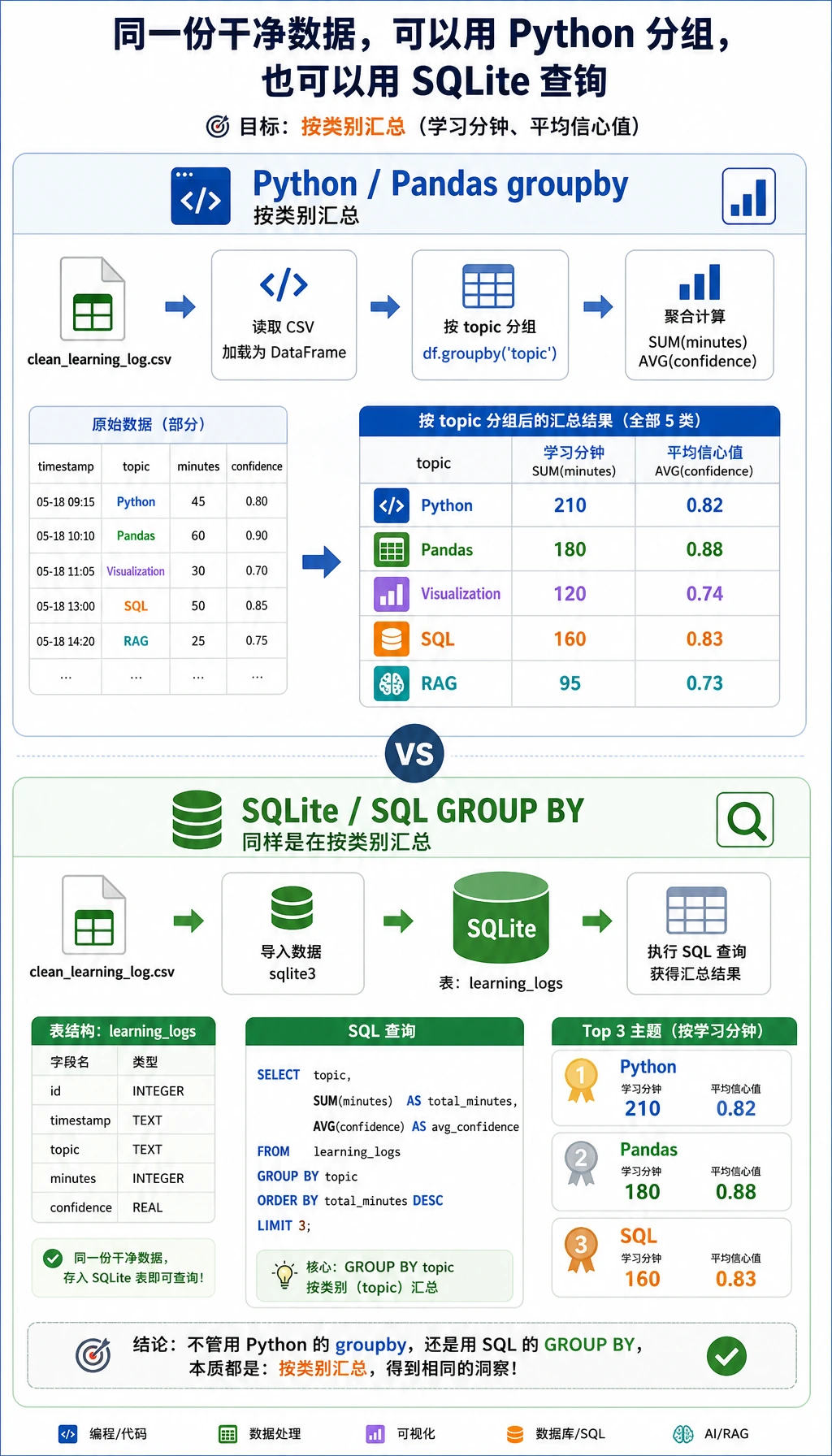
先打开 ch03_output/cleaning_log.json。它应该记录三条被丢弃的数据:一条 minutes 缺失,一条 minutes 为负数,一条重复记录。这个文件很重要,因为没有记录的数据清洗,很难让别人信任。
再检查清洗后的 CSV:
python3 - <<'PY'
import csv

with open("ch03_output/clean_learning_log.csv", encoding="utf-8", newline="") as file:
    rows = list(csv.DictReader(file))

print(rows[0])
print("rows:", len(rows))
PY
预期输出:
{'date': '2026-05-01', 'topic': 'Python', 'minutes': '45', 'status': 'completed', 'confidence': '0.92', 'note': 'loops and conditions'}
rows: 9
现在直接查询 SQLite 数据库:
python3 - <<'PY'
import sqlite3

with sqlite3.connect("ch03_output/learning_log.sqlite3") as conn:
    for row in conn.execute("SELECT topic, SUM(minutes) FROM learning_logs GROUP BY topic ORDER BY SUM(minutes) DESC"):
        print(row)
PY
预期输出:
('Python', 150)
('Visualization', 115)
('Pandas', 70)
('SQL', 35)
('RAG', 25)
Step 5:打开图表和报告
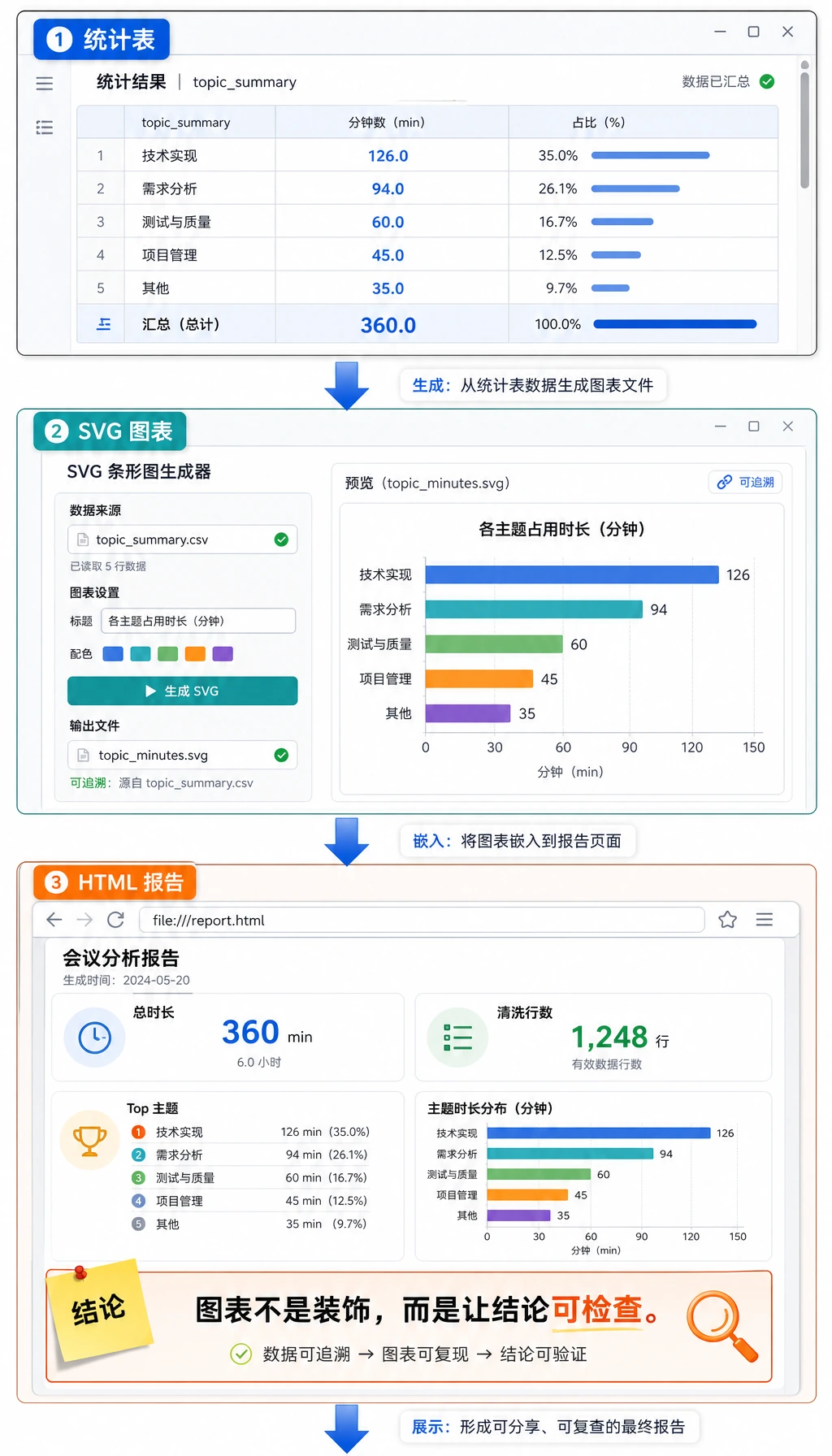
打开 HTML 报告:
# macOS
open ch03_output/report.html

# Windows PowerShell
start ch03_output/report.html

# Linux
xdg-open ch03_output/report.html
这份报告故意做得很简单。重点不是页面多漂亮,而是证明每个数字都能追溯到清洗后的行,每个结论都能被检查。
为什么这些概念重要
| 术语 | 新人友好解释 |
|---|---|
CSV | 纯文本表格文件,容易查看,但不会自动保证数据质量。 |
cleaning log | 记录清洗时改了什么、为什么改,避免结论变成黑盒。 |
grouped statistics | 按类别拆分行,对每组计算指标,再比较不同组。 |
SQLite | Python 通过 sqlite3 自带的小型文件数据库。 |
SVG | 文本形式的图片格式。这里我们不安装绘图库,也能生成一张图。 |
| 可复现性 | 其他人运行同一个脚本,也能得到同样的文件和数字。 |
常见错误与修复
| 问题 | 可能原因 | 修复 |
|---|---|---|
python3: command not found | 你的系统使用 python 而不是 python3 | 先运行 python --version,再用 python learning_log_pipeline.py |
| 输出行数不同 | 脚本被误改了 | 重新复制脚本,在干净文件夹里重跑 |
report.html 能打开但图表不显示 | HTML 文件被移出了 topic_minutes.svg 所在目录 | 让两个文件都留在 ch03_output/ 里 |
| SQLite 查询到旧数据 | 其他脚本复用了旧数据库 | 本脚本会删除并重建表,重新完整运行一次 |
| 会调用 API 但说不清结论 | 只盯着方法,没有看证据 | 按顺序读 cleaning_log.json、clean_learning_log.csv、report.html |
小练习
- 增加一条
Machine Learning记录,让minutes大于0,重跑脚本,观察图表是否变化。 - 增加一条
confidence等于1.2的记录,确认parse_confidence()会把它限制到1.0。 - 修改 SQLite 查询,只显示
status = 'stuck'的记录。 - 增加一个名为
difficulty的字段,并把它写入 CSV、SQLite 表和报告。 - 学完 Pandas 后,用 Pandas 重写
summarize_by_topic(),再和这个标准库版本对照结果。
作品集证据清单
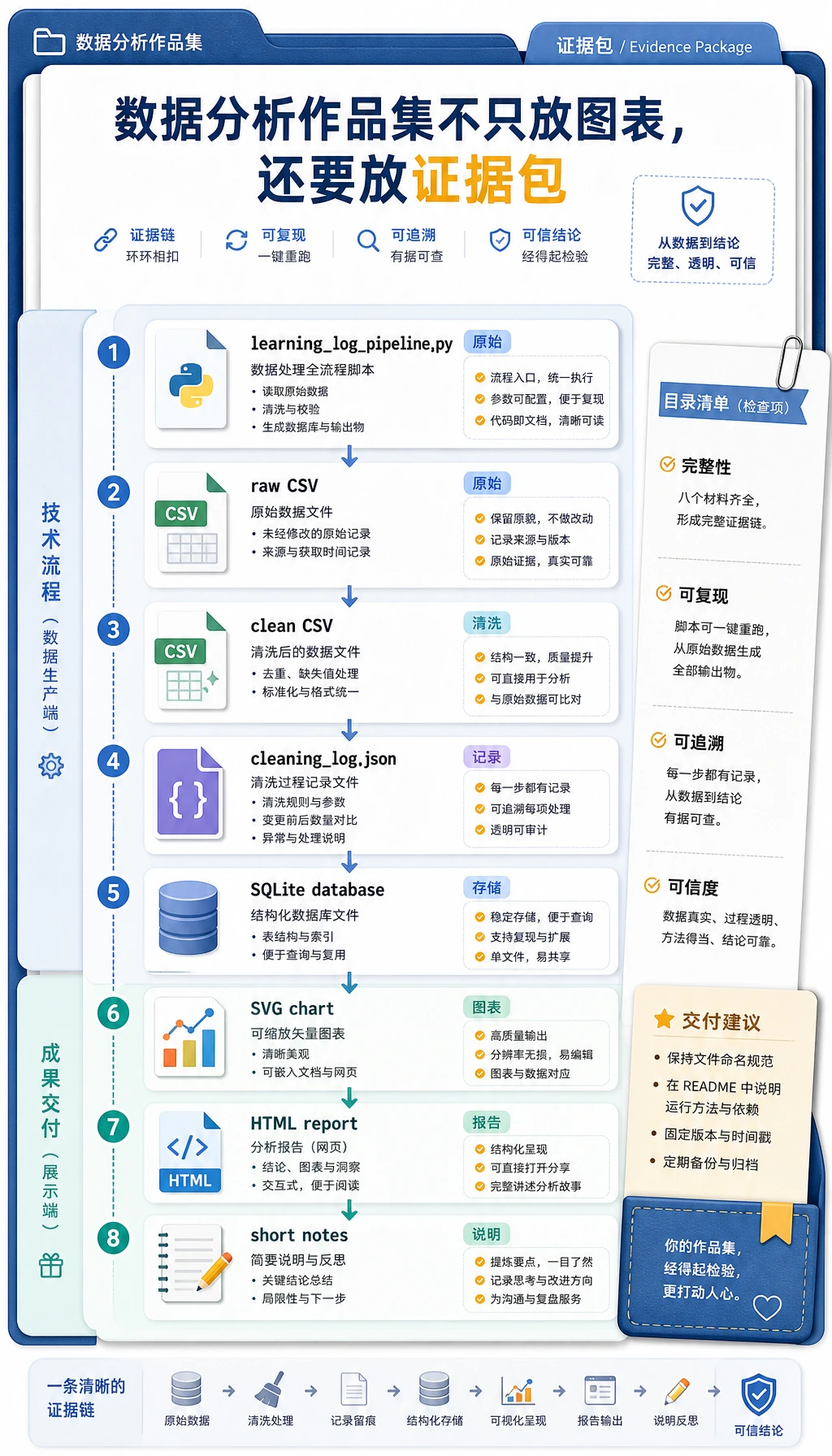
如果你把这个工作坊当成作品集练习,请保留这些材料:
- 脚本:
learning_log_pipeline.py - 原始输入:
raw_learning_log.csv - 清洗输出:
clean_learning_log.csv - 清洗记录:
cleaning_log.json - 数据库:
learning_log.sqlite3 - 图表:
topic_minutes.svg - 报告:
report.html - 一段简短说明:哪些数据被丢弃、哪个主题排名第一、下一步还想分析什么
这是数据工作的最低专业习惯:不要只展示最后的图表,也要展示让图表可信的路径。