1.4.1 跟做工作坊:构建可复现的 AI 学习工作台
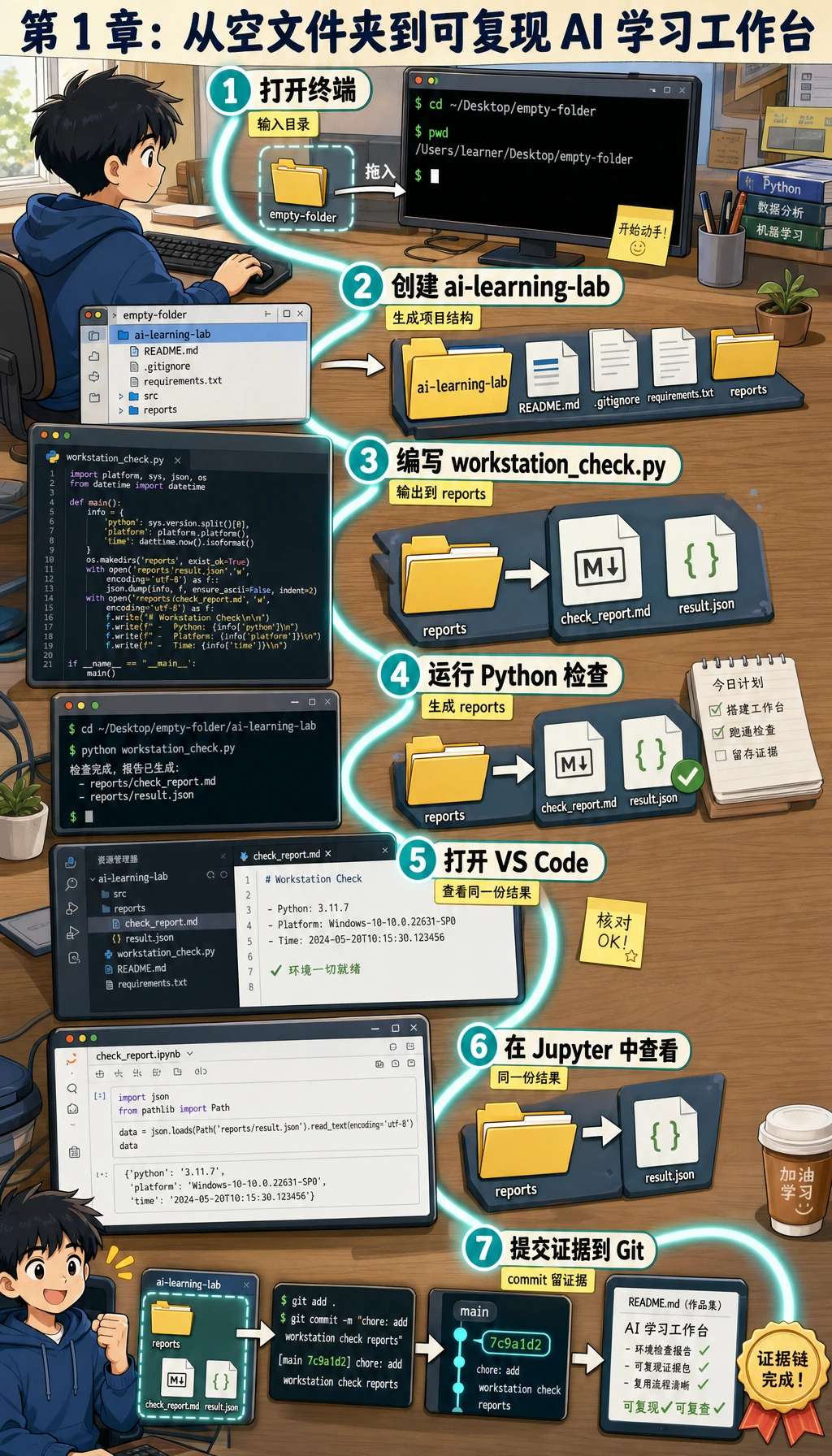
这一页是第 1 章的实操桥梁。你会创建一个名为 ai-learning-lab 的小仓库,运行 Python 环境检查脚本,保存报告,完成 Git 提交,并留下能证明工作台可用的作品集证据。
你将构建什么
你要创建一个本地项目,用它回答一个简单但重要的问题:“我能不能在这台电脑上创建、运行、检查、保存并解释一个项目?”
最终项目会包含:
| 文件或文件夹 | 用途 |
|---|---|
README.md | 说明项目目标、运行命令和预期输出 |
src/workstation_check.py | 可运行的 Python 脚本,用来检查当前工具链 |
notes/learning-log.md | 记录每天的命令、问题和排障过程 |
reports/workstation-check.json | 机器可读的环境报告 |
reports/workstation-report.md | 人能读懂的作品集证据 |
.gitignore | 避免缓存、密钥和本地环境被提交 |
本工作坊只使用 Python 标准库,不需要第三方 SDK、云账号或付费服务。
第 0 步:创建干净的练习文件夹
打开终端并运行:
mkdir ai-learning-lab
cd ai-learning-lab
pwd
python3 --version
预期输出类似:
/Users/zhangsan/ai-learning-lab
Python 3.12.3
你的路径和 Python 版本可以不同。本工作坊使用 Python 3.10 或更新版本即可。
如果 PowerShell 不认识 python3 --version,可以改用 python --version。后面的命令也尽量保持同一个 Python 命令,不要一会儿用 python,一会儿用 python3。
第 1 步:先看完整路线
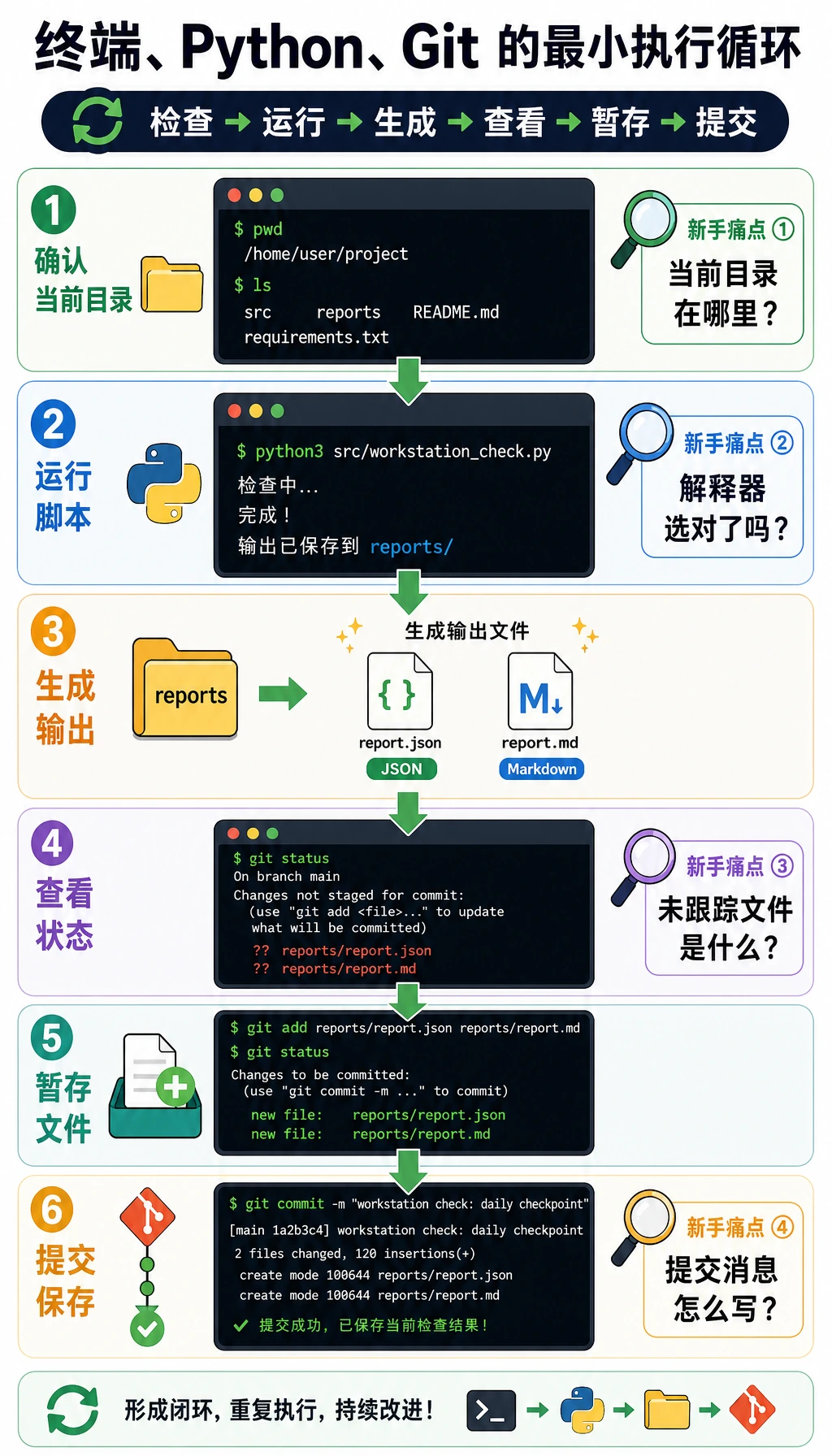
不要把这些工具看成互不相关的主题。在真实开发中,它们会组成一个闭环:
| 步骤 | 工具 | 你要做什么 |
|---|---|---|
| 1 | 终端 | 进入项目文件夹并运行命令 |
| 2 | Python | 运行检查脚本并生成证据 |
| 3 | 编辑器 | 阅读并改进文件 |
| 4 | Git | 把稳定状态保存成 commit |
| 5 | 报告 | 保留能证明项目可复现的输出 |
以后遇到问题,通常就是这些环节中的某一个断了:当前目录、Python 解释器、依赖安装位置、文件路径或 Git 状态。
第 2 步:创建项目骨架
在 ai-learning-lab 里运行:
mkdir -p src notes reports notebooks screenshots
touch requirements.txt
创建 .gitignore:
cat > .gitignore << 'EOF'
__pycache__/
*.pyc
.venv/
venv/
.env
.env.local
.ipynb_checkpoints/
.DS_Store
EOF
创建第一版 README:
cat > README.md << 'EOF'
# AI Learning Lab

This repository is my reproducible learning workspace for the AI full-stack course.

## Run

```bash
python3 src/workstation_check.py
```

## Expected output

The script prints the current project root, Python executable, Git branch, and report file paths.
EOF
创建第一份学习日志:
cat > notes/learning-log.md << 'EOF'
# Learning Log

| Time | Command or action | Result | Note |
|---|---|---|---|
EOF
预期目录结构:
ai-learning-lab/
  README.md
  requirements.txt
  src/
  notes/
  reports/
  notebooks/
  screenshots/
如果你装了 tree,可以用 tree -a -L 2 检查;没有安装也没关系,用 find . -maxdepth 2 -type f 也能看文件。
第 3 步:加入可运行的环境检查脚本
创建 src/workstation_check.py,粘贴下面完整代码。
from __future__ import annotations

import json
import platform
import subprocess
import sys
from datetime import datetime, timezone
from pathlib import Path
from typing import Any

PROJECT_ROOT = Path(__file__).resolve().parents[1]
REPORTS_DIR = PROJECT_ROOT / "reports"
NOTES_DIR = PROJECT_ROOT / "notes"
JSON_REPORT = REPORTS_DIR / "workstation-check.json"
MARKDOWN_REPORT = REPORTS_DIR / "workstation-report.md"
LEARNING_LOG = NOTES_DIR / "learning-log.md"


def utc_now() -> str:
    return datetime.now(timezone.utc).replace(microsecond=0).isoformat()


def run_command(command: list[str]) -> dict[str, Any]:
    try:
        completed = subprocess.run(
            command,
            cwd=PROJECT_ROOT,
            text=True,
            capture_output=True,
            check=False,
        )
    except FileNotFoundError:
        return {
            "command": " ".join(command),
            "returncode": 127,
            "stdout": "",
            "stderr": f"{command[0]} was not found",
        }
    return {
        "command": " ".join(command),
        "returncode": completed.returncode,
        "stdout": completed.stdout.strip(),
        "stderr": completed.stderr.strip(),
    }


def visible_project_files() -> list[str]:
    files: list[str] = []
    for path in sorted(PROJECT_ROOT.rglob("*")):
        if ".git" in path.parts or path.is_dir():
            continue
        files.append(str(path.relative_to(PROJECT_ROOT)))
    return files


def ensure_workspace_files() -> None:
    REPORTS_DIR.mkdir(exist_ok=True)
    NOTES_DIR.mkdir(exist_ok=True)
    if not LEARNING_LOG.exists():
        LEARNING_LOG.write_text(
            "# Learning Log\n\n| Time | Command or action | Result | Note |\n|---|---|---|---|\n",
            encoding="utf-8",
        )


def build_report() -> dict[str, Any]:
    return {
        "generated_at": utc_now(),
        "project_root": str(PROJECT_ROOT),
        "python_version": sys.version.split()[0],
        "python_executable": sys.executable,
        "platform": platform.platform(),
        "git_branch": run_command(["git", "branch", "--show-current"]),
        "git_status": run_command(["git", "status", "--short"]),
        "project_files": visible_project_files(),
    }


def write_reports(report: dict[str, Any]) -> None:
    JSON_REPORT.write_text(json.dumps(report, ensure_ascii=False, indent=2), encoding="utf-8")

    branch = report["git_branch"]["stdout"] or "(no branch yet)"
    status = report["git_status"]["stdout"] or "working tree clean"
    lines = [
        "# Workstation Report",
        "",
        f"- Generated at: {report['generated_at']}",
        f"- Project root: `{report['project_root']}`",
        f"- Python version: `{report['python_version']}`",
        f"- Python executable: `{report['python_executable']}`",
        f"- Git branch: `{branch}`",
        "",
        "## Git status",
        "",
        "```text",
        status,
        "```",
        "",
        "## Project files",
        "",
    ]
    lines.extend(f"- `{file}`" for file in report["project_files"])
    MARKDOWN_REPORT.write_text("\n".join(lines) + "\n", encoding="utf-8")


def append_learning_log(report: dict[str, Any]) -> None:
    branch = report["git_branch"]["stdout"] or "no branch"
    LEARNING_LOG.write_text(
        LEARNING_LOG.read_text(encoding="utf-8")
        + f"| {report['generated_at']} | python3 src/workstation_check.py | ok | branch: {branch} |\n",
        encoding="utf-8",
    )


def main() -> None:
    ensure_workspace_files()
    report = build_report()
    write_reports(report)
    append_learning_log(report)

    branch = report["git_branch"]["stdout"] or "(no branch yet)"
    print(f"[ok] project root: {PROJECT_ROOT}")
    print(f"[ok] python: {report['python_version']} at {report['python_executable']}")
    print(f"[ok] git branch: {branch}")
    print(f"[ok] wrote {JSON_REPORT.relative_to(PROJECT_ROOT)}")
    print(f"[ok] wrote {MARKDOWN_REPORT.relative_to(PROJECT_ROOT)}")
    print("[next] run git status, then commit the files when the output looks right")


if __name__ == "__main__":
    main()
新人要特别看懂这一点:脚本用 Path(__file__).resolve().parents[1] 找到项目根目录。所以只要从项目目录运行 python3 src/workstation_check.py,它就知道报告应该写到哪里。
第 4 步:初始化 Git 并运行脚本
运行下面命令:
git init
git branch -M main
git config user.name "AI Learner"
git config user.email "[email protected]"
python3 src/workstation_check.py
预期输出:
[ok] project root: /Users/zhangsan/ai-learning-lab
[ok] python: 3.12.3 at /usr/local/bin/python3
[ok] git branch: main
[ok] wrote reports/workstation-check.json
[ok] wrote reports/workstation-report.md
[next] run git status, then commit the files when the output looks right
你的 Python 路径可以不同。关键是脚本能运行,并且两个报告文件都生成了。
检查生成的证据:
cat reports/workstation-report.md
git status --short
预期 git status --short 类似:
?? .gitignore
?? README.md
?? notes/
?? reports/
?? requirements.txt
?? src/
?? 表示 Git 已经看到这些文件,但还没有开始跟踪。
第 5 步:完成第一次干净提交
git add .gitignore README.md requirements.txt src notes reports
git status --short
git commit -m "Initialize AI learning lab workstation"
git log --oneline
预期输出:
abc1234 Initialize AI learning lab workstation
你现在已经给自己的工作台保存了第一个稳定检查点。
第 6 步:练习分支,但不破坏 main
创建一个小分支,添加一条学习记录,重新运行脚本,再合并回 main。
git checkout -b practice/add-daily-note
printf "\n- Practiced terminal, Python, and Git together.\n" >> notes/learning-log.md
python3 src/workstation_check.py
git diff -- notes/learning-log.md
git add notes/learning-log.md reports/workstation-check.json reports/workstation-report.md
git commit -m "Add daily tool practice note"
git checkout main
git merge practice/add-daily-note
git log --oneline --graph --all
PowerShell 用户可以把 printf 那一行替换成:
Add-Content notes/learning-log.md "- Practiced terminal, Python, and Git together."
这个练习故意很小。目的不是马上掌握复杂分支模型,而是先感受到:main 是稳定线,练习分支是安全试错区。
第 7 步:把 VS Code 和 Jupyter 当成两块操作面板
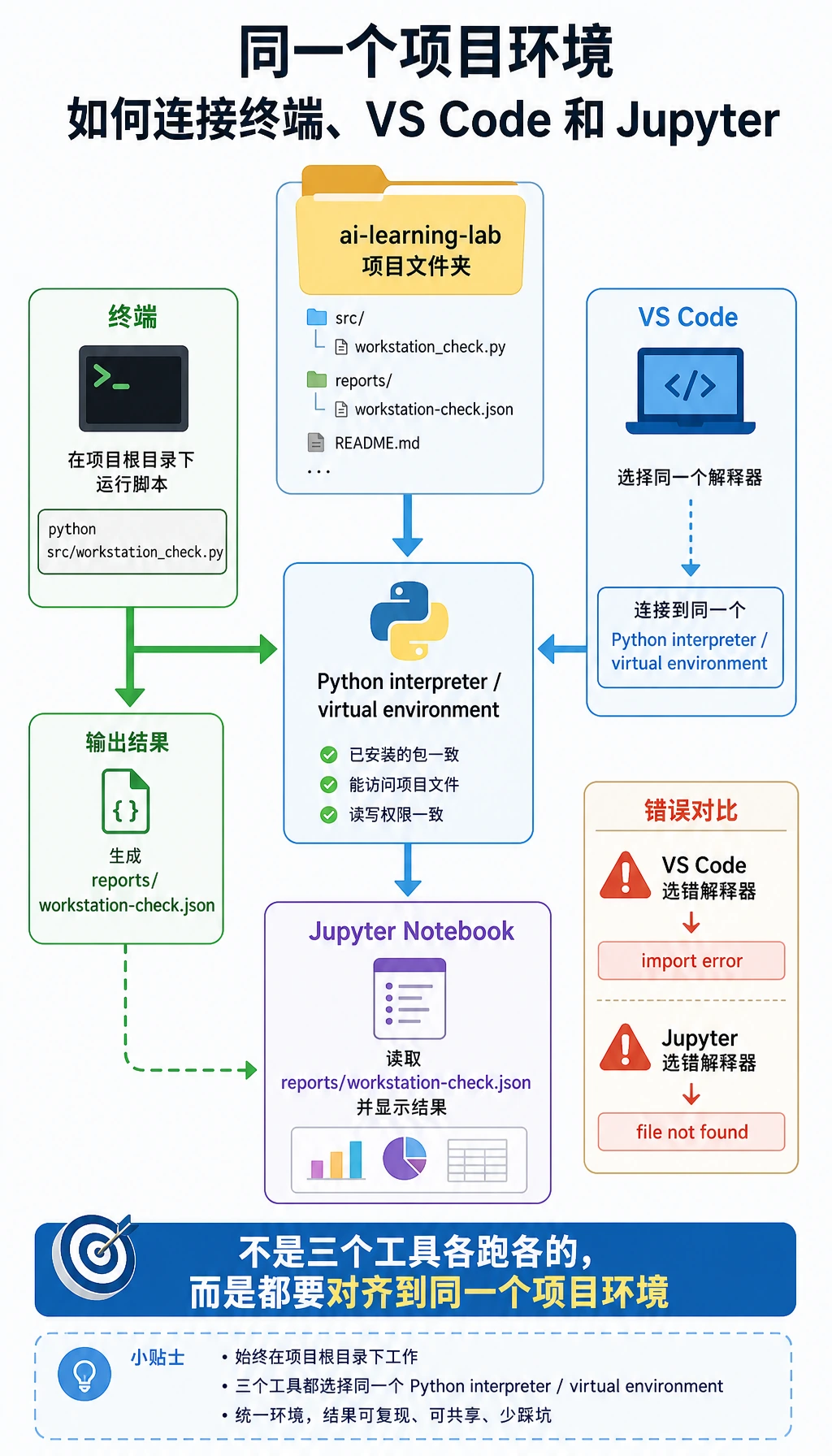
用 VS Code 打开项目:
code .
然后检查:
| 检查项 | 去哪里看 |
|---|---|
文件夹名是 ai-learning-lab | VS Code Explorer |
| 选择的解释器是你期望的那个 | Command Palette -> Python: Select Interpreter |
| 脚本能运行 | VS Code 终端:python3 src/workstation_check.py |
| Git 修改能看到 | Source Control 面板 |
如果你使用 Jupyter,可以创建 notebooks/01-workstation-review.ipynb,运行下面这个 Cell:
import json
from pathlib import Path

report = json.loads(Path("../reports/workstation-check.json").read_text(encoding="utf-8"))
print(report["python_version"])
print(report["git_branch"]["stdout"])
print(len(report["project_files"]))
预期输出:
3.12.3
main
7
文件数量可以不同。关键是 Notebook 读到了脚本生成的同一份报告。这样,探索记录(notebooks/)和项目证据(reports/)就连起来了。
第 8 步:按断点定位问题
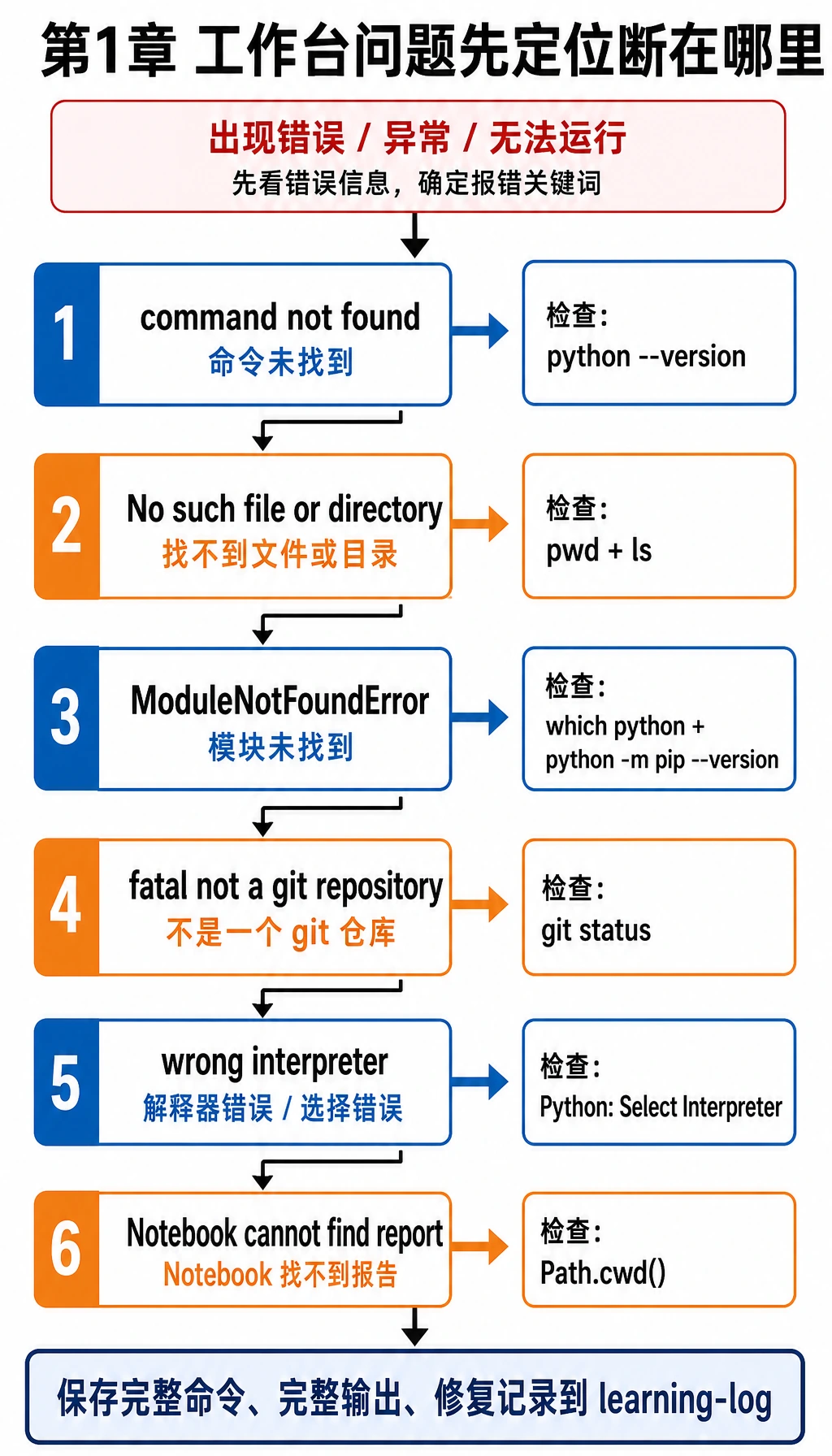
看到错误时,先放慢速度,判断是哪一环断了:
| 现象 | 第一条检查命令 | 可能原因 | 修复方向 |
|---|---|---|---|
python3: command not found | python --version | 系统使用 python 而不是 python3 | 固定使用 python,或配置 PATH |
No such file or directory | pwd 和 ls | 当前目录不对 | cd 进入 ai-learning-lab |
ModuleNotFoundError | which python 和 python -m pip --version | 包安装到了另一个环境 | 激活目标环境,再用 python -m pip install ... |
fatal: not a git repository | git status | 你不在仓库里,或忘了 git init | 进入项目目录,或运行 git init |
| VS Code 运行了另一个 Python | python3 -c "import sys; print(sys.executable)" | VS Code 解释器和终端解释器不同 | 使用 Python: Select Interpreter |
| Jupyter 找不到报告 | 在 Notebook Cell 里运行 Path.cwd() | Notebook 路径和项目根目录不同 | 用 ../reports/... 或移动 Notebook |
不要只复制最后一行报错。把完整命令、完整输出和下一步尝试写进 notes/learning-log.md。
第 9 步:整理作品集证据包
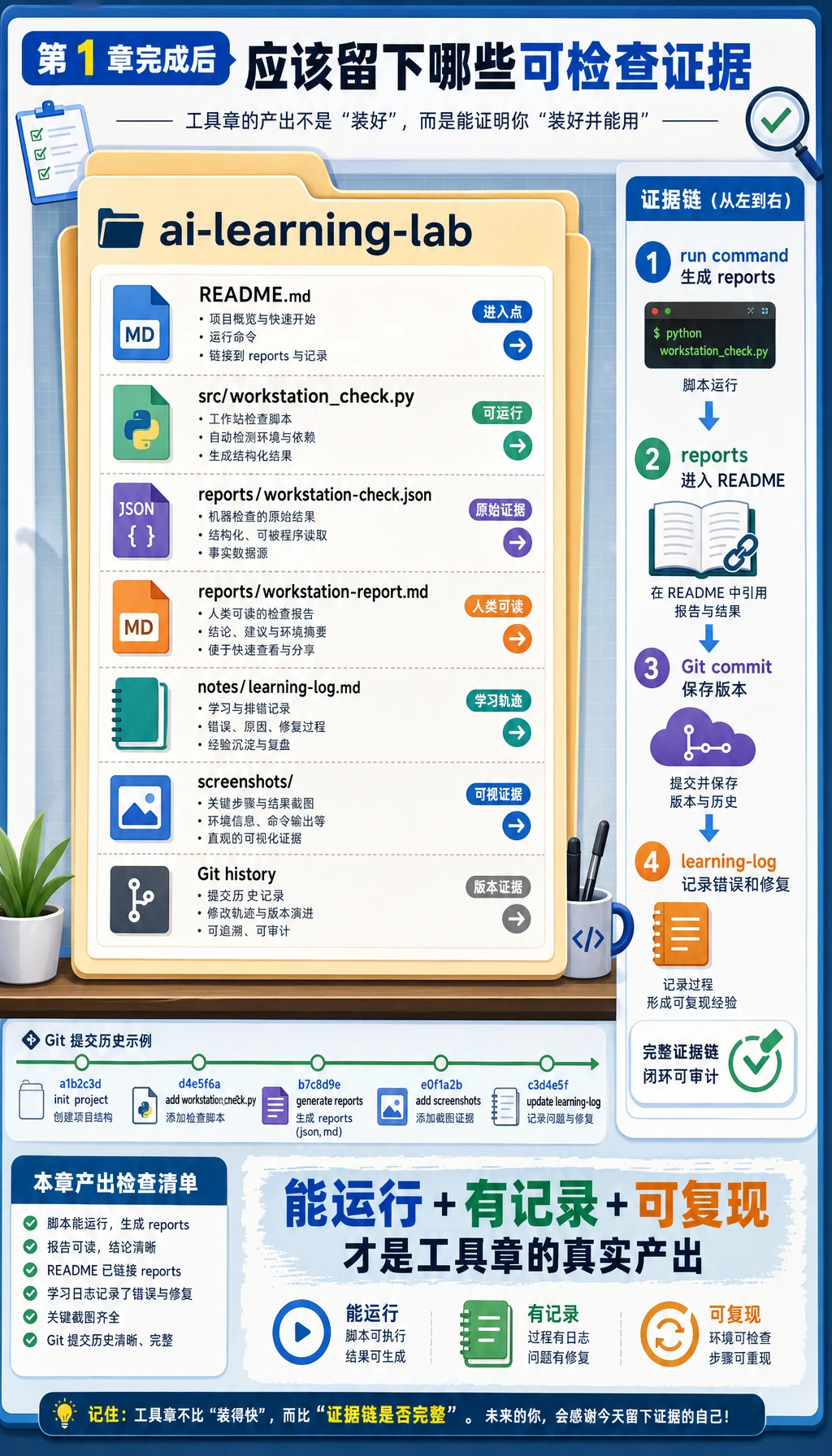
离开第 1 章前,你的证据包要同时展示结果和过程:
| 证据 | 最小可接受版本 | 更强作品集版本 |
|---|---|---|
| 运行命令 | python3 src/workstation_check.py | README 写清命令、输出和排障记录 |
| 环境证明 | 终端输出里有 Python 版本 | reports/workstation-check.json 记录解释器和平台 |
| Git 证明 | 1 次 commit | 多次小步提交,消息清楚 |
| 编辑器证明 | 项目能在 VS Code 打开 | 选对解释器,并记录运行输出 |
| Notebook 证明 | 可选 | Notebook 读取生成报告并解释结果 |
| 排障证明 | 1 条错误记录 | 一张“现象 -> 原因 -> 修复”表 |
小练习
- 新增
docs/commands.md,记录本章用过的 10 条命令,并用git commit -m "Add command practice notes"提交。 - 新增
reports/terminal-transcript.txt,粘贴一次成功运行输出和一次你修好的错误。 - 新增脚本
src/path_check.py,输出Path.cwd()和Path(__file__).resolve()。 - 创建分支
practice/readme-update,改进 README,再合并回main。
最终自查
- 我能解释当前目录、项目根目录和 Python 文件路径的区别。
- 我能从终端和 VS Code 运行同一个脚本。
- 我能用
git status --short检查 Git 状态。 - 我能创建小分支、提交并合并回主线。
- 我有一份报告文件,能证明我的工作台可以运行代码。
完成这些后,第 1 章就不再只是工具清单,而是变成了后续每一章都能复用的工作基础。