2.1.8 模块与包
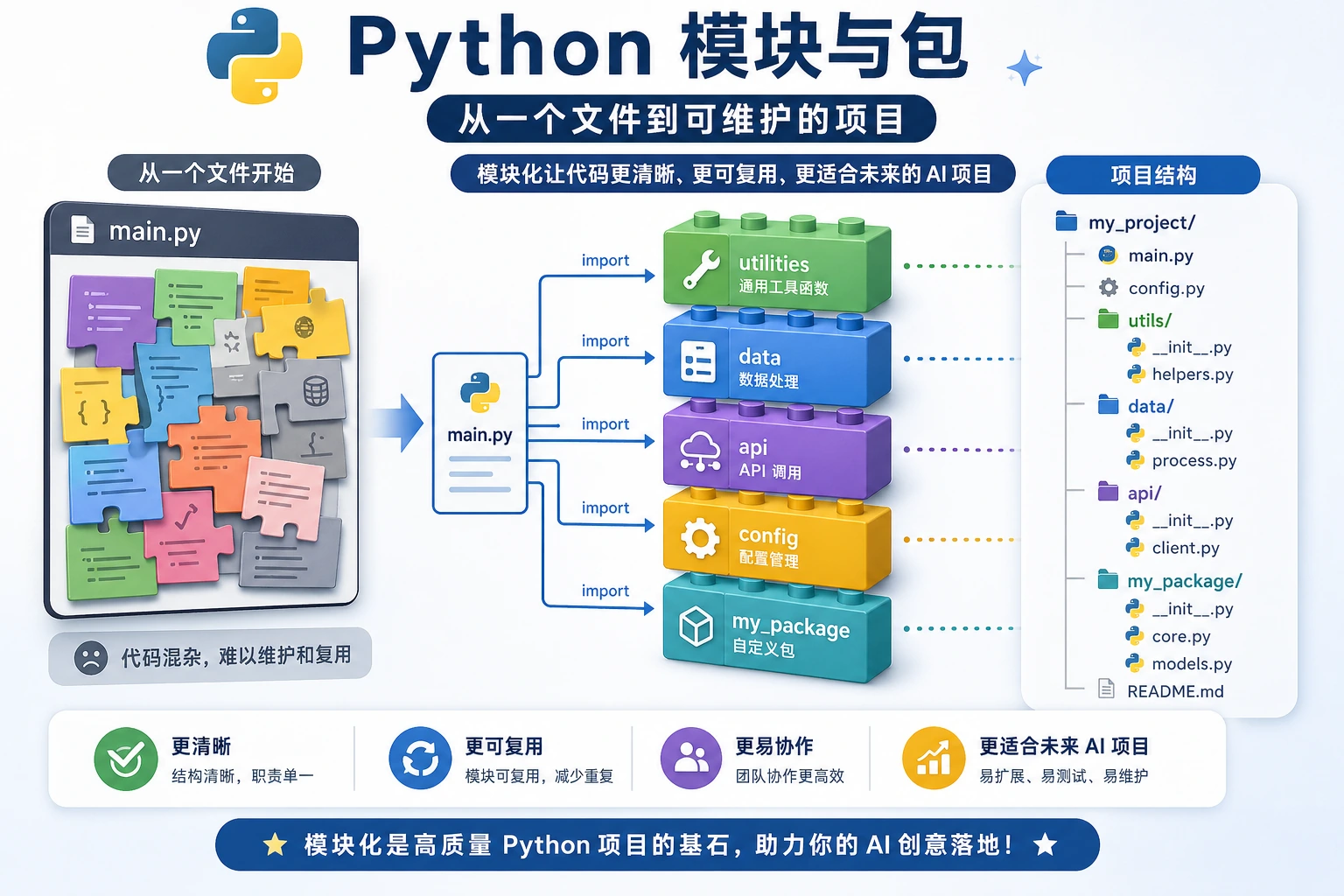
本节定位
这一节学习如何把代码拆成多个文件,并复用别人写好的库。模块、包、import 和 pip 是 Python 生态的入口,理解它们后,你才能更自然地使用 NumPy、Pandas、FastAPI、PyTorch 等工具。
学习目标
- 理解模块和包的概念
- 掌握
import的各种用法 - 了解 Python 常用标准库
- 学会使用
pip安装第三方库 - 能创建和使用自己的模块
什么是模块?
到目前为止,你的所有代码都写在一个文件里。但当项目变大后,一个文件可能有几千行代码——这太难管理了。
模块(module)就是一个 .py 文件。 你可以把相关的函数、类、变量放在一个模块里,然后在其他文件中导入使用。
想象你在搬家:
- 把衣服放一个箱子(
clothes.py) - 把书籍放一个箱子(
books.py) - 把厨具放一个箱子(
kitchen.py)
每个箱子就是一个模块,需要什么就打开对应的箱子。
import 的基本用法
导入整个模块
import math

# 使用时需要加模块名前缀
print(math.pi)          # 3.141592653589793
print(math.sqrt(16))    # 4.0
print(math.ceil(3.2))   # 4(向上取整)
print(math.floor(3.8))  # 3(向下取整)
从模块中导入特定内容
from math import pi, sqrt

# 直接使用,不需要模块名前缀
print(pi)          # 3.141592653589793
print(sqrt(16))    # 4.0
导入并起别名
import numpy as np            # 给 numpy 起个简短的别名
import pandas as pd           # pandas 的标准别名

# AI 领域的约定俗成的别名
import matplotlib.pyplot as plt
import tensorflow as tf
import torch
导入模块中的所有内容
from math import *

# 可以直接用所有内容
print(pi)
print(sqrt(16))
print(sin(0))
虽然看起来很方便,但它会把模块里所有名字都导入当前文件,可能导致命名冲突(两个模块里有同名函数)。而且别人读你的代码时,不知道某个函数是从哪个模块来的。
推荐的做法:
import math然后用math.sqrt()(最明确)from math import sqrt, pi(只导入需要的)
Python 常用标准库
Python 自带了很多实用的模块,安装 Python 后就能直接用,不需要额外安装。
math —— 数学运算
import math

print(math.pi)          # 3.141592653589793
print(math.e)           # 2.718281828459045
print(math.sqrt(144))   # 12.0
print(math.pow(2, 10))  # 1024.0
print(math.log(100, 10))  # 2.0(以 10 为底的对数)
print(math.sin(math.pi / 2))  # 1.0
print(math.factorial(5))  # 120(5! = 5×4×3×2×1)
random —— 随机数
import random

# 随机整数
print(random.randint(1, 100))     # 1 到 100 之间的随机整数

# 随机浮点数
print(random.random())            # 0 到 1 之间的随机浮点数
print(random.uniform(1.0, 10.0))  # 1.0 到 10.0 之间

# 从列表中随机选择
colors = ["红", "绿", "蓝", "黄"]
print(random.choice(colors))       # 随机选一个
print(random.sample(colors, 2))    # 随机选 2 个(不重复)

# 打乱列表
cards = list(range(1, 14))
random.shuffle(cards)
print(cards)  # 打乱后的列表

# 设置随机种子(让结果可复现——AI 训练中常用)
random.seed(42)
print(random.randint(1, 100))  # 每次运行结果都一样
os —— 操作系统交互
import os

# 获取当前工作目录
print(os.getcwd())

# 列出目录中的文件
print(os.listdir("."))

# 检查文件/目录是否存在
print(os.path.exists("hello.py"))

# 拼接路径(跨平台兼容)
path = os.path.join("data", "train", "images")
print(path)  # data/train/images(macOS/Linux)或 data\train\images(Windows)

# 获取文件名和扩展名
filename = "model_v2.pth"
name, ext = os.path.splitext(filename)
print(f"文件名: {name}, 扩展名: {ext}")  # 文件名: model_v2, 扩展名: .pth

# 创建目录
os.makedirs("output/results", exist_ok=True)  # exist_ok=True 表示已存在时不报错
datetime —— 日期时间
from datetime import datetime, timedelta

# 获取当前时间
now = datetime.now()
print(now)                           # 2026-02-09 14:30:45.123456
print(now.strftime("%Y-%m-%d"))      # 2026-02-09
print(now.strftime("%Y年%m月%d日"))   # 2026年02月09日

# 时间计算
tomorrow = now + timedelta(days=1)
last_week = now - timedelta(weeks=1)
print(f"明天: {tomorrow.strftime('%Y-%m-%d')}")
print(f"上周: {last_week.strftime('%Y-%m-%d')}")

# 解析时间字符串
date_str = "2026-01-15"
date = datetime.strptime(date_str, "%Y-%m-%d")
print(date)
json —— JSON 数据处理
import json

# Python 对象 → JSON 字符串
data = {
    "name": "小明",
    "age": 20,
    "scores": [85, 92, 78],
    "is_student": True
}

json_str = json.dumps(data, ensure_ascii=False, indent=2)
print(json_str)

# JSON 字符串 → Python 对象
parsed = json.loads(json_str)
print(parsed["name"])  # 小明

# 读写 JSON 文件
with open("data.json", "w", encoding="utf-8") as f:
    json.dump(data, f, ensure_ascii=False, indent=2)

with open("data.json", "r", encoding="utf-8") as f:
    loaded = json.load(f)
    print(loaded)
标准库速查表
| 模块 | 用途 | 常用功能 |
|---|---|---|
math | 数学运算 | sqrt, pi, sin, log |
random | 随机数 | randint, choice, shuffle |
os | 操作系统 | getcwd, listdir, path.join |
datetime | 日期时间 | now, strftime, timedelta |
json | JSON 处理 | dumps, loads, dump, load |
re | 正则表达式 | search, findall, sub |
collections | 高级容器 | Counter, defaultdict |
pathlib | 路径操作 | Path, glob, mkdir |
sys | 系统参数 | argv, path, exit |
time | 时间相关 | sleep, time |
安装第三方库
Python 的强大很大程度上来自第三方库——别人写好的模块,你可以直接安装使用。
用 pip 安装
# 安装单个库
pip install requests

# 安装指定版本
pip install requests==2.28.0

# 安装多个库
pip install numpy pandas matplotlib

# 升级已安装的库
pip install --upgrade requests

# 卸载
pip uninstall requests

# 查看已安装的库
pip list

# 导出所有已安装的库(方便别人复现你的环境)
pip freeze > requirements.txt

# 从文件批量安装
pip install -r requirements.txt
AI 开发常用第三方库
| 库 | 安装命令 | 用途 |
|---|---|---|
| NumPy | pip install numpy | 数值计算基础库 |
| Pandas | pip install pandas | 数据分析和处理 |
| Matplotlib | pip install matplotlib | 数据可视化 |
| Requests | pip install requests | 网络请求 |
| scikit-learn | pip install scikit-learn | 传统机器学习 |
| PyTorch | pip install torch | 深度学习框架 |
| Transformers | pip install transformers | Hugging Face 预训练模型 |
| FastAPI | pip install fastapi | Web API 框架 |
在第 1 章“开发者工具基础”中你安装了 conda。简单规则:
- conda:管理 Python 环境和安装复杂的科学计算库
- pip:安装绝大多数 Python 包
通常先用 conda 创建和管理环境,然后在环境中用 pip 安装需要的库。
创建自己的模块
基本模块
创建一个文件 my_math.py:
# my_math.py

PI = 3.14159

def circle_area(radius):
    """计算圆的面积"""
    return PI * radius ** 2

def circle_perimeter(radius):
    """计算圆的周长"""
    return 2 * PI * radius

def rectangle_area(width, height):
    """计算矩形面积"""
    return width * height
在另一个文件中使用:
# main.py
import my_math

print(my_math.circle_area(5))       # 78.53975
print(my_math.circle_perimeter(5))  # 31.4159

# 或者
from my_math import circle_area, PI
print(f"圆面积: {circle_area(3)}")
print(f"PI = {PI}")
__name__ 的作用
你可能在别人的代码里见过这个神秘的写法:
if __name__ == "__main__":
    print("这个文件正在被直接运行。")
这是什么意思?
# my_math.py

def circle_area(radius):
    return 3.14159 * radius ** 2

# 这段代码只在直接运行 my_math.py 时执行
# 当它被其他文件 import 时,不会执行
if __name__ == "__main__":
    # 测试代码
    print("测试 circle_area:")
    print(circle_area(5))  # 78.53975
    print("测试通过!")
# 直接运行 my_math.py → __name__ 是 "__main__",测试代码会执行
python my_math.py
# 输出:
# 测试 circle_area:
# 78.53975
# 测试通过!

# 在 main.py 中 import my_math → __name__ 是 "my_math",测试代码不会执行
这是 Python 的一个巧妙设计:让一个文件既能被导入,又能单独运行。
包(Package)
当你有很多模块时,可以把它们组织成包——就是一个包含 __init__.py 文件的文件夹。
my_project/
├── main.py
└── utils/               ← 这是一个包
    ├── __init__.py      ← 这个文件让 Python 知道 utils 是一个包
    ├── math_utils.py
    ├── string_utils.py
    └── file_utils.py
使用方式:
# main.py
from utils.math_utils import circle_area
from utils.string_utils import clean_text
from utils import file_utils

area = circle_area(5)
text = clean_text("  Hello  ")
file_utils.save_data(data, "output.json")
__init__.py 可以是空文件,也可以用来定义包导入时的默认行为:
# utils/__init__.py
from .math_utils import circle_area, rectangle_area
from .string_utils import clean_text

# 这样使用者可以直接从包导入
# from utils import circle_area
综合案例:个人工具库
创建一个包含多个实用函数的模块:
# tools.py —— 我的个人工具库

import random
import string
from datetime import datetime

def generate_id(length=8):
    """生成随机 ID"""
    chars = string.ascii_letters + string.digits
    return ''.join(random.choice(chars) for _ in range(length))

def timestamp():
    """获取当前时间戳字符串"""
    return datetime.now().strftime("%Y%m%d_%H%M%S")

def format_number(num):
    """格式化大数字,加千分位分隔"""
    return f"{num:,.0f}"

def flatten_list(nested):
    """展平嵌套列表"""
    result = []
    for item in nested:
        if isinstance(item, list):
            result.extend(flatten_list(item))
        else:
            result.append(item)
    return result

def timer(func):
    """简单的计时装饰器"""
    import time
    def wrapper(*args, **kwargs):
        start = time.time()
        result = func(*args, **kwargs)
        end = time.time()
        print(f"{func.__name__} 执行耗时: {end - start:.4f} 秒")
        return result
    return wrapper


if __name__ == "__main__":
    # 测试
    print(f"随机 ID: {generate_id()}")
    print(f"时间戳: {timestamp()}")
    print(f"格式化: {format_number(1234567890)}")
    print(f"展平: {flatten_list([1, [2, 3], [4, [5, 6]]])}")
动手练习
练习 1:探索标准库
分别用 math、random、datetime 完成以下任务:
# 1. 计算 100 的阶乘有多少位数字
# 提示:math.factorial() 和 len(str(...))

# 2. 生成 10 个 1-100 的不重复随机数
# 提示:random.sample()

# 3. 计算从今天到 2027 年 1 月 1 日还有多少天
# 提示:datetime
练习 2:创建自己的模块
创建一个 string_tools.py 模块,包含以下函数:
def count_words(text):
    """统计英文文本的单词数"""
    return len(text.split())

def reverse_words(text):
    """反转每个单词的顺序(不是字母)"""
    # "hello world" → "world hello"
    return " ".join(reversed(text.split()))

def is_palindrome(text):
    """判断是否是回文(忽略空格和大小写)"""
    # "A man a plan a canal Panama" → True
    normalized = "".join(text.lower().split())
    return normalized == normalized[::-1]
然后在另一个文件中导入并测试。
练习 3:pip 操作练习
在终端中执行以下操作:
# 1. 安装 requests 库
pip install requests

# 2. 写一个简单的脚本测试 requests
python -c "import requests; print(requests.get('https://httpbin.org/get').status_code)"

# 3. 查看当前环境安装了哪些库
pip list

# 4. 导出依赖列表
pip freeze > requirements.txt
小结
| 概念 | 说明 | 示例 |
|---|---|---|
| 模块 | 一个 .py 文件 | import math |
| 包 | 包含 __init__.py 的文件夹 | from utils import helper |
| import | 导入整个模块 | import os |
| from...import | 导入特定内容 | from math import pi |
| as | 起别名 | import numpy as np |
| pip | 安装第三方库 | pip install requests |
__name__ | 判断是否直接运行 | if __name__ == "__main__": |
模块系统让你能站在巨人的肩膀上。Python 之所以强大,不是因为语言本身有多复杂,而是因为有数十万个模块——从数据分析到机器学习,从网站开发到图像处理——几乎你能想到的任何功能,都有人已经帮你写好了。学会找和用这些模块,是 Python 开发者的核心能力。