2.1.8 Modules and Packages
Where This Section Fits
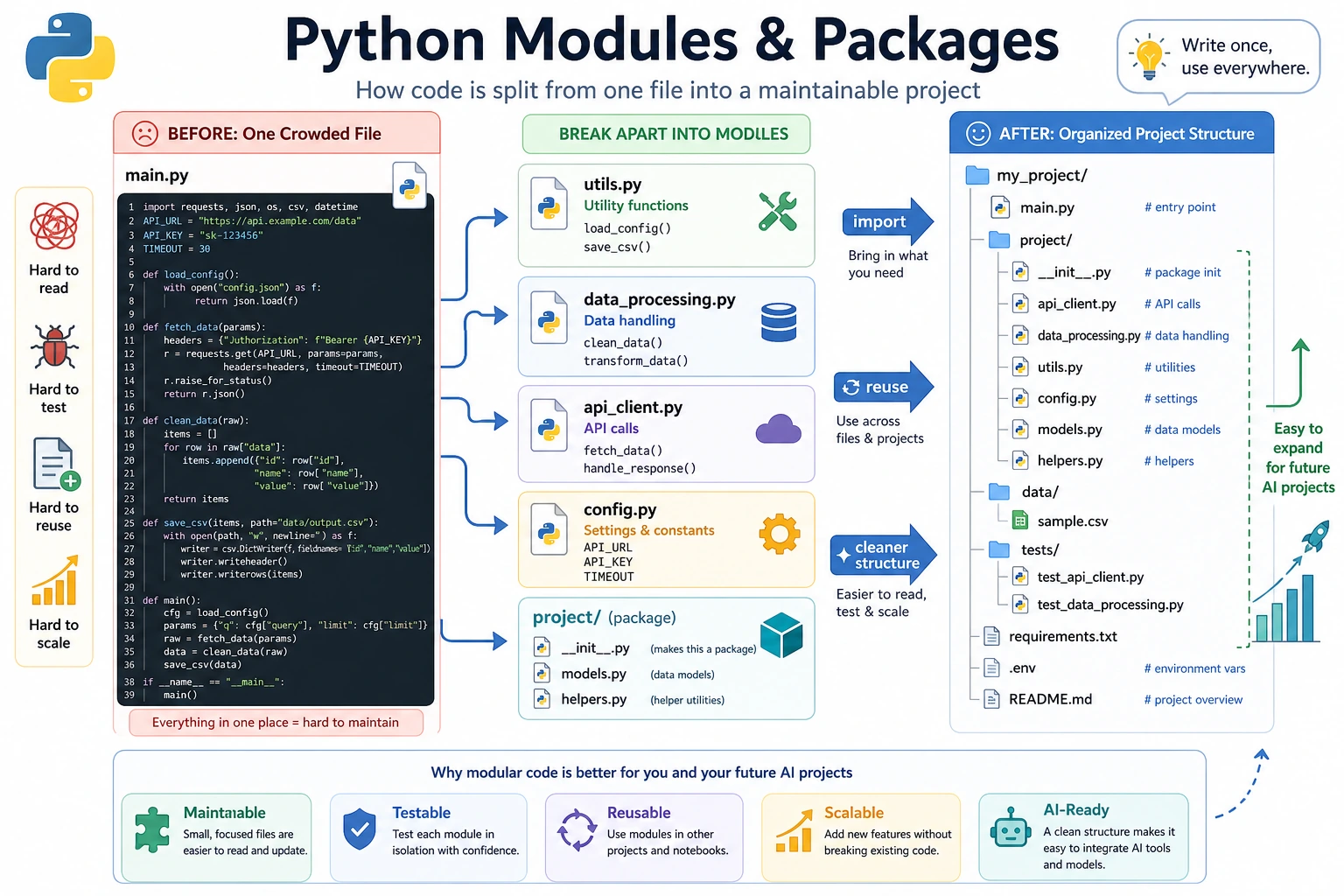
In this section, you’ll learn how to split code into multiple files and reuse libraries written by others. Modules, packages, import, and pip are the gateway to the Python ecosystem. Once you understand them, you’ll be able to use tools like NumPy, Pandas, FastAPI, PyTorch, and more naturally.
Learning Objectives
- Understand the concepts of modules and packages
- Master different uses of
import - Learn about commonly used Python standard libraries
- Learn how to use
pipto install third-party libraries - Be able to create and use your own modules
What Is a Module?
So far, all of your code has been written in a single file. But when a project grows, one file can easily become thousands of lines long — and that becomes hard to manage.
A module is a .py file. You can put related functions, classes, and variables into a module, then import and use them in other files.
Think about moving house:
- Put clothes in one box (
clothes.py) - Put books in one box (
books.py) - Put kitchenware in one box (
kitchen.py)
Each box is a module. You open the one you need.
Basic Uses of import
Import an Entire Module
import math

# You need to use the module name as a prefix
print(math.pi)          # 3.141592653589793
print(math.sqrt(16))    # 4.0
print(math.ceil(3.2))   # 4 (round up)
print(math.floor(3.8))  # 3 (round down)
Import Specific Items from a Module
from math import pi, sqrt

# Use directly without the module name prefix
print(pi)          # 3.141592653589793
print(sqrt(16))    # 4.0
Import with an Alias
import numpy as np            # give numpy a short alias
import pandas as pd           # standard alias for pandas

# Common aliases in the AI field
import matplotlib.pyplot as plt
import tensorflow as tf
import torch
Import Everything from a Module
from math import *

# You can use everything directly
print(pi)
print(sqrt(16))
print(sin(0))
from xxx import *Although it looks convenient, it imports all names from the module into the current file, which can cause name conflicts (for example, two modules having functions with the same name). It also makes your code harder to read, because others cannot easily tell which module a function came from.
Recommended approaches:
import mathand then usemath.sqrt()(most explicit)from math import sqrt, pi(import only what you need)
Common Python Standard Libraries
Python comes with many useful modules built in. After installing Python, you can use them right away without any extra installation.
math — Mathematical Operations
import math

print(math.pi)          # 3.141592653589793
print(math.e)           # 2.718281828459045
print(math.sqrt(144))   # 12.0
print(math.pow(2, 10))  # 1024.0
print(math.log(100, 10))  # 2.0 (logarithm with base 10)
print(math.sin(math.pi / 2))  # 1.0
print(math.factorial(5))  # 120 (5! = 5×4×3×2×1)
random — Random Numbers
import random

# Random integers
print(random.randint(1, 100))     # random integer between 1 and 100

# Random floating-point numbers
print(random.random())            # random float between 0 and 1
print(random.uniform(1.0, 10.0))  # between 1.0 and 10.0

# Randomly choose from a list
colors = ["red", "green", "blue", "yellow"]
print(random.choice(colors))       # choose one at random
print(random.sample(colors, 2))    # choose 2 at random (no duplicates)

# Shuffle a list
cards = list(range(1, 14))
random.shuffle(cards)
print(cards)  # shuffled list

# Set a random seed (to make results reproducible — commonly used in AI training)
random.seed(42)
print(random.randint(1, 100))  # same result every time you run it
os — Operating System Interaction
import os

# Get the current working directory
print(os.getcwd())

# List files in a directory
print(os.listdir("."))

# Check whether a file/directory exists
print(os.path.exists("hello.py"))

# Join paths (cross-platform)
path = os.path.join("data", "train", "images")
print(path)  # data/train/images (macOS/Linux) or data\train\images (Windows)

# Get file name and extension
filename = "model_v2.pth"
name, ext = os.path.splitext(filename)
print(f"File name: {name}, extension: {ext}")  # File name: model_v2, extension: .pth

# Create directories
os.makedirs("output/results", exist_ok=True)  # exist_ok=True means no error if it already exists
datetime — Date and Time
from datetime import datetime, timedelta

# Get the current time
now = datetime.now()
print(now)                           # 2026-02-09 14:30:45.123456
print(now.strftime("%Y-%m-%d"))      # 2026-02-09
print(now.strftime("%Y-%m-%d"))      # 2026-02-09

# Time calculations
tomorrow = now + timedelta(days=1)
last_week = now - timedelta(weeks=1)
print(f"Tomorrow: {tomorrow.strftime('%Y-%m-%d')}")
print(f"Last week: {last_week.strftime('%Y-%m-%d')}")

# Parse a time string
date_str = "2026-01-15"
date = datetime.strptime(date_str, "%Y-%m-%d")
print(date)
json — JSON Data Handling
import json

# Python object → JSON string
data = {
    "name": "Xiao Ming",
    "age": 20,
    "scores": [85, 92, 78],
    "is_student": True
}

json_str = json.dumps(data, ensure_ascii=False, indent=2)
print(json_str)

# JSON string → Python object
parsed = json.loads(json_str)
print(parsed["name"])  # Xiao Ming

# Read and write JSON files
with open("data.json", "w", encoding="utf-8") as f:
    json.dump(data, f, ensure_ascii=False, indent=2)

with open("data.json", "r", encoding="utf-8") as f:
    loaded = json.load(f)
    print(loaded)
Standard Library Quick Reference
| Module | Purpose | Common Functions |
|---|---|---|
math | Mathematical operations | sqrt, pi, sin, log |
random | Random numbers | randint, choice, shuffle |
os | Operating system | getcwd, listdir, path.join |
datetime | Date and time | now, strftime, timedelta |
json | JSON handling | dumps, loads, dump, load |
re | Regular expressions | search, findall, sub |
collections | Advanced containers | Counter, defaultdict |
pathlib | Path operations | Path, glob, mkdir |
sys | System parameters | argv, path, exit |
time | Time-related utilities | sleep, time |
Installing Third-Party Libraries
Python’s power comes largely from third-party libraries — modules written by others that you can install and use directly.
Install with pip
# Install a single library
pip install requests

# Install a specific version
pip install requests==2.28.0

# Install multiple libraries
pip install numpy pandas matplotlib

# Upgrade an installed library
pip install --upgrade requests

# Uninstall
pip uninstall requests

# List installed libraries
pip list

# Export all installed libraries (helpful for others to reproduce your environment)
pip freeze > requirements.txt

# Install in batch from a file
pip install -r requirements.txt
Common Third-Party Libraries for AI Development
| Library | Install Command | Purpose |
|---|---|---|
| NumPy | pip install numpy | Foundation for numerical computing |
| Pandas | pip install pandas | Data analysis and processing |
| Matplotlib | pip install matplotlib | Data visualization |
| Requests | pip install requests | Network requests |
| scikit-learn | pip install scikit-learn | Traditional machine learning |
| PyTorch | pip install torch | Deep learning framework |
| Transformers | pip install transformers | Hugging Face pretrained models |
| FastAPI | pip install fastapi | Web API framework |
In Chapter 1, "Developer Tools Basics," you installed conda. Simple rule:
- conda: manage Python environments and install complex scientific computing libraries
- pip: install most Python packages
Usually, you first use conda to create and manage environments, and then use pip inside the environment to install the libraries you need.
Creating Your Own Modules
A Basic Module
Create a file called my_math.py:
# my_math.py

PI = 3.14159

def circle_area(radius):
    """Calculate the area of a circle"""
    return PI * radius ** 2

def circle_perimeter(radius):
    """Calculate the circumference of a circle"""
    return 2 * PI * radius

def rectangle_area(width, height):
    """Calculate the area of a rectangle"""
    return width * height
Use it in another file:
# main.py
import my_math

print(my_math.circle_area(5))       # 78.53975
print(my_math.circle_perimeter(5))  # 31.4159

# Or:
from my_math import circle_area, PI
print(f"Circle area: {circle_area(3)}")
print(f"PI = {PI}")
What __name__ Does
You may have seen this mysterious pattern in other people’s code:
if __name__ == "__main__":
    print("This file is being run directly.")
What does it mean?
# my_math.py

def circle_area(radius):
    return 3.14159 * radius ** 2

# This code only runs when my_math.py is executed directly
# It will not run when imported by another file
if __name__ == "__main__":
    # test code
    print("Testing circle_area:")
    print(circle_area(5))  # 78.53975
    print("Test passed!")
# Run my_math.py directly → __name__ is "__main__", so the test code runs
python my_math.py
# Output:
# Testing circle_area:
# 78.53975
# Test passed!

# Import my_math in main.py → __name__ is "my_math", so the test code does not run
This is a clever Python design: a file can be both importable and directly runnable.
Packages
When you have many modules, you can organize them into a package — a folder that contains an __init__.py file.
my_project/
├── main.py
└── utils/               ← this is a package
    ├── __init__.py      ← this file tells Python that utils is a package
    ├── math_utils.py
    ├── string_utils.py
    └── file_utils.py
Usage:
# main.py
from utils.math_utils import circle_area
from utils.string_utils import clean_text
from utils import file_utils

area = circle_area(5)
text = clean_text("  Hello  ")
file_utils.save_data(data, "output.json")
__init__.py can be an empty file, or it can define default behavior when the package is imported:
# utils/__init__.py
from .math_utils import circle_area, rectangle_area
from .string_utils import clean_text

# This lets users import directly from the package
# from utils import circle_area
Comprehensive Example: A Personal Utility Library
Create a module that contains several useful functions:
# tools.py — my personal utility library

import random
import string
from datetime import datetime

def generate_id(length=8):
    """Generate a random ID"""
    chars = string.ascii_letters + string.digits
    return ''.join(random.choice(chars) for _ in range(length))

def timestamp():
    """Get the current timestamp string"""
    return datetime.now().strftime("%Y%m%d_%H%M%S")

def format_number(num):
    """Format a large number with thousands separators"""
    return f"{num:,.0f}"

def flatten_list(nested):
    """Flatten a nested list"""
    result = []
    for item in nested:
        if isinstance(item, list):
            result.extend(flatten_list(item))
        else:
            result.append(item)
    return result

def timer(func):
    """A simple timing decorator"""
    import time
    def wrapper(*args, **kwargs):
        start = time.time()
        result = func(*args, **kwargs)
        end = time.time()
        print(f"{func.__name__} took {end - start:.4f} seconds")
        return result
    return wrapper


if __name__ == "__main__":
    # test
    print(f"Random ID: {generate_id()}")
    print(f"Timestamp: {timestamp()}")
    print(f"Formatted: {format_number(1234567890)}")
    print(f"Flattened: {flatten_list([1, [2, 3], [4, [5, 6]]])}")
Hands-On Practice
Exercise 1: Explore the Standard Library
Use math, random, and datetime to complete the following tasks:
# 1. Calculate how many digits are in 100!
# Hint: math.factorial() and len(str(...))

# 2. Generate 10 unique random numbers from 1 to 100
# Hint: random.sample()

# 3. Calculate how many days remain from today until January 1, 2027
# Hint: datetime
Exercise 2: Create Your Own Module
Create a string_tools.py module containing the following functions:
def count_words(text):
    """Count the number of words in an English text"""
    return len(text.split())

def reverse_words(text):
    """Reverse the order of words, not letters"""
    # "hello world" → "world hello"
    return " ".join(reversed(text.split()))

def is_palindrome(text):
    """Determine whether the text is a palindrome (ignore spaces and case)"""
    # "A man a plan a canal Panama" → True
    normalized = "".join(text.lower().split())
    return normalized == normalized[::-1]
Then import and test it in another file.
Exercise 3: Practice pip Operations
Run the following commands in the terminal:
# 1. Install the requests library
pip install requests

# 2. Write a simple script to test requests
python -c "import requests; print(requests.get('https://httpbin.org/get').status_code)"

# 3. Check which libraries are installed in the current environment
pip list

# 4. Export the dependency list
pip freeze > requirements.txt
Summary
| Concept | Description | Example |
|---|---|---|
| Module | A .py file | import math |
| Package | A folder containing __init__.py | from utils import helper |
| import | Import an entire module | import os |
| from...import | Import specific items | from math import pi |
| as | Create an alias | import numpy as np |
| pip | Install third-party libraries | pip install requests |
__name__ | Check whether a file is run directly | if __name__ == "__main__": |
The module system lets you stand on the shoulders of giants. Python is powerful not because the language itself is overly complex, but because there are hundreds of thousands of modules — from data analysis and machine learning to web development and image processing — that cover almost any function you can imagine. Learning how to find and use these modules is a core skill for Python developers.