2.2.5 イテレータとジェネレータ
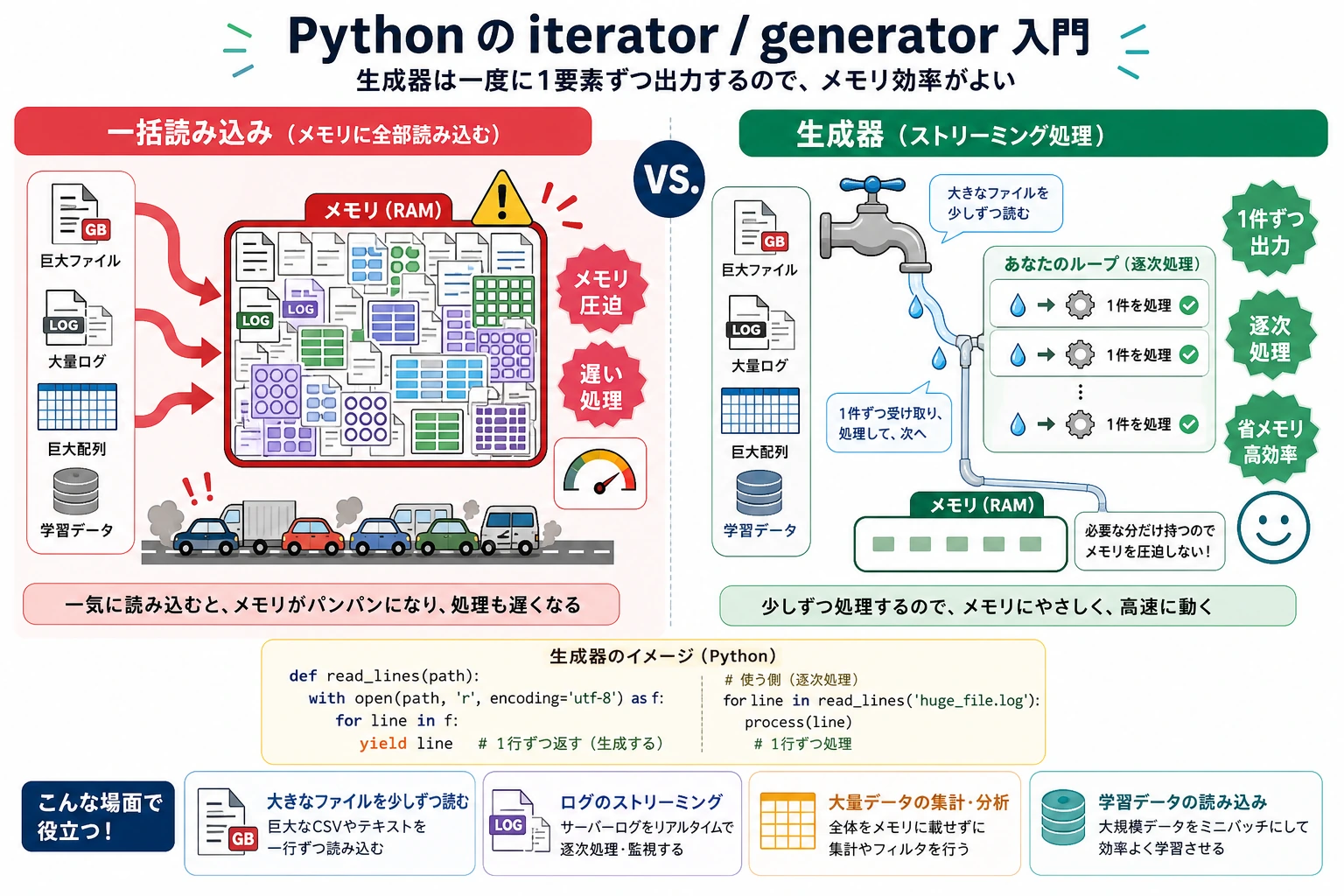
この節の位置づけ
この節では、for ループの裏側にある仕組みを説明し、よりメモリ効率のよいデータ処理方法を紹介します。イテレータとジェネレータは、大きなファイル、ストリーミングデータ、学習データの読み込みを扱うときにとても役立ちます。まず考え方を理解してから、最もよく使う yield の書き方を身につけましょう。
学習目標
- イテレータ規約(
__iter__と__next__)を理解する - ジェネレータ関数(
yield)の使い方を身につける - ジェネレータ式を理解する
- なぜジェネレータが大規模データ処理で重要なのかを知る
イテレーションとは?
あなたはすでに何度も for ループを使っています。
for item in [1, 2, 3]:
    print(item)

for char in "Hello":
    print(char)

for key in {"a": 1, "b": 2}:
    print(key)
for...in でこれらを順にたどれるのは、すべて**イテラブル(Iterable)**だからです。では、for ループの裏側では実際に何が起きているのでしょうか?
イテレータ規約
手動で反復する
for ループの本質は、次のようなものです。
numbers = [10, 20, 30]

# for ループの書き方
for n in numbers:
    print(n)

# 同じ動きを手動で書くと
iterator = iter(numbers)   # 1. イテレータを取得
print(next(iterator))      # 2. 次の要素を取得 → 10
print(next(iterator))      # 3. 次の要素を取得 → 20
print(next(iterator))      # 4. 次の要素を取得 → 30
# print(next(iterator))    # 5. もう要素がない → StopIteration を送出
イテレータ規約:
iter(オブジェクト)→ イテレータを取得するnext(イテレータ)→ 次の要素を取得する- 要素がなくなったら
StopIteration例外を送出する
独自のイテレータを作る
class Countdown:
    """カウントダウンのイテレータ"""

    def __init__(self, start):
        self.current = start

    def __iter__(self):
        return self   # 自分自身をイテレータとして返す

    def __next__(self):
        if self.current <= 0:
            raise StopIteration
        value = self.current
        self.current -= 1
        return value

# 使い方
for num in Countdown(5):
    print(num, end=" ")
# 出力: 5 4 3 2 1
ただし、イテレータを手で実装するのは少し面倒です。次に紹介するジェネレータは、もっと簡潔な方法です。
ジェネレータ関数(Generator)
ジェネレータは特別なイテレータで、return の代わりに yield キーワードを使います。
基本的な使い方
def countdown(n):
    """カウントダウンのジェネレータ"""
    while n > 0:
        yield n    # 一時停止して n を返し、次回ここから続く
        n -= 1

# 使い方はイテレータと同じ
for num in countdown(5):
    print(num, end=" ")
# 出力: 5 4 3 2 1
yield と return の違い
# return: 関数が最後まで実行され、結果をまとめて返す
def get_squares_return(n):
    result = []
    for i in range(n):
        result.append(i ** 2)
    return result

# yield: 1つずつ返し、次の呼び出しまで一時停止する
def get_squares_yield(n):
    for i in range(n):
        yield i ** 2

# どちらも結果は同じ
print(list(get_squares_return(5)))  # [0, 1, 4, 9, 16]
print(list(get_squares_yield(5)))   # [0, 1, 4, 9, 16]
重要な違い:
| 特徴 | return | yield |
|---|---|---|
| 戻り方 | まとめて全部返す | 1つずつ返す |
| メモリ使用量 | すべてメモリに載る | 必要に応じて生成し、ほとんどメモリを使わない |
| 実行方法 | 最後まで実行する | 一時停止 / 再開する |
ジェネレータの実行の流れ
def simple_gen():
    print("1つ目")
    yield 1
    print("2つ目")
    yield 2
    print("3つ目")
    yield 3
    print("終了")

gen = simple_gen()   # ジェネレータを作るだけで、まだコードは実行しない

print(next(gen))     # 最初の yield まで実行。 "1つ目" を表示し、1 を返す
print(next(gen))     # 前回の停止位置から再開。 "2つ目" を表示し、2 を返す
print(next(gen))     # "3つ目" を表示し、3 を返す
# next(gen)          # "終了" を表示してから StopIteration を送出
出力:
1つ目
1
2つ目
2
3つ目
3
なぜジェネレータが必要なのか?—— 大規模データの処理
これは、ジェネレータの最も重要な使いどころです。
問題:一度に大量のデータを読み込む
# たとえば 10GB のファイルを処理するとします
# 悪い方法: すべての行を一度に読み込む
lines = open("huge_file.txt").readlines()  # 💥 メモリ不足になる!

# 正しい方法: ジェネレータで1行ずつ処理する
def read_large_file(filepath):
    with open(filepath, "r") as f:
        for line in f:   # ファイルオブジェクト自体がイテレータ。1行ずつ読める
            yield line.strip()

for line in read_large_file("huge_file.txt"):
    process(line)  # メモリ上には常に1行だけある
メモリ使用量の比較
import sys

# リスト: すべての要素がメモリ上にある
big_list = [i ** 2 for i in range(1_000_000)]
print(f"リストのメモリ使用量: {sys.getsizeof(big_list):,} バイト")  # 約 8MB

# ジェネレータ: 現在の状態だけを覚えている
big_gen = (i ** 2 for i in range(1_000_000))
print(f"ジェネレータのメモリ使用量: {sys.getsizeof(big_gen):,} バイト")  # 約 200 バイト!
8MB と 200 バイトでは、4万倍もの差があります。データ量がさらに大きくなると、たとえば数百万件の学習データを処理するとき、この差は「動くかどうか」と「メモリ不足で落ちるかどうか」の違いになります。
ジェネレータ式
リスト内包表記の [] を () に変えると、ジェネレータ式になります。
# リスト内包表記 → すぐにすべての要素を作る
squares_list = [x ** 2 for x in range(10)]

# ジェネレータ式 → 必要に応じて生成する
squares_gen = (x ** 2 for x in range(10))

print(type(squares_list))  # <class 'list'>
print(type(squares_gen))   # <class 'generator'>

# ジェネレータ式は関数の引数でよく使う
total = sum(x ** 2 for x in range(1000))  # 追加の括弧は不要
print(total)

max_score = max(s["score"] for s in students)
実用的なジェネレータのパターン
無限列
def infinite_counter(start=0, step=1):
    """無限カウンター"""
    n = start
    while True:
        yield n
        n += step

# 最初の10個の偶数を生成する
counter = infinite_counter(0, 2)
for _ in range(10):
    print(next(counter), end=" ")
# 0 2 4 6 8 10 12 14 16 18
データパイプライン
ジェネレータは連結して使うことで、データ処理のパイプラインを作れます。
def read_lines(filename):
    """ファイルの各行を読む"""
    with open(filename) as f:
        for line in f:
            yield line.strip()

def filter_comments(lines):
    """コメント行を除外する"""
    for line in lines:
        if not line.startswith("#") and line:
            yield line

def parse_numbers(lines):
    """各行を数値に変換する"""
    for line in lines:
        try:
            yield float(line)
        except ValueError:
            continue  # 変換できない行はスキップする

# パイプラインを組み合わせる: 読み込み → フィルタ → 変換
# メモリ上には常に1行分のデータしかない!
sample = ["# note", "1", "2.5", "bad", "4"]
numbers = parse_numbers(filter_comments(sample))
total = sum(numbers)
print(total)
バッチ処理
def batch(iterable, size):
    """データを一定サイズのバッチに分ける"""
    batch_data = []
    for item in iterable:
        batch_data.append(item)
        if len(batch_data) == size:
            yield batch_data
            batch_data = []
    if batch_data:  # 最後にバッチにならなかった分
        yield batch_data

# 学習データのバッチ処理をまねる
data = list(range(1, 11))  # [1, 2, 3, ..., 10]

for b in batch(data, 3):
    print(f"処理中のバッチ: {b}")
# 処理中のバッチ: [1, 2, 3]
# 処理中のバッチ: [4, 5, 6]
# 処理中のバッチ: [7, 8, 9]
# 処理中のバッチ: [10]
itertools: イテレータの便利ツール集
Python 標準ライブラリの itertools には、便利なイテレータツールがたくさんあります。
import itertools

# chain: 複数のイテレータをつなぐ
for item in itertools.chain([1, 2], [3, 4], [5, 6]):
    print(item, end=" ")  # 1 2 3 4 5 6

# islice: イテレータのスライス(ジェネレータで便利)
gen = (x ** 2 for x in range(100))
first_five = list(itertools.islice(gen, 5))
print(first_five)  # [0, 1, 4, 9, 16]

# zip_longest: 長さが違うときに埋める
names = ["山田", "佐藤", "鈴木"]
scores = [85, 92]
for name, score in itertools.zip_longest(names, scores, fillvalue="欠席"):
    print(f"{name}: {score}")
# 山田: 85, 佐藤: 92, 鈴木: 欠席

# product: デカルト積
for combo in itertools.product(["赤", "青"], ["大", "小"]):
    print(combo)
# ('赤', '大'), ('赤', '小'), ('青', '大'), ('青', '小')

# count: 無限カウント
for i in itertools.islice(itertools.count(10, 5), 5):
    print(i, end=" ")  # 10 15 20 25 30
総合例: AI データローダー
import random

def data_loader(dataset, batch_size=32, shuffle=True):
    """
    AI 学習用のデータローダーをまねる。
    ジェネレータで実装しているので、メモリ効率がよい。
    """
    indices = list(range(len(dataset)))

    if shuffle:
        random.shuffle(indices)

    for start in range(0, len(indices), batch_size):
        batch_indices = indices[start:start + batch_size]
        batch_data = [dataset[i] for i in batch_indices]
        yield batch_data

# 例のデータセット
dataset = [f"sample_{i}" for i in range(100)]

# 学習ループ
for epoch in range(3):
    print(f"\n=== Epoch {epoch + 1} ===")
    for batch_idx, batch in enumerate(data_loader(dataset, batch_size=32)):
        print(f"  Batch {batch_idx + 1}: {len(batch)} 個のサンプル "
              f"(最初: {batch[0]}, 最後: {batch[-1]})")
手を動かしてみよう
練習 1: フィボナッチのジェネレータ
def fibonacci(n=None):
    """フィボナッチ数を生成する。n が None なら無限に生成する。"""
    count = 0
    a, b = 0, 1
    while n is None or count < n:
        yield a
        a, b = b, a + b
        count += 1

for num in fibonacci(10):
    print(num, end=" ")
# 0 1 1 2 3 5 8 13 21 34
練習 2: ファイル検索器
from pathlib import Path

def search_files(directory, pattern):
    """pattern に一致するファイルパスを再帰的に生成する。"""
    yield from Path(directory).rglob(pattern)

for filepath in search_files(".", "*.py"):
    print(filepath)
練習 3: スライディングウィンドウ
def sliding_window(data, window_size):
    """固定サイズのスライディングウィンドウを生成する。"""
    for index in range(len(data) - window_size + 1):
        yield data[index:index + window_size]

for window in sliding_window([1, 2, 3, 4, 5], 3):
    print(window)
まとめ
| 概念 | 説明 | 重要ポイント |
|---|---|---|
| イテレータ | __iter__ と __next__ を実装したオブジェクト | for ループの基礎 |
| ジェネレータ関数 | yield を含む関数 | イテレータを簡単に作れる |
| ジェネレータ式 | (x for x in iterable) | リスト内包表記の遅延版 |
yield | 関数を一時停止して値を返す | 次回呼び出し時に停止位置から再開する |
itertools | 標準ライブラリのイテレータツール集 | chain, islice, product など |
ジェネレータの本質は**遅延評価(Lazy Evaluation)**です。結果を一度にすべて計算するのではなく、必要になったときに1つずつ計算します。これは、ビュッフェとデリバリーの違いのようなものです。リストは料理を全部まとめてテーブルに並べるイメージ(テーブルがいっぱいになる)、ジェネレータは料理を1品ずつ出すイメージ(テーブルの上にはいつも1皿だけ)です。大規模データセットやデータストリームを扱うとき、ジェネレータは欠かせない道具です。