2.2.5 Iterators and Generators
Where this section fits
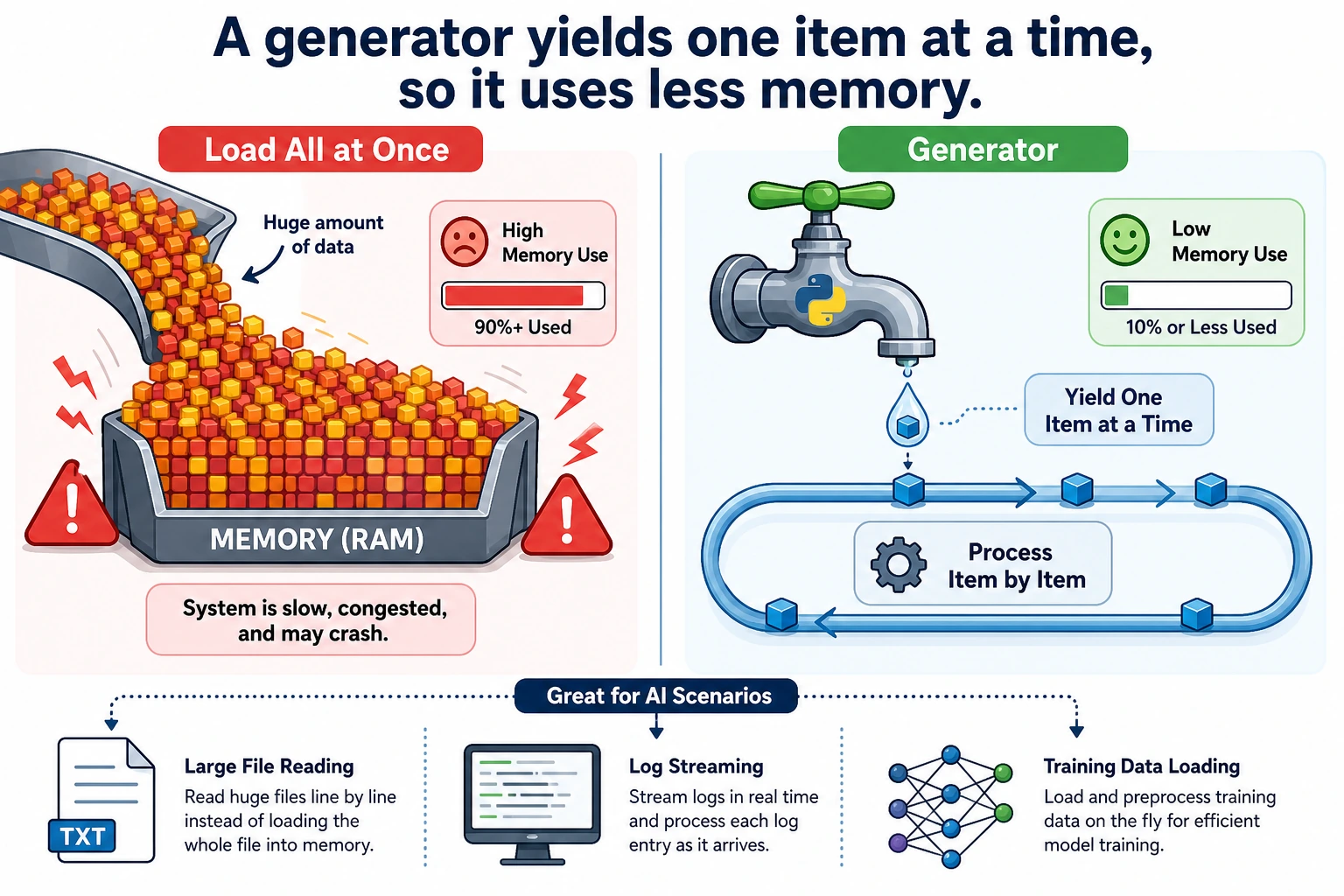
This section explains the mechanism behind for loops and introduces more memory-efficient data processing methods. Iterators and generators are very useful when handling large files, streaming data, and training data loading. First understand the idea, then master the most common yield syntax.
Learning objectives
- Understand the iterator protocol (
__iter__and__next__) - Master generator functions (
yield) - Understand generator expressions
- Learn why generators are so important for big data
What is iteration?
You have already used for loops many times:
for item in [1, 2, 3]:
    print(item)

for char in "Hello":
    print(char)

for key in {"a": 1, "b": 2}:
    print(key)
for...in can iterate over these things because they are all iterable objects (Iterable). So the question is: what actually happens behind a for loop?
The iterator protocol
Manual iteration
The essence of a for loop is this:
numbers = [10, 20, 30]

# for loop version
for n in numbers:
    print(n)

# Equivalent manual version
iterator = iter(numbers)   # 1. Get an iterator
print(next(iterator))      # 2. Get the next element → 10
print(next(iterator))      # 3. Get the next element → 20
print(next(iterator))      # 4. Get the next element → 30
# print(next(iterator))    # 5. No more elements → raises StopIteration
Iterator protocol:
iter(object)→ get an iteratornext(iterator)→ get the next element- When the elements are exhausted, raise a
StopIterationexception
Custom iterator
class Countdown:
    """Countdown iterator"""

    def __init__(self, start):
        self.current = start

    def __iter__(self):
        return self   # Return self as the iterator

    def __next__(self):
        if self.current <= 0:
            raise StopIteration
        value = self.current
        self.current -= 1
        return value

# Use
for num in Countdown(5):
    print(num, end=" ")
# Output: 5 4 3 2 1
However, writing an iterator by hand is a bit cumbersome — the generator introduced next is a simpler approach.
Generator functions
A generator is a special iterator that uses the yield keyword instead of return.
Basic usage
def countdown(n):
    """Countdown generator"""
    while n > 0:
        yield n    # Pause, return n, and continue from here next time
        n -= 1

# Use it the same way as an iterator
for num in countdown(5):
    print(num, end=" ")
# Output: 5 4 3 2 1
yield vs return
# return: the function finishes execution and returns all results at once
def get_squares_return(n):
    result = []
    for i in range(n):
        result.append(i ** 2)
    return result

# yield: return one result at a time, then pause until the next call
def get_squares_yield(n):
    for i in range(n):
        yield i ** 2

# The final effect is the same
print(list(get_squares_return(5)))  # [0, 1, 4, 9, 16]
print(list(get_squares_yield(5)))   # [0, 1, 4, 9, 16]
Key differences:
| Feature | return | yield |
|---|---|---|
| Return style | Returns everything at once | Returns one item at a time |
| Memory usage | Loads everything into memory | Generates on demand, uses almost no memory |
| Execution style | Finishes execution | Pauses/resumes |
How generators execute
def simple_gen():
    print("Step 1")
    yield 1
    print("Step 2")
    yield 2
    print("Step 3")
    yield 3
    print("Done")

gen = simple_gen()   # Create the generator, but do not execute any code yet

print(next(gen))     # Executes to the first yield, prints "Step 1", returns 1
print(next(gen))     # Continues from the last paused point, prints "Step 2", returns 2
print(next(gen))     # Prints "Step 3", returns 3
# next(gen)          # Prints "Done", then raises StopIteration
Output:
Step 1
1
Step 2
2
Step 3
3
Why do we need generators? — Handling big data
This is the most important use case for generators.
Problem: loading too much data at once
# Suppose you need to process a 10GB file
# Wrong approach: read all lines into memory at once
lines = open("huge_file.txt").readlines()  # 💥 Memory explosion!

# Correct approach: process line by line with a generator
def read_large_file(filepath):
    with open(filepath, "r") as f:
        for line in f:   # The file object itself is an iterator and reads line by line
            yield line.strip()

for line in read_large_file("huge_file.txt"):
    process(line)  # Only one line is in memory at a time
Memory usage comparison
import sys

# List: all elements are stored in memory
big_list = [i ** 2 for i in range(1_000_000)]
print(f"List memory usage: {sys.getsizeof(big_list):,} bytes")  # ~8MB

# Generator: only remembers the current state
big_gen = (i ** 2 for i in range(1_000_000))
print(f"Generator memory usage: {sys.getsizeof(big_gen):,} bytes")  # ~200 bytes!
8MB vs 200 bytes — a difference of 40,000 times! When the data gets even larger (for example, processing millions of training samples), this gap is the difference between "the program runs" and "out-of-memory crash."
Generator expressions
If you replace the [] in a list comprehension with (), it becomes a generator expression:
# List comprehension → generate all elements immediately
squares_list = [x ** 2 for x in range(10)]

# Generator expression → generate on demand
squares_gen = (x ** 2 for x in range(10))

print(type(squares_list))  # <class 'list'>
print(type(squares_gen))   # <class 'generator'>

# Generator expressions are often used as function arguments
total = sum(x ** 2 for x in range(1000))  # No extra parentheses needed
print(total)

max_score = max(s["score"] for s in students)
Practical generator patterns
Infinite sequence
def infinite_counter(start=0, step=1):
    """Infinite counter"""
    n = start
    while True:
        yield n
        n += step

# Generate the first 10 even numbers
counter = infinite_counter(0, 2)
for _ in range(10):
    print(next(counter), end=" ")
# 0 2 4 6 8 10 12 14 16 18
Data pipeline
Generators can be chained together to form a data processing pipeline:
def read_lines(filename):
    """Read each line from a file"""
    with open(filename) as f:
        for line in f:
            yield line.strip()

def filter_comments(lines):
    """Filter out comment lines"""
    for line in lines:
        if not line.startswith("#") and line:
            yield line

def parse_numbers(lines):
    """Convert each line to a number"""
    for line in lines:
        try:
            yield float(line)
        except ValueError:
            continue  # Skip lines that cannot be converted

# Pipeline composition: read → filter → transform
# There is always only one line of data in memory!
sample = ["# note", "1", "2.5", "bad", "4"]
numbers = parse_numbers(filter_comments(sample))
total = sum(numbers)
print(total)
Batch processing
def batch(iterable, size):
    """Split data into fixed-size batches"""
    batch_data = []
    for item in iterable:
        batch_data.append(item)
        if len(batch_data) == size:
            yield batch_data
            batch_data = []
    if batch_data:  # Remaining data that does not fill a full batch
        yield batch_data

# Simulate batch processing for training data
data = list(range(1, 11))  # [1, 2, 3, ..., 10]

for b in batch(data, 3):
    print(f"Processing batch: {b}")
# Processing batch: [1, 2, 3]
# Processing batch: [4, 5, 6]
# Processing batch: [7, 8, 9]
# Processing batch: [10]
itertools: the iterator toolbox
Python's standard library itertools provides many useful iterator tools:
import itertools

# chain: connect multiple iterators
for item in itertools.chain([1, 2], [3, 4], [5, 6]):
    print(item, end=" ")  # 1 2 3 4 5 6

# islice: slice an iterator (very useful for generators)
gen = (x ** 2 for x in range(100))
first_five = list(itertools.islice(gen, 5))
print(first_five)  # [0, 1, 4, 9, 16]

# zip_longest: fill when lengths differ
names = ["Zhang San", "Li Si", "Wang Wu"]
scores = [85, 92]
for name, score in itertools.zip_longest(names, scores, fillvalue="Absent"):
    print(f"{name}: {score}")
# Zhang San: 85, Li Si: 92, Wang Wu: Absent

# product: Cartesian product
for combo in itertools.product(["red", "blue"], ["large", "small"]):
    print(combo)
# ('red', 'large'), ('red', 'small'), ('blue', 'large'), ('blue', 'small')

# count: infinite counting
for i in itertools.islice(itertools.count(10, 5), 5):
    print(i, end=" ")  # 10 15 20 25 30
Comprehensive example: AI data loader
import random

def data_loader(dataset, batch_size=32, shuffle=True):
    """
    Simulate a data loader for AI training.
    Implemented with a generator, so it is memory-friendly.
    """
    indices = list(range(len(dataset)))

    if shuffle:
        random.shuffle(indices)

    for start in range(0, len(indices), batch_size):
        batch_indices = indices[start:start + batch_size]
        batch_data = [dataset[i] for i in batch_indices]
        yield batch_data

# Simulated dataset
dataset = [f"sample_{i}" for i in range(100)]

# Training loop
for epoch in range(3):
    print(f"\n=== Epoch {epoch + 1} ===")
    for batch_idx, batch in enumerate(data_loader(dataset, batch_size=32)):
        print(f"  Batch {batch_idx + 1}: {len(batch)} samples "
              f"(first: {batch[0]}, last: {batch[-1]})")
Hands-on exercises
Exercise 1: Fibonacci generator
def fibonacci(n=None):
    """Generate Fibonacci numbers. If n is None, generate forever."""
    count = 0
    a, b = 0, 1
    while n is None or count < n:
        yield a
        a, b = b, a + b
        count += 1

for num in fibonacci(10):
    print(num, end=" ")
# 0 1 1 2 3 5 8 13 21 34
Exercise 2: File searcher
from pathlib import Path

def search_files(directory, pattern):
    """Recursively yield files matching pattern."""
    yield from Path(directory).rglob(pattern)

for filepath in search_files(".", "*.py"):
    print(filepath)
Exercise 3: Sliding window
def sliding_window(data, window_size):
    """Yield fixed-size sliding windows."""
    for index in range(len(data) - window_size + 1):
        yield data[index:index + window_size]

for window in sliding_window([1, 2, 3, 4, 5], 3):
    print(window)
Summary
| Concept | Description | Key point |
|---|---|---|
| Iterator | An object that implements __iter__ and __next__ | The underlying mechanism of for loops |
| Generator function | A function containing yield | A concise way to create iterators |
| Generator expression | (x for x in iterable) | The lazy version of a list comprehension |
yield | Pauses a function and returns a value | Resumes from the paused point on the next call |
itertools | The standard library iterator toolbox | chain, islice, product, and more |
The essence of generators is lazy evaluation — instead of computing all results at once, compute them one by one as needed. It is like the difference between a buffet and takeout: a list is like having all the dishes brought to your table at once (filling up the whole table), while a generator is like serving one dish at a time (there is always only one plate on the table). When dealing with large datasets and data streams, generators are an essential tool.