7.1.5 Hugging Face クイックスタート
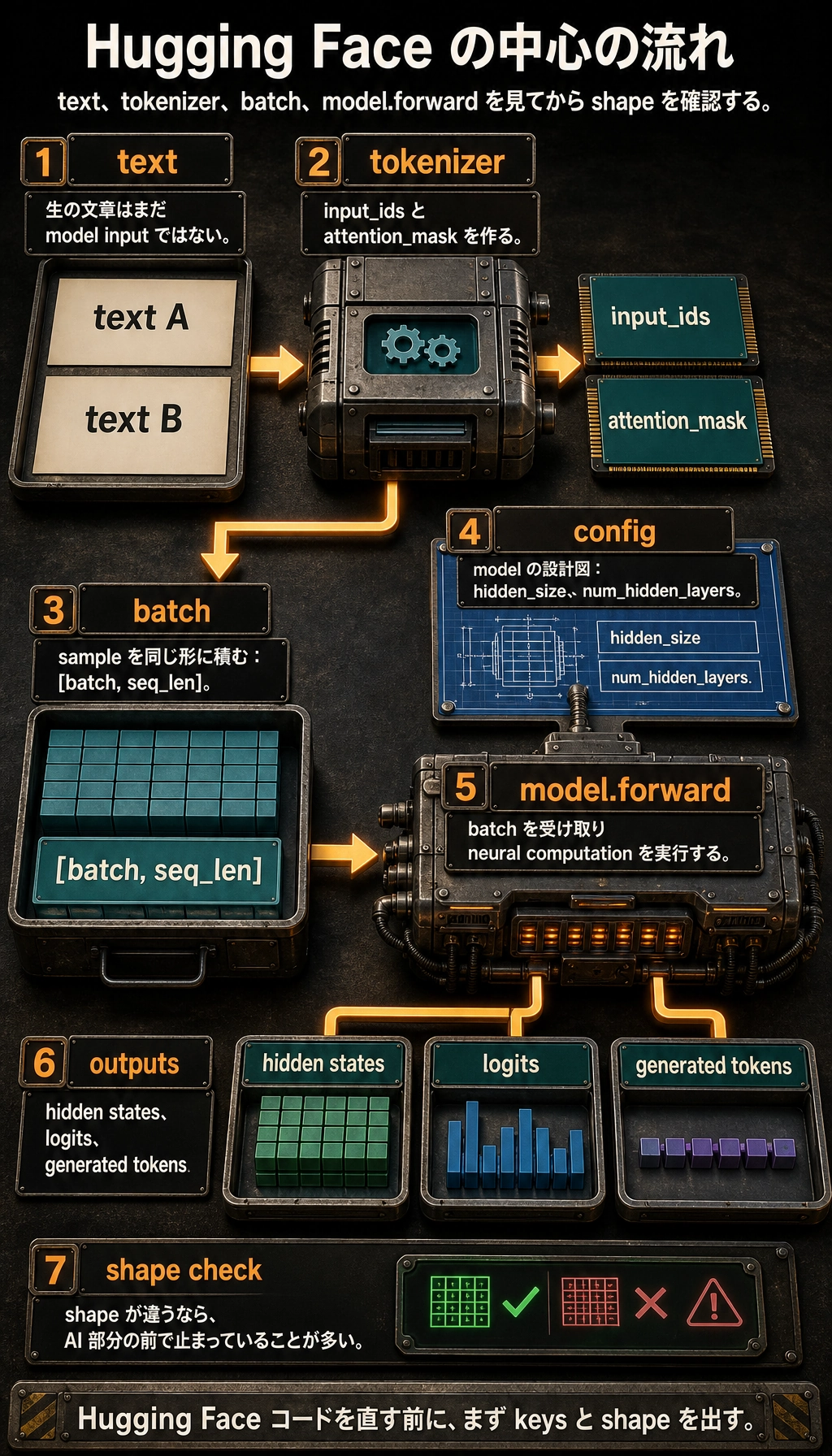
中心の流れ
多くの Hugging Face 例は、次の 1 本の流れに戻せます。
text -> tokenizer -> input_ids / attention_mask -> model.forward -> hidden states / logits / generated tokens
この流れが分かると、pipeline、Trainer、DataCollator、AutoModel... は不思議な API ではなく、便利なラッパーとして読めます。
4 つのオブジェクト
| オブジェクト | 役割 | よく見るフィールド |
|---|---|---|
| tokenizer | テキスト前処理と token から ID への変換 | input_ids, attention_mask |
| config | モデル構造の設計図 | hidden_size, num_hidden_layers, vocab_size |
| model | ニューラルネットワーク計算 | last_hidden_state, logits, generated IDs |
| batch | 同じ shape に積まれた tensor 群 | [batch, seq_len] 入力 |
大事な習慣は shape を確認することです。shape が違う場合、モデルはまだ「AI らしい処理」に入る前で止まっています。
実験 1:重みをダウンロードせずに流れを動かす
依存関係を入れます。
python -m pip install torch transformers
この例では BertConfig から小さなランダム BERT を作ります。言語能力はありませんが、pretrained weights をダウンロードせずに基本の呼び出し経路を確認できます。
import torch
from transformers import BertConfig, BertModel

vocab = {
    "[PAD]": 0,
    "[CLS]": 1,
    "[SEP]": 2,
    "[UNK]": 3,
    "reset": 4,
    "password": 5,
    "refund": 6,
    "order": 7,
    "please": 8,
    "help": 9,
}


def encode(text, max_length=6):
    tokens = ["[CLS]"] + text.lower().split() + ["[SEP]"]
    input_ids = [vocab.get(token, vocab["[UNK]"]) for token in tokens][:max_length]
    attention_mask = [1] * len(input_ids)

    while len(input_ids) < max_length:
        input_ids.append(vocab["[PAD]"])
        attention_mask.append(0)

    return input_ids, attention_mask


texts = ["please help reset password", "refund order"]
encoded = [encode(text) for text in texts]

input_ids = torch.tensor([item[0] for item in encoded], dtype=torch.long)
attention_mask = torch.tensor([item[1] for item in encoded], dtype=torch.long)

config = BertConfig(
    vocab_size=len(vocab),
    hidden_size=32,
    num_hidden_layers=2,
    num_attention_heads=4,
    intermediate_size=64,
)

model = BertModel(config)
outputs = model(input_ids=input_ids, attention_mask=attention_mask)

print("input_ids shape        :", tuple(input_ids.shape))
print("attention_mask shape   :", tuple(attention_mask.shape))
print("last_hidden_state shape:", tuple(outputs.last_hidden_state.shape))
print("pooler_output shape    :", tuple(outputs.pooler_output.shape))
期待される出力:
input_ids shape        : (2, 6)
attention_mask shape   : (2, 6)
last_hidden_state shape: (2, 6, 32)
pooler_output shape    : (2, 32)
shape はこう読みます。
2は batch に 2 文あるという意味。6は各文が長さ 6 に padding または truncation されたという意味。32はhidden_size=32から来る。last_hidden_stateは token ごとに 1 vector を持つ。pooler_outputはこの BERT 風モデルで、文ごとに 1 vector を返す。
実験 2:本物の pretrained model を使う
ネットワークがある場合は from_pretrained を使います。
from transformers import AutoModel, AutoTokenizer

model_name = "bert-base-uncased"
tokenizer = AutoTokenizer.from_pretrained(model_name)
model = AutoModel.from_pretrained(model_name)

batch = tokenizer(
    ["please help reset password", "refund order"],
    padding=True,
    truncation=True,
    return_tensors="pt",
)

outputs = model(**batch)

print(batch.keys())
print(batch["input_ids"].shape)
print(outputs.last_hidden_state.shape)
期待される形状レベルの出力:
dict_keys(['input_ids', 'token_type_ids', 'attention_mask'])
torch.Size([2, 6])
torch.Size([2, 6, 768])
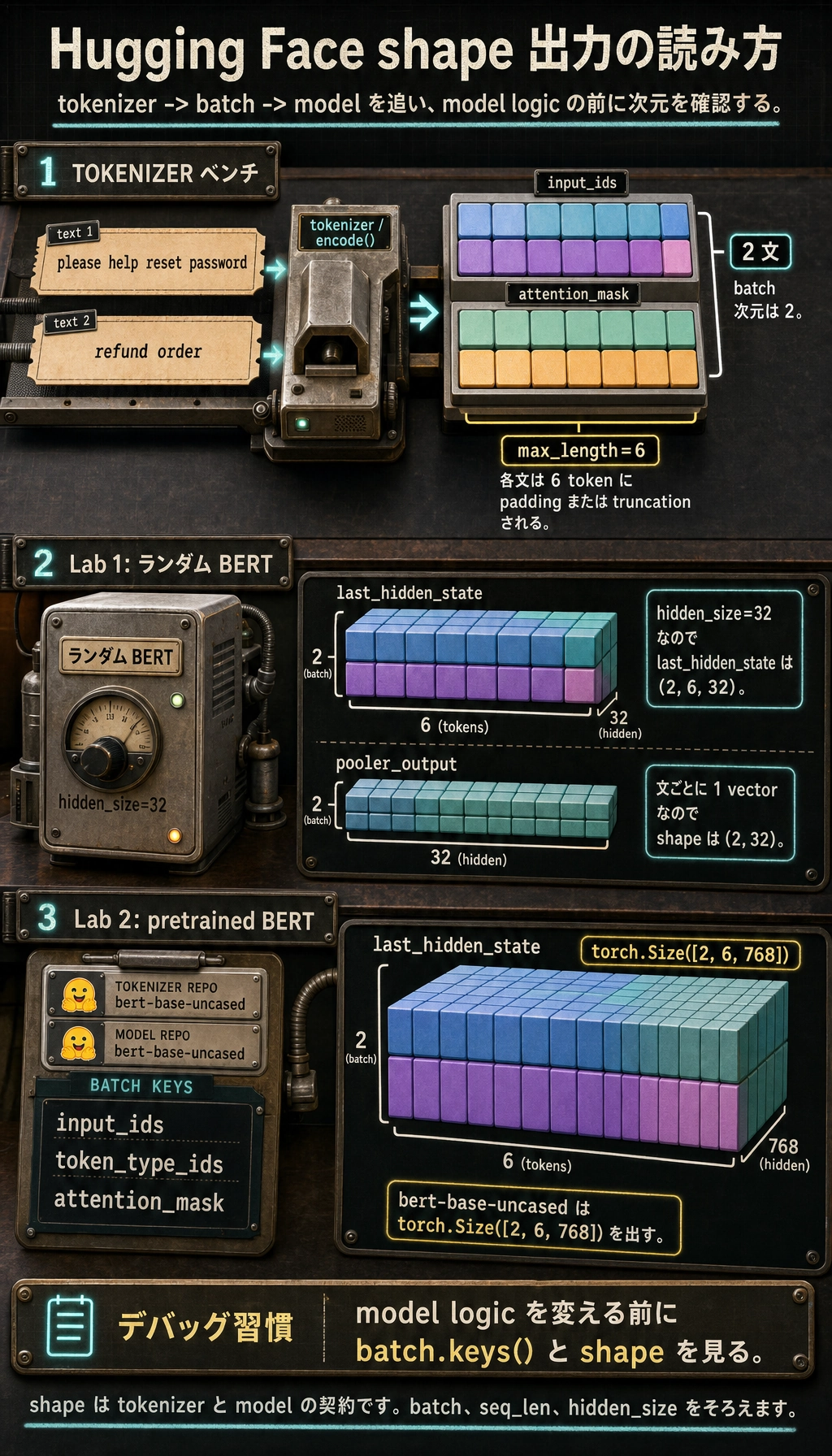
ここでは pretrained weights を持つモデルを使います。流れは同じですが、tokenizer、config、weights は Hub から来ており、互いに一致している必要があります。
実コードを読むためのオブジェクト地図
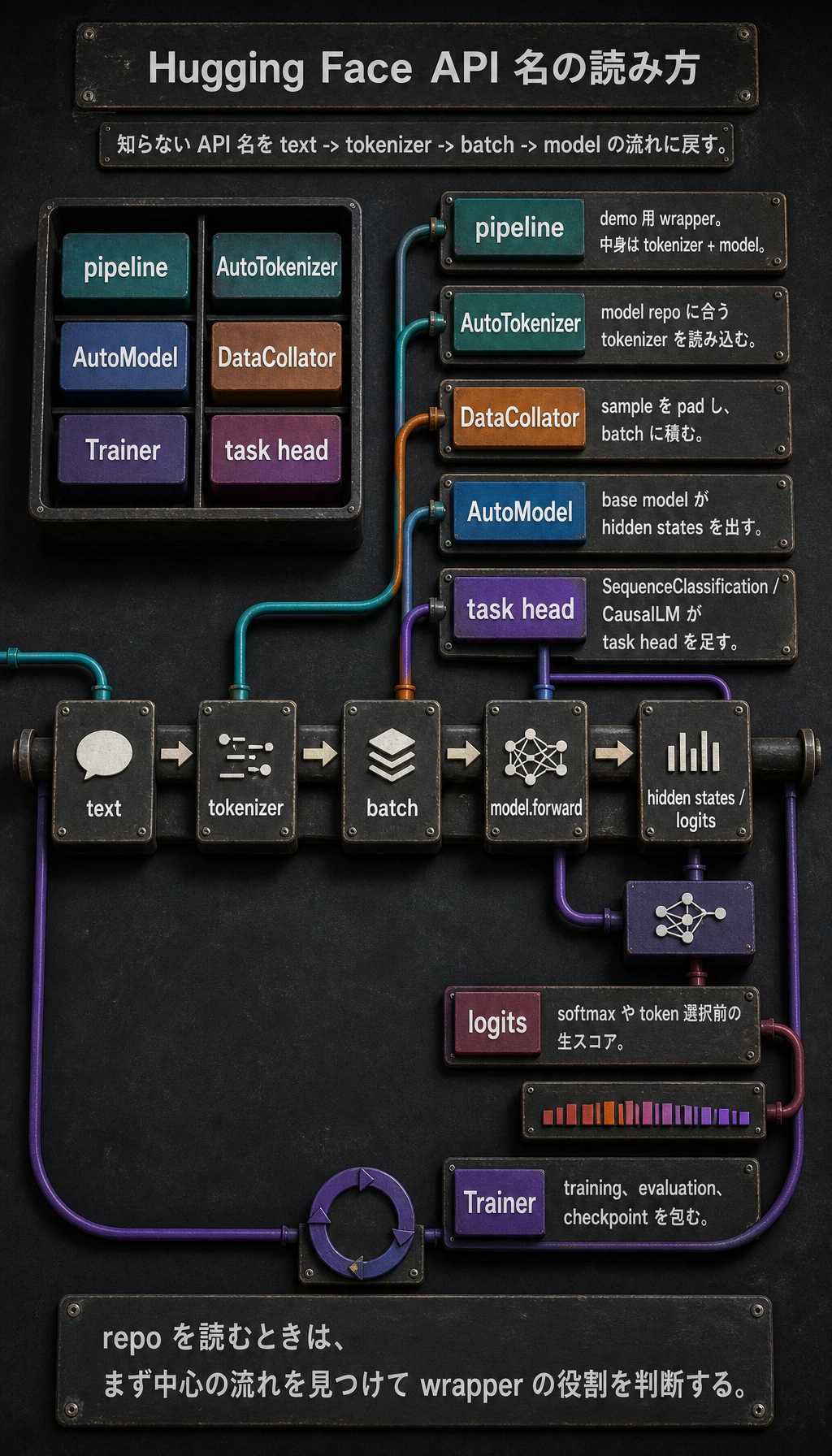
リポジトリを読むときは、知らない名前を中心の流れに戻します。
| 名前 | どう考えるか |
|---|---|
pipeline | tokenizer + model の高レベル demo wrapper |
AutoTokenizer | model repo に合う tokenizer class を読み込む |
AutoModel | task head なしの base model を読み込む |
AutoModelForSequenceClassification | base model + classification head |
AutoModelForCausalLM | next-token generation 用の decoder 系 model |
DataCollator | sample を padding し、batch に積む |
Trainer | training loop、evaluation、checkpoint、logging を包む |
logits | softmax や token 選択前の生スコア |
デバッグチェックリスト
- Tokenizer と model は同じ model repo から読み込む。
- model を呼ぶ前に
batch.keys()と tensor shapes を出す。 - padding を使うなら、通常は
attention_maskが必要。 - ランダムな
BertModel(config)は interface 学習用で、pretrained model ではない。 AutoModelは表現を返す。task-specific class は task logits を返す。- CUDA memory error では、まず batch size、sequence length、model size を下げる。
練習
- 実験 1 の
max_lengthを6から4に変える。どの token が切られるか。 hidden_size=64に変える。どの output shape が変わるか。- 3 つ目の文を追加し、batch 次元が
2から3になることを確認する。 - 実験 2 で
AutoModelをAutoModelForSequenceClassificationに替える。どの新しい field が出るか。 pipeline()が demo に便利でも、batch shape のデバッグに不十分な理由を説明する。
まとめ
Hugging Face は tensor を追うと学びやすいです。
tokenizer creates tensors -> model consumes tensors -> outputs expose states or logits
この経路を確認できれば、公式サンプルはかなり読みやすくなります。