4.1.2 Vectors: The Basic Unit of the AI World
You do not need to “prove theorems” in this chapter. You only need to understand the intuition and know how to implement it in code. Each concept comes with visualization and NumPy code. It is okay if you do not fully understand the formulas—just understand the diagrams and code.
Learning Objectives
- Intuitively understand what a vector is (direction + magnitude)
- Master vector addition and scalar multiplication
- Understand the meaning of dot product
- Master cosine similarity — the most commonly used similarity measure in AI
- Implement all vector operations with NumPy
First, set a very important learning expectation
Although this section includes code, the code is not there to replace understanding. It is more like doing two things:
- Helping you turn abstract objects into something visible
- Helping you check whether your intuition is correct
If you finish this section and still cannot solve problems fluently right away, that is completely normal. A more important standard is:
- Can you write a “real-world object” as a vector?
- Can you clearly explain what dot product and cosine similarity are comparing?
- Can you connect them to AI scenarios such as recommendation, retrieval, and RAG?
First, build a map
The most important thing in this section is not memorizing terms, but first grasping the main thread:
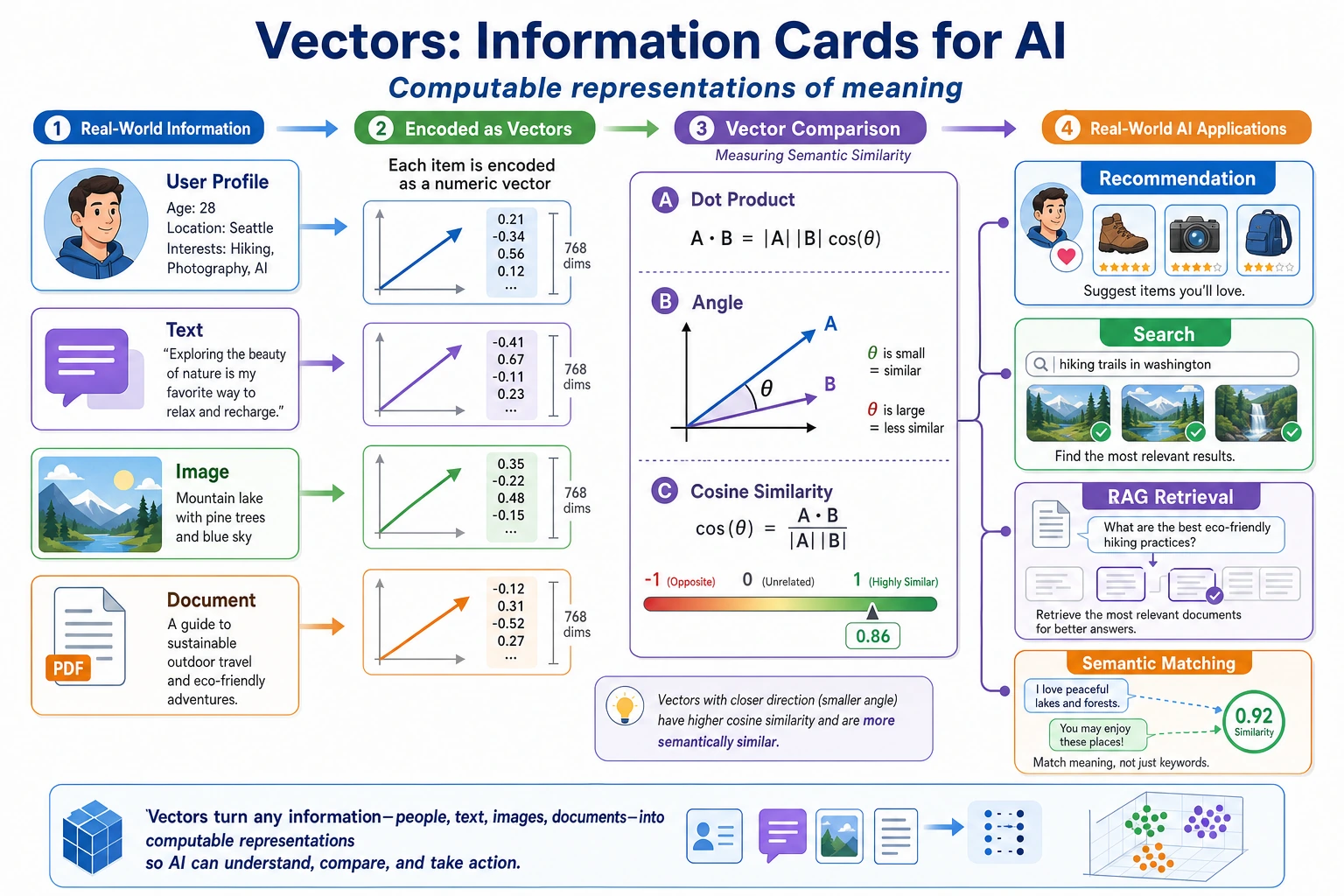
You can understand this lesson as:
- The first half answers “how to write an object as a vector”
- The second half answers “how to compare whether two vectors are similar”
Terms to Keep Handy
| Term | What it means | Why beginners often need it |
|---|---|---|
scalar | A single number, such as 2 or 0.5 | Scalar multiplication means “use one number to scale the whole vector.” |
dimension | The number of components in a vector | [90, 85, 92] has 3 dimensions because it has 3 numbers. |
shape | NumPy’s description of array structure | (3,), (1, 3), and (3, 1) all hold 3 numbers but behave differently in multiplication. |
norm | Vector length | np.linalg.norm(a) tells you how long or strong a vector is. |
NLP | Natural Language Processing | Text vectors and word vectors are important examples of vectors in AI. |
vector database | A database optimized for storing and searching vectors | It powers retrieval in many RAG and semantic search systems. |
Read this table as a safety net, not as vocabulary to memorize. When a later code example uses one of these words, return here and reconnect it to the current operation.
What Is a Vector?
Intuitive Understanding
A vector = an ordered set of numbers.
A more beginner-friendly analogy
If this is your first time learning vectors, and “direction + magnitude” still feels a bit abstract, you can think of it as:
- An information card for an object
For example, a student:
- Math 90
- English 85
- Physics 92
Arrange these items in a fixed order, and you get an information card that a computer can process:
[90, 85, 92]
So the most basic meaning of a vector is not a “geometric shape,” but:
A stable way to write an object as a sequence of numbers.
That is all. In AI, vectors are everywhere:
| AI scenario | Vector representation | Dimension |
|---|---|---|
| A student's grades | [Math, English, Physics] = [90, 85, 92] | 3D |
| The color of a pixel | [R, G, B] = [255, 128, 0] | 3D |
| The meaning of a word (word vector) | [0.2, -0.5, 0.8, ...] | Usually 100–300D |
| An image (flattened) | [pixel1, pixel2, ..., pixeln] | Tens of thousands to millions of dimensions |
Geometric Intuition
In 2D space, a vector can be drawn as a line segment with an arrow — it has both direction and magnitude (length).
import numpy as np
import matplotlib.pyplot as plt

plt.rcParams['font.sans-serif'] = ['Arial Unicode MS']
plt.rcParams['axes.unicode_minus'] = False

# Define two 2D vectors
a = np.array([3, 2])
b = np.array([1, 4])

# Plot vectors
fig, ax = plt.subplots(figsize=(6, 6))
ax.quiver(0, 0, a[0], a[1], angles='xy', scale_units='xy', scale=1,
          color='steelblue', linewidth=2, label=f'a = {a}')
ax.quiver(0, 0, b[0], b[1], angles='xy', scale_units='xy', scale=1,
          color='coral', linewidth=2, label=f'b = {b}')

ax.set_xlim(-1, 6)
ax.set_ylim(-1, 6)
ax.set_aspect('equal')
ax.grid(True, alpha=0.3)
ax.axhline(y=0, color='k', linewidth=0.5)
ax.axvline(x=0, color='k', linewidth=0.5)
ax.legend(fontsize=12)
ax.set_title('Geometric representation of 2D vectors')
plt.show()
Interpretation: vector a = [3, 2] starts at the origin, moves 3 steps to the right and 2 steps up.
Vectors in AI are often hundreds or thousands of dimensions, so they cannot be drawn. But the mathematical operations are exactly the same — a vector is just a sequence of numbers, and all the rules apply to any dimension.
From a Real Data Record to a Vector
A point where beginners often get stuck is this: they know “a vector is a sequence of numbers,” but they do not know how that connects to real data.
import numpy as np

student = {
    "math": 90,
    "english": 85,
    "physics": 92,
}

student_vector = np.array([
    student["math"],
    student["english"],
    student["physics"],
])

print("Student vector:", student_vector)
print("Vector shape:", student_vector.shape)  # (3,)
The essence here is:
- In the real world, there are “meaningful fields”
- In the computer, they must become a “fixed-order numeric array”
Once you write an object as a vector, you can start doing mathematical operations.
weights = np.array([0.4, 0.2, 0.4])
score = student_vector @ weights
print("Overall score:", score)  # 89.8
This already connects to a main thread in machine learning:
- Data is a vector
- Rules are also vectors
- If you take the dot product of the two, you get a score
Basic Vector Operations
Vector Addition
Adding two vectors = adding the numbers at corresponding positions.
a = np.array([3, 2])
b = np.array([1, 4])

# Vector addition
c = a + b
print(f"a + b = {c}")  # [4, 6]
Geometric meaning: place b at the end of a, and the result points to the final endpoint.
fig, ax = plt.subplots(figsize=(7, 7))

# Plot a
ax.quiver(0, 0, a[0], a[1], angles='xy', scale_units='xy', scale=1,
          color='steelblue', linewidth=2, label=f'a = {a}')
# Plot b (starting from the end of a)
ax.quiver(a[0], a[1], b[0], b[1], angles='xy', scale_units='xy', scale=1,
          color='coral', linewidth=2, label=f'b = {b}')
# Plot a + b
ax.quiver(0, 0, c[0], c[1], angles='xy', scale_units='xy', scale=1,
          color='green', linewidth=2.5, label=f'a + b = {c}')

ax.set_xlim(-1, 7)
ax.set_ylim(-1, 8)
ax.set_aspect('equal')
ax.grid(True, alpha=0.3)
ax.legend(fontsize=11)
ax.set_title('Vector addition: head-to-tail')
plt.show()
Scalar Multiplication
Multiplying a vector by a number = multiplying each component by that number.
a = np.array([3, 2])

# Scalar multiplication
print(f"2 * a = {2 * a}")     # [6, 4]  —— same direction, twice the length
print(f"0.5 * a = {0.5 * a}") # [1.5, 1.0]  —— same direction, half the length
print(f"-1 * a = {-1 * a}")   # [-3, -2]  —— reversed direction
fig, ax = plt.subplots(figsize=(8, 6))

vectors = [
    (a, 'steelblue', f'a = {a}'),
    (2 * a, 'green', f'2a = {2*a}'),
    (0.5 * a, 'orange', f'0.5a = {0.5*a}'),
    (-1 * a, 'red', f'-a = {-1*a}'),
]

for vec, color, label in vectors:
    ax.quiver(0, 0, vec[0], vec[1], angles='xy', scale_units='xy', scale=1,
              color=color, linewidth=2, label=label)

ax.set_xlim(-5, 8)
ax.set_ylim(-4, 6)
ax.set_aspect('equal')
ax.grid(True, alpha=0.3)
ax.axhline(y=0, color='k', linewidth=0.5)
ax.axvline(x=0, color='k', linewidth=0.5)
ax.legend(fontsize=11)
ax.set_title('Scalar multiplication: scaling and flipping')
plt.show()
Vector Length (Magnitude / Norm)
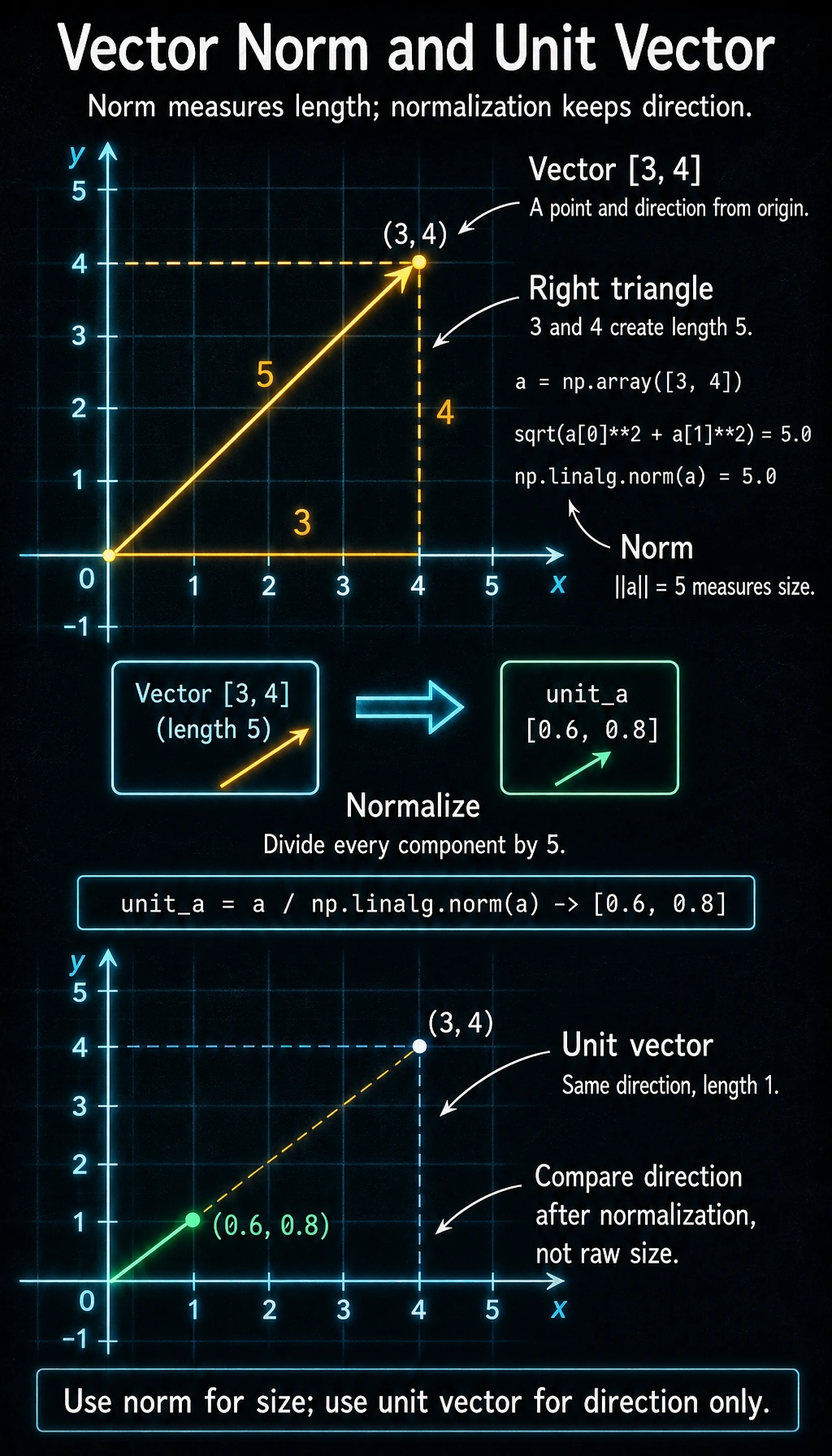
The length of a vector (also called magnitude or norm) is calculated using the Pythagorean theorem:
For vector a = [a1, a2], length = square root of (a1 squared + a2 squared)
a = np.array([3, 4])

# Method 1: manual calculation
length_manual = np.sqrt(a[0]**2 + a[1]**2)
print(f"Manual length: {length_manual}")  # 5.0

# Method 2: NumPy built-in function (recommended)
length = np.linalg.norm(a)
print(f"NumPy length: {length}")  # 5.0
The length of vector [3, 4] is exactly 5 — the classic Pythagorean triple. In data science, we will often use np.linalg.norm() to compute vector length.
Unit Vector
A vector with length 1 is called a unit vector. If you divide any vector by its length, you get a unit vector in the same direction:
a = np.array([3, 4])

# Normalize
unit_a = a / np.linalg.norm(a)
print(f"Unit vector: {unit_a}")                  # [0.6, 0.8]
print(f"Unit vector length: {np.linalg.norm(unit_a)}")  # 1.0
Why is this important? In AI, we often need to compare the direction of two vectors rather than their size. After normalization, only the directional information remains.
A Shape Sense You Must Build as a Beginner
When many people first learn vectors, they can understand the concept, but get confused by shape as soon as they write code.
import numpy as np

a = np.array([1, 2, 3])          # 1D vector
row = a.reshape(1, 3)            # row vector
col = a.reshape(3, 1)            # column vector

print("a.shape   =", a.shape)    # (3,)
print("row.shape =", row.shape)  # (1, 3)
print("col.shape =", col.shape)  # (3, 1)
They all look like “three numbers,” but in matrix multiplication they mean different things:
(3,)is a normal 1D NumPy array(1, 3)explicitly means “1 row, 3 columns”(3, 1)explicitly means “3 rows, 1 column”
When you later learn matrices and neural networks, this shape sense is more important than memorizing formulas.
Dot Product — The Most Important Vector Operation
What Is the Dot Product?
The dot product of two vectors = multiply corresponding positions and then sum.
a = np.array([1, 2, 3])
b = np.array([4, 5, 6])

# Method 1: manual calculation
dot_manual = a[0]*b[0] + a[1]*b[1] + a[2]*b[2]
print(f"Manual: {dot_manual}")  # 1*4 + 2*5 + 3*6 = 32

# Method 2: NumPy (recommended)
dot_np = np.dot(a, b)
print(f"NumPy: {dot_np}")  # 32

# Method 3: @ operator (Python 3.5+)
dot_at = a @ b
print(f"@ operator: {dot_at}")  # 32
Geometric Meaning of the Dot Product
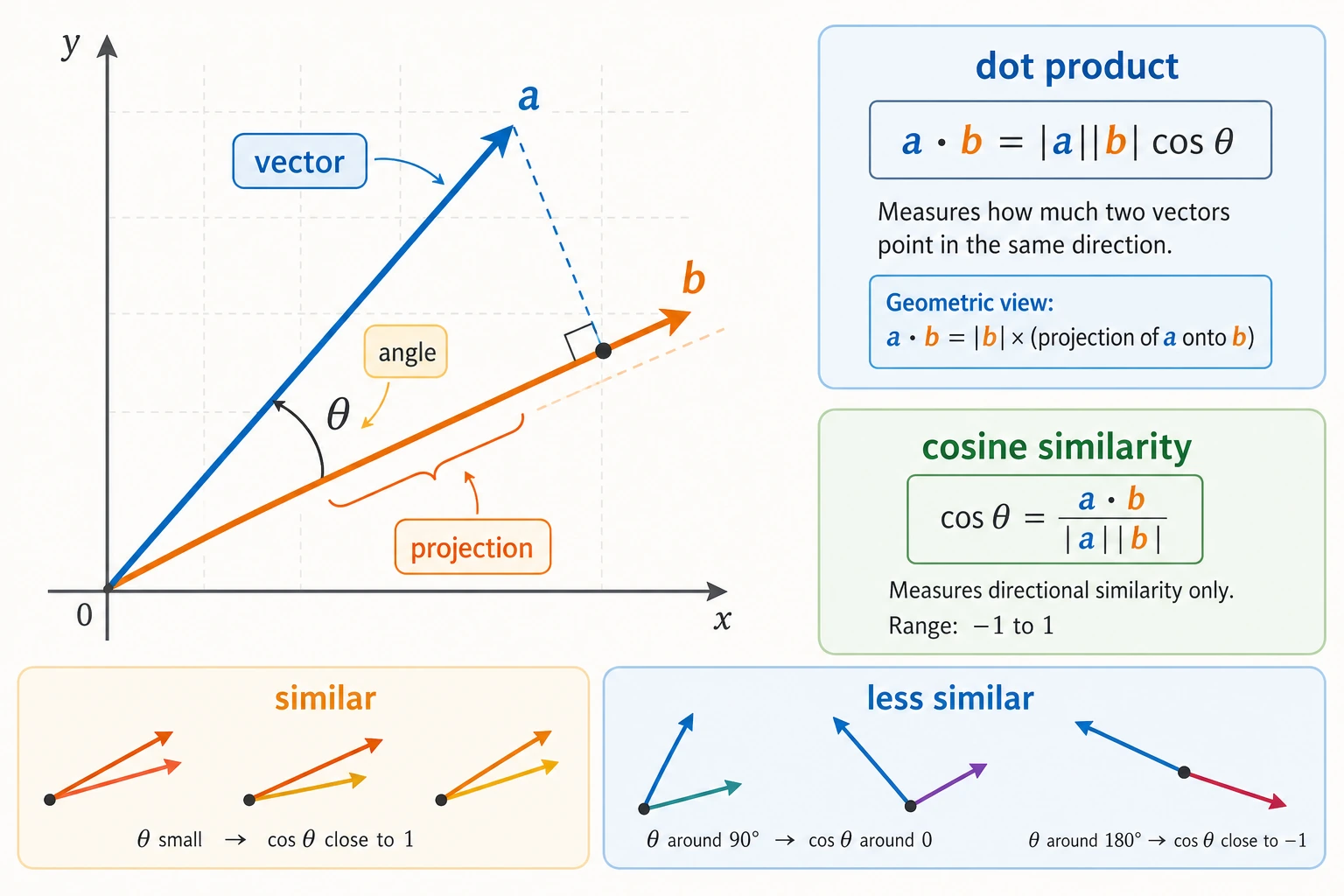
The dot product reflects the directional relationship between two vectors:
# Same direction
a = np.array([1, 0])
b = np.array([1, 1])
print(f"Same direction: a · b = {np.dot(a, b)}")  # 1 (positive)

# Perpendicular
a = np.array([1, 0])
b = np.array([0, 1])
print(f"Perpendicular: a · b = {np.dot(a, b)}")  # 0

# Opposite direction
a = np.array([1, 0])
b = np.array([-1, 0])
print(f"Opposite direction: a · b = {np.dot(a, b)}")  # -1 (negative)
Why Can the Dot Product Be Understood as “Alignment”?
The dot product can also be understood from another very important angle:
The more one vector projects onto the direction of another vector, the larger the dot product usually is.
Its formula is:
a · b = |a| × |b| × cos(theta)
You do not need to derive it first. Just remember three things for now:
- The more two vectors point in the same direction, the closer
cos(theta)is to 1 - The more two vectors are perpendicular, the closer
cos(theta)is to 0 - The more two vectors point in opposite directions, the closer
cos(theta)is to -1
So the dot product contains both:
- Length information
- Direction information
Understanding the Dot Product with Visualization
fig, axes = plt.subplots(1, 3, figsize=(15, 4))

cases = [
    ([2, 1], [1, 2], 'Same direction (dot product > 0)'),
    ([2, 0], [0, 2], 'Perpendicular (dot product = 0)'),
    ([2, 1], [-1, -2], 'Opposite direction (dot product < 0)'),
]

for ax, (a, b, title) in zip(axes, cases):
    a, b = np.array(a), np.array(b)
    dot = np.dot(a, b)

    ax.quiver(0, 0, a[0], a[1], angles='xy', scale_units='xy', scale=1,
              color='steelblue', width=0.02, label='a')
    ax.quiver(0, 0, b[0], b[1], angles='xy', scale_units='xy', scale=1,
              color='coral', width=0.02, label='b')

    ax.set_xlim(-3, 4)
    ax.set_ylim(-3, 4)
    ax.set_aspect('equal')
    ax.grid(True, alpha=0.3)
    ax.axhline(y=0, color='k', linewidth=0.5)
    ax.axvline(x=0, color='k', linewidth=0.5)
    ax.set_title(f'{title}\na·b = {dot}')
    ax.legend()

plt.tight_layout()
plt.show()
Cosine Similarity — The Most Common Similarity Measure in AI
From Dot Product to Cosine Similarity
The size of the dot product depends not only on direction, but also on vector length. If we only care about how similar the directions are, we need to remove the effect of length:
Cosine similarity = dot product / (length of vector A × length of vector B)
def cosine_similarity(a, b):
    """Compute the cosine similarity between two vectors"""
    dot_product = np.dot(a, b)
    norm_a = np.linalg.norm(a)
    norm_b = np.linalg.norm(b)
    if norm_a == 0 or norm_b == 0:
        raise ValueError("Cosine similarity is undefined for zero vectors.")
    return dot_product / (norm_a * norm_b)
The zero-vector check matters because a vector with length 0 has no direction. Cosine similarity compares direction, so dividing by a zero length would produce a misleading result or a runtime warning.
The range of cosine similarity is:
| Value | Meaning |
|---|---|
| 1 | Exactly the same direction |
| 0 | Completely unrelated (perpendicular) |
| -1 | Exactly opposite directions |
Example: User Preference Similarity
Suppose three users rate five movie genres:
# Users' preference scores for [action, comedy, romance, sci-fi, horror] (1-5)
alice   = np.array([5, 3, 4, 5, 1])
bob     = np.array([4, 2, 5, 4, 1])
charlie = np.array([1, 5, 2, 1, 5])

# Compute pairwise similarity
print(f"Alice vs Bob:     {cosine_similarity(alice, bob):.4f}")
print(f"Alice vs Charlie: {cosine_similarity(alice, charlie):.4f}")
print(f"Bob vs Charlie:   {cosine_similarity(bob, charlie):.4f}")
Output:
Alice vs Bob:     0.9761
Alice vs Charlie: 0.5825
Bob vs Charlie:   0.5600
Interpretation: Alice and Bob have very similar preferences (0.98 is close to 1). Charlie is less aligned with both of them, but not completely opposite. This is the basic idea behind recommendation systems — compare preference directions first, then recommend items liked by nearby users or nearby items.
Applications of Cosine Similarity in AI
- NLP (11 Natural Language Processing): compute how similar two word vectors are, for example, the cosine similarity between "cat" and "dog" is high
- RAG (8 LLM Application Development and RAG): use a vector database to retrieve the most relevant document chunks
- Recommendation systems: find users with the most similar preferences
So cosine similarity is a tool you will encounter repeatedly throughout your AI learning journey.
Visualization: Vectors with Different Cosine Similarities
fig, axes = plt.subplots(1, 4, figsize=(16, 4))

# Vector pairs with different similarities
pairs = [
    ([1, 0], [1, 0.1], '≈ 1.0 (almost identical)'),
    ([1, 0], [0.7, 0.7], '≈ 0.7 (fairly similar)'),
    ([1, 0], [0, 1], '= 0 (unrelated)'),
    ([1, 0], [-0.9, -0.3], '≈ -0.95 (opposite)'),
]

for ax, (a, b, desc) in zip(axes, pairs):
    a, b = np.array(a), np.array(b)
    sim = cosine_similarity(a, b)

    ax.quiver(0, 0, a[0], a[1], angles='xy', scale_units='xy', scale=1,
              color='steelblue', width=0.02)
    ax.quiver(0, 0, b[0], b[1], angles='xy', scale_units='xy', scale=1,
              color='coral', width=0.02)

    ax.set_xlim(-1.5, 1.5)
    ax.set_ylim(-1, 1.5)
    ax.set_aspect('equal')
    ax.grid(True, alpha=0.3)
    ax.set_title(f'cos = {sim:.2f}\n{desc}', fontsize=10)

plt.tight_layout()
plt.show()
A Minimal Retrieval Example: Find the Most Similar Item Among 3 Candidates
Although the following example uses hand-crafted small vectors, the idea is the same as vector retrieval, RAG, and semantic search.
import numpy as np

def cosine_similarity(a, b):
    return np.dot(a, b) / (np.linalg.norm(a) * np.linalg.norm(b))

query = np.array([0.9, 0.1, 0.8, 0.2])

docs = {
    "Document A: Machine Learning Basics": np.array([0.8, 0.2, 0.75, 0.1]),
    "Document B: Travel Guide":     np.array([0.1, 0.9, 0.2, 0.8]),
    "Document C: Deep Learning Basics": np.array([0.85, 0.15, 0.7, 0.25]),
}

scores = []
for name, vec in docs.items():
    sim = cosine_similarity(query, vec)
    scores.append((name, sim))

scores.sort(key=lambda x: x[1], reverse=True)

for name, sim in scores:
    print(f"{name}: {sim:.4f}")
Expected output:
Document C: Deep Learning Basics: 0.9964
Document A: Machine Learning Basics: 0.9922
Document B: Travel Guide: 0.3333
You will find that the document with the highest similarity is usually the one whose semantic direction is closest to the query.
NumPy Vector Operations Summary
Let’s organize all the operations learned in this section with NumPy:
import numpy as np

# ========== Create vectors ==========
a = np.array([1, 2, 3])
b = np.array([4, 5, 6])

# ========== Basic operations ==========
print("Addition:", a + b)           # [5, 7, 9]
print("Subtraction:", a - b)        # [-3, -3, -3]
print("Scalar multiplication:", 3 * a)           # [3, 6, 9]
print("Elementwise multiplication:", a * b)       # [4, 10, 18]

# ========== Dot product ==========
print("Dot product:", np.dot(a, b))    # 32
print("Dot product:", a @ b)           # 32 (equivalent)

# ========== Length (norm) ==========
print("Length:", np.linalg.norm(a))   # 3.742

# ========== Normalization ==========
unit_a = a / np.linalg.norm(a)
print("Unit vector:", unit_a)

# ========== Cosine similarity ==========
cos_sim = np.dot(a, b) / (np.linalg.norm(a) * np.linalg.norm(b))
print("Cosine similarity:", cos_sim)   # 0.9746

# scikit-learn also provides a built-in function
# from sklearn.metrics.pairwise import cosine_similarity
After learning this, what should you bring to the next section?
After finishing vectors, the most valuable questions to carry forward are:
- If one object can be written as a vector, how do we write many objects at once?
- If two vectors can be compared for similarity, how do we transform a whole batch of vectors at once?
- Why do neural networks not process just one vector at a time, but instead always process a batch?
These three questions will naturally lead you to:
- Next section: Matrices — batch transformations for a set of vectors
- 5 Introduction to Machine Learning to Practice: in linear regression, each sample is a feature vector, and the model is finding a weight vector
- 11 Natural Language Processing (elective track): word vectors, sentence vectors, and cosine similarity appear repeatedly
- 8 LLM Application Development and RAG: the core of vector databases is similarity retrieval over high-dimensional vectors
Summary
| Concept | Intuitive understanding | NumPy implementation |
|---|---|---|
| Vector | An ordered set of numbers | np.array([1, 2, 3]) |
| Vector addition | Add corresponding positions | a + b |
| Scalar multiplication | Scale the vector | k * a |
| Vector length | Distance from the origin to the endpoint | np.linalg.norm(a) |
| Dot product | Measures the directional relationship between two vectors | np.dot(a, b) or a @ b |
| Cosine similarity | Similarity that looks only at direction, not length | dot / (norm_a * norm_b) |
What should you take away from this section?
- A vector is first of all a way to represent an object, not just an arrow
- The dot product is best understood first as “alignment”
- Cosine similarity is best understood first as “how close the directions are”
- This is why many retrieval, recommendation, and matching systems in AI cannot do without vectors
Hands-on Exercises
Exercise 1: Vector Operations
Given vectors a = [2, 3, -1] and b = [1, -2, 4], use NumPy to compute:
- a + b
- 3a - 2b
- The length of a
- The dot product of a and b
- The cosine similarity of a and b
Exercise 2: Find the Most Similar Movie
Given the feature vectors of five movies (scored by style):
movies = {
    "Interstellar": np.array([5, 1, 3, 5, 2]),   # [action, comedy, emotion, sci-fi, horror]
    "Lost in Thailand":     np.array([2, 5, 3, 1, 1]),
    "Wolf Warrior 2":    np.array([5, 1, 2, 2, 1]),
    "Ex-Files 3":    np.array([1, 3, 5, 1, 1]),
    "Alien":     np.array([4, 1, 1, 4, 5]),
}
Task: compute the cosine similarity between every pair of movies, and find the most similar pair and the least similar pair.
Exercise 3: Visualize Vector Addition
Use Matplotlib to draw the process of the following vector addition (with arrows):
- a = [2, 3], b = [-1, 2], and draw a, b, and a+b
Hint: refer to the code in Section 2.1.