
9 AI Agent and Intelligent Agent Systems
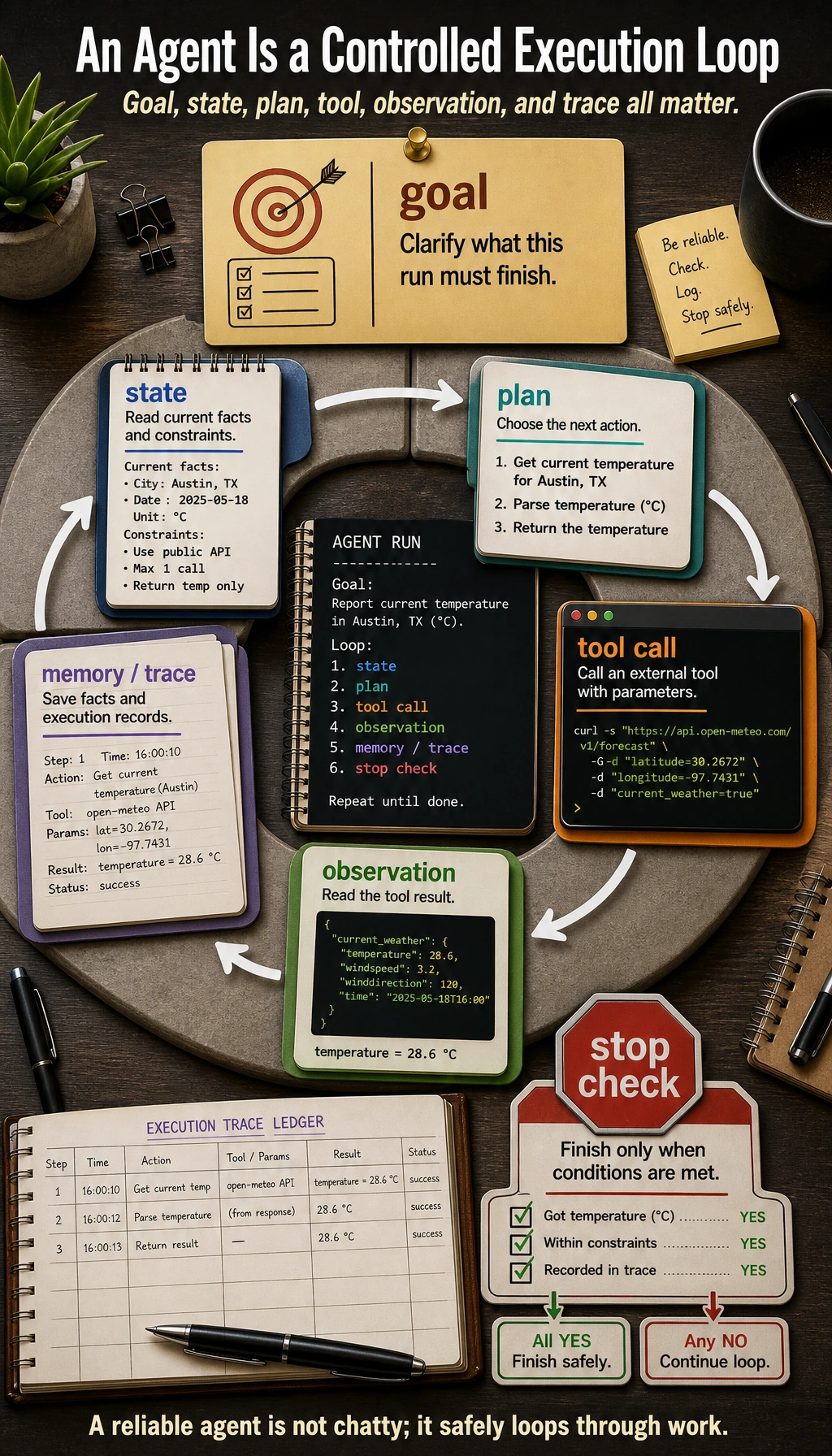
Chapter 8 made the model answer from documents. Chapter 9 makes the system act toward a goal: plan a next step, call a tool, read the observation, adjust, stop safely, and leave a trace that people can review.
Do not start with multi-agent frameworks. Start with one small Agent that can show every step.
Where You Are In The Main Route
Section titled “Where You Are In The Main Route”You have already built an LLM response loop and a RAG evidence loop. This chapter adds controlled action: the system decides the next step, calls allowed tools, reads observations, updates state, and stops with a replayable trace.
This is the final core application layer in the main route. After this chapter, Chapters 10-12 become product specializations, and Chapter 13 adds open-source model runtime ownership. Vision, NLP, multimodal workflows, and self-hosted LLMs can all plug into the same evidence, tool, trace, and safety habits.
See the Agent Execution Loop
Section titled “See the Agent Execution Loop”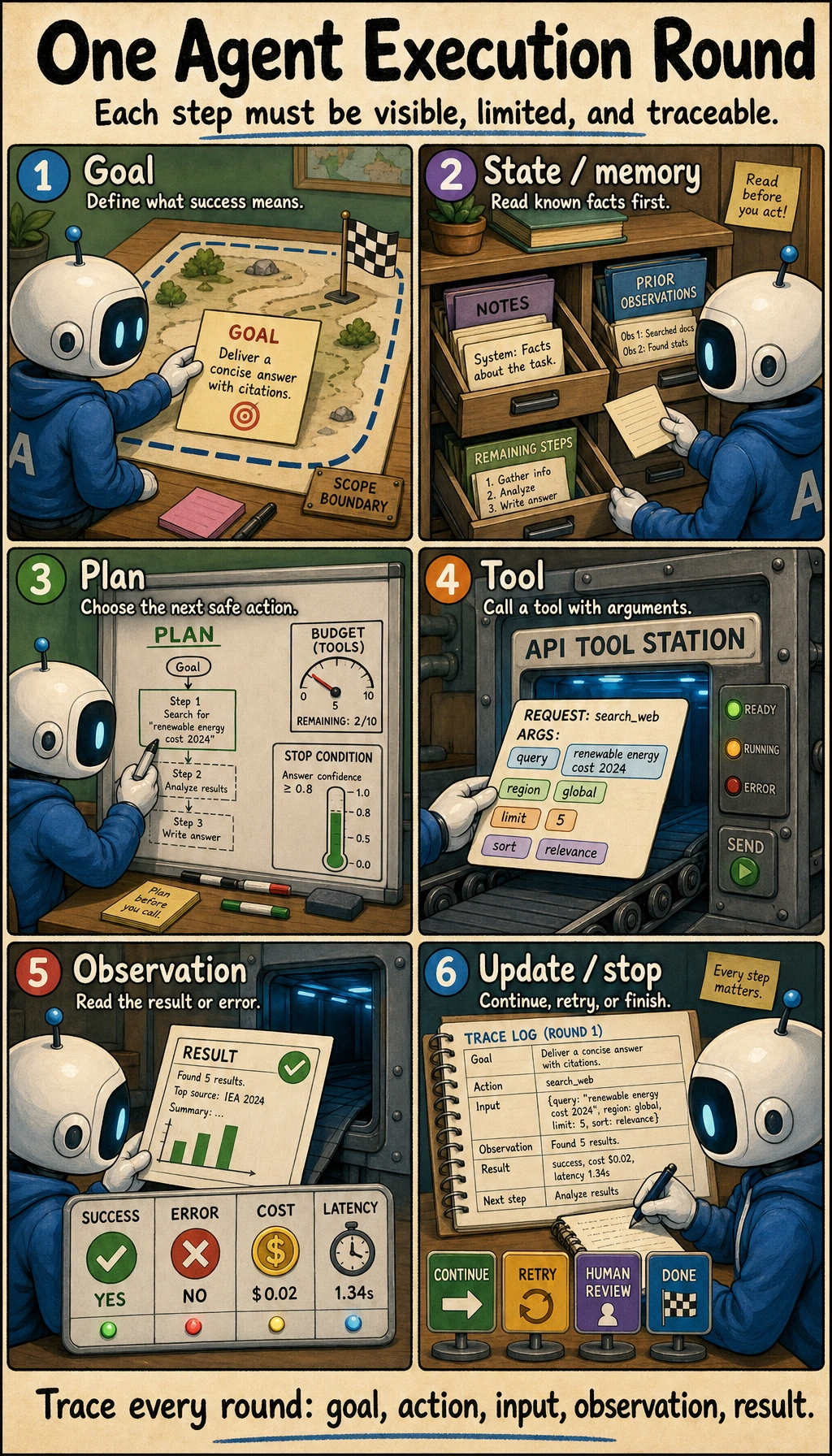
An Agent is not “a chatbot with tools.” It is a controlled execution loop.
| Part | Plain meaning | What you must control |
|---|---|---|
| Goal | What the Agent is trying to finish | scope, success criteria, stop condition |
| State | What is known right now | current inputs, previous observations, remaining steps |
| Plan | What to try next | step limit, fallback path, human takeover |
| Tool | External action such as search, file read, API call, code run | schema, validation, whitelist, risk level |
| Observation | What the tool returned | error handling, retry rule, trust boundary |
| Memory | What should persist across steps or runs | short-term state versus long-term preference |
| Trace | The replayable record of the run | goal, action, arguments, observation, cost, final result |
Learning Order And Task List
Section titled “Learning Order And Task List”Build a single traceable Agent before multi-agent systems. Follow the core single-Agent path first: 9.1 -> 9.2 -> 9.3 -> 9.4 -> 9.8 -> 9.10. Treat MCP, frameworks, multi-agent systems, and deployment operations as advanced chapters after the single-Agent loop is stable.
| Step | Read | Do | Evidence to keep |
|---|---|---|---|
| 9.1 | Agent basics and architecture | Explain goal, state, plan, tool, observation, memory | one architecture sketch |
| 9.2 | Reasoning and planning | Compare ReAct and Plan-and-Execute on one task | a step-by-step trace |
| 9.3 | Tool calling | Define one or two tools with parameters and errors | tools_schema.md |
| 9.4 | Memory | Separate current state from long-term memory | memory boundary notes |
| 9.8 | Evaluation and safety | Score outputs, block risky actions, and inspect traces | trace logs, safety block, eval cases |
| 9.10 | Stage project | Run 9.10.5 Hands-on: Build a Traceable Single-Agent Assistant | agent_traces.jsonl, safety boundary, eval cases |
| 9.5 | MCP and protocols | Understand MCP plus agent handoff contracts as ways to connect tools, data sources, and peer agents | one capability card and integration note |
| 9.6-9.7 | Frameworks and multi-agent | Study only after the single-Agent loop is stable | framework choice note |
| 9.9 | Deployment and operations | Add runtime, recovery, cost, and production readiness after the core project works | launch checklist and rollback note |
Core Path, Extensions, And Depth
Section titled “Core Path, Extensions, And Depth”Required core
Study the Single-Agent loop, tool schema, whitelist, max steps, state boundary, memory boundary, trace log, safety block, and evaluation cases. These are the minimum skills for an Agent that can be reviewed instead of merely demoed.
Optional extension
Return to MCP, framework comparison, multi-agent coordination, deployment operations, and cost optimization after the Single-Agent loop is stable and the product needs integration or scale.
Depth challenge
Compare the same task as a workflow, RAG flow, function call, and Agent trace. Then justify the simplest safe design so Agent use stays intentional rather than fashionable.
Time Budget And Deliverable
Section titled “Time Budget And Deliverable”Fast pass: finish one traceable Agent loop with a blocked unsafe tool. Keep agent_traces.jsonl plus a short trace explanation.
Standard pass: complete the core path 9.1 -> 9.2 -> 9.3 -> 9.4 -> 9.8 -> 9.10. Keep tools_schema.md, safety_boundary.md, evaluation cases, and one failure trace.
Deep pass: add MCP, framework comparison, deployment readiness, or multi-agent coordination only after the Single-Agent loop works. Keep a design memo explaining why Agent is safer or more useful than workflow, RAG, or function calling.
A strong Chapter 9 output proves control. It should show what the Agent was allowed to do, what it was not allowed to do, how it stopped, and how a reviewer can replay the trace.
First Runnable Loop: Print the Trace
Section titled “First Runnable Loop: Print the Trace”This offline script has no LLM dependency. It teaches the engineering habit: every action must be replayable. Later, replace the fixed plan with a model-generated plan, but keep the trace format.
Create ch09_agent_trace.py and run it with Python 3.10 or later.
import json

def search_docs(tool_input: dict) -> str:    return "Found notes about RAGOps, AgentOps, evaluation sets, and trace logs."

def make_todo(tool_input: dict) -> str:    topic = tool_input["topic"]    return f"1) Review {topic} notes; 2) add one eval case; 3) write failure notes."

TOOLS = {    "search_docs": {"fn": search_docs, "risk": "read_only"},    "make_todo": {"fn": make_todo, "risk": "draft_only"},}
goal = "Prepare a short RAG review plan."plan = [    {        "thought": "Find relevant course materials before making a plan.",        "action": "search_docs",        "input": {"query": "RAGOps AgentOps evaluation trace"},    },    {        "thought": "Turn the materials into a small review checklist.",        "action": "make_todo",        "input": {"topic": "RAG evaluation"},    },]
trace = []for step_number, step in enumerate(plan, start=1):    tool = TOOLS.get(step["action"])    if tool is None:        observation = "Blocked: tool is not whitelisted."        risk = "blocked"    else:        observation = tool["fn"](step["input"])        risk = tool["risk"]
    trace.append(        {            "step": step_number,            "goal": goal,            "thought": step["thought"],            "action": step["action"],            "input": step["input"],            "risk": risk,            "observation": observation,        }    )
for item in trace:    print(json.dumps(item, ensure_ascii=False))
Expected output starts like this:
{"step": 1, "goal": "Prepare a short RAG review plan.", "thought": "Find relevant course materials before making a plan.", "action": "search_docs", ...{"step": 2, "goal": "Prepare a short RAG review plan.", "thought": "Turn the materials into a small review checklist.", "action": "make_todo", ...Operation tip: change make_todo to a non-whitelisted tool name such as send_email. The script should block it. This is the smallest version of a safety boundary.
Depth Ladder
Section titled “Depth Ladder”| Level | What you can prove |
|---|---|
| Minimum pass | You can run one trace and explain each goal, action, input, observation, and result. |
| Project-ready | You can define tool schemas, block non-whitelisted tools, set max steps, and save failed traces. |
| Deeper check | You can decide when a workflow is safer than an Agent, and where human approval belongs for risky actions. |
Choose Agent, Workflow, RAG, Or Function Calling
Section titled “Choose Agent, Workflow, RAG, Or Function Calling”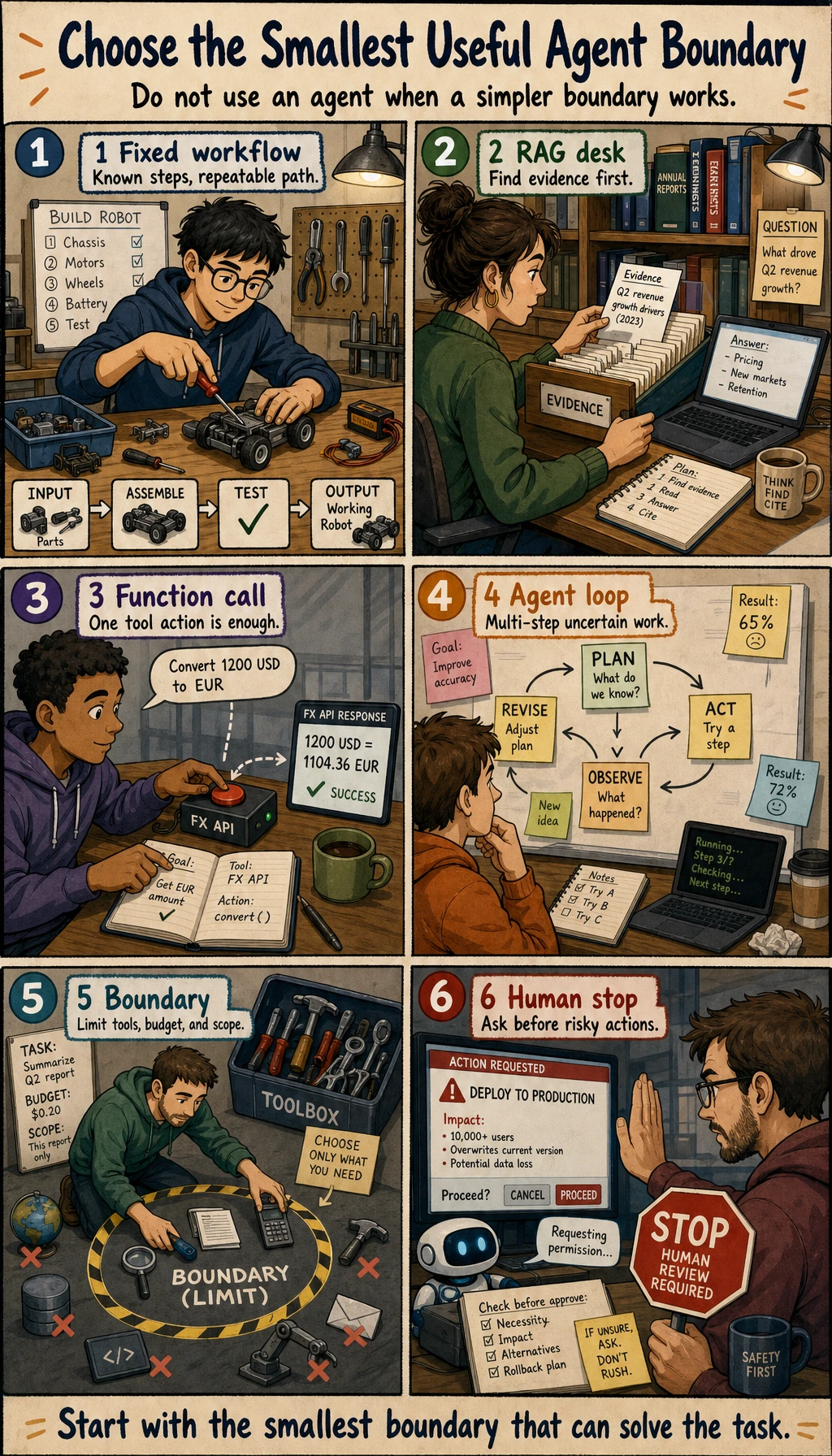
Agents are powerful, but they are not the default solution.
| Problem | Start with | Use an Agent when |
|---|---|---|
| Steps are fixed and known | Workflow | the route must change after each observation |
| Answer needs private or fresh knowledge | RAG | retrieval is only one step inside a larger goal |
| One structured action is enough | Function Calling | multiple tool calls and state updates are required |
| Task is high risk | Workflow with human approval | the Agent can draft, but humans must confirm risky actions |
| Exploration needs planning, tools, memory, and recovery | Agent | you can log every step and stop safely |
Common Failures
Section titled “Common Failures”- Building multi-agent before a single Agent is stable.
- Calling tools without schema, validation, or useful error messages.
- Missing stop conditions, which causes loops and cost spikes.
- Letting high-risk tools run without human confirmation.
- Showing only a successful demo while hiding failed traces.
- Using memory as a dumping ground instead of separating current state, long-term preference, and task history.
Evidence to Keep
Section titled “Evidence to Keep”Keep this page’s proof of learning as a small evidence card:
- Core Route
- 9.1 → 9.2 → 9.3 → 9.4 → 9.8 → 9.10 first
- Agent Loop
- goal → plan → tool/action → observation → memory → evaluation
- Trace Rule
- every action should leave input, output, decision, and error record
- Protocol Rule
- tool discovery, authorization, and agent handoff should have a capability card
- Safety Rule
- permissions, tool boundaries, sandbox guardrails, and rollback are part of design
- Depth Split
- MCP/frameworks/multi-agent/deployment after single-Agent loop is stable
Pass Check
Section titled “Pass Check”Before leaving this chapter, you should be able to:
- explain goal, state, plan, tool, observation, memory, trace, and guardrail;
- run the trace script and block a non-whitelisted tool;
- save
agent_traces.jsonl,tools_schema.md,protocol_card.md,safety_boundary.md, andfailure_cases.md; - judge whether a task needs workflow, RAG, function calling, or an Agent;
- run the full Chapter 9 workshop and add one evaluation task plus one safety-block example.
For a printable checklist, use 9.0 Learning Checklist. For the guided project, start with 9.10.5 Hands-on: Build a Traceable Single-Agent Assistant.
Check reasoning and explanation
- A passing answer describes the agent loop: goal, plan, tool call, observation, memory or state update, and stop condition.
- The evidence should include a trace that another developer can inspect, not only the final answer.
- A good self-check names one safety or reliability control such as tool schemas, permission boundaries, retries, evaluation cases, or a human-review point.