
7 LLM Principles, Prompt, and Fine-tuning
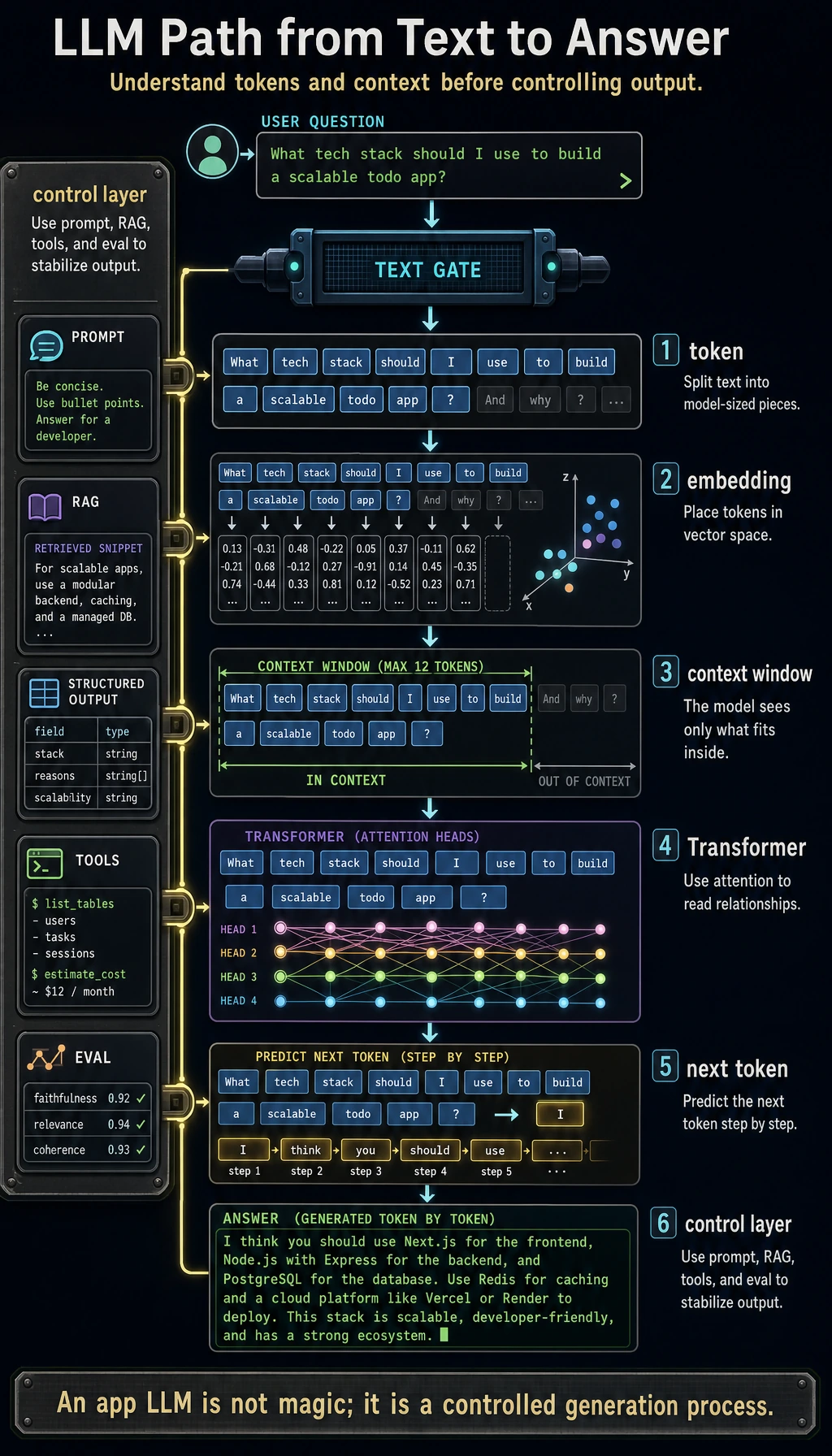
This chapter answers one practical question: when a user sends text to an LLM, what path does that text take, and how can you make the result stable enough for an application?
Do not start by memorizing model names. Start with the loop you can operate: text becomes tokens, tokens become vectors, the Transformer predicts the next token from context, and you control the result with Prompt, structured output, RAG, fine-tuning, or tools.
Where You Are In The Main Route
Section titled “Where You Are In The Main Route”You are now using the model foundations from Chapters 4-6 in a language-model setting. Vectors become embeddings, the evaluation habit becomes prompt and output evaluation, and Transformer intuition becomes the token-to-answer path.
This chapter is the bridge from understanding models to building LLM applications. Chapter 8 will add external documents and retrieval; Chapter 9 will add goal-directed tool use and traceable actions.
See the Whole Loop First
Section titled “See the Whole Loop First”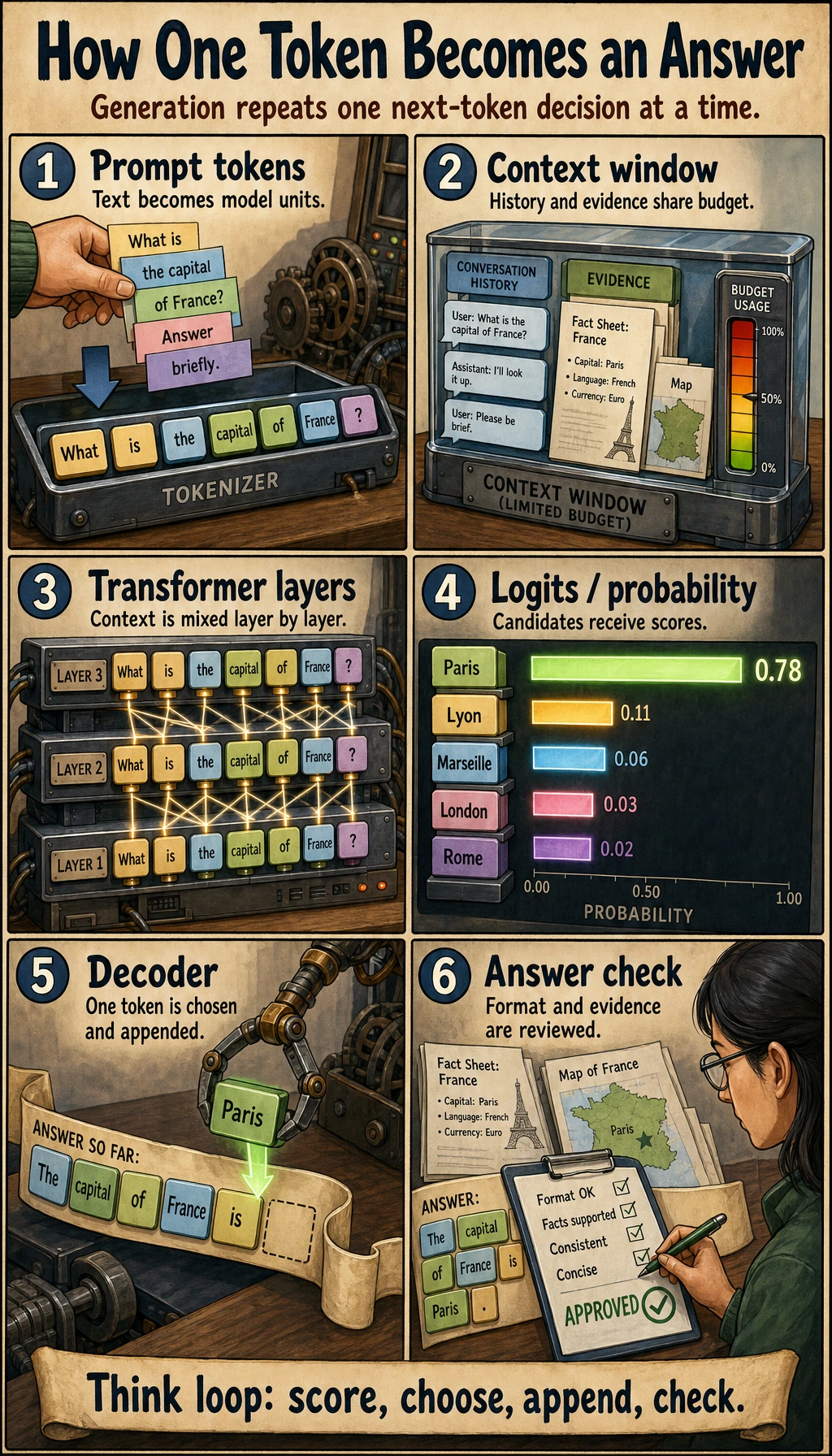
Use this picture as the map for the whole chapter.
| Term | Plain meaning | What you check in practice |
|---|---|---|
| Token | A small text unit after splitting input | Does the prompt fit the context window? |
| Embedding | A vector representation of a token or text chunk | Are similar meanings close enough to compare or retrieve? |
| Transformer | The architecture that mixes token context with attention | Which earlier words or examples affect the answer? |
| Pretraining | Learning general language patterns from large data | What general capability already exists before your task? |
| Prompt | The task instructions and context you send now | Can a clearer instruction solve the problem first? |
| Fine-tuning | Updating model behavior with training examples | Is this a repeated behavior pattern, not just missing knowledge? |
| Alignment | Making outputs safer and closer to human intent | What can still fail even when the answer sounds fluent? |
Learning Order And Task List
Section titled “Learning Order And Task List”The workshop belongs at the end. First build the mental model, then run the full experiment. Follow the core application path first: 7.1 -> 7.2 -> 7.5 -> 7.8. Use 7.3, 7.4, 7.6, and 7.7 as deeper model-adaptation chapters when you need to explain behavior, cost, or training choices.
| Step | Read | Do | Evidence to keep |
|---|---|---|---|
| 7.1 | NLP crash course | Run tokenizer and embedding examples | Notes that explain token, vector, and context |
| 7.2 | LLM overview and history | Mark where scale, data, instruction tuning, and alignment changed model behavior | One timeline or capability map |
| 7.5 | Prompt engineering | Compare prompt versions with fixed inputs | Prompt versions, outputs, scores, failures |
| 7.8 | Stage project | Run 7.8.4 Hands-on: Full Chapter 7 Workshop | Terminal output, pass rate, README notes |
| 7.3-7.4 | Transformer and pretraining | Read for intuition, then run mini GPT-2 | A diagram that explains attention, context, and training objective, plus a device: cuda GPU training log |
| 7.6 | Fine-tuning | Decide whether a task needs Prompt, RAG, or fine-tuning | A short decision table |
| 7.7 | Alignment | Check failure modes and safety boundaries | A safety/evaluation checklist |
Core Path, Extensions, And Depth
Section titled “Core Path, Extensions, And Depth”- Required core: tokenization, embeddings, context window, LLM API call, prompt testing, structured output, and basic safety checks. These are the minimum skills before RAG and Agent applications.
- Optional extension: Transformer internals, pretraining details, fine-tuning, and alignment history. Return here when model behavior, cost, or adaptation choices need deeper explanation.
- Depth challenge: hand-build mini GPT-2, keep a fixed eval set, change one prompt/schema/model setting, and save failures. This turns LLM usage from a demo into an engineering loop.
First Runnable Loop: Prompt Testing Without an API
Section titled “First Runnable Loop: Prompt Testing Without an API”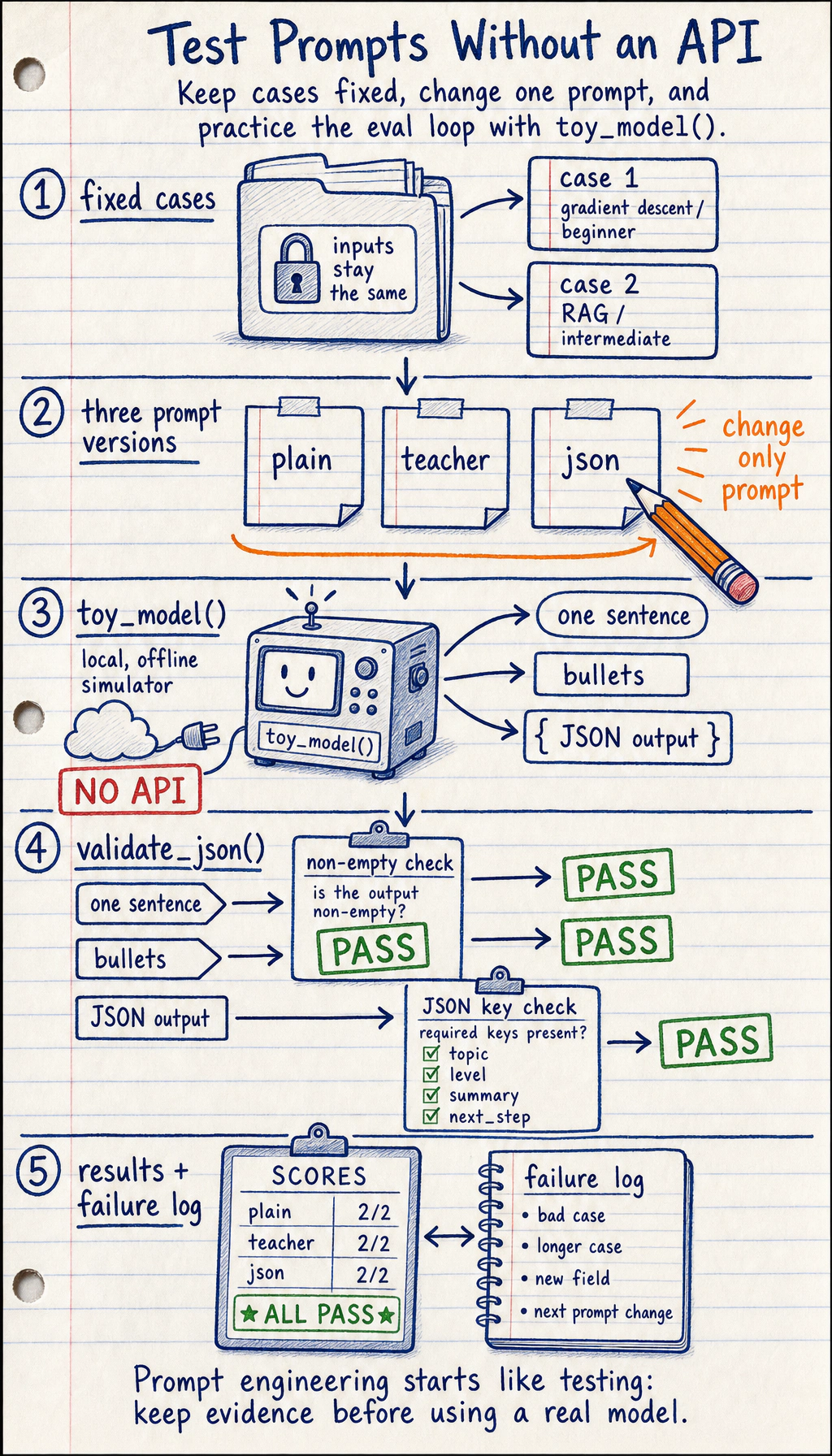
Prompt work should feel like testing software: keep the input cases fixed, change one prompt variable at a time, validate the output, and save failures.
Create ch07_prompt_test.py and run it with Python 3.10 or later. This offline toy runner does not call a real model; it teaches the evaluation loop. When you connect a real LLM SDK later, replace only toy_model().
import json
cases = [    {"topic": "gradient descent", "level": "beginner"},    {"topic": "RAG", "level": "intermediate"},]
prompts = {    "plain": "Explain the topic.",    "mentor": "You are a patient AI mentor. Explain the topic in 3 short bullets.",    "json": "Return JSON with keys: topic, level, summary, next_step.",}

def toy_model(prompt: str, case: dict) -> str:    topic = case["topic"]    level = case["level"]    if "Return JSON" in prompt:        return json.dumps(            {                "topic": topic,                "level": level,                "summary": f"{topic} explained for {level} learners",                "next_step": "Run one small example and record the result",            },            ensure_ascii=False,        )    if "patient AI mentor" in prompt:        return f"- Define {topic}\n- Show one example\n- Ask the learner to retry"    return f"{topic} is an AI concept."

def validate_json(raw: str) -> bool:    try:        data = json.loads(raw)    except json.JSONDecodeError:        return False    return {"topic", "level", "summary", "next_step"} <= data.keys()

for prompt_name, prompt in prompts.items():    passed = 0    for case in cases:        output = toy_model(prompt, case)        ok = validate_json(output) if prompt_name == "json" else bool(output.strip())        passed += int(ok)    print(f"{prompt_name}: {passed}/{len(cases)} cases passed")
Expected output:
plain: 2/2 cases passedmentor: 2/2 cases passedjson: 2/2 cases passedOperation tip: add one bad case, one longer case, and one output field requirement. If the score changes, write down which prompt change caused it. That habit matters more than a single good-looking answer.
Depth Ladder
Section titled “Depth Ladder”| Level | What you can prove |
|---|---|
| Minimum pass | You can explain the token-to-answer path and run a fixed prompt test without a real API. |
| Project-ready | You can keep inputs fixed, change one prompt or schema variable at a time, validate structured output, and save failures. |
| Deeper check | You can justify Prompt vs RAG vs fine-tuning vs tools using evidence, not preference, and name the safety boundary. |
Choose Prompt, RAG, Fine-tuning, Or Tools
Section titled “Choose Prompt, RAG, Fine-tuning, Or Tools”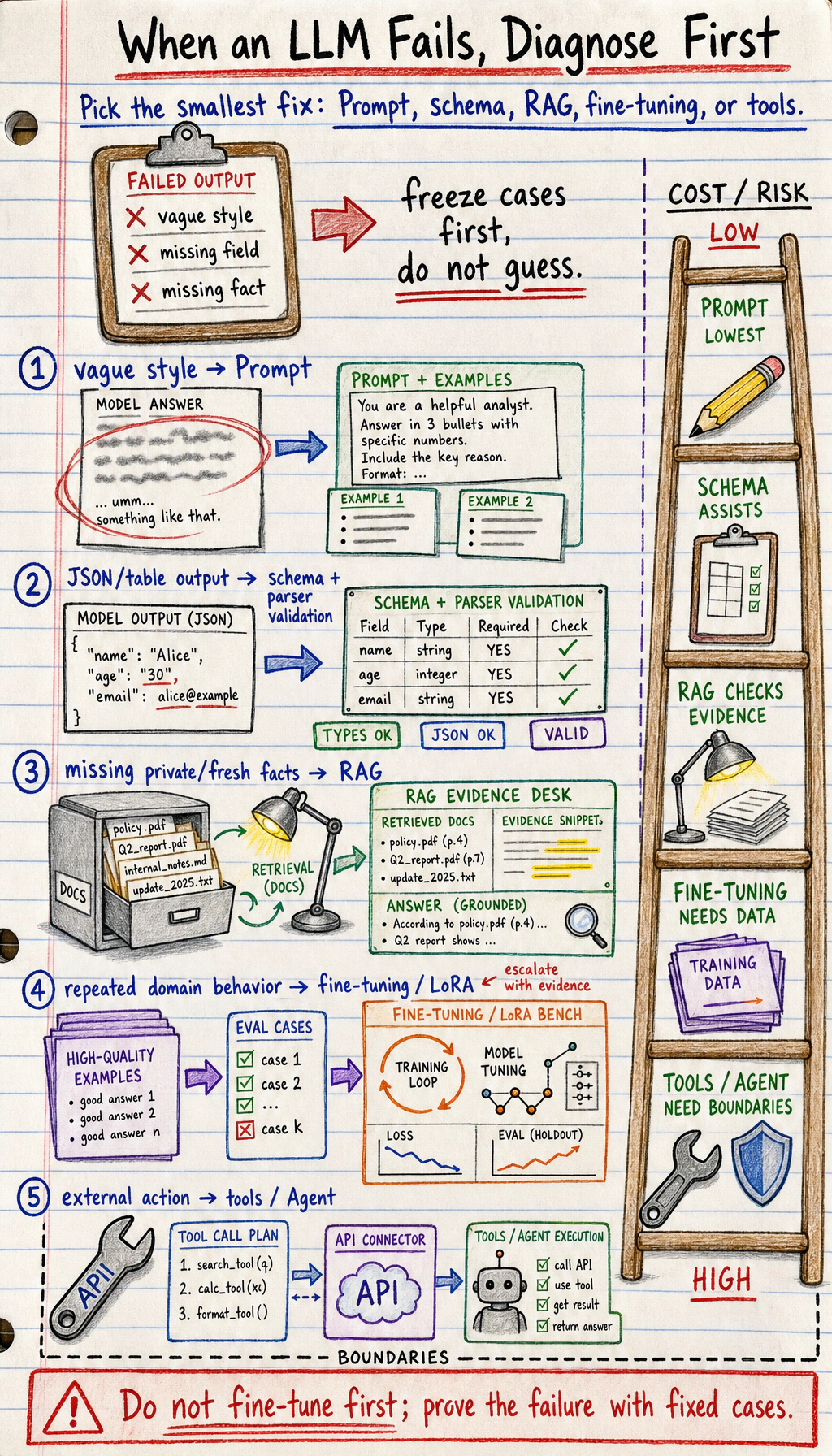
When an LLM result is weak, do not jump straight to fine-tuning.
| Symptom | Try first | Move on when |
|---|---|---|
| The answer style is vague | Improve the Prompt and add examples | Fixed cases still fail after clear instructions |
| The app needs JSON or table output | Add a schema and parser validation | The model repeatedly misses fields or types |
| The answer lacks private or fresh facts | Use RAG with retrieved documents | Retrieval is accurate but the model still applies the wrong behavior |
| The model must follow a repeated domain behavior | Consider fine-tuning or LoRA | You have enough high-quality examples and evaluation cases |
| The task needs external action | Use tools or an Agent workflow | The model must call APIs, search files, or execute steps |
Common Failures
Section titled “Common Failures”- Treating an LLM as a database: fluent text is not proof of truth.
- Changing the prompt, input cases, and model all at once: you cannot tell what improved the result.
- Asking for structured output without validating it: a JSON-looking answer can still be invalid.
- Fine-tuning too early: many problems should start with Prompt, RAG, tools, or product logic.
- Reading Transformer details before seeing any output loop: the theory becomes hard to anchor.
Evidence to Keep
Section titled “Evidence to Keep”Keep this page’s proof of learning as a small evidence card:
- Token Path
- text → tokens → embeddings → Transformer context → next token
- Core Route
- 7.1 → 7.2 → 7.5 → 7.8 first
- Fixed Cases
- prompt tests use the same inputs before comparing changes
- Method Choice
- Prompt, RAG, fine-tuning, tools, or Agent chosen by evidence
- Chapter Bridge
- Chapter 8 adds retrieval and application architecture
Pass Check
Section titled “Pass Check”Before entering Chapter 8, you should be able to:
- explain token, embedding, attention, context window, pretraining, Prompt, fine-tuning, and alignment in plain language;
- run the prompt testing loop above and change one prompt variable at a time;
- save prompt versions, fixed input cases, outputs, scores, and failure samples;
- decide whether a task should start with Prompt, structured output, RAG, fine-tuning, tools, or an Agent;
- run the full chapter workshop and record the result in a short README.
For a printable checklist, use 7.0 Learning Checklist. For the guided project, start with 7.8.4 Hands-on: Full Chapter 7 Workshop.
Check reasoning and explanation
- A passing answer explains how tokens, context, attention, prompts, and generation behavior connect in one request-response path.
- The evidence should include at least one reproducible prompt or structured-output test, plus notes on why the output passed or failed.
- A good self-check separates prompt design, RAG, fine-tuning, and alignment: use the lightest method that fixes the observed problem.