8.3.2 Practice with LLM API Calls
When many people build their first LLM application, they stop at “I can call the API.” But in real development, what really matters is:
How to turn model calls from a one-off demo into a stable, maintainable application capability.
In this section, we’ll start from the smallest request and explain it step by step.
Learning objectives
- Understand what components make up the smallest LLM API call
- Know the roles of requests, responses, parameters, and error handling
- Learn how to write a minimal but practical API client wrapper
- Understand why there is still a big gap between “can call the API” and “can build an application”
Why is API calling the first step in LLM application development?
Because this is the entry point where the model actually enters the system
Most of the concepts you’ve learned so far, no matter how powerful, eventually come down to one thing in an application:
- Send a request
- Get a result
- Keep processing
So API calls are not “basic chores”; they are:
The interface layer through which LLM capabilities enter the product.
A question that is often overlooked
Many people only care about:
- Whether they can get a reply
But real projects care more about:
- Whether the reply is stable
- How errors are handled
- How token cost is controlled
- How multi-turn context is organized
So the focus of this section is not “how to send an HTTP request,” but “how to design application code around a model call.”
What does the smallest chat request contain?
The most core set of elements usually includes:
- Model name
- Message list
- Parameters such as temperature
- Returned content
You can think of it as:
Sending task instructions, context, and control parameters to the model together.
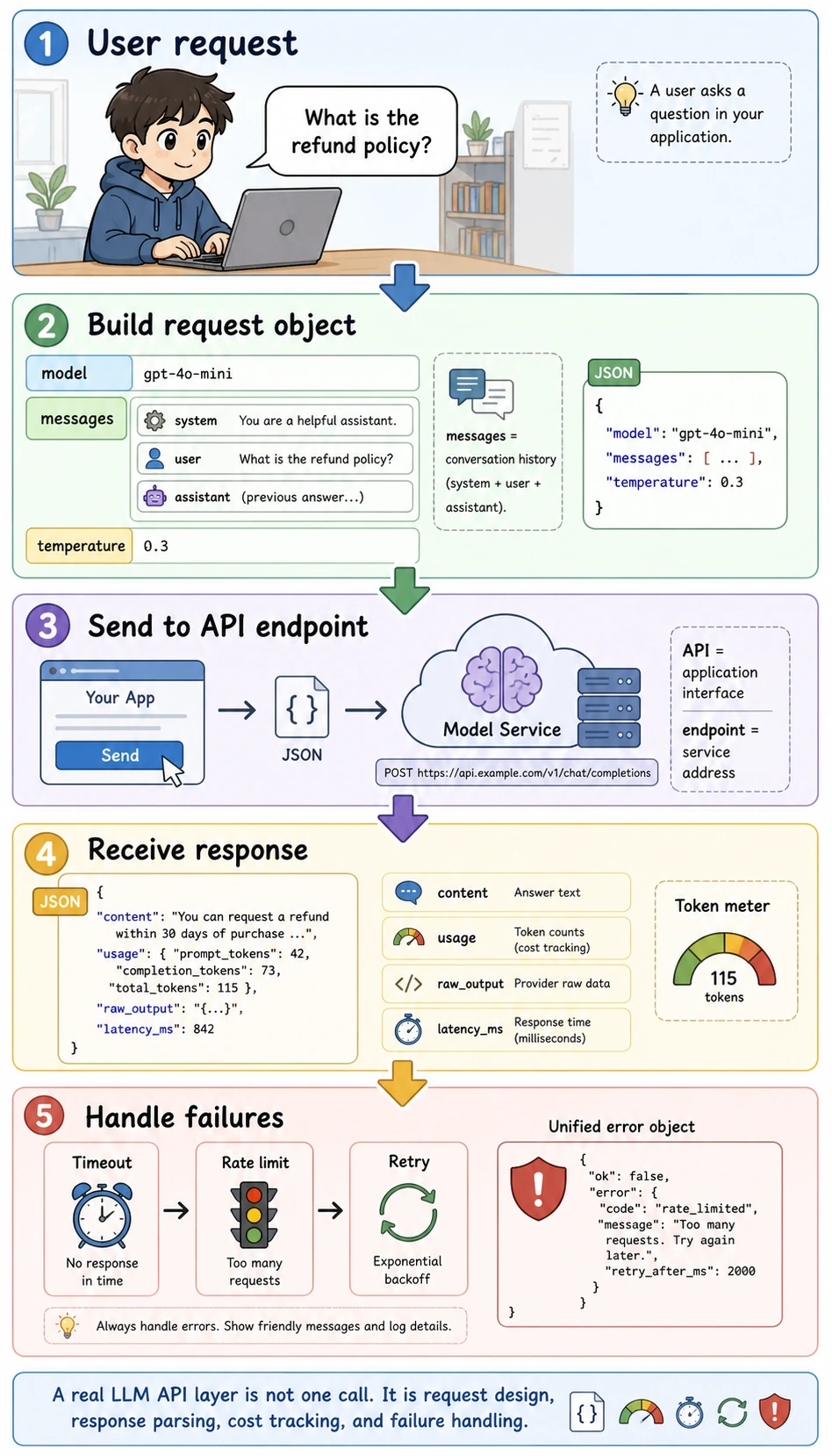
Read this diagram as a runtime loop instead of a single line of code. API means an application interface, endpoint means the service address, JSON is the structured data format sent over the network, and usage records token consumption so later cost and performance analysis are possible.
A minimal request example
request = {
    "model": "demo-chat-model",
    "messages": [
        {"role": "system", "content": "You are a course assistant."},
        {"role": "user", "content": "What is the refund policy?"}
    ],
    "temperature": 0.2
}

print(request)
Expected output:
{'model': 'demo-chat-model', 'messages': [{'role': 'system', 'content': 'You are a course assistant.'}, {'role': 'user', 'content': 'What is the refund policy?'}], 'temperature': 0.2}
Why is messages a list?
Because chat models usually do not look at just one string. They look at:
- system instructions
- user questions
- assistant history replies
This helps them better understand the context of multi-turn conversations.
Start with an “offline mock client”
To make the code directly runnable, we won’t use a real network request yet. Instead, we’ll write a minimal mock client.
class MockLLMClient:
    def chat(self, messages, model="demo-chat-model", temperature=0.2):
        user_message = messages[-1]["content"]

        if "refund" in user_message:
            reply = "You can request a refund within 7 days of purchase if your learning progress is below 20%."
        elif "certificate" in user_message:
            reply = "You can receive a completion certificate after finishing all required tasks and passing the final test."
        else:
            reply = "This is a simulated reply."

        return {
            "model": model,
            "content": reply,
            "usage": {
                "prompt_tokens": 42,
                "completion_tokens": 18
            }
        }

client = MockLLMClient()

response = client.chat([
    {"role": "system", "content": "You are a course assistant."},
    {"role": "user", "content": "What is the refund policy?"}
])

print(response)
Expected output:
{'model': 'demo-chat-model', 'content': 'You can request a refund within 7 days of purchase if your learning progress is below 20%.', 'usage': {'prompt_tokens': 42, 'completion_tokens': 18}}
Why start with a mock version?
Because it helps you first understand:
- What the input structure looks like
- What the output structure looks like
- Where your business logic should live
Without being distracted too early by networking, authentication, and SDK details.
From “can call” to “can use”
Why not write API calls directly everywhere in business code?
If you write this everywhere:
client.chat(...)
Over time, you’ll run into these problems:
- Inconsistent parameters
- Scattered system prompts
- Inconsistent error handling
- Hard to switch models or providers later
A wrapper that looks more like real project code
class CourseAssistant:
    def __init__(self, llm_client):
        self.llm = llm_client
        self.system_prompt = "You are a course assistant. Answer accurately and concisely."

    def ask(self, user_query):
        messages = [
            {"role": "system", "content": self.system_prompt},
            {"role": "user", "content": user_query}
        ]
        return self.llm.chat(messages)

assistant = CourseAssistant(MockLLMClient())

print(assistant.ask("How do I get a certificate?"))
Expected output:
{'model': 'demo-chat-model', 'content': 'You can receive a completion certificate after finishing all required tasks and passing the final test.', 'usage': {'prompt_tokens': 42, 'completion_tokens': 18}}
What is this wrapper teaching you?
It is teaching you:
Model calls should usually be hidden behind a more stable application-layer interface.
This is very important, because later you will keep adding:
- Business prompts
- Tool calling
- Logging
- Retry logic
Why is response parsing equally important?
After you get the model output, you usually do not stop there. You often still need to:
- Show it to the user
- Save it to the database
- Feed it into a workflow
- Do post-processing
So you should get used to separating the response first:
response = assistant.ask("What is the refund policy?")

print("reply =", response["content"])
print("usage =", response["usage"])
Expected output:
reply = You can request a refund within 7 days of purchase if your learning progress is below 20%.
usage = {'prompt_tokens': 42, 'completion_tokens': 18}
This may look simple, but it reminds you:
The model returns not only “text,” but also a lot of valuable metadata.
One of the most important engineering problems: error handling
In real calls, the most common situation is not “always success,” but:
- Timeout
- Rate limiting
- Network exception
- Server error
A minimal error-handling example
class UnstableMockLLMClient:
    def __init__(self):
        self.fail_once = True

    def chat(self, messages, model="demo-chat-model", temperature=0.2):
        if self.fail_once:
            self.fail_once = False
            raise RuntimeError("temporary_api_error")
        return {
            "model": model,
            "content": "Successfully returned after retry.",
            "usage": {"prompt_tokens": 20, "completion_tokens": 6}
        }

def safe_chat(client, messages):
    try:
        return client.chat(messages)
    except Exception as e:
        return {"error": str(e)}

client = UnstableMockLLMClient()
messages = [{"role": "user", "content": "Hello"}]

print(safe_chat(client, messages))
print(safe_chat(client, messages))
Expected output:
{'error': 'temporary_api_error'}
{'model': 'demo-chat-model', 'content': 'Successfully returned after retry.', 'usage': {'prompt_tokens': 20, 'completion_tokens': 6}}
Why must this layer be taken seriously?
Because once model calls become part of your system pipeline, an error is no longer just “the user didn’t get a reply.” It can mean:
- The workflow downstream may break completely
- Logs and metrics may become misleading
- User experience may suddenly get worse
A retry example with more realistic behavior
def retry_chat(client, messages, retries=2):
    last_error = None
    for _ in range(retries + 1):
        try:
            return client.chat(messages)
        except Exception as e:
            last_error = str(e)
    return {"error": last_error}

client = UnstableMockLLMClient()
print(retry_chat(client, [{"role": "user", "content": "Hello"}]))
Expected output:
{'model': 'demo-chat-model', 'content': 'Successfully returned after retry.', 'usage': {'prompt_tokens': 20, 'completion_tokens': 6}}
This example teaches you:
Once API calls enter an engineering system, retry is often not a bonus feature, but a basic capability.
What else do real projects need to add?
When you move from a mock client to a real API, you usually still need to add:
- Authentication
- Model switching
- Token cost tracking
- Logging and tracing
- Timeout
- Provider adaptation layer
So the LLM API layer in a real project often serves both as:
- A model entry point
and as:
- A runtime middleware layer
The most common misunderstandings
Thinking “getting the content” is enough
In fact, usage, error structure, and trace information are also important.
Scattering client.chat(...) everywhere in business code
This will make maintenance painful later.
Having no unified error handling
Production issues will be exposed very quickly.
Minimal engineering standards for LLM API calls
When you start connecting API calls into a real project, you can use the table below to check whether your wrapper is stable enough.
| Check item | Minimum requirement | Why it matters |
|---|---|---|
| Configuration management | API key, model, and base_url are not hard-coded in business functions | Makes environment switching easier and protects secrets |
| Unified entry point | All model calls go through the same client or service | Makes logging, retries, rate limiting, and cost tracking easier |
| Timeout setting | Every request has a timeout | Prevents one request from blocking the whole flow |
| Retry strategy | Retry only temporary errors and limit the maximum number of attempts | Prevents infinite retries and uncontrolled cost |
| Error structure | Return a unified error object on failure | Upper-layer business code can handle failures consistently |
| usage recording | Record token count, model name, and latency | Needed for later cost and performance analysis |
| Raw output preservation | Save raw output or key traces | Helps diagnose what the model actually returned when something goes wrong |
The key point of this table is to make the API layer a “stable interface” rather than a collection of scattered model requests in the codebase. The later topics of RAG, structured output, Function Calling, and Agent all depend on this layer.
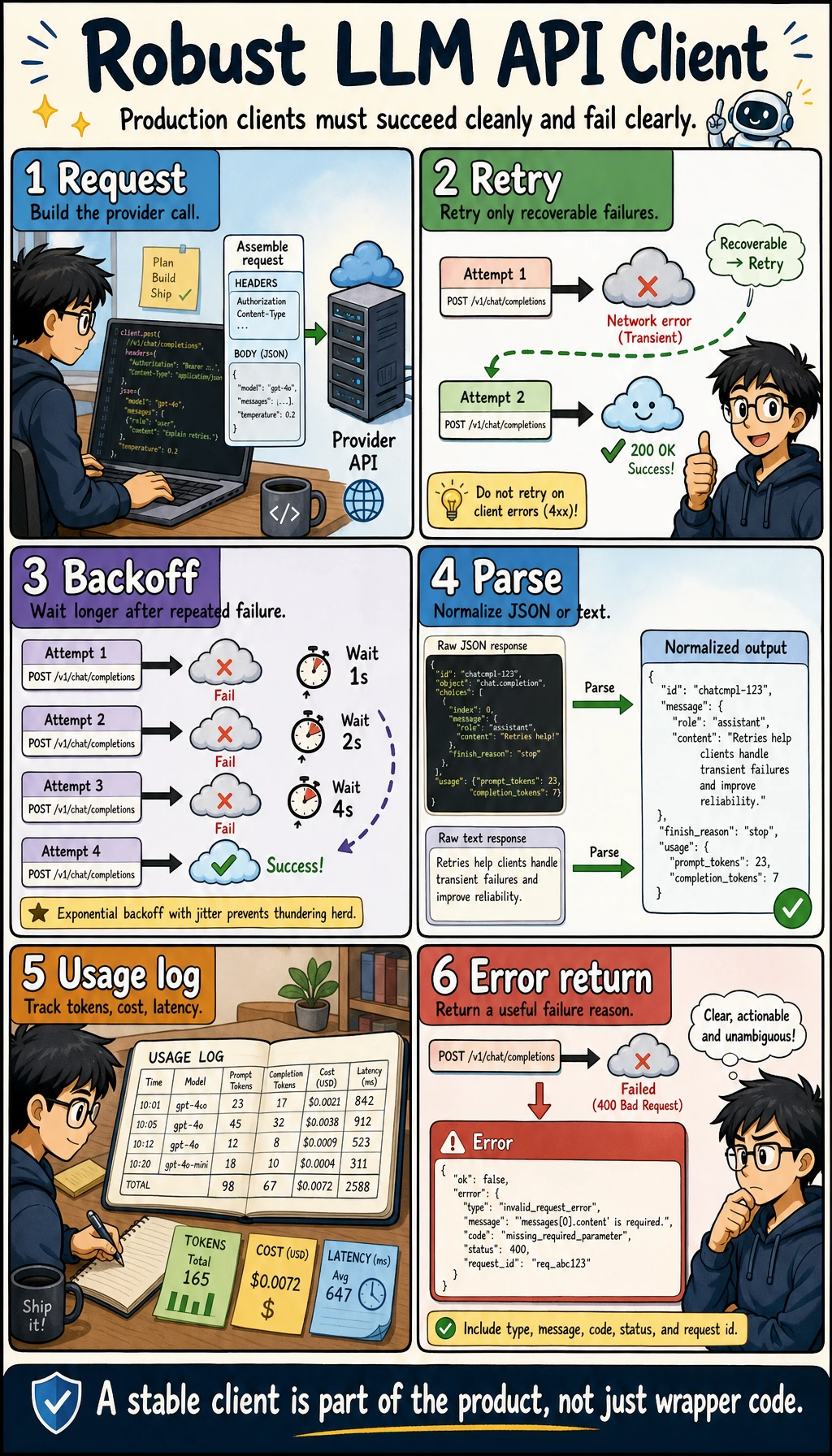
Once a model call enters the project, it is no longer just client.chat(). In the diagram, configuration, timeout, retry, unified response, usage, logging, and raw output are placed in the same loop to remind you that the API layer should first become a stable runtime.
A response structure that feels more like a real project
It is recommended that, from the beginning, you make model calls return a unified structure instead of sometimes a string, sometimes a dict, and sometimes an exception.
import time


def llm_response(ok, content=None, usage=None, error=None, raw=None, latency_ms=0):
    return {
        "ok": ok,
        "content": content,
        "usage": usage or {},
        "error": error,
        "raw": raw,
        "latency_ms": latency_ms,
    }


def robust_chat(client, messages):
    start = time.time()
    try:
        raw = client.chat(messages)
        latency_ms = int((time.time() - start) * 1000)
        return llm_response(
            ok=True,
            content=raw.get("content"),
            usage=raw.get("usage"),
            raw=raw,
            latency_ms=latency_ms,
        )
    except Exception as e:
        latency_ms = int((time.time() - start) * 1000)
        return llm_response(ok=False, error=str(e), latency_ms=latency_ms)


print(robust_chat(MockLLMClient(), [{"role": "user", "content": "What is the refund policy?"}]))
Example output:
{'ok': True, 'content': 'You can request a refund within 7 days of purchase if your learning progress is below 20%.', 'usage': {'prompt_tokens': 42, 'completion_tokens': 18}, 'error': None, 'raw': {'model': 'demo-chat-model', 'content': 'You can request a refund within 7 days of purchase if your learning progress is below 20%.', 'usage': {'prompt_tokens': 42, 'completion_tokens': 18}}, 'latency_ms': 0}
latency_ms may be 0 in this mock example because there is no real network request. In real API calls, this field becomes one of the first signals to watch.
This wrapper makes it easier for upper-layer business code to determine whether the call succeeded, where the content is, how many tokens were used, what the failure reason was, and how long the request took.
What should API call logs record?
When an LLM application has problems, if there are no logs, you usually can only guess. At minimum, it is recommended to record these fields:
| Field | Example | Purpose |
|---|---|---|
request_id | req_001 | Connect the context of one call |
model | demo-chat-model | Compare the performance of different models |
prompt_version | course_assistant_v1 | Track which prompt version caused the issue |
input_preview | What is the refund policy | Quickly locate user input |
output_preview | You can request a refund within 7 days... | Quickly inspect model output |
prompt_tokens | 42 | Cost analysis |
completion_tokens | 18 | Cost analysis |
latency_ms | 850 | Performance analysis |
error | timeout | Failure attribution |
Note that logs should not store sensitive information directly. In real projects, user privacy, secrets, and internal materials should be anonymized or access-controlled.
Summary
The most important thing in this section is not “being able to call a model once,” but understanding:
The real engineering value of LLM API calls is to package model capabilities into repeatable, maintainable, and scalable system interfaces.
Once you build this perspective, later learning about LangChain, dialogue systems, and Agent tool layers will feel much more natural.
Exercises
- Extend
MockLLMClientso that it can handle questions about the “learning sequence.” - Add a unified error return structure to
CourseAssistant. - Think about why business code in a real project should not directly build
messageseverywhere. - Explain in your own words: why do we say there is still a layer of system design between “being able to call the API” and “being able to build an LLM application”?