5.6.6 Hands-on Workshop: Build a Reproducible ML Evidence Pack
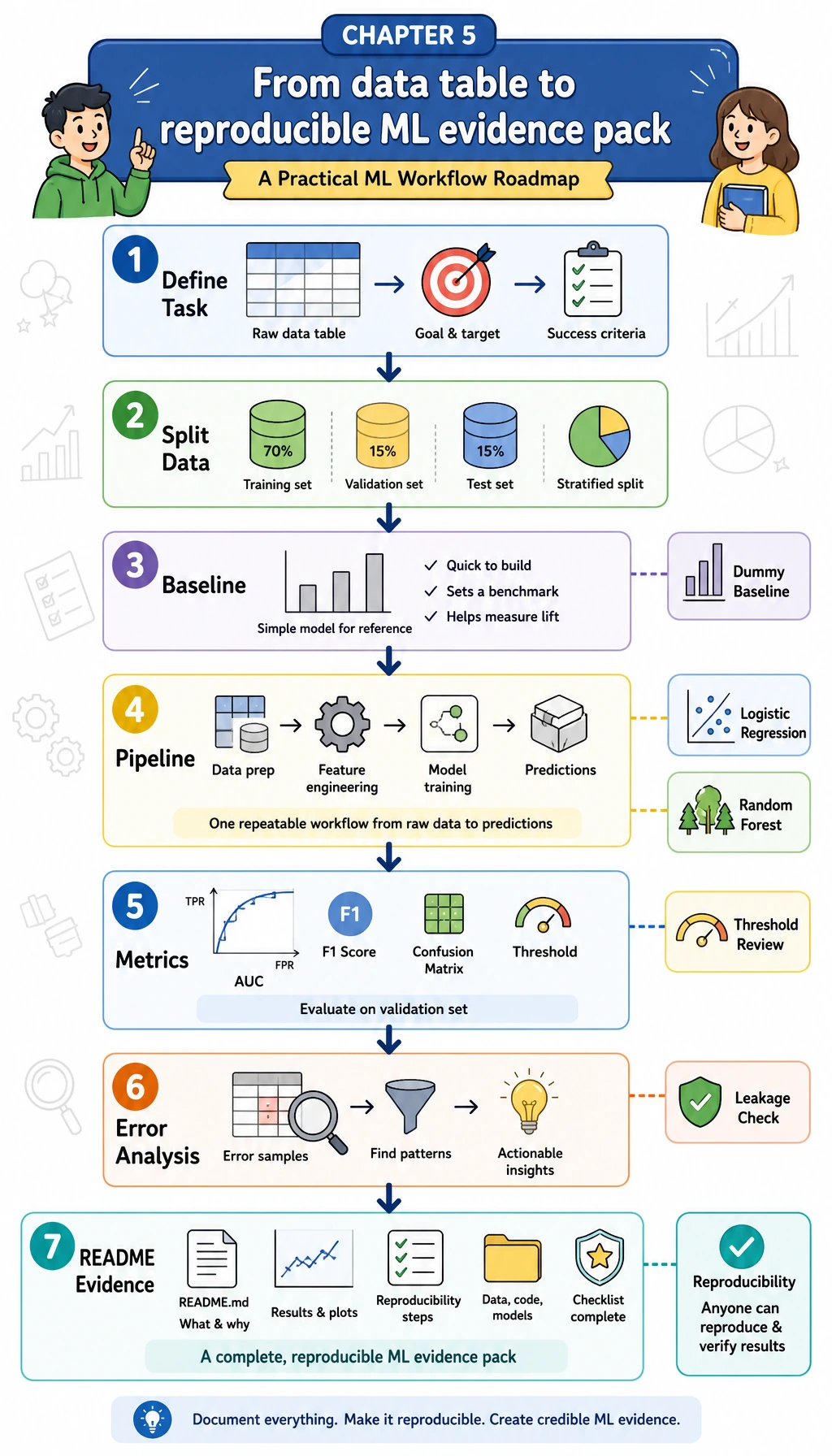
Read each diagram first, then run the code below it. The goal is not to chase the highest score. The goal is to practice the whole Chapter 5 loop: define the task, split the data, build a baseline, train a real model, evaluate it, inspect errors, and leave evidence that another person can rerun.
Learning Objectives
- Turn a tabular business question into a supervised learning task
- Build a
DummyClassifierbaseline before trying stronger models - Use
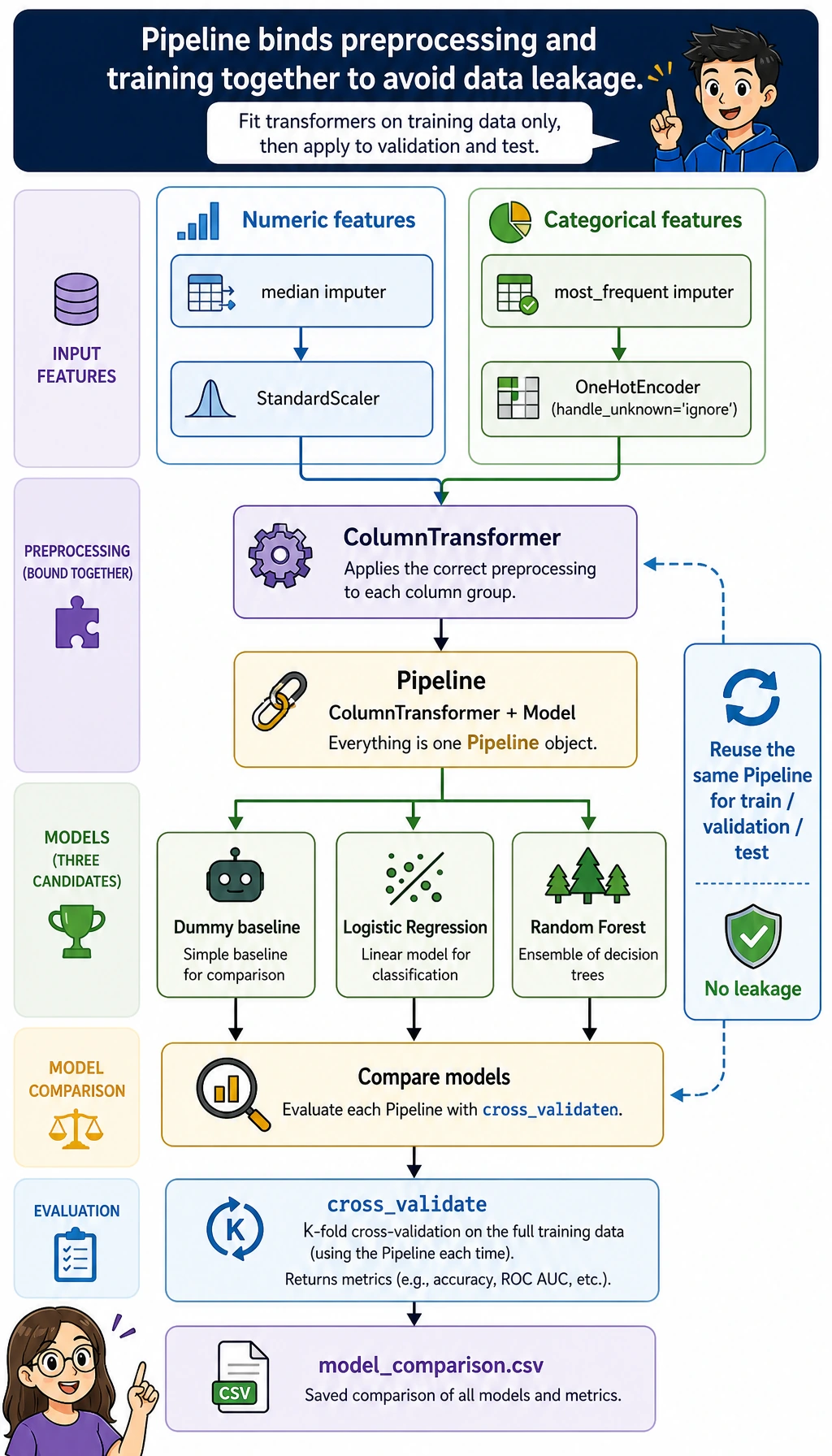
ColumnTransformerandPipelineso preprocessing stays inside the training workflow - Compare models with cross-validation and a held-out test set
- Review threshold trade-offs instead of treating
0.5as magic - Save metrics, error samples, leakage checks, and an experiment log as project evidence
What You Will Build
This workshop creates a small local project called ml_workshop_run/.
The task is:
Predict whether a learner is likely to delay the next study task.
The dataset is synthetic and generated locally, so you do not need to download anything. It contains numeric features such as practice hours and quiz score, plus categorical features such as learning track and study mode. The target column is delayed, where 1 means the learner is at higher delay risk.
| Chapter 5 idea | What you will do in the project |
|---|---|
| Task definition | Convert “delay risk” into binary classification |
| Baseline | Train a DummyClassifier first |
| Feature preprocessing | Impute missing values, scale numeric columns, and one-hot encode categories |
| Pipeline | Keep preprocessing and model training together |
| Evaluation | Compare F1, recall, precision, AUC, and confusion matrix |
| Threshold | Review different probability cutoffs |
| Error analysis | Save mispredicted samples |
| Portfolio evidence | Save README, metrics, error samples, and leakage notes |
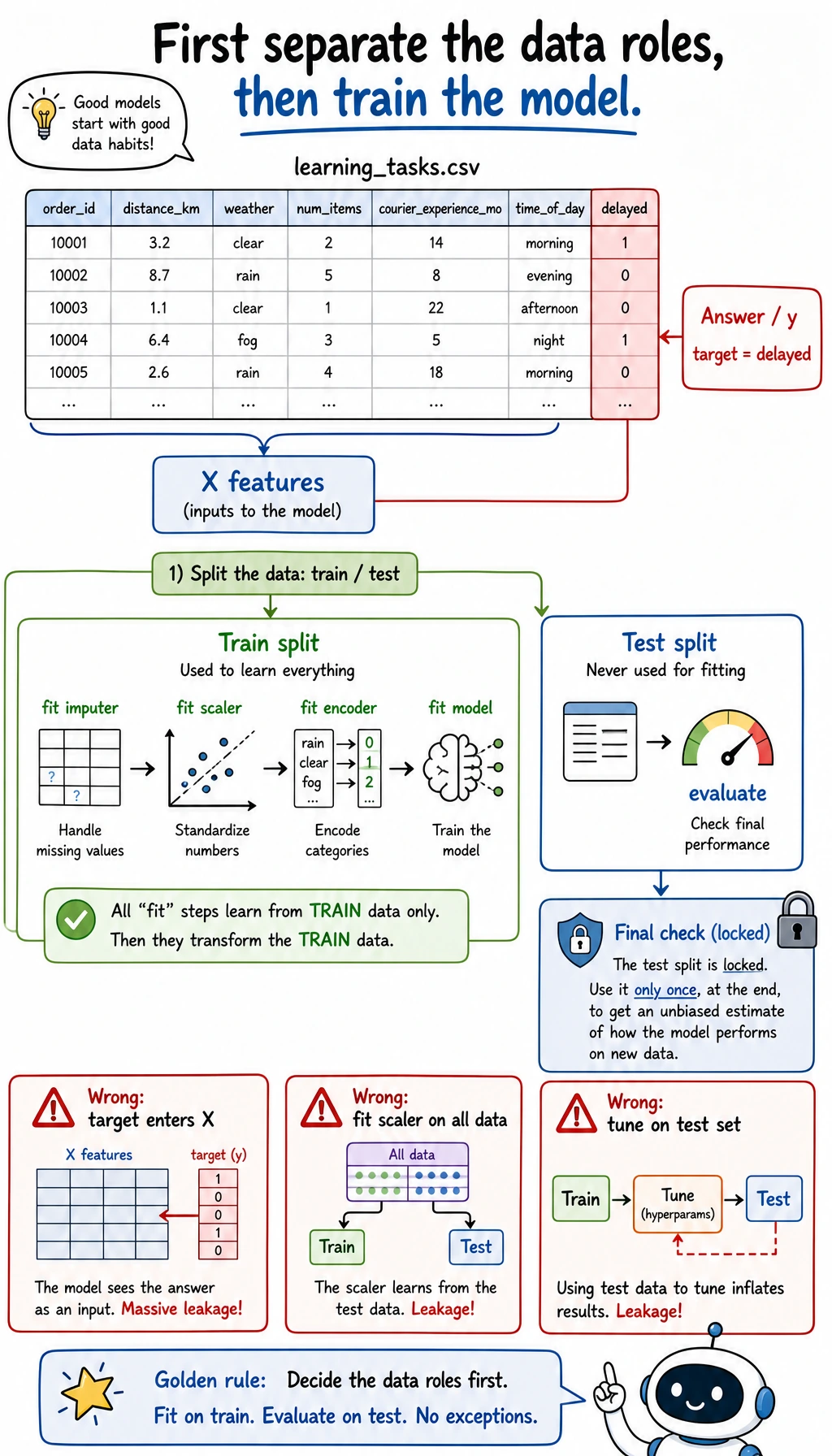
Read the diagram before you run the script. The target column delayed is the answer the model is trying to learn. It must stay out of X. The training split is where preprocessing and model parameters are learned; the test split is held back for the final check. If you mix these roles, the score may look good while the project is already broken.
Evidence Flow: From Data to Report
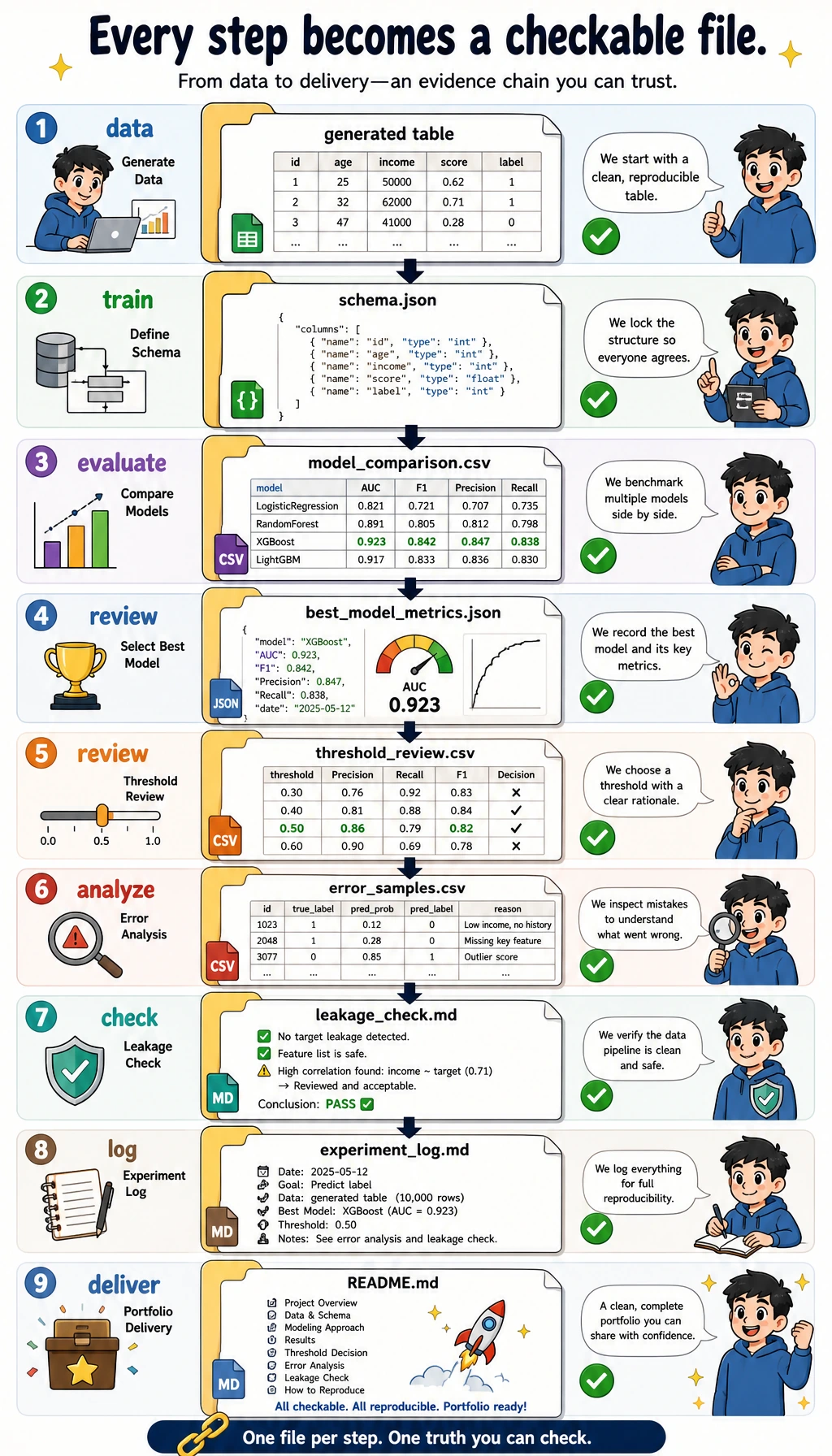
A beginner mistake is stopping at:
model.fit(...)
print(score)
That is not enough for a real machine learning project. You need to leave a trail:
- What data did you use?
- What was the baseline?
- Which model beat the baseline?
- Which metric matters most?
- Where did the model fail?
- How can someone rerun the project?
The script below generates this evidence pack:
ml_workshop_run/
  data/learning_tasks.csv
  data/schema.json
  outputs/model_comparison.csv
  outputs/best_model_metrics.json
  outputs/threshold_review.csv
  outputs/error_samples.csv
  outputs/classification_report.txt
  reports/leakage_check.md
  reports/experiment_log.md
  README.md
Terms to Decode Before Running
- Baseline: the simplest first model. It tells you what score you must beat.
- F1: a balance between precision and recall, useful when the positive class matters and classes are not perfectly balanced.
- Recall: among truly delayed learners, how many did the model catch?
- Precision: among learners flagged as delayed, how many were truly delayed?
- AUC: how well the model ranks positive cases ahead of negative cases across thresholds.
- Pipeline: a scikit-learn object that runs preprocessing and modeling as one safe workflow.
- Data leakage: when the model accidentally sees information it would not have at prediction time.
Prepare the Environment
If you are inside this course repository, install the Chapter 1-5 runtime:
python -m pip install -r requirements-course-core.txt
If you are working in a separate folder, install the required packages directly:
python -m pip install numpy pandas scikit-learn
This workshop uses stable scikit-learn APIs such as Pipeline, ColumnTransformer, OneHotEncoder, DummyClassifier, LogisticRegression, and RandomForestClassifier. It was verified locally with Python 3.13, NumPy 2.4, pandas 3.0, and scikit-learn 1.8.
Run the Complete Workshop
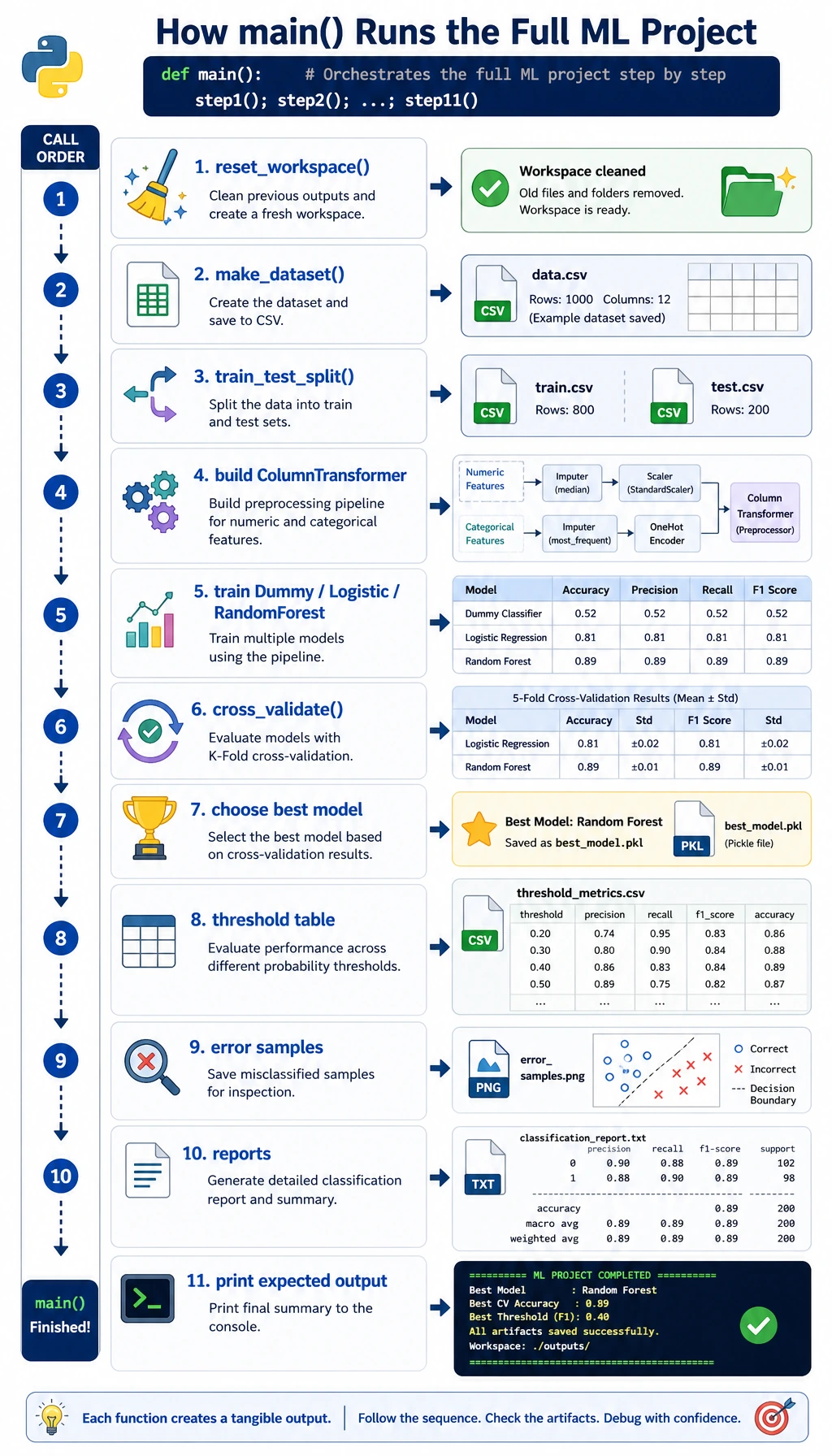
This is the order you will follow: create a clean folder, copy one script, run it once, then inspect the generated evidence. Do not edit the model first. The first run is your reference point.
Create a Clean Folder
mkdir ch05-ml-workshop
cd ch05-ml-workshop
Create ml_workshop.py
Copy the code below into ml_workshop.py.
from __future__ import annotations

import json
import shutil
from pathlib import Path

import numpy as np
import pandas as pd
from sklearn.compose import ColumnTransformer
from sklearn.dummy import DummyClassifier
from sklearn.ensemble import RandomForestClassifier
from sklearn.impute import SimpleImputer
from sklearn.linear_model import LogisticRegression
from sklearn.metrics import (
    accuracy_score,
    classification_report,
    confusion_matrix,
    f1_score,
    precision_score,
    recall_score,
    roc_auc_score,
)
from sklearn.model_selection import StratifiedKFold, cross_validate, train_test_split
from sklearn.pipeline import Pipeline
from sklearn.preprocessing import OneHotEncoder, StandardScaler

RUN_DIR = Path("ml_workshop_run")
DATA_DIR = RUN_DIR / "data"
OUTPUT_DIR = RUN_DIR / "outputs"
REPORT_DIR = RUN_DIR / "reports"

NUMERIC_FEATURES = [
    "hours_practiced",
    "quiz_score",
    "forum_questions",
    "previous_stage_days",
]
CATEGORICAL_FEATURES = ["track", "study_mode"]
TARGET = "delayed"


def reset_workspace() -> None:
    if RUN_DIR.exists():
        shutil.rmtree(RUN_DIR)
    for folder in (DATA_DIR, OUTPUT_DIR, REPORT_DIR):
        folder.mkdir(parents=True, exist_ok=True)


def write_json(path: Path, payload) -> None:
    path.write_text(json.dumps(payload, indent=2, ensure_ascii=False), encoding="utf-8")


def make_learning_dataset(seed: int = 42) -> pd.DataFrame:
    rng = np.random.default_rng(seed)
    rows = 240
    hours = rng.normal(7.5, 2.2, rows).clip(1, 14)
    quiz = rng.normal(72, 13, rows).clip(25, 100)
    questions = rng.poisson(2.5, rows)
    previous_days = rng.normal(9, 3.5, rows).clip(2, 24)
    track = rng.choice(["data", "app", "model"], rows, p=[0.38, 0.34, 0.28])
    study_mode = rng.choice(["solo", "group", "mentor"], rows, p=[0.45, 0.35, 0.20])

    track_risk = np.select([track == "model", track == "app", track == "data"], [0.55, 0.20, 0.05])
    mode_bonus = np.select([study_mode == "mentor", study_mode == "group", study_mode == "solo"], [-0.45, -0.18, 0.15])
    raw_score = (
        1.3
        - 0.22 * hours
        - 0.035 * quiz
        + 0.16 * questions
        + 0.14 * previous_days
        + track_risk
        + mode_bonus
        + rng.normal(0, 0.55, rows)
    )
    probability = 1 / (1 + np.exp(-raw_score))
    delayed = (probability >= 0.38).astype(int)

    df = pd.DataFrame(
        {
            "hours_practiced": hours.round(1),
            "quiz_score": quiz.round(1),
            "forum_questions": questions,
            "previous_stage_days": previous_days.round(1),
            "track": track,
            "study_mode": study_mode,
            TARGET: delayed,
        }
    )

    missing_hours = rng.choice(df.index, size=10, replace=False)
    missing_track = rng.choice(df.index, size=8, replace=False)
    df.loc[missing_hours, "hours_practiced"] = np.nan
    df.loc[missing_track, "track"] = np.nan
    return df


def build_preprocessor() -> ColumnTransformer:
    numeric_pipe = Pipeline(
        steps=[
            ("imputer", SimpleImputer(strategy="median")),
            ("scaler", StandardScaler()),
        ]
    )
    categorical_pipe = Pipeline(
        steps=[
            ("imputer", SimpleImputer(strategy="most_frequent")),
            ("onehot", OneHotEncoder(handle_unknown="ignore", sparse_output=False)),
        ]
    )
    return ColumnTransformer(
        transformers=[
            ("num", numeric_pipe, NUMERIC_FEATURES),
            ("cat", categorical_pipe, CATEGORICAL_FEATURES),
        ]
    )


def make_models() -> dict[str, Pipeline]:
    return {
        "Dummy baseline": Pipeline(
            steps=[
                ("preprocess", build_preprocessor()),
                ("model", DummyClassifier(strategy="most_frequent")),
            ]
        ),
        "Logistic Regression": Pipeline(
            steps=[
                ("preprocess", build_preprocessor()),
                ("model", LogisticRegression(max_iter=1000, class_weight="balanced")),
            ]
        ),
        "Random Forest": Pipeline(
            steps=[
                ("preprocess", build_preprocessor()),
                ("model", RandomForestClassifier(n_estimators=160, max_depth=5, random_state=42, class_weight="balanced")),
            ]
        ),
    }


def evaluate_models(models, X_train, y_train, X_test, y_test) -> pd.DataFrame:
    cv = StratifiedKFold(n_splits=5, shuffle=True, random_state=42)
    rows = []
    for name, model in models.items():
        cv_scores = cross_validate(
            model,
            X_train,
            y_train,
            cv=cv,
            scoring={"f1": "f1", "roc_auc": "roc_auc", "recall": "recall"},
            n_jobs=None,
        )
        model.fit(X_train, y_train)
        predictions = model.predict(X_test)
        probabilities = model.predict_proba(X_test)[:, 1]
        rows.append(
            {
                "model": name,
                "cv_f1_mean": round(float(cv_scores["test_f1"].mean()), 3),
                "cv_auc_mean": round(float(cv_scores["test_roc_auc"].mean()), 3),
                "test_accuracy": round(accuracy_score(y_test, predictions), 3),
                "test_precision": round(precision_score(y_test, predictions, zero_division=0), 3),
                "test_recall": round(recall_score(y_test, predictions, zero_division=0), 3),
                "test_f1": round(f1_score(y_test, predictions, zero_division=0), 3),
                "test_auc": round(roc_auc_score(y_test, probabilities), 3),
            }
        )
    return pd.DataFrame(rows).sort_values(["test_f1", "test_auc"], ascending=False)


def threshold_table(model: Pipeline, X_test: pd.DataFrame, y_test: pd.Series) -> pd.DataFrame:
    probabilities = model.predict_proba(X_test)[:, 1]
    rows = []
    for threshold in [0.30, 0.40, 0.50, 0.60, 0.70]:
        pred = (probabilities >= threshold).astype(int)
        rows.append(
            {
                "threshold": threshold,
                "precision": round(precision_score(y_test, pred, zero_division=0), 3),
                "recall": round(recall_score(y_test, pred, zero_division=0), 3),
                "f1": round(f1_score(y_test, pred, zero_division=0), 3),
                "flagged_students": int(pred.sum()),
            }
        )
    return pd.DataFrame(rows)


def save_error_samples(model: Pipeline, X_test: pd.DataFrame, y_test: pd.Series) -> pd.DataFrame:
    probabilities = model.predict_proba(X_test)[:, 1]
    predictions = (probabilities >= 0.5).astype(int)
    errors = X_test.copy()
    errors["actual_delayed"] = y_test.to_numpy()
    errors["predicted_delayed"] = predictions
    errors["delay_probability"] = probabilities.round(3)
    errors = errors[errors["actual_delayed"] != errors["predicted_delayed"]]
    return errors.sort_values("delay_probability", ascending=False).head(8)


def write_markdown_report(path: Path, title: str, lines: list[str]) -> None:
    path.write_text("# " + title + "\n\n" + "\n".join(lines) + "\n", encoding="utf-8")


def main() -> None:
    reset_workspace()
    df = make_learning_dataset()
    df.to_csv(DATA_DIR / "learning_tasks.csv", index=False)
    write_json(
        DATA_DIR / "schema.json",
        {
            "target": TARGET,
            "numeric_features": NUMERIC_FEATURES,
            "categorical_features": CATEGORICAL_FEATURES,
            "meaning": "Predict whether a learner is likely to delay the next task.",
        },
    )

    X = df[NUMERIC_FEATURES + CATEGORICAL_FEATURES]
    y = df[TARGET]
    X_train, X_test, y_train, y_test = train_test_split(
        X,
        y,
        test_size=0.25,
        random_state=42,
        stratify=y,
    )

    models = make_models()
    metrics = evaluate_models(models, X_train, y_train, X_test, y_test)
    metrics.to_csv(OUTPUT_DIR / "model_comparison.csv", index=False)

    best_name = str(metrics.iloc[0]["model"])
    best_model = models[best_name]
    best_model.fit(X_train, y_train)

    best_predictions = best_model.predict(X_test)
    best_probabilities = best_model.predict_proba(X_test)[:, 1]
    write_json(
        OUTPUT_DIR / "best_model_metrics.json",
        {
            "best_model": best_name,
            "accuracy": round(accuracy_score(y_test, best_predictions), 3),
            "precision": round(precision_score(y_test, best_predictions, zero_division=0), 3),
            "recall": round(recall_score(y_test, best_predictions, zero_division=0), 3),
            "f1": round(f1_score(y_test, best_predictions, zero_division=0), 3),
            "auc": round(roc_auc_score(y_test, best_probabilities), 3),
            "confusion_matrix": confusion_matrix(y_test, best_predictions).tolist(),
        },
    )

    threshold_results = threshold_table(best_model, X_test, y_test)
    threshold_results.to_csv(OUTPUT_DIR / "threshold_review.csv", index=False)

    errors = save_error_samples(best_model, X_test, y_test)
    errors.to_csv(OUTPUT_DIR / "error_samples.csv", index=False)

    report_text = classification_report(y_test, best_predictions, zero_division=0)
    (OUTPUT_DIR / "classification_report.txt").write_text(report_text, encoding="utf-8")

    write_markdown_report(
        REPORT_DIR / "leakage_check.md",
        "Leakage Check",
        [
            "- Split the data before fitting imputers, scalers, encoders, or models.",
            "- Keep the target column out of the feature list.",
            "- Put preprocessing inside ColumnTransformer and Pipeline.",
            "- Use cross-validation on the training split, then check the test split once.",
        ],
    )
    write_markdown_report(
        REPORT_DIR / "experiment_log.md",
        "Experiment Log",
        [
            "| version | change | main result | next step |",
            "|---|---|---|---|",
            f"| v0 | Dummy baseline | f1={metrics[metrics['model'] == 'Dummy baseline'].iloc[0]['test_f1']} | Need a real model |",
            f"| v1 | {best_name} with Pipeline | f1={metrics.iloc[0]['test_f1']} | Review threshold and errors |",
        ],
    )

    readme_lines = [
        "# Machine Learning Workshop Evidence Pack",
        "",
        "Run command:",
        "",
        "```bash",
        "python ml_workshop.py",
        "```",
        "",
        "Generated files:",
        "- data/learning_tasks.csv",
        "- outputs/model_comparison.csv",
        "- outputs/best_model_metrics.json",
        "- outputs/threshold_review.csv",
        "- outputs/error_samples.csv",
        "- reports/leakage_check.md",
        "- reports/experiment_log.md",
    ]
    (RUN_DIR / "README.md").write_text("\n".join(readme_lines) + "\n", encoding="utf-8")

    positive_rate = float(y.mean())
    dummy_f1 = float(metrics[metrics["model"] == "Dummy baseline"].iloc[0]["test_f1"])
    best_f1 = float(metrics.iloc[0]["test_f1"])
    print("STEP 1: data prepared")
    print(f"rows: {len(df)}")
    print(f"features: {len(NUMERIC_FEATURES) + len(CATEGORICAL_FEATURES)}")
    print(f"positive_rate: {positive_rate:.3f}")
    print("STEP 2: baseline and model comparison")
    print(f"dummy_f1: {dummy_f1:.3f}")
    print(f"best_model: {best_name}")
    print(f"best_f1: {best_f1:.3f}")
    print("STEP 3: evidence files")
    print(RUN_DIR / "README.md")
    print(OUTPUT_DIR / "model_comparison.csv")
    print(OUTPUT_DIR / "error_samples.csv")
    print(REPORT_DIR / "leakage_check.md")


if __name__ == "__main__":
    main()
Run It
python ml_workshop.py
Expected output:
STEP 1: data prepared
rows: 240
features: 6
positive_rate: 0.287
STEP 2: baseline and model comparison
dummy_f1: 0.000
best_model: Logistic Regression
best_f1: 0.821
STEP 3: evidence files
ml_workshop_run/README.md
ml_workshop_run/outputs/model_comparison.csv
ml_workshop_run/outputs/error_samples.csv
ml_workshop_run/reports/leakage_check.md
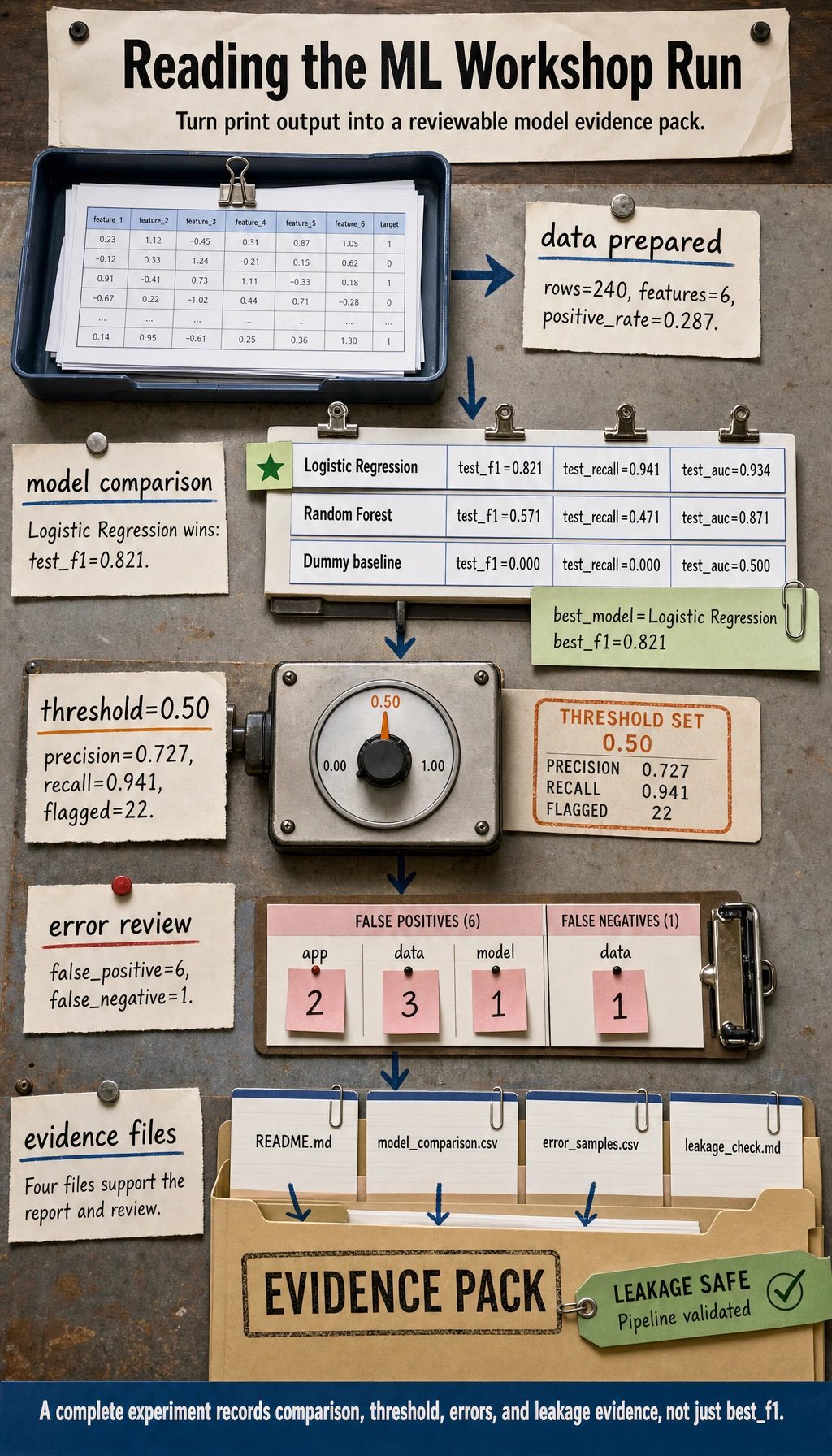
Verify the Generated Evidence
Before interpreting any score, confirm that the evidence files were actually created.
find ml_workshop_run -maxdepth 2 -type f | sort
Expected output:
ml_workshop_run/README.md
ml_workshop_run/data/learning_tasks.csv
ml_workshop_run/data/schema.json
ml_workshop_run/outputs/best_model_metrics.json
ml_workshop_run/outputs/classification_report.txt
ml_workshop_run/outputs/error_samples.csv
ml_workshop_run/outputs/model_comparison.csv
ml_workshop_run/outputs/threshold_review.csv
ml_workshop_run/reports/experiment_log.md
ml_workshop_run/reports/leakage_check.md
Read the Output Step by Step
Start with the baseline
Open ml_workshop_run/outputs/model_comparison.csv.
The Dummy baseline usually gets f1 = 0. This is not a failure. It is the floor. If a real model cannot beat this floor, your data, feature design, metric, or task definition is not ready.
Use this quick reader so you are not guessing from the raw CSV:
python - <<'PY'
import pandas as pd

comparison = pd.read_csv("ml_workshop_run/outputs/model_comparison.csv")
print(comparison[["model", "test_f1", "test_recall", "test_auc"]].to_string(index=False))
PY
Expected output:
              model  test_f1  test_recall  test_auc
Logistic Regression    0.821        0.941     0.934
      Random Forest    0.571        0.471     0.871
     Dummy baseline    0.000        0.000     0.500
Check the real model
The expected best model is Logistic Regression. That is a good beginner result because it is:
- easy to explain
- fast to train
- strong enough for a first tabular baseline
- compatible with scaled numeric features and one-hot categorical features
Do not jump straight to the Random Forest just because it sounds stronger. In Chapter 5, the first habit is: simple baseline first, stronger model later.
Review the threshold
Open ml_workshop_run/outputs/threshold_review.csv.
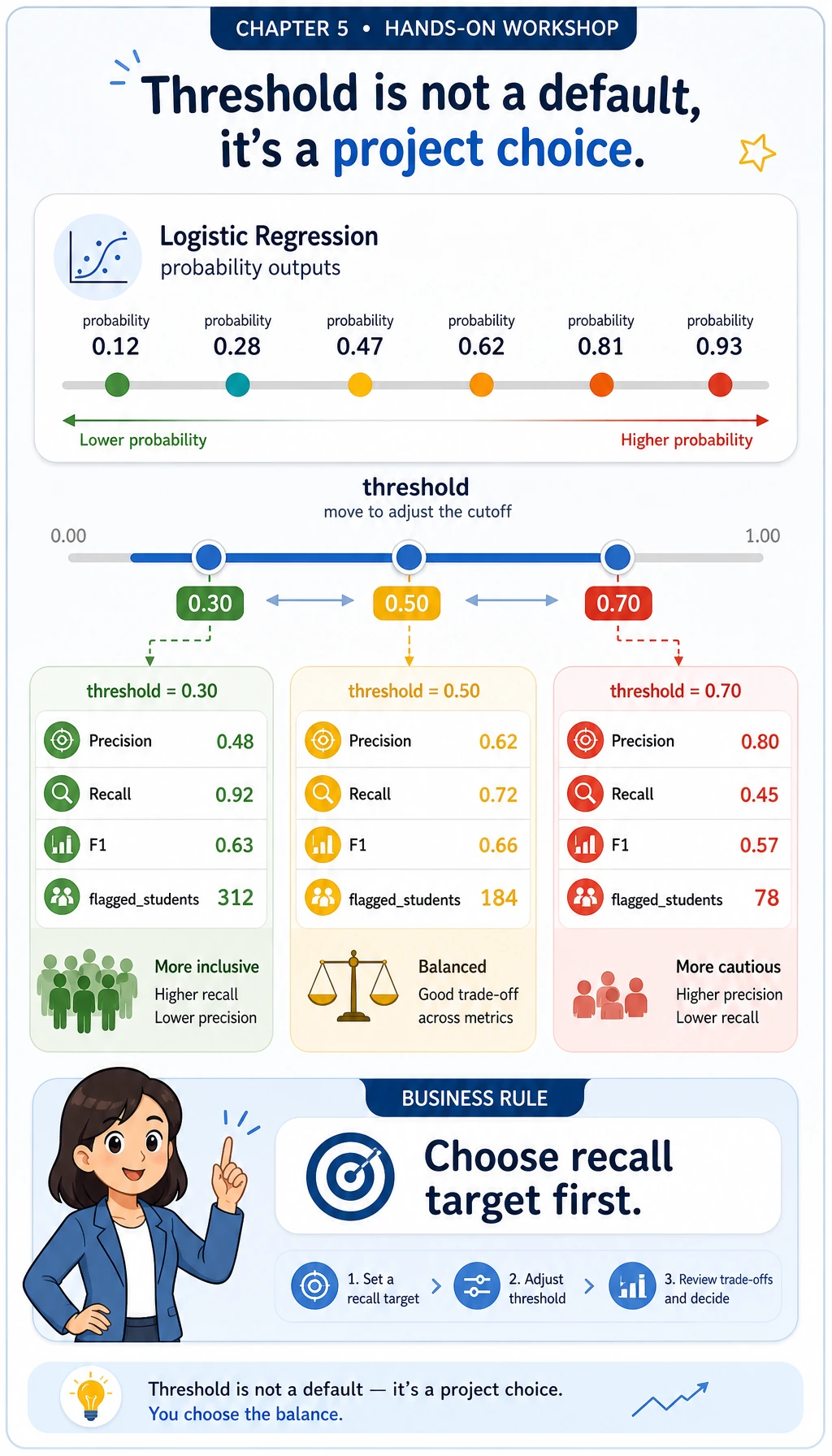
For a delay-risk model, recall may matter more than precision: if the goal is to help learners early, missing high-risk learners may be more expensive than sending a few extra reminders. A threshold is therefore a project decision, not just a model default.
Run this small decision helper. It chooses the best row whose recall is at least 0.90, then prints the trade-off in plain text.
python - <<'PY'
import pandas as pd

thresholds = pd.read_csv("ml_workshop_run/outputs/threshold_review.csv")
choice = thresholds[thresholds["recall"] >= 0.90].sort_values(
    ["f1", "precision"],
    ascending=False,
).iloc[0]

print(f"chosen_threshold={choice.threshold:.2f}")
print(
    f"precision={choice.precision:.3f} "
    f"recall={choice.recall:.3f} "
    f"f1={choice.f1:.3f} "
    f"flagged={int(choice.flagged_students)}"
)
PY
Expected output:
chosen_threshold=0.50
precision=0.727 recall=0.941 f1=0.821 flagged=22
If your business goal changes, change the rule. For example, recall >= 0.80 may be enough for a low-cost reminder system, while a medical or safety workflow may require a much stricter recall target and human review.
Inspect the errors
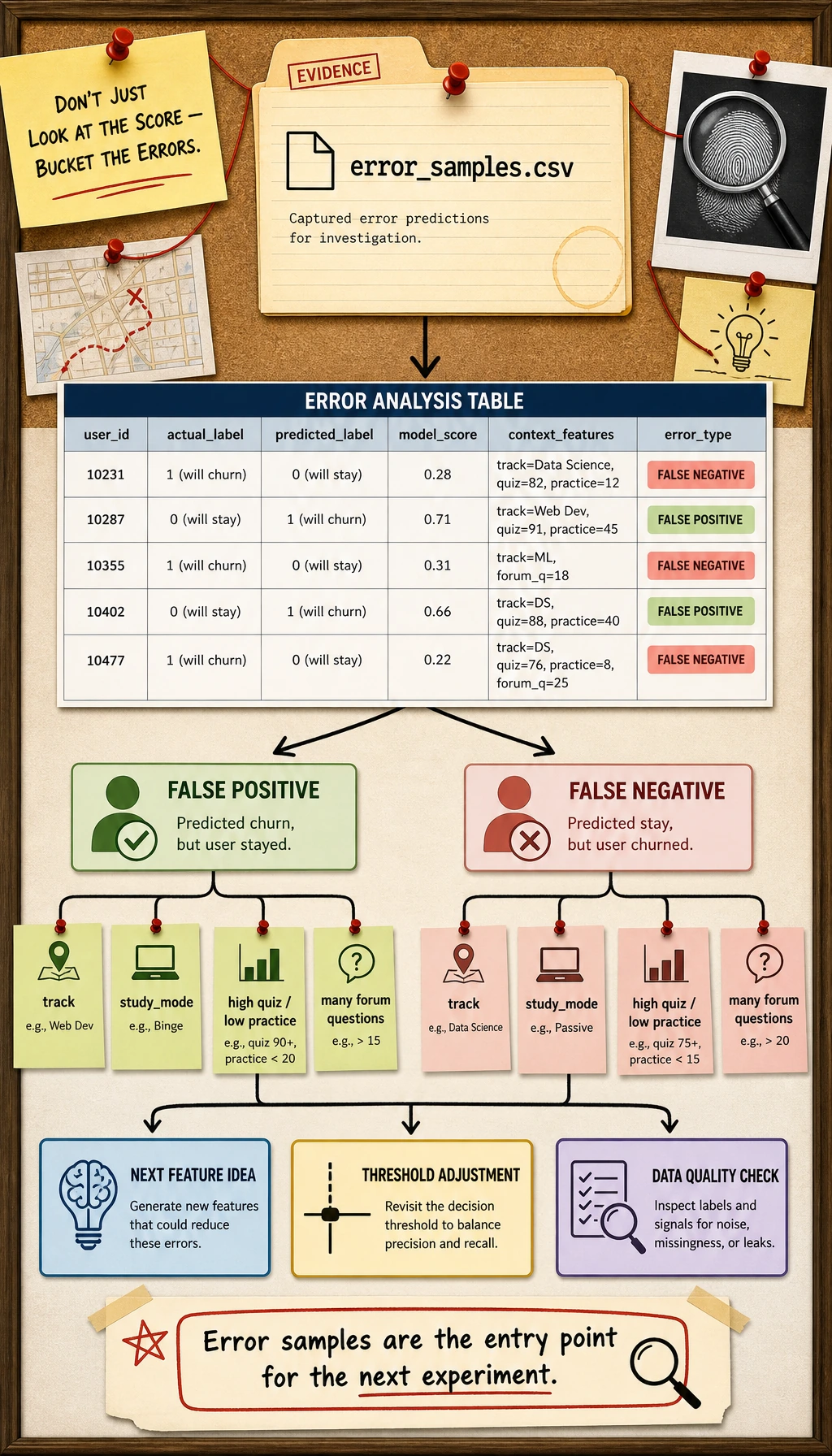
Open ml_workshop_run/outputs/error_samples.csv.
Ask:
- Are the false negatives learners with high quiz scores but low practice time?
- Are the false positives learners from one track or study mode?
- Do the features describe the real reason for delay, or are important signals missing?
Error analysis turns the project from “a score” into “an investigation.”
Use a second quick reader to bucket the wrong predictions:
python - <<'PY'
import pandas as pd

errors = pd.read_csv("ml_workshop_run/outputs/error_samples.csv")
errors["error_type"] = errors.apply(
    lambda row: "false_negative" if row.actual_delayed == 1 else "false_positive",
    axis=1,
)

print(errors["error_type"].value_counts().to_string())
print("--- by track ---")
print(errors.groupby(["error_type", "track"]).size().to_string())
PY
Expected output:
error_type
false_positive    6
false_negative    1
--- by track ---
error_type      track
false_negative  data     1
false_positive  app      2
                data     3
                model    1
Read this as a to-do list, not as blame. False positives may mean the model is too cautious. False negatives are usually more urgent when the product goal is early help.
Read the leakage check
Open ml_workshop_run/reports/leakage_check.md.
The most important line is:
Split first, then fit preprocessing only inside the training workflow.
That is why this example uses ColumnTransformer inside Pipeline.
Common Errors and Debugging Loop
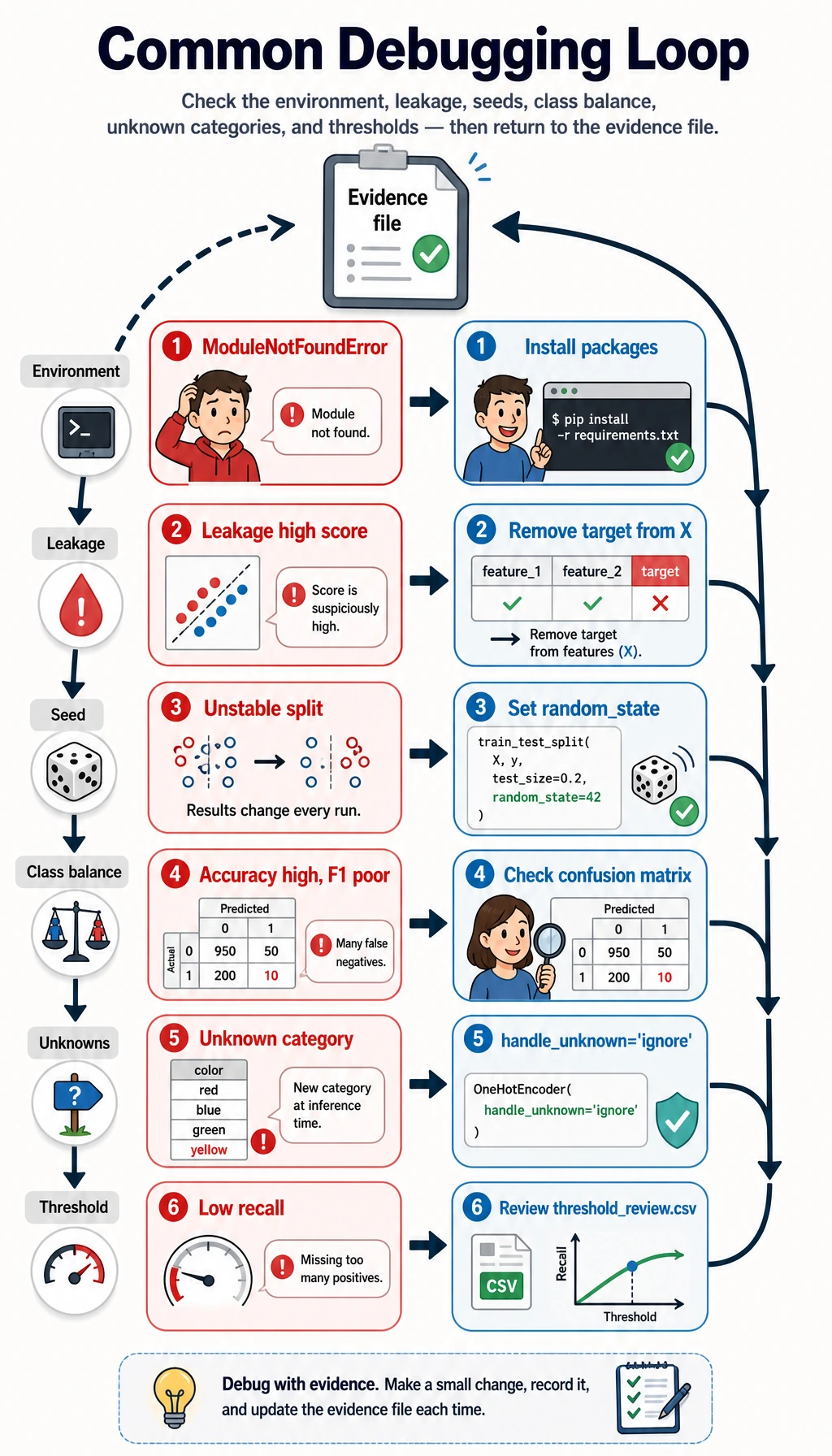
| Symptom | Likely cause | What to do |
|---|---|---|
ModuleNotFoundError: No module named 'sklearn' | The course runtime is not installed | Run python -m pip install -r requirements-course-core.txt or install numpy pandas scikit-learn |
| Score looks impossibly high | Target leakage or wrong split | Check the feature list and make sure delayed is not in X |
| Test F1 changes every run | Random seed or split is not fixed | Keep random_state=42 while learning |
| Accuracy is high but F1 is poor | Class imbalance | Compare precision, recall, F1, and confusion matrix |
| Pipeline fails on categorical values | New category appears in test data | Use OneHotEncoder(handle_unknown="ignore") |
| Model catches too few positive cases | Threshold is too high | Review threshold_review.csv and lower the threshold if recall matters more |
Turn This Into a Portfolio Project
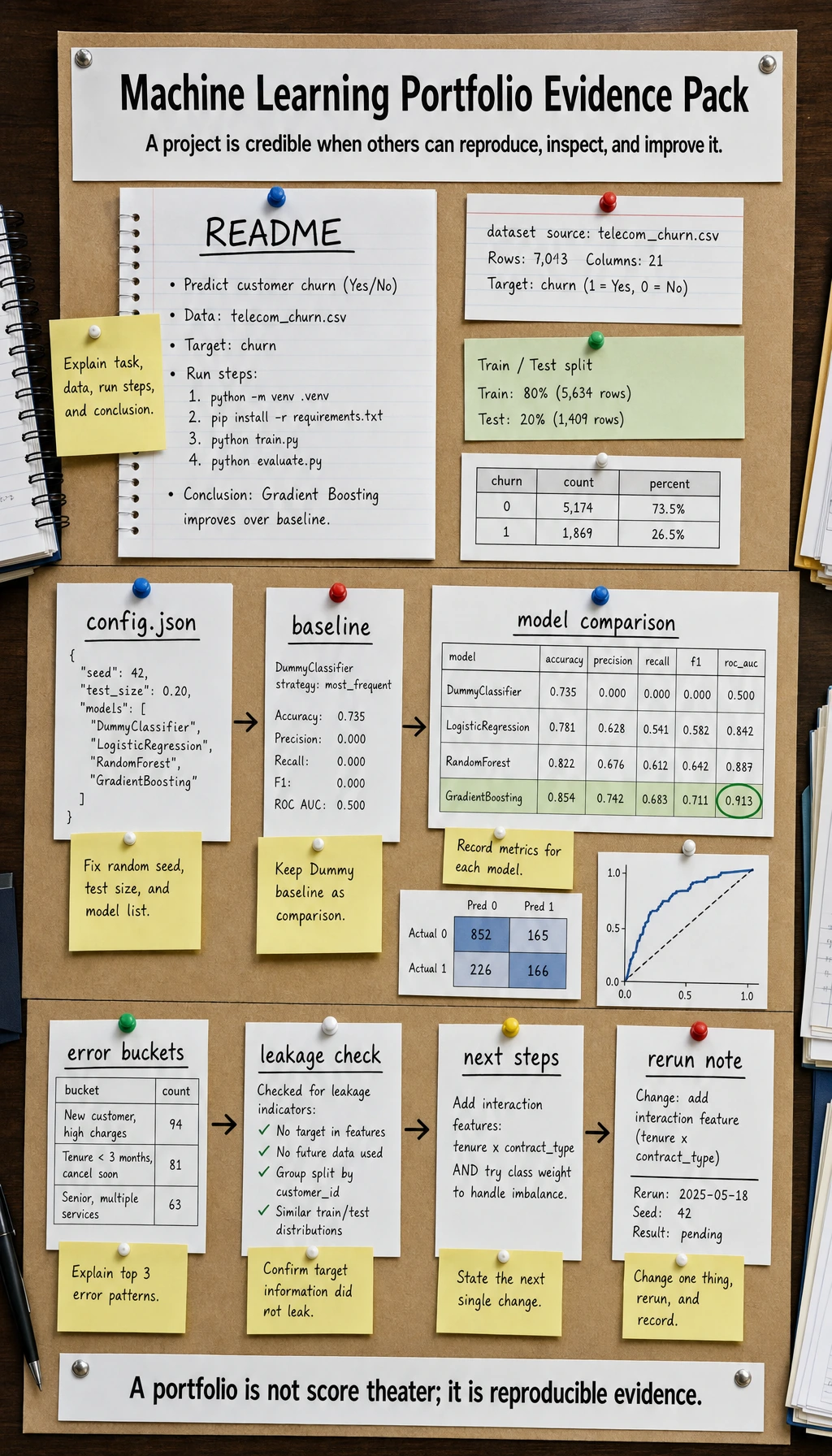
Upgrade the workshop in small steps:
- Replace the synthetic dataset with a CSV from your own project.
- Add a
config.jsonfile for random seed, test size, and model list. - Add one more model, but keep the Dummy baseline.
- Add a confusion matrix plot or threshold curve.
- Write one paragraph explaining the top 3 error patterns.
- Add a “what I would improve next” section to
README.md.
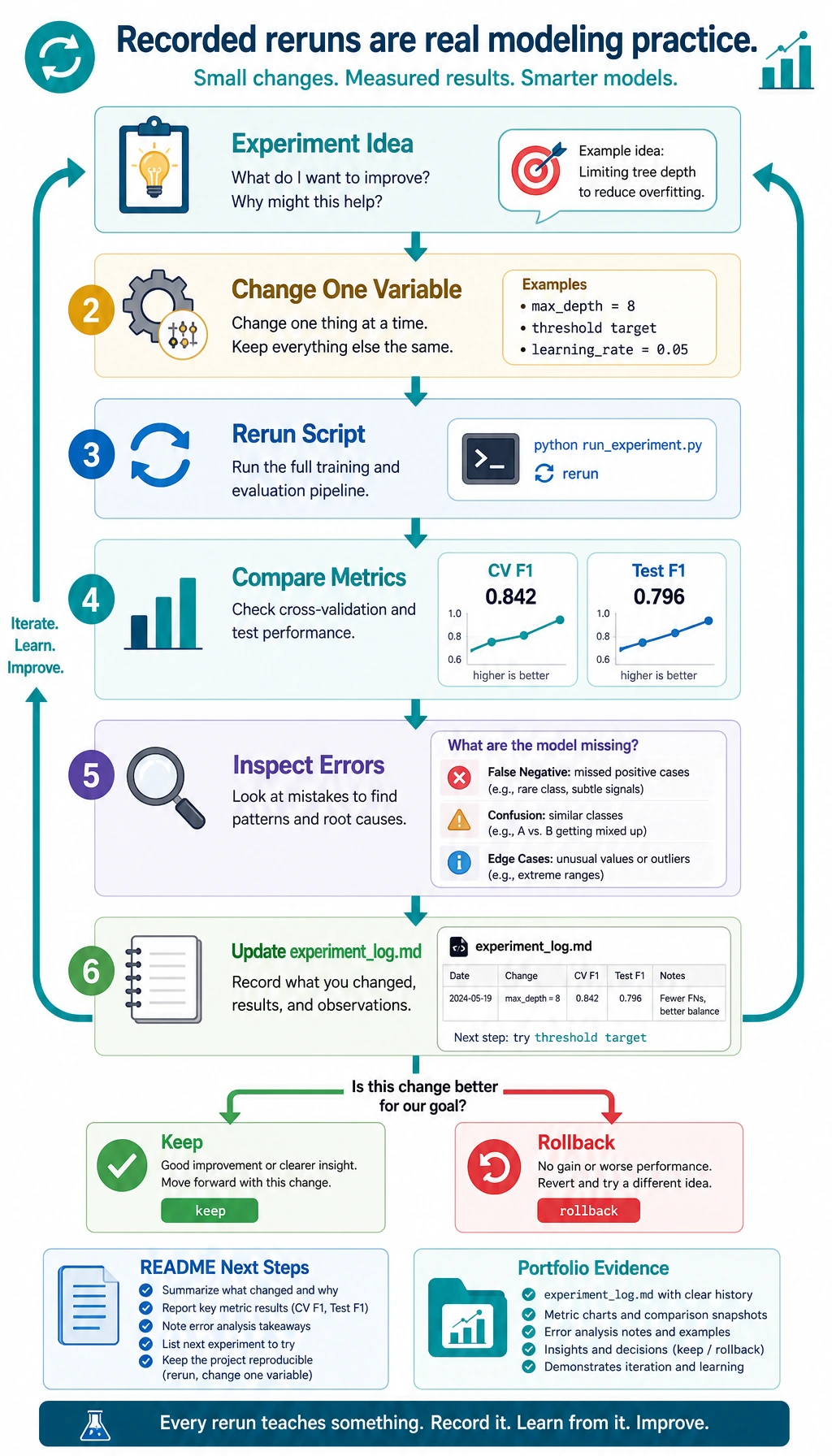
Do one tiny iteration before you leave this page. Append an experiment note, then rerun the script after you change exactly one thing, such as max_depth=8 for the random forest.
python - <<'PY'
from pathlib import Path

log_path = Path("ml_workshop_run/reports/experiment_log.md")
log = log_path.read_text(encoding="utf-8")
log += "\n| v2 | Try RandomForest max_depth=8 | Compare CV F1 and test F1 after rerun | Keep only if both stay stable |\n"
log_path.write_text(log, encoding="utf-8")
print(log_path.read_text(encoding="utf-8"))
PY
Expected output includes this new row:
| v2 | Try RandomForest max_depth=8 | Compare CV F1 and test F1 after rerun | Keep only if both stay stable |
This is the habit you want from Chapter 5: change one variable, rerun, compare evidence, then decide. Random experimentation is not yet modeling practice; recorded experimentation is.
Portfolio Checklist
Before calling your Chapter 5 project done, make sure you have:
- A run command that works from a clean folder
- A baseline metric
- A real model metric
- A model comparison table
- A leakage check
- A threshold or metric explanation
- Error samples
- A README with next steps
Summary
This workshop is the Chapter 5 loop in one file: data, baseline, Pipeline, model comparison, threshold review, error analysis, leakage check, and README evidence. If you can rerun it and explain each output file, you are no longer only learning machine learning APIs. You are practicing a real modeling workflow.