8.2.2 Local Model Runtime
The most common default path for large-model applications is:
- Call a cloud API directly
But in real projects, you will quickly run into these issues:
- Cost
- Latency
- Data security
- Network dependency
At that point, “Can a local model run, and is it worth running?” becomes a very practical question.
Learning objectives
- Understand why many scenarios prioritize local models
- Understand the relationship between model size, quantization, and hardware constraints
- Distinguish the basic differences between CPU runtime, GPU runtime, and quantized runtime
- Read a minimal local inference flow
- Build judgment about “when to run locally and when an API is a better fit”
First, build a map
For beginners, the best way to understand local models is not to “pick a model name” first, but to first see clearly:
So what this section really wants to answer is:
- Why would someone choose not to use an existing API and instead run locally?
- What are you actually trading for local runtime?
A better overall analogy for beginners
You can think of cloud APIs and local models as:
- Taking a taxi
- Versus buying your own car
The advantages of taking a taxi:
- Hassle-free
- Available on demand
The advantages of owning a car:
- More controllable
- Potentially cheaper in the long run
- Safer in some cases
But you also have to handle:
- Maintenance
- Parking
- Repairs
The relationship between local models and cloud APIs is very much a trade-off like this.
Why consider local models?
First, look at the strengths of cloud APIs
The advantages of cloud APIs are obvious:
- Ready to use out of the box
- The model is usually stronger
- Less operational burden
So when a project is just getting started, cloud APIs are often the most convenient choice.
But why do some people still insist on running locally?
Common reasons usually include:
- Data cannot leave the local machine or the enterprise intranet
- API costs add up too quickly
- The system needs to work offline
- You want stronger control over the model and inference pipeline
In other words, the core value of local models is not “being more advanced,” but:
Rebalancing the trade-off among quality, cost, privacy, and controllability.
First build the most important real-world intuition: model size is not an abstract number
Parameter count directly affects resource usage
When you see a model described as:
- 7B
- 13B
- 70B
These are not just marketing labels. They usually mean:
- Very different memory / VRAM usage
- Very different loading times
- Very different inference speeds
A rough resource illustration
runtime_options = [
    {"name": "small_quantized_model", "memory_gb": 4, "quality": "basic"},
    {"name": "medium_quantized_model", "memory_gb": 8, "quality": "good"},
    {"name": "larger_model", "memory_gb": 16, "quality": "better"}
]

for item in runtime_options:
    print(item)
Expected output:
{'name': 'small_quantized_model', 'memory_gb': 4, 'quality': 'basic'}
{'name': 'medium_quantized_model', 'memory_gb': 8, 'quality': 'good'}
{'name': 'larger_model', 'memory_gb': 16, 'quality': 'better'}
What is this code really trying to tell you?
It is not asking you to memorize numbers. It is helping you build a very practical judgment:
Whether a model can run locally is often first a resource-matching problem.
The question is not “Do I want to run it?” but “Can my machine handle it?”
A decision table that is very useful for beginners
| What you care about most | Which path is more likely to come first |
|---|---|
| Fast prototyping | Cloud API |
| Privacy and intranet use | Local model |
| Long-term cost | Local model or a hybrid solution |
| Best possible performance | Often try the cloud API first |
This table is not an absolute rule, but it is very useful for beginners to build a realistic judgment:
- The deployment path is first a business decision, not just a technical preference
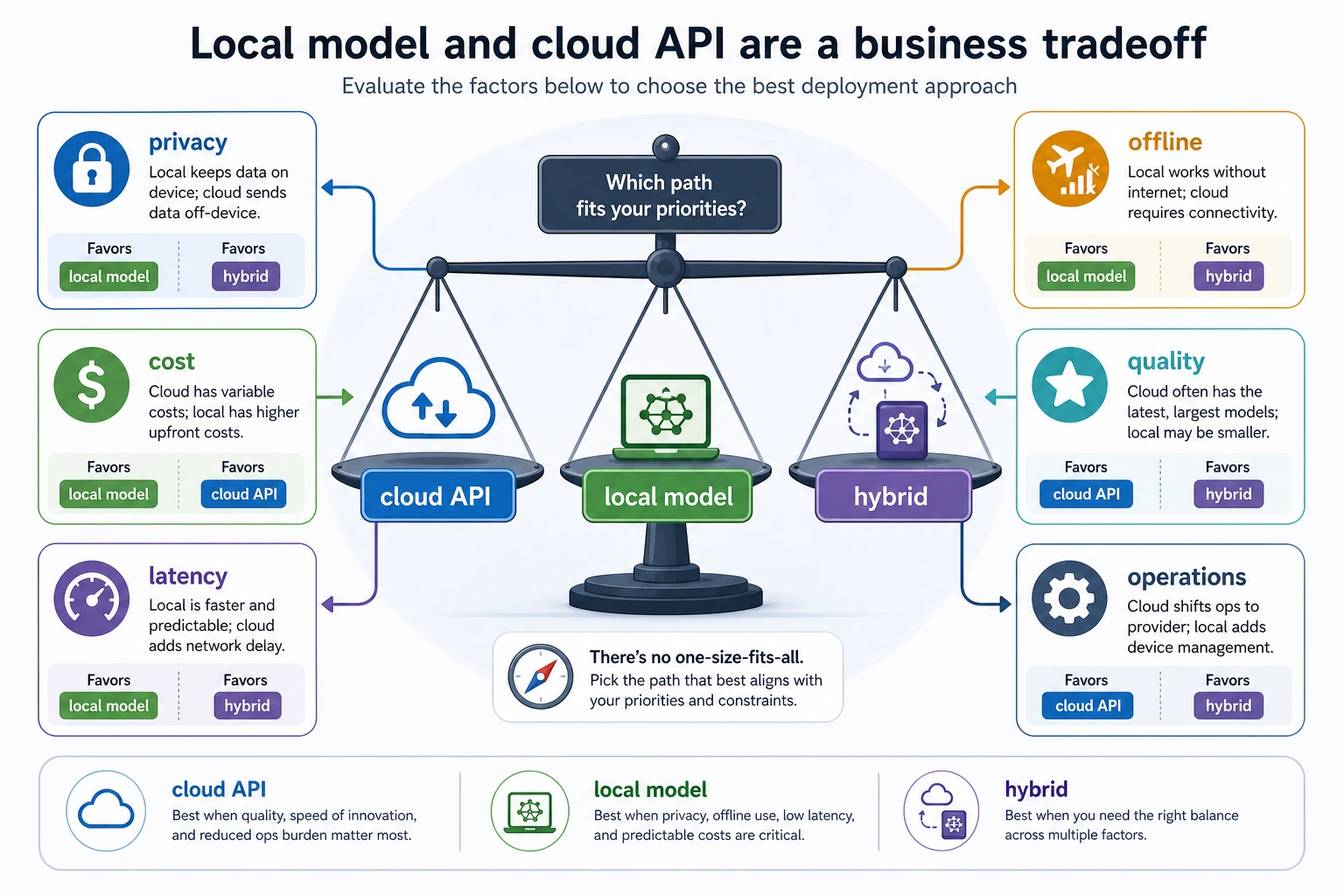
When looking at the diagram, do not start by asking “which model is stronger.” Instead, first look at privacy, cost, latency, offline needs, and operational capability. Many deployment choices are essentially about ordering business constraints, not simply comparing model capability.
Why are quantization and local models always mentioned together?
Because everyone wants to fit the model into a smaller machine
The roughest but easiest way to understand quantization is:
Use lower-precision values to represent model parameters, and trade that for lower memory usage.
A minimal illustration
params = 7_000_000_000  # 7 billion parameters, illustrative

precisions = {
    "fp16": 2.0,
    "int8": 1.0,
    "int4": 0.5
}

for name, bytes_per_param in precisions.items():
    memory_gb = params * bytes_per_param / (1024 ** 3)
    print(name, "rough memory GB =", round(memory_gb, 2))
Expected output:
fp16 rough memory GB = 13.04
int8 rough memory GB = 6.52
int4 rough memory GB = 3.26
This is only a rough parameter-memory estimate. Real runtime memory also includes KV cache, temporary buffers, tokenizer/runtime overhead, and serving queues.
The benefits and costs of quantization
Benefits:
- Easier to run locally
- Easier to fit on edge devices or weaker machines
Costs:
- Accuracy may drop a little
- Some tasks are more sensitive to it
So quantization is also a typical engineering trade-off, not a free magic trick.
Another minimal example of “what if resources are not enough”
constraints = {
    "memory_gb": 8,
    "need_low_latency": False,
    "privacy_sensitive": True,
}


def suggest_runtime(constraints):
    if constraints["privacy_sensitive"] and constraints["memory_gb"] <= 8:
        return "Prioritize a small quantized local model."
    if constraints["need_low_latency"] and constraints["memory_gb"] >= 16:
        return "Prioritize GPU local inference."
    return "Start with a cloud API prototype, then evaluate whether to migrate locally."


print(suggest_runtime(constraints))
Expected output:
Prioritize a small quantized local model.
This example is very suitable for beginners because it reminds you:
- Local deployment is often not about choosing a model first
- It is about checking constraints first
What is the real difference between CPU runtime and GPU runtime?
Characteristics of CPU runtime
Advantages:
- Available on most computers
- Low deployment barrier
Disadvantages:
- Slow
Characteristics of GPU runtime
Advantages:
- Faster
- Better suited for larger models
Disadvantages:
- Higher cost
- Higher environment requirements
A practical rule of thumb
If your scenario is:
- A personal tool
- A low-traffic experiment
- An offline assistant
Then running a small model on CPU may be enough.
If your scenario is:
- Multi-turn interaction
- Sensitive to user waiting time
- A somewhat larger model
Then GPU or a more specialized runtime is more realistic.
A minimal local inference flow
Why start with a mock runtime?
Here we will not use a real large model yet. Instead, we will write a mock runtime to make the “load -> infer -> return” flow clear.
class LocalModelRuntime:
    def __init__(self, model_name):
        self.model_name = model_name
        self.loaded = False

    def load(self):
        self.loaded = True
        print(f"loaded {self.model_name}")

    def generate(self, prompt):
        if not self.loaded:
            raise RuntimeError("model not loaded")
        return f"[{self.model_name}] local reply to: {prompt}"

runtime = LocalModelRuntime("small-local-model")
runtime.load()
print(runtime.generate("What is the refund policy?"))
Expected output:
loaded small-local-model
[small-local-model] local reply to: What is the refund policy?
What is this code teaching?
It is teaching you the three most basic things about local model runtime:
- The model must be loaded first
- Inference requests must go through the runtime
- The result is then handed back to the upper-level system
This looks simple, but it is already very close to the smallest skeleton of a real inference system.
When beginners build their first project, how should they decide whether to run locally?
A safer order is usually:
- First ask whether you really have privacy / offline / cost constraints
- Then ask whether the current machine can actually handle it
- If you are only building a prototype, prioritize the cloud API
- If you need to control the pipeline or reduce costs long term, seriously consider a local model
This is usually more realistic than starting with “local deployment is cool.”
If you turn this into a project or solution, what is worth showing most?
What is usually worth showing most is not:
- “The model runs successfully”
But rather:
- Why you chose local instead of an API
- How hardware and model size match
- Whether quantization was used
- The trade-offs between cold start, latency, and cost
- What scenarios this solution fits and what scenarios it does not
That way, others can more easily see:
- You understand deployment decisions
- Not just that you got inference to run once
The real challenge is not “generation succeeds,” but “stable long-term operation”
Once you reach a real system, you will encounter these more practical issues:
- How long does cold start take
- How many resources does the resident model consume
- How much concurrency can one machine handle
- Does switching models require reloading
The cold start problem
The first model load is usually slow. This is a big problem for service-oriented systems.
The always-on process problem
To reduce cold start, you often keep the model resident in memory. But that brings:
- Higher long-term resource usage
So you will find:
The real difficulty of local model runtime is not “making it succeed once,” but “making it live like a service.”
When is a local model especially worth it?
A very good fit
- Enterprise intranets
- Privacy-sensitive content
- High API cost pressure
- Weak network / offline scenarios
- Need for stronger control over the pipeline
Not necessarily a good fit
- The team lacks operations capability
- The task heavily depends on cutting-edge large-model quality
- User volume is small, and an API is already convenient enough
In these cases, a cloud model may actually be more appropriate.
A very practical checklist for deciding
Before deciding to run locally, you can ask:
- What do I care about most: cost, privacy, or model quality?
- Do I have enough hardware?
- Am I willing to take on deployment and maintenance complexity?
- Is the API solution already good enough?
If these questions are answered clearly, the local model approach usually will not be too blind.
Common beginner mistakes
Looking only at model parameters, not the runtime
For the same model, changing the runtime can make the experience very different.
Going straight for a large model
In many local scenarios, a small model is already enough.
Thinking “it runs” means “it is ready for production”
After going live, you still need to look at:
- Stability
- Monitoring
- Concurrency
- Cost
Summary
The most important thing in this section is not remembering a few model names, but building a stable intuition:
The core of local model runtime is making a real-world trade-off among “quality, cost, privacy, hardware, and maintenance complexity.”
It is not a simple replacement for a cloud API, but a completely different deployment choice.
Exercises
- Based on your current machine, write out a local model runtime plan that you think is reasonable.
- In your own words, explain: why does quantization appear so frequently in local model runtime?
- Why does “the model file can be loaded” not mean “the model service is ready for production”?
- If your system is highly privacy-sensitive but your team has weak operations capability, how would you make the trade-off?