8.4.5 Containerization and Deployment
Many projects get stuck here:
- It runs locally
- It breaks on another machine
- Team members have inconsistent environments
- Dependency versions become a mess after going live
The core value of containerization is to take your application from:
“It runs on my computer”
to:
“It runs reliably and reproducibly in an agreed environment”.
Learning Objectives
- Understand why LLM applications are especially well-suited to containerization
- Read the key structure of a minimal Dockerfile
- Understand the core concepts of images, containers, ports, and environment variables
- Read a small Docker Compose startup example
- Understand that containerization is not the end of deployment, but the starting point
Beginner terminology bridge
Docker becomes much less intimidating once the nouns are separated:
| Term | Beginner meaning | Why it matters |
|---|---|---|
image | A packaged runtime template, like a recipe plus ingredients | You build it once and run containers from it |
container | A running instance created from an image | This is the actual process serving requests |
Dockerfile | The build recipe for an image | It records the base image, dependencies, files, and startup command |
port | The doorway where a service listens for requests | -p 8000:8000 maps the host port to the container port |
environment variable | Configuration injected from outside the code | API keys, model names, and runtime modes should not be hardcoded |
Compose | A tool for starting multiple related containers together | Useful when the app needs a vector database, Redis, or Postgres |
The core idea is not “learn Docker commands by heart,” but “make the runtime environment reproducible.”
Why containerize?
What is the biggest hidden risk of a local script?
When you can run a project locally, it often depends on many implicit conditions:
- Python version
- Package versions
- System dependencies
- Environment variables
- Startup command
Once you change the person, the machine, or the server, these conditions can easily cause problems.
What does containerization actually solve?
The core value of containerization is:
Package the application together with the runtime environment it depends on.
This lets you reproduce more reliably:
- What was installed
- Which versions were used
- Which command was used to start it
This is especially important for LLM applications, because they often depend on:
- Web frameworks
- Model services
- Vector databases
- System tools
What are images and containers?
A very practical analogy
- Image: like a recipe + ingredient kit
- Container: the actual dish made from that recipe
In other words:
- An image is a static template
- A container is a running instance
Why is this distinction important?
Because during deployment, you usually:
- Build the image first
- Then start the container
If you do not clearly understand this order, Docker commands will feel confusing for a long time.
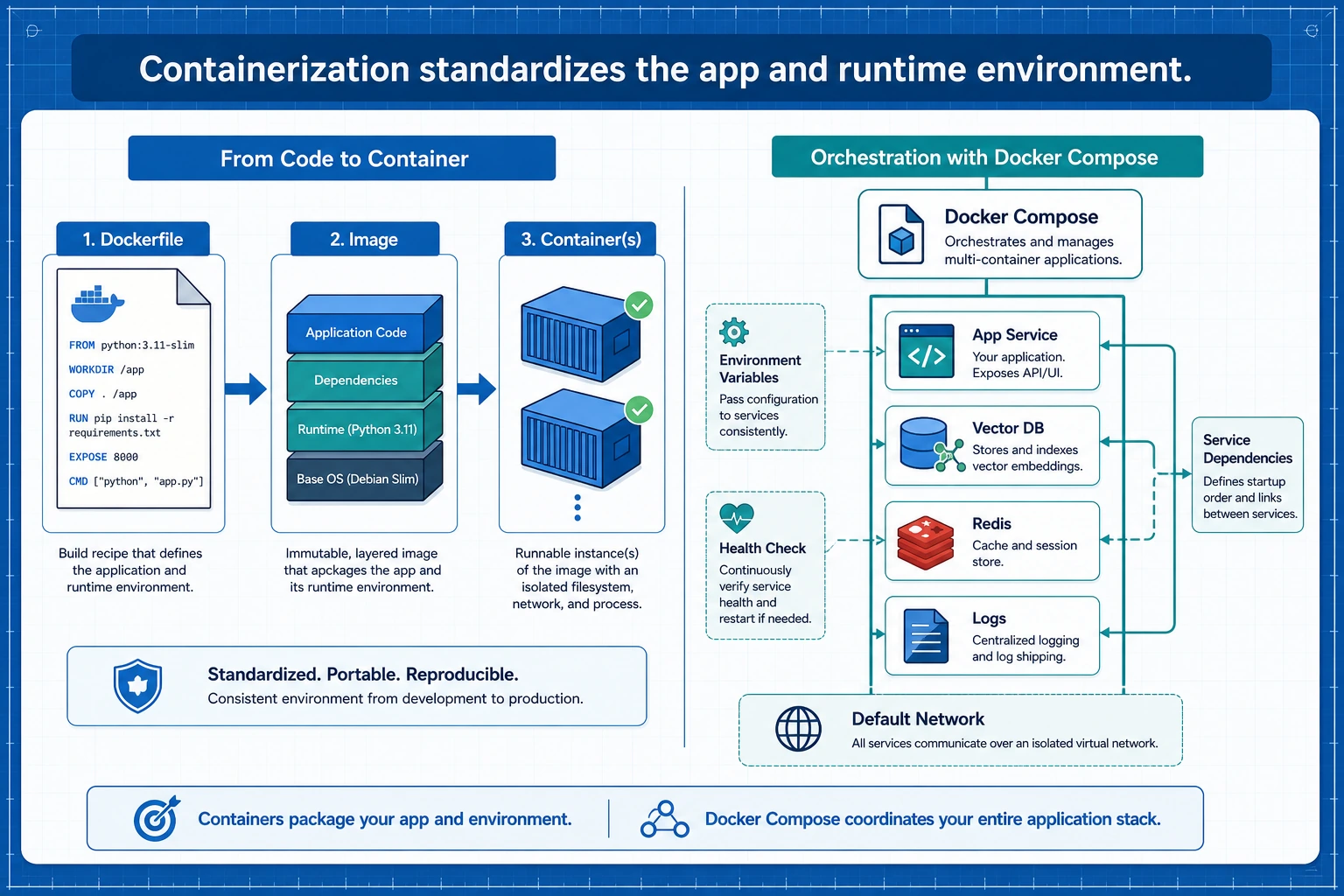
An image is a reproducible runtime template, a container is a running instance, and Compose is responsible for starting multiple services together. For LLM applications, you also need to include environment variables, health checks, vector databases, and logs in the deployment diagram.
What does a minimal Dockerfile look like?
First, look at the complete example
FROM python:3.14-slim

WORKDIR /app

COPY requirements.txt .
RUN pip install --no-cache-dir -r requirements.txt

COPY . .

EXPOSE 8000

CMD ["python", "app.py"]
What does each line do?
-
FROM- Choose the base image
-
WORKDIR- Set the working directory
-
COPY requirements.txt .- Copy in the dependency file
-
RUN pip install ...- Install dependencies
-
COPY . .- Copy the project code in as well
-
EXPOSE 8000- Indicate the port the service listens on
-
CMD- The default command executed when the container starts
This is the core skeleton of a Dockerfile.
This section uses python:3.14-slim, the current stable Python line at the time of this course update. If your project depends on libraries that have not yet caught up, pin a tested image such as python:3.13-slim or python:3.11-slim and write down the reason in your deployment notes.
First prepare a small app that can actually run
Minimal Python service
To make the Docker deployment example more concrete, let's first write a very simple app.py.
# app.py
from http.server import BaseHTTPRequestHandler, HTTPServer
import json

class Handler(BaseHTTPRequestHandler):
    def do_GET(self):
        if self.path == "/health":
            self.send_response(200)
            self.send_header("Content-Type", "application/json")
            self.end_headers()
            self.wfile.write(json.dumps({"status": "ok"}).encode())
            return

        self.send_response(200)
        self.send_header("Content-Type", "application/json")
        self.end_headers()
        self.wfile.write(json.dumps({"message": "hello from llm app"}).encode())

server = HTTPServer(("0.0.0.0", 8000), Handler)
print("serving on 8000")
server.serve_forever()
Run it locally first:
python app.py
In another terminal, test the service:
curl http://localhost:8000/
curl http://localhost:8000/health
Expected output:
{"message": "hello from llm app"}
{"status": "ok"}
Why start with this?
Because containerization is not about talking about Dockerfiles in the abstract, but about understanding them around a real running application.
Then containerize it
Matching requirements.txt
This minimal service does not depend on any third-party packages, so requirements.txt can be empty, or you may even not need it.
But to stay close to a real project, we will keep the structure.
# requirements.txt
Corresponding Dockerfile
FROM python:3.14-slim

WORKDIR /app

COPY requirements.txt .
RUN pip install --no-cache-dir -r requirements.txt

COPY app.py .

EXPOSE 8000

CMD ["python", "app.py"]
Run commands
docker build -t mini-llm-app .
docker run -p 8000:8000 mini-llm-app
Then visit:
http://localhost:8000/http://localhost:8000/health
and you will see the returned results.
You can also verify it from the command line:
curl http://localhost:8000/
curl http://localhost:8000/health
Expected output:
{"message": "hello from llm app"}
{"status": "ok"}
This is the smallest containerization loop.
Why are environment variables important?
LLM applications often have configurations like these:
- API Key
- Model name
- Vector database address
- Runtime mode
These are usually not hardcoded in the code; environment variables are a better fit.
A minimal example
import os

model_name = os.getenv("MODEL_NAME", "demo-model")
port = int(os.getenv("PORT", "8000"))

print("MODEL_NAME =", model_name)
print("PORT =", port)
Expected output without extra environment variables:
MODEL_NAME = demo-model
PORT = 8000
How do you pass environment variables in Docker?
docker run -p 8000:8000 -e MODEL_NAME=qwen-demo mini-llm-app
This step is very important, because real deployment almost always relies on configuration injection.
To make the running service show configuration, you can read MODEL_NAME in app.py and return it from the root endpoint. The key idea is the same: code stays stable, configuration changes outside the image.
Why is Compose so commonly used?
Because real projects usually have more than one service
An LLM application may also need to work with:
- Web service
- Vector database
- Redis
- Postgres
If you write docker run by hand for each one, things quickly become messy.
A minimal Compose example
version: "3.9"

services:
  app:
    build: .
    ports:
      - "8000:8000"
    environment:
      MODEL_NAME: demo-model
Startup command:
docker compose up --build
This is why Compose is very useful for local development and small-scale deployments.
Containerization does not mean deployment is finished
This is a very common misunderstanding.
Containerization solves packaging and the runtime environment
But going live still requires considering:
- Logs
- Health checks
- Resource limits
- Automatic restarts
- Canary releases
- Reverse proxies
A very important health check idea
An endpoint like:
/health
is very valuable. Because deployment systems usually need to know:
Is this container alive right now, and can it accept requests?
Common mistakes beginners often make
Putting everything into one huge image
The image becomes bloated.
No health check
You do not know when the service is broken.
Hardcoding configuration in the code
Things break easily when you switch environments.
Thinking containerization automatically makes things scalable
It does not. Containerization is only the first step; orchestration, monitoring, and operations come next.
Ignoring local Docker disk usage
If a build fails with no space left on device, first inspect Docker storage:
docker system df
docker builder prune
Only prune what you no longer need. In team or CI environments, it is safer to clean build cache first before deleting images or volumes.
Summary
The most important thing in this section is not memorizing Docker commands, but understanding:
The core value of containerization is standardizing “application + dependencies + startup method” together, so deployment becomes a reproducible process instead of personal machine experience.
Once you make this step solid, service orchestration and production operations will have a foundation.
Exercises
- Use the
app.pyand Dockerfile from this section to actually build a minimal image locally. - Add another environment variable to the service, such as
APP_MODE=dev. - Think about this: why is the
/healthendpoint important for deployment systems? - Explain in your own words: why is containerization the starting point of deployment, not the end?