2.3.4 Project: Quick AI API Experience
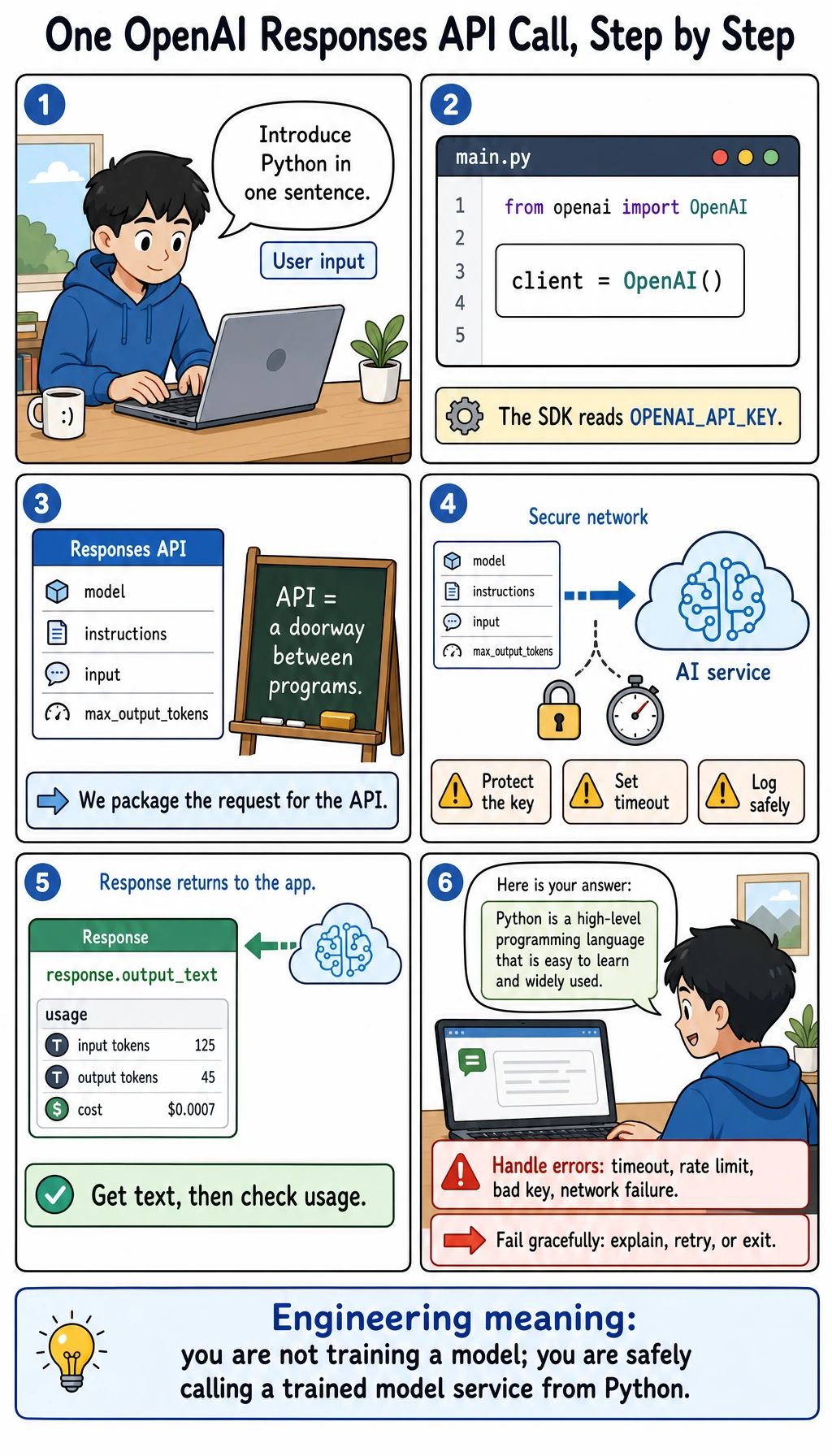
Project Overview
This project lets you experience LLM capabilities early in the Python fundamentals stage. You will use an API Key to call ready-made AI services, understand the difference between "training a model" and "calling a model service," and build a simple AI conversation program.
Project Goals
- Understand what an AI API is and how it relates to AI models
- Learn how to call mainstream AI APIs such as OpenAI
- Experience AI capabilities such as conversation generation and text analysis
- Build a simple AI chatbot
What Is an AI API?
In the previous project, you learned how to write your own API. An AI API is someone else’s trained AI model packaged as an API for you to call.
Traditional approach: you train the model yourself (needs lots of data, GPUs, and time)
API approach: directly call someone else’s model (just need an API Key and a few lines of code)
Just like you do not need to grow wheat yourself to eat bread, with an AI API, you can directly use some of the most advanced AI capabilities in the world.
Common AI API Services
| Service | Provider | Main Capabilities |
|---|---|---|
| OpenAI API | OpenAI | Conversation, text generation, code generation |
| Claude API | Anthropic | Conversation, document analysis, reasoning |
| Tongyi Qianwen API | Alibaba Cloud | Conversation, text understanding |
| Wenxin Yiyan API | Baidu | Conversation, knowledge Q&A |
| Zhipu API | Zhipu AI | Conversation, code generation |
Step 1: Get an API Key
To use an AI API, you first need to register and obtain an API Key—it is like a key that proves you have permission to call the API.
The tutorial below uses the OpenAI API as an example. If access is difficult in your region, you can choose:
- Zhipu AI (bigmodel.cn) — relatively generous free quota
- Tongyi Qianwen (dashscope.aliyun.com) — from Alibaba Cloud
The calling methods for these domestic APIs are very similar to OpenAI; you usually only need to change the URL and the Key.
Get an OpenAI API Key
- Visit platform.openai.com
- Register or log in
- Go to the API Keys page
- Click "Create new secret key"
- Copy and store the Key safely (it will only be shown once)
Install the OpenAI SDK
python -m pip install --upgrade openai
Set the API Key
# Method 1: set an environment variable (recommended)
export OPENAI_API_KEY="your_api_key_here"

# Method 2: set it in code (not recommended to commit to Git)
Never write your API Key directly in code and commit it to GitHub! That is like making your password public. The correct approach is:
- Use environment variables
- Use a
.envfile +.gitignore
Step 2: Your First AI API Call
Modern OpenAI text generation tutorials should start with the Responses API. It is the newer unified entry point for text generation, tool calling, multimodal input, and later Agent-style workflows. You may still see older tutorials using client.chat.completions.create(...); know what it is, but use client.responses.create(...) as your main learning path here.
from openai import OpenAI

# Create a client (reads OPENAI_API_KEY automatically from the environment variable)
client = OpenAI()

# Send a simple text generation request
response = client.responses.create(
    model="gpt-4o-mini",
    input="Hello! Please introduce the Python language in one sentence."
)

# Get the AI's reply
print(f"AI says: {response.output_text}")
Sample output:
AI says: Python is a concise, elegant, and powerful high-level programming language widely used in data analysis, AI, web development, and many other fields.
Understand the Request Structure
response = client.responses.create(
    model="gpt-4o-mini",
    instructions="You are a Python programming assistant. Use beginner-friendly language.",
    input=[
        {"role": "user", "content": "What is a list comprehension?"},
        {"role": "assistant", "content": "A list comprehension is a compact way to build a list."},
        {"role": "user", "content": "Can you give an example?"},
    ],
)

print(response.output_text)
| Part | Meaning |
|---|---|
model | Which model to call. Start with a small, low-cost model for learning, then upgrade when needed. |
instructions | High-level behavior rules for the model, such as tone, role, and output style. |
input | The user content, or a list of previous user/assistant messages for manual conversation history. |
role: "user" | Message written by the user. |
role: "assistant" | Previous model reply, used when you manually include conversation history. |
output_text | A convenient SDK property that collects the model's text output into one string. |
- SDK (Software Development Kit): a library that makes an API easier to call. The
openaiPython package is the SDK. - Responses API: OpenAI's unified API for model responses. It can return text, tool calls, reasoning metadata, and other output items.
- Chat Completions API: an older chat-specific API you will still see in many tutorials and compatible providers.
- context window: the maximum amount of input and output tokens a model can consider in one request.
Step 3: Build an Interactive Chatbot
"""
AI chatbot
Use the OpenAI Responses API to implement multi-turn conversations
"""

from openai import OpenAI

def create_chatbot(system_prompt: str = "You are a friendly AI assistant."):
    """Create a chatbot"""
    client = OpenAI()
    history = []

    print("=" * 50)
    print("  AI Chatbot")
    print("  Type 'quit' to exit, type 'clear' to clear the conversation history")
    print("=" * 50)

    while True:
        user_input = input("\nYou: ").strip()

        if not user_input:
            continue
        if user_input.lower() == "quit":
            print("Goodbye!")
            break
        if user_input.lower() == "clear":
            history = []
            print("🧹 Conversation history cleared")
            continue

        # Add user message
        history.append({"role": "user", "content": user_input})

        try:
            # Call the API
            response = client.responses.create(
                model="gpt-4o-mini",
                instructions=system_prompt,
                input=history,
                temperature=0.7,        # controls creativity (0=conservative, higher=more varied)
                max_output_tokens=800,  # maximum reply length
                store=False,            # do not store this learning conversation on the provider side
            )

            # Get reply
            reply = response.output_text
            print(f"\nAI: {reply}")

            # Add the AI reply to history as well (to enable multi-turn conversation)
            history.append({"role": "assistant", "content": reply})

            # Show token usage
            usage = response.usage
            print(f"\n  [Token usage: input={usage.input_tokens}, "
                  f"output={usage.output_tokens}, "
                  f"total={usage.total_tokens}]")

        except Exception as e:
            print(f"\n❌ Call failed: {e}")
            history.pop()  # remove the failed user message

if __name__ == "__main__":
    create_chatbot("You are a professional Python programming mentor. Answer questions in clear and simple language.")
Step 4: Practical AI Tools
Tool 1: AI Code Review Assistant
def review_code(code: str) -> str:
    """Let AI review your code"""
    client = OpenAI()

    response = client.responses.create(
        model="gpt-4o-mini",
        instructions=(
            "You are a senior Python code review expert. "
            "Please review the user's code, point out issues, and give improvement suggestions. "
            "Reply in Chinese, with a clear format."
        ),
        input=f"Please review the following code:\n\n```python\n{code}\n```",
        temperature=0.3  # low temperature for code review, more rigorous
    )

    return response.output_text

# Test
code = """
def calc(l):
    s = 0
    for i in range(len(l)):
        s = s + l[i]
    return s / len(l)
"""

print(review_code(code))
Tool 2: AI Text Summarization Tool
def summarize(text: str, max_sentences: int = 3) -> str:
    """Let AI generate a text summary"""
    client = OpenAI()

    response = client.responses.create(
        model="gpt-4o-mini",
        instructions=f"Summarize the core content in no more than {max_sentences} sentences. Reply in Chinese.",
        input=text,
        temperature=0.3
    )

    return response.output_text

# Use
long_text = """
Python is a widely used high-level programming language created by Guido van Rossum and first released in 1991.
Python's design philosophy emphasizes code readability and simplicity, using significant whitespace indentation to define code blocks.
It supports multiple programming paradigms, including procedural, object-oriented, and functional programming.
Python has a large standard library and a rich third-party library ecosystem.
In fields such as AI, machine learning, data science, and web development, Python is one of the most popular programming languages.
"""

print(summarize(long_text))
Tool 3: AI Translation Tool
def translate(text: str, target_lang: str = "English") -> str:
    """AI translation"""
    client = OpenAI()

    response = client.responses.create(
        model="gpt-4o-mini",
        instructions=(
            f"You are a professional translator. Translate the user's text into {target_lang}. "
            "Return only the translation, without any explanations."
        ),
        input=text,
        temperature=0.3
    )

    return response.output_text

print(translate("Artificial intelligence is changing the world"))
print(translate("Hello, how are you?", "Chinese"))
Step 5: Use a Domestic AI API (Alternative)
If you use a domestic AI API, the code structure is almost the same; you only need to change the API address and Key.
Zhipu AI (GLM model)
python -m pip install --upgrade zhipuai
This example uses Zhipu's own SDK, so the method name may still look like Chat Completions. Treat it as a provider-specific interface. For OpenAI's current text generation path in this course, continue to use the Responses API shown above.
from zhipuai import ZhipuAI

client = ZhipuAI(api_key="your_api_key")

response = client.chat.completions.create(
    model="glm-4-flash",
    messages=[
        {"role": "user", "content": "Hello! Please introduce Python"}
    ]
)

print(response.choices[0].message.content)
General OpenAI-Compatible Interface
Many providers are compatible with an OpenAI-style interface. Some already support client.responses.create(...); others may still only support client.chat.completions.create(...). Always check the provider's documentation first.
from openai import OpenAI

# Use a different API service
client = OpenAI(
    api_key="your_api_key",
    base_url="https://api.your-provider.com/v1"  # replace with the corresponding service address
)

# If this provider supports the Responses API:
response = client.responses.create(
    model="model_name",
    input="Hello"
)
print(response.output_text)
Key Parameters for Understanding AI APIs
| Parameter | Meaning | Suggested Value |
|---|---|---|
model | Which model to use | Start with a small, low-cost model; upgrade for harder tasks |
instructions | High-level behavior rules | Role, tone, output format, safety rules |
input | User input or conversation history | String or message list |
temperature | Creativity / randomness | 0.0-0.3 (factual), 0.7-1.0 (creative) |
max_output_tokens | Maximum output length | Set as needed |
store | Whether provider stores the response object | False for simple learning demos |
stream | Whether to stream output | True creates a typewriter effect |
Tokens and Cost
AI APIs are billed by Token. A Token is roughly a word or a few Chinese characters.
# Check token usage
usage = response.usage
print(f"Input tokens: {usage.input_tokens}")
print(f"Output tokens: {usage.output_tokens}")
print(f"Total tokens: {usage.total_tokens}")
- Use smaller models for learning demos, and upgrade only when the task is genuinely difficult
- Control
max_output_tokensto avoid unnecessarily long replies - Optimize the system prompt to reduce input tokens
- Clean up conversation history regularly to avoid accumulating too many tokens
Extension Challenges
Challenge 1: Streaming Output
Implement a typewriter effect (the AI reply appears one character at a time):
# Hint: use the stream=True parameter with the Responses API
stream = client.responses.create(
    model="gpt-4o-mini",
    input="Write a short welcome message for Python beginners.",
    stream=True,
)

for event in stream:
    if event.type == "response.output_text.delta":
        print(event.delta, end="", flush=True)
Challenge 2: Combine with FastAPI
Wrap the AI chatbot functionality as an API so others can use your AI bot through HTTP requests.
Challenge 3: Role Playing
Create AI assistants with different roles (Python mentor, English teacher, interviewer) and let the user choose one.
Challenge 4: Local Knowledge Base
Let the AI read a local file first (for example, your notes), then answer questions based on the file content.
Project Self-Check Checklist
- Successfully obtained an API Key and stored it safely
- Can successfully call the AI API and get a reply
- Implemented multi-turn conversation
- Built at least one practical tool (code review / summarization / translation)
- Has exception handling (network errors, API errors)
- API Key is not hard-coded in the code
Stage Summary
Congratulations on completing all the learning in Python Programming Fundamentals 2! Let’s review the skills you have mastered:
| Chapter | Skills Mastered |
|---|---|
| Python Basics | Variables, data types, operators, control flow, data structures, functions, modules |
| Advanced Python | Object-oriented programming, exception handling, file operations, functional programming, generators, type annotations |
| Practical Projects | Command-line tools, web crawlers, Web APIs, AI API calls |
You now have:
- Programming thinking: you can break problems down into code logic
- Engineering ability: you can write well-structured programs with error handling
- Practical experience: you have completed 4 real projects
Next, we will move into Data Analysis and Visualization 3 — using NumPy, Pandas, and Matplotlib to process and display data. This is a core skill for AI engineers, because the first step in AI is understanding data. Keep building on the foundation you developed in Python Programming Fundamentals 2 and keep going!
Recommended Version Roadmap
| Version | Goal | Key Deliverables |
|---|---|---|
| Basic version | Get the minimum loop working | Can input, process, and output, while keeping one set of examples |
| Standard version | Form a project that can be shown | Add configuration, logging, error handling, README, and screenshots |
| Challenge version | Get close to portfolio quality | Add evaluation, comparison experiments, failed sample analysis, and a next-step roadmap |
It is recommended to finish the basic version first; do not try to make it too large or complete at the beginning. Each time you upgrade a version, be sure to write in the README: "What capabilities were added, how to verify them, and what problems still remain."