2.1.1 Python Introduction
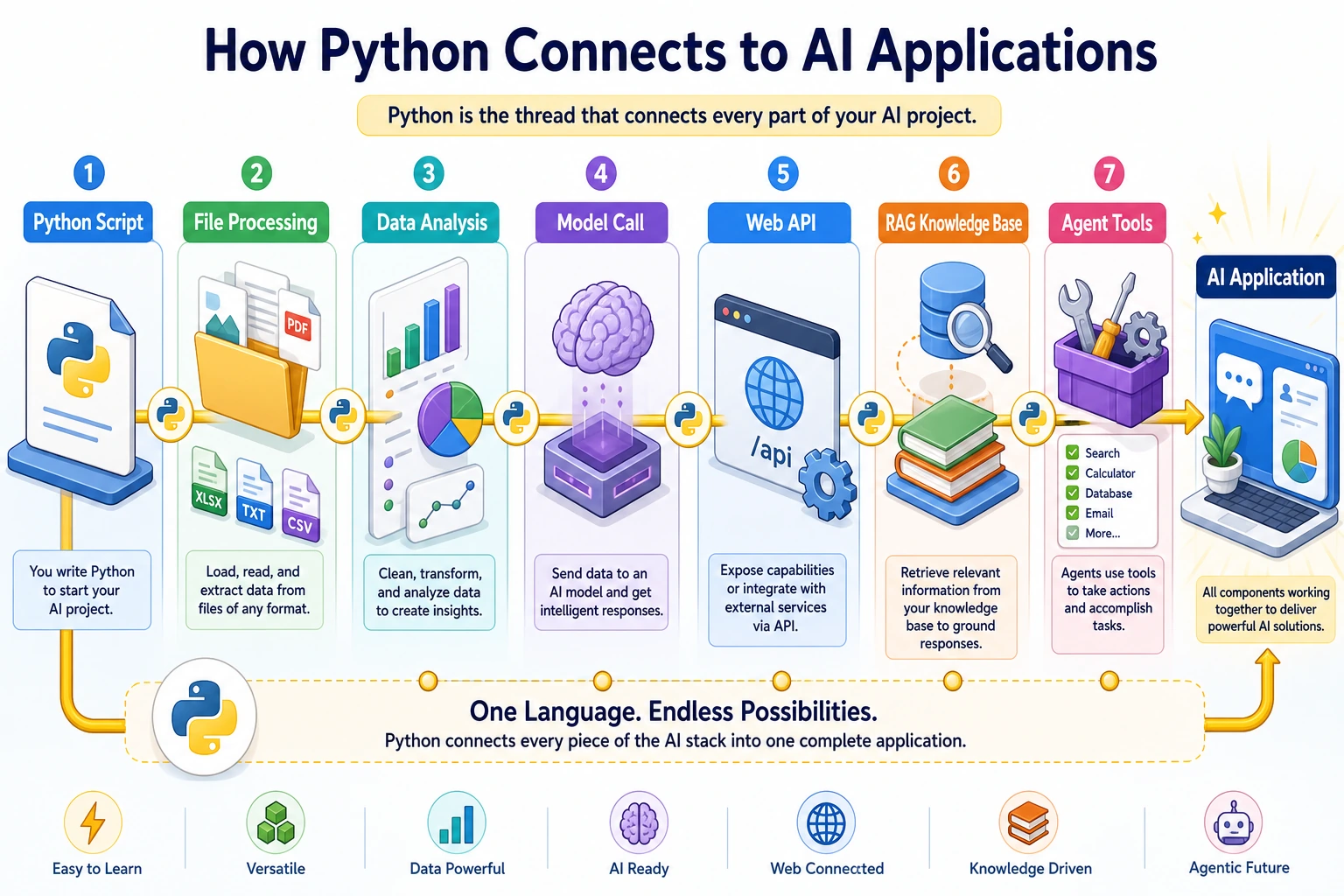
What This Section Is About
This section is your entry point into learning Python. You do not need to master complex syntax right away. First, understand why Python is a good fit for AI, what it can do, and run your first program yourself so you can build the first impression that “code can solve real problems.”
Learning Objectives
- Understand what Python is and why it is so popular
- Understand Python’s central role in AI
- Write and run your first Python program
- Understand the basic structure of Python code
Why Learn Python?
If a programming language is a tool, then Python is a Swiss Army knife—it can do almost anything, and it is easy to get started with.
First, let’s look at some data:
| Dimension | Description |
|---|---|
| Popularity | Has ranked No. 1 on the TIOBE programming language leaderboard for many consecutive years |
| AI First Choice | Almost all AI / machine learning frameworks (PyTorch, TensorFlow) are Python-first |
| Job Market | A must-have skill for data science, AI engineering, and backend development roles |
| Learning Curve | Syntax is close to natural language, making it one of the easiest languages for beginners to pick up |
In one sentence: If you want to do AI, Python is the starting point.
What Exactly Is Python?
Python is a high-level programming language released by Guido van Rossum in 1991.
What does “high-level” mean? The farther a programming language is from hardware and the closer it is to human language, the more “high-level” it is. Compare these:
# Machine language (binary, directly executed by the computer)
10110000 01100001

# C language (requires manual management of many details)
#include <stdio.h>
int main() {
    printf("Hello World\n");
    return 0;
}

# Python (concise and clear)
print("Hello World")
To print the same sentence, Python needs only 1 line, while C needs 5 lines. This is Python’s design philosophy: simple and elegant, so you can focus on solving problems instead of syntax details.
Core Features of Python
| Feature | Description | Benefit to You |
|---|---|---|
| Simple syntax | Uses indentation instead of braces; code reads like English | Learn faster, write less |
| Interpreted language | Run directly after writing, no compilation needed | Easy to debug, see results immediately |
| Dynamic typing | No need to declare variable types | Code is shorter and more flexible |
| Rich ecosystem | More than 400,000 third-party libraries | Ready-made tools others have built, use them directly |
| Cross-platform | Runs on Windows, macOS, and Linux | One codebase, many environments |
What Can Python Do?
Python is used in many areas. Here are a few of the most important:
AI and Machine Learning (the core of this course)
Before running the code below in Colab or Jupyter, install it first (only once):
!pip install scikit-learn
On your local terminal or in a Conda environment, use: pip install scikit-learn
# Train a simple linear regression model with a few lines of code (sample data, runnable as-is)
import numpy as np
from sklearn.linear_model import LinearRegression

X_train = np.array([[1], [2], [3], [4], [5]])   # features
y_train = np.array([2, 4, 6, 8, 10])             # labels (y ≈ 2*x)

model = LinearRegression()
model.fit(X_train, y_train)
# After training, you can use model.predict() for prediction
Mainstream frameworks: PyTorch, TensorFlow, scikit-learn, Hugging Face Transformers
Data Analysis and Visualization
import pandas as pd
import matplotlib.pyplot as plt

# Sample data (in real projects, you can use pd.read_csv("sales.csv") to load your own file)
data = pd.DataFrame({"month": ["January", "February", "March"], "revenue": [100, 150, 120]})

# Draw a chart in one line
data.plot(x="month", y="revenue", kind="bar")
plt.show()
Mainstream libraries: pandas, NumPy, Matplotlib, Seaborn
Web Backend Development
With Python, you can quickly build a website backend that provides an API, for example:
from fastapi import FastAPI

app = FastAPI()

@app.get("/hello")
def say_hello():
    return {"message": "Hello, world!"}
Run the service and visit it:
- First save the code above into a file, such as
main.py. Then open a terminal in that directory and run:pip install fastapi uvicorn
uvicorn main:app --reload - After you see
Uvicorn running on http://127.0.0.1:8000in the terminal, open the following in your browser:- http://127.0.0.1:8000/hello → returns
{"message":"Hello, world!"} - http://127.0.0.1:8000/docs → the auto-generated API documentation page, where you can click endpoints to test them
- http://127.0.0.1:8000/hello → returns
Mainstream frameworks: FastAPI, Django, Flask
Automation Scripts
import os

# Example: batch rename images in a folder (create a test directory first before running to avoid FileNotFoundError)
os.makedirs("photos", exist_ok=True)
for i in range(3):
    open(f"photos/old_{i}.jpg", "w").close()   # create 3 empty files as examples

for i, filename in enumerate(os.listdir("photos/")):
    new_name = f"photo_{i+1}.jpg"
    os.rename(f"photos/{filename}", f"photos/{new_name}")

# Check the result (in real projects, you can remove the test directory: os.removedirs, etc.)
print(os.listdir("photos/"))   # ['photo_1.jpg', 'photo_2.jpg', 'photo_3.jpg']
Web Scraping
# First install: !pip install beautifulsoup4
from bs4 import BeautifulSoup

# Use a sample HTML snippet to demonstrate parsing (no internet required, runnable as-is)
html = """
<html><body>
  <h1>Welcome to Learning Python</h1>
  <p>First paragraph</p>
  <p>Second paragraph</p>
</body></html>
"""
soup = BeautifulSoup(html, "html.parser")
title = soup.find("h1").text
paragraphs = soup.find_all("p")
print(f"Web page title: {title}")
print(f"Total {len(paragraphs)} paragraphs")
Write Your First Python Program
Option 1: Use Python Interactive Mode in the Terminal
Open the terminal (you already learned this in Station 1) and type:
python
You will see a prompt like this:
Python 3.11.5 (main, Sep 11 2023, 08:31:25)
Type "help", "copyright", "credits" or "license" for more information.
>>>
>>> is Python’s interactive prompt, which means it is waiting for you to enter a command.
Try these:
>>> print("Hello, World!")
Hello, World!

>>> 1 + 1
2

>>> "AI" * 3
'AIAIAI'

>>> len("Python")
6
Type exit() or press Ctrl+D to exit interactive mode.
Interactive mode is great for quick experiments—for example, if you are not sure how a function works, you can try it in interactive mode first, then write it into a file once you confirm it works.
Option 2: Write and Run in VS Code
- Open VS Code (it has already been installed in Station 1)
- Create a new file called
hello.py(note the.pyextension) - Enter the following code:
# This is my first Python program
print("Hello, World!")
print("I am learning Python!")
print("1 + 1 =", 1 + 1)
- Save the file (
Ctrl+S/Cmd+S) - Run it in the terminal:
python hello.py
Output:
Hello, World!
I am learning Python!
1 + 1 = 2
Congratulations, your first Python program is born!
Option 3: Run in Jupyter Notebook
You already installed Jupyter in Station 1. Open it:
jupyter notebook
Create a new Notebook, enter print("Hello from Jupyter!") in a code cell, and then press Shift+Enter to run it.
- Interactive mode: quickly test a small piece of code
- VS Code + .py files: write formal project code
- Jupyter Notebook: data analysis and learning experiments (this course will mainly use this one)
Basic Rules of Python Code
Before diving deeper, let’s first understand a few basic rules:
Indentation Matters
Python uses indentation (usually 4 spaces) to indicate code blocks, instead of braces {} like some other languages.
# Correct ✅
if True:
    print("Indented by 4 spaces")
    print("Same code block")
The following example is intentionally wrong and will raise IndentationError:
if True:
print("Not indented, Python will raise an error")
Indentation errors are one of the most common mistakes for beginners. VS Code will help you indent automatically, but if you copy and paste code, make sure the indentation is still correct.
Comments Use #
# This is a comment line; Python will ignore it
print("This line will run")  # You can also write comments at the end of a line

# Multi-line comments are just multiple lines starting with #
# First comment line
# Second comment line
Comments are for humans to read and help you (and others) understand the code. Good comments explain why something is done, not what is done.
Python Is Case-Sensitive
name = "Alice"
Name = "Bob"
NAME = "Charlie"
# These are three different variables!

print(name)   # Alice
Print(name)   # Error! Python has no Print, only print
Files End with .py
Python script files use the .py extension, such as hello.py, train.py, and model.py.
Python 2 or Python 3?
Short answer: Use Python 3, not Python 2.
Python 2 officially reached end of life on January 1, 2020. All new projects and all modern libraries support only Python 3. This course uses Python 3.10+.
Check your Python version:
python --version
# Should output Python 3.10.x or higher
If the output is Python 2.x, you need to use the python3 command, or check whether the Conda environment you configured in Station 1 is activated correctly.
Hands-on Practice
Exercise 1: An Upgraded Hello World
Create a file called about_me.py and make it print your personal introduction:
print("=== Personal Introduction ===")
print("Name: [Your Name]")
print("Goal: Become an AI Engineer")
print("Currently learning: Python programming")
print("=" * 20)
Run it and see the output. Try changing the content and add more information.
Exercise 2: Use Python as a Calculator
In Python interactive mode, try the following operations:
>>> 100 + 200
>>> 10 * 3.14
>>> 2 ** 10        # ** is exponentiation, 2 to the 10th power
>>> 17 / 5         # division
>>> 17 // 5        # floor division (drop the decimal part)
>>> 17 % 5         # remainder
Write down the result of each operation and think about why.
Exercise 3: Explore print()
Try the following code and observe different uses of print():
print("Hello")
print("Hello", "World")           # multiple arguments separated by commas
print("Hello", "World", sep="-")  # connect with -
print("Hello", end=" ")           # no newline
print("World")
print("Price:", 99.9, "yuan")
Summary
| Key Point | Description |
|---|---|
| Python is the preferred language for AI development | Almost all AI frameworks are built on Python |
| Syntax is simple and close to natural language | Lowers the learning barrier and lets you focus on logic |
| Rich ecosystem | 400,000+ third-party libraries, with ready-made solutions for most needs |
| Three ways to run code | Interactive mode, .py files, and Jupyter Notebook |
| Indentation is the soul of Python | Use 4-space indentation, not Tab |
Programming is a craft. You cannot learn it just by watching. For every exercise in this course, type the code yourself—do not copy and paste. Type it character by character. In the process of typing, you will make mistakes, debug, and understand more deeply.