2.2.1 Object-Oriented Programming
Section Overview
This section introduces an important way to organize complex code in Python. You do not need to master object-oriented programming right away, but understanding classes, objects, attributes, and methods will help you read later code for model classes, dataset classes, API service classes, and third-party library source code.
Learning Objectives
- Understand the basic idea of object-oriented programming (OOP)
- Master how to define and use classes and objects
- Understand attributes and methods
- Learn the basic use of inheritance and encapsulation
- Get to know commonly used magic methods
Why do we need object-oriented programming?
Suppose you are developing a student management system and need to record information about each student:
# Using variables and dictionaries
student1_name = "Zhang San"
student1_age = 20
student1_scores = [85, 92, 78]

student2_name = "Li Si"
student2_age = 21
student2_scores = [90, 88, 95]

# Or using dictionaries
student1 = {"name": "Zhang San", "age": 20, "scores": [85, 92, 78]}
student2 = {"name": "Li Si", "age": 21, "scores": [90, 88, 95]}

# Function to calculate average score
def get_average(student):
    return sum(student["scores"]) / len(student["scores"])
This approach has several problems:
- Data and operations are separated (student data is in dictionaries, while the calculation function is outside)
- There is no constraint (anyone can add strange keys to the dictionary or remove required keys)
- As students have more and more attributes, the code becomes messier and messier
The idea behind object-oriented programming is: bundle data and operations together to form an "object".
class Student:
    def __init__(self, name, age, scores):
        self.name = name
        self.age = age
        self.scores = scores

    def get_average(self):
        return sum(self.scores) / len(self.scores)

# Create student objects
student1 = Student("Zhang San", 20, [85, 92, 78])
student2 = Student("Li Si", 21, [90, 88, 95])

# Data and operations are tied together, which feels more natural to use
print(f"{student1.name}'s average score: {student1.get_average():.1f}")
print(f"{student2.name}'s average score: {student2.get_average():.1f}")
Basic concepts of classes and objects
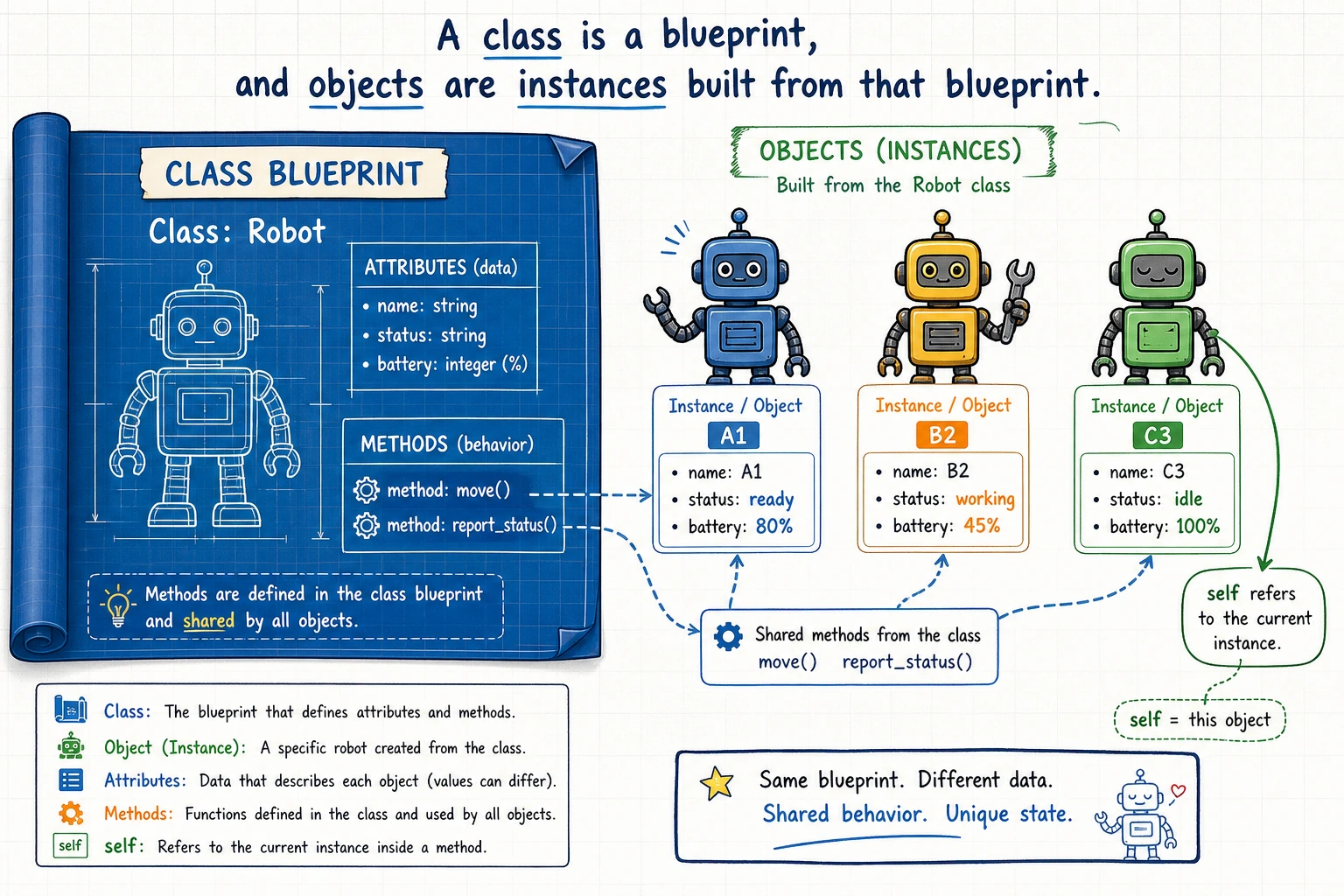
A simple real-world analogy:
- Class = blueprint/template. For example, "phone" is a concept/category
- Object/Instance = the real thing built from the blueprint. For example, "the iPhone 15 in your hand"
Class: Student (a template for students)
    └── Attributes: name, age, scores
    └── Methods: get_average(), is_passed()

Objects (instances):
    └── student1 = Student("Zhang San", 20, [85, 92, 78])
    └── student2 = Student("Li Si", 21, [90, 88, 95])
Defining a class
The simplest class
class Dog:
    """A dog"""

    def __init__(self, name, breed):
        """Initialization method, called automatically when an object is created"""
        self.name = name      # instance attribute
        self.breed = breed    # instance attribute

    def bark(self):
        """Method: dog barks"""
        print(f"{self.name} says: Woof woof woof!")

    def info(self):
        """Method: display information"""
        print(f"Name: {self.name}, Breed: {self.breed}")

# Create objects (instantiation)
my_dog = Dog("Wangcai", "Golden Retriever")
your_dog = Dog("Xiaohei", "Labrador")

# Access attributes
print(my_dog.name)     # Wangcai
print(your_dog.breed)  # Labrador

# Call methods
my_dog.bark()      # Wangcai says: Woof woof woof!
your_dog.info()    # Name: Xiaohei, Breed: Labrador
Key points explained
1. __init__ method (constructor)
__init__ is called automatically when you create an object, and it is used to initialize the object's attributes.
my_dog = Dog("Wangcai", "Golden Retriever")
# Python automatically does the following:
# 1. Create a new Dog object
# 2. Call __init__(self, "Wangcai", "Golden Retriever")
# 3. self.name = "Wangcai"
# 4. self.breed = "Golden Retriever"
# 5. Return this object to my_dog
2. What is self?
self represents the object itself. When you call my_dog.bark(), Python automatically passes my_dog as self to the bark method.
my_dog.bark()
# Equivalent to
Dog.bark(my_dog)
So self.name means "the name of this object."
selfself is just a convention. You can call it this or any other name, but it is strongly recommended to use self—this is the convention followed by all Python programmers.
Attributes and methods
Instance attributes vs class attributes
class Student:
    # Class attributes: shared by all instances
    school = "Python University"
    student_count = 0

    def __init__(self, name, age):
        # Instance attributes: unique to each instance
        self.name = name
        self.age = age
        Student.student_count += 1  # Add 1 for each student created

s1 = Student("Zhang San", 20)
s2 = Student("Li Si", 21)

# Class attributes can be accessed through the class name or an instance
print(Student.school)       # Python University
print(s1.school)            # Python University
print(Student.student_count)  # 2

# Instance attributes belong only to their own instances
print(s1.name)  # Zhang San
print(s2.name)  # Li Si
Methods
class Circle:
    def __init__(self, radius):
        self.radius = radius

    def area(self):
        """Calculate area"""
        return 3.14159 * self.radius ** 2

    def perimeter(self):
        """Calculate perimeter"""
        return 2 * 3.14159 * self.radius

    def scale(self, factor):
        """Scale the radius"""
        self.radius *= factor  # Modify attribute

c = Circle(5)
print(f"Area: {c.area():.2f}")       # 78.54
print(f"Perimeter: {c.perimeter():.2f}")   # 31.42

c.scale(2)  # Radius becomes 10
print(f"Area after scaling: {c.area():.2f}") # 314.16
Magic methods (double-underscore methods)
In Python, methods that start and end with __ are called magic methods. They allow your class to behave like built-in types.
__str__: define the output of print
class Student:
    def __init__(self, name, age):
        self.name = name
        self.age = age

    def __str__(self):
        return f"Student({self.name}, {self.age} years old)"

s = Student("Zhang San", 20)
print(s)  # Student(Zhang San, 20 years old)
# If there is no `__str__`, print will output <__main__.Student object at 0x...>
__repr__: define the representation developers see
class Student:
    def __init__(self, name, age):
        self.name = name
        self.age = age

    def __repr__(self):
        return f"Student('{self.name}', {self.age})"

s = Student("Zhang San", 20)
print(repr(s))   # Student('Zhang San', 20)
# In interactive mode, typing s directly will also show this
__len__: define the behavior of len()
class Playlist:
    def __init__(self, name, songs):
        self.name = name
        self.songs = songs

    def __len__(self):
        return len(self.songs)

my_playlist = Playlist("Study Music", ["Song A", "Song B", "Song C"])
print(len(my_playlist))  # 3
__eq__: define the behavior of ==
class Point:
    def __init__(self, x, y):
        self.x = x
        self.y = y

    def __eq__(self, other):
        return self.x == other.x and self.y == other.y

p1 = Point(3, 4)
p2 = Point(3, 4)
p3 = Point(1, 2)

print(p1 == p2)  # True
print(p1 == p3)  # False
Inheritance
Inheritance lets you create a new class based on an existing class, so you can reuse code.
Basic inheritance
# Parent class (base class)
class Animal:
    def __init__(self, name, age):
        self.name = name
        self.age = age

    def speak(self):
        print(f"{self.name} made a sound")

    def info(self):
        print(f"{self.name}, {self.age} years old")

# Child class (derived class)
class Dog(Animal):
    def __init__(self, name, age, breed):
        super().__init__(name, age)  # Call the parent class's __init__
        self.breed = breed

    def speak(self):  # Override the parent class method
        print(f"{self.name} says: Woof woof woof!")

    def fetch(self):  # Method unique to the child class
        print(f"{self.name} brought the ball back!")

class Cat(Animal):
    def speak(self):  # Override the parent class method
        print(f"{self.name} says: Meow meow meow~")

# Use
dog = Dog("Wangcai", 3, "Golden Retriever")
cat = Cat("Mimi", 2)

dog.info()     # Wangcai, 3 years old (inherited from Animal)
dog.speak()    # Wangcai says: Woof woof woof! (Dog's own implementation)
dog.fetch()    # Wangcai brought the ball back! (unique to Dog)

cat.info()     # Mimi, 2 years old
cat.speak()    # Mimi says: Meow meow meow~
What super() does
super() is used to call a parent class method. The most common use is in __init__:
class Animal:
    def __init__(self, name):
        self.name = name

class Dog(Animal):
    def __init__(self, name, breed):
        super().__init__(name)   # Let the parent class initialize name for me
        self.breed = breed       # Initialize breed myself
Using isinstance() to check types
dog = Dog("Wangcai", 3, "Golden Retriever")

print(isinstance(dog, Dog))     # True —— is a Dog
print(isinstance(dog, Animal))  # True —— also an Animal (because of inheritance)
print(isinstance(dog, Cat))     # False —— not a Cat
Encapsulation
The idea of encapsulation is: hide internal details and expose only the necessary interface.
Private attributes (by convention)
Python does not have truly private attributes, but it has naming conventions:
class BankAccount:
    def __init__(self, owner, balance=0):
        self.owner = owner
        self._balance = balance  # Single underscore: conventionally "internal use"

    def deposit(self, amount):
        if amount > 0:
            self._balance += amount
            print(f"Deposited {amount} yuan, balance: {self._balance}")

    def withdraw(self, amount):
        if 0 < amount <= self._balance:
            self._balance -= amount
            print(f"Withdrew {amount} yuan, balance: {self._balance}")
        else:
            print("Insufficient balance!")

    def get_balance(self):
        return self._balance

account = BankAccount("Zhang San", 1000)
account.deposit(500)     # Deposited 500 yuan, balance: 1500
account.withdraw(200)    # Withdrew 200 yuan, balance: 1300
print(account.get_balance())  # 1300

# Although you can technically access _balance directly, this is not recommended
# print(account._balance)  # It works, but you should not do this
| Naming convention | Meaning | Example |
|---|---|---|
name | Public attribute | self.name |
_name | Internal use (by convention) | self._balance |
__name | Name mangling (strongly hidden) | self.__secret |
Comprehensive example: AI model manager
class AIModel:
    """Base class for AI models"""
    model_count = 0

    def __init__(self, name, version="1.0"):
        self.name = name
        self.version = version
        self.is_trained = False
        self._accuracy = 0.0
        self._history = []
        AIModel.model_count += 1

    def train(self, epochs=10):
        """Train the model (simulation)"""
        import random
        print(f"Starting training {self.name} v{self.version}...")
        for epoch in range(1, epochs + 1):
            acc = min(0.5 + epoch * 0.05 + random.uniform(-0.02, 0.02), 1.0)
            self._history.append(acc)
            if epoch % 5 == 0 or epoch == epochs:
                print(f"  Epoch {epoch}/{epochs} - Accuracy: {acc:.2%}")
        self._accuracy = self._history[-1]
        self.is_trained = True
        print(f"Training complete! Final accuracy: {self._accuracy:.2%}")

    def predict(self, data):
        """Predict"""
        if not self.is_trained:
            print("Error: the model has not been trained yet!")
            return None
        print(f"{self.name} is predicting {len(data)} samples...")
        return [f"prediction_{i}" for i in range(len(data))]

    def __str__(self):
        status = "trained" if self.is_trained else "untrained"
        return f"Model({self.name} v{self.version}, {status}, acc={self._accuracy:.2%})"


class ImageClassifier(AIModel):
    """Image classification model"""
    def __init__(self, name, version="1.0", num_classes=10):
        super().__init__(name, version)
        self.num_classes = num_classes

    def predict(self, images):
        if not self.is_trained:
            print("Error: the model has not been trained yet!")
            return None
        print(f"Classifying {len(images)} images ({self.num_classes} classes)...")
        import random
        return [random.randint(0, self.num_classes - 1) for _ in images]


# Use
model = ImageClassifier("ResNet-50", "2.0", num_classes=100)
print(model)  # Model(ResNet-50 v2.0, untrained, acc=0.00%)

model.train(epochs=10)
predictions = model.predict(["img1.jpg", "img2.jpg", "img3.jpg"])
print(f"Predicted classes: {predictions}")
print(model)
print(f"Current total number of models: {AIModel.model_count}")
Hands-on practice
Exercise 1: Book management
Create a Book class:
class Book:
    def __init__(self, title, author, pages):
        self.title = title
        self.author = author
        self.pages = pages
        self.current_page = 0

    def read(self, pages):
        self.current_page = min(self.current_page + pages, self.pages)

    def progress(self):
        return self.current_page / self.pages * 100

    def __str__(self):
        return f"{self.title} by {self.author}: {self.current_page}/{self.pages} pages"

# Test
book = Book("Python Basics", "Zhang San", 300)
book.read(50)
print(f"{book.progress():.1f}%")  # 16.7%
print(book)
Exercise 2: A simple shopping cart
class Product:
    def __init__(self, name, price):
        self.name = name
        self.price = price

class ShoppingCart:
    def __init__(self):
        self.items = {}

    def add(self, product, quantity=1):
        self.items[product.name] = self.items.get(product.name, [product, 0])
        self.items[product.name][1] += quantity

    def remove(self, product_name):
        self.items.pop(product_name, None)

    def total(self):
        return sum(product.price * quantity for product, quantity in self.items.values())

    def __str__(self):
        lines = [f"{product.name} x {quantity}" for product, quantity in self.items.values()]
        return "\n".join(lines) or "Shopping cart is empty"

cart = ShoppingCart()
cart.add(Product("Keyboard", 199), 2)
cart.add(Product("Mouse", 99), 1)
print(cart)
print(f"Total: {cart.total()}")
Exercise 3: Zoo
Implement this using inheritance:
class Animal:
    def __init__(self, name, age):
        self.name = name
        self.age = age

    def speak(self):
        return "..."

class Dog(Animal):
    def speak(self):
        return "Woof woof"

class Cat(Animal):
    def speak(self):
        return "Meow meow"

class Duck(Animal):
    def speak(self):
        return "Quack quack"

animals = [Dog("Buddy", 3), Cat("Mimi", 2), Duck("Ducky", 1)]
for animal in animals:
    print(f"{animal.name}: {animal.speak()}")
Summary
| Concept | Description | Syntax |
|---|---|---|
| Class | Template/blueprint for objects | class MyClass: |
| Object | An instance of a class | obj = MyClass() |
__init__ | Constructor method, initializes attributes | def __init__(self): |
| self | Points to the current object itself | self.name = name |
| Inheritance | Child class reuses parent class code | class Dog(Animal): |
| super() | Call a parent class method | super().__init__() |
| Magic methods | Customize object behavior | __str__, __len__, __eq__ |
The core idea of object-oriented programming is to bind data and behavior together. A class is a template, and an object is an instance. Inheritance lets you reuse code, and encapsulation lets you hide details. In AI development, you will see classes very often—PyTorch model definitions are classes that inherit from nn.Module, and the objects manipulated in the training loop are all instances.