2.3.2 Project: Web Scraper
Project Overview
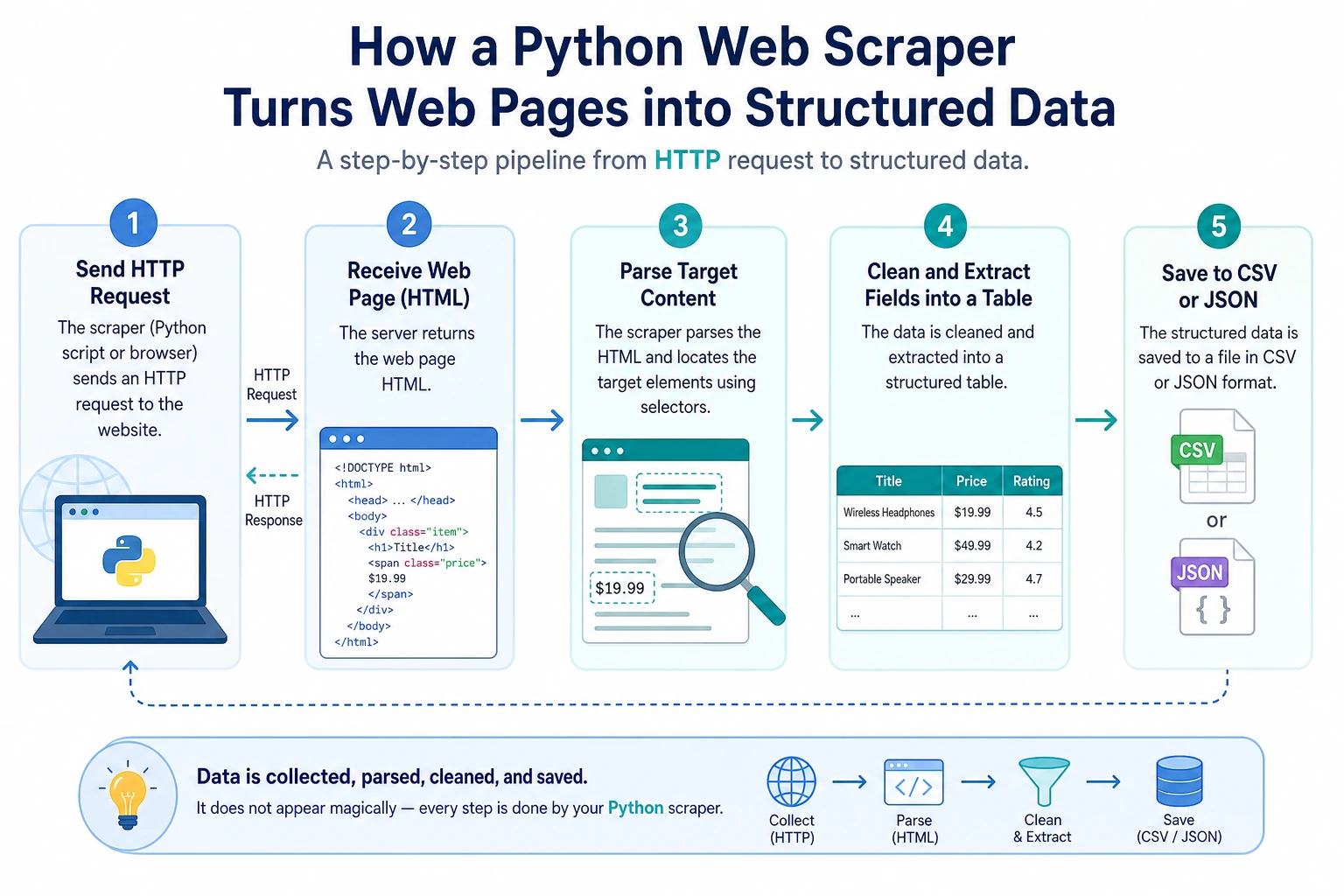
This project gives you your first experience using Python to obtain data from the internet. You will connect HTTP requests, HTML parsing, data cleaning, and file saving to understand that real-world data does not appear out of thin air — it must be collected, organized, and structured.
Project Goals
- Understand the basic concepts of HTTP requests and web page structure
- Learn how to use the
requestslibrary to send HTTP requests - Learn how to use
BeautifulSoupto parse HTML - Build a practical web data collection tool
Introduction
A Web Scraper is a program that automatically extracts data from web pages. For example:
- Collect job listings from job boards
- Scrape article titles from news websites
- Get product prices from e-commerce websites
- Collect data for AI model training
We will build a scraper that can extract web page information and save it as structured data.
Prerequisite Knowledge: HTTP and HTML
What is an HTTP request?
When you enter a URL in your browser and press Enter, the browser sends an HTTP request to the server, and the server returns the web page content (HTTP response).
Your browser  →  HTTP request  →  Server
Your browser  ←  HTTP response  ←  Server (returns HTML)
Python’s requests library can help you do the same thing as a browser — send requests and get page content.
What is HTML?
HTML (HyperText Markup Language) is the "skeleton" of a web page. A simple HTML page:
<html>
<head>
    <title>Sample Page</title>
</head>
<body>
    <h1>Welcome to My Website</h1>
    <p class="intro">This is an introductory paragraph.</p>
    <ul>
        <li>Item 1</li>
        <li>Item 2</li>
        <li>Item 3</li>
    </ul>
    <a href="https://example.com">Click here</a>
</body>
</html>
The scraper’s job is to extract the data you need from these HTML tags.
Step 1: Install Dependencies
pip install requests beautifulsoup4
| Library | Purpose |
|---|---|
requests | Send HTTP requests and get web content |
beautifulsoup4 | Parse HTML and extract data |
Step 2: Send an HTTP Request
import requests

# Send a GET request
response = requests.get("https://httpbin.org/get")

# Check the response status
print(f"Status code: {response.status_code}")  # 200 means success
print(f"Encoding: {response.encoding}")

# View the response content
print(response.text[:200])  # Text content (first 200 characters)

# Meaning of response status codes
# 200: Success
# 404: Page not found
# 403: Forbidden
# 500: Server error
Add Request Headers (Simulate a Browser)
Some websites check whether requests come from a browser, so you may need to set a User-Agent:
headers = {
    "User-Agent": "Mozilla/5.0 (Macintosh; Intel Mac OS X 10_15_7) "
                  "AppleWebKit/537.36 (KHTML, like Gecko) "
                  "Chrome/120.0.0.0 Safari/537.36"
}

response = requests.get("https://example.com", headers=headers)
print(response.status_code)
Handle Request Exceptions
import requests

def fetch_page(url: str) -> str | None:
    """Safely fetch web page content"""
    try:
        response = requests.get(url, headers=headers, timeout=10)
        response.raise_for_status()  # Raise an exception if the status code is not 200
        response.encoding = response.apparent_encoding  # Auto-detect encoding
        return response.text
    except requests.ConnectionError:
        print(f"❌ Could not connect to {url}")
    except requests.Timeout:
        print(f"❌ Request timed out: {url}")
    except requests.HTTPError as e:
        print(f"❌ HTTP error: {e}")
    return None
Step 3: Parse HTML
from bs4 import BeautifulSoup

html = """
<html>
<body>
    <h1>Python Course List</h1>
    <div class="course-list">
        <div class="course">
            <h2 class="title">Python Basics</h2>
            <span class="price">¥99</span>
            <span class="rating">4.8</span>
        </div>
        <div class="course">
            <h2 class="title">Advanced Python</h2>
            <span class="price">¥199</span>
            <span class="rating">4.6</span>
        </div>
        <div class="course">
            <h2 class="title">Python AI Practice</h2>
            <span class="price">¥399</span>
            <span class="rating">4.9</span>
        </div>
    </div>
</body>
</html>
"""

# Create a BeautifulSoup object
soup = BeautifulSoup(html, "html.parser")

# Find a single element
title = soup.find("h1")
print(title.text)  # Python Course List

# Find all matching elements
courses = soup.find_all("div", class_="course")
for course in courses:
    name = course.find("h2", class_="title").text
    price = course.find("span", class_="price").text
    rating = course.find("span", class_="rating").text
    print(f"{name} - {price} - Rating: {rating}")

# Output:
# Python Basics - ¥99 - Rating: 4.8
# Advanced Python - ¥199 - Rating: 4.6
# Python AI Practice - ¥399 - Rating: 4.9
Common BeautifulSoup Methods
# Find by tag name
soup.find("h1")           # Find the first h1
soup.find_all("p")        # Find all p tags

# Find by class
soup.find("div", class_="content")
soup.find_all("span", class_="price")

# Find by id
soup.find("div", id="main")

# CSS selectors (more powerful)
soup.select("div.course h2")          # All h2 under div.course
soup.select("ul > li")                # li direct children of ul
soup.select("a[href]")                # All a tags with an href attribute

# Get text and attributes
tag = soup.find("a")
print(tag.text)              # Link text
print(tag.get("href"))       # href attribute value
print(tag["href"])           # Same as above
Step 4: Full Project Demo
Project: Scrape a Quotes Website
We’ll use a website made specifically for scraper practice: quotes.toscrape.com:
"""
Web scraper project: Scrape famous quotes
Target website: https://quotes.toscrape.com
"""

import requests
from bs4 import BeautifulSoup
import json
import time


def scrape_quotes(max_pages: int = 5) -> list[dict]:
    """Scrape quote data"""
    all_quotes = []
    base_url = "https://quotes.toscrape.com"

    for page in range(1, max_pages + 1):
        url = f"{base_url}/page/{page}/"
        print(f"Scraping page {page}: {url}")

        try:
            response = requests.get(url, timeout=10)
            response.raise_for_status()
        except requests.RequestException as e:
            print(f"  ❌ Request failed: {e}")
            continue

        soup = BeautifulSoup(response.text, "html.parser")
        quotes = soup.find_all("div", class_="quote")

        if not quotes:
            print("  No more data available")
            break

        for quote in quotes:
            text = quote.find("span", class_="text").text
            author = quote.find("small", class_="author").text
            tags = [tag.text for tag in quote.find_all("a", class_="tag")]

            all_quotes.append({
                "text": text,
                "author": author,
                "tags": tags
            })

        print(f"  ✅ Scraped {len(quotes)} quotes")
        time.sleep(1)  # Be polite and do not put too much pressure on the server

    return all_quotes


def save_to_json(data: list[dict], filename: str = "quotes.json") -> None:
    """Save as a JSON file"""
    with open(filename, "w", encoding="utf-8") as f:
        json.dump(data, f, ensure_ascii=False, indent=2)
    print(f"\n💾 Saved {len(data)} records to {filename}")


def save_to_csv(data: list[dict], filename: str = "quotes.csv") -> None:
    """Save as a CSV file"""
    import csv
    with open(filename, "w", newline="", encoding="utf-8") as f:
        writer = csv.DictWriter(f, fieldnames=["text", "author", "tags"])
        writer.writeheader()
        for item in data:
            item_copy = item.copy()
            item_copy["tags"] = ", ".join(item["tags"])
            writer.writerow(item_copy)
    print(f"💾 Saved to {filename}")


def analyze_quotes(quotes: list[dict]) -> None:
    """Analyze data"""
    print("\n📊 Data analysis:")
    print(f"  Total quotes: {len(quotes)}")

    # Count how many quotes each author has
    author_count = {}
    for q in quotes:
        author = q["author"]
        author_count[author] = author_count.get(author, 0) + 1

    # Sort by count
    sorted_authors = sorted(author_count.items(), key=lambda x: x[1], reverse=True)
    print(f"  Number of authors: {len(sorted_authors)}")
    print(f"\n  Top 5 authors by quote count:")
    for author, count in sorted_authors[:5]:
        print(f"    {author}: {count} quotes")

    # Count tags
    all_tags = {}
    for q in quotes:
        for tag in q["tags"]:
            all_tags[tag] = all_tags.get(tag, 0) + 1

    sorted_tags = sorted(all_tags.items(), key=lambda x: x[1], reverse=True)
    print(f"\n  Top 10 most popular tags:")
    for tag, count in sorted_tags[:10]:
        print(f"    #{tag}: {count} times")


def main():
    print("=== Famous Quotes Scraper ===\n")

    # Scrape data
    quotes = scrape_quotes(max_pages=5)

    if not quotes:
        print("No data was scraped")
        return

    # Save data
    save_to_json(quotes)
    save_to_csv(quotes)

    # Analyze data
    analyze_quotes(quotes)


if __name__ == "__main__":
    main()
Things to Keep in Mind When Scraping
- Follow robots.txt: A website’s
robots.txtfile specifies which content is allowed to be scraped - Control request frequency: Add
time.sleep()between requests; do not put too much pressure on the server - Do not scrape sensitive data: Personal privacy, paid content, and similar data should not be scraped
- Follow the website’s terms of use: Some websites explicitly prohibit scraping
- Use only for learning and personal purposes: Commercial use requires extra attention to legal issues
Extension Challenges
Challenge 1: Error Retry Mechanism
Add automatic retry support to your scraper — if a request fails, wait a few seconds and retry automatically (up to 3 times).
Challenge 2: Automatic Pagination
Let the scraper automatically detect the "next page" button and keep scraping until there is no next page.
Challenge 3: Data Deduplication
If the same piece of data is scraped multiple times, automatically remove duplicates.
Challenge 4: Command-Line Arguments
Use sys.argv or argparse to let users specify the number of pages to scrape and the output filename from the command line:
python scraper.py --pages 10 --output data.json
Project Self-Check Checklist
- Can successfully send HTTP requests and get responses
- Can parse HTML and extract target data
- Data is saved in JSON and/or CSV format
- Has proper error handling (network errors, parsing errors)
- Includes delays between requests (
time.sleep) - Code structure is clear, with well-defined functions
- Includes simple data analysis and statistics
Web scraping is an important way to collect data. In the AI field, the quality and quantity of training data directly determine model performance. Mastering scraping means you can collect your own training data instead of relying only on ready-made datasets. At the same time, this project introduces you to the HTTP protocol and HTML parsing — fundamental knowledge for web development.
Suggested Version Roadmap
| Version | Goal | Delivery Focus |
|---|---|---|
| Basic | Complete the smallest working loop | Can accept input, process it, output it, and keep one set of examples |
| Standard | Turn it into a presentable project | Add configuration, logging, error handling, README, and screenshots |
| Challenge | Approach portfolio quality | Add evaluation, comparison experiments, failure sample analysis, and next-step roadmap |
It’s recommended to complete the basic version first. Don’t try to make it large and comprehensive from the start. With each version upgrade, write into the README: “What new capability was added, how was it verified, and what problems remain.”