2.3.3 Project: Web API Development
Project Overview
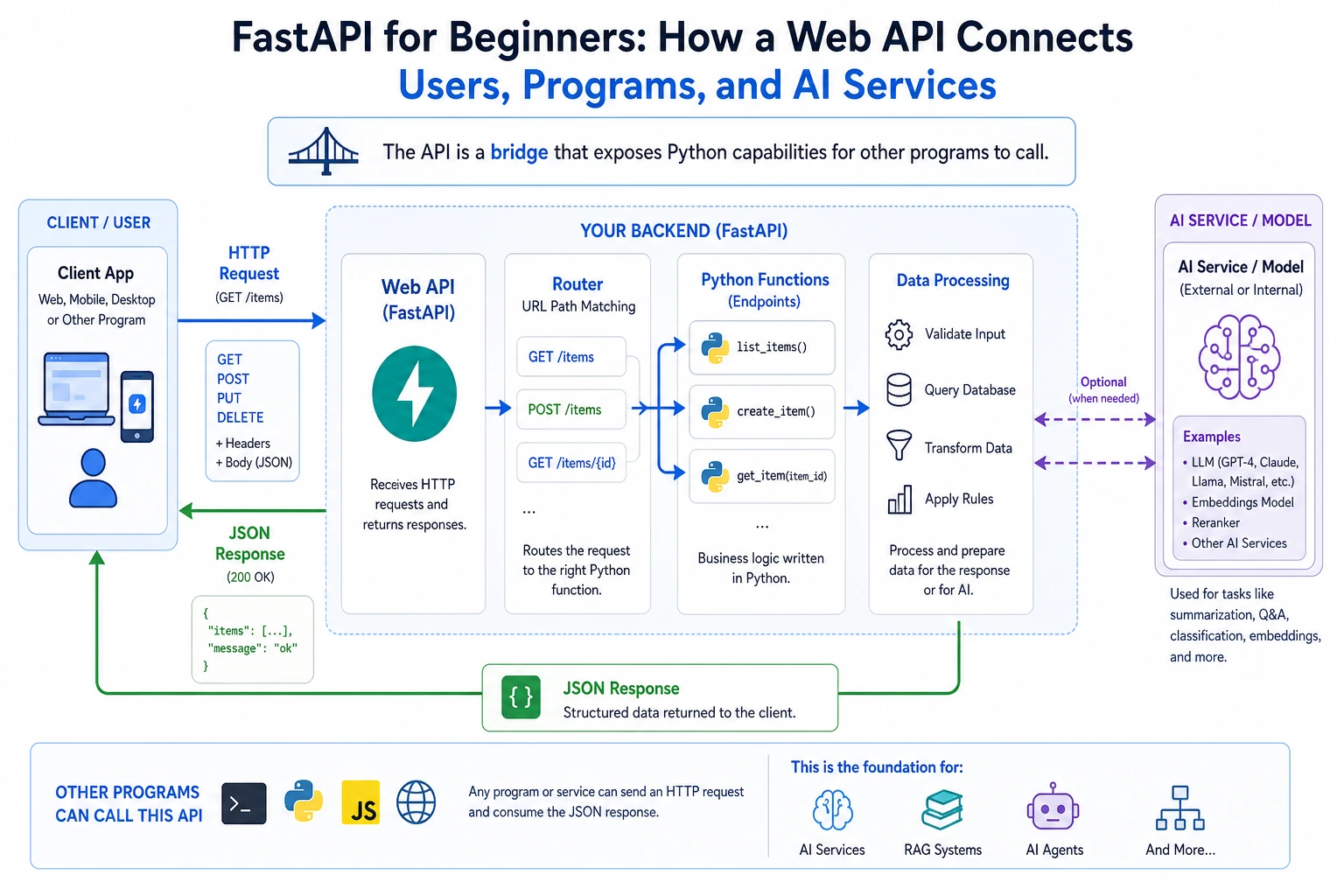
This project takes Python from scripts to the server side. You will use FastAPI to wrap functionality into interfaces that other programs can call, understand how APIs connect models, applications, and users, and lay the groundwork for later AI application development.
Project Goals
- Understand what an API is and why AI engineers need to know how to write APIs
- Learn how to use the FastAPI framework to build a Web API
- Master the basic design principles of RESTful APIs
- Build an AI service interface that can be called by other programs
Why do AI engineers need to know how to write APIs?
You trained a great AI model — then what?
Training the model is only the first step. To let others use your model, you need to wrap it as an API service:
Your AI model  →  wrapped as an API  →  called by mobile apps / websites / other programs

Examples:
- ChatGPT model → provide service through an API → called by various apps
- Image recognition model → through an API → users upload images and get recognition results
- Recommendation algorithm → through an API → e-commerce websites show recommended products
So APIs are the bridge between AI models and the real world.
What is an API?
API (Application Programming Interface) = Application Programming Interface.
Simply put, an API is a "conversation window" between programs.
Going to a restaurant to eat is just like making an API call:
You (client)  →  tell the server (API) "one bowl of beef noodles" (request)
The server     →  passes it to the kitchen (server)
The kitchen    →  makes the noodles
The server     →  brings the noodles to you (response)
You do not need to know how the kitchen makes the noodles. You only need to know how to order (send a request) and how to receive the food (get a response).
Core concepts of Web APIs
| Concept | Description | Analogy |
|---|---|---|
| URL (endpoint) | The address of the API | Restaurant address |
| HTTP method | Type of operation | Ordering / returning a dish / adding a dish |
| Request body | The data you send | The dish you want |
| Response | The returned result | The dish served to you |
| Status code | Whether the operation succeeded | 200 = success, 404 = no such dish |
HTTP methods
| Method | Use | Example |
|---|---|---|
GET | Retrieve data | Get task list |
POST | Create data | Add a new task |
PUT | Update data (entirely) | Modify all task information |
DELETE | Delete data | Delete a task |
Step 1: Install FastAPI
pip install fastapi uvicorn
| Library | Purpose |
|---|---|
fastapi | Web framework for writing APIs |
uvicorn | ASGI server for running FastAPI apps |
Step 2: Hello World API
Create the file main.py:
from fastapi import FastAPI

# Create the app instance
app = FastAPI(title="My First API", version="1.0")

# Define an endpoint
@app.get("/")
def root():
    return {"message": "Hello, World!", "status": "running"}

@app.get("/hello/{name}")
def hello(name: str):
    return {"message": f"Hello, {name}!", "name": name}
Start the server:
uvicorn main:app --reload
main= file name (main.py)app= FastAPI instance name--reload= automatically restart after code changes (for development)
Open your browser and visit:
http://127.0.0.1:8000→ see Hello Worldhttp://127.0.0.1:8000/hello/Xiaoming→ see a personalized greetinghttp://127.0.0.1:8000/docs→ automatically generated interactive API documentation!
Visit /docs, and you will see a beautiful interactive API document (based on Swagger UI). You can test the API directly in your browser without writing any frontend code. This is one of FastAPI's most popular features.
Step 3: Build a task management API
Let's turn the task manager from the previous command line project into a Web API:
"""
Task Management API
Run: uvicorn main:app --reload
Docs: http://127.0.0.1:8000/docs
"""

from fastapi import FastAPI, HTTPException
from pydantic import BaseModel
from datetime import datetime

# Create the app
app = FastAPI(
    title="Task Management API",
    description="A simple RESTful task management interface",
    version="1.0"
)

# ---------- Data models ----------

class TaskCreate(BaseModel):
    """Request body for creating a task"""
    title: str
    priority: str = "medium"

class TaskUpdate(BaseModel):
    """Request body for updating a task"""
    title: str | None = None
    priority: str | None = None
    done: bool | None = None

class Task(BaseModel):
    """Full task data"""
    id: int
    title: str
    priority: str
    done: bool
    created_at: str

# ---------- Mock database (in-memory storage) ----------

tasks_db: list[dict] = []
next_id: int = 1

# ---------- API endpoints ----------

@app.get("/")
def root():
    """API homepage"""
    return {
        "name": "Task Management API",
        "version": "1.0",
        "endpoints": {
            "View all tasks": "GET /tasks",
            "Create a task": "POST /tasks",
            "View a single task": "GET /tasks/{task_id}",
            "Update a task": "PUT /tasks/{task_id}",
            "Delete a task": "DELETE /tasks/{task_id}",
            "API documentation": "GET /docs"
        }
    }


@app.get("/tasks")
def get_tasks(done: bool | None = None):
    """
    Get all tasks.

    Optional parameter:
    - done: filter completed (true) or incomplete (false) tasks
    """
    if done is not None:
        filtered = [t for t in tasks_db if t["done"] == done]
        return {"count": len(filtered), "tasks": filtered}
    return {"count": len(tasks_db), "tasks": tasks_db}


@app.post("/tasks", status_code=201)
def create_task(task: TaskCreate):
    """Create a new task"""
    global next_id

    new_task = {
        "id": next_id,
        "title": task.title,
        "priority": task.priority,
        "done": False,
        "created_at": datetime.now().strftime("%Y-%m-%d %H:%M:%S")
    }
    tasks_db.append(new_task)
    next_id += 1

    return {"message": "Task created successfully", "task": new_task}


@app.get("/tasks/{task_id}")
def get_task(task_id: int):
    """Get a task by its ID"""
    for task in tasks_db:
        if task["id"] == task_id:
            return task

    # Task not found, return 404
    raise HTTPException(status_code=404, detail=f"Task {task_id} does not exist")


@app.put("/tasks/{task_id}")
def update_task(task_id: int, task_update: TaskUpdate):
    """Update a task"""
    for task in tasks_db:
        if task["id"] == task_id:
            if task_update.title is not None:
                task["title"] = task_update.title
            if task_update.priority is not None:
                task["priority"] = task_update.priority
            if task_update.done is not None:
                task["done"] = task_update.done
            return {"message": "Update successful", "task": task}

    raise HTTPException(status_code=404, detail=f"Task {task_id} does not exist")


@app.delete("/tasks/{task_id}")
def delete_task(task_id: int):
    """Delete a task"""
    for i, task in enumerate(tasks_db):
        if task["id"] == task_id:
            removed = tasks_db.pop(i)
            return {"message": "Delete successful", "task": removed}

    raise HTTPException(status_code=404, detail=f"Task {task_id} does not exist")


@app.get("/stats")
def get_stats():
    """Get task statistics"""
    total = len(tasks_db)
    done = sum(1 for t in tasks_db if t["done"])
    return {
        "total": total,
        "done": done,
        "pending": total - done,
        "completion_rate": f"{done/total:.1%}" if total > 0 else "0%"
    }
Run and test
# Start the server
uvicorn main:app --reload
Then open http://127.0.0.1:8000/docs, and you can test all APIs directly in the browser.
You can also test with the command line:
# Create a task
curl -X POST http://127.0.0.1:8000/tasks \
  -H "Content-Type: application/json" \
  -d '{"title": "Learn FastAPI", "priority": "high"}'

# View all tasks
curl http://127.0.0.1:8000/tasks

# Complete a task
curl -X PUT http://127.0.0.1:8000/tasks/1 \
  -H "Content-Type: application/json" \
  -d '{"done": true}'

# Delete a task
curl -X DELETE http://127.0.0.1:8000/tasks/1
Or use Python's requests library:
import requests

BASE_URL = "http://127.0.0.1:8000"

# Create a task
resp = requests.post(f"{BASE_URL}/tasks", json={"title": "Learn Python", "priority": "high"})
print(resp.json())

# Get all tasks
resp = requests.get(f"{BASE_URL}/tasks")
print(resp.json())
Understanding Pydantic data models
FastAPI uses Pydantic to validate request data — you define the data model, and FastAPI checks it automatically:
from pydantic import BaseModel, Field

class TaskCreate(BaseModel):
    title: str = Field(..., min_length=1, max_length=100, description="Task title")
    priority: str = Field(default="medium", description="Priority: high/medium/low")

# If the user sends invalid data
# POST /tasks {"title": ""} → automatically returns a 422 error (title too short)
# POST /tasks {} → automatically returns a 422 error (missing title)
# POST /tasks {"title": "OK"} → success, priority uses the default value "medium"
You do not need to write validation code by hand — Pydantic and FastAPI handle it for you.
Extension challenges
Challenge 1: Add file persistence
Right now the data is stored in memory, so it disappears when the server restarts. Change it to save data in a JSON file.
Challenge 2: Add search
@app.get("/tasks/search")
def search_tasks(keyword: str):
    """Search tasks by keyword"""
    keyword_lower = keyword.lower()
    return [task for task in tasks if keyword_lower in task.title.lower()]
Challenge 3: Add pagination
When there are many tasks, support paginated responses:
GET /tasks?page=1&size=10
Challenge 4: Connect an AI model
Preview for later: create a /predict endpoint that accepts text input and returns sentiment analysis results.
Project self-checklist
- The API can start and be accessed normally
- Full CRUD (create, read, update, delete) operations are implemented
- Pydantic is used for data validation
- Proper error handling is in place (HTTPException)
- The automatically generated API docs (
/docs) work correctly - All endpoints can be tested with curl or requests
FastAPI is one of the most commonly used Web frameworks for AI engineers. Many AI projects are deployed like this: train the model → wrap it as an API with FastAPI → deploy it to a server. By mastering FastAPI, you gain the key ability to productize AI models. Also, FastAPI's automatic documentation makes frontend-backend collaboration very smooth.
Suggested version roadmap
| Version | Goal | Delivery focus |
|---|---|---|
| Basic version | Make the minimal loop run end to end | Can input, process, and output, and keep a set of examples |
| Standard version | Shape it into a presentable project | Add configuration, logs, error handling, a README, and screenshots |
| Challenge version | Approach portfolio quality | Add evaluation, comparison experiments, failure sample analysis, and next-step roadmap |
It is recommended to finish the basic version first. Do not chase a huge, all-in-one project at the beginning. Each time you upgrade to a new version, write down in the README what new capability was added, how it was verified, and what problems remain.