2.3.1 Project: Command-Line Task Manager
Project Overview
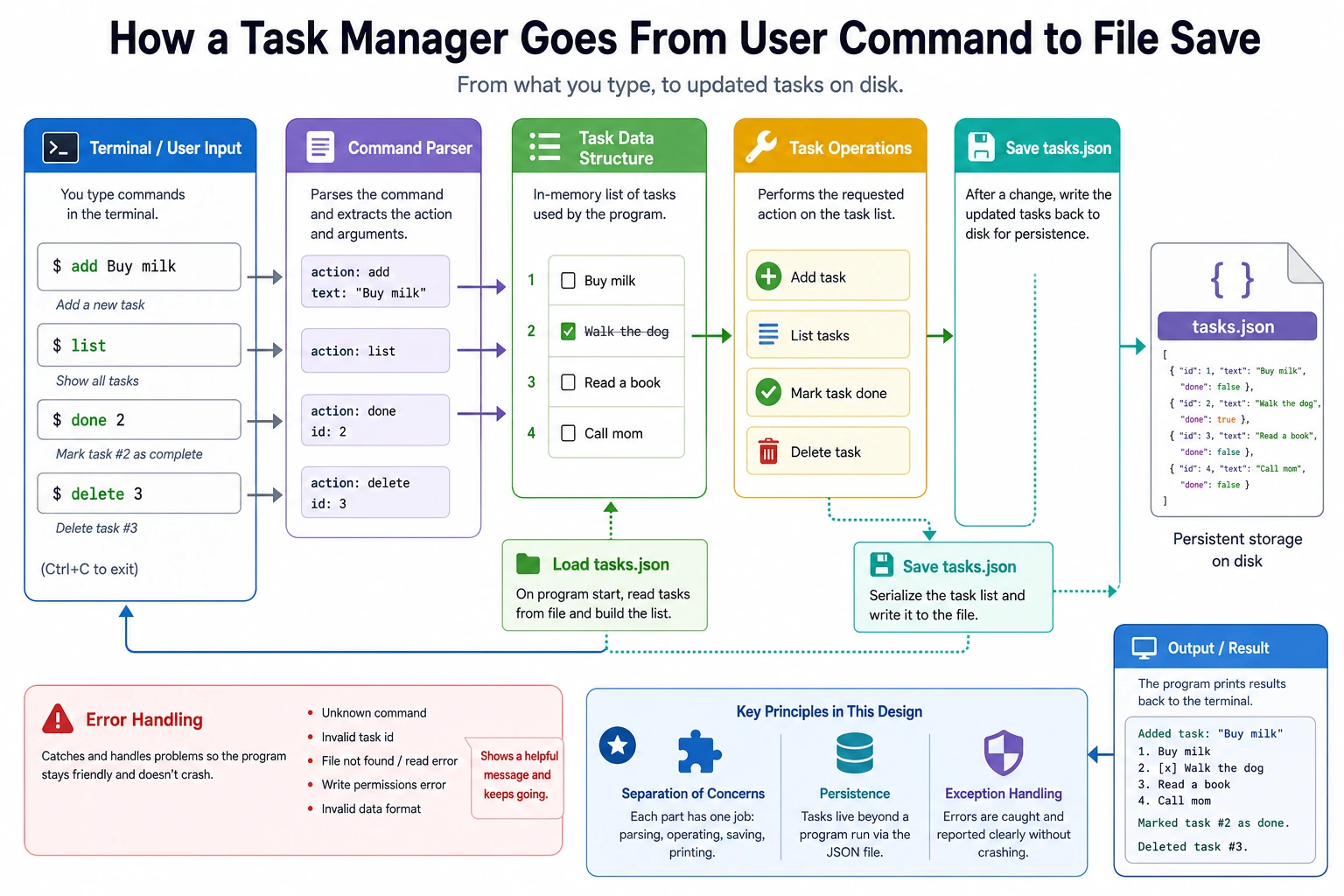
This is the first complete mini-project in the Python fundamentals stage. You will combine data structures, functions, file I/O, and exception handling to build a real command-line tool that can save tasks, view tasks, and update task status.
Project Goals
- Apply Python fundamentals in a comprehensive way (data structures, functions, file operations, exception handling)
- Experience the full project development workflow: requirements analysis → design → coding → testing
- Build a truly usable command-line tool
Project Introduction
We are going to build a command-line task manager (similar to a simplified Todoist) that supports:
- Adding tasks
- Viewing all tasks
- Marking tasks as complete
- Deleting tasks
- Data persistence (data will not be lost after the program closes)
Final result:
===== Task Manager =====
1. View all tasks
2. Add task
3. Complete task
4. Delete task
5. Exit

Choose an action (1-5): 1

📋 Task List:
  1. [ ] Learn Python fundamentals   (Created at: 2026-02-09)
  2. [✓] Finish Chapter 1 tooling basics  (Created at: 2026-02-08)
  3. [ ] Start a machine learning project (Created at: 2026-02-09)

Total 3 tasks, 1 completed
Step 1: Project Planning
Data Design
What information does each task need?
task = {
    "id": 1,
    "title": "Learn Python fundamentals",
    "done": False,
    "created_at": "2026-02-09 14:30:00"
}
All tasks are stored in a list and saved to a JSON file.
Functional Modules
| Module | Function |
|---|---|
| Data management | Load/save tasks to/from a file |
| Task operations | Create, read, update, delete |
| User interface | Menu display, input handling |
Step 2: Basic Version
First, implement the simplest version without file persistence:
# todo.py —— command-line task manager

from datetime import datetime


def show_menu():
    """Display the menu"""
    print("\n===== Task Manager =====")
    print("1. View all tasks")
    print("2. Add task")
    print("3. Complete task")
    print("4. Delete task")
    print("5. Exit")
    print()


def show_tasks(tasks: list[dict]) -> None:
    """Display all tasks"""
    if not tasks:
        print("📭 No tasks yet. Go add one!")
        return

    print("\n📋 Task List:")
    for i, task in enumerate(tasks, 1):
        status = "✓" if task["done"] else " "
        print(f'  {i}. [{status}] {task["title"]}  '
              f'(Created at: {task["created_at"][:10]})')

    done_count = sum(1 for t in tasks if t["done"])
    print(f"\nTotal {len(tasks)} tasks, {done_count} completed")


def add_task(tasks: list[dict]) -> None:
    """Add a new task"""
    title = input("Enter task title: ").strip()
    if not title:
        print("❌ Task title cannot be empty!")
        return

    task = {
        "id": len(tasks) + 1,
        "title": title,
        "done": False,
        "created_at": datetime.now().strftime("%Y-%m-%d %H:%M:%S")
    }
    tasks.append(task)
    print(f"✅ Task '{title}' has been added!")


def complete_task(tasks: list[dict]) -> None:
    """Mark a task as complete"""
    show_tasks(tasks)
    if not tasks:
        return

    try:
        num = int(input("Enter the task number to complete: "))
        if 1 <= num <= len(tasks):
            task = tasks[num - 1]
            if task["done"]:
                print(f"⚠️ Task '{task['title']}' has already been completed")
            else:
                task["done"] = True
                print(f"✅ Task '{task['title']}' has been marked as complete!")
        else:
            print("❌ Invalid task number!")
    except ValueError:
        print("❌ Please enter a number!")


def delete_task(tasks: list[dict]) -> None:
    """Delete a task"""
    show_tasks(tasks)
    if not tasks:
        return

    try:
        num = int(input("Enter the task number to delete: "))
        if 1 <= num <= len(tasks):
            removed = tasks.pop(num - 1)
            print(f"🗑️ Task '{removed['title']}' has been deleted!")
        else:
            print("❌ Invalid task number!")
    except ValueError:
        print("❌ Please enter a number!")


def main():
    """Main function"""
    tasks = []

    print("Welcome to Task Manager!")

    while True:
        show_menu()
        choice = input("Choose an action (1-5): ").strip()

        if choice == "1":
            show_tasks(tasks)
        elif choice == "2":
            add_task(tasks)
        elif choice == "3":
            complete_task(tasks)
        elif choice == "4":
            delete_task(tasks)
        elif choice == "5":
            print("👋 Goodbye!")
            break
        else:
            print("❌ Invalid choice, please enter 1-5")


if __name__ == "__main__":
    main()
Try it out: Save the code above as todo.py, then run python todo.py.
Step 3: Add File Persistence
Right now, the data disappears when the program closes. Let's add file saving:
import json
from pathlib import Path

DATA_FILE = Path("tasks.json")


def load_tasks() -> list[dict]:
    """Load tasks from a file"""
    if DATA_FILE.exists():
        try:
            with open(DATA_FILE, "r", encoding="utf-8") as f:
                tasks = json.load(f)
            print(f"📂 Loaded {len(tasks)} tasks")
            return tasks
        except (json.JSONDecodeError, IOError) as e:
            print(f"⚠️ Failed to load data: {e}. An empty list will be used")
    return []


def save_tasks(tasks: list[dict]) -> None:
    """Save tasks to a file"""
    try:
        with open(DATA_FILE, "w", encoding="utf-8") as f:
            json.dump(tasks, f, ensure_ascii=False, indent=2)
    except IOError as e:
        print(f"⚠️ Failed to save data: {e}")
Then update the main() function:
def main():
    tasks = load_tasks()  # Load on startup

    print("Welcome to Task Manager!")

    while True:
        show_menu()
        choice = input("Choose an action (1-5): ").strip()

        if choice == "1":
            show_tasks(tasks)
        elif choice == "2":
            add_task(tasks)
            save_tasks(tasks)  # Save after adding
        elif choice == "3":
            complete_task(tasks)
            save_tasks(tasks)  # Save after updating
        elif choice == "4":
            delete_task(tasks)
            save_tasks(tasks)  # Save after deleting
        elif choice == "5":
            save_tasks(tasks)  # Save before exiting
            print("👋 Goodbye!")
            break
        else:
            print("❌ Invalid choice, please enter 1-5")
Step 4: Extension Challenges
After finishing the basic version, try adding the following features to improve it:
Challenge 1: Task Priority
Add priority levels to tasks (high/medium/low) and support sorting by priority when displaying tasks.
Challenge 2: Search Feature
Support searching task titles by keyword.
Challenge 3: Statistics
Display statistics such as total task count, completion rate, and number of tasks added today.
Challenge 4: Refactor with Classes
Refactor the whole project using object-oriented programming:
class Task:
    """Single task"""
    def __init__(self, title: str, priority: str = "medium"):
        self.title = title
        self.priority = priority
        self.done = False
        self.created_at = datetime.now()

class TaskManager:
    """Task manager"""
    def __init__(self, filename: str = "tasks.json"):
        self.filename = filename
        self.tasks: list[Task] = []
        self.load()

    def add(self, title: str, priority: str = "medium") -> None:
        self.tasks.append(Task(title, priority))

    def complete(self, index: int) -> None:
        self.tasks[index].done = True

    def delete(self, index: int) -> None:
        self.tasks.pop(index)

    def search(self, keyword: str) -> list[Task]:
        return [task for task in self.tasks if keyword.lower() in task.title.lower()]

    def save(self) -> None:
        import json
        from pathlib import Path

        Path(self.filename).write_text(
            json.dumps([task.__dict__ for task in self.tasks], ensure_ascii=False, indent=2),
            encoding="utf-8",
        )

    def load(self) -> None:
        import json
        from pathlib import Path

        path = Path(self.filename)
        if not path.exists():
            return
        data = json.loads(path.read_text(encoding="utf-8"))
        self.tasks = []
        for item in data:
            task = Task(item["title"], item.get("priority", "medium"))
            task.done = item.get("done", False)
            self.tasks.append(task)
Project Self-Check Checklist
After completing the project, check the following:
- The program runs normally and does not crash because of invalid input
- Data is saved to a file and still exists after restarting
- The code is split into functions, not one giant block
- There is appropriate error handling (
try/except) - Functions have docstrings
- Variable names are clear (follow PEP 8)
- The project code is managed with Git
Although this project is simple, it covers the core elements of software development: user interaction, data processing, file storage, error handling. All later projects, whether web applications or AI systems, are extensions and combinations of these elements. If you do this project well, you will take your first real step into hands-on programming.
Recommended Version Roadmap
| Version | Goal | Delivery Focus |
|---|---|---|
| Basic version | Get the minimum working loop running | Be able to input, process, output, and keep a sample set |
| Standard version | Turn it into a presentable project | Add configuration, logging, error handling, README, and screenshots |
| Challenge version | Get close to portfolio quality | Add evaluation, comparison experiments, failure-case analysis, and next-step roadmap |
It is recommended to finish the basic version first. Do not aim for something huge right from the start. With each version upgrade, make sure to write in the README what new capability was added, how it was verified, and what issues still remain.