3.5.5 Database Design
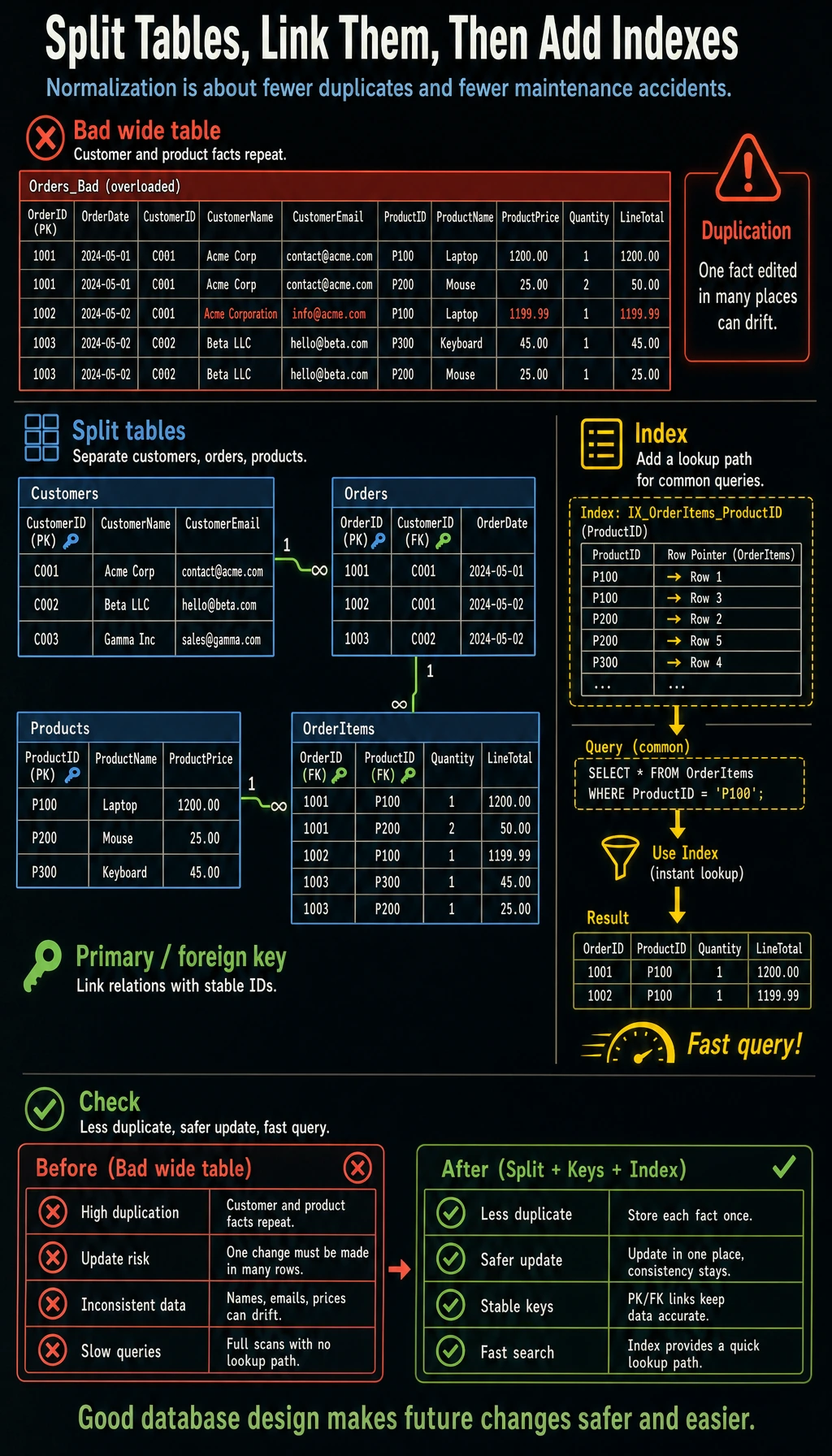
When many beginners first learn database design, they often focus entirely on:
- normalization names
- formal definitions
But a more solid understanding is:
At its core, database design is about reducing duplication, reducing conflicts, and avoiding maintenance problems later.
So the most important thing in this section is not memorizing terms, but first understanding “what goes wrong when the design is bad.”
Learning Objectives
- Understand why good database design matters
- Master the core ideas behind database normalization
- Learn how to design table structures and relationships
- Understand the role of indexes and when to use them
First, Build a Map
Database design is easier to understand as “split tables first, then connect tables, then add indexes”:
So what this section really aims to solve is:
- Why tables should not be lumped together casually
- Why design problems eventually become data quality and query efficiency problems
Why Is Design Important?
A bad database design can lead to:
| Problem | Result |
|---|---|
| Data redundancy | The same information is stored N times, wasting space and requiring N changes for one update |
| Update anomalies | You update one copy but forget another, causing inconsistent data |
| Insert anomalies | You want to add one piece of information, but you are forced to invent related data that does not exist |
| Delete anomalies | Deleting one record accidentally removes other useful information |
A Better Analogy for Beginners
You can think of database design like this:
- Design the warehouse shelves first, then start putting things on them
If the shelves are messy from the start:
- The same kind of item gets placed everywhere
- One item appears in many copies
- It becomes hard to find things later
Maintenance costs will keep rising.
Database Normalization
Normalization is a set of database design rules that helps you avoid the problems above. You only need to remember the core ideas of the first three normal forms.
First Normal Form (1NF): Columns Must Be Atomic
Rule: Each field should store only one value, not a list or multiple comma-separated values.
❌ Violates 1NF:
| name | phones                    |
|------|---------------------------|
| Zhang San | 138xxxx, 139xxxx, 186xxxx |   ← One field stores multiple values

✅ Follows 1NF:
| name | phone    |
|------|----------|
| Zhang San | 138xxxx  |
| Zhang San | 139xxxx  |
| Zhang San | 186xxxx  |
Second Normal Form (2NF): Remove Partial Dependency
Rule: On the basis of 1NF, non-key fields must depend on the whole primary key, not just part of it.
❌ Violates 2NF (composite primary key = student_id + course_id):
| student_id | course_id | student_name | course_name | score |
|------------|-----------|--------------|-------------|-------|
| 1          | C01       | Zhang San    | Math        | 89    |

student_name depends only on student_id, not on course_id → partial dependency

✅ Follows 2NF (split into three tables):
students: student_id, student_name
courses:  course_id, course_name
scores:   student_id, course_id, score
Third Normal Form (3NF): Remove Transitive Dependency
Rule: On the basis of 2NF, non-key fields must not depend on another non-key field.
❌ Violates 3NF:
| employee_id | name | dept_id | dept_name | dept_manager |
|-------------|------|---------|-----------|--------------|

dept_name and dept_manager depend on dept_id, not directly on employee_id
→ transitive dependency: employee_id → dept_id → dept_name

✅ Follows 3NF (split tables):
employees:   employee_id, name, dept_id
departments: dept_id, dept_name, dept_manager
Normalization Summary
Normalization is a theoretical guide. In real-world design, we sometimes intentionally violate normalization, using a bit of redundancy to improve query performance. For example, in a user table, you might store both city_id and city_name to avoid needing a JOIN on every query.
A Quick Normalization Cheat Sheet for Beginners
| Normal Form | The most useful intuition to remember first |
|---|---|
| 1NF | Do not put multiple values in one cell |
| 2NF | Non-key fields should not depend on only part of a composite primary key |
| 3NF | Non-key fields should not depend on other non-key fields |
This table is especially helpful for beginners because it turns abstract normalization ideas into a few practical sentences.
Practice: Designing an E-commerce Database
Requirement Analysis
A simple e-commerce system needs to manage:
- user information
- product information
- product categories
- orders and order details
ER Diagram (Entity-Relationship Diagram)
Key Design Decisions
Why split an order into two tables: orders + order_items?
❌ One table:
| order_id | user_id | product1 | qty1 | product2 | qty2 | ...
This makes the number of columns unstable and violates 1NF

❌ Repeated order information:
| order_id | user_id | total | product  | quantity |
| 1        | Zhang San | 8998  | iPhone   | 1        |
| 1        | Zhang San | 8998  | AirPods  | 1        |
order_id, user_id, and total are repeated, violating 2NF

✅ Split into two tables:
orders:      order_id, user_id, total_amount, status
order_items: item_id, order_id, product_id, quantity, unit_price
Implementing with SQLite
import sqlite3

conn = sqlite3.connect(":memory:")
cursor = conn.cursor()

# Create tables
cursor.executescript("""
    CREATE TABLE categories (
        id INTEGER PRIMARY KEY AUTOINCREMENT,
        name TEXT NOT NULL UNIQUE
    );

    CREATE TABLE products (
        id INTEGER PRIMARY KEY AUTOINCREMENT,
        name TEXT NOT NULL,
        price REAL NOT NULL CHECK(price > 0),
        stock INTEGER DEFAULT 0,
        category_id INTEGER,
        FOREIGN KEY (category_id) REFERENCES categories(id)
    );

    CREATE TABLE users (
        id INTEGER PRIMARY KEY AUTOINCREMENT,
        name TEXT NOT NULL,
        email TEXT UNIQUE,
        created_at TEXT DEFAULT CURRENT_TIMESTAMP
    );

    CREATE TABLE orders (
        id INTEGER PRIMARY KEY AUTOINCREMENT,
        user_id INTEGER NOT NULL,
        total_amount REAL DEFAULT 0,
        status TEXT DEFAULT 'pending',
        created_at TEXT DEFAULT CURRENT_TIMESTAMP,
        FOREIGN KEY (user_id) REFERENCES users(id)
    );

    CREATE TABLE order_items (
        id INTEGER PRIMARY KEY AUTOINCREMENT,
        order_id INTEGER NOT NULL,
        product_id INTEGER NOT NULL,
        quantity INTEGER NOT NULL CHECK(quantity > 0),
        unit_price REAL NOT NULL,
        FOREIGN KEY (order_id) REFERENCES orders(id),
        FOREIGN KEY (product_id) REFERENCES products(id)
    );
""")

# Insert sample data
cursor.executescript("""
    INSERT INTO categories (name) VALUES ('Phone'), ('Accessories'), ('Computer');

    INSERT INTO products (name, price, stock, category_id) VALUES
        ('iPhone 16', 7999, 100, 1),
        ('AirPods Pro', 1899, 200, 2),
        ('MacBook Pro', 14999, 50, 3),
        ('Phone Case', 39, 500, 2);

    INSERT INTO users (name, email) VALUES
        ('Zhang San', '[email protected]'),
        ('Li Si', '[email protected]');

    INSERT INTO orders (user_id, total_amount, status) VALUES
        (1, 9898, 'completed'),
        (2, 14999, 'shipped');

    INSERT INTO order_items (order_id, product_id, quantity, unit_price) VALUES
        (1, 1, 1, 7999),
        (1, 2, 1, 1899),
        (2, 3, 1, 14999);
""")

conn.commit()
Practical Query Examples
import pandas as pd

# Query each user's order details
df = pd.read_sql_query("""
    SELECT
        u.name AS user,
        o.id AS order_id,
        p.name AS product,
        oi.quantity AS quantity,
        oi.unit_price AS unit_price,
        oi.quantity * oi.unit_price AS subtotal,
        o.status AS status
    FROM order_items oi
    JOIN orders o ON oi.order_id = o.id
    JOIN users u ON o.user_id = u.id
    JOIN products p ON oi.product_id = p.id
""", conn)
print(df)

# Query sales amount for each category
df_category = pd.read_sql_query("""
    SELECT
        c.name AS category,
        COUNT(oi.id) AS sales_count,
        SUM(oi.quantity * oi.unit_price) AS total_sales
    FROM categories c
    LEFT JOIN products p ON c.id = p.category_id
    LEFT JOIN order_items oi ON p.id = oi.product_id
    GROUP BY c.id, c.name
    ORDER BY total_sales DESC
""", conn)
print(df_category)
Index
What Is an Index?
An index is like a book’s table of contents — without it, you have to flip through the whole book to find a word; with it, you can jump straight to the right page.
| Scenario | Without index | With index |
|---|---|---|
| Query one row from 1 million rows | Scan all 1 million rows | Locate directly, in milliseconds |
| Search principle | Compare row by row (full table scan) | B-Tree search (logarithmic) |
Creating and Using Indexes
-- Create an index on the email column (speeds up queries by email)
CREATE INDEX idx_users_email ON users(email);

-- Create an index on the order_date column
CREATE INDEX idx_orders_date ON orders(created_at);

-- Composite index (multiple columns)
CREATE INDEX idx_items_order_product ON order_items(order_id, product_id);

-- View table indexes
-- SQLite: PRAGMA index_list('users');
-- MySQL:  SHOW INDEX FROM users;
When Should You Add an Index?
| Add an index | No need to add an index |
|---|---|
| Columns commonly used in WHERE conditions | Columns rarely used for queries |
| Columns used in JOIN conditions | Small tables (a few hundred rows) |
| Columns used in ORDER BY | Frequently updated columns (indexes must also be updated) |
| Columns that must be unique | Columns with a very high duplication rate (such as gender) |
Indexes are not free — each index uses extra storage space, and insert/update/delete operations must keep the index updated. So do not add indexes to every column; only add them where they help solve a real query bottleneck.
A Beginner-Friendly Index Decision Table
| Scenario | What to think about first |
|---|---|
| A column is often used in WHERE filtering | Consider an index |
| A column is often used in JOINs | Consider an index |
| The table is very small | Do not rush to add an index |
| A column changes very frequently | Be more cautious with indexes |
This table is helpful for beginners because it turns “when should I create an index?” into a few concrete decisions.
Database Design Checklist
Use this checklist every time you design a database:
☐ Does every table have a primary key?
☐ Are field names clear and consistently styled? (snake_case is recommended)
☐ Are data types chosen reasonably? (use INTEGER for integers, REAL for money)
☐ Are required fields marked NOT NULL?
☐ Are unique fields marked UNIQUE? (such as email)
☐ Are relationships between tables established with foreign keys?
☐ Does the design satisfy Third Normal Form? (or is denormalization intentional?)
☐ Are frequently queried columns indexed?
☐ Are there reasonable default values? (such as status DEFAULT 'active')
☐ Is there a created_at timestamp to record creation time?
What You Should Take Away from This Section
- The most important part of database design is not “how pretty the tables look,” but whether they are easy to maintain and free from conflicts later
- Normalization helps reduce redundancy and anomalies; it is not just theory to memorize
- More indexes are not always better; indexes should serve real query scenarios
Summary
| Principle | Explanation |
|---|---|
| Draw the ER diagram first | Understand entities and relationships before creating tables |
| Follow normalization | Reduce redundancy and anomalies |
| Denormalize appropriately | Trade some redundancy for performance |
| Use indexes wisely | Speed up critical queries |
| Design first, code later | Changing the database structure is much harder than changing code |
Hands-on Exercises
Exercise 1: Identify Normalization Problems
What is wrong with the following table design? Which normal form is violated? How would you fix it?

Table: student_courses
| student_id | student_name | student_phone       | course_id | course_name | teacher   | score |
|------------|-------------|---------------------|-----------|-------------|-----------|-------|
| 1          | Zhang San   | 138xxxx, 139xxxx    | C01       | Math        | Teacher Li    | 89    |
| 1          | Zhang San   | 138xxxx, 139xxxx    | C02       | English     | Teacher Wang    | 75    |
| 2          | Li Si       | 186xxxx             | C01       | Math        | Teacher Li    | 92    |
Exercise 2: Design a Blog System
Design a database for a simple blog system that needs to support:
- user registration and login
- publishing articles (with title, content, category)
- article comments
- article tags (one article can have multiple tags)

Requirements:
1. Draw an ER diagram (you can use paper or Mermaid)
2. Write the CREATE TABLE statements
3. Consider which indexes should be added
Exercise 3: Implement and Query
# Implement the design from Exercise 2 using SQLite
# Insert sample data
# Complete the following queries:
# 1. Query all articles published by a specific user
# 2. Query all comments for a specific article (including commenter names)
# 3. Query the number of articles under each category
# 4. Query all articles with the "Python" tag