3.5.3 SQL Basics
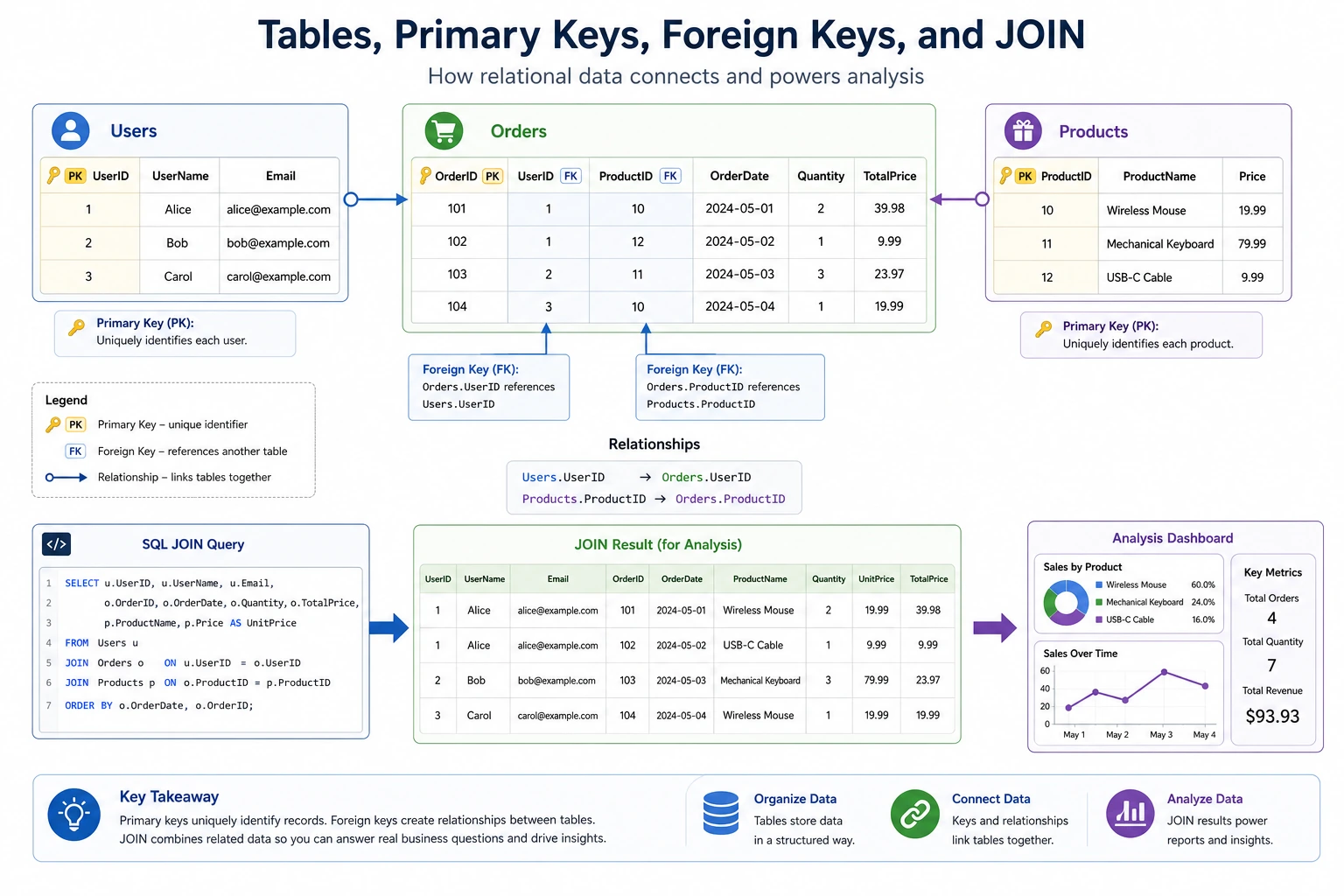
When many beginners first learn SQL, what trips them up most is not that the syntax is too much, but that they don’t know:
- What the relationship is between SQL and Pandas
- How the query order should be organized in their head
So the most important thing in this section is not memorizing every syntax rule first, but building a judgment:
In essence, SQL is a stable language for asking tables questions.
Learning Objectives
- Master the four basic SQL operations: create, read, update, delete
- Use
SELECTqueries fluently - Learn
WHEREcondition filtering - Master
JOINfor combining multiple tables - Understand
GROUP BYfor grouped aggregation
First, Build a Map
The best way for beginners to understand SQL is not to “memorize the syntax book from start to finish,” but to first see clearly:
So what this section really wants to solve is:
- How SQL queries actually flow in your head
- Why it corresponds to
Pandasfiltering, grouping, and merging
What Is SQL?
SQL (Structured Query Language) is the language used to “talk” to databases. Whether you use SQLite, MySQL, or PostgreSQL, the SQL syntax is basically the same.
What SQL can do, Pandas can do for the most part too. In fact, many Pandas method names, such as merge and groupby, were borrowed from SQL. Learning them side by side works better.
A Better Analogy for Beginners
You can think of SQL as:
- You asking the database questions
And these questions are usually very straightforward:
- Which columns do I want?
- Which rows do I want?
- How should I group them?
- How do I connect two tables?
This analogy is especially useful for beginners because it pulls SQL back from “another language” into “how do I ask the table questions?”
Preparation: Create a Practice Database
All examples in this section are based on this practice database. Please run the following first:
import sqlite3

conn = sqlite3.connect(":memory:")  # In-memory database, disappears when closed
cursor = conn.cursor()

# Create users table
cursor.execute("""
    CREATE TABLE users (
        id INTEGER PRIMARY KEY,
        name TEXT NOT NULL,
        age INTEGER,
        city TEXT,
        salary REAL
    )
""")

# Create orders table
cursor.execute("""
    CREATE TABLE orders (
        order_id INTEGER PRIMARY KEY,
        user_id INTEGER,
        product TEXT,
        amount REAL,
        order_date TEXT,
        FOREIGN KEY (user_id) REFERENCES users(id)
    )
""")

# Insert user data
users_data = [
    (1, "Alice", 28, "Beijing", 15000),
    (2, "Bob", 35, "Shanghai", 22000),
    (3, "Charlie", 22, "Guangzhou", 8000),
    (4, "Diana", 42, "Beijing", 35000),
    (5, "Ethan", 30, "Shanghai", 18000),
    (6, "Fiona", 26, "Shenzhen", 12000),
]
cursor.executemany("INSERT INTO users VALUES (?, ?, ?, ?, ?)", users_data)

# Insert order data
orders_data = [
    (101, 1, "iPhone", 7999, "2024-11-01"),
    (102, 1, "AirPods", 999, "2024-11-05"),
    (103, 2, "MacBook", 14999, "2024-11-10"),
    (104, 3, "iPad", 3999, "2024-11-15"),
    (105, 2, "Keyboard", 599, "2024-11-20"),
    (106, 4, "Monitor", 2999, "2024-12-01"),
    (107, 5, "Mouse", 299, "2024-12-05"),
]
cursor.executemany("INSERT INTO orders VALUES (?, ?, ?, ?, ?)", orders_data)

conn.commit()

# Define a helper function for easier querying
def query(sql):
    cursor.execute(sql)
    cols = [desc[0] for desc in cursor.description]
    rows = cursor.fetchall()
    # Print header
    print(" | ".join(cols))
    print("-" * (len(" | ".join(cols))))
    for row in rows:
        print(" | ".join(str(v) for v in row))
    print()
Query Data (SELECT)
SELECT is the most commonly used SQL statement. It is used to retrieve data from tables.
Basic Queries
-- Query all columns
SELECT * FROM users;

-- Query specific columns
SELECT name, age, city FROM users;

-- Give columns aliases
SELECT name AS name, age AS age FROM users;
query("SELECT * FROM users")
# id | name | age | city | salary
# 1 | Alice | 28 | Beijing | 15000
# 2 | Bob | 35 | Shanghai | 22000
# ...
DISTINCT: Remove Duplicates
-- Query all unique cities
SELECT DISTINCT city FROM users;
LIMIT: Limit the Number of Rows
-- Take only the first 3 rows
SELECT * FROM users LIMIT 3;
The Safest Default Order When Writing Your First Query
A more reliable order is usually:
- Write
SELECTfirst - Then write
FROM - Then decide whether to add
WHERE - Finally add sorting and grouping
This is less confusing than trying to mix all clauses together right away.
Condition Filtering (WHERE)
WHERE is like Pandas boolean indexing and is used to filter rows that meet certain conditions.
Basic Comparisons
-- Age greater than 30
SELECT * FROM users WHERE age > 30;

-- City is Beijing
SELECT * FROM users WHERE city = 'Beijing';

-- Salary between 10000 and 20000
SELECT * FROM users WHERE salary BETWEEN 10000 AND 20000;
Combined Conditions
-- AND: both conditions must be true
SELECT * FROM users WHERE city = 'Beijing' AND age > 25;

-- OR: either condition
SELECT * FROM users WHERE city = 'Beijing' OR city = 'Shanghai';

-- IN: within a list
SELECT * FROM users WHERE city IN ('Beijing', 'Shanghai', 'Shenzhen');

-- NOT: negation
SELECT * FROM users WHERE city NOT IN ('Beijing');
Pattern Matching (LIKE)
-- % matches any characters (similar to Pandas str.contains)
SELECT * FROM users WHERE name LIKE 'A%';    -- starts with "A"
SELECT * FROM users WHERE name LIKE '%e';    -- ends with "e"
SELECT * FROM users WHERE email LIKE '%@mail%'; -- contains "@mail"
Handling NULL
-- Check whether it is empty (do not use = NULL)
SELECT * FROM users WHERE city IS NULL;
SELECT * FROM users WHERE city IS NOT NULL;
SQL vs Pandas Comparison
| Requirement | SQL | Pandas |
|---|---|---|
| Age greater than 30 | WHERE age > 30 | df[df["age"] > 30] |
| City is Beijing | WHERE city = 'Beijing' | df[df["city"] == "Beijing"] |
| Multiple conditions with AND | WHERE age > 30 AND city = 'Beijing' | df[(df["age"] > 30) & (df["city"] == "Beijing")] |
| Multiple conditions with OR | WHERE city IN ('Beijing', 'Shanghai') | df[df["city"].isin(["Beijing", "Shanghai"])] |
| Pattern matching | WHERE name LIKE 'A%' | df[df["name"].str.startswith("A")] |
| Empty values | WHERE city IS NULL | df[df["city"].isna()] |
A Comparison Table Beginners Should Remember First
| Question in your head | More like which SQL clause |
|---|---|
| Only look at records that meet the condition | WHERE |
| See which unique values exist in a table | DISTINCT |
| Just take the first few rows to check | LIMIT |
| Connect two tables | JOIN |
| Group first, then aggregate | GROUP BY |
This table is especially useful for beginners because it compresses SQL back into a few common types of questions instead of a long list of keywords.
Sorting (ORDER BY)
-- Sort by salary ascending (default)
SELECT * FROM users ORDER BY salary;

-- Sort by salary descending
SELECT * FROM users ORDER BY salary DESC;

-- Sort by city first, then salary descending within the same city
SELECT * FROM users ORDER BY city, salary DESC;
Why Is ORDER BY Often Written Last?
Because sorting is more like:
- The result is already there, and now I want to see it in a certain order
This is not the same kind of problem as:
- Filtering first
- Grouping first
Aggregate Functions and Grouping (GROUP BY)
Common Aggregate Functions
| Function | Purpose | Example |
|---|---|---|
COUNT(*) | Count rows | How many records in total |
SUM(col) | Sum values | Total salary |
AVG(col) | Average value | Average age |
MAX(col) | Maximum value | Highest salary |
MIN(col) | Minimum value | Lowest age |
-- Basic aggregation
SELECT COUNT(*) AS total_people, AVG(salary) AS avg_salary, MAX(salary) AS highest_salary
FROM users;
GROUP BY: Grouped Statistics
-- Count people and average salary by city
SELECT city, COUNT(*) AS people_count, AVG(salary) AS avg_salary
FROM users
GROUP BY city;
city | people_count | avg_salary
Beijing | 2 | 25000.0
Shanghai | 2 | 20000.0
Guangzhou | 1 | 8000.0
Shenzhen | 1 | 12000.0
HAVING: Filter Grouped Results
-- Find cities with average salary above 15000
SELECT city, AVG(salary) AS avg_salary
FROM users
GROUP BY city
HAVING avg_salary > 15000;
WHERE vs HAVINGWHEREfilters before grouping (filters raw rows)HAVINGfilters after grouping (filters aggregated results)
SQL Execution Order
The writing order of SQL is different from the execution order:
Joining Multiple Tables (JOIN)
JOIN is one of SQL’s most powerful features. It lets you combine data from multiple tables.
INNER JOIN
Returns only rows that match in both tables.
-- Query each user's order information
SELECT users.name, orders.product, orders.amount
FROM users
INNER JOIN orders ON users.id = orders.user_id;
name | product | amount
Zhang San | iPhone | 7999.0
Zhang San | AirPods | 999.0
Li Si | MacBook | 14999.0
Wang Wu | iPad | 3999.0
Li Si | Keyboard | 599.0
Zhao Liu | Monitor | 2999.0
Qian Qi | Mouse | 299.0
Note: Sun Ba has no orders, so he does not appear in the result.
LEFT JOIN
Returns all rows from the left table; unmatched rows from the right table are shown as NULL.
-- Query all users and their orders (including users with no orders)
SELECT users.name, orders.product, orders.amount
FROM users
LEFT JOIN orders ON users.id = orders.user_id;
name | product | amount
Zhang San | iPhone | 7999.0
Zhang San | AirPods | 999.0
Li Si | MacBook | 14999.0
...
Sun Ba | None | None       ← No orders, but still shown
Comparison of JOIN Types
JOIN vs Pandas merge| SQL | Pandas |
|---|---|
INNER JOIN | pd.merge(how="inner") |
LEFT JOIN | pd.merge(how="left") |
RIGHT JOIN | pd.merge(how="right") |
ON users.id = orders.user_id | on="user_id" or left_on=, right_on= |
Practical Combination: JOIN + GROUP BY
-- Query each user's total order amount
SELECT users.name, COUNT(orders.order_id) AS order_count, SUM(orders.amount) AS total_spent
FROM users
LEFT JOIN orders ON users.id = orders.user_id
GROUP BY users.id, users.name
ORDER BY total_spent DESC;
Insert, Update, Delete (INSERT / UPDATE / DELETE)
Insert Data
-- Insert one row
INSERT INTO users (name, age, city, salary) VALUES ('Zhou Jiu', 29, 'Hangzhou', 16000);

-- Insert multiple rows
INSERT INTO users (name, age, city, salary) VALUES
    ('Wu Shi', 33, 'Chengdu', 13000),
    ('Zheng Shiyi', 27, 'Nanjing', 11000);
Update Data
-- Give Zhang San a raise
UPDATE users SET salary = 18000 WHERE name = 'Zhang San';

-- Give all Beijing employees a 10% raise
UPDATE users SET salary = salary * 1.1 WHERE city = 'Beijing';
WHERE for UPDATE!UPDATE users SET salary = 0; will set the salary of all users to zero! Forgetting WHERE is one of the most common disasters in database operations.
Delete Data
-- Delete a specific record
DELETE FROM users WHERE name = 'Zhou Jiu';

-- Delete all records with age less than 20
DELETE FROM users WHERE age < 20;
WHERE for DELETE!DELETE FROM users; will delete all data in the table! Think carefully before doing this.
The Safest Default Order When Learning SQL for the First Time
A more reliable order is usually:
- First write
SELECT / FROM / WHEREcorrectly - Then add
ORDER BY - Then add
GROUP BY / HAVING - Finally learn
JOINand insert, update, delete
This is less confusing than memorizing all syntax blocks at once.
SQL Statement Quick Reference
| Operation | SQL Syntax | Description |
|---|---|---|
| Query all | SELECT * FROM table_name | Get all data |
| Query specific columns | SELECT col1, col2 FROM table_name | Get some columns |
| Condition filtering | SELECT ... WHERE condition | Filter rows |
| Sorting | ORDER BY col DESC | Sort descending |
| Limit rows | LIMIT 10 | Take the first N rows |
| Remove duplicates | SELECT DISTINCT col | Unique values |
| Aggregation | COUNT / SUM / AVG / MAX / MIN | Statistical calculations |
| Grouping | GROUP BY col | Grouped statistics |
| Group filtering | HAVING condition | Filter grouped results |
| Inner join | INNER JOIN table ON condition | Intersection of two tables |
| Left join | LEFT JOIN table ON condition | All rows from the left table |
| Insert | INSERT INTO table VALUES (...) | Add data |
| Update | UPDATE table SET col=value WHERE condition | Modify data |
| Delete | DELETE FROM table WHERE condition | Delete data |
Summary
SQL is the language for “talking” to databases. Its core consists of four types of operations:
| Category | Keyword | Purpose |
|---|---|---|
| Read | SELECT | Query data (most common) |
| Create | INSERT | Insert new data |
| Update | UPDATE | Modify existing data |
| Delete | DELETE | Remove data |
Among them, SELECT together with WHERE, JOIN, and GROUP BY can cover most data analysis tasks.
What You Should Take Away From This Section
- The most important thing about SQL is not that it has many keywords, but whether you can use it steadily to ask tables questions
- If you first think, “Which columns do I want, which rows do I want, and how should I group them?”, writing SQL will be much more stable than memorizing syntax
- Once
WHERE / GROUP BY / JOINbecomes clear, most later queries can be understood step by step
Hands-On Exercises
Exercise 1: Basic Queries
-- Using the practice database above, complete the following queries:
-- 1. Query all users in Shanghai
-- 2. Query the top 3 people with the highest salaries
-- 3. Query the average salary for each city, sorted by average salary in descending order
Exercise 2: JOIN Queries
-- 1. Query the names of all users and the products they have bought
-- 2. Query users who have never placed an order
--    Hint: LEFT JOIN + WHERE orders.order_id IS NULL
-- 3. Query the total order amount for each user, including users with no orders (show as 0)
Exercise 3: Comprehensive Analysis
-- Complete this with one SQL statement:
-- Query the user name, number of orders, and total spending for users whose total spending exceeds 5000
-- Sort by total spending in descending order