3.5.4 Python Database Operations
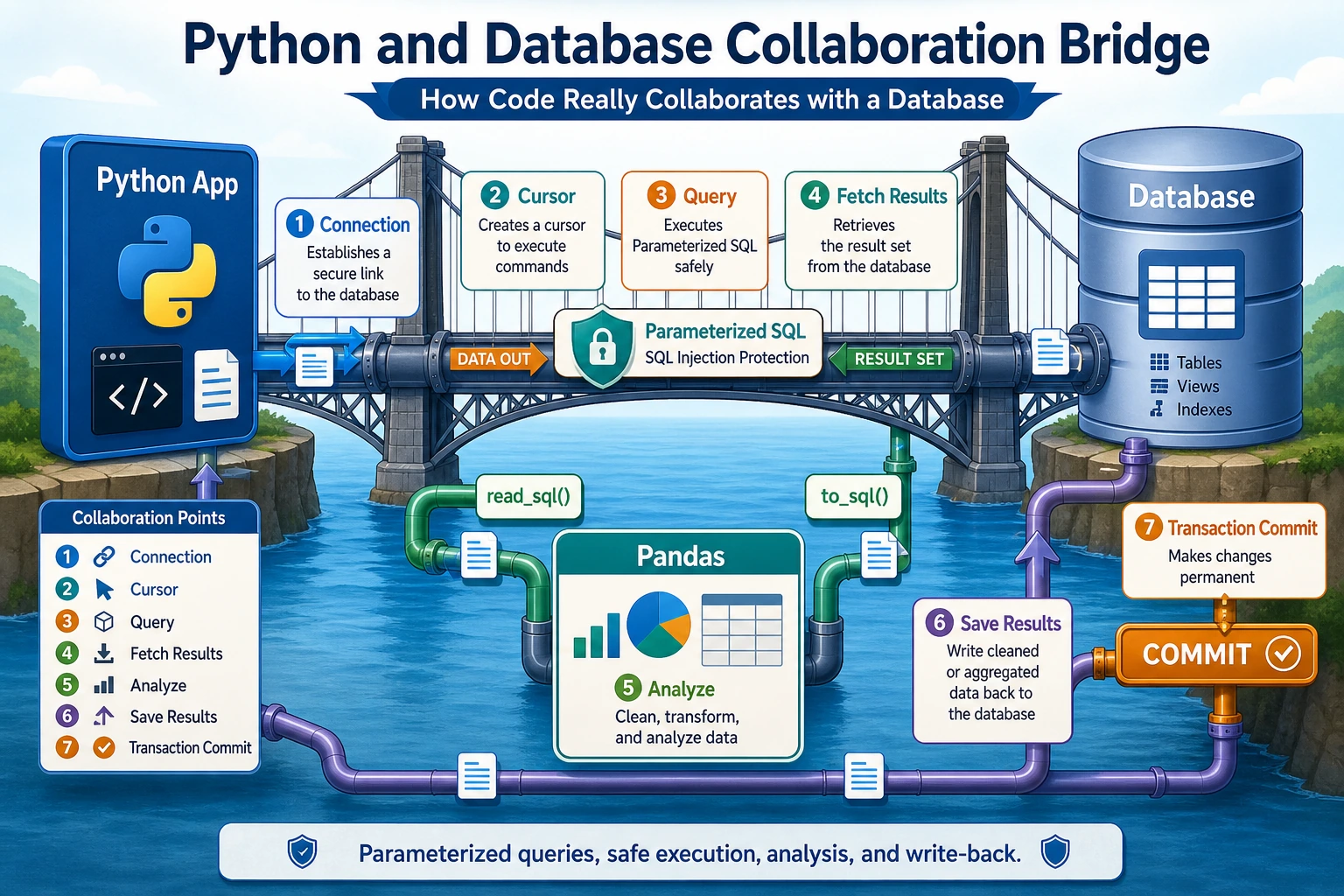
Many beginners start to feel a little confused here:
- I already know how to write SQL
- I also know how to use Python
So why do we need to learn “Python database operations” separately?
The clearest way to understand it is:
This section solves the problem of how code actually works with a database.
In other words, it is not teaching SQL again. Instead, it teaches:
- How Python connects to a database
- How to retrieve results
- How to connect it with Pandas
Learning Objectives
- Master the full usage of Python's
sqlite3module - Learn parameterized queries to prevent SQL injection
- Master how to read from and write to databases directly with Pandas
- Understand the basic concepts of SQLAlchemy
First, Build a Map
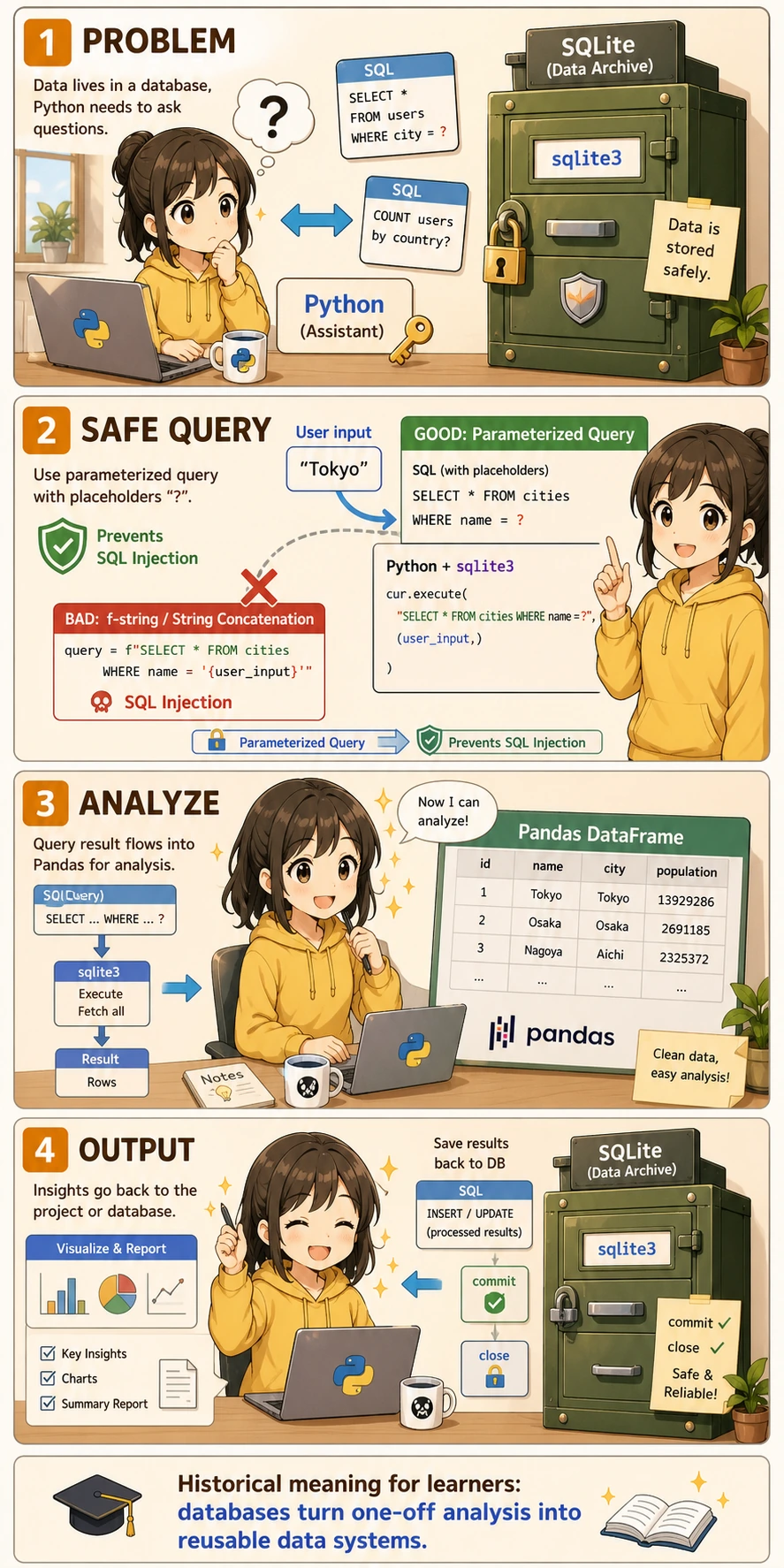
Python database operations are easier to understand as a flow of “connect -> execute -> retrieve -> hand off to Pandas”:
So what this section really wants to solve is:
- How Python and databases are connected
- Why this step becomes the real entry point for many data projects
Acronyms and Terms to Understand First
| Term | Full name | Beginner-friendly meaning |
|---|---|---|
DB | Database | A long-term place for storing structured data |
SQL | Structured Query Language | The language used to ask tables questions |
CRUD | Create, Read, Update, Delete | The four basic operations most applications perform on data |
SQLite | SQLite database engine | A lightweight database stored in one file, ideal for learning and small tools |
ORM | Object-Relational Mapping | A way to operate database rows through Python objects instead of writing every SQL statement manually |
SQL injection | SQL injection attack | A security problem where malicious input changes the meaning of your SQL |
Do not worry if these terms feel dense at first. In this lesson, your main goal is to understand one safe loop: Python connects to the database, sends SQL safely, receives rows, and hands the result to Pandas for analysis.
The sqlite3 Standard Library
Python comes with the sqlite3 module, so you do not need to install anything. It works out of the box.
A Better Analogy for Beginners
You can understand this section as:
- Using Python to operate a cabinet that stores data
sqlite3 is more like:
- Taking the key directly to open the cabinet, read tables, and write tables
Pandas is more like:
- Bringing some of the cabinet’s contents back to your desk for analysis
So the real value of this section is:
- Code and database can finally work together
Basic Workflow
Full Example
import sqlite3

# ========== Connect ==========
# Connect to a file-based database (it will be created automatically if it does not exist)
conn = sqlite3.connect("example.db")

# Or use an in-memory database (data disappears after closing, good for testing)
# conn = sqlite3.connect(":memory:")

# Create a cursor object
cursor = conn.cursor()

# ========== Create Table ==========
cursor.execute("""
    CREATE TABLE IF NOT EXISTS students (
        id INTEGER PRIMARY KEY AUTOINCREMENT,
        name TEXT NOT NULL,
        grade INTEGER,
        score REAL
    )
""")

# ========== Insert Data ==========
# Method 1: direct insert
cursor.execute("INSERT INTO students (name, grade, score) VALUES ('Zhang San', 3, 89.5)")

# Method 2: parameterized insert (recommended!)
cursor.execute(
    "INSERT INTO students (name, grade, score) VALUES (?, ?, ?)",
    ("Li Si", 2, 92.0)
)

# Method 3: batch insert
students = [
    ("Wang Wu", 3, 76.5),
    ("Zhao Liu", 1, 95.0),
    ("Qian Qi", 2, 88.0),
    ("Sun Ba", 1, 70.5),
]
cursor.executemany(
    "INSERT INTO students (name, grade, score) VALUES (?, ?, ?)",
    students
)

# Don't forget to commit!
conn.commit()

# ========== Query Data ==========
# fetchall(): get all results
cursor.execute("SELECT * FROM students")
all_rows = cursor.fetchall()
print("All students:", all_rows)

# fetchone(): get one row
cursor.execute("SELECT * FROM students WHERE name = 'Zhang San'")
one_row = cursor.fetchone()
print("Zhang San:", one_row)

# fetchmany(n): get n rows
cursor.execute("SELECT * FROM students ORDER BY score DESC")
top3 = cursor.fetchmany(3)
print("Top 3:", top3)

# ========== Get Column Names ==========
cursor.execute("SELECT * FROM students")
col_names = [desc[0] for desc in cursor.description]
print("Column names:", col_names)  # ['id', 'name', 'grade', 'score']

# ========== Close ==========
conn.close()
What Is the Most Important Thing to Remember First?
The most important thing to remember is:
- Connect to the database first
- Then create a cursor
- Then execute SQL
- Finally retrieve results and commit changes
You do not need to memorize every method at once. The key is to understand this main flow first.
Parameterized Queries: Prevent SQL Injection
SQL injection is one of the most common security vulnerabilities. Attackers can use malicious input to tamper with SQL statements.
Wrong Way (Dangerous!)
# ❌ Never build SQL by concatenating strings like this!
user_input = "Zhang San"
sql = f"SELECT * FROM students WHERE name = '{user_input}'"
cursor.execute(sql)

# If the user input is:  ' OR '1'='1
# The SQL becomes: SELECT * FROM students WHERE name = '' OR '1'='1'
# This will return all data!
Right Way (Safe!)
# ✅ Use ? placeholders
user_input = "Zhang San"
cursor.execute("SELECT * FROM students WHERE name = ?", (user_input,))

# ✅ Multiple parameters
cursor.execute(
    "SELECT * FROM students WHERE grade = ? AND score > ?",
    (3, 80.0)
)
Always use ? placeholders. Never use f-strings or string concatenation to build SQL.
A Beginner-Friendly Rule of Thumb
If you find yourself thinking:
f"SELECT ... {user_input} ..."
then you should immediately be careful. For beginners, the safest habit is:
- If there is any user input, always use parameterized queries
Manage Connections with the with Statement
import sqlite3

# Recommended style: with automatically manages commit and close
with sqlite3.connect("example.db") as conn:
    cursor = conn.cursor()

    cursor.execute("SELECT * FROM students WHERE score > ?", (85,))
    results = cursor.fetchall()

    for row in results:
        print(row)
    # After the with block ends, commit happens automatically (if there is no exception)
    # If there is an exception, rollback happens automatically
Row Factory: Access Results Like a Dictionary
By default, query results are tuples, so you need to use indexes like row[0]. Using the Row factory lets you access columns by name:
import sqlite3

conn = sqlite3.connect("example.db")
conn.row_factory = sqlite3.Row  # Key setting

cursor = conn.cursor()
cursor.execute("SELECT * FROM students WHERE name = 'Zhang San'")
row = cursor.fetchone()

# Now you can access by column name!
print(row["name"])   # Zhang San
print(row["score"])  # 89.5
print(dict(row))     # {'id': 1, 'name': 'Zhang San', 'grade': 3, 'score': 89.5}

conn.close()
Pandas + Database: A Powerful Combination
Pandas can read from and write to databases directly. This is one of the most commonly used workflows in real projects.
Why Is This So Valuable?
Because in real work, the most common pipeline is often:
- Use SQL to query the needed data
- Then use Pandas for more complex analysis and visualization
In other words, this section is really about connecting:
- the database
- Pandas
Read from a Database into a DataFrame
import pandas as pd
import sqlite3

conn = sqlite3.connect("example.db")

# Method 1: read_sql_query (recommended)
df = pd.read_sql_query("SELECT * FROM students", conn)
print(df)
#    id name  grade  score
# 0   1   Alice    3   89.5
# 1   2   Bob      2   92.0
# 2   3   Carol    3   76.5
# ...

# Method 2: query with conditions
df_top = pd.read_sql_query(
    "SELECT name, score FROM students WHERE score > 85 ORDER BY score DESC",
    conn
)
print(df_top)

conn.close()
read_sql_table() here?pd.read_sql_query() works directly with a normal sqlite3 connection, so it is the safest first choice for beginners. pd.read_sql_table() requires a SQLAlchemy engine and is introduced in the SQLAlchemy section below.
Write a DataFrame to a Database
import pandas as pd
import sqlite3

# Create a DataFrame
df_new = pd.DataFrame({
    "name": ["Zhou Jiu", "Wu Shi", "Zheng Shi Yi"],
    "grade": [2, 3, 1],
    "score": [85.5, 91.0, 78.0]
})

conn = sqlite3.connect("example.db")

# Write to the database
df_new.to_sql(
    "new_students",     # table name
    conn,
    if_exists="replace",  # if table exists: replace / append / fail
    index=False           # do not write the DataFrame index
)

# Verify
df_check = pd.read_sql_query("SELECT * FROM new_students", conn)
print(df_check)

conn.close()
Real Workflow: Database -> Pandas -> Analysis
import pandas as pd
import sqlite3

conn = sqlite3.connect("example.db")

# 1. Use SQL for initial filtering and joining (use database indexes to speed things up)
df = pd.read_sql_query("""
    SELECT s.name, s.grade, s.score
    FROM students s
    WHERE s.score > 60
    ORDER BY s.score DESC
""", conn)

# 2. Use Pandas for more complex analysis
print("Average score by grade:")
print(df.groupby("grade")["score"].mean())

print("\nScore distribution:")
print(df["score"].describe())

conn.close()
- Large-scale filtering: Use SQL
WHEREfirst to reduce the amount of data sent to Pandas - Complex analysis: After SQL filtering, use Pandas for aggregation, visualization, and other complex operations
- Write results back: After analysis, use
to_sql()to store the results back in the database
A Database Collaboration Order You Can Copy Directly as a Beginner
When Python works with a database for the first time, the safest order is usually:
- Connect to the database first
- Do the simplest query first
- Then try parameterized queries
- Then read the results into Pandas
- Finally write data back to the database
This is easier than mixing all capabilities together from the start.
A Beginner-Friendly Choice Table
| What do you want to do now? | Safer first choice |
|---|---|
| Query and filter a large table | Use SQL first |
| Do complex statistics and plotting | Hand the results to Pandas first |
| Save analysis results back | to_sql() |
This table is helpful for beginners because it turns “Should SQL or Pandas come first?” into something you can actually decide.
Introduction to SQLAlchemy
SQLAlchemy is the most popular database toolkit in Python. It supports multiple databases and provides ORM (Object-Relational Mapping).
# Install
# python -m pip install --upgrade sqlalchemy

from sqlalchemy import create_engine
import pandas as pd

# Create an engine (only the URL changes for different databases)
engine = create_engine("sqlite:///example.db")

# SQLite:  sqlite:///file_path
# MySQL:   mysql+pymysql://user:password@host:port/database
# PostgreSQL: postgresql://user:password@host:port/database

# Use Pandas with SQLAlchemy
df = pd.read_sql("SELECT * FROM students", engine)
print(df)

# Write
df.to_sql("students_backup", engine, if_exists="replace", index=False)
- If you only use SQLite ->
sqlite3is enough - If you need to connect to MySQL/PostgreSQL -> use SQLAlchemy
- If you are doing web development -> use SQLAlchemy's ORM features
What You Should Take Away from This Section
- The truly important thing in this section is not “being able to write connection code,” but understanding how Python, SQL, and Pandas work together
- Whenever there is external input, prefer parameterized queries first
- In real data projects, the common pattern is usually: filter with SQL first, then analyze with Pandas
Complete Practice: Student Grade Management
import sqlite3
import pandas as pd

class StudentDB:
    """A simple student grade management system"""

    def __init__(self, db_path="students.db"):
        self.conn = sqlite3.connect(db_path)
        self.conn.row_factory = sqlite3.Row
        self._create_table()

    def _create_table(self):
        self.conn.execute("""
            CREATE TABLE IF NOT EXISTS students (
                id INTEGER PRIMARY KEY AUTOINCREMENT,
                name TEXT NOT NULL,
                subject TEXT NOT NULL,
                score REAL CHECK(score >= 0 AND score <= 100)
            )
        """)
        self.conn.commit()

    def add_student(self, name, subject, score):
        """Add a grade record"""
        self.conn.execute(
            "INSERT INTO students (name, subject, score) VALUES (?, ?, ?)",
            (name, subject, score)
        )
        self.conn.commit()
        print(f"✅ Added: {name} - {subject}: {score}")

    def query_by_name(self, name):
        """Query by name"""
        cursor = self.conn.execute(
            "SELECT * FROM students WHERE name = ?", (name,)
        )
        return [dict(row) for row in cursor.fetchall()]

    def get_ranking(self, subject):
        """Get ranking for a subject"""
        df = pd.read_sql_query(
            "SELECT name, score FROM students WHERE subject = ? ORDER BY score DESC",
            self.conn,
            params=(subject,)
        )
        df["Ranking"] = range(1, len(df) + 1)
        return df

    def get_stats(self):
        """Get statistics"""
        return pd.read_sql_query("""
            SELECT subject AS Subject,
                   COUNT(*) AS Count,
                   ROUND(AVG(score), 1) AS Average,
                   MAX(score) AS Highest,
                   MIN(score) AS Lowest
            FROM students
            GROUP BY subject
        """, self.conn)

    def close(self):
        self.conn.close()


# Usage example
db = StudentDB(":memory:")

# Add data
for name, subject, score in [
    ("Zhang San", "Math", 89), ("Zhang San", "English", 75),
    ("Li Si", "Math", 92), ("Li Si", "English", 88),
    ("Wang Wu", "Math", 76), ("Wang Wu", "English", 95),
]:
    db.add_student(name, subject, score)

# Query
print("\nZhang San's grades:", db.query_by_name("Zhang San"))
print("\nMath ranking:")
print(db.get_ranking("Math"))
print("\nStatistics by subject:")
print(db.get_stats())

db.close()
Summary
| Method | Use Case | Features |
|---|---|---|
sqlite3 | SQLite databases | Built into Python, zero dependencies |
pd.read_sql_query() | SQL -> DataFrame | Convenient for analysis |
df.to_sql() | DataFrame -> database | Write in one line |
SQLAlchemy | Multiple databases | Strong generality |
Core principles:
- Use
?placeholders, do not concatenate SQL - Use
withto manage connections - For large datasets, filter with SQL first, then analyze with Pandas
Hands-On Exercises
Exercise 1: Basic CRUD
# Create a SQLite database
# Create a books table (title, author, price, publication year)
# Insert 5 books
# Query books with price greater than 50
# Update the price of one book to 99
# Delete the book with the earliest publication year
Exercise 2: Working with Pandas
# 1. Use pd.read_sql_query to read the books table into a DataFrame
# 2. Use Pandas to calculate the average book price for each author
# 3. Write the result back to a new table in the database with to_sql
Exercise 3: Encapsulate a Class
# Refer to the StudentDB example above
# Encapsulate a TodoDB class to implement to-do management:
# - Add tasks
# - Mark as completed
# - Query by status
# - Calculate completion rate