3.2.1 NumPy Overview
Learning Objectives
- Understand what NumPy is and its place in the Python ecosystem
- Understand the difference between ndarray and Python list
- Install NumPy and run your first piece of code
- Intuitively feel NumPy’s performance advantages
What Is NumPy?
NumPy (Numerical Python) is the core library in Python for scientific computing. If Python is a car, then NumPy is its engine — almost every data science and AI-related library is built on top of NumPy.
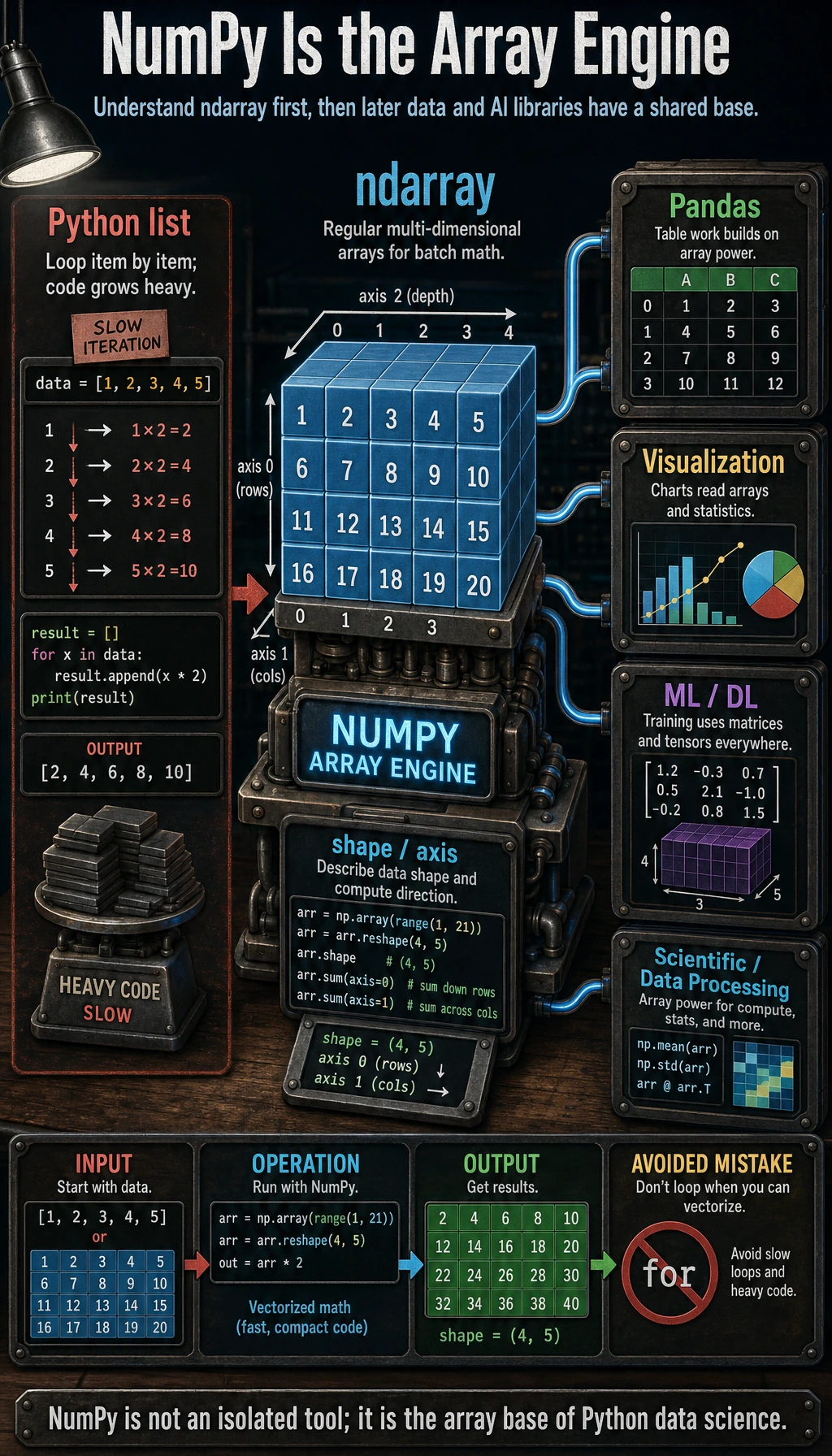
In simple terms: if you want to learn data analysis and AI, NumPy is the first stop you can’t avoid.
Why Do We Need NumPy?
In the warm-up exercises of Chapter 1, we processed data using pure Python and ran into many pain points. So what problems can NumPy solve for us?
The Limitations of Python Lists
Think back: if we want to multiply a set of numbers by 2:
# Pure Python: need to write a loop
numbers = [1, 2, 3, 4, 5]
result = []
for n in numbers:
    result.append(n * 2)
print(result)  # [2, 4, 6, 8, 10]

# Or use a list comprehension
result = [n * 2 for n in numbers]
If we want to calculate the sum of two datasets at corresponding positions:
a = [1, 2, 3, 4, 5]
b = [10, 20, 30, 40, 50]
result = [a[i] + b[i] for i in range(len(a))]
print(result)  # [11, 22, 33, 44, 55]
These operations are very common, but writing a loop every time is both troublesome and slow.
NumPy’s Solution
import numpy as np

# NumPy: operate directly on the whole array, no loop needed!
numbers = np.array([1, 2, 3, 4, 5])
result = numbers * 2
print(result)  # [ 2  4  6  8 10]

# Add two datasets
a = np.array([1, 2, 3, 4, 5])
b = np.array([10, 20, 30, 40, 50])
result = a + b
print(result)  # [11 22 33 44 55]
No loop, done in one line! This is NumPy’s core ability — vectorized computation.
Installing NumPy
If you use Miniconda / Anaconda, NumPy is usually already installed. If not:
# Install with pip
python -m pip install --upgrade numpy

# Or install with conda
conda install numpy
Verify the installation:
import numpy as np
print(np.__version__)  # e.g. 1.26.4
print("NumPy installed successfully!")
import numpy as np is the conventional way to write it. In the entire data science community, almost everyone abbreviates NumPy as np. We’ll use np consistently from here on.
ndarray vs Python list
The core of NumPy is the ndarray (N-dimensional array). How is it different from a Python list?
Visual Comparison
import numpy as np

# Python list
py_list = [1, 2, 3, 4, 5]
print(type(py_list))   # <class 'list'>
print(py_list)          # [1, 2, 3, 4, 5]

# NumPy ndarray
np_array = np.array([1, 2, 3, 4, 5])
print(type(np_array))  # <class 'numpy.ndarray'>
print(np_array)         # [1 2 3 4 5]  ← Notice: no commas!
Key Differences
| Feature | Python list | NumPy ndarray |
|---|---|---|
| Data type | Can mix types (integers, strings, objects together) | All elements must be the same type |
| Computation style | Needs loops to process item by item | Supports vectorized computation, operating on the whole array |
| Memory layout | Elements stored separately | Elements stored contiguously, more compactly |
| Speed | Slow (Python interpreter processes each item) | Fast (optimized in C under the hood) |
| Functionality | General-purpose container | Designed for numerical computing, with many built-in math functions |
Why Is “Same Type” So Important?
# Python list can mix types
mixed = [1, "hello", 3.14, True]  # ✅ No problem

# NumPy arrays require a single type
arr = np.array([1, 2, 3])       # all integers → int64
arr2 = np.array([1, 2.5, 3])    # contains a float → automatically becomes float64
print(arr.dtype)   # int64
print(arr2.dtype)  # float64
Because all elements have the same type, NumPy can use low-level C code for efficient batch computation instead of checking types one by one like Python lists do.
Performance Comparison: Seeing Is Believing
Rather than just talking about it, let’s actually measure how fast NumPy is:
import numpy as np
import time

# Prepare 1 million numbers
size = 1_000_000
py_list = list(range(size))
np_array = np.arange(size)

# Python list: multiply each number by 2 using a loop
start = time.time()
result_py = [x * 2 for x in py_list]
time_py = time.time() - start
print(f"Python list: {time_py:.4f} seconds")

# NumPy: direct vectorized computation
start = time.time()
result_np = np_array * 2
time_np = time.time() - start
print(f"NumPy array: {time_np:.4f} seconds")

# Speed comparison
print(f"\nNumPy is about {time_py / time_np:.0f} times faster!")
Typical output:
Python list: 0.0580 seconds
NumPy array: 0.0008 seconds

NumPy is about 72 times faster!
NumPy is written in C under the hood and takes advantage of the CPU’s SIMD instructions (Single Instruction, Multiple Data), which can process multiple values at once. By contrast, a Python for loop processes only one element at a time and must go through the Python interpreter’s type checking.
Put simply: Python lists are like manually carrying bricks one by one, while NumPy is like using a forklift to move them in batches.
Quick Hands-On: What Can NumPy Do?
Before going deeper, let’s quickly try some common NumPy operations:
Creating Arrays
import numpy as np

# Create from a list
a = np.array([1, 2, 3, 4, 5])

# Create an array of all zeros
zeros = np.zeros(5)
print(zeros)  # [0. 0. 0. 0. 0.]

# Create an array of all ones
ones = np.ones(3)
print(ones)   # [1. 1. 1.]

# Create an arithmetic sequence
seq = np.arange(0, 10, 2)  # from 0 to 10, step size 2
print(seq)    # [0 2 4 6 8]

# Create an evenly spaced sequence
lin = np.linspace(0, 1, 5)  # from 0 to 1, evenly take 5 points
print(lin)    # [0.   0.25 0.5  0.75 1.  ]
Math Operations
a = np.array([1, 2, 3, 4, 5])

print(a + 10)      # [11 12 13 14 15]  add 10 to each element
print(a ** 2)       # [ 1  4  9 16 25]  square each element
print(np.sqrt(a))   # [1.   1.41 1.73 2.   2.24]  take the square root of each element
Statistical Computation
scores = np.array([85, 92, 78, 95, 88, 72, 90, 85])

print(f"Average score: {np.mean(scores):.1f}")     # 85.6
print(f"Highest score: {np.max(scores)}")          # 95
print(f"Lowest score: {np.min(scores)}")           # 72
print(f"Standard deviation: {np.std(scores):.1f}") # 7.3
print(f"Median: {np.median(scores):.1f}")          # 86.5
Multidimensional Arrays
# Create a 3×3 2D array (matrix)
matrix = np.array([
    [1, 2, 3],
    [4, 5, 6],
    [7, 8, 9]
])
print(matrix)
# [[1 2 3]
#  [4 5 6]
#  [7 8 9]]

print(f"Shape: {matrix.shape}")   # (3, 3)
print(f"Dimensions: {matrix.ndim}")    # 2
print(f"Total elements: {matrix.size}")  # 9
NumPy in AI
You may ask: what does NumPy have to do with AI? In fact, the connection is very close:
| AI scenario | NumPy’s role |
|---|---|
| Image processing | An image is a three-dimensional array (height × width × color channels) |
| Data preprocessing | Normalization, standardization, and missing-value filling all use NumPy |
| Feature computation | Compute statistics such as mean, variance, and correlation |
| Neural networks | PyTorch Tensor and NumPy ndarray can be converted seamlessly |
| Word vectors | Word embeddings in NLP are a set of NumPy vectors |
| Matrix operations | The core of machine learning is matrix multiplication and gradient computation |
For example, an RGB color image in a computer is a NumPy array:
import numpy as np

# Simulate a 4×4 color image (a real image might be 1920×1080×3)
rng = np.random.default_rng(seed=42)
image = rng.integers(0, 256, size=(4, 4, 3), dtype=np.uint8)
print(f"Image shape: {image.shape}")  # (4, 4, 3)  → 4 rows × 4 columns × 3 color channels (RGB)
print(f"Total pixel values: {image.size}")   # 48 numbers
Summary
| Key point | Explanation |
|---|---|
| What NumPy is | The core library for scientific computing in Python, relied on by almost all AI/database work |
| Core data structure | ndarray (N-dimensional array), where all elements have the same type |
| Why it’s fast | C implementation under the hood + contiguous memory + vectorized computation |
| vs Python list | Faster by dozens to hundreds of times, and much more convenient for computation |
| Import convention | import numpy as np |
In the next section, we’ll dive into how to create NumPy arrays and their basic properties — the foundation for everything we do later.
Hands-On Exercises
Exercise 1: Install and Verify
Make sure NumPy is installed in your environment and print its version.
Exercise 2: Performance Comparison
Run the performance comparison code yourself. Try changing the data size to 5 million and 10 million to see how the speed difference changes.
Exercise 3: First Try
Create a NumPy array containing all integers from 1 to 100, then:
- Compute the sum of all numbers
- Compute the average
- Find the maximum and minimum values
- Compute the sum of the squares of all numbers
import numpy as np

arr = np.arange(1, 101)  # 1 to 100

total = arr.sum()
average = arr.mean()
max_val = arr.max()
min_val = arr.min()
square_sum = (arr ** 2).sum()

print("total =", total)
print("average =", average)
print("max =", max_val)
print("min =", min_val)
print("square_sum =", square_sum)