2.2.6 Type Hints and Code Quality
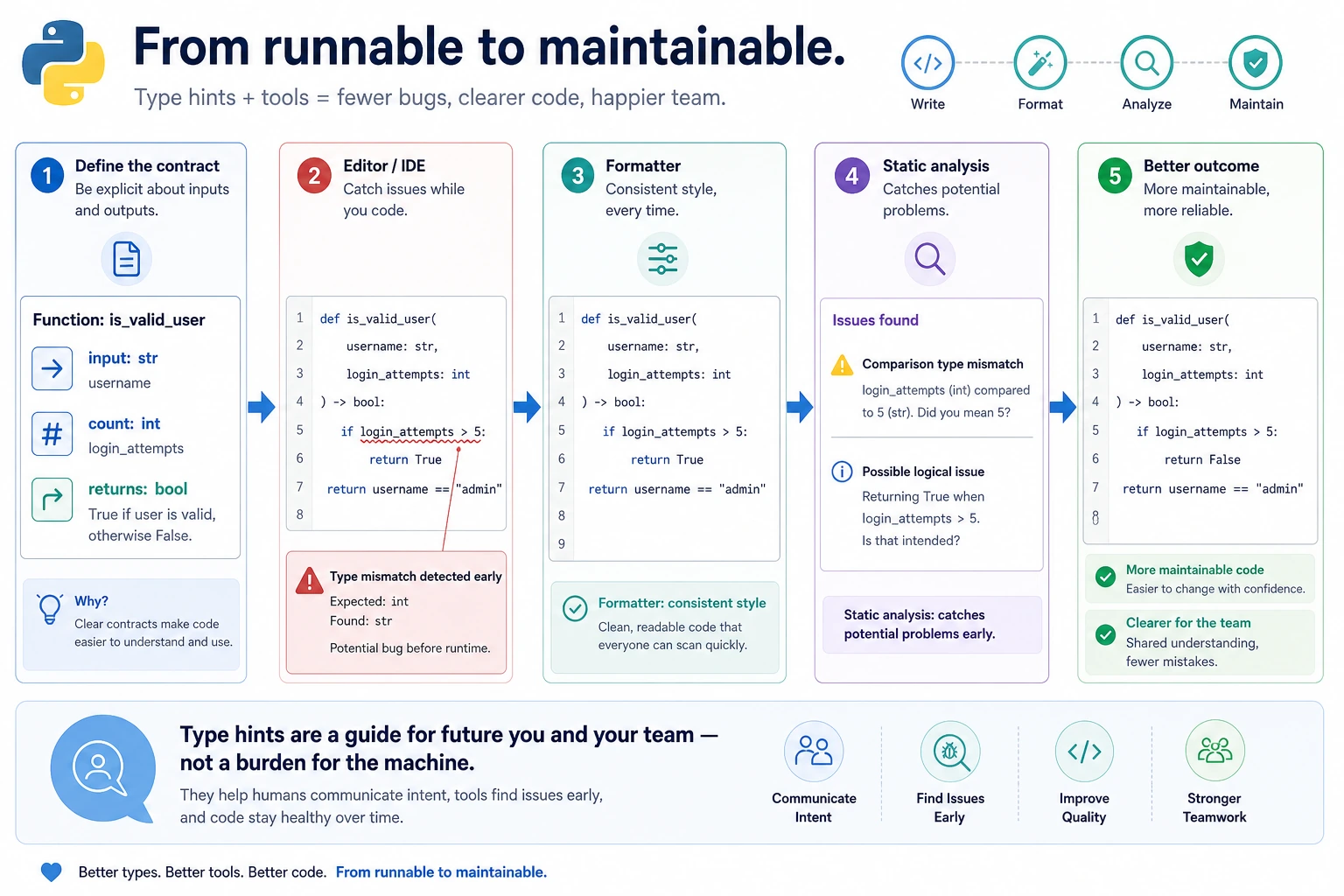
Where This Section Fits
This section shifts the focus from “code that runs” to “code that is easy to maintain.” Type hints, formatting tools, and code-checking tools help you make fewer mistakes as your project grows, as more people collaborate, and as you work with more complex libraries. They also help your future self understand the code faster.
Learning Objectives
- Understand why type hints are needed
- Master the basic syntax of Python type hints
- Learn common code quality tools (linter, formatter)
- Build the habit of writing high-quality code
Why Do We Need Type Hints?
Python is a dynamically typed language — variables do not need type declarations. This makes coding very flexible, but it also brings a problem:
def calculate_total(items, tax):
    return sum(items) * (1 + tax)

# When using it, you have to guess:
# What is items? A list? A tuple?
# What is tax? 0.1? Or "10%"?
# What does it return? A number? A string?
As projects get larger, code without type information is like a highway with no road signs — you have to rely on guessing.
The benefits of type hints:
| Benefit | Description |
|---|---|
| Self-documenting | You can tell at a glance what parameters a function needs and what it returns |
| IDE smart hints | VS Code can provide more accurate autocomplete |
| Static checking | Type errors can be found before the code runs |
| Team collaboration | Reduces communication cost; the code speaks for itself |
Basic Type Hints
Variable Hints
# Basic types
name: str = "Xiao Ming"
age: int = 25
height: float = 1.75
is_student: bool = True

# Python does not enforce type hints
# The following code will not raise an error, but static analysis tools will warn
age: int = "twenty-five"  # The type hint says int, but a str is assigned
Python type hints are not enforced at runtime. Even if the types do not match, the program can still run. They are mainly for developers and tools. Real type checking requires static analysis tools such as mypy.
Function Hints
def greet(name: str) -> str:
    """
    name: str  → The type of parameter name is str
    -> str     → The return type is str
    """
    return f"Hello, {name}!"

def calculate_bmi(weight: float, height: float) -> float:
    """Calculate BMI"""
    return weight / (height ** 2)

def train_model(epochs: int = 10, lr: float = 0.001) -> None:
    """A function that returns None"""
    print(f"Training for {epochs} epochs, learning rate {lr}")
With type hints, VS Code’s IntelliSense becomes much more accurate — when you type greet(, it can tell you that the parameter type is str.
Composite Type Hints
Lists and Dictionaries
# Python 3.9+: use built-in types directly
scores: list[int] = [85, 92, 78]
student: dict[str, int] = {"Zhang San": 85, "Li Si": 92}
coordinates: tuple[float, float] = (3.14, 2.71)
unique_ids: set[int] = {1, 2, 3}

# Python 3.8 and earlier: import from typing
from typing import List, Dict, Tuple, Set

scores: List[int] = [85, 92, 78]
student: Dict[str, int] = {"Zhang San": 85, "Li Si": 92}
Optional: Values That May Be None
from typing import Optional

def find_student(name: str) -> Optional[dict]:
    """Look up a student; return None if not found"""
    students = {"Zhang San": {"age": 20}, "Li Si": {"age": 21}}
    return students.get(name)

# Python 3.10+ can use a shorter syntax
def find_student(name: str) -> dict | None:
    students = {"Zhang San": {"age": 20}, "Li Si": {"age": 21}}
    return students.get(name)
Union: Multiple Possible Types
from typing import Union

def process(data: Union[str, list]) -> str:
    """Accepts a string or a list"""
    if isinstance(data, list):
        return ", ".join(str(item) for item in data)
    return data

# Shorter syntax in Python 3.10+
def process(data: str | list) -> str:
    if isinstance(data, list):
        return ", ".join(str(item) for item in data)
    return data
Callable: Function Types
from typing import Callable

def apply_func(func: Callable[[int, int], int], a: int, b: int) -> int:
    """Accepts a function as an argument"""
    return func(a, b)

result = apply_func(lambda x, y: x + y, 3, 5)  # 8
More Type Hints
from typing import Any, Literal

# Any: any type
def log(message: Any) -> None:
    print(message)

# Literal: only accepts specific values
def set_mode(mode: Literal["train", "eval", "test"]) -> None:
    print(f"Mode: {mode}")

set_mode("train")   # ✅
set_mode("play")    # Static analysis will warn
Type Hints in Practice
Add Type Hints to a Function
def analyze_scores(
    scores: list[float],
    subject: str = "Unknown",
    pass_line: float = 60.0
) -> dict[str, float | int | str]:
    """Analyze scores and return summary statistics"""
    if not scores:
        return {"error": "The score list is empty"}

    return {
        "subject": subject,
        "count": len(scores),
        "average": sum(scores) / len(scores),
        "max": max(scores),
        "min": min(scores),
        "pass_count": sum(1 for s in scores if s >= pass_line)
    }
Add Type Hints to a Class
class DataProcessor:
    def __init__(self, name: str, data: list[dict[str, Any]]) -> None:
        self.name: str = name
        self.data: list[dict[str, Any]] = data
        self._processed: bool = False

    def filter_by(self, key: str, value: Any) -> list[dict[str, Any]]:
        """Filter data by condition"""
        return [item for item in self.data if item.get(key) == value]

    def get_column(self, key: str) -> list[Any]:
        """Extract a column"""
        return [item[key] for item in self.data if key in item]
Code Quality Tools
Good code should not only run, but also be readable, consistent, and bug-free. The following tools help you achieve that.
Code Formatter: black
black is the most popular Python code formatter. It automatically formats your code into a consistent style.
# Install
pip install black

# Format a single file
black my_script.py

# Format an entire directory
black src/

# Check only, without modifying files
black --check my_script.py
Before formatting:
x = {  'a':37,'b':42,
'c':927}
y = 'hello ''world'
z = 'hello '+'world'
a = [1,2,3,4,5,]
After formatting:
x = {"a": 37, "b": 42, "c": 927}
y = "hello " "world"
z = "hello " + "world"
a = [1, 2, 3, 4, 5]
Code Checking: ruff
ruff is a next-generation Python linter. It is extremely fast and can find many common problems.
# Install
pip install ruff

# Check code
ruff check my_script.py

# Auto-fix
ruff check --fix my_script.py

# Format (ruff can also replace black)
ruff format my_script.py
Type Checking: mypy
# Install
pip install mypy

# Check types
mypy my_script.py
# example.py
def add(a: int, b: int) -> int:
    return a + b

result = add("hello", "world")  # mypy will raise an error: wrong argument types!
$ mypy example.py
example.py:4: error: Argument 1 to "add" has incompatible type "str"; expected "int"
VS Code Integration
Install the following extensions in VS Code to see code quality issues in real time:
| Extension | Feature |
|---|---|
| Pylance | Type checking and smart hints (recommended by VS Code by default) |
| Ruff | Real-time code checking and optional formatting |
| Black Formatter | Auto-format on save if you prefer Black as the formatter |
For new projects, using Ruff for both linting and formatting keeps the toolchain simple. Add the following to your VS Code settings:
{
    "editor.formatOnSave": true,
    "editor.defaultFormatter": "charliermarsh.ruff",
    "[python]": {
        "editor.defaultFormatter": "charliermarsh.ruff"
    }
}
If your team already standardizes on Black, keep Black Formatter as the default formatter and use Ruff only for linting/import cleanup. Do not set Ruff and Black as competing default formatters for the same Python files.
Python Style Guide (PEP 8)
PEP 8 is the official Python style guide. Here are the most important rules:
Naming Conventions
# Variables and functions: lowercase with underscores (snake_case)
student_name = "Zhang San"
def calculate_average(scores):
    return sum(scores) / len(scores)

# Classes: CapitalizedWords (PascalCase)
class DataProcessor:
    def __init__(self, source: str):
        self.source = source

# Constants: ALL_CAPS with underscores
MAX_RETRY = 3
DEFAULT_TIMEOUT = 30
API_BASE_URL = "https://api.example.com"

# "Private" attributes: underscore prefix
class MyClass:
    def __init__(self):
        self._internal_state = None
Blank Lines and Spaces
# Two blank lines between functions
def function_one():
    return "function one"


def function_two():
    return "function two"


# Two blank lines between classes
class ClassOne:
    value = 1


class ClassTwo:
    value = 2

# Add spaces around operators
x = 1 + 2       # ✅
x = 1+2          # ❌

# Add spaces after commas
items = [1, 2, 3]     # ✅
items = [1,2,3]        # ❌

# No spaces around default values in function parameters.
# The second style is valid Python, but not recommended by PEP 8.
def func(x=10):       # ✅
    return x

def func_not_recommended(x = 10):  # ❌ style only
    return x
Line Length
# A single line should not exceed 79 characters (or 88/120, depending on team standards)

# Long lines can be wrapped with parentheses
result = (
    first_variable
    + second_variable
    + third_variable
)

# When a function has too many parameters
def complex_function(
    param1: str,
    param2: int,
    param3: float = 0.0,
    param4: bool = True,
) -> dict:
    return {
        "param1": param1,
        "param2": param2,
        "param3": param3,
        "param4": param4,
    }
Writing Docstrings
Good docstrings help other people (and your future self) quickly understand the code:
def train_model(
    data: list[dict],
    epochs: int = 100,
    learning_rate: float = 0.001,
    batch_size: int = 32
) -> dict[str, float]:
    """
    Train a model and return training metrics.

    Args:
        data: A list of training data, where each element is a sample dictionary
        epochs: Number of training epochs, default is 100
        learning_rate: Learning rate, default is 0.001
        batch_size: Batch size, default is 32

    Returns:
        A dictionary containing training metrics, for example:
        {"accuracy": 0.95, "loss": 0.05}

    Raises:
        ValueError: When data is empty
        RuntimeError: When the GPU is unavailable

    Example:
        >>> result = train_model(data, epochs=50)
        >>> print(result["accuracy"])
        0.95
    """
    if not data:
        raise ValueError("Training data cannot be empty")
    total = sum(sample.get("score", 0.0) for sample in data)
    return {"accuracy": min(0.99, 0.5 + total / (len(data) * 100)), "loss": 0.05}
Hands-On Exercises
Exercise 1: Add Type Hints to Legacy Code
Add complete type hints to the following code:
def process_students(students, min_score):
    results = []
    for student in students:
        if student["score"] >= min_score:
            results.append({
                "name": student["name"],
                "score": student["score"],
                "passed": True
            })
    return results

def calculate_stats(numbers):
    if not numbers:
        return None
    return {
        "mean": sum(numbers) / len(numbers),
        "max": max(numbers),
        "min": min(numbers),
        "count": len(numbers)
    }
Exercise 2: Install and Use Code Quality Tools
# 1. Install ruff
pip install ruff

# 2. Create a Python file with formatting issues

# 3. Run ruff check to see the problems

# 4. Run ruff format to auto-format it

# 5. Compare the differences before and after
Exercise 3: Write High-Quality Code
Use all the conventions you have learned to rewrite the following "bad" code:
# Bad code
def f(l,n):
 r=[]
 for x in l:
  if x>n:r.append(x)
 return r

def g(d):
 s=0
 for k in d:s+=d[k]
 return s/len(d)
Requirements:
- Use meaningful names
- Add type hints
- Add docstrings
- Follow PEP 8
Summary
| Tool/Concept | Purpose | Recommendation |
|---|---|---|
| Type hints | Annotate parameter and return types | Strongly recommended |
| PEP 8 | Python code style standard | Must follow |
| black / ruff format | Automatically format code | Strongly recommended |
| ruff | Code quality checks | Strongly recommended |
| mypy | Static type checking | Recommended |
| docstring | Documentation strings | Required for public functions |
Code is written for humans to read, and only then for machines to execute. Type hints and code conventions will not make your code run faster, but they will make your code easier to understand, maintain, and collaborate on. In AI projects, code written by one person is often used and modified by many others — build good habits starting now.