3.2.3 Array Indexing and Slicing
Learning Objectives
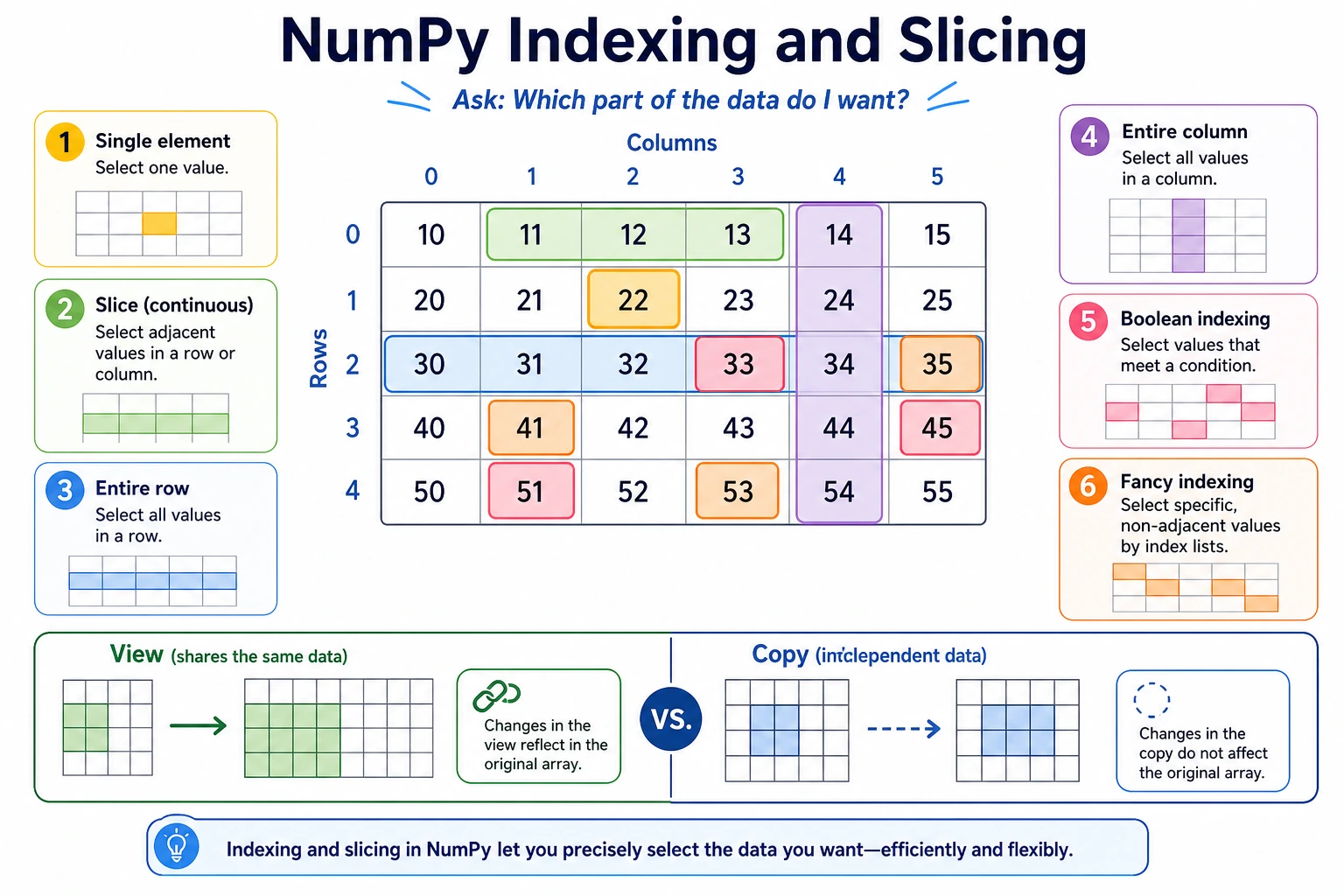
- Master basic indexing and slicing for 1D and multi-dimensional arrays
- Learn how to use boolean indexing for conditional filtering
- Understand Fancy Indexing
- Understand the difference between View and Copy
Indexing and Slicing 1D Arrays
Indexing in 1D arrays is basically the same as in Python lists:
import numpy as np

arr = np.array([10, 20, 30, 40, 50, 60, 70, 80])

# ===== Basic indexing =====
print(arr[0])     # 10   first element
print(arr[3])     # 40   fourth element
print(arr[-1])    # 80   last element
print(arr[-2])    # 70   second-to-last element

# ===== Slicing [start:stop:step] =====
print(arr[2:5])    # [30 40 50]    indices 2 to 4
print(arr[:3])     # [10 20 30]    first 3 elements
print(arr[5:])     # [60 70 80]    from index 5 to the end
print(arr[::2])    # [10 30 50 70] take every other element
print(arr[::-1])   # [80 70 60 50 40 30 20 10] reverse
Indexing and Slicing 2D Arrays
2D arrays are accessed using [row, column]:
matrix = np.array([
    [1,  2,  3,  4],
    [5,  6,  7,  8],
    [9,  10, 11, 12],
    [13, 14, 15, 16]
])
Access a Single Element
print(matrix[0, 0])    # 1    row 0, column 0
print(matrix[1, 2])    # 7    row 1, column 2
print(matrix[-1, -1])  # 16   last row, last column
Access an Entire Row/Column
print(matrix[0])       # [1 2 3 4]     row 0 (entire row)
print(matrix[0, :])    # [1 2 3 4]     same as above, more explicit

print(matrix[:, 0])    # [ 1  5  9 13]  column 0 (entire column)
print(matrix[:, -1])   # [ 4  8 12 16]  last column
Row and Column Slicing
# Get the first 2 rows and first 3 columns
sub = matrix[:2, :3]
print(sub)
# [[1 2 3]
#  [5 6 7]]

# Get rows 1~2 and columns 2~3
sub2 = matrix[1:3, 2:4]
print(sub2)
# [[ 7  8]
#  [11 12]]

# Take every other row (rows 0 and 2)
sub3 = matrix[::2]
print(sub3)
# [[ 1  2  3  4]
#  [ 9 10 11 12]]
Visual Guide to 2D Indexing
matrix =
     Col 0  Col 1  Col 2  Col 3
Row 0 [  1    2    3    4 ]
Row 1 [  5    6    7    8 ]
Row 2 [  9   10   11   12 ]
Row 3 [ 13   14   15   16 ]

matrix[1, 2]      → 7        (row 1, column 2)
matrix[:2, :3]    → [[1,2,3], [5,6,7]]  (first 2 rows, first 3 columns)
matrix[:, 1]      → [2, 6, 10, 14]      (all rows, column 1)
Boolean Indexing: Conditional Filtering
This is one of NumPy's most powerful features — use conditional expressions to filter data directly!
Basic Idea
arr = np.array([15, 23, 8, 42, 31, 5, 19, 27])

# Step 1: a condition expression generates a boolean array
mask = arr > 20
print(mask)      # [False  True False  True  True False False  True]

# Step 2: use the boolean array as an index to select elements where the value is True
result = arr[mask]
print(result)    # [23 42 31 27]

# Usually combined into one line
print(arr[arr > 20])    # [23 42 31 27]
Common Filtering Examples
scores = np.array([85, 92, 78, 65, 95, 43, 88, 72, 55, 90])

# Passing scores (>= 60)
print(scores[scores >= 60])    # [85 92 78 65 95 88 72 90]

# Excellent scores (>= 90)
print(scores[scores >= 90])    # [92 95 90]

# Failing scores (< 60)
print(scores[scores < 60])     # [43 55]

# Scores between 60 and 80 (combine multiple conditions with &, and add parentheses around each condition)
print(scores[(scores >= 60) & (scores <= 80)])  # [78 65 72]

# Scores below 60 or above 90 (combine multiple conditions with |)
print(scores[(scores < 60) | (scores > 90)])    # [92 95 43 55]

# Negation (~)
print(scores[~(scores >= 60)])  # [43 55]  equivalent to scores[scores < 60]
Syntax for Multiple Conditions
When combining conditions in NumPy, you cannot use Python's and / or. You must use:
&instead ofand(and)|instead ofor(or)~instead ofnot(not)- Parentheses are required around each condition
# ❌ Wrong
arr[arr > 5 and arr < 20]

# ✅ Correct
arr[(arr > 5) & (arr < 20)]
Boolean Indexing with 2D Arrays
matrix = np.array([
    [85, 92, 78],
    [65, 95, 43],
    [88, 72, 90]
])

# Find all scores greater than 80
print(matrix[matrix > 80])   # [85 92 95 88 90]
# Note: the result becomes a 1D array!

# Change failing scores to 60 (conditional assignment)
matrix[matrix < 60] = 60
print(matrix)
# [[85 92 78]
#  [65 95 60]   ← 43 was changed to 60
#  [88 72 90]]
Fancy Indexing
Fancy indexing lets you use an integer array as the index to retrieve multiple elements at specific positions at once:
Fancy Indexing in 1D
arr = np.array([10, 20, 30, 40, 50, 60, 70])

# Get elements at indices 1, 3, 5
print(arr[[1, 3, 5]])     # [20 40 60]

# Repeated selection is allowed
print(arr[[0, 0, 2, 2]])  # [10 10 30 30]

# Any order is allowed
print(arr[[6, 4, 2, 0]])  # [70 50 30 10]
Fancy Indexing in 2D
matrix = np.array([
    [1,  2,  3,  4],
    [5,  6,  7,  8],
    [9,  10, 11, 12]
])

# Get row 0 and row 2
print(matrix[[0, 2]])
# [[ 1  2  3  4]
#  [ 9 10 11 12]]

# Get specific positions: the three elements (0,1), (1,2), (2,3)
rows = [0, 1, 2]
cols = [1, 2, 3]
print(matrix[rows, cols])   # [ 2  7 12]
View vs Copy
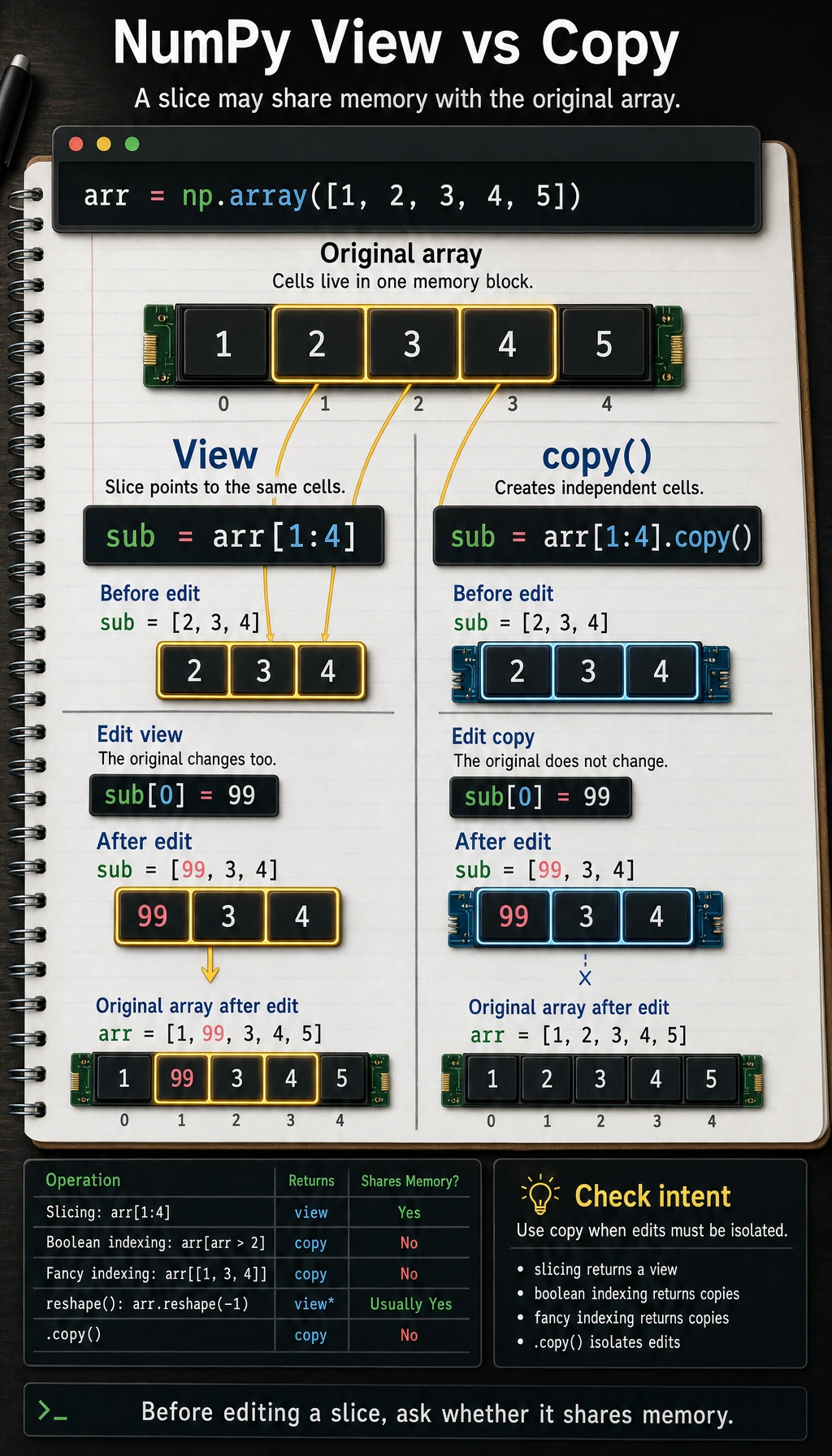
This is a common beginner trap — NumPy slicing returns a view, not a copy!
View: Changes Affect the Original Array
arr = np.array([1, 2, 3, 4, 5])

# Slicing returns a view
sub = arr[1:4]
print(sub)       # [2 3 4]

# Changing sub also changes arr!
sub[0] = 99
print(sub)       # [99  3  4]
print(arr)       # [ 1 99  3  4  5]  ← the original array changed too!
Copy: Independent from the Original
arr = np.array([1, 2, 3, 4, 5])

# Use copy() to create an independent copy
sub = arr[1:4].copy()
print(sub)       # [2 3 4]

# Changing sub does not affect arr
sub[0] = 99
print(sub)       # [99  3  4]
print(arr)       # [1 2 3 4 5]  ← the original array is unchanged
When Is It a View? When Is It a Copy?
| Operation | Return Type | Example |
|---|---|---|
| Slicing | View | arr[2:5] |
| Boolean indexing | Copy | arr[arr > 3] |
| Fancy indexing | Copy | arr[[1, 3, 5]] |
.copy() | Copy | arr[2:5].copy() |
.reshape() | View (usually) | arr.reshape(2, 3) |
Practical Advice
If you're not sure whether an operation returns a view or a copy, and you don't want to accidentally modify the original array, add .copy() — safety first.
safe_sub = arr[1:4].copy() # always safe
Hands-on Example: Analyzing Data with Indexing
Back to the Titanic scenario, let's use NumPy indexing to analyze the data:
import numpy as np

# Simulated data for 10 passengers
ages = np.array([22, 38, 26, 35, 35, np.nan, 54, 2, 27, 14])
fares = np.array([7.25, 71.28, 7.92, 53.10, 8.05, 8.46, 51.86, 21.08, 11.13, 30.07])
survived = np.array([0, 1, 1, 1, 0, 0, 0, 0, 1, 1])

# Find the average fare of survivors
survivor_fares = fares[survived == 1]
print(f"Average fare of survivors: ${np.mean(survivor_fares):.2f}")

# Find fares for passengers older than 30 (exclude NaN first)
valid_mask = ~np.isnan(ages)  # exclude NaN
age_mask = ages > 30
combined_mask = valid_mask & age_mask
print(f"Fares for passengers over 30: {fares[combined_mask]}")

# Find the indices of the 3 passengers with the highest fares
top3_indices = np.argsort(fares)[-3:][::-1]  # sort, take the last 3, then reverse
print(f"Top 3 fare indices: {top3_indices}")
print(f"Corresponding fares: {fares[top3_indices]}")
Summary
| Indexing Method | Syntax | Return Type | Use Case |
|---|---|---|---|
| Basic indexing | arr[i], arr[i, j] | Element value | Get a single element |
| Slicing | arr[start:stop:step] | View | Get a continuous region |
| Boolean indexing | arr[arr > 5] | Copy | Conditional filtering |
| Fancy indexing | arr[[1, 3, 5]] | Copy | Get non-contiguous positions |
Practice
Exercise 1: Basic Slicing
arr = np.arange(1, 21)  # [1, 2, 3, ..., 20]

# 1. Get the first 5 elements
# 2. Get all elements at odd positions (indices 1, 3, 5, ...)
# 3. Get the last 3 elements
# 4. Reverse the array
Exercise 2: 2D Slicing
matrix = np.arange(1, 26).reshape(5, 5)
print(matrix)
# [[ 1  2  3  4  5]
#  [ 6  7  8  9 10]
#  [11 12 13 14 15]
#  [16 17 18 19 20]
#  [21 22 23 24 25]]

# 1. Get the middle 3×3 submatrix
# 2. Get all elements in the second column
# 3. Get the diagonal elements [1, 7, 13, 19, 25] (hint: use fancy indexing)
Exercise 3: Boolean Indexing in Practice
# Math scores for 20 students in a class
math_scores = np.array([
    78, 92, 65, 88, 45, 95, 72, 81, 56, 90,
    83, 67, 94, 73, 85, 60, 98, 77, 69, 87
])

# 1. Find all failing scores (< 60)
# 2. Find all scores between 80 and 90 (inclusive)
# 3. Compute the average score of passing students
# 4. Change all failing scores to 60
# 5. Compute the updated average score