3.2.5 Array Reshaping and Operations
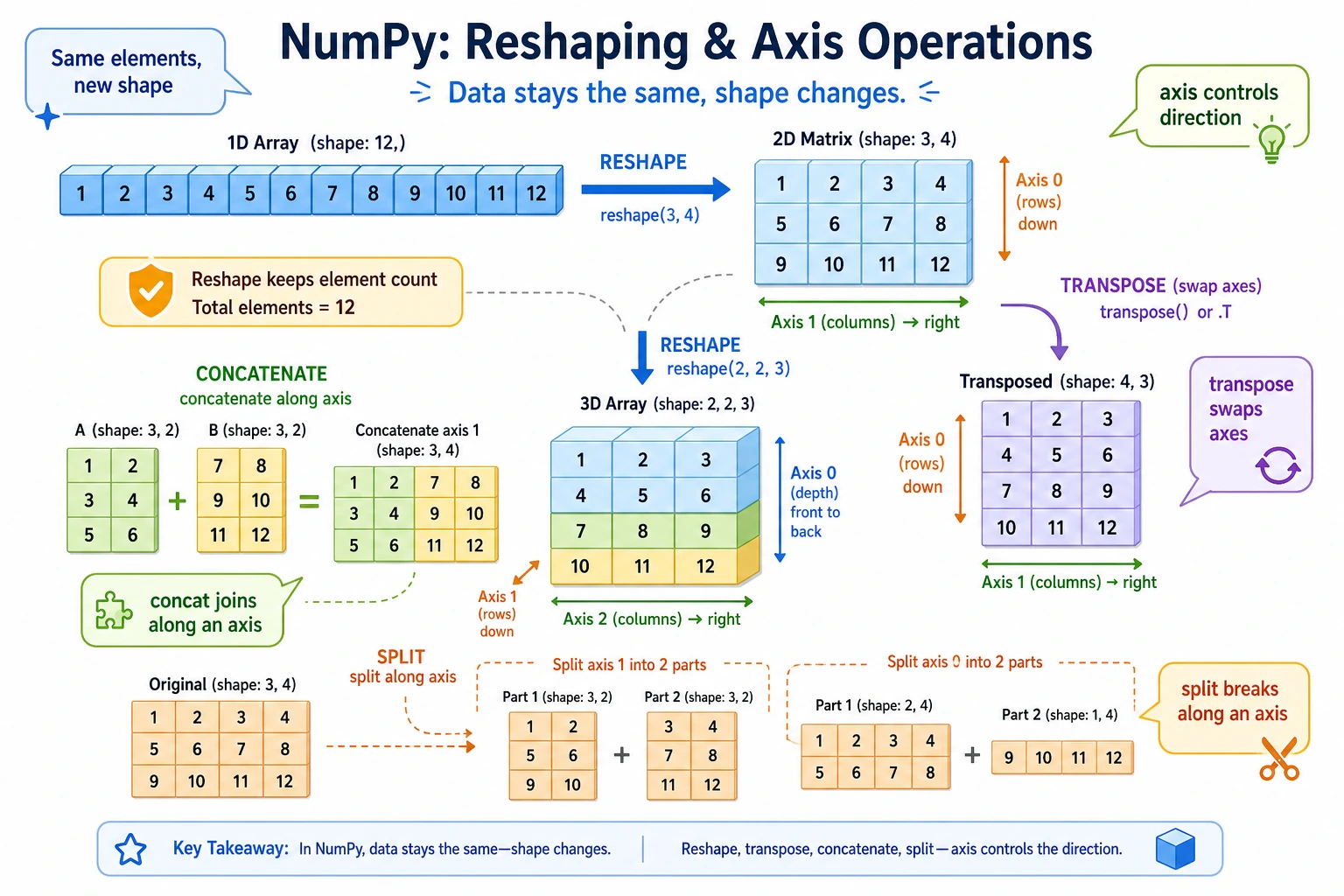
Learning Objectives
- Master reshaping operations such as reshape, flatten, and ravel
- Learn array concatenation (concatenate, stack, hstack, vstack)
- Learn array splitting (split, hsplit, vsplit)
- Understand transpose and axis swapping
reshape: Changing Shape
reshape is one of the most commonly used reshaping operations—it changes the shape of an array without changing the data.
Basic Usage
import numpy as np

arr = np.arange(12)    # [ 0  1  2  3  4  5  6  7  8  9 10 11]
print(arr.shape)       # (12,)

# Change to 3 rows and 4 columns
m1 = arr.reshape(3, 4)
print(m1)
# [[ 0  1  2  3]
#  [ 4  5  6  7]
#  [ 8  9 10 11]]

# Change to 4 rows and 3 columns
m2 = arr.reshape(4, 3)
print(m2)
# [[ 0  1  2]
#  [ 3  4  5]
#  [ 6  7  8]
#  [ 9 10 11]]

# Change to a 2×2×3 3D array
m3 = arr.reshape(2, 2, 3)
print(m3)
# [[[ 0  1  2]
#   [ 3  4  5]]
#  [[ 6  7  8]
#   [ 9 10 11]]]
The number of elements before and after reshape must be the same, otherwise an error will occur:
arr = np.arange(12)    # 12 elements
arr.reshape(3, 5)      # ❌ Error! 3 × 5 = 15 ≠ 12
arr.reshape(3, 4)      # ✅ 3 × 4 = 12
Use -1 for Automatic Calculation
-1 means "let NumPy automatically calculate this dimension":
arr = np.arange(12)

# I want 3 rows, please calculate the number of columns
m1 = arr.reshape(3, -1)    # Automatically calculates 4 columns
print(m1.shape)             # (3, 4)

# I want 4 columns, please calculate the number of rows
m2 = arr.reshape(-1, 4)    # Automatically calculates 3 rows
print(m2.shape)             # (3, 4)

# Convert to a single column (column vector)
col = arr.reshape(-1, 1)
print(col.shape)            # (12, 1)
In reshape, at most one dimension can be -1. That is because there must be only one unknown value to solve for.
arr.reshape(-1, -1) # ❌ Error! You cannot have two -1 values
flatten and ravel: Flattening Arrays
Convert a multi-dimensional array back to one dimension:
matrix = np.array([
    [1, 2, 3],
    [4, 5, 6]
])

# flatten: returns a copy (changes do not affect the original array)
flat = matrix.flatten()
print(flat)          # [1 2 3 4 5 6]
flat[0] = 99
print(matrix[0, 0])  # 1  ← original array does not change

# ravel: returns a view (changes affect the original array)
rav = matrix.ravel()
print(rav)           # [1 2 3 4 5 6]
rav[0] = 99
print(matrix[0, 0])  # 99  ← original array also changes!
| Method | Return type | Does modification affect the original array? | Speed |
|---|---|---|---|
flatten() | Copy | No | Slower (data must be copied) |
ravel() | View | Yes | Faster (no copy) |
reshape(-1) | View | Yes | Faster |
Array Concatenation
concatenate: General-Purpose Concatenation
a = np.array([1, 2, 3])
b = np.array([4, 5, 6])

# 1D concatenation
c = np.concatenate([a, b])
print(c)  # [1 2 3 4 5 6]
For 2D concatenation, you need to specify the direction (axis):
m1 = np.array([[1, 2], [3, 4]])
m2 = np.array([[5, 6], [7, 8]])

# axis=0: stack vertically (increase rows)
v = np.concatenate([m1, m2], axis=0)
print(v)
# [[1 2]
#  [3 4]
#  [5 6]
#  [7 8]]

# axis=1: stack horizontally (increase columns)
h = np.concatenate([m1, m2], axis=1)
print(h)
# [[1 2 5 6]
#  [3 4 7 8]]
vstack and hstack: Shortcut Concatenation
m1 = np.array([[1, 2], [3, 4]])
m2 = np.array([[5, 6], [7, 8]])

# vstack = vertical stack = stack vertically = concatenate(axis=0)
print(np.vstack([m1, m2]))
# [[1 2]
#  [3 4]
#  [5 6]
#  [7 8]]

# hstack = horizontal stack = stack horizontally = concatenate(axis=1)
print(np.hstack([m1, m2]))
# [[1 2 5 6]
#  [3 4 7 8]]
stack: Create a New Dimension
The difference between stack and concatenate is that stack adds a new dimension:
a = np.array([1, 2, 3])   # shape: (3,)
b = np.array([4, 5, 6])   # shape: (3,)

# Stack along a new dimension
s0 = np.stack([a, b], axis=0)   # similar to placing them "side by side"
print(s0)
# [[1 2 3]
#  [4 5 6]]
print(s0.shape)  # (2, 3)

s1 = np.stack([a, b], axis=1)   # similar to placing them "top to bottom"
print(s1)
# [[1 4]
#  [2 5]
#  [3 6]]
print(s1.shape)  # (3, 2)
Concatenation Summary
| Function | Purpose | Dimension Change |
|---|---|---|
np.concatenate() | Concatenate along an existing axis | Number of dimensions stays the same, one axis becomes longer |
np.vstack() | Stack vertically | Number of rows increases |
np.hstack() | Stack horizontally | Number of columns increases |
np.stack() | Stack along a new axis | Adds one dimension |
Array Splitting
split: Even Splitting
arr = np.arange(12)   # [ 0  1  2  3  4  5  6  7  8  9 10 11]

# Split evenly into 3 parts
parts = np.split(arr, 3)
print(parts[0])   # [0 1 2 3]
print(parts[1])   # [4 5 6 7]
print(parts[2])   # [8 9 10 11]

# Split at specified positions
parts2 = np.split(arr, [3, 7])  # split at indices 3 and 7
print(parts2[0])  # [0 1 2]
print(parts2[1])  # [3 4 5 6]
print(parts2[2])  # [7 8 9 10 11]
2D Splitting
matrix = np.arange(16).reshape(4, 4)
print(matrix)
# [[ 0  1  2  3]
#  [ 4  5  6  7]
#  [ 8  9 10 11]
#  [12 13 14 15]]

# vsplit: split vertically
top, bottom = np.vsplit(matrix, 2)
print(top)
# [[0 1 2 3]
#  [4 5 6 7]]

# hsplit: split horizontally
left, right = np.hsplit(matrix, 2)
print(left)
# [[ 0  1]
#  [ 4  5]
#  [ 8  9]
#  [12 13]]
Transpose and Axis Swapping
2D Transpose
Transpose means rows become columns, and columns become rows:
matrix = np.array([
    [1, 2, 3],
    [4, 5, 6]
])
print(matrix.shape)  # (2, 3)

# Transpose
t = matrix.T
print(t)
# [[1 4]
#  [2 5]
#  [3 6]]
print(t.shape)  # (3, 2)

# You can also use transpose
t2 = matrix.transpose()
print(np.array_equal(t, t2))  # True
Add Dimensions: np.newaxis and expand_dims
Sometimes we need to add a dimension to an array (for example, turning a row vector into a column vector):
arr = np.array([1, 2, 3])      # shape: (3,)

# Method 1: np.newaxis
row = arr[np.newaxis, :]        # shape: (1, 3) row vector
col = arr[:, np.newaxis]        # shape: (3, 1) column vector
print(row)  # [[1 2 3]]
print(col)
# [[1]
#  [2]
#  [3]]

# Method 2: np.expand_dims
row2 = np.expand_dims(arr, axis=0)   # add a dimension at axis=0 → (1, 3)
col2 = np.expand_dims(arr, axis=1)    # add a dimension at axis=1 → (3, 1)

# Method 3: reshape
row3 = arr.reshape(1, -1)   # (1, 3)
col3 = arr.reshape(-1, 1)   # (3, 1)
Remove Dimensions: squeeze
Remove dimensions whose size is 1:
arr = np.array([[[1, 2, 3]]])
print(arr.shape)          # (1, 1, 3)

squeezed = arr.squeeze()
print(squeezed.shape)     # (3,)
print(squeezed)           # [1 2 3]
Practice: Data Reorganization
import numpy as np

# Scenario: you have 12 months of sales data (1D)
monthly_sales = np.array([
    120, 135, 150, 180, 200, 210,
    195, 188, 220, 250, 280, 310
])

# Reorganize into 4 quarters × 3 months
quarterly = monthly_sales.reshape(4, 3)
print("Quarterly data:")
print(quarterly)
# [[120 135 150]    Q1
#  [180 200 210]    Q2
#  [195 188 220]    Q3
#  [250 280 310]]   Q4

# Total sales for each quarter
q_totals = quarterly.sum(axis=1)
quarters = ["Q1", "Q2", "Q3", "Q4"]
for q, total in zip(quarters, q_totals):
    print(f"  {q}: {total}")

# First half vs second half
first_half, second_half = np.vsplit(quarterly, 2)
print(f"\nFirst-half total: {first_half.sum()}")
print(f"Second-half total: {second_half.sum()}")
Summary
| Operation | Function | Description |
|---|---|---|
| Change shape | reshape() | Keep the total number of elements the same, change the arrangement of dimensions |
| Flatten | flatten() / ravel() | Convert multi-dimensional arrays to 1D |
| Concatenate | concatenate() / vstack() / hstack() | Merge multiple arrays |
| Stack | stack() | Merge arrays and add a new dimension |
| Split | split() / vsplit() / hsplit() | Split one array into multiple parts |
| Transpose | .T / transpose() | Swap rows and columns |
| Add dimensions | np.newaxis / expand_dims() | Add a dimension with size 1 |
| Remove dimensions | squeeze() | Remove dimensions with size 1 |
Hands-on Exercises
Exercise 1: reshape Practice
arr = np.arange(24)

# 1. Change it into a 4×6 matrix
# 2. Change it into a 2×3×4 3D array
# 3. Change it into 6 rows (let the number of columns be calculated automatically)
# 4. Flatten a (2,3,4) array back into 1D
Exercise 2: Concatenation and Splitting
# Grade data from 3 classes
class_a = np.array([[85, 90], [78, 82], [92, 88]])   # 3 students × 2 subjects
class_b = np.array([[76, 80], [95, 91], [83, 87]])   # 3 students × 2 subjects
class_c = np.array([[88, 92], [71, 75], [90, 85]])   # 3 students × 2 subjects

# 1. Merge the grades from the 3 classes into one 9×2 matrix
# 2. If scores for a 3rd subject need to be added, how should you concatenate them?
extra_scores = np.array([[70], [65], [80], [75], [90], [85], [78], [72], [88]])
# 3. Split the merged 9×3 matrix back into 3 groups, 3 students each
Exercise 3: Data Reorganization
# Temperature data for 365 days in a year (dummy data)
rng = np.random.default_rng(seed=42)
daily_temps = rng.uniform(low=-5, high=38, size=360)  # Use 360 days for easier splitting

# 1. Reorganize into 12 months × 30 days
# 2. Calculate the average temperature for each month
# 3. Find the hottest and coldest months
# 4. Calculate the average temperature difference between the first half and second half of the year