3.2.6 Basic Linear Algebra Operations
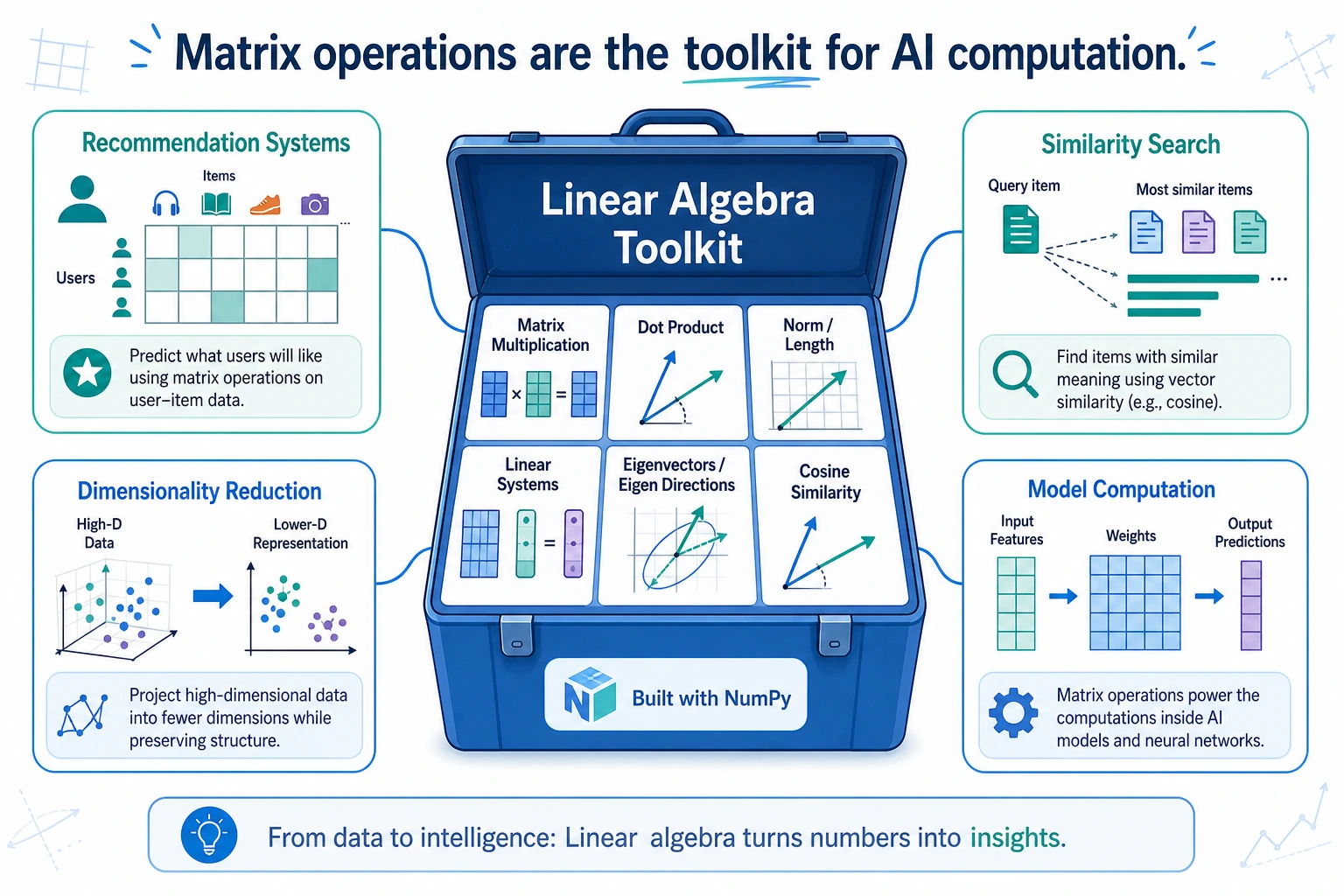
Learning Objectives
- Master three ways to write matrix multiplication (
dot,matmul,@) - Understand the meaning and computation of inverse matrices, determinants, and eigenvalues
- Learn to use the
numpy.linalgmodule for linear algebra operations - Understand why linear algebra matters in AI
Why learn linear algebra?
You may feel that “linear algebra” sounds very mathematical and abstract. But in AI, it is one of the most essential mathematical foundations:
| AI Scenario | Role of Linear Algebra |
|---|---|
| Neural networks | The computation in each layer is matrix multiplication |
| Recommender systems | User-item matrix factorization |
| Image processing | An image is a matrix |
| Word vectors | Each word is a vector; similarity = dot product |
| Dimensionality reduction | PCA is about finding eigenvalues and eigenvectors |
For now, let’s use NumPy to work with these concepts and build intuition. Chapter 4, The Minimum Necessary Math Foundation for AI, will explain the principles in more depth.
Matrix multiplication
Element-wise multiplication vs. matrix multiplication
This is one of the most common points of confusion for beginners:
import numpy as np

A = np.array([[1, 2], [3, 4]])
B = np.array([[5, 6], [7, 8]])

# Element-wise multiplication
print(A * B)
# [[ 5 12]
#  [21 32]]
# Calculation: 1×5=5, 2×6=12, 3×7=21, 4×8=32

# Matrix multiplication
print(A @ B)
# [[19 22]
#  [43 50]]
# Calculation:
# [1×5+2×7, 1×6+2×8]   = [19, 22]
# [3×5+4×7, 3×6+4×8]   = [43, 50]
Three ways to write matrix multiplication
A = np.array([[1, 2], [3, 4]])
B = np.array([[5, 6], [7, 8]])

# Method 1: @ operator (recommended, most concise)
C1 = A @ B

# Method 2: np.matmul
C2 = np.matmul(A, B)

# Method 3: np.dot
C3 = np.dot(A, B)

# All three methods give exactly the same result
print(np.array_equal(C1, C2))  # True
print(np.array_equal(C2, C3))  # True
In Python 3.5+, the @ operator is the most recommended way to write matrix multiplication because it is concise and intuitive.
Rules for matrix multiplication
Two matrices can be multiplied only when: the number of columns in the first matrix = the number of rows in the second matrix.
# (2, 3) @ (3, 4) → (2, 4)  ✅ 3 == 3
A = np.ones((2, 3))
B = np.ones((3, 4))
C = A @ B
print(C.shape)   # (2, 4)

# (2, 3) @ (2, 4) → ❌ error! 3 ≠ 2
# A = np.ones((2, 3))
# B = np.ones((2, 4))
# C = A @ B  # ValueError!
Memory trick: (m, n) @ (n, p) → (m, p)
Vector dot product
For one-dimensional arrays, @ or np.dot computes the dot product:
a = np.array([1, 2, 3])
b = np.array([4, 5, 6])

# Dot product = 1×4 + 2×5 + 3×6 = 32
print(a @ b)        # 32
print(np.dot(a, b)) # 32
The dot product is very important in AI—you will use it later when learning cosine similarity and the attention mechanism.
The numpy.linalg module
NumPy’s linalg submodule provides a full set of linear algebra functions:
Inverse matrix
The inverse of a matrix satisfies A × A⁻¹ = identity matrix:
A = np.array([[1, 2], [3, 4]])

# Compute the inverse matrix
A_inv = np.linalg.inv(A)
print(A_inv)
# [[-2.   1. ]
#  [ 1.5 -0.5]]

# Verify: A × A_inv ≈ identity matrix
print(A @ A_inv)
# [[1.0000000e+00 0.0000000e+00]
#  [8.8817842e-16 1.0000000e+00]]
# The diagonal is 1, and the other values are close to 0 (floating-point precision error)
Only square matrices (same number of rows and columns) with non-zero determinant have an inverse.
# A singular matrix (determinant = 0) has no inverse
singular = np.array([[1, 2], [2, 4]])  # The second row is 2 times the first row
# np.linalg.inv(singular)  # LinAlgError: Singular matrix
Determinant
The determinant is a scalar value that represents the matrix’s “scaling factor”:
A = np.array([[1, 2], [3, 4]])
det = np.linalg.det(A)
print(f"Determinant: {det:.1f}")   # -2.0

# Determinant of a 2×2 matrix = ad - bc
# [[a, b], [c, d]] → 1×4 - 2×3 = -2
Eigenvalues and eigenvectors
Eigenvalues and eigenvectors are the “DNA” of a matrix—they reveal its internal properties:
A = np.array([[4, 2], [1, 3]])

# Compute eigenvalues and eigenvectors
eigenvalues, eigenvectors = np.linalg.eig(A)
print(f"Eigenvalues: {eigenvalues}")      # [5. 2.]
print(f"Eigenvectors:\n{eigenvectors}")
# [[ 0.894 -0.707]
#  [ 0.447  0.707]]
If you think of a matrix as a kind of “transformation” (such as rotation or stretching), then:
- Eigenvectors = vectors whose direction does not change after the transformation
- Eigenvalues = the amount of stretching along that direction
This concept will be very useful later when we learn PCA for dimensionality reduction—PCA is essentially about finding the directions where the data changes the most (the eigenvectors corresponding to the largest eigenvalues).
Solving systems of linear equations
Solve the equations:
2x + y = 5
x + 3y = 7
Write them in matrix form: Ax = b
A = np.array([[2, 1], [1, 3]])
b = np.array([5, 7])

# Solve the system
x = np.linalg.solve(A, b)
print(f"x = {x[0]:.2f}, y = {x[1]:.2f}")  # x = 1.60, y = 1.80

# Verify
print(A @ x)   # [5. 7.]  ← equals b, so the solution is correct
Other useful operations
Norms (vector length)
v = np.array([3, 4])

# L2 norm (Euclidean distance)
l2 = np.linalg.norm(v)
print(f"L2 norm: {l2}")   # 5.0  (3² + 4² = 25, √25 = 5)

# L1 norm (sum of absolute values)
l1 = np.linalg.norm(v, ord=1)
print(f"L1 norm: {l1}")   # 7.0  (|3| + |4| = 7)

# Matrix norm
M = np.array([[1, 2], [3, 4]])
print(f"Matrix Frobenius norm: {np.linalg.norm(M):.2f}")  # 5.48
Matrix rank
A = np.array([[1, 2, 3], [4, 5, 6], [7, 8, 9]])
rank = np.linalg.matrix_rank(A)
print(f"Matrix rank: {rank}")  # 2 (not full rank, because the third row = first row×(-1) + second row×2)
Quick reference for common functions
| Function | Purpose | Example |
|---|---|---|
A @ B | Matrix multiplication | np.array([[1,2],[3,4]]) @ np.eye(2) |
np.linalg.inv(A) | Inverse matrix | |
np.linalg.det(A) | Determinant | |
np.linalg.eig(A) | Eigenvalues and eigenvectors | |
np.linalg.solve(A, b) | Solve Ax=b | |
np.linalg.norm(v) | Norm | |
np.linalg.matrix_rank(A) | Matrix rank | |
A.T | Transpose | |
np.trace(A) | Trace (sum of diagonal elements) |
Practice: Calculate cosine similarity
Cosine similarity is a common way in AI to measure how “similar” two vectors are. It will be used repeatedly later in word vectors, recommender systems, and RAG.
Formula: cos(θ) = (a · b) / (||a|| × ||b||)
import numpy as np

def cosine_similarity(a, b):
    """Calculate the cosine similarity between two vectors"""
    dot_product = a @ b                         # Dot product
    norm_a = np.linalg.norm(a)                  # Length of a
    norm_b = np.linalg.norm(b)                  # Length of b
    return dot_product / (norm_a * norm_b)

# Example: compare user interests
# Dimensions represent: [technology, sports, music, movies, food]
user_a = np.array([5, 1, 3, 4, 2])   # Likes technology and movies
user_b = np.array([4, 2, 3, 5, 1])   # Also likes technology and movies
user_c = np.array([1, 5, 2, 1, 4])   # Likes sports and food

print(f"Similarity between A and B: {cosine_similarity(user_a, user_b):.4f}")  # 0.9631 very similar
print(f"Similarity between A and C: {cosine_similarity(user_a, user_c):.4f}")  # 0.5528 not very similar
print(f"Similarity between B and C: {cosine_similarity(user_b, user_c):.4f}")  # 0.5025 not very similar
Summary
| Concept | Description | NumPy function |
|---|---|---|
| Matrix multiplication | (m,n) @ (n,p) → (m,p) | A @ B or np.matmul |
| Inverse matrix | A × A⁻¹ = I | np.linalg.inv() |
| Determinant | Matrix scaling factor | np.linalg.det() |
| Eigenvalues/vectors | The “DNA” of a matrix | np.linalg.eig() |
| Solving equations | Solve Ax = b | np.linalg.solve() |
| Norm | Vector length | np.linalg.norm() |
At this stage, you only need to:
- Be able to use NumPy’s linear algebra functions
- Know roughly what matrix multiplication, inverse matrices, and eigenvalues mean
- Be able to calculate cosine similarity
You will learn the deeper mathematical understanding systematically in Chapter 4, The Minimum Necessary Math Foundation for AI. For now, just build intuition through code.
Hands-on exercises
Exercise 1: Matrix multiplication
# Unit prices for 3 products in a store
prices = np.array([10, 25, 8])   # [apples, steak, bread]

# Purchase quantities for 3 customers
quantities = np.array([
    [3, 1, 2],    # Customer 1: 3 apples + 1 steak + 2 bread
    [0, 2, 5],    # Customer 2
    [5, 0, 3]     # Customer 3
])

# Use matrix multiplication to calculate the total spending of each customer
# totals = ?
Exercise 2: Solve equations
# Solve the system:
# 3x + 2y - z = 1
# x - y + 2z = 5
# 2x + 3y - z = 0
#
# Hint: write it in the form Ax = b
Exercise 3: Cosine similarity application
# Suppose we have feature vectors for 5 movies
# Dimensions represent: [action, comedy, romance, sci-fi, horror]
movies = {
    "Avengers": np.array([5, 2, 1, 4, 0]),
    "Lost in Thailand": np.array([1, 5, 2, 0, 0]),
    "Titanic": np.array([1, 0, 5, 0, 1]),
    "Interstellar": np.array([3, 0, 2, 5, 0]),
    "Train to Busan": np.array([4, 0, 1, 1, 5]),
}

# Use cosine similarity to find the movie most similar to "Avengers"
# Hint: calculate the cosine similarity between "Avengers" and each of the other movies