3.3.6 Data Transformation
Many beginners start to feel a bit confused when they get here:
applymapreplacerankcut
You may know all these names, but once they show up in a problem, it’s easy to mix up which one to use first.
So the most important thing in this section is not memorizing more functions, but first building a clear judgment:
Am I trying to “change values”, “create a new column”, “do sorting/ranking”, or “split continuous values into bins”?
Learning Objectives
- Understand how
apply,map, andapplymapwork and how they differ - Learn sorting (
sort_values) and ranking (rank) - Master data replacement and mapping
Build a mental map first
Data transformation is easier to understand by asking: “What do I want this column to become?”
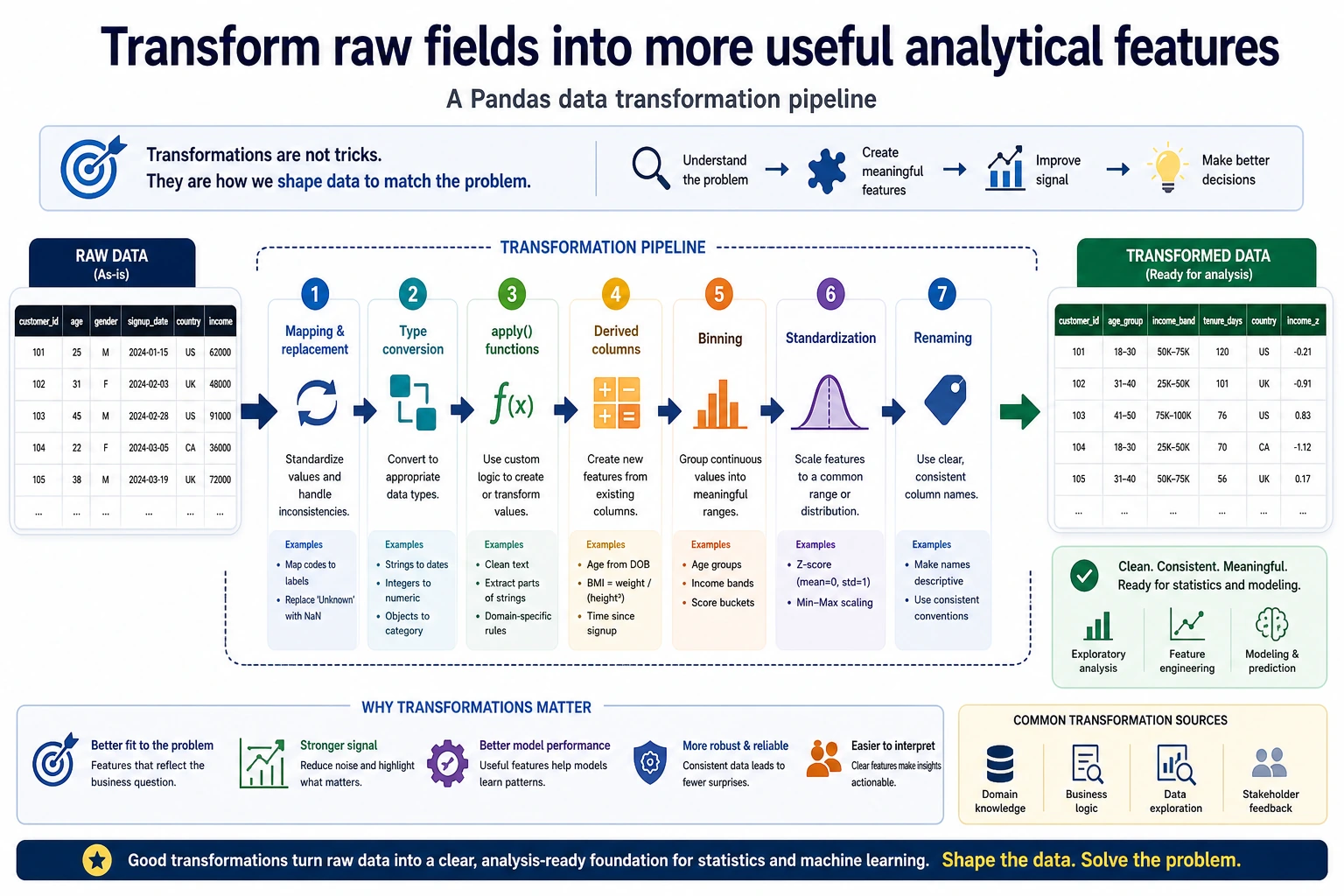
So what this section really aims to solve is:
- What each transformation action is used for
- When to think of
mapfirst, and when to think ofapplyfirst
apply: Apply a function to rows or columns
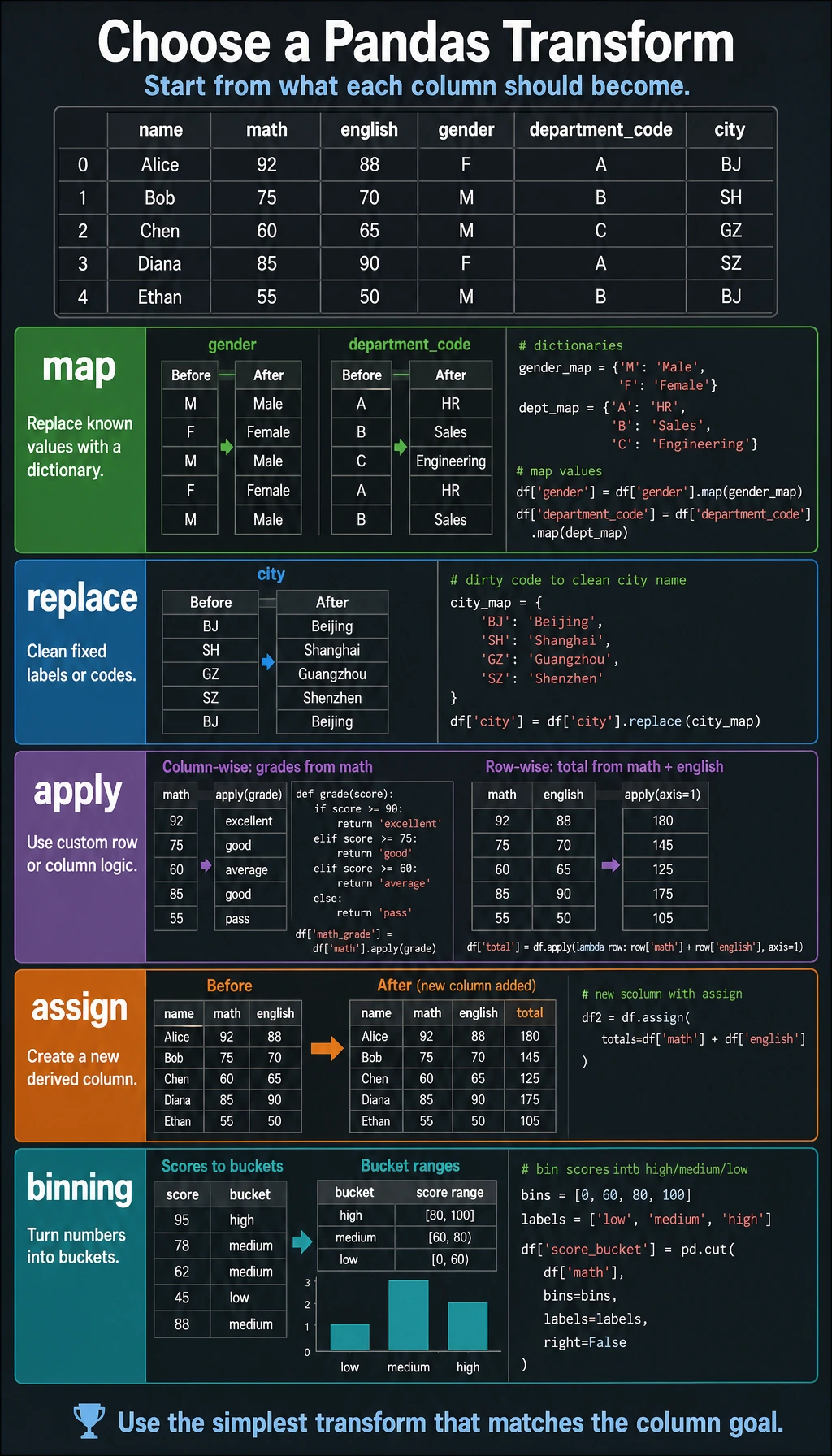
apply is one of Pandas’ most flexible transformation tools — it can apply any function to each row or each column.
A better beginner-friendly analogy
You can think of data transformation as:
- “translating, processing, and relabeling” raw data
Sometimes you just want to:
- translate codes into English
Sometimes you want to:
- calculate a new result from several columns in one row
Sometimes you want to:
- split continuous numbers into three levels: high, medium, and low
All of these look like “transformations,” but they are actually different types of problems.
Apply to a column (Series)
import pandas as pd
import numpy as np

df = pd.DataFrame({
    "name": ["Zhang San", "Li Si", "Wang Wu", "Zhao Liu"],
    "math": [85, 92, 78, 95],
    "english": [90, 88, 72, 85]
})

# Apply a built-in function to a single column
print(df["math"].apply(np.sqrt))  # square root of each score

# Apply a custom function to a single column
def grade(score):
    if score >= 90: return "excellent"
    elif score >= 80: return "good"
    elif score >= 70: return "average"
    else: return "pass"

df["math_grade"] = df["math"].apply(grade)
print(df)

# Use lambda for a more concise expression
df["english_grade"] = df["english"].apply(lambda x: "pass" if x >= 60 else "fail")
Apply to a DataFrame by row
# axis=1 means operate on each row
df["total"] = df[["math", "english"]].apply(np.sum, axis=1)

# Custom row operation
def student_info(row):
    return f"{row['name']}'s math score is {row['math']}"

df["description"] = df.apply(student_info, axis=1)
print(df[["name", "description"]])
When learning apply for the first time, what should you remember first?
The most important thing to remember is:
applyis best for custom calculations when built-in methods are not enough.
In other words, it is not the first tool you should reach for, but more like something you use when:
- the rule is a bit complex and can’t be handled directly by one or two built-in methods
map: mapping and replacement
map is used on a Series to map old values to new values:
df = pd.DataFrame({
    "name": ["Zhang San", "Li Si", "Wang Wu"],
    "gender": ["M", "F", "M"],
    "department_code": [1, 2, 1]
})

# Map with a dictionary
df["gender_cn"] = df["gender"].map({"M": "male", "F": "female"})

# Department code mapping
dept_map = {1: "Engineering", 2: "Marketing", 3: "Management"}
df["department_name"] = df["department_code"].map(dept_map)

# Map with a function
df["name_length"] = df["name"].map(len)

print(df)
When is it best to think of map first?
When your brain is thinking about:
- code A -> name A
- M / F -> male / female
- month abbreviation -> month name
In this kind of “one value maps to one value” translation relationship, you usually should think of:
map
Difference between map and apply
| Feature | map | apply |
|---|---|---|
| Target object | Series only | Series or DataFrame |
| Supports dictionary mapping | ✅ | ❌ |
| Supports functions | ✅ | ✅ |
| Row-wise operation | ❌ | ✅ (axis=1) |
replace: replace values
df = pd.DataFrame({
    "city": ["BJ", "SH", "GZ", "SZ", "BJ"],
    "level": ["A", "B", "C", "A", "B"]
})

# Replace a single value
df["city"] = df["city"].replace("BJ", "Beijing")

# Replace multiple values (dictionary)
city_map = {"SH": "Shanghai", "GZ": "Guangzhou", "SZ": "Shenzhen"}
df["city"] = df["city"].replace(city_map)

print(df)
Where do map and replace get mixed up most easily?
A simple way to remember it is:
mapis more like “mapping and translating”replaceis more like “directly swapping out old values”
If your goal is:
- converting a whole set of codes into names
that is usually more like map;
if you just want to:
- replace a dirty value
that is usually more like replace.
Sorting
sort_values: sort by values
df = pd.DataFrame({
    "name": ["Zhang San", "Li Si", "Wang Wu", "Zhao Liu", "Qian Qi"],
    "age": [22, 28, 25, 35, 21],
    "salary": [15000, 22000, 18000, 35000, 12000]
})

# Sort by salary ascending
print(df.sort_values("salary"))

# Sort by salary descending
print(df.sort_values("salary", ascending=False))

# Multi-column sort: first by age ascending, and if ages are the same, by salary descending
print(df.sort_values(["age", "salary"], ascending=[True, False]))

# Get top 3 (recommended: nlargest)
print(df.nlargest(3, "salary"))

# Get bottom 3
print(df.nsmallest(3, "salary"))
sort_index: sort by index
df_indexed = df.set_index("name")
print(df_indexed.sort_index())           # sort by name
print(df_indexed.sort_index(ascending=False))
rank: ranking
df = pd.DataFrame({
    "name": ["Zhang San", "Li Si", "Wang Wu", "Zhao Liu", "Qian Qi"],
    "score": [85, 92, 78, 92, 88]
})

# Default ranking (equal values get the average rank)
df["rank"] = df["score"].rank(ascending=False)
print(df)
#    name  score   rank
# 0  Zhang San   85   4.0
# 1  Li Si      92   1.5  ← tied for 1st, average of (1+2)
# 2  Wang Wu    78   5.0
# 3  Zhao Liu   92   1.5
# 4  Qian Qi    88   3.0

# Different ranking strategies
df["min_rank"] = df["score"].rank(ascending=False, method="min")     # tied values take the smallest rank
df["max_rank"] = df["score"].rank(ascending=False, method="max")     # tied values take the largest rank
df["dense_rank"] = df["score"].rank(ascending=False, method="dense")   # no gaps in ranking
print(df[["name", "score", "rank", "min_rank", "dense_rank"]])
| method | Tie handling | Example (92, 92) |
|---|---|---|
average | Take the average | 1.5, 1.5 |
min | Take the minimum | 1, 1 |
max | Take the maximum | 2, 2 |
dense | Dense ranking (no gaps) | 1, 1 (next is 2) |
first | By order of appearance | 1, 2 |
A very practical choice table for beginners
| What do you want to do now | Better first choice |
|---|---|
| Translate codes into English labels | map |
| Calculate a new result from several columns in one row | apply(axis=1) |
| Find Top N / sort | sort_values / nlargest |
| Rank values | rank |
| Split continuous values into intervals | cut / qcut |
This table is especially useful for beginners, because it turns “there are many transformation methods” back into a few very common problems.
Other common transformations
Value counts
df = pd.DataFrame({
    "department": ["Engineering", "Marketing", "Engineering", "Management", "Engineering", "Marketing"]
})

# Count how many times each value appears
print(df["department"].value_counts())
# Engineering    3
# Marketing      2
# Management     1

# Proportion
print(df["department"].value_counts(normalize=True))
Unique values
print(df["department"].unique())     # ['Engineering' 'Marketing' 'Management']
print(df["department"].nunique())    # 3 (number of unique values)
Binning (cut / qcut)
ages = pd.Series([18, 22, 25, 30, 35, 42, 55, 68])

# Bin by fixed intervals
bins = [0, 18, 30, 50, 100]
labels = ["teen", "young adult", "middle-aged", "senior"]
age_group = pd.cut(ages, bins=bins, labels=labels)
print(age_group)

# Bin by quantiles (each group has roughly the same number of people)
quartile_group = pd.qcut(ages, q=4, labels=["Q1", "Q2", "Q3", "Q4"])
print(quartile_group)
Summary
| Operation | Method | Common use |
|---|---|---|
| Custom transformation | apply() | Complex row-wise/column-wise calculations |
| Value mapping | map() | Dictionary mapping, code conversion |
| Value replacement | replace() | Fixing incorrect values |
| Sorting | sort_values() | Top N, ranking lists |
| Ranking | rank() | Score ranking |
| Counting values | value_counts() | Category statistics |
| Binning | cut() / qcut() | Age bands, income bands |
What should you take away from this section?
- The most important thing in data transformation is not the function name, but first figuring out what you want the data to become
mapis more like mapping and translation, whileapplyis more like custom processing- Sorting, ranking, and binning are all essentially ways of reorganizing how data is expressed
Hands-on Exercises
Exercise 1: Data mapping
# Create data that contains English month abbreviations
# 1. Map month abbreviations to month names
# 2. Map months to quarters (Q1, Q2, Q3, Q4)
Exercise 2: Ranking practice
# Create a DataFrame with scores for 3 subjects for 20 students
# 1. Calculate the total score
# 2. Rank by total score (dense ranking)
# 3. Sort by total score and take the top 5
# 4. Label each subject score with a grade (excellent/good/average/pass/fail)
Exercise 3: Binning practice
# You have spending data for 100 users
# 1. Use cut to divide spending into three levels: "low spending / medium spending / high spending"
# 2. Use qcut to split them evenly into 5 groups
# 3. Count the number of users and the average spending in each group