3.3.4 Data Selection and Filtering
When many beginners first learn Pandas, what usually blocks them is not cleaning, but:
- How do I select the part of the data I actually want?
So the most important thing in this section is not memorizing every syntax pattern, but building this first question:
Am I selecting by label, by position, or by condition?
Learning Objectives
- Master
loc(label indexing) andiloc(position indexing) - Learn to use boolean indexing for conditional filtering
- Master the
query()method - Learn multi-condition filtering
First, build a mental map
Data selection and filtering are easier to understand as “who do I want to select?”
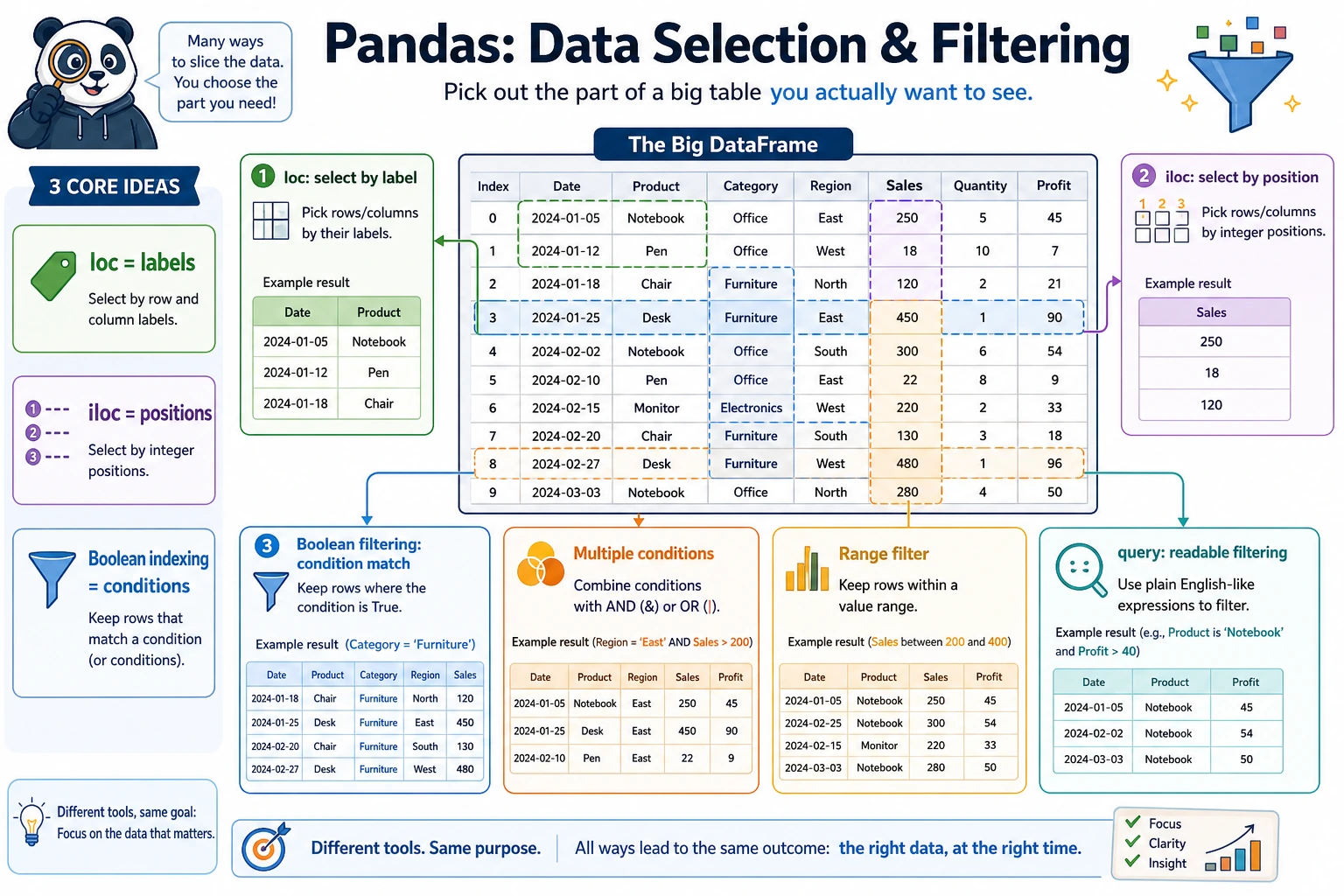
So what this section really aims to solve is:
- In different scenarios, should you think of
loc,iloc, or boolean indexing first? - Why is the first step in so many
Pandasproblems to “select the data you need first”?
Prepare sample data
import pandas as pd
import numpy as np

df = pd.DataFrame({
    "Name": ["Alice", "Bob", "Charlie", "Diana", "Ethan", "Fiona"],
    "Age": [22, 28, 25, 35, 21, 30],
    "Department": ["Engineering", "Marketing", "Engineering", "Management", "Engineering", "Marketing"],
    "Salary": [15000, 18000, 22000, 35000, 12000, 20000],
    "HireYear": [2023, 2020, 2021, 2018, 2024, 2019]
})
print(df)
A better analogy for beginners
You can think of this section as:
- Finding the rows and columns you really want in a large table
In other words, the core of this section is not “many syntax patterns,” but:
- First figure out whether you are searching by name
- Or by position
- Or filtering by condition
loc: label indexing
loc uses labels (names) to locate data, with the format: df.loc[row_label, column_label]
What should you remember first when learning loc?
The most important thing to remember first is:
locselects by “name and label.”
That means it is more like:
- I know which column I want, and which label range I want
# Select a single row
print(df.loc[0])         # The first row (the row with label 0)

# Select multiple rows
print(df.loc[0:2])       # Labels 0 to 2 (includes 2!)

# Select specific rows and columns
print(df.loc[0, "Name"])          # "Alice"
print(df.loc[0:2, "Name"])        # Names in the first 3 rows
print(df.loc[0:2, ["Name", "Salary"]])  # Names and salaries in the first 3 rows

# Select certain columns from all rows
print(df.loc[:, ["Name", "Age"]])

# Conditional filtering (the most common use!)
print(df.loc[df["Age"] > 25])    # All rows where age is greater than 25
iloc: position indexing
iloc uses position (integer) to locate data, following the same slicing rules as Python lists:
What should you remember first when learning iloc?
The most important thing to remember first is:
ilocselects by “which row, which column.”
So it is more like:
- You use coordinates to pick values from the table
# Select a single row
print(df.iloc[0])        # First row

# Select multiple rows (does not include the end, just like Python)
print(df.iloc[0:3])      # Rows 0, 1, 2

# Select specific positions
print(df.iloc[0, 0])     # Row 0, column 0 → "Alice"
print(df.iloc[0:3, 0:2]) # First 3 rows, first 2 columns
print(df.iloc[[0, 2, 4]])  # Rows 0, 2, 4

# Select the last row
print(df.iloc[-1])
loc vs iloc comparison
| Feature | loc | iloc |
|---|---|---|
| Indexing method | Label (name) | Position (integer) |
| Slice end | Included | Not included |
| Example | df.loc[0:2] → 3 rows | df.iloc[0:2] → 2 rows |
| Conditional filtering | ✅ Supported | ❌ Not supported |
When the index is the default 0, 1, 2..., loc[0:2] returns 3 rows, while iloc[0:2] returns 2 rows.
print(len(df.loc[0:2]))    # 3  (includes label 2)
print(len(df.iloc[0:2]))   # 2  (does not include position 2)
A selection table that beginners can remember first
| What you are thinking | Safer first choice |
|---|---|
| I know the column name or label | loc |
| I only know which row and column position | iloc |
| I want to filter people or orders by a condition | Boolean indexing |
| The condition is long and I want it to read more like a sentence | query() |
This table is especially good for beginners because it turns “which one should I use?” into a question you can actually answer.
Boolean indexing: conditional filtering
This is the most frequently used operation in data analysis:
Why is boolean indexing so important?
Because in real analysis tasks, what you most often do is:
- Find orders with amount greater than a certain value
- Find people in a specific department
- Find a subset that meets two or three conditions
In other words, in many analysis tasks, the first real step is:
- First filter out the data you want to analyze
Single-condition filtering
# Employees with salary greater than 20000
high_salary = df[df["Salary"] > 20000]
print(high_salary)

# Employees in the "Engineering" department
tech = df[df["Department"] == "Engineering"]
print(tech)

# Employees whose age is not 22
print(df[df["Age"] != 22])
Combining multiple conditions
# Engineering department and salary greater than 15000 (use & for AND)
result = df[(df["Department"] == "Engineering") & (df["Salary"] > 15000)]
print(result)

# Engineering department or management department (use | for OR)
result = df[(df["Department"] == "Engineering") | (df["Department"] == "Management")]
print(result)

# Negation (use ~ for NOT)
result = df[~(df["Department"] == "Engineering")]  # Non-engineering departments
print(result)
Just like with NumPy, every condition must be wrapped in parentheses. Use &, |, and ~ instead of and, or, and not.
# ❌ Wrong
df[df["Age"] > 25 and df["Salary"] > 20000]

# ✅ Correct
df[(df["Age"] > 25) & (df["Salary"] > 20000)]
isin: match multiple values
# Employees whose department is in ["Engineering", "Marketing"]
result = df[df["Department"].isin(["Engineering", "Marketing"])]
print(result)

# Reverse: not in these departments
result = df[~df["Department"].isin(["Engineering", "Marketing"])]
print(result)
between: range filtering
# Ages between 22 and 30 (inclusive)
result = df[df["Age"].between(22, 30)]
print(result)
String conditions
# Names containing "li"
result = df[df["Name"].str.contains("li")]

# Names starting with "A"
result = df[df["Name"].str.startswith("A")]
The safest default order when you first do filtering problems
A safer order is usually:
- Ask yourself whether you are selecting by label, by position, or by condition
- Use boolean indexing first when the condition is simple
- Consider
query()when the condition is long - Finally, combine row selection and column selection
This is usually less confusing than mixing several styles at once from the start.
The query() method
query() lets you filter data in a way that feels closer to natural language:
# Equivalent to df[df["Salary"] > 20000]
result = df.query("Salary > 20000")
print(result)

# Multiple conditions
result = df.query("Department == 'Engineering' and Salary > 15000")
print(result)

# Using variables
min_salary = 20000
result = df.query("Salary > @min_salary")  # @ references an external variable
print(result)

# Range query
result = df.query("22 <= Age <= 30")
print(result)
- For simple conditions: boolean indexing like
df[df["col"] > 5]is more direct - For complex conditions:
query()is more readable, especially with multiple conditions - When you need to reference variables:
query("col > @var")is very convenient
Summary of methods for selecting specific data
A data selection checklist beginners can copy directly
When you first do a Pandas filtering problem, the safest checklist is usually:
- Am I selecting columns, rows, or both rows and columns?
- Am I selecting by label, by position, or by condition?
- Did I add parentheses to the conditions?
- Is the result really the rows and columns I expected?
If you answer these 4 questions clearly, many filtering problems become much easier.
Practice: data filtering
import pandas as pd
import numpy as np

# Create a set of e-commerce order data
rng = np.random.default_rng(seed=42)
n = 100
orders = pd.DataFrame({
    "OrderID": range(1001, 1001 + n),
    "Customer": rng.choice(["Alice", "Bob", "Charlie", "Diana", "Eve"], n),
    "Category": rng.choice(["Electronics", "Clothing", "Food", "Books"], n),
    "Amount": rng.integers(10, 500, n),
    "Quantity": rng.integers(1, 10, n),
    "Returned": rng.choice([True, False], n, p=[0.1, 0.9])
})

# View the data
print(orders.head(10))
print(orders.info())

# Filtering practice
# 1. Orders with amount greater than 300
print(orders[orders["Amount"] > 300])

# 2. Electronic products purchased by Alice
print(orders.query("Customer == 'Alice' and Category == 'Electronics'"))

# 3. Orders that have not been returned and are in the top 10 by amount
not_returned = orders[~orders["Returned"]]
top10 = not_returned.nlargest(10, "Amount")
print(top10[["OrderID", "Customer", "Amount"]])
Hands-on exercises
Exercise 1: Basic filtering
# Use the orders data above
# 1. Find all returned orders
# 2. Find the number of orders with amounts between 100 and 200
# 3. Find orders in the "Books" or "Food" category
# 4. Find the average amount of Bob's non-returned orders
Exercise 2: Comprehensive filtering
# 1. What is the maximum order amount for each customer? (Hint: filter first, then aggregate)
# 2. Which customers have return records?
# 3. Which orders are in the top 5% by amount? (Hint: use quantile)
What you should take away from this section
locselects by label,ilocselects by position, and boolean indexing selects by condition- In many real analysis tasks, the first step is not calculation, but filtering
- Before writing code, clearly think about “who do I want to select?” — that is more reliable than memorizing syntax