2.2.2 Exception Handling
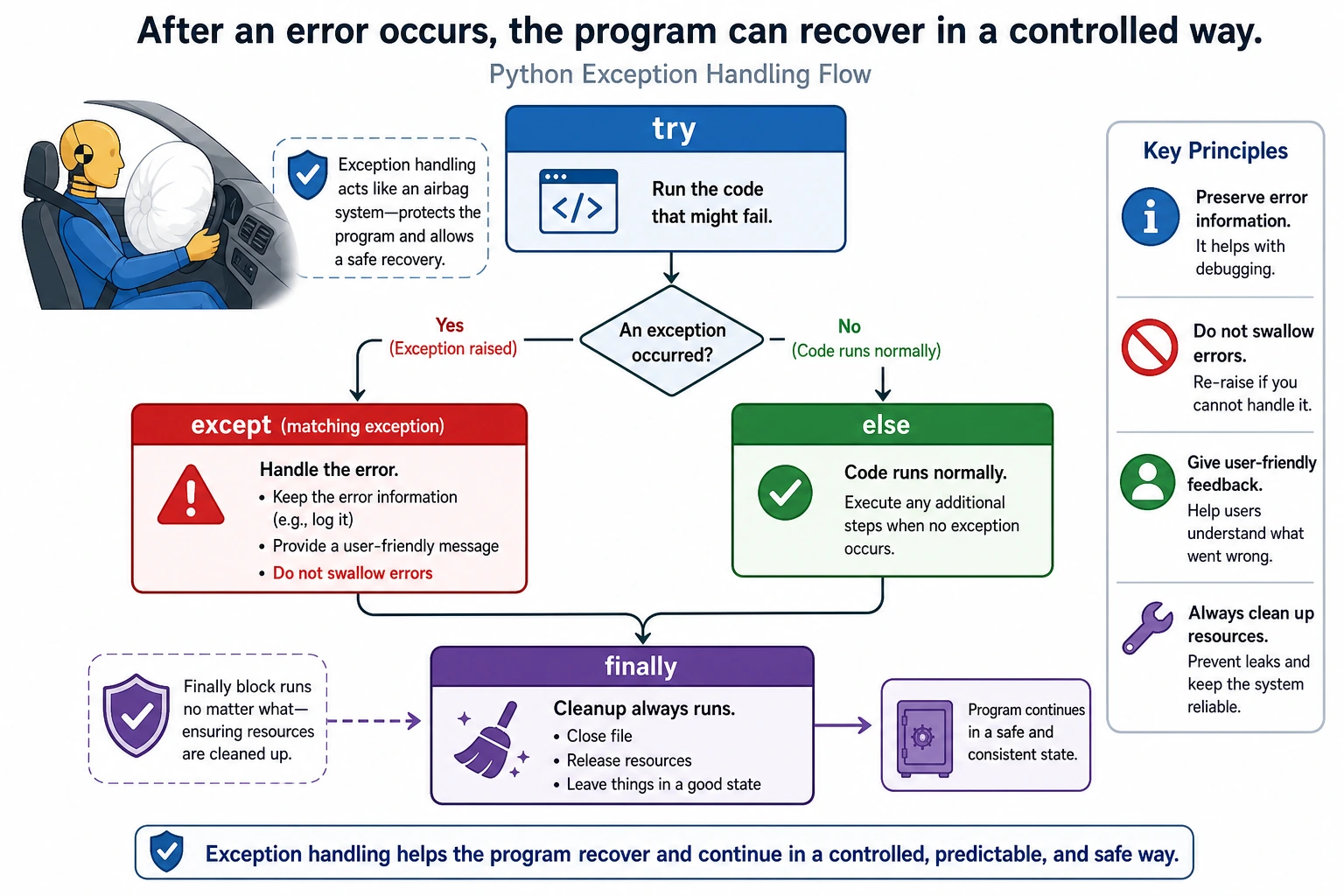
Where this section fits
This section helps your program avoid crashing immediately when something goes wrong. Exception handling comes up again and again in file I/O, network requests, API calls, data cleaning, and model inference. The key is to learn how to anticipate errors, catch errors, and provide recoverable handling.
Learning objectives
- Understand what exceptions are and why they need to be handled
- Master the use of
try/except/else/finally - Learn how to catch different types of exceptions
- Write robust programs that do not crash easily
What is an exception?
An exception is an error that occurs while a program is running. A program without exception handling will crash immediately when it encounters an error:
# These lines will all crash the program
print(10 / 0)           # ZeroDivisionError: division by zero
print(int("abc"))        # ValueError: cannot convert
print([1, 2, 3][10])     # IndexError: list index out of range
print({"a": 1}["b"])     # KeyError: key does not exist

# If the program crashes, the code below will never run
print("This line will never be executed")
In real programs, errors are unavoidable — users may enter invalid data, files may not exist, and networks may disconnect. Exception handling lets you respond to these problems gracefully instead of letting the program crash.
Common exception types
| Exception type | Trigger scenario | Example |
|---|---|---|
ZeroDivisionError | Division by zero | 1 / 0 |
TypeError | Mismatched operation types | "hello" + 5 |
ValueError | Invalid value | int("abc") |
IndexError | List index out of range | [1, 2][5] |
KeyError | Dictionary key does not exist | {"a": 1}["b"] |
FileNotFoundError | File does not exist | open("nonexistent.txt") |
AttributeError | Attribute does not exist | "hello".foo() |
NameError | Variable is not defined | print(xyz) |
ImportError | Import failed | import nonexistent_module |
Basic try / except usage
The logic of try/except is: try to run the code, and if something goes wrong, run an alternative plan.
try:
    number = int(input("Please enter a number: "))
    print(f"You entered: {number}")
except ValueError:
    print("Invalid input! Please enter a number.")

print("The program continues running...")  # This line runs whether or not there was an exception
Output behavior:
# Valid input
Please enter a number: 42
You entered: 42
The program continues running...

# Non-numeric input
Please enter a number: abc
Invalid input! Please enter a number.
The program continues running...
Key point: with try/except, the program will not crash because of an error.
Catching different types of exceptions
Catching multiple exceptions
def safe_divide(a, b):
    try:
        result = a / b
        return result
    except ZeroDivisionError:
        print("Error: cannot divide by zero!")
        return None
    except TypeError:
        print("Error: please pass numbers!")
        return None

print(safe_divide(10, 3))    # 3.333...
print(safe_divide(10, 0))    # Error: cannot divide by zero! → None
print(safe_divide("10", 3))  # Error: please pass numbers! → None
Catching multiple exceptions (combined form)
try:
    # Code that may fail
    value = int(input("Please enter a number: "))
    result = 100 / value
    print(f"Result: {result}")
except (ValueError, ZeroDivisionError) as e:
    print(f"An error occurred: {e}")
else:
    print("Input was valid and division succeeded.")
Getting exception information
try:
    number = int("abc")
except ValueError as e:
    print(f"Exception type: {type(e).__name__}")  # ValueError
    print(f"Exception message: {e}")               # invalid literal for int() with base 10: 'abc'
Catching all exceptions (use with caution)
try:
    # Some code
    result = risky_operation()
except Exception as e:
    print(f"An unexpected error occurred: {type(e).__name__}: {e}")
else:
    print(f"Operation succeeded: {result}")
except ExceptionCatching all exceptions may seem convenient, but it can hide real bugs. You should try to catch specific exception types and use except Exception only as a last-resort fallback at the outermost level.
# Bad practice ❌
try:
    do_something()
except:  # Catches all exceptions, including KeyboardInterrupt
    pass   # And does nothing at all!

# Good practice ✅
try:
    do_something()
except ValueError:
    handle_value_error()
except FileNotFoundError:
    handle_file_not_found()
except Exception as e:
    logging.error(f"Unexpected error: {e}")
try / except / else / finally
A complete exception-handling structure has four parts:
try:
    # Code to try
    file = open("data.txt", "r")
    content = file.read()
except FileNotFoundError:
    # Runs when an error occurs
    print("File not found!")
else:
    # Runs when no error occurs
    print(f"File content: {content}")
finally:
    # Runs whether or not an error occurs (usually for cleanup)
    print("Operation complete")
| Clause | When it runs | Purpose |
|---|---|---|
try | Always | Put code that may fail here |
except | Only when an error occurs | Handle the error |
else | Only when no error occurs | Put success logic here |
finally | Always, regardless of errors | Clean up resources (close files, disconnect connections) |
Typical use of finally
file = None
try:
    file = open("data.txt", "r")
    data = file.read()
    data = data.strip()
    print(data)
except FileNotFoundError:
    print("File not found")
finally:
    if file:
        file.close()   # Always close the file, whether or not there was an error
        print("File closed")
with statementIn the later "File Operations" section, you will learn the with statement. It can automatically close resources and is cleaner than finally.
Raising exceptions
In addition to handling exceptions, you can also raise exceptions proactively — when you detect an invalid state, you tell the caller that "something is wrong."
The raise statement
def set_age(age):
    if not isinstance(age, int):
        raise TypeError("Age must be an integer")
    if age < 0 or age > 150:
        raise ValueError(f"Age {age} is invalid and should be between 0 and 150")
    return age

# Normal use
print(set_age(25))      # 25

# Trigger an exception
try:
    set_age(-5)
except ValueError as e:
    print(f"Error: {e}")  # Error: Age -5 is invalid and should be between 0 and 150

try:
    set_age("twenty")
except TypeError as e:
    print(f"Error: {e}")  # Error: Age must be an integer
Custom exceptions
When built-in exception types are not enough, you can define your own:
class InsufficientFundsError(Exception):
    """Insufficient funds error"""
    def __init__(self, balance, amount):
        self.balance = balance
        self.amount = amount
        super().__init__(f"Insufficient funds: current balance {balance}, attempted withdrawal {amount}")

class BankAccount:
    def __init__(self, balance=0):
        self.balance = balance

    def withdraw(self, amount):
        if amount > self.balance:
            raise InsufficientFundsError(self.balance, amount)
        self.balance -= amount
        return self.balance

# Use it
account = BankAccount(1000)
try:
    account.withdraw(1500)
except InsufficientFundsError as e:
    print(f"Transaction failed: {e}")
    print(f"Current balance: {e.balance}, requested amount: {e.amount}")
Practical patterns
Pattern 1: LBYL vs EAFP
The Python community prefers EAFP (Easier to Ask Forgiveness than Permission, try first and handle errors) over LBYL (Look Before You Leap, check first and then act):
# LBYL style (check before acting) — not very Pythonic
if key in my_dict:
    value = my_dict[key]
else:
    value = default_value

# EAFP style (act first, handle errors later) — more Pythonic
try:
    value = my_dict[key]
except KeyError:
    value = default_value

# Of course, dictionaries have an even better way
value = my_dict.get(key, default_value)
Pattern 2: Retry mechanism
import time

def fetch_data_with_retry(url, max_retries=3):
    """Fetch data with retries"""
    for attempt in range(1, max_retries + 1):
        try:
            print(f"Attempt {attempt}...")
            # Simulate a network request
            import random
            if random.random() < 0.5:
                raise ConnectionError("Network connection failed")
            return "Fetched data"
        except ConnectionError as e:
            print(f"  Failed: {e}")
            if attempt < max_retries:
                wait = attempt * 2  # Increasing wait time
                print(f"  Retrying in {wait} seconds...")
                time.sleep(wait)
            else:
                print("  All retries failed!")
                raise  # If the last retry fails, re-raise the exception

try:
    data = fetch_data_with_retry("https://api.example.com")
    print(f"Success: {data}")
except ConnectionError:
    print("Failed to fetch data საბოლო")
Pattern 3: Safe user input
def get_number(prompt, min_val=None, max_val=None):
    """Safely get a number from user input"""
    while True:
        try:
            value = float(input(prompt))
            if min_val is not None and value < min_val:
                print(f"Please enter a number no less than {min_val}")
                continue
            if max_val is not None and value > max_val:
                print(f"Please enter a number no greater than {max_val}")
                continue
            return value
        except ValueError:
            print("Please enter a valid number!")

# Use it
age = get_number("Please enter your age: ", min_val=0, max_val=150)
print(f"Your age is: {age}")
Comprehensive example: a safe grade management system
class GradeManager:
    def __init__(self):
        self.students = {}

    def add_student(self, name, score):
        """Add a student's score"""
        if not isinstance(name, str) or not name.strip():
            raise ValueError("Student name cannot be empty")
        if not isinstance(score, (int, float)):
            raise TypeError(f"Score must be a number, got: {type(score).__name__}")
        if not 0 <= score <= 100:
            raise ValueError(f"Score {score} is out of range (0-100)")

        self.students[name] = score
        print(f"✅ Added successfully: {name} - {score} points")

    def get_average(self):
        """Get the average score"""
        if not self.students:
            raise RuntimeError("No student data available, cannot calculate average")
        return sum(self.students.values()) / len(self.students)

    def get_student(self, name):
        """Look up a student's score"""
        if name not in self.students:
            raise KeyError(f"Cannot find student: {name}")
        return self.students[name]

# Use it
gm = GradeManager()

# Safely add students
test_data = [
    ("Zhang San", 85),
    ("Li Si", 92),
    ("Wang Wu", "excellent"),  # Type error
    ("Zhao Liu", 150),         # Range error
    ("", 80),                  # Empty name
    ("Qian Qi", 78),
]

for name, score in test_data:
    try:
        gm.add_student(name, score)
    except (ValueError, TypeError) as e:
        print(f"❌ Add failed: {e}")

# Query
print(f"\nAverage score: {gm.get_average():.1f}")

try:
    print(gm.get_student("Sun Ba"))
except KeyError as e:
    print(f"Lookup failed: {e}")
Hands-on exercises
Exercise 1: Safe calculator
def safe_calculator(inputs=None):
    """A safe calculator that can handle invalid input and division by zero."""
    inputs = iter(inputs or ["10", "0", "/", "n"])

    while True:
        try:
            a = float(next(inputs) if inputs else input("First number: "))
            b = float(next(inputs) if inputs else input("Second number: "))
            op = next(inputs) if inputs else input("Operator (+, -, *, /): ")

            if op == "+":
                result = a + b
            elif op == "-":
                result = a - b
            elif op == "*":
                result = a * b
            elif op == "/":
                result = a / b
            else:
                raise ValueError(f"Unsupported operator: {op}")

            print(f"Result: {result}")
        except ZeroDivisionError:
            print("Cannot divide by zero.")
        except ValueError as error:
            print(f"Invalid input: {error}")
        except StopIteration:
            break

        again = next(inputs, "n") if inputs else input("Continue? (y/n): ")
        if again.lower() != "y":
            break

safe_calculator()
Exercise 2: File reader
def read_file_safely(filename):
    """Safely read file contents."""
    try:
        with open(filename, "r", encoding="utf-8") as file:
            return file.read()
    except FileNotFoundError:
        print(f"File not found: {filename}")
    except PermissionError:
        print(f"No permission to read: {filename}")
    except OSError as error:
        print(f"Read failed: {error}")
    return None

content = read_file_safely("test.txt")
if content:
    print(content)
Exercise 3: Batch type conversion
def convert_to_numbers(data_list):
    """Convert strings to numbers; keep errors for later inspection."""
    numbers = []
    errors = []
    for item in data_list:
        try:
            numbers.append(float(item))
        except ValueError:
            numbers.append(None)
            errors.append(f"{item} cannot be converted")
    return numbers, errors

values, errors = convert_to_numbers(["10", "20.5", "abc", "30", "xyz"])
print(values)
print(errors)
Summary
| Syntax | Purpose | When to use |
|---|---|---|
try | Wrap code that may fail | Anywhere errors may occur |
except | Catch and handle exceptions | For specific exception types |
else | Runs when no exception occurs | Success logic |
finally | Always runs | Resource cleanup |
raise | Raise an exception proactively | When input is invalid or state is wrong |
| Custom exceptions | Create business-specific exceptions | When built-in exceptions are not descriptive enough |
The essence of exception handling is: anticipate possible problems and prepare a response plan. A good program is not one that never makes mistakes, but one that can handle them gracefully when they happen — by giving users friendly messages, recording error information, or retrying automatically. This is an important difference between professional developers and beginners.