2.2.3 File Operations and Serialization
Where this section fits
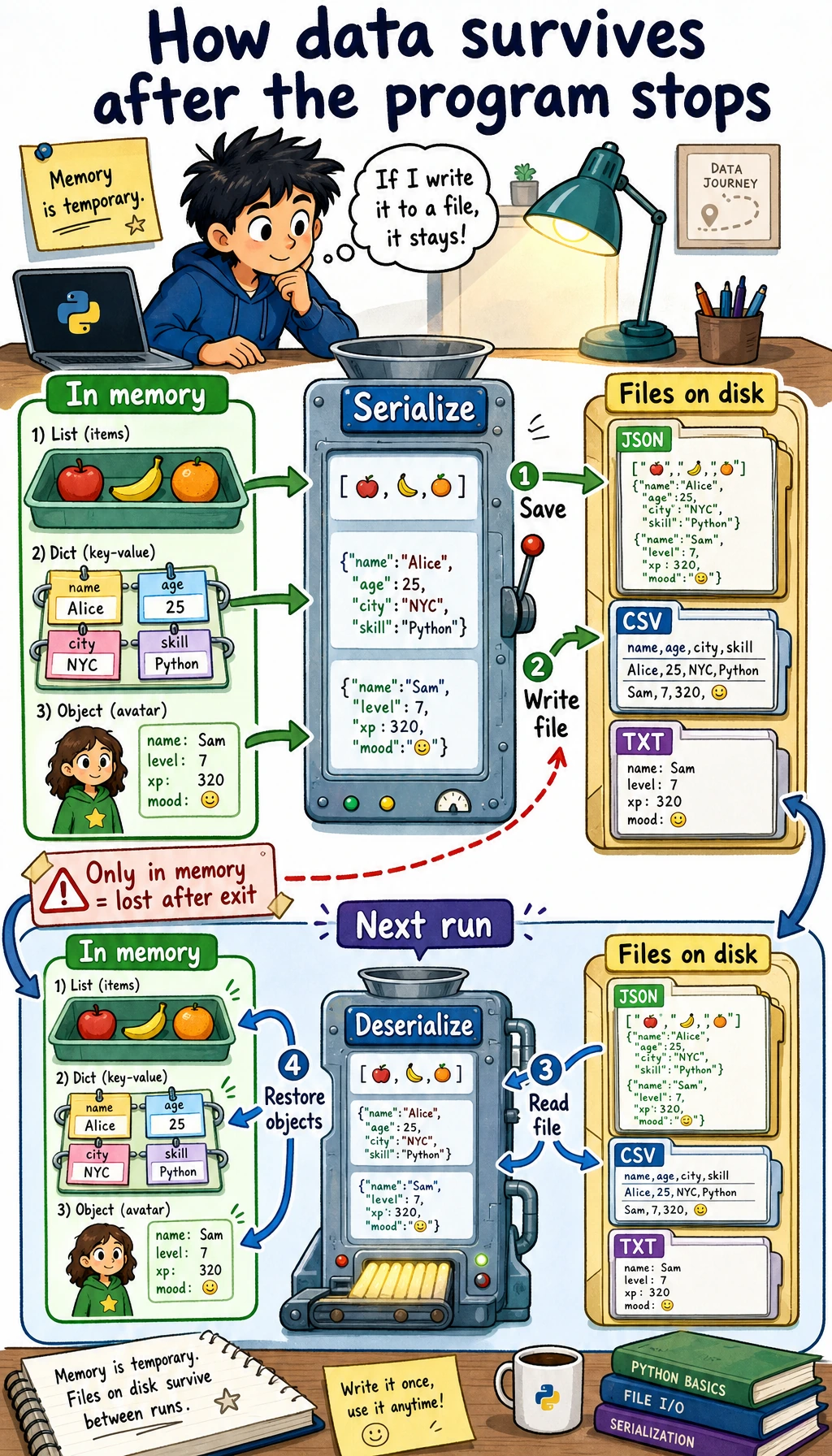
This section shows how program data can be saved and loaded again later. File reading and writing, CSV, JSON, and serialization are the foundation for dataset processing, training logs, configuration files, and saving model results. They are also a key step from temporary code in memory to real projects.
Learning objectives
- Master basic file reading and writing operations (
open,read,write) - Understand the role and benefits of the
withstatement - Learn how to handle common data formats such as CSV and JSON
- Understand the concepts of serialization and deserialization
Why do we need file operations?
So far, the data in your programs has lived in memory — once the program closes, the data is gone. But in real-world scenarios:
- Trained AI models need to be saved to a file so they can be loaded later
- Datasets are stored in CSV files and need to be read into the program
- Training logs need to be written to files for later analysis
- Configuration parameters are stored in JSON files and need to be loaded at startup
File operations let your program persist data.
File I/O basics
Open a file: open()
# Basic syntax
file = open("file_path", "mode", encoding="encoding")
Common modes:
| Mode | Meaning | When the file does not exist |
|---|---|---|
"r" | Read (default) | Error |
"w" | Write (overwrite) | Create automatically |
"a" | Append (add to the end) | Create automatically |
"x" | Create (error if file already exists) | Create automatically |
"rb" | Read binary file | Error |
"wb" | Write binary file | Create automatically |
Write to a file
# Method 1: Manually open and close (not recommended)
file = open("hello.txt", "w", encoding="utf-8")
file.write("Hello, world!\n")
file.write("I am learning Python file operations.\n")
file.close()  # Don't forget to close the file!

# Method 2: Use the with statement (recommended!)
with open("hello.txt", "w", encoding="utf-8") as file:
    file.write("Hello, world!\n")
    file.write("I am learning Python file operations.\n")
# When you leave the with block, the file is closed automatically, so no manual close() is needed
The with statement has two benefits:
- Automatically closes the file — you do not need to worry about forgetting
close() - Exception-safe — even if an error occurs, the file will still be closed properly
From now on, when writing file operations, always use with.
Read a file
# Read the entire content
with open("hello.txt", "r", encoding="utf-8") as file:
    content = file.read()
    print(content)

# Read line by line
with open("hello.txt", "r", encoding="utf-8") as file:
    for line in file:
        print(line.strip())  # strip() removes the newline at the end of the line

# Read all lines into a list
with open("hello.txt", "r", encoding="utf-8") as file:
    lines = file.readlines()
    print(lines)  # ['Hello, world!\n', 'I am learning Python file operations.\n']
Append content
# "a" mode: append to the end of the file without overwriting existing content
with open("log.txt", "a", encoding="utf-8") as file:
    file.write("2026-02-09: Started learning\n")
    file.write("2026-02-09: Finished Chapter 1\n")
Write multiple lines
lines = ["Line 1\n", "Line 2\n", "Line 3\n"]

with open("output.txt", "w", encoding="utf-8") as file:
    file.writelines(lines)  # Write a list of strings

# Or use print to write to a file
with open("output.txt", "w", encoding="utf-8") as file:
    print("Line 1", file=file)  # print can direct output to a file
    print("Line 2", file=file)
    print("Line 3", file=file)
Real-world examples: working with different file formats
CSV files
CSV (Comma-Separated Values) is one of the most common data file formats:
import csv

# Write CSV
students = [
    ["Name", "Age", "Score"],
    ["Zhang San", 20, 85],
    ["Li Si", 21, 92],
    ["Wang Wu", 19, 78],
]

with open("students.csv", "w", newline="", encoding="utf-8") as file:
    writer = csv.writer(file)
    writer.writerows(students)

# Read CSV
with open("students.csv", "r", encoding="utf-8") as file:
    reader = csv.reader(file)
    header = next(reader)  # Read the header row
    print(f"Column names: {header}")

    for row in reader:
        name, age, score = row
        print(f"{name}, {age} years old, score: {score}")

# Read as dictionaries (more convenient)
with open("students.csv", "r", encoding="utf-8") as file:
    reader = csv.DictReader(file)
    for row in reader:
        print(f"{row['Name']}'s score is {row['Score']}")
JSON files
JSON is the most common data format in web development and APIs:
import json

# Write JSON
config = {
    "model": "ResNet-50",
    "learning_rate": 0.001,
    "epochs": 100,
    "batch_size": 32,
    "classes": ["cat", "dog", "bird"],
    "use_gpu": True
}

with open("config.json", "w", encoding="utf-8") as file:
    json.dump(config, file, ensure_ascii=False, indent=2)

# Read JSON
with open("config.json", "r", encoding="utf-8") as file:
    loaded_config = json.load(file)

print(f"Model: {loaded_config['model']}")
print(f"Learning rate: {loaded_config['learning_rate']}")
print(f"Classes: {loaded_config['classes']}")
Generated config.json content:
{
  "model": "ResNet-50",
  "learning_rate": 0.001,
  "epochs": 100,
  "batch_size": 32,
  "classes": ["cat", "dog", "bird"],
  "use_gpu": true
}
By default, json.dump() converts Chinese characters into Unicode escapes (such as \u732b). Adding ensure_ascii=False keeps the Chinese characters as they are, making the file easier to read.
Text log files
from datetime import datetime

def log(message, filename="app.log"):
    """Write a log entry"""
    timestamp = datetime.now().strftime("%Y-%m-%d %H:%M:%S")
    with open(filename, "a", encoding="utf-8") as file:
        file.write(f"[{timestamp}] {message}\n")

# Use it
log("Program started")
log("Loaded dataset: train.csv")
log("Started training model")
log("Training complete, accuracy: 92.5%")
Generated log file:
[2026-02-09 14:30:01] Program started
[2026-02-09 14:30:02] Loaded dataset: train.csv
[2026-02-09 14:30:03] Started training model
[2026-02-09 14:35:15] Training complete, accuracy: 92.5%
Path handling: pathlib
pathlib is the recommended way to handle paths in Python 3. It is more modern and easier to use than os.path:
from pathlib import Path

# Create Path objects
data_dir = Path("data")
train_file = data_dir / "train" / "data.csv"  # Use / to join paths!
print(train_file)  # data/train/data.csv

# Check paths
print(train_file.exists())    # Whether the file exists
print(train_file.is_file())   # Whether it is a file
print(data_dir.is_dir())      # Whether it is a directory

# Get file information
path = Path("model.pth")
print(path.name)       # model.pth (file name)
print(path.stem)       # model (without extension)
print(path.suffix)     # .pth (extension)
print(path.parent)     # . (parent directory)

# Create directories
Path("output/results").mkdir(parents=True, exist_ok=True)

# List files in a directory
for file in Path(".").glob("*.py"):
    print(file)

# Recursively find all CSV files
for csv_file in Path("data").rglob("*.csv"):
    print(csv_file)

# Convenient file read/write methods
Path("note.txt").write_text("Hello!", encoding="utf-8")
content = Path("note.txt").read_text(encoding="utf-8")
print(content)  # Hello!
Serialization: saving Python objects
What is serialization?
Serialization means converting Python objects (lists, dictionaries, class instances, and so on) into a format that can be saved to a file. Deserialization means doing the reverse: restoring Python objects from a file.
| Format | Module | Readability | Speed | Safety | Use case |
|---|---|---|---|---|---|
| JSON | json | ✅ Good | Medium | ✅ Safe | Configuration files, API data |
| CSV | csv | ✅ Good | Fast | ✅ Safe | Tabular data |
| pickle | pickle | ❌ Binary | Fast | ❌ Unsafe | Python objects |
pickle: save any Python object
import pickle

# Save Python object
data = {
    "scores": [85, 92, 78, 95],
    "names": ["Zhang San", "Li Si", "Wang Wu", "Zhao Liu"],
    "metadata": {"class": "Class A", "year": 2026}
}

with open("data.pkl", "wb") as file:  # Note: "wb" (binary write)
    pickle.dump(data, file)

# Load Python object
with open("data.pkl", "rb") as file:  # Note: "rb" (binary read)
    loaded_data = pickle.load(file)

print(loaded_data["names"])  # ['Zhang San', 'Li Si', 'Wang Wu', 'Zhao Liu']
Never load a pickle file from an untrusted source! pickle can execute arbitrary code, and a maliciously crafted pickle file can run dangerous operations on your computer. Only load pickle files created by yourself or from trusted sources.
Comprehensive example: student grade management system
import json
from pathlib import Path
from datetime import datetime

class GradeBook:
    """Grade management system with file persistence"""

    def __init__(self, filename="gradebook.json"):
        self.filename = Path(filename)
        self.students = {}
        self.load()  # Load data at startup

    def load(self):
        """Load data from a file"""
        if self.filename.exists():
            with open(self.filename, "r", encoding="utf-8") as f:
                self.students = json.load(f)
            print(f"✅ Loaded data for {len(self.students)} students")
        else:
            print("📝 Creating a new gradebook")

    def save(self):
        """Save data to a file"""
        with open(self.filename, "w", encoding="utf-8") as f:
            json.dump(self.students, f, ensure_ascii=False, indent=2)

    def add_score(self, name, subject, score):
        """Add a score"""
        if name not in self.students:
            self.students[name] = {}
        self.students[name][subject] = score
        self.save()
        print(f"✅ Saved {name}'s {subject} score ({score})")

    def get_report(self, name):
        """Get a student report"""
        if name not in self.students:
            print(f"❌ Student not found: {name}")
            return

        scores = self.students[name]
        print(f"\n{'='*30}")
        print(f"  {name}'s Grade Report")
        print(f"{'='*30}")
        for subject, score in scores.items():
            print(f"  {subject}: {score}")
        avg = sum(scores.values()) / len(scores)
        print(f"{'─'*30}")
        print(f"  Average score: {avg:.1f}")
        print(f"{'='*30}")

    def export_csv(self, filename="grades.csv"):
        """Export as CSV"""
        import csv
        subjects = set()
        for scores in self.students.values():
            subjects.update(scores.keys())
        subjects = sorted(subjects)

        with open(filename, "w", newline="", encoding="utf-8") as f:
            writer = csv.writer(f)
            writer.writerow(["Name"] + subjects)
            for name, scores in self.students.items():
                row = [name] + [scores.get(s, "") for s in subjects]
                writer.writerow(row)
        print(f"✅ Exported to {filename}")

# Use it
gb = GradeBook()
gb.add_score("Zhang San", "Math", 85)
gb.add_score("Zhang San", "English", 92)
gb.add_score("Zhang San", "Python", 95)
gb.add_score("Li Si", "Math", 78)
gb.add_score("Li Si", "English", 88)
gb.get_report("Zhang San")
gb.export_csv()
Hands-on exercises
Exercise 1: File statistics tool
from pathlib import Path

def file_stats(filename):
    """Return line, character, word, and longest-line statistics."""
    path = Path(filename)
    lines = path.read_text(encoding="utf-8").splitlines()
    longest_index, longest_line = max(
        enumerate(lines, start=1),
        key=lambda item: len(item[1]),
        default=(0, ""),
    )
    return {
        "lines": len(lines),
        "characters": sum(len(line) for line in lines),
        "words": sum(len(line.split()) for line in lines),
        "longest_line_number": longest_index,
        "longest_line": longest_line,
    }

Path("sample.txt").write_text("hello world\nthis is Python\n", encoding="utf-8")
print(file_stats("sample.txt"))
Exercise 2: Diary app
Write a simple diary app:
- Support writing new diary entries (automatically add a timestamp)
- Support viewing all diary entries
- Store diary entries in a text file so data is not lost after the program closes
Exercise 3: Configuration file manager
import json
from pathlib import Path

DEFAULT_CONFIG = {"theme": "light", "language": "en", "page_size": 20}

def load_config(filename="config.json"):
    """Load a configuration file, or create a default config if it does not exist."""
    path = Path(filename)
    if not path.exists():
        save_config(DEFAULT_CONFIG.copy(), filename)
    return json.loads(path.read_text(encoding="utf-8"))

def save_config(config, filename="config.json"):
    """Save the config to a file."""
    Path(filename).write_text(json.dumps(config, indent=2), encoding="utf-8")

def update_config(key, value, filename="config.json"):
    """Update a configuration item."""
    config = load_config(filename)
    config[key] = value
    save_config(config, filename)
    return config

print(update_config("theme", "dark"))
Summary
| Operation | Code | Notes |
|---|---|---|
| Write file | with open("f.txt", "w") as f: | "w" overwrites, "a" appends |
| Read file | with open("f.txt", "r") as f: | .read(), .readlines() |
| Write JSON | json.dump(data, file) | Dictionary → JSON file |
| Read JSON | json.load(file) | JSON file → Dictionary |
| Write CSV | csv.writer(file).writerow() | List → CSV row |
| Read CSV | csv.reader(file) | CSV row → List |
| Path handling | Path("data") / "file.txt" | pathlib is recommended |
File operations give your program a "memory" — data can persist across program runs. In AI development, you will often read and write many kinds of files: datasets (CSV), configurations (JSON/YAML), model weights (.pth), and training logs (.log). Mastering file operations is a fundamental skill for becoming a developer.