2.2.4 Basics of Functional Programming
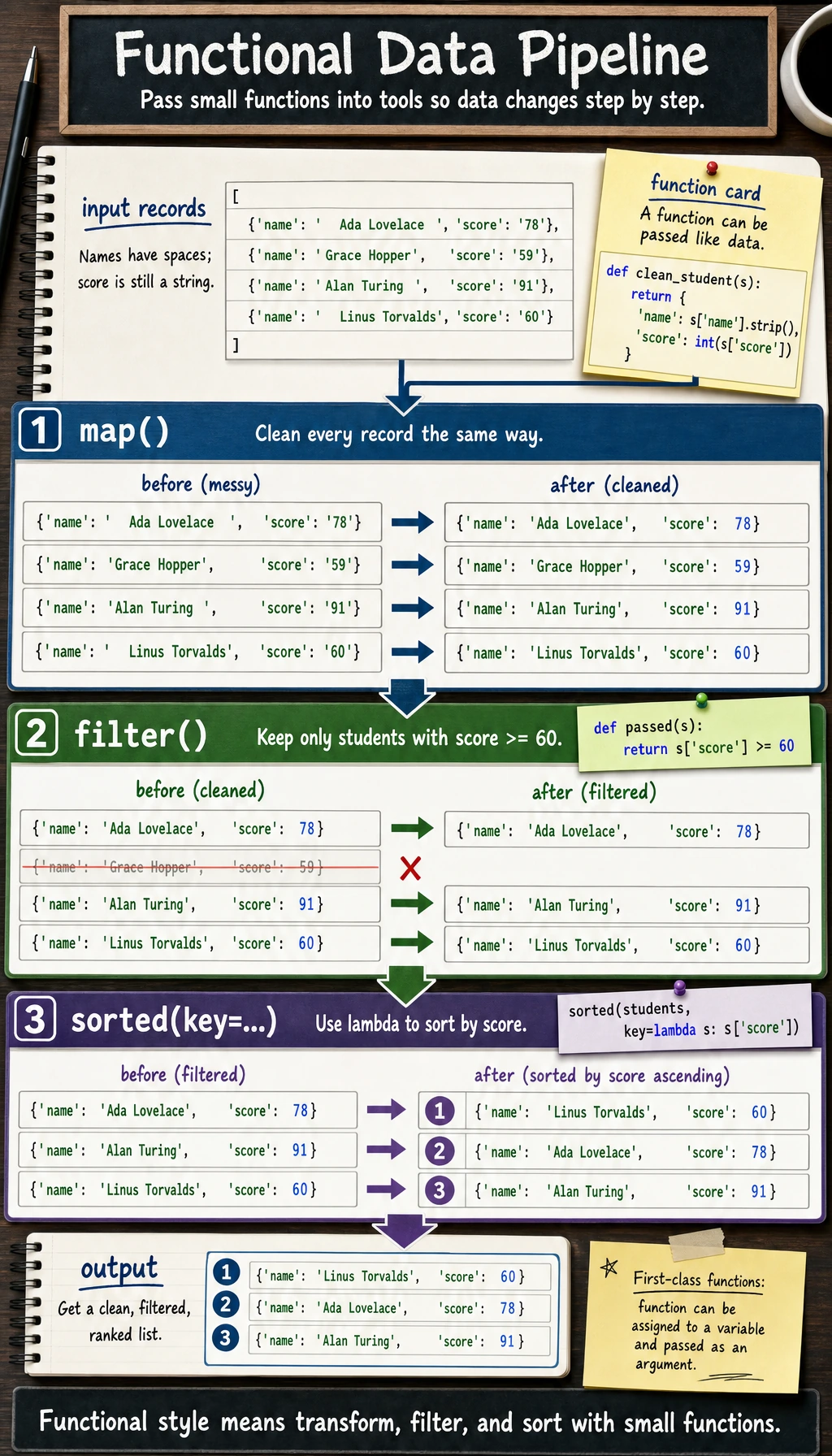
Section Overview
This section adds more flexible ways to use functions in Python. lambda, map, filter, the key argument of sorted, and decorators often appear in data processing, framework source code, and utility functions. The goal is to understand and use them moderately, not to chase advanced tricks from the start.
Learning Objectives
- Understand the basic ideas of functional programming
- Master
lambdaanonymous functions - Use the
keyargument ofmap(),filter(), andsorted()fluently - Understand the basic concepts of closures and decorators
You do not need to aim for “functional is elegant” on the first pass. Just know that it is often used for batch transformation, filtering, sorting, and passing custom logic into frameworks.
What Is Functional Programming?
Simply put, functional programming means treating functions as data that can be passed around and used.
In Python, functions are first-class citizens — just like numbers and strings, they can:
- be assigned to variables
- be passed as arguments to other functions
- be returned as values
# Functions can be assigned to variables
def greet(name):
    return f"Hello, {name}!"

say_hi = greet   # Assign the function to a variable (note: no parentheses)
print(say_hi("Xiao Ming"))  # Hello, Xiao Ming!

# Functions can be put into a list
def add(a, b): return a + b
def sub(a, b): return a - b
def mul(a, b): return a * b

operations = [add, sub, mul]
for op in operations:
    print(op(10, 3))  # 13, 7, 30
Lambda Anonymous Functions
lambda is a one-off small function. You do not need def to define it, and it does not need a name.
Basic Syntax
# Ordinary function
def square(x):
    return x ** 2

# Equivalent lambda
square = lambda x: x ** 2

print(square(5))  # 25
Syntax: lambda parameters: expression
# One parameter
double = lambda x: x * 2
print(double(5))  # 10

# Multiple parameters
add = lambda a, b: a + b
print(add(3, 5))  # 8

# With a condition
grade = lambda score: "Pass" if score >= 60 else "Fail"
print(grade(75))  # Pass
print(grade(45))  # Fail
Main Uses of lambda
The most common use of lambda is passing it as an argument to another function:
# Scenario: sort by a specific rule
students = [
    {"name": "Zhang San", "score": 85},
    {"name": "Li Si", "score": 92},
    {"name": "Wang Wu", "score": 78},
]

# Sort by score
students.sort(key=lambda s: s["score"])
print([s["name"] for s in students])  # ['Wang Wu', 'Zhang San', 'Li Si']

# Sort by score in descending order
students.sort(key=lambda s: s["score"], reverse=True)
print([s["name"] for s in students])  # ['Li Si', 'Zhang San', 'Wang Wu']
lambda usage guidelines- Use
lambdafor simple logic:lambda x: x * 2 - Use
deffor complex logic: if alambdabecomes long or hard to read, you should usedefto define a named function - A
lambdacan contain only one expression and cannot contain multi-line code
map(): Apply the Same Operation to Each Element
map(function, iterable) applies a function to each element in a sequence and returns a new sequence.
# Square each number in a list
numbers = [1, 2, 3, 4, 5]

# Method 1: use a for loop
squares = []
for n in numbers:
    squares.append(n ** 2)

# Method 2: use map
squares = list(map(lambda x: x ** 2, numbers))
print(squares)  # [1, 4, 9, 16, 25]

# Method 3: use a list comprehension (usually preferred)
squares = [x ** 2 for x in numbers]
print(squares)  # [1, 4, 9, 16, 25]
Practical Uses of map()
# Batch convert data types
str_numbers = ["10", "20", "30", "40"]
numbers = list(map(int, str_numbers))
print(numbers)  # [10, 20, 30, 40]

# Batch process strings
names = ["  alice  ", " BOB", "charlie  "]
clean_names = list(map(str.strip, names))
print(clean_names)  # ['alice', 'BOB', 'charlie']

# Use an existing function
temperatures_c = [0, 20, 37, 100]
def c_to_f(c):
    return c * 9/5 + 32

temperatures_f = list(map(c_to_f, temperatures_c))
print(temperatures_f)  # [32.0, 68.0, 98.6, 212.0]
filter(): Select Elements That Meet a Condition
filter(function, iterable) keeps the elements for which the function returns True.
numbers = [1, 2, 3, 4, 5, 6, 7, 8, 9, 10]

# Filter even numbers
evens = list(filter(lambda x: x % 2 == 0, numbers))
print(evens)  # [2, 4, 6, 8, 10]

# Equivalent list comprehension
evens = [x for x in numbers if x % 2 == 0]
print(evens)  # [2, 4, 6, 8, 10]
Practical Uses of filter()
# Filter passing scores
scores = [45, 78, 55, 92, 88, 30, 67, 100]
passed = list(filter(lambda s: s >= 60, scores))
print(f"Passing scores: {passed}")  # [78, 92, 88, 67, 100]

# Filter non-empty strings
data = ["hello", "", "world", "", "python", ""]
non_empty = list(filter(None, data))  # filter(None, ...) filters out falsy values
print(non_empty)  # ['hello', 'world', 'python']

# Filter files of a specific type
files = ["data.csv", "model.py", "readme.md", "train.py", "config.json"]
py_files = list(filter(lambda f: f.endswith(".py"), files))
print(py_files)  # ['model.py', 'train.py']
The key Argument of sorted()
The key argument of sorted() lets you define your own sorting rule:
# Sort by absolute value
numbers = [-5, 3, -1, 4, -2]
result = sorted(numbers, key=abs)
print(result)  # [-1, -2, 3, 4, -5]

# Sort by string length
words = ["python", "AI", "deep", "learning"]
result = sorted(words, key=len)
print(result)  # ['AI', 'deep', 'python', 'learning']

# Sort by a dictionary key
students = [
    {"name": "Zhang San", "age": 20, "score": 85},
    {"name": "Li Si", "age": 22, "score": 92},
    {"name": "Wang Wu", "age": 19, "score": 78},
]

# Sort by score
by_score = sorted(students, key=lambda s: s["score"], reverse=True)
for s in by_score:
    print(f"{s['name']}: {s['score']} points")
# Li Si: 92 points
# Zhang San: 85 points
# Wang Wu: 78 points

# Sort by multiple conditions (first by score descending, then by age ascending if scores are the same)
students2 = [
    {"name": "A", "age": 20, "score": 85},
    {"name": "B", "age": 22, "score": 85},
    {"name": "C", "age": 19, "score": 92},
]
result = sorted(students2, key=lambda s: (-s["score"], s["age"]))
for s in result:
    print(f"{s['name']}: score={s['score']}, age={s['age']}")
# C: score=92, age=19
# A: score=85, age=20
# B: score=85, age=22
Closures
A closure is a function that remembers variables from its outer function, even after the outer function has finished executing.
def make_multiplier(factor):
    """Create a multiplier"""
    def multiplier(x):
        return x * factor  # factor comes from the outer function
    return multiplier

double = make_multiplier(2)
triple = make_multiplier(3)

print(double(5))   # 10
print(triple(5))   # 15
print(double(10))  # 20
Practical Uses of Closures
# Create a counter
def make_counter(start=0):
    count = [start]   # Wrap it in a list so it can be modified in the inner function
    def counter():
        count[0] += 1
        return count[0]
    return counter

counter = make_counter()
print(counter())  # 1
print(counter())  # 2
print(counter())  # 3

# Create a logging function with a prefix
def make_logger(prefix):
    def log(message):
        from datetime import datetime
        timestamp = datetime.now().strftime("%H:%M:%S")
        print(f"[{prefix}] {timestamp} {message}")
    return log

info = make_logger("INFO")
error = make_logger("ERROR")

info("Program started")      # [INFO] 14:30:01 Program started
error("File not found")      # [ERROR] 14:30:01 File not found
Decorators
A decorator is an elegant way to add extra functionality to a function. At its core, it is an application of closures.
Problem Scenario
Suppose you want to add execution-time statistics to multiple functions:
import time

# Without decorators: each function needs timing code
def train_model():
    start = time.time()
    # In a real project, this might call a model training loop or API.
    epochs = 3
    for epoch in range(epochs):
        time.sleep(0.25)
        print(f"epoch {epoch + 1}/{epochs}: training...")
    time.sleep(1)
    end = time.time()
    print(f"train_model took: {end - start:.2f} seconds")

def process_data():
    start = time.time()
    # Here we simulate an ETL-style preprocessing step.
    records = ["raw-1", "raw-2", "raw-3"]
    cleaned = [record.replace("raw", "clean") for record in records]
    print("cleaned records:", cleaned)
    time.sleep(0.5)
    end = time.time()
    print(f"process_data took: {end - start:.2f} seconds")
Each function has to repeat the timing code — that is annoying!
Decorator Solution
import time

def timer(func):
    """Timing decorator"""
    def wrapper(*args, **kwargs):
        start = time.time()
        result = func(*args, **kwargs)
        end = time.time()
        print(f"⏱ {func.__name__} took: {end - start:.2f} seconds")
        return result
    return wrapper

# Use decorator with @ syntax
@timer
def train_model():
    """Train the model"""
    time.sleep(1)
    print("Training completed!")

@timer
def process_data(filename):
    """Process data"""
    time.sleep(0.5)
    print(f"Processing {filename} completed!")

train_model()
# Training completed!
# ⏱ train_model took: 1.00 seconds

process_data("data.csv")
# Processing data.csv completed!
# ⏱ process_data took: 0.50 seconds
@timer is equivalent to train_model = timer(train_model).
Common Decorator Pattern
# Retry decorator
def retry(max_attempts=3):
    def decorator(func):
        def wrapper(*args, **kwargs):
            for attempt in range(1, max_attempts + 1):
                try:
                    return func(*args, **kwargs)
                except Exception as e:
                    print(f"Attempt {attempt} failed: {e}")
                    if attempt == max_attempts:
                        raise
        return wrapper
    return decorator

@retry(max_attempts=3)
def risky_operation():
    import random
    if random.random() < 0.7:
        raise ConnectionError("Connection failed")
    return "Success!"
map / filter vs List Comprehensions
| Approach | Use Case | Example |
|---|---|---|
| List comprehension | Most cases (recommended) | [x**2 for x in nums] |
map() | When an existing function can be used directly | list(map(int, strings)) |
filter() | When paired with an existing predicate function | list(filter(str.isdigit, items)) |
# When you already have a ready-made function, map is simpler
numbers = ["1", "2", "3"]
list(map(int, numbers))        # concise
[int(x) for x in numbers]     # also fine, but slightly longer

# When you need transformation + condition, a list comprehension is clearer
[x**2 for x in range(10) if x % 2 == 0]
# Much clearer than list(filter(lambda x: x%2==0, map(lambda x: x**2, range(10))))
Hands-on Exercises
Exercise 1: Data Processing Pipeline
# Use map and filter to process the following data
raw_data = ["  23  ", "abc", "45.6", "", "78", "not_a_number", "90.1"]

# 1. Remove whitespace
# 2. Filter out strings that cannot be converted to numbers
# 3. Convert to floating-point numbers
# 4. Filter out numbers less than 50
# Hint: you can combine map, filter, and list comprehensions
Exercise 2: Custom Sorting
products = [
    {"name": "laptop", "price": 5999, "rating": 4.5},
    {"name": "mouse", "price": 199, "rating": 4.8},
    {"name": "keyboard", "price": 599, "rating": 4.2},
    {"name": "monitor", "price": 2999, "rating": 4.7},
]

# 1. Sort by price from low to high
# 2. Sort by rating from high to low
# 3. Sort by cost-effectiveness (rating/price) from high to low
Exercise 3: Write a Decorator
Write a @log decorator that prints logs before and after a function runs:
@log
def add(a, b):
    return a + b

add(3, 5)
# It should output:
# Calling add, arguments: (3, 5) {}
# add returned: 8
Summary
| Concept | Description | Example |
|---|---|---|
| lambda | Anonymous function | lambda x: x * 2 |
| map() | Apply a function to each element | map(int, ["1", "2"]) |
| filter() | Select elements that meet a condition | filter(lambda x: x>0, nums) |
| sorted(key=) | Custom sorting | sorted(data, key=lambda x: x["score"]) |
| Closure | Function remembers outer variables | Factory function pattern |
| Decorator | Add extra functionality to a function | @timer |
The core of functional programming is treating functions as data — you can store functions, pass them around, and combine them. This way of thinking is especially useful in data processing, because you often need an operation chain of "transform → filter → sort" on a set of data. You do not need to fully master functional programming, but you should definitely know how to use lambda, map/filter, and decorators.