
12 AIGC and Multimodal
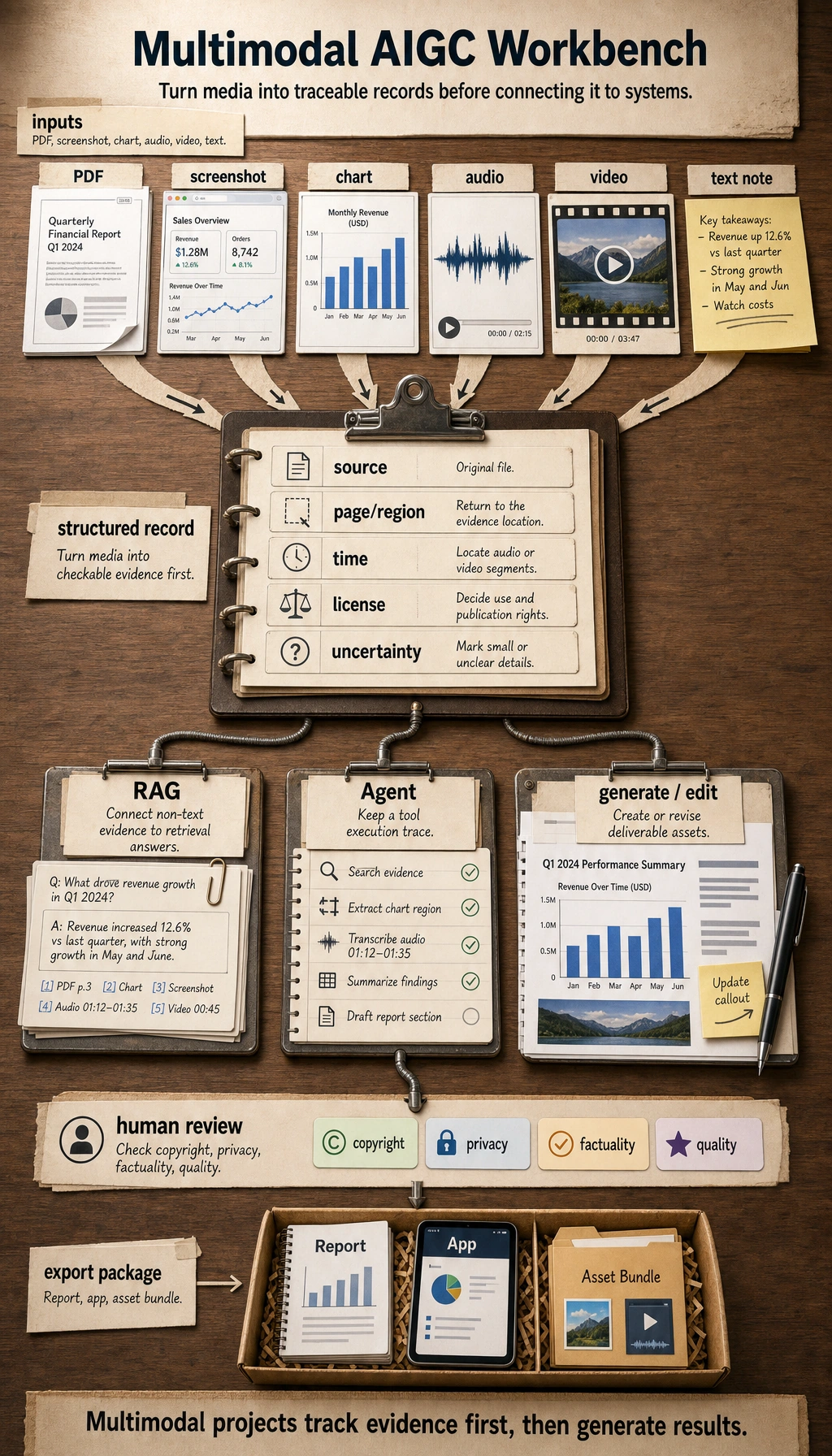
Chapter 12 is the multimodal expansion: AI is no longer only text. Images, PDFs, audio, video, screenshots, charts, and generated assets can all enter the same product workflow.
Do not chase every new demo. First learn how to turn non-text inputs into structured records, connect them to RAG or Agents, generate or edit assets, review risks, and export something usable.
See the Multimodal Workflow
Section titled “See the Multimodal Workflow”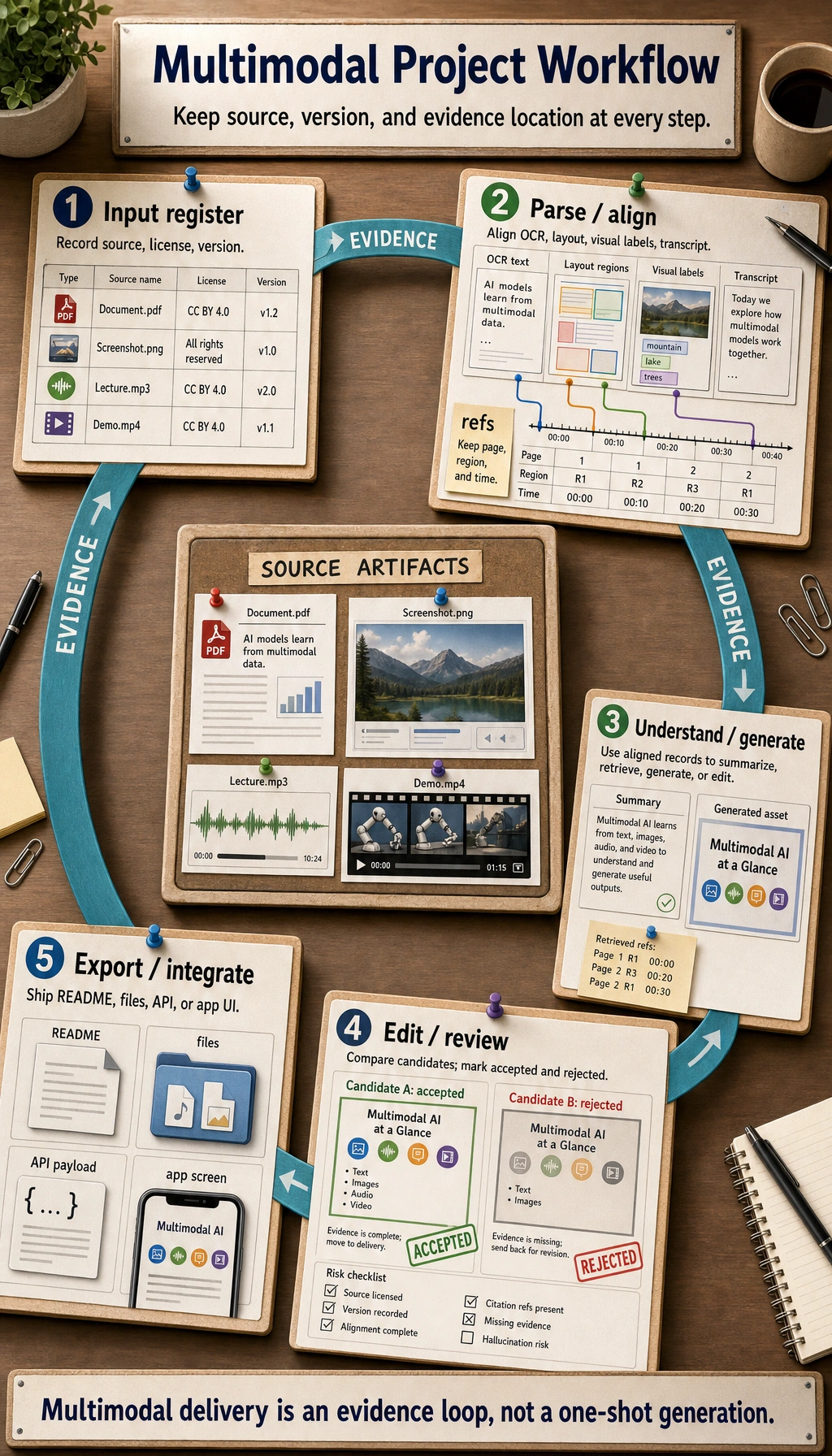
Use this workflow as the chapter map.
| Layer | What happens | Evidence to keep |
|---|---|---|
| Input | text, screenshot, image, PDF, audio, video | source file, owner, license, version |
| Parse / align | OCR, layout parsing, visual understanding, transcript | structured record, page/region/time reference |
| Understand / generate | answer, caption, image, voice, storyboard, video plan | prompt, model, output, candidate versions |
| Edit / review | human selection, factual check, copyright and portrait checks | review checklist, rejected versions, reason |
| Export / integrate | RAG index, Agent trace, creative package, demo | README, export file, limitations, next step |
Learning Order And Task List
Section titled “Learning Order And Task List”Make one small workflow traceable before trying video or full creative platforms.
-
12.1 Multimodal basics Turn one screenshot or image into a structured record. Keep the source, visible text, objects, and uncertainty notes.
-
12.2 Image generation Record prompts, references, negative requirements, and selected output. Keep prompt versions and review notes.
-
12.3 Video, speech, digital humans Understand storyboard, voice, shot, subtitle, and timing. Keep the storyboard and asset list.
-
12.4 Ethics and compliance Check copyright, portrait rights, sensitive content, and factual risk. Keep the safety review checklist.
-
12.5 Stage project Run 12.5.3 Hands-on: Build a Reproducible Multimodal Creative Package. Keep the brief, prompts, assets, storyboard, review, and export preview.
First Runnable Loop: Structure A Visual Input
Section titled “First Runnable Loop: Structure A Visual Input”This offline script simulates the first engineering step of a multimodal system: after a model or human reads an image, the result must become a structured, checkable record.
Create ch12_visual_record.py and run it with Python 3.10 or later.
visual_record = {    "source": "course-slide-01.png",    "content_type": "course screenshot",    "visible_text": ["RAGOps", "evaluation set", "Trace", "cost monitoring"],    "objects": ["flowchart", "table"],    "uncertainty": ["small text in the lower-right corner is unclear"],    "next_step": "write into the multimodal RAG index for the course Q&A assistant to cite",}
required_fields = {"source", "content_type", "visible_text", "objects", "uncertainty", "next_step"}missing = required_fields - visual_record.keys()rag_ready = not missing and bool(visual_record["visible_text"])
print("source:", visual_record["source"])print("visible_text_count:", len(visual_record["visible_text"]))print("uncertainty_count:", len(visual_record["uncertainty"]))print("rag_ready:", rag_ready)
Expected output:
source: course-slide-01.pngvisible_text_count: 4uncertainty_count: 1rag_ready: True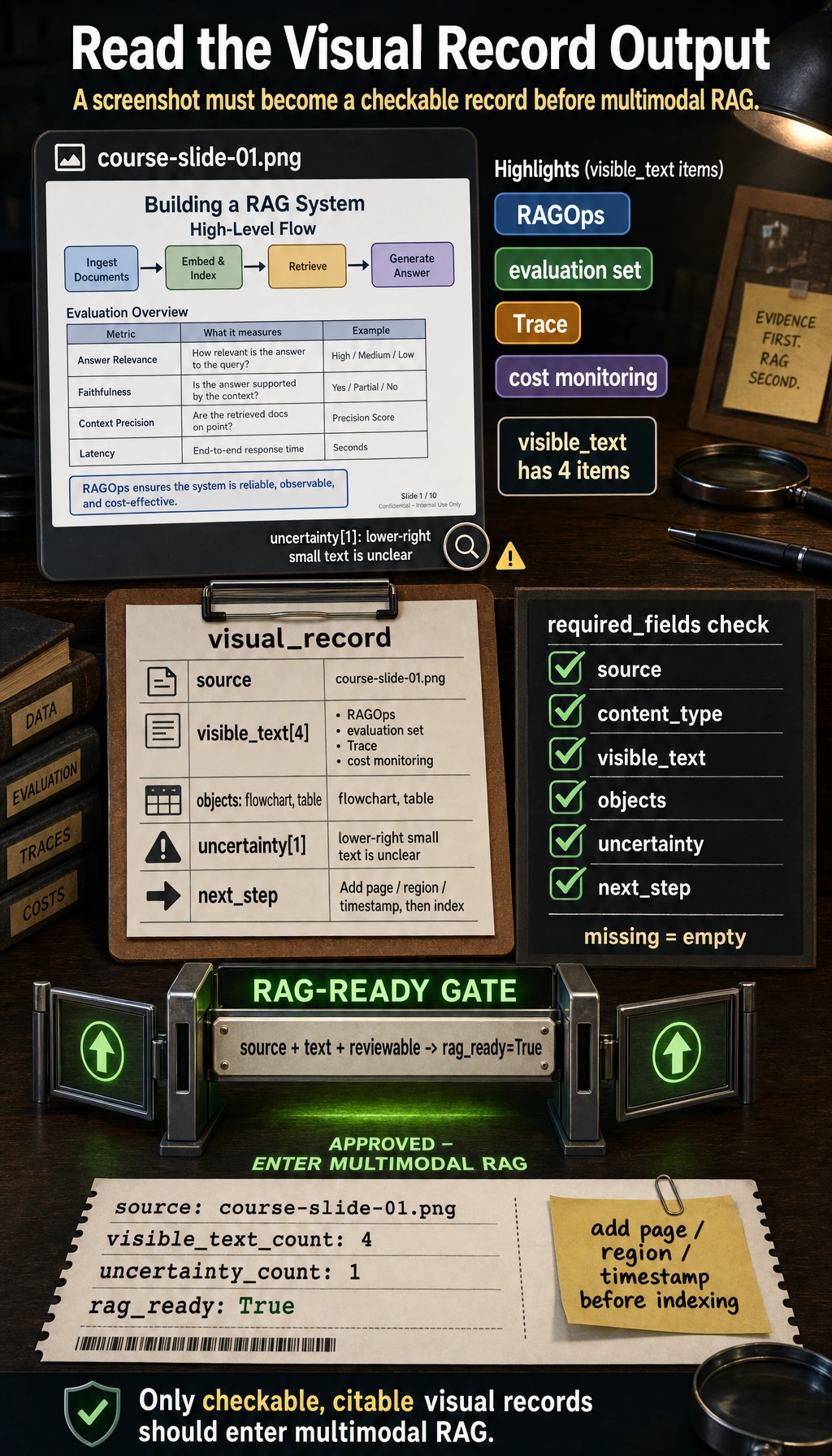
Operation tip: add page, region, or timestamp fields. If the record can be cited later, it can enter multimodal RAG. If it cannot be checked or cited, it should stay in review.
How to read this output
Section titled “How to read this output”sourceproves where the visual record came from.visible_text_countshows how much text was extracted or observed.uncertainty_countis not a weakness; it is the part that should stay reviewable.rag_ready=Truemeans the record has enough structure to be cited later, not that the visual understanding is automatically correct.
Depth Ladder
Section titled “Depth Ladder”| Level | What you can prove |
|---|---|
| Minimum pass | You can turn one screenshot, image, PDF, audio, or video note into a structured record with source and uncertainty. |
| Project-ready | You can preserve source references, prompt versions, candidate outputs, review decisions, and export files. |
| Deeper check | You can connect multimodal records to RAG or Agent while enforcing copyright, portrait, sensitive-content, factual, latency, and cost boundaries. |
Connect Multimodal To RAG, Agent, And Creative Work
Section titled “Connect Multimodal To RAG, Agent, And Creative Work”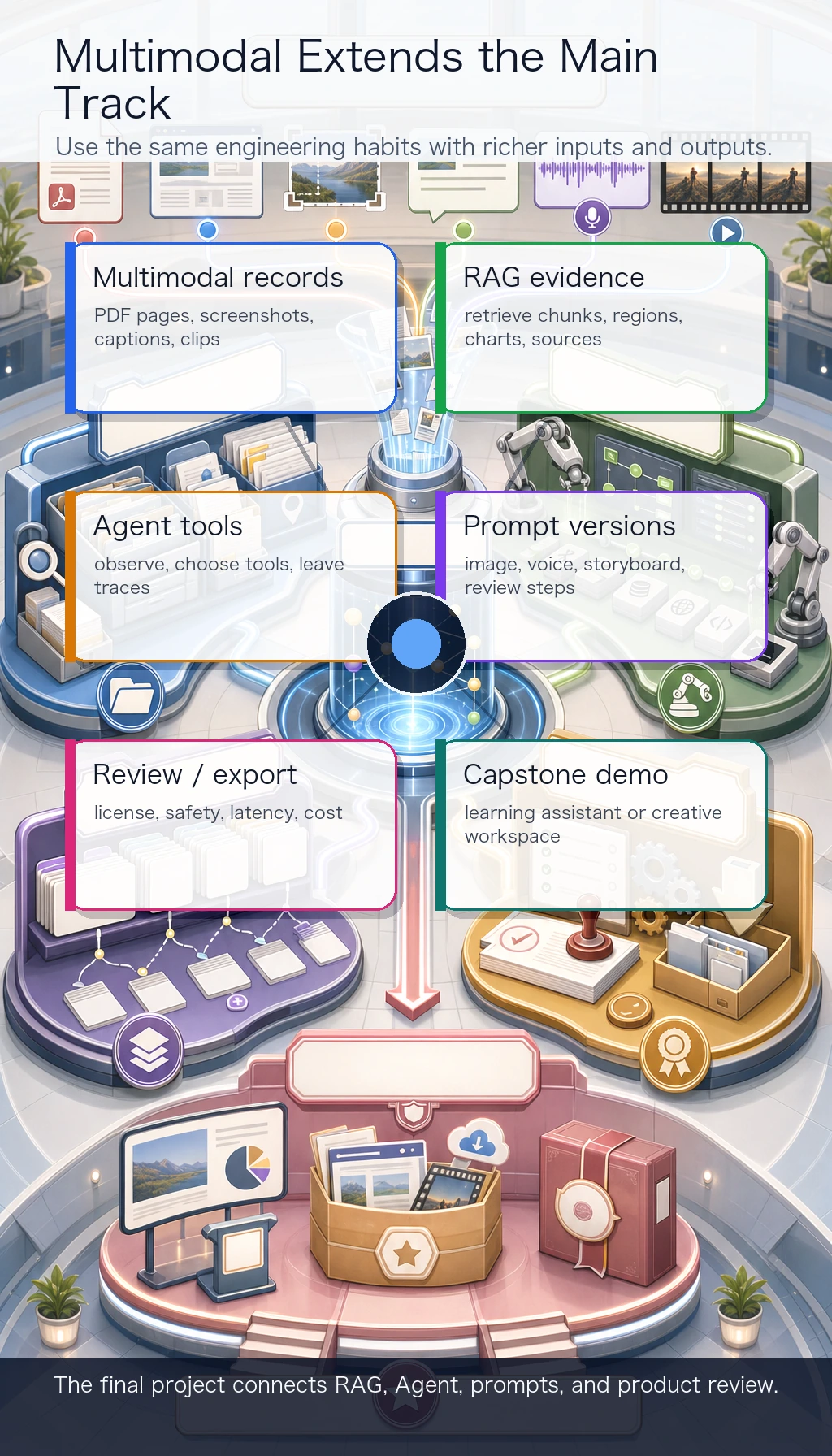
Multimodal is not separate from the main track.
| Main-track skill | Multimodal extension |
|---|---|
| RAG | retrieve PDF pages, screenshots, charts, image captions, and text chunks with citations |
| Agent | observe screenshots or documents, choose tools, and leave traceable actions |
| Prompt | create image, voice, storyboard, and review prompts with version records |
| Engineering | track assets, licenses, reviews, export files, latency, and cost |
| Capstone | build a multimodal learning assistant or creative workspace |
Evidence to Keep
Section titled “Evidence to Keep”Keep this page’s proof of learning as a small evidence card:
- Brief
- user goal, audience, assets, constraints, and export format
- Artifacts
- source files, prompts, generated candidates, selected output, and rejected versions
- Review
- factual check, copyright/portrait/sensitive-content check, and human decision
- Integration
- RAG record, Agent trace, creative package, storyboard, or export preview
- Expected Output
- reproducible asset package with README, review checklist, and failure notes
Common Failures
Section titled “Common Failures”- Treating AIGC as “one pretty output” instead of a workflow.
- Losing source references after OCR, PDF parsing, or screenshot understanding.
- Comparing generated results without prompt and version records.
- Skipping human review for copyright, portrait rights, sensitive content, or factual risk.
- Starting with video generation before the storyboard, assets, and review rules are clear.
Pass Check
Section titled “Pass Check”Before finishing the course, you should be able to:
- explain how text, images, PDFs, audio, and video enter one workflow;
- run the visual record script and add source references such as page, region, or timestamp;
- preserve prompts, assets, selected outputs, rejected outputs, and review reasons;
- connect a multimodal record to RAG, Agent, or a creative package;
- run the multimodal workshop and keep a README, review checklist, export preview, and failure cases.
For a printable checklist, use 12.0 Learning Checklist. For the guided final project, start with 12.5.3 Hands-on: Build a Reproducible Multimodal Creative Package.
Check reasoning and explanation
- A passing answer names the modalities involved, the input-output contract, and how text, image, audio, or video evidence is aligned.
- The evidence should include a real media artifact or trace, plus a note on quality, safety, and failure cases.
- A good self-check explains whether the task needs generation, understanding, retrieval, tool orchestration, or human review rather than treating every multimodal problem as the same kind of demo.