12.1.4 Multimodal Application Development
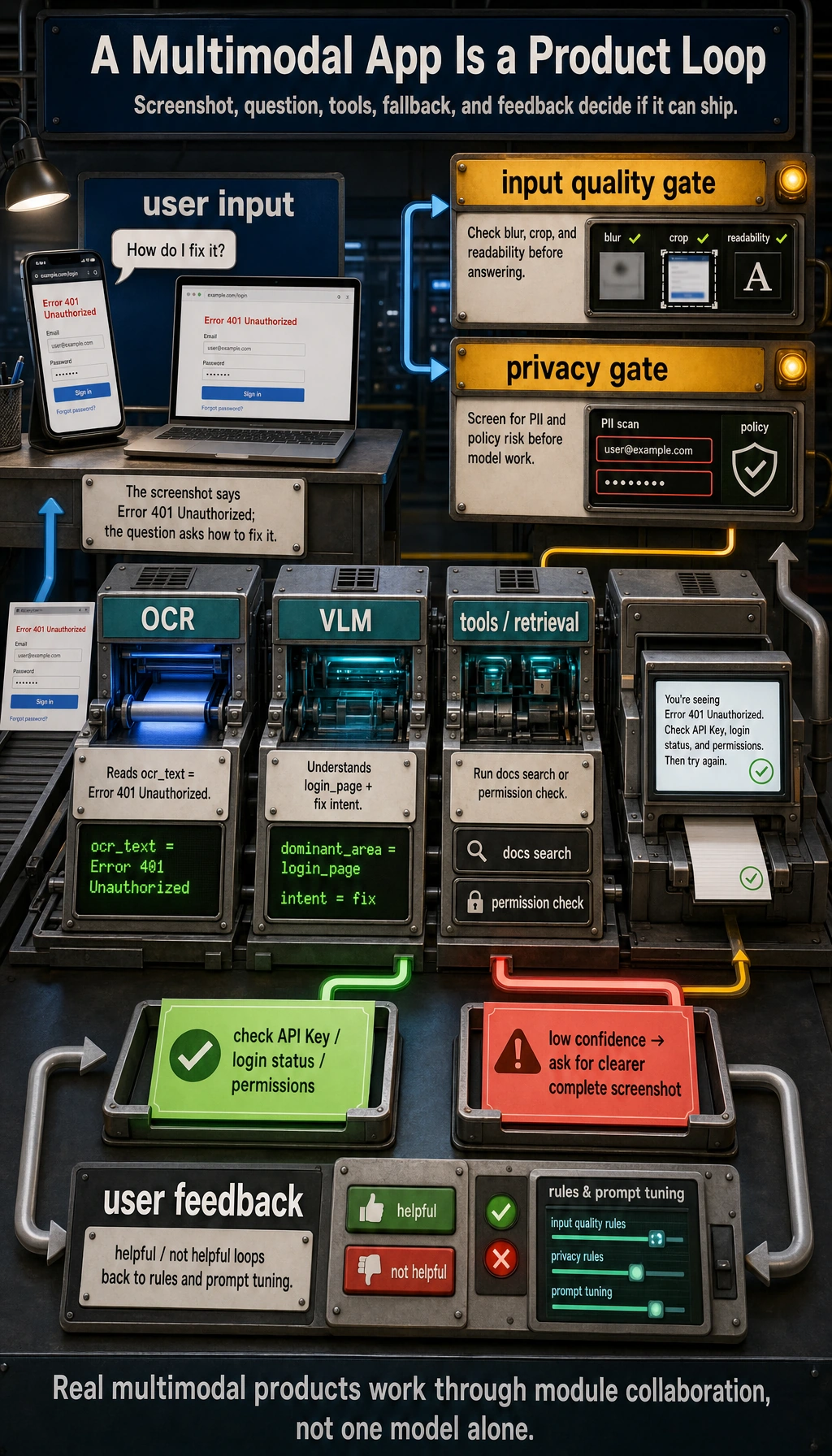
Multimodal applications do not end when “the model can see images.” When reading this diagram, focus on how input quality, OCR/VLM responsibilities, retrieval or tool calls, user feedback, failure fallback, and privacy compliance come together into a real product pipeline.
Learning Objectives
By the end of this section, you will be able to:
- Identify common product forms of multimodal applications
- Understand the basic engineering pipeline of multimodal applications
- Run a toy application for “image information + text question”
- Know which engineering issues matter most when deploying multimodal systems
What Do Multimodal Applications Actually Look Like?
It’s not “adding images for coolness”; it’s about having more complete input
For many tasks, text alone is actually incomplete.
For example:
- Screenshot error analysis
- Invoice recognition and Q&A
- Product image search
- Image moderation
- Document photo parsing
These are all naturally suited to multimodal applications.
Common product forms
| Form | User input | System output |
|---|---|---|
| Screenshot assistant | Screenshot + question | Error explanation / action suggestions |
| Image-text customer support | Product image + user inquiry | Product description / after-sales advice |
| Document understanding | Invoice / contract image + question | Key information extraction / answer |
| Teaching assistant | Problem image + student question | Explanation and hints |
The Basic Engineering Pipeline for Multimodal Applications
A very common processing pipeline
Why are many multimodal applications not “one model does everything”?
Because real systems often combine multiple modules:
- OCR
- Image classification
- VLM
- Rule-based logic
- Database queries
So multimodal applications are often not “pure model products,” but rather “multi-module collaboration products.”
A Runnable Toy Screenshot Assistant
To make sure the code runs directly, we use structured image information to simulate the output of a vision module.
image_info = {
    "type": "screenshot",
    "has_text": True,
    "ocr_text": "Error 401 Unauthorized",
    "dominant_area": "login_page"
}

def multimodal_assistant(image_info, user_question):
    user_question = user_question.lower()

    if image_info["type"] == "screenshot" and image_info["has_text"]:
        if "401" in image_info["ocr_text"] or "unauthorized" in image_info["ocr_text"].lower():
            if "how do i fix it" in user_question or "what should i do" in user_question:
                return "This looks like an authentication failure. Check the API Key, login status, or permission settings first."
            return "The core error in the screenshot is: 401 Unauthorized."

    return "I can’t extract enough information from this image and question right now."

print(multimodal_assistant(image_info, "What error is this?"))
print(multimodal_assistant(image_info, "How do I fix it?"))
Expected output:
The core error in the screenshot is: 401 Unauthorized.
This looks like an authentication failure. Check the API Key, login status, or permission settings first.
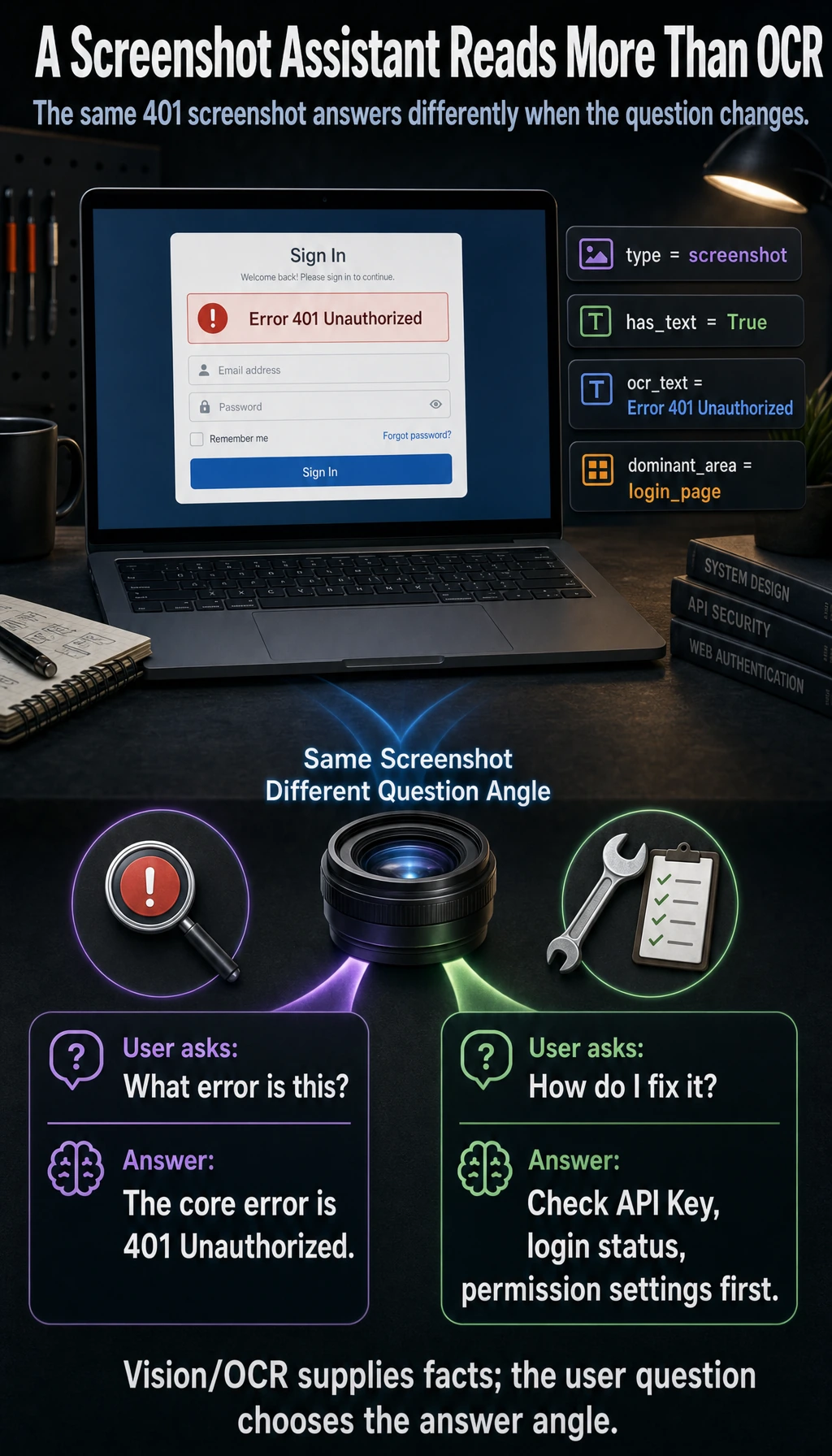
This small example is already a real product pattern: first read the visual/OCR state, then answer from the angle requested by the user.
Even though this is a toy example, it already reflects the real feel of multimodal applications:
- The image provides visual context
- OCR provides the text content
- The user question determines the angle of the answer
Why Do Multimodal Applications Often Need OCR?
Because many “look at the image” problems are also “read the image” problems
For example:
- Error screenshots
- Contract photos
- Invoice images
- Form screenshots
In these scenarios, if you don’t do OCR, the model will miss a lot of key text information.
The division of labor between OCR and VLM
You can think of it like this:
- OCR: reads the text in the image
- VLM: understands the image content together with the question
In many engineering setups, using both together is more robust than relying on either one alone.
A Small Example of an Image-Text Product Assistant
The example below simulates making a judgment using both “image features + text requirements.”
product_image_feature = {
    "color": "white",
    "style": "sport",
    "category": "shoes"
}

def match_product(image_feature, user_text):
    user_text = user_text.lower()

    if image_feature["category"] == "shoes":
        if "run" in user_text:
            return "This image looks more like sports shoes, so it may be suitable for running-related recommendations."
        if "office" in user_text:
            return "These shoes have a sporty style and may not be the best match for a commuting scenario."

    return "More image and text information is needed to make a further judgment."

print(match_product(product_image_feature, "I want a pair of shoes suitable for running"))
print(match_product(product_image_feature, "Are they suitable for commuting to work?"))
Expected output:
This image looks more like sports shoes, so it may be suitable for running-related recommendations.
These shoes have a sporty style and may not be the best match for a commuting scenario.
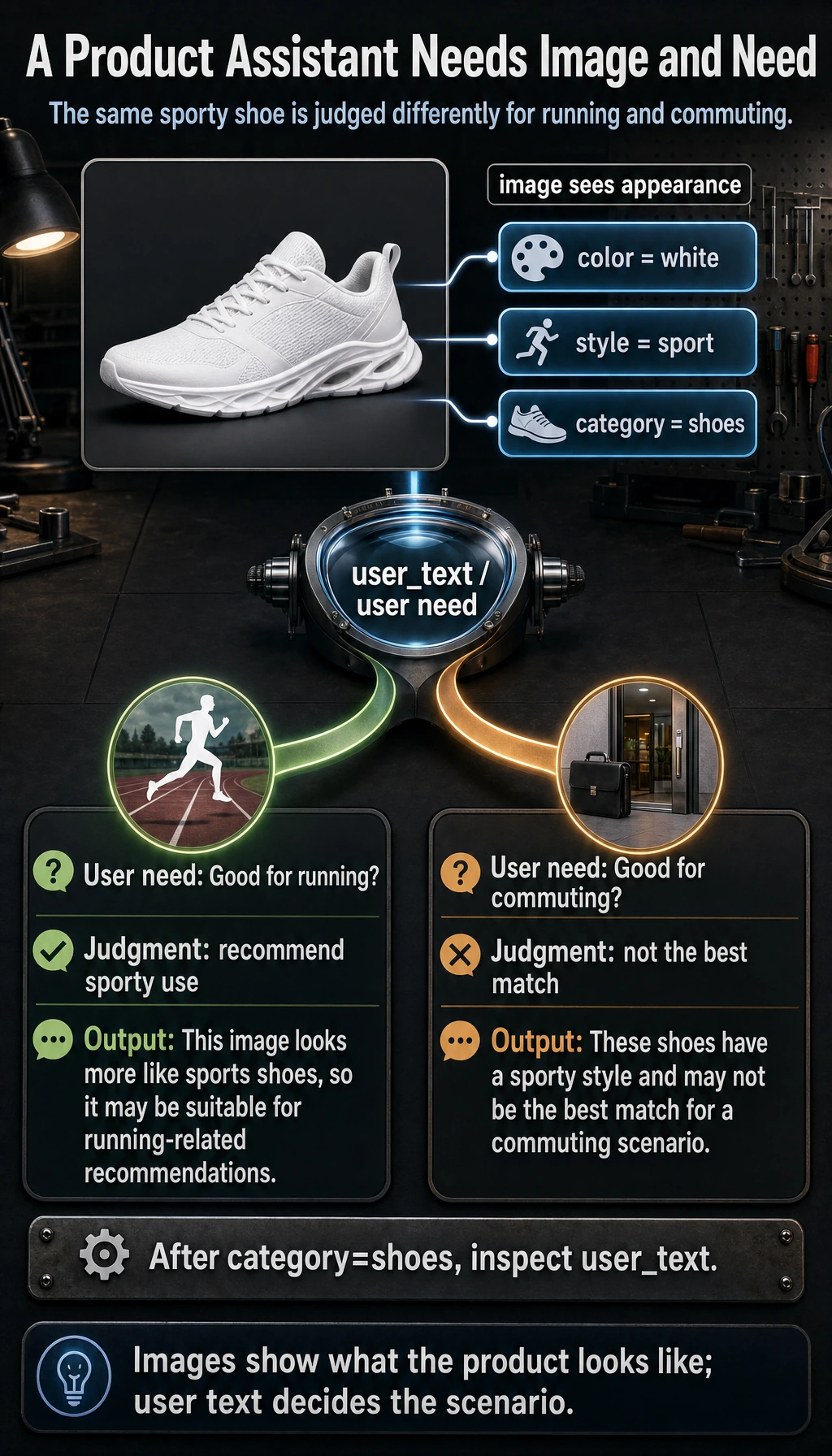
This kind of image-text collaboration is very common in e-commerce, recommendation systems, and customer support.
The Most Common Engineering Problems in Real Systems
Input quality issues
For example:
- Blurry images
- Incomplete screenshots
- OCR misreads
- Low image resolution
Latency and cost issues
Multimodal models are usually heavier than pure text models. So you especially need to pay attention to:
- Inference latency
- Concurrency capacity
- Cost per request
Privacy and data compliance
Many images may contain:
- Faces
- ID cards
- Internal company screenshots
- Contract content
So multimodal applications are often more likely than pure text applications to run into privacy requirements.
A Very Practical Product Design Habit
Don’t let the model carry all the responsibility alone
Mature systems often add mechanisms like:
- Low-confidence warnings
- Manual review entry points
- Source display
- Requesting additional images when recognition fails
A simple fallback idea
def safe_multimodal_reply(image_info, user_question):
    if not image_info.get("has_text") and "error" in user_question:
        return "Not enough text was recognized in this image. Please upload a clearer, complete screenshot."
    return multimodal_assistant(image_info, user_question)

print(safe_multimodal_reply({"type": "screenshot", "has_text": False}, "What error is this?"))
Expected output:
Not enough text was recognized in this image. Please upload a clearer, complete screenshot.
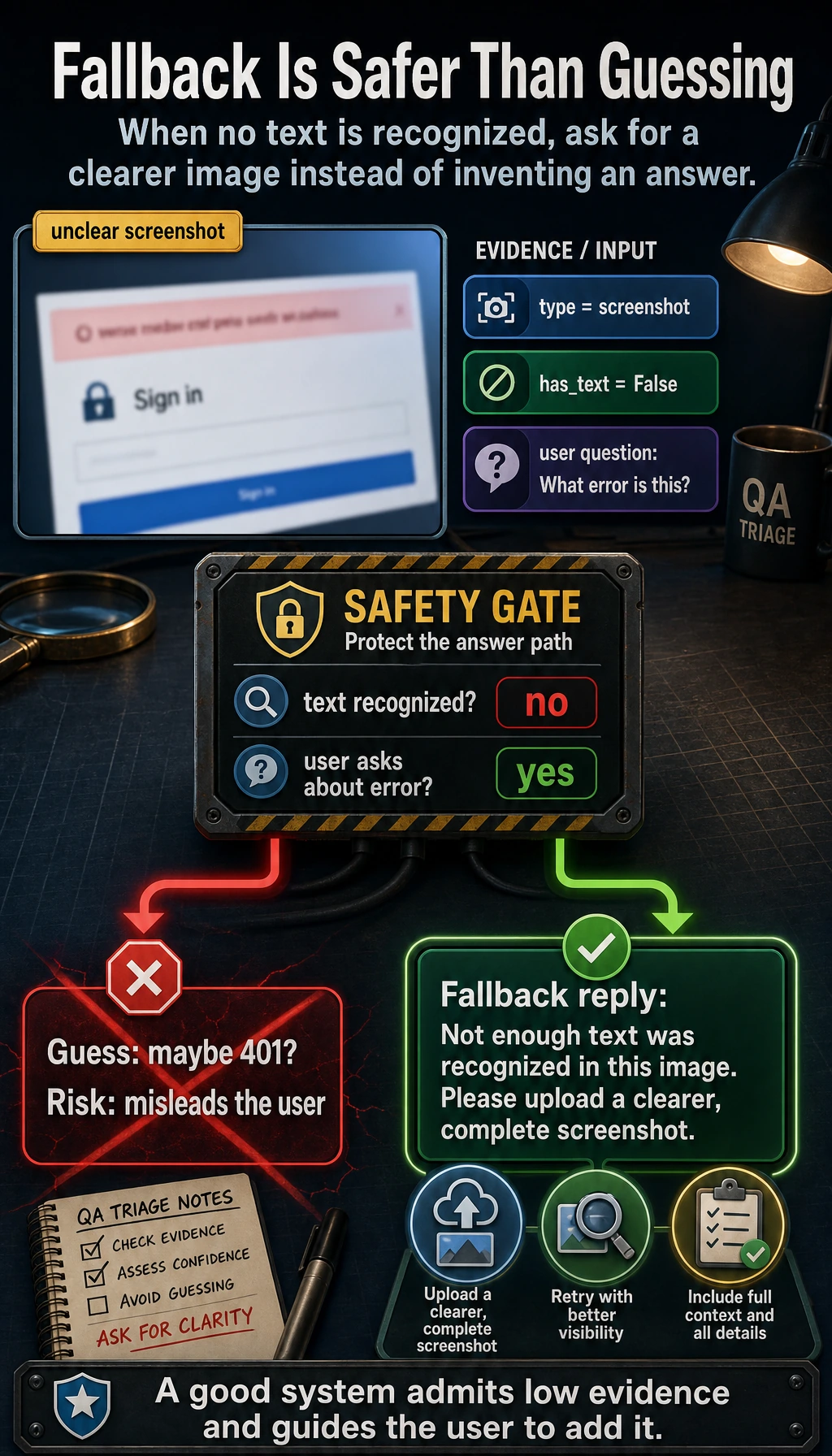
Often, a good fallback prompt is more valuable than forcing out a wrong answer.
When Is It Worth Building a Multimodal Application?
Strong signs that it is worth it
If your users’ questions often depend on:
- Image content
- Layout structure
- Screen state
- Visual context
Then multimodal is very worthwhile.
Signs that it may not be worth it
If your task is essentially just:
- FAQ text Q&A
- Text search
- Text summarization
Then it is usually more cost-effective to first build a strong pure-text pipeline.
Common Beginner Misconceptions
Thinking multimodal applications must directly use the most complex model
In many cases:
- OCR + a text model
- An image classifier + a rule system
Can already solve quite a few problems.
Thinking “can see images” means the system automatically “understands the scenario”
A multimodal model can extract information, but that does not mean it naturally understands business rules.
Ignoring failure-scenario design
Blurry images, low light, and cropped screenshots are all common high-frequency production cases.
Summary
The most important takeaway from this section is:
Multimodal applications are not as simple as “feeding images into a model.” They are about organizing visual input, text questions, engineering workflows, and failure fallback into a usable system.
Truly useful multimodal products often win through system design, not just the model itself.
Exercises
- Add another error type to the toy screenshot assistant, such as
404 Not Found. - Add another image attribute to the product assistant, such as
material, and extend the matching logic. - Think about this: if the user uploads a blurry screenshot, how should the system prompt the user to provide more information?