6.8.2 Project: Image Classification System
Section Overview
An image classification project is portfolio-ready when another person can understand the labels, run the baseline, inspect the metrics, and see what failed.
Learning Objectives
- Define a classification task with clear class boundaries.
- Organize train/validation/test evidence.
- Run a tiny baseline that produces predictions.
- Build a confusion matrix and extract error cases.
- Know what to show in a real CNN or transfer-learning project.
See the Project Loop First
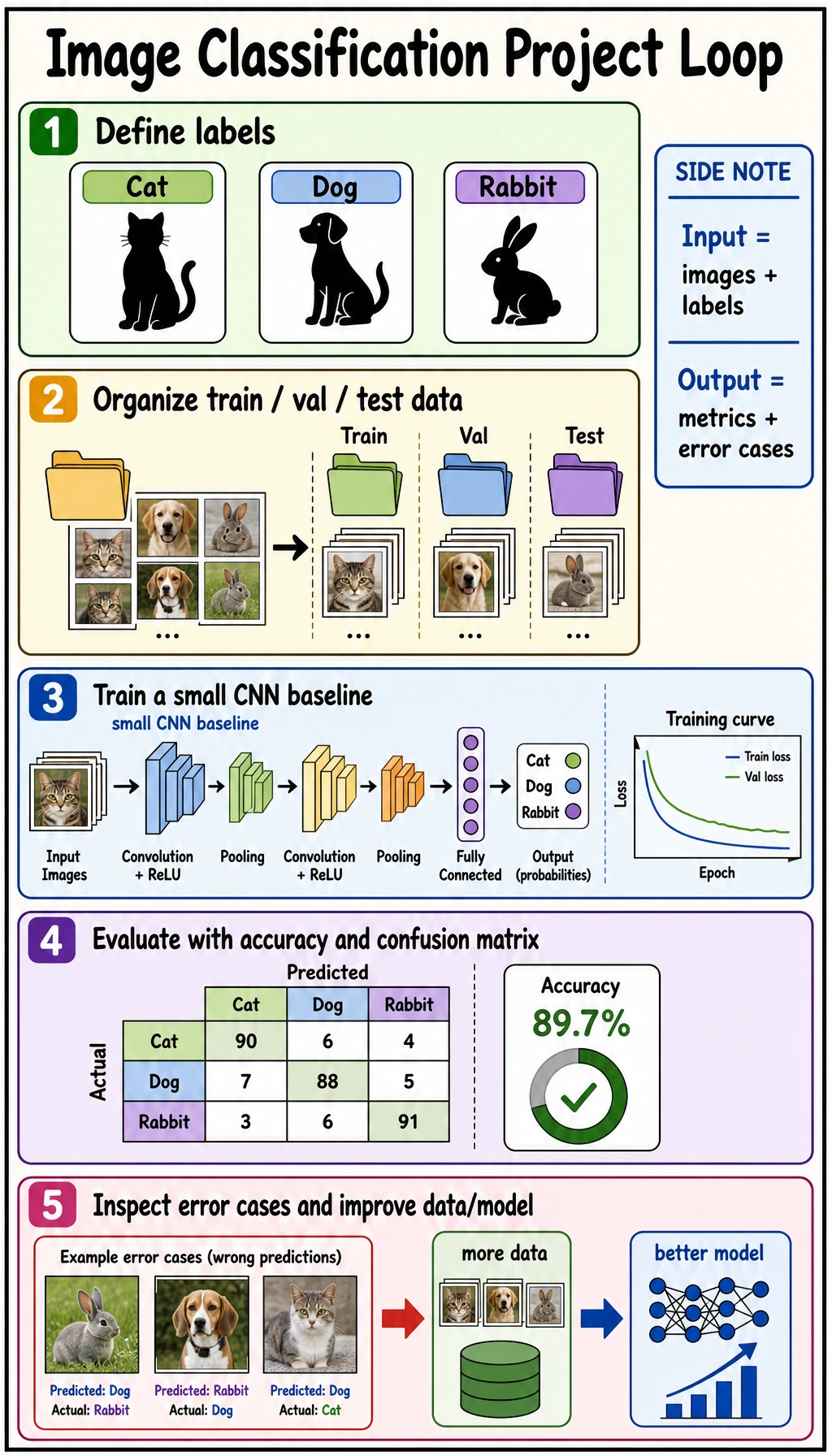
labels -> data split -> baseline -> metrics -> error cases -> next data/model action
Choose topics with:
- clear class boundaries;
- data you can actually collect;
- mistakes you can explain.
Avoid starting with hundreds of fine-grained classes or labels that even humans disagree on.
Project Plan Template
from dataclasses import dataclass, field


@dataclass
class CVProjectPlan:
    name: str
    classes: list[str]
    dataset_split: dict[str, int]
    baseline: str
    metrics: list[str]
    risks: list[str] = field(default_factory=list)


plan = CVProjectPlan(
    name="pet_image_classifier",
    classes=["cat", "dog", "rabbit"],
    dataset_split={"train": 900, "val": 180, "test": 180},
    baseline="small_cnn_then_transfer_learning",
    metrics=["accuracy", "confusion_matrix", "error_cases"],
    risks=["class imbalance", "background leakage", "label noise"],
)

print(plan)
This object is a project boundary. If you cannot fill it in, the model choice is still premature.
Lab: Prototype Baseline and Confusion Matrix
This toy example uses three pseudo-features instead of real images. It teaches the same evaluation loop you will use with a CNN later.
Create image_project_baseline.py:
from collections import defaultdict

train_data = [
    ("cat", [0.9, 0.8, 0.4]),
    ("cat", [0.8, 0.7, 0.5]),
    ("dog", [0.7, 0.5, 0.8]),
    ("dog", [0.6, 0.4, 0.9]),
    ("rabbit", [0.5, 0.9, 0.3]),
    ("rabbit", [0.4, 0.8, 0.2]),
]

val_data = [
    ("cat", [0.85, 0.75, 0.45]),
    ("dog", [0.65, 0.45, 0.85]),
    ("rabbit", [0.45, 0.85, 0.25]),
    ("dog", [0.82, 0.72, 0.42]),
]

labels = ["cat", "dog", "rabbit"]


def prototypes(data):
    groups = defaultdict(list)
    for label, features in data:
        groups[label].append(features)

    result = {}
    for label, rows in groups.items():
        result[label] = [
            round(sum(row[i] for row in rows) / len(rows), 3)
            for i in range(len(rows[0]))
        ]
    return result


def l1(a, b):
    return sum(abs(x - y) for x, y in zip(a, b))


def predict(features, protos):
    distances = {label: round(l1(features, proto), 3) for label, proto in protos.items()}
    pred = min(distances, key=distances.get)
    return pred, distances


protos = prototypes(train_data)
print("prototypes")
for label in labels:
    print(label, protos[label])

rows = []
for gold, features in val_data:
    pred, distances = predict(features, protos)
    rows.append({"gold": gold, "pred": pred})
    print("prediction", gold, "->", pred, distances)

cm = {g: {p: 0 for p in labels} for g in labels}
for row in rows:
    cm[row["gold"]][row["pred"]] += 1

print("confusion_matrix")
for gold in labels:
    print(gold, [cm[gold][p] for p in labels])

errors = [row for row in rows if row["gold"] != row["pred"]]
print("accuracy:", round((len(rows) - len(errors)) / len(rows), 3))
print("errors:", errors)
Run it:
python image_project_baseline.py
Expected output:
prototypes
cat [0.85, 0.75, 0.45]
dog [0.65, 0.45, 0.85]
rabbit [0.45, 0.85, 0.25]
prediction cat -> cat {'cat': 0.0, 'dog': 0.9, 'rabbit': 0.7}
prediction dog -> dog {'cat': 0.9, 'dog': 0.0, 'rabbit': 1.2}
prediction rabbit -> rabbit {'cat': 0.7, 'dog': 1.2, 'rabbit': 0.0}
prediction dog -> cat {'cat': 0.09, 'dog': 0.87, 'rabbit': 0.67}
confusion_matrix
cat [1, 0, 0]
dog [1, 1, 0]
rabbit [0, 0, 1]
accuracy: 0.75
errors: [{'gold': 'dog', 'pred': 'cat'}]
Read the error:
- the last
dogsample is closer to thecatprototype; - the confusion matrix shows
dog -> cat; - the next action is not “try a bigger model” first. Inspect whether dog images share cat-like backgrounds, poses, or labels.
Real Project Upgrade Path
| Version | What to add | Evidence to show |
|---|---|---|
| baseline | small CNN or transfer-learning baseline | train/val curves, accuracy |
| evaluation | confusion matrix and error samples | class-level mistakes |
| robustness | augmentation and leakage checks | before/after comparison |
| portfolio | README and demo command | reproducible run |
For a real CNN project, keep:
- dataset directory screenshot or class count table;
- train/validation/test split rule;
- baseline model summary;
- metric table;
- confusion matrix;
- 6 to 12 correct and wrong examples;
- next-step plan.
Common Mistakes
| Mistake | Fix |
|---|---|
| only reporting accuracy | show confusion matrix and error cases |
| choosing fuzzy classes | define label boundaries before collecting data |
| leaking similar images into train and test | split by source or subject when needed |
| starting with a huge model | build a small baseline first |
| hiding failures | use failures to justify the next improvement |
Exercises
- Add two more
dogvalidation samples and rerun the confusion matrix. - Add a new class
hamster. What changes inlabelsand the matrix? - Write one possible data issue for the
dog -> caterror. - Replace the prototype baseline with a small CNN outline in your README.
- Create a project checklist with dataset, command, metric, and failure cases.
Key Takeaways
- Image classification projects are judged by the full loop, not only the model name.
- Confusion matrices reveal class-level failures.
- Error cases are project evidence, not embarrassment.
- A strong portfolio project shows what improved and what still fails.