7.5.5 Prompt Engineering Practice
In the previous sections, we covered:
- Prompt basics
- Advanced techniques
- Structured output
In this section, we will not introduce new terms. Instead, we will do something even more important:
Treat Prompt as an engineering object and practice with it.
In other words, do not just ask, “Can this prompt run?” Ask, “Why is it more stable, what is clearer, and why is it more suitable for the current task?”
Learning Objectives
- Learn how to judge why a prompt is bad
- Learn how to improve a prompt from four angles: goal, constraints, examples, and output format
- Understand the prompt iteration process for several typical tasks
- Build the habit of debugging Prompts instead of writing them by guesswork
The Most Common Misunderstandings About Prompt Engineering
Misunderstanding: A prompt is just “writing more politely”
In fact, Prompt Engineering really cares about:
- Whether the task definition is clear
- Whether the output requirements are explicit
- Whether the constraints are executable
- Whether the examples provide enough guidance
Politeness is usually not the key point.
A more accurate sentence
A Prompt is the task interface documentation you write for the model.
If the documentation is vague, the model’s output will naturally be unstable.
First, Look at a “Bad Prompt”
Task: Sentiment classification for user reviews
A very poor prompt might look like this:
Help me analyze this comment.
What is wrong with it?
- It does not say what to analyze
- It does not specify the output format
- It does not define the label set
- It does not say whether an explanation is needed
A clearer version
Please determine the sentiment of the review below. Only output positive or negative. Do not output anything else.

Review: This course is explained very clearly, and there are many examples.
This version is much clearer because it defines:
- Task: sentiment classification
- Output set: positive / negative
- Output constraint: no extra content
The Four Core Dimensions of Prompt Debugging
Is the task goal clear enough?
First ask:
- Is the model supposed to classify, summarize, extract, or rewrite?
Is the output format clear enough?
Then ask:
- Is the output a sentence?
- A label?
- JSON?
- A table?
Are the constraints clear enough?
For example:
- Do not hallucinate
- Do not output extra explanations
- Answer only based on the given text
Are the examples guiding enough?
For some tasks, instructions alone are not enough. It is better to add few-shot examples.
These four questions basically form the main thread of Prompt practice.
A Runnable Prompt Practice Helper
The example below does not call a real large model. Instead, it uses a “task specification object” to help you learn how to break down Prompt requirements.
prompt_spec = {
    "task": "sentiment_classification",
    "allowed_labels": ["positive", "negative"],
    "output_format": "single_label",
    "constraints": ["Do not output explanations", "Only output the label"]
}

print(prompt_spec)
Expected output:
{'task': 'sentiment_classification', 'allowed_labels': ['positive', 'negative'], 'output_format': 'single_label', 'constraints': ['Do not output explanations', 'Only output the label']}
This example looks simple, but it teaches you something very important:
Behind a good Prompt, there is usually a clearer task specification.
Prompt Iteration for a Typical Task
Task: Text summarization
Version 1: Too vague
Summarize this paragraph.
Problems:
- It does not say how long the summary should be
- It does not say what style to use
- It does not say whether key points should be preserved
Version 2: More specific
Please summarize the text below into 3 bullet points in Chinese, with no more than 20 characters per point.
This is much better.
Version 3: Add boundaries
Please summarize the text below into 3 bullet points in Chinese, with no more than 20 characters per point.
Keep only the facts, and do not add any information that is not in the original text.
At this point, the prompt has moved from “able to respond” to “more stable and controllable.”
When Is few-shot Especially Useful?
When the task definition is not clear enough from language alone
For example, if you ask the model to decide whether a sentence is:
- fact
- opinion
If you only provide definitions, the model may interpret them inconsistently. In this case, few-shot examples are very helpful.
An example
few_shot_examples = [
    {"input": "Beijing is the capital of China.", "output": "fact"},
    {"input": "This course is very interesting.", "output": "opinion"}
]

for ex in few_shot_examples:
    print(ex)
Expected output:
{'input': 'Beijing is the capital of China.', 'output': 'fact'}
{'input': 'This course is very interesting.', 'output': 'opinion'}
The role of few-shot is not “writing more words,” but:
Showing the model the judgment style you want.
How Can You Write Prompts More Stably for Structured Tasks?
A typical scenario: Information extraction
If you only say:
Help me extract resume information.
Then the model may:
- Miss fields
- Use inconsistent field names
- Output extra explanations
A better version
Please extract the information from the resume below and output JSON.

Fields:
- name: string
- school: string
- skills: list[string]

Do not output any extra explanation.
This clearly explains the task, structure, and boundaries.
The “Minimal Experiment” Habit in Prompt Practice
Do not change too many things at once
The biggest trap in Prompt debugging is this:
- The task description changes
- The examples change
- The output format changes too
Then you have no idea which change actually mattered.
A better way
Change only one variable at a time, for example:
- First add output constraints only
- Then add few-shot examples only
- Then change only the format requirements
This is very similar to tuning model hyperparameters.
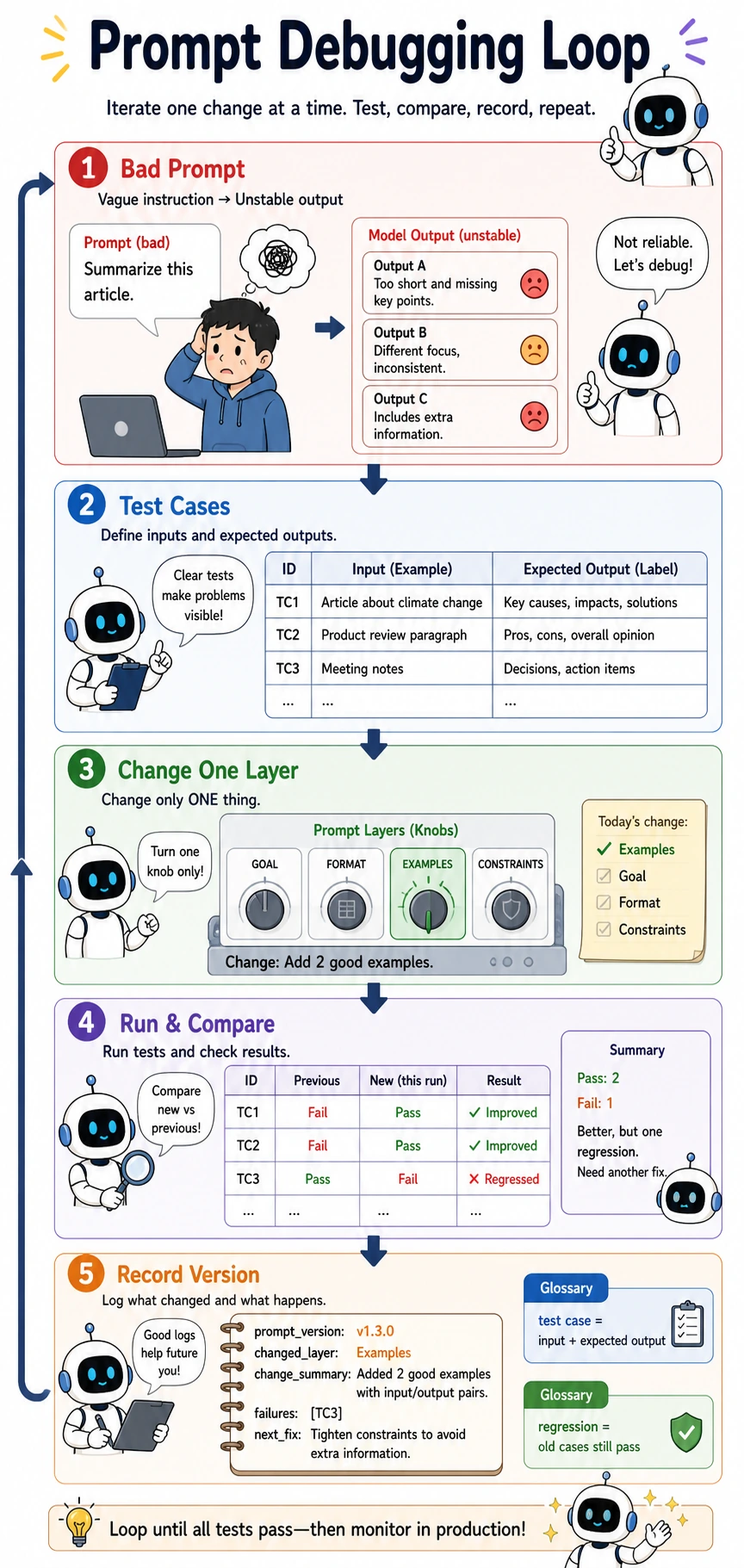
Prompt debugging should feel like engineering, not guessing. Prepare test cases, change only one layer at a time, run the same cases again, compare pass/fail results, then record the Prompt version and failure samples. Regression means old cases should still pass after the new change.
A Small Prompt Evaluation Example
First define test samples
test_cases = [
    {"input": "This course is explained very clearly.", "expected": "positive"},
    {"input": "The content is a bit messy.", "expected": "negative"}
]

for case in test_cases:
    print(case)
Expected output:
{'input': 'This course is explained very clearly.', 'expected': 'positive'}
{'input': 'The content is a bit messy.', 'expected': 'negative'}
Why is this step important?
Because Prompt Engineering also needs evaluation. Without test samples, you can only judge whether a prompt is “good” based on feeling.
A more mature approach is:
- Have an input set
- Have expected outputs
- Check whether the prompt consistently matches expectations
Common Pitfalls for Beginners
Not clearly defining the output when writing prompts
This makes post-processing increasingly painful.
Thinking prompt tuning can only rely on inspiration
In fact, it is very similar to ordinary engineering debugging: run small experiments, look at the results, and improve step by step.
Only looking at one successful case
Getting one example right does not mean the prompt is stable.
Summary
The most important thing in this section is not memorizing how many Prompt techniques you know, but building this habit:
Treat Prompt as a task interface to design, and as a system component to debug.
When you start iterating around the task goal, format, constraints, and examples instead of writing one sentence by intuition, Prompt Engineering truly begins to mature.
Exercises
- Choose a task you are familiar with, first write a “bad prompt,” then improve it step by step into a better version.
- Add a few-shot version for the “sentiment classification” task.
- Rewrite the “text summarization” task into a structured output format, such as JSON.
- Explain in your own words: Why is Prompt Engineering not “writing one nice sentence,” but “designing a task interface”?