7.5.4 Structured Output
When many people use large models for the first time, they naturally let the model output a piece of natural language. But once you want to connect the model into a program system, you quickly run into a real problem:
Natural language is flexible, but not stable.
Structured output is about solving the problem of “making the model’s answer look more like a program interface.”
Learning Objectives
- Understand why structured output is very important for LLM applications
- Learn how to design a simple but clear JSON output format
- Understand field design, constraint instructions, and validation logic
- Read a minimal closed loop from Prompt to JSON parsing
- Distinguish the differences and relationship between “structured output” and “Function Calling”
Why Isn’t Natural Language Enough?
A Very Common Fragile Scenario
Suppose you want the model to identify user intent:
User input:
“I want to learn about the refund policy”
If the model returns:
“This user is probably asking about refunds; suggest routing to the refund module.”
A human can understand it. But it is hard for a program to use this text stably.
Because what the program really wants is:
{
  "intent": "refund_policy",
  "confidence": 0.92
}
What Is the Real Problem?
The problem is not that the model cannot answer, but that:
Natural-language output is too free-form, so programs have a hard time consuming it reliably.
So when the model’s output needs to be passed to:
- the frontend
- the backend
- a workflow
- a database
structured output almost becomes a must-have.
What Exactly Is Structured Output?
A Simple Definition
Structured output = making the model output results according to pre-agreed fields and format.
The most common formats include:
- JSON
- lists
- tables
- fixed-field objects
Why Is JSON the Most Common?
Because it satisfies all of these at the same time:
- humans can read it
- programs can parse it
- the structure is clear
So in LLM applications, JSON is usually the first choice for structured output.
Terms you should understand before writing schemas
| Term | Plain meaning | Practical use |
|---|---|---|
| JSON | A lightweight data format made of objects, arrays, strings, numbers, booleans, and null | It lets the model output something a program can parse with json.loads() |
| Schema | The expected shape of the output: field names, field types, allowed values, and required fields | It is the contract between the Prompt and the downstream program |
| Field | One named piece of data, such as intent or confidence | Stable field names let backend code read the result without guessing |
| Validation | Program checks that the output is parseable, complete, and typed correctly | It catches bad model output before it breaks the next workflow |
| Enum | A fixed set of allowed values, such as refund_policy / certificate / other | It prevents the model from inventing many similar labels |
What Is the Most Core Design Point of Structured Output?
Keep Fields Few and Clear
A mistake beginners often make is:
- designing 20 fields at the start
- but each field has unstable meaning
A better principle is:
First use the fewest fields to express the most important result.
For example, for intent recognition:
{
  "intent": "refund_policy",
  "confidence": 0.92
}
is already enough.
Field Names Must Be Stable
If today it is called:
intent
tomorrow:
user_intent
and the day after:
task_type
then the program side will become more and more confused.
So one of the first principles of structured output is:
Field names must be stable.
A Minimal Runnable Example: From String JSON to Program Parsing
First Look at Minimal Parsing
import json

text = '{"intent": "refund_policy", "confidence": 0.92}'
data = json.loads(text)

print(data)
print("intent =", data["intent"])
print("confidence =", data["confidence"])
Expected output:
{'intent': 'refund_policy', 'confidence': 0.92}
intent = refund_policy
confidence = 0.92
This Code Is Simple, but Very Meaningful
It teaches you:
- Structured output is not just “looking like JSON”; it must be truly parseable
- After parsing, the program can stably retrieve fields
In other words, the value of structured output is not “better looking,” but:
The downstream program can actually use it.
A Smaller Example Closer to a Real Task: User Intent Recognition
Suppose You Ask the Model to Output This Structure
{
  "intent": "refund_policy",
  "needs_human": false,
  "confidence": 0.92
}
Simulated Model Output + Program Parsing
import json

mock_model_output = """
{
  "intent": "refund_policy",
  "needs_human": false,
  "confidence": 0.92
}
"""

data = json.loads(mock_model_output)

if data["intent"] == "refund_policy" and not data["needs_human"]:
    print("Enter the automatic refund policy processing flow")
else:
    print("Route to a human or another flow")

print(data)
Expected output:
Enter the automatic refund policy processing flow
{'intent': 'refund_policy', 'needs_human': False, 'confidence': 0.92}
This is already a typical use case of structured output in a real workflow.
How Should the Prompt Be Written So Structured Output Is More Stable?
Don’t Just Say “Please Output JSON”
A more stable way usually includes:
- explicit field names
- explicit field types
- explicit instruction to output only JSON
- explicit instruction not to add explanations
For example:
Please perform intent recognition based on the user input and strictly output JSON.

Field requirements:
- intent: string, possible values are refund_policy / certificate / other
- needs_human: boolean
- confidence: float, range 0 to 1

Do not output any extra explanation. Only output JSON.
Why Is This More Stable?
Because you are not just “stating a request,” but:
Defining an output contract for the model.
The clearer the contract, the more stable the result.
Why Do Structured Outputs Still Need Validation?
Because the Model Is Not a Compiler
Even if your prompt is written very well, the model may still:
- miss fields
- use the wrong type
- output extra explanatory text
- produce invalid JSON syntax
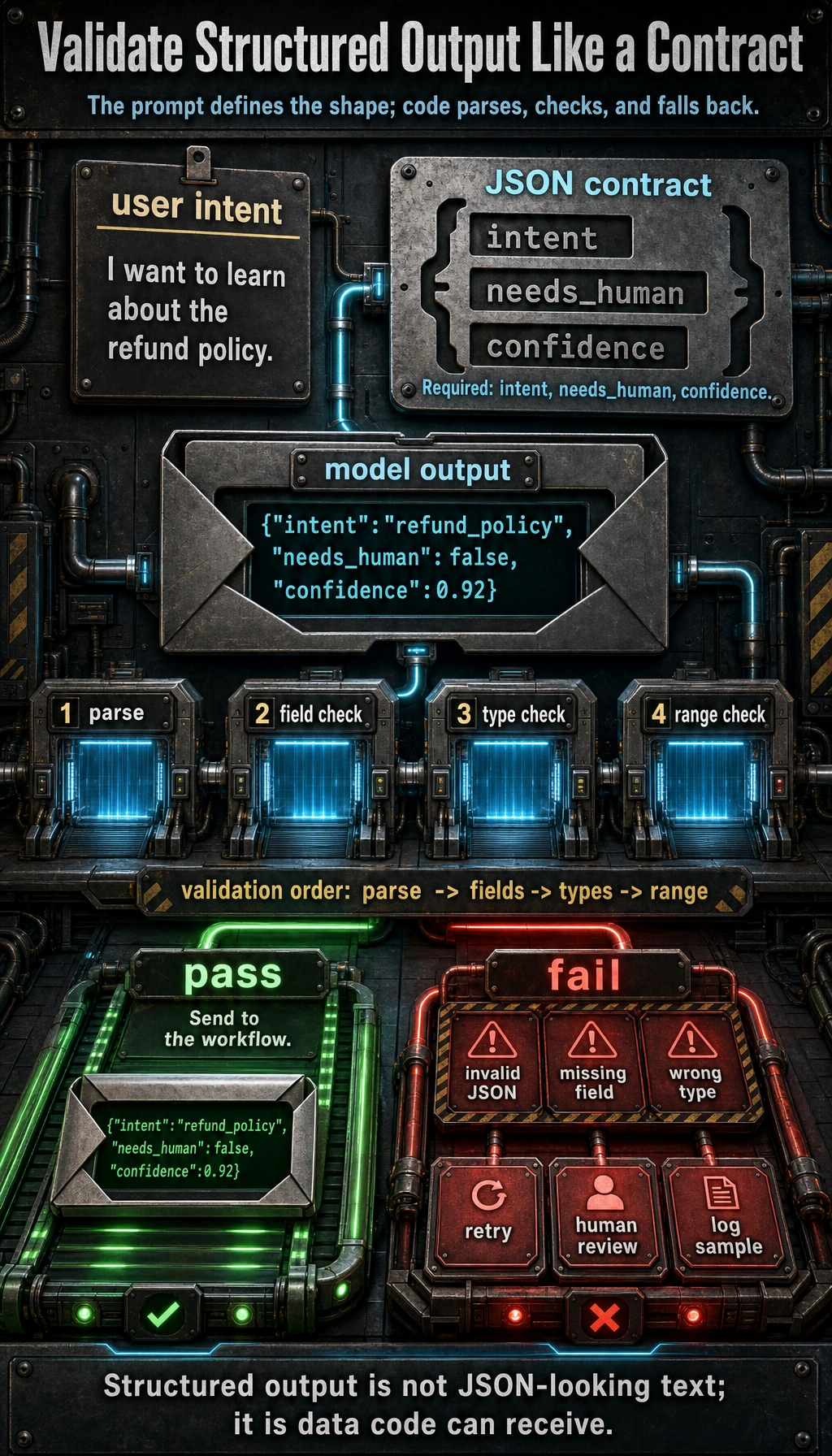
It is best to read this diagram as an engineering loop: the Prompt first defines the JSON contract, the model outputs a structured result, the program parses and validates fields, types, and value ranges, and on failure it retries or routes to a human. Structured output is not “something that looks like JSON”; it is about the downstream program being able to reliably receive it.
A Minimal Validation Example
import json

def validate_output(text):
    try:
        data = json.loads(text)
    except Exception:
        return False, "invalid_json"

    required = ["intent", "needs_human", "confidence"]
    for field in required:
        if field not in data:
            return False, f"missing_{field}"

    if not isinstance(data["intent"], str):
        return False, "intent_type_error"
    if not isinstance(data["needs_human"], bool):
        return False, "needs_human_type_error"
    if not isinstance(data["confidence"], (int, float)):
        return False, "confidence_type_error"

    return True, data

good = '{"intent":"refund_policy","needs_human":false,"confidence":0.92}'
bad = '{"intent":"refund_policy","confidence":"high"}'

print(validate_output(good))
print(validate_output(bad))
Expected output:
(True, {'intent': 'refund_policy', 'needs_human': False, 'confidence': 0.92})
(False, 'missing_needs_human')
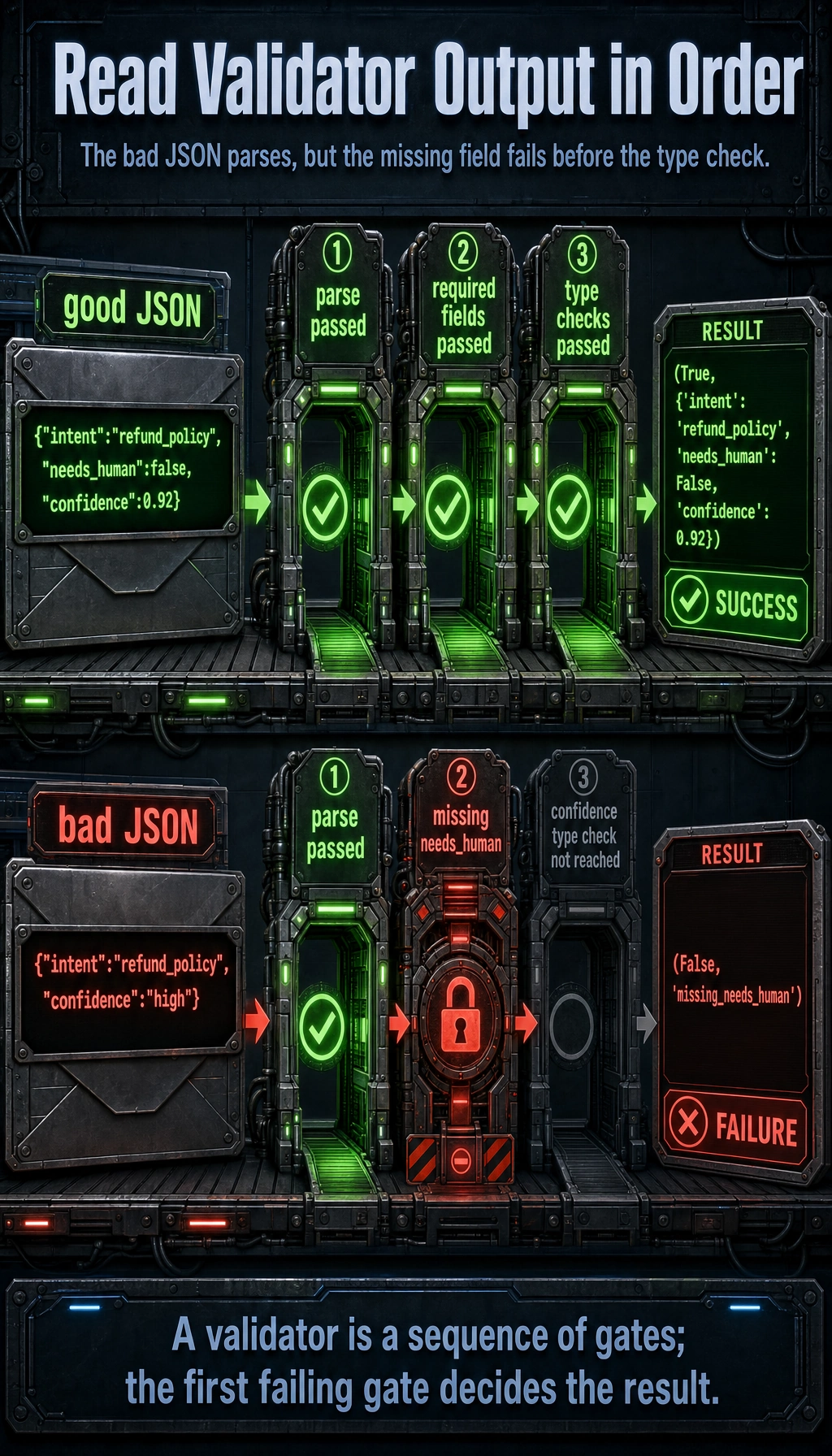
The bad JSON is parseable, but it fails before the confidence type check because needs_human is missing. Validation is a sequence of gates, and the first failing gate decides the error code.
This step is especially important because it changes your system from:
- “the model will probably output something like this”
to:
- “the program clearly knows whether the output is valid”
What Is the Relationship Between Structured Output and Function Calling?
Similarity
They are both doing the same thing:
turning model output from free text into a format that programs can more easily receive.
Difference
Roughly speaking:
- Structured output: broader, focused on “stable result format”
- Function Calling: one step further, focused on “the output is a tool-calling intent”
For example:
- Structured output: output a classification result JSON
- Function Calling: output
{name, arguments}to call a tool
So you can understand it like this:
Function Calling is a more execution-oriented form of structured output.
If Your Goal Is to Generate Fixed-Format Word / PPT, How Should the Schema Be Designed?
If your goal is to:
- generate courseware
- generate reports
- generate documents with fixed sections
then the most important step in structured output is often not “telling the model to output JSON,” but first designing the schema clearly.
A minimal schema more suitable for courseware generation often looks like this:
{
  "title": "Explanation of Discount Word Problems",
  "audience": "Upper elementary students",
  "teaching_goal": ["Understand the basic calculation method for discounts"],
  "sections": [
    {"type": "concept", "heading": "Knowledge Review", "items": ["Discount = original price × discount rate"]},
    {"type": "example", "heading": "Worked Example", "items": ["If a product costs 100 yuan and is 20% off, how much is it?"]},
    {"type": "exercise", "heading": "Class Practice", "items": ["If a coat costs 80 yuan and is 30% off, how much is it?"]}
  ],
  "source_refs": [{"doc_id": "word_001", "page_or_slide": 3}]
}
The most important thing for beginners to notice about this schema is:
- More fields are not always better
- Instead, the fields should be just enough to drive later template rendering and source tracing
The Most Common Pitfalls in Real Projects
Too Many Fields
The more fields you have, the easier it is for the model to make mistakes, and the more complex post-processing becomes.
Unstable Field Meaning
For example, if confidence sometimes means 0 to 1 and sometimes means a percentage, that design is very dangerous.
No Parsing or Validation
Many demos seem to work, but once connected to a program they break. The problem is usually here.
The Output Structure Is Detached from the Business Flow
If the JSON is complete but cannot directly drive the downstream flow, then structured output is not really serving the business.
Structured Output Acceptance Checklist
Structured output is not successful just because it “looks like JSON”; it must be stably consumable by the program. After designing a schema, you can use the checklist below to verify it.
| Check Item | Passing Behavior | Common Problem |
|---|---|---|
| Parseable | json.loads() can parse it directly | Explanatory text appears before or after, JSON is not closed properly |
| Complete fields | All required fields are present | Missing fields, too many field-name variants |
| Correct types | Stable types such as string, boolean, number, array | confidence is sometimes a number and sometimes “high” |
| Controlled enum | Classification fields stay within allowed values | intent outputs many similar but inconsistent terms |
| Business usable | Output can directly drive the next process | JSON is complete, but the backend doesn’t know how to use it |
| Failure identifiable | The program can detect invalid_json, missing_field, type_error | All failures are only shown as “parse failed” |
If this table is not passed, prioritize fixing the schema and validation logic, rather than repeatedly changing the Prompt wording.
Why Prompt Version Management Matters
When you start optimizing structured output, the Prompt itself should also have versions like code. Otherwise, it becomes hard to answer: which change improved the output, and which change introduced a new problem?
| Field | Example | Purpose |
|---|---|---|
prompt_version | intent_schema_v2 | Marks the current Prompt version |
change_reason | Add needs_human field | Explains why it was changed |
test_inputs | 20 fixed inputs | Compare stability with the same sample set |
pass_rate | 18/20 | Record the structured output pass rate |
failure_cases | 2 missing-field cases | Keep evidence for the next optimization round |
A simple record can look like this:
Version: intent_schema_v2
Change: Added the needs_human field, and required confidence to be a number from 0 to 1
Evaluation: 18 out of 20 test inputs passed parsing and validation
Failures: 2 outputs used confidence="high"
Conclusion: Keep the field, but emphasize the confidence type in the prompt
This habit will turn Prompt engineering from “let’s try it” into “iterate with records.”
How to Record Structured Output Failure Samples
It is recommended to record failure samples by type, rather than only saying “the model did not follow the format.”
| Failure Type | Example | Fix Direction |
|---|---|---|
invalid_json | Missing the right brace | Require outputting only JSON and add retry on parse failure |
missing_field | Missing needs_human | Mark required fields in the field requirements |
type_error | confidence is output as a string | Clarify the type and range |
enum_error | intent outputs refund instead of refund_policy | Provide allowed values and forbid inventing categories |
extra_text | Explanations are added before and after JSON | Explicitly forbid any extra explanation |
The clearer the failure samples, the easier regression testing becomes later. In real projects, the stability of structured output is often not guaranteed by one perfect Prompt, but by schema, validation, failure logging, and regression samples working together.
Summary
The most important thing in this section is not memorizing JSON syntax, but understanding:
The essence of structured output is turning the model’s answer into an intermediate result that programs can consume reliably.
When you start connecting models into real systems, this is often more important than “making the answer prettier.”
Exercises
- Design a JSON output format for a “course Q&A routing” task, and include at least
intent,confidence, andneeds_human. - Intentionally construct a JSON object with a missing field and see whether the validator can catch it.
- Think about it: when should you use structured output, and when is plain natural language enough?
- Explain in your own words: why is structured output a key step in the engineering transformation of Prompt engineering?