11.6.6 Practical Transformers Library Usage
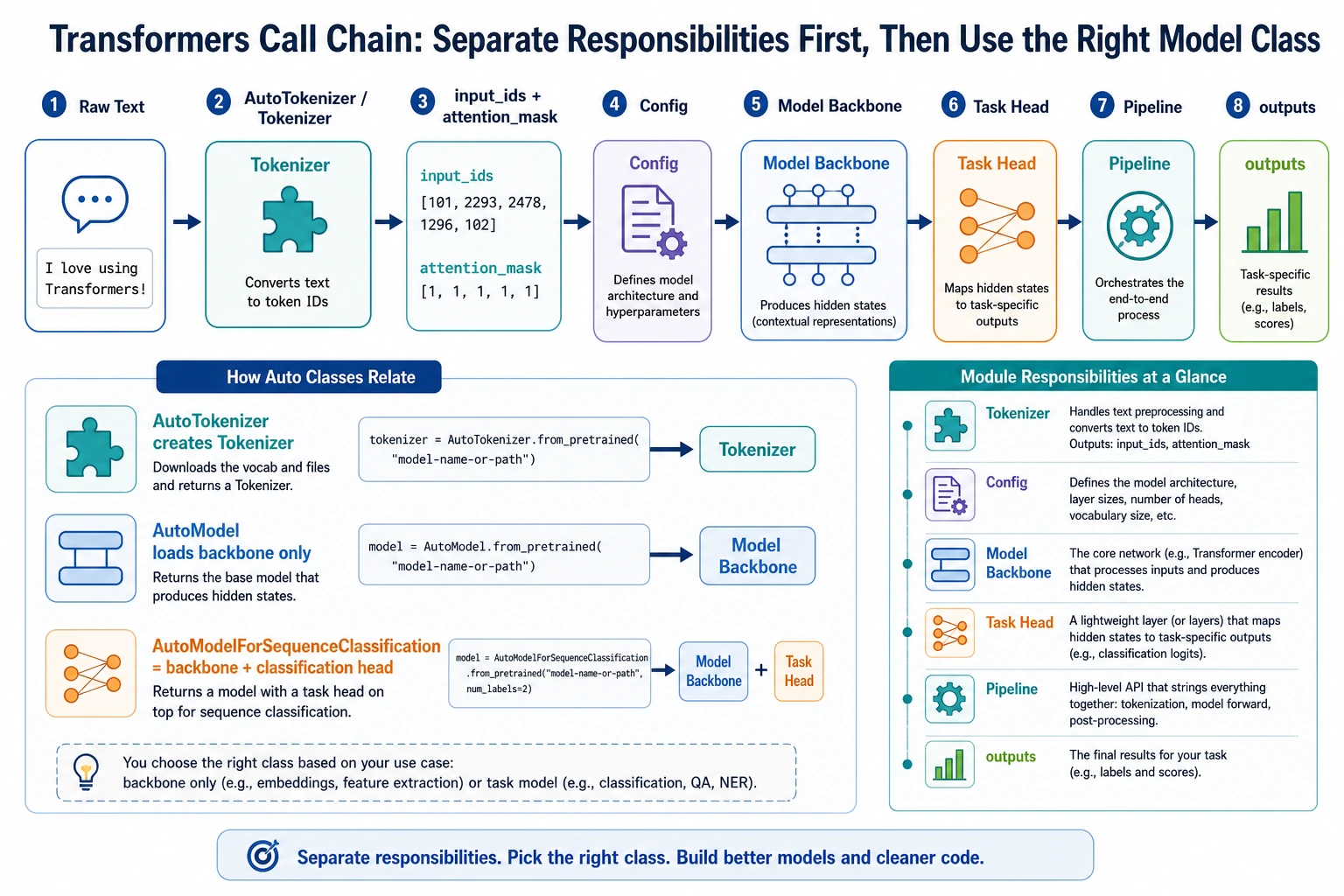
When you first use the Transformers library, it is easy to get confused by all the API names. First, look at the call chain in this order: Tokenizer, Config, Model, Task Head, Pipeline. Understand what each object is responsible for, and then look up the specific class names. That will make things much clearer.
When learning pretrained models, it is easy to stay at the conceptual level and end up “able to talk about it but not use it.” This section is meant to solve a very practical question:
When facing the
transformerslibrary, where should I even start?
We will try to walk through the most important interfaces in a way that does not depend on downloading anything from the internet.
Learning objectives
- Understand what the most common objects in the
transformerslibrary do - Learn to distinguish the roles of tokenizer, config, model, and pipeline
- Run a minimal offline example with tokenizer + model
- Understand how real projects move from “it runs” to “it is maintainable”
First, let’s separate the main characters in the library
Tokenizer
Responsible for turning text into a sequence of numbers that the model can process.
Config
Responsible for describing model architecture parameters, such as:
- hidden size
- number of layers
- number of heads
Model
Responsible for the actual forward computation.
Pipeline
A higher-level wrapper that helps you combine:
- tokenization
- forward pass
- post-processing
into a more convenient interface.
Remember this in one sentence:
tokenizer handles entry, model handles computation, and pipeline stitches the whole thing together.
Why do many people get confused the first time they use transformers?
Because it has two layers:
Concept layer
You know things like:
- BERT is encoder-only
- GPT is decoder-only
Tool layer
Then you run into:
AutoTokenizerAutoModelAutoModelForSequenceClassificationpipelinefrom_pretrained
Beginners often get stuck here:
There are too many names, but I do not know what each interface actually solves.
So the key goal of this section is not memorizing APIs, but building a map of the call sequence.
First, build a minimal tokenizer offline
pip install torch transformers
Why not just download an existing model?
Because the tutorial should try to ensure that you can still run it even without internet access.
So here we manually prepare a tiny vocab.txt so that you can truly understand what a tokenizer does.
Runnable example
from pathlib import Path
from tempfile import TemporaryDirectory
from transformers import BertTokenizer

vocab_tokens = [
    "[PAD]", "[UNK]", "[CLS]", "[SEP]", "[MASK]",
    "I", "love", "natural", "language", "processing", "Beijing"
]

with TemporaryDirectory() as tmpdir:
    vocab_path = Path(tmpdir) / "vocab.txt"
    vocab_path.write_text("\n".join(vocab_tokens), encoding="utf-8")

    tokenizer = BertTokenizer.from_pretrained(tmpdir, do_lower_case=False)

    encoded = tokenizer("I love natural language processing", return_tensors="pt")

    print(encoded)
    print("tokens:", tokenizer.convert_ids_to_tokens(encoded["input_ids"][0]))
Expected output:
{'input_ids': tensor([[2, 5, 6, 7, 8, 9, 3]]), 'token_type_ids': tensor([[0, 0, 0, 0, 0, 0, 0]]), 'attention_mask': tensor([[1, 1, 1, 1, 1, 1, 1]])}
tokens: ['[CLS]', 'I', 'love', 'natural', 'language', 'processing', '[SEP]']
The temporary directory keeps this practice run from leaving vocab.txt in your project. input_ids are the token numbers, while attention_mask marks the valid positions.
What is this code teaching you?
It is teaching you that:
- a tokenizer is not a magical black box
- it is essentially “vocabulary + splitting rules + encoding rules”
- the most important outputs are
input_idsandattention_mask
Next, build a minimal BERT model offline
Why use a randomly initialized model?
Because our goal right now is not to chase performance, but to:
truly understand how a model object in the
transformerslibrary receives input and produces output.
Runnable example
import torch
from transformers import BertConfig, BertModel

config = BertConfig(
    vocab_size=15,
    hidden_size=32,
    num_hidden_layers=2,
    num_attention_heads=4,
    intermediate_size=64
)

model = BertModel(config)

input_ids = torch.tensor([[2, 5, 6, 7, 8, 9, 10, 11, 12, 3]])
attention_mask = torch.ones_like(input_ids)

outputs = model(input_ids=input_ids, attention_mask=attention_mask)

print("last_hidden_state shape:", outputs.last_hidden_state.shape)
print("pooler_output shape    :", outputs.pooler_output.shape)
Expected output:
last_hidden_state shape: torch.Size([1, 10, 32])
pooler_output shape    : torch.Size([1, 32])
The random model is useful for interface learning, not accuracy. The first shape says: 1 sample, 10 token positions, 32 hidden dimensions.
What should you really understand here?
input_idsare token IDsattention_masktells the model which positions are validlast_hidden_stateis the contextualized representation of each positionpooler_outputis one kind of sentence-level representation
Once you understand these, it becomes much easier to add a classification head, matching head, or generation head later.
Connect tokenizer and model together
Runnable example
from pathlib import Path
from tempfile import TemporaryDirectory
import torch
from transformers import BertTokenizer, BertConfig, BertModel

vocab_tokens = [
    "[PAD]", "[UNK]", "[CLS]", "[SEP]", "[MASK]",
    "I", "love", "natural", "language", "processing"
]

with TemporaryDirectory() as tmpdir:
    vocab_path = Path(tmpdir) / "vocab.txt"
    vocab_path.write_text("\n".join(vocab_tokens), encoding="utf-8")

    tokenizer = BertTokenizer.from_pretrained(tmpdir, do_lower_case=False)

    config = BertConfig(
        vocab_size=len(vocab_tokens),
        hidden_size=32,
        num_hidden_layers=2,
        num_attention_heads=4,
        intermediate_size=64
    )
    model = BertModel(config)

    batch = tokenizer(["I love natural language processing", "I love language"], padding=True, return_tensors="pt")
    outputs = model(**batch)

    print("input_ids shape        :", batch["input_ids"].shape)
    print("attention_mask shape   :", batch["attention_mask"].shape)
    print("last_hidden_state shape:", outputs.last_hidden_state.shape)
Expected output:
input_ids shape        : torch.Size([2, 7])
attention_mask shape   : torch.Size([2, 7])
last_hidden_state shape: torch.Size([2, 7, 32])
The tokenizer padded the shorter sentence to the same length as the longer one. That is why the batch becomes a neat rectangular tensor.
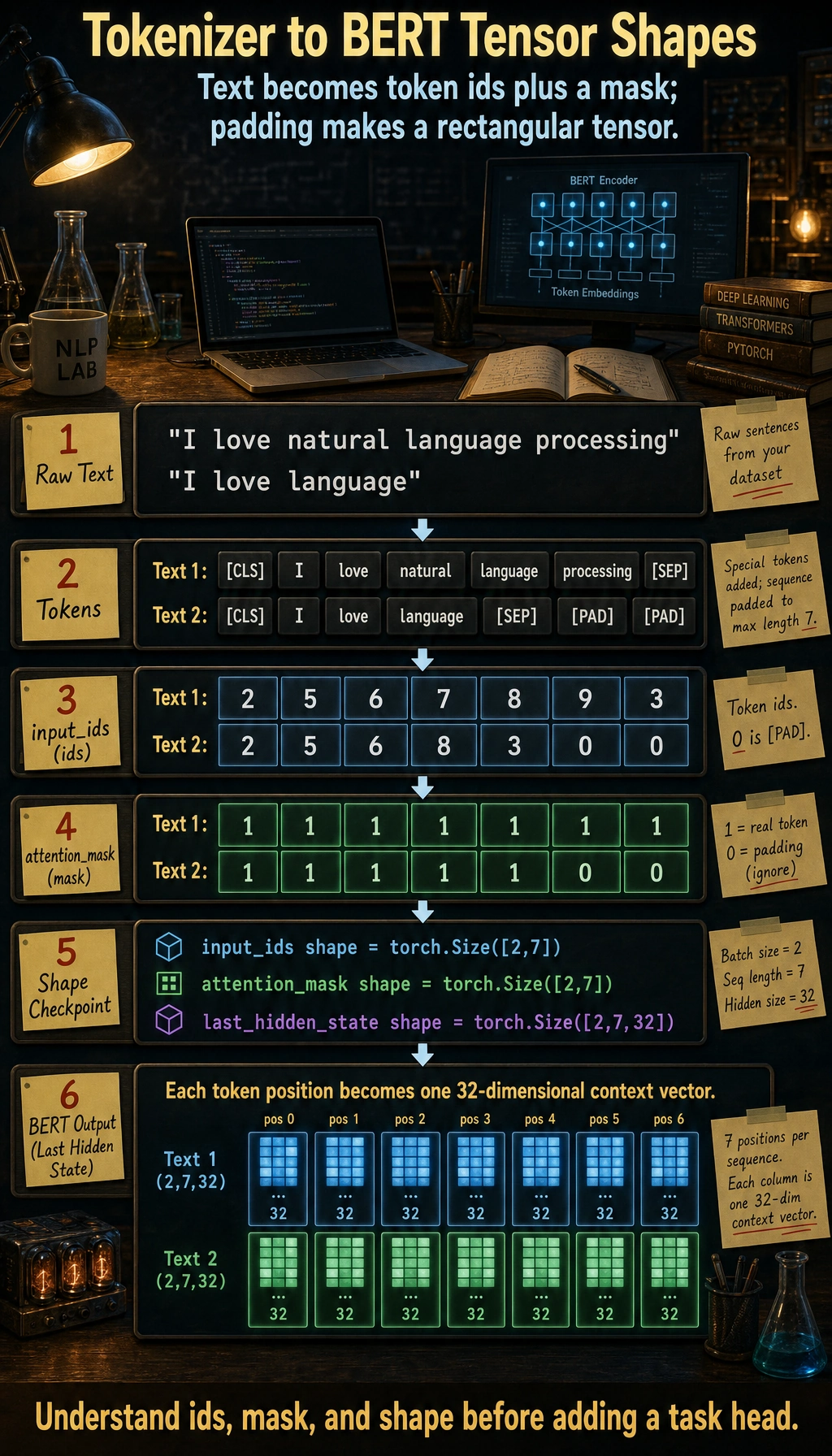
The first two dimensions are the batch size and padded sequence length. The last hidden state adds one 32-dimensional contextual vector for every token position.
This is the most basic real call chain
In real projects, the most common low-level flow is:
- text -> tokenizer
- tokenizer -> tensor
- tensor -> model
- model output -> post-processing or task head
You have already run through this chain.
What are the Auto* interfaces for?
Why does the library have so many AutoModel variants?
Because transformers wants to save you from writing lots of model-type conditionals by hand.
For example:
AutoTokenizerAutoModelAutoModelForSequenceClassificationAutoModelForCausalLM
Their design goal is:
Give a model name or config, and automatically pick the right class.
An offline AutoModel.from_config example
from transformers import AutoModel, BertConfig

config = BertConfig(
    vocab_size=20,
    hidden_size=16,
    num_hidden_layers=1,
    num_attention_heads=4,
    intermediate_size=32
)

model = AutoModel.from_config(config)
print(type(model))
Expected output:
<class 'transformers.models.bert.modeling_bert.BertModel'>
AutoModel inspected the BERT config and instantiated the matching BERT model class. This is the same idea used when loading real pretrained checkpoints by name.
This shows that:
AutoModeldoes not necessarily need to download anything online- it is essentially “automatically instantiate the correct model based on the config”
Is pipeline worth learning?
Yes, but you need to know when it is appropriate
Advantages of pipeline:
- quick to get started
- fast for demos
- less boilerplate code
It is better suited for:
- learning
- quick validation
- small experiments
But in engineering, you cannot rely on it alone
Because real projects often still need control over:
- batch
- device
- output format
- logging
- error handling
So the mature approach is usually:
- learn
pipeline - but also understand the underlying tokenizer + model call chain
The most common task heads in the Transformers library
Here are some high-frequency interfaces to remember:
| Interface | Suitable for |
|---|---|
AutoModel | Getting basic representations only |
AutoModelForSequenceClassification | Text classification |
AutoModelForTokenClassification | Sequence labeling |
AutoModelForQuestionAnswering | Extractive QA |
AutoModelForCausalLM | Generation tasks |
The logic behind this is actually simple:
the same backbone model + different task heads.
Common pitfalls for beginners
Only knowing pipeline, not the underlying calls
This makes it easy to get stuck in engineering scenarios.
Not understanding tokenizer output fields
At minimum, you should understand:
input_idsattention_mask
Mixing up “model concepts” and “library interfaces”
You need to clearly distinguish:
- BERT / GPT are model families
AutoModel/pipelineare library interfaces
Summary
The most important thing in this section is not memorizing APIs, but understanding:
The core call chain of the Transformers library is: tokenizer encodes text into tensors, model performs the forward computation on those tensors, and then a task head or post-processing step produces the final result.
Once this chain is clear, your thinking will become much more stable when you later do classification, extraction, generation, or fine-tuning.
Exercises
- Modify the mini vocab in this section, add a few of your own words, and see how the tokenizer output changes.
- Change
hidden_sizeinBertConfigto 64 and see how the output shape changes. - Explain in your own words: why can’t you just learn
pipelinewhen studying thetransformerslibrary? - Think about this: if you want to do text classification, should you start with
AutoModelorAutoModelForSequenceClassification?