2.1.5 Flow Control
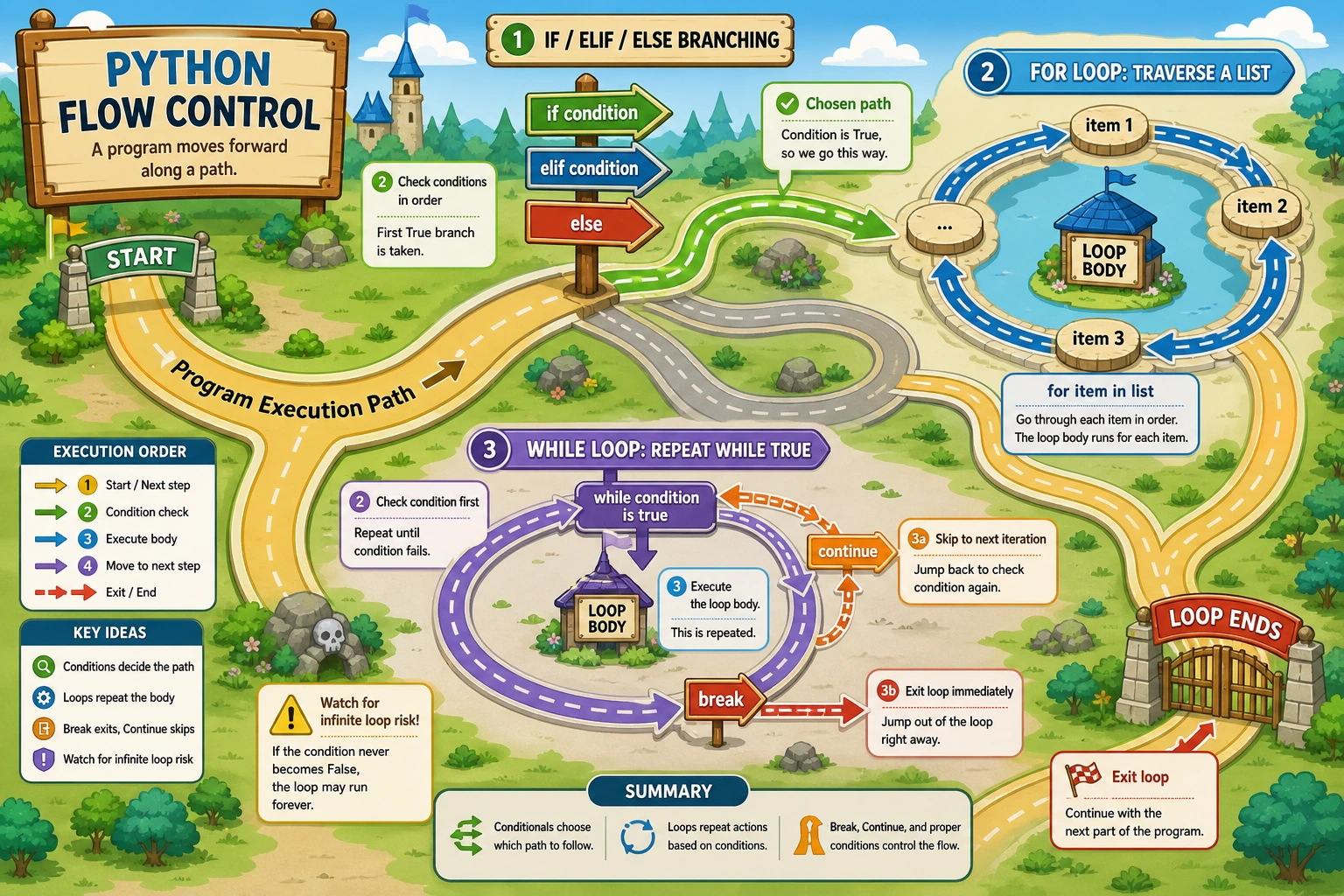
Where This Section Fits
In this section, you will learn how to make a program “make decisions” and “repeat actions.” Conditional logic and loops are the backbone of all automation scripts, data processing pipelines, and model training code. Once you understand them, your code will no longer just execute from top to bottom.
Learning Objectives
- Master
if/elif/elseconditional logic - Master
forloops andwhileloops - Learn to use
breakandcontinueto control loops - Be able to write programs with nested logic
What Is Flow Control?
So far, the code you have written has all been executed line by line from top to bottom. But real programs need to make decisions and repeat actions — that is flow control.
Imagine the decision process when you leave home in the morning:
If it is raining:
    take an umbrella
Otherwise if the sun is very strong:
    wear a hat
Otherwise:
    just leave
This is conditional logic.
Now imagine memorizing vocabulary words:
Repeat 100 times:
    look at a new word
    remember it
This is a loop.
Conditional Logic: if / elif / else
Basic if
temperature = 35

if temperature > 30:
    print("It's very hot today. Be careful of heatstroke!")
Syntax rules:
ifis followed by a condition expression- The condition must end with a colon
:(many beginners forget this) - The code that runs when the condition is true must be indented by 4 spaces
if...else
age = 15

if age >= 18:
    print("You are an adult")
    print("You can watch this movie")
else:
    print("You are not yet an adult")
    print("A parent or guardian is required")
if...elif...else
elif is short for "else if" and is used to check multiple conditions:
score = 85

if score >= 90:
    grade = "A (Excellent)"
elif score >= 80:
    grade = "B (Good)"
elif score >= 70:
    grade = "C (Average)"
elif score >= 60:
    grade = "D (Pass)"
else:
    grade = "F (Fail)"

print(f"Your score: {score}, grade: {grade}")
# Output: Your score: 85, grade: B (Good)
Python checks each condition from top to bottom. As soon as one condition is true, it runs that code block and skips all remaining elif and else blocks. So the order of your conditions matters!
score = 95

# Wrong order ❌
if score >= 60:
    print("Pass")      # 95 >= 60 is true, so this runs immediately
elif score >= 90:
    print("Excellent") # This will not run!

# Correct order ✅: from strict to broad
if score >= 90:
    print("Excellent") # 95 >= 90 is true, so this runs
elif score >= 60:
    print("Pass")
Shortened conditional logic
# Ternary expression (one line for a simple if-else)
age = 20
status = "Adult" if age >= 18 else "Minor"
print(status)  # Adult

# Equivalent to:
if age >= 18:
    status = "Adult"
else:
    status = "Minor"
Nested if
You can put conditions inside other conditions:
has_ticket = True
age = 15

if has_ticket:
    if age >= 18:
        print("Please enter")
    else:
        print("Minors need to be accompanied by a parent or guardian")
else:
    print("Please buy a ticket first")
However, too many levels of nesting make code hard to read, so it is usually not recommended to go beyond 3 levels.
for Loops
A for loop is used to iterate over each element in a sequence (lists, strings, ranges, etc.).
Iterate over a list
fruits = ["apple", "banana", "orange", "grape"]

for fruit in fruits:
    print(f"I like eating {fruit}")

# Output:
# I like eating apple
# I like eating banana
# I like eating orange
# I like eating grape
The idea is: for fruit in fruits means "for each fruit in fruits, execute the code below."
Iterate over a string
word = "Python"

for char in word:
    print(char, end=" ")

# Output: P y t h o n
The range() function
range() generates a sequence of numbers and is the most common partner for for loops:
# range(5) generates 0, 1, 2, 3, 4
for i in range(5):
    print(i, end=" ")
# Output: 0 1 2 3 4

# range(start, stop) goes from start to stop-1
for i in range(1, 6):
    print(i, end=" ")
# Output: 1 2 3 4 5

# range(start, stop, step) with a step size
for i in range(0, 10, 2):
    print(i, end=" ")
# Output: 0 2 4 6 8

# Count down
for i in range(5, 0, -1):
    print(i, end=" ")
# Output: 5 4 3 2 1
Real example: sum from 1 to 100
total = 0
for i in range(1, 101):
    total += i
print(f"The sum from 1 to 100 is: {total}")  # 5050
enumerate(): get both index and value
students = ["Zhang San", "Li Si", "Wang Wu"]

# Traditional way
for i in range(len(students)):
    print(f"Number {i+1}: {students[i]}")

# More Pythonic way: use enumerate
for i, name in enumerate(students):
    print(f"Number {i+1}: {name}")

# Specify the starting number
for i, name in enumerate(students, start=1):
    print(f"Number {i}: {name}")
while Loops
A while loop keeps running as long as the condition is true, and stops when the condition becomes false.
Basic usage
count = 0

while count < 5:
    print(f"Current count: {count}")
    count += 1   # Don't forget to update the condition!

print("Loop ended")

# Output:
# Current count: 0
# Current count: 1
# Current count: 2
# Current count: 3
# Current count: 4
# Loop ended
If you forget to update the condition variable, the loop will never stop:
# Infinite loop example (do not run!)
count = 0
while count < 5:
    print(count)
    # Forgot count += 1, so count is always 0 and the loop never ends
If you accidentally get stuck in an infinite loop, press Ctrl+C to force-stop the program.
Typical use cases for while
while is suitable when the number of iterations is unknown:
# Scenario: number guessing game
import random

target = random.randint(1, 100)
guess = 0
attempts = 0

print("I have thought of a number from 1 to 100. Try to guess it!")

while guess != target:
    guess = int(input("Your guess: "))
    attempts += 1

    if guess < target:
        print("Too small!")
    elif guess > target:
        print("Too big!")
    else:
        print(f"Congratulations, you guessed it! It took {attempts} tries")
Which should you choose: for or while?
| Scenario | Recommended | Reason |
|---|---|---|
| Iterate over a list/string | for | Naturally suited |
| Loop a fixed number of times | for + range() | Clear and concise |
| Unknown number of iterations | while | Flexible control |
| Wait until a condition is met | while | Intuitive |
Rule of thumb: use for whenever possible; it is safer (it won’t become an infinite loop).
break and continue
break: stop the loop immediately
# Stop as soon as the first even number is found
numbers = [1, 3, 7, 4, 9, 2]

for num in numbers:
    if num % 2 == 0:
        print(f"Found the first even number: {num}")
        break
    print(f"{num} is not even, keep looking...")

# Output:
# 1 is not even, keep looking...
# 3 is not even, keep looking...
# 7 is not even, keep looking...
# Found the first even number: 4
continue: skip the current iteration and move to the next one
# Print all odd numbers, skip even numbers
for i in range(1, 11):
    if i % 2 == 0:
        continue   # Skip even numbers
    print(i, end=" ")

# Output: 1 3 5 7 9
The difference between break and continue
# break: leave the loop immediately
for i in range(10):
    if i == 5:
        break       # The loop stops completely at 5
    print(i, end=" ")
# Output: 0 1 2 3 4

# continue: skip the current item and go to the next one
for i in range(10):
    if i == 5:
        continue    # Skip 5 and continue with 6, 7, 8, 9
    print(i, end=" ")
# Output: 0 1 2 3 4 6 7 8 9
else in Loops
Python loops have a unique else clause — it runs when the loop ends normally (that is, not stopped by break):
# Check whether a number is prime
num = 17

for i in range(2, num):
    if num % i == 0:
        print(f"{num} is not a prime number; it can be divided by {i}")
        break
else:
    # The loop was not terminated by break, so no factor was found
    print(f"{num} is a prime number")

# Output: 17 is a prime number
Nested Loops
You can put a loop inside another loop:
# Print the 9x9 multiplication table
for i in range(1, 10):
    for j in range(1, i + 1):
        print(f"{j}×{i}={i*j}", end="\t")
    print()   # New line after each row
Output:
1×1=1
1×2=2	2×2=4
1×3=3	2×3=6	3×3=9
...
1×9=9	2×9=18	3×9=27	...	9×9=81
Comprehensive Examples
Example 1: Simulate an AI model training process
import random

print("=== Starting model training ===")
print(f"{'Epoch':<10}{'Loss':<15}{'Accuracy':<15}{'Status'}")
print("-" * 50)

loss = 2.5
accuracy = 0.10

for epoch in range(1, 21):
    # Simulate training: loss gradually decreases, accuracy gradually increases
    loss *= random.uniform(0.85, 0.95)
    accuracy = min(accuracy + random.uniform(0.03, 0.06), 1.0)

    # Determine training status
    if accuracy >= 0.95:
        status = "✅ Achieved"
    elif accuracy >= 0.80:
        status = "📈 Good"
    else:
        status = "🔄 Training"

    print(f"{epoch:<10}{loss:<15.4f}{accuracy:<15.2%}{status}")

    # Stop early if accuracy reaches 98%
    if accuracy >= 0.98:
        print(f"\nEarly stopping! Target accuracy reached at epoch {epoch}")
        break
else:
    print(f"\nTraining complete! Final accuracy: {accuracy:.2%}")
Example 2: Password strength checker
password = input("Please enter a password: ")

has_upper = False    # Contains an uppercase letter
has_lower = False    # Contains a lowercase letter
has_digit = False    # Contains a digit
has_special = False  # Contains a special character

for char in password:
    if char.isupper():
        has_upper = True
    elif char.islower():
        has_lower = True
    elif char.isdigit():
        has_digit = True
    else:
        has_special = True

# Calculate strength score
score = 0
if len(password) >= 8:
    score += 1
if has_upper:
    score += 1
if has_lower:
    score += 1
if has_digit:
    score += 1
if has_special:
    score += 1

# Output result
print(f"\nPassword strength: {'★' * score}{'☆' * (5 - score)} ({score}/5)")

if score <= 2:
    print("Weak password! Consider strengthening it")
elif score <= 4:
    print("Medium strength")
else:
    print("Strong password!")
Hands-on Practice
Exercise 1: FizzBuzz
This is a classic programming interview question:
Print the numbers from 1 to 50, but:
- If a number is divisible by 3, print "Fizz"
- If a number is divisible by 5, print "Buzz"
- If a number is divisible by both 3 and 5, print "FizzBuzz"
- Otherwise, print the number itself
for i in range(1, 51):
    if i % 15 == 0:
        print("FizzBuzz")
    elif i % 3 == 0:
        print("Fizz")
    elif i % 5 == 0:
        print("Buzz")
    else:
        print(i)
Hint: First check whether the number is divisible by 15 (the common multiple of 3 and 5), then check 3 and 5 separately.
Exercise 2: Guess the Number Game (Limited Attempts)
Improve the guessing game: allow at most 7 guesses, and fail if the user goes over.
import random
target = random.randint(1, 100)
max_attempts = 7

for attempt in range(1, max_attempts + 1):
    raw = input(f"Attempt {attempt}/{max_attempts}, enter your guess: ")

    if not raw.isdigit():
        print("Please enter an integer.")
        continue

    guess = int(raw)
    if guess == target:
        print("Correct!")
        break
    elif guess < target:
        print("Too small")
    else:
        print("Too large")
else:
    print(f"Failed. The answer was {target}.")
When you are learning flow control, interaction can make debugging harder. First change target = random.randint(1, 100) to target = 42, test the three branches "too small / too large / correct," and then switch back to the random version.
Exercise 3: Draw a Triangle
Use loops to print the following pattern:
*
**
***
****
*****
Then try printing an inverted triangle:
*****
****
***
**
*
Exercise 4: Find Prime Numbers
Print all prime numbers between 1 and 100.
Hint: A prime number is a natural number greater than 1 that can only be divided by 1 and itself.
Summary
| Syntax | Purpose | Key Point |
|---|---|---|
if/elif/else | Conditional logic | Conditions are checked from top to bottom; don’t forget the colon and indentation |
for...in | Iterate over a sequence | Used with range(), lists, and strings |
while | Conditional loop | Update the condition to avoid infinite loops |
break | Stop the loop | Exit the entire loop immediately |
continue | Skip this iteration | Skip the current iteration and move to the next one |
range() | Generate a sequence of numbers | range(start, stop, step) |
Flow control is the skeleton of programming. Variables are data, operators are actions, and flow control decides “what to do under which condition” and “how many times to do it.” Once you learn flow control, you can write programs that have real “logic.”