2.1.7 Function Basics
Where This Section Fits
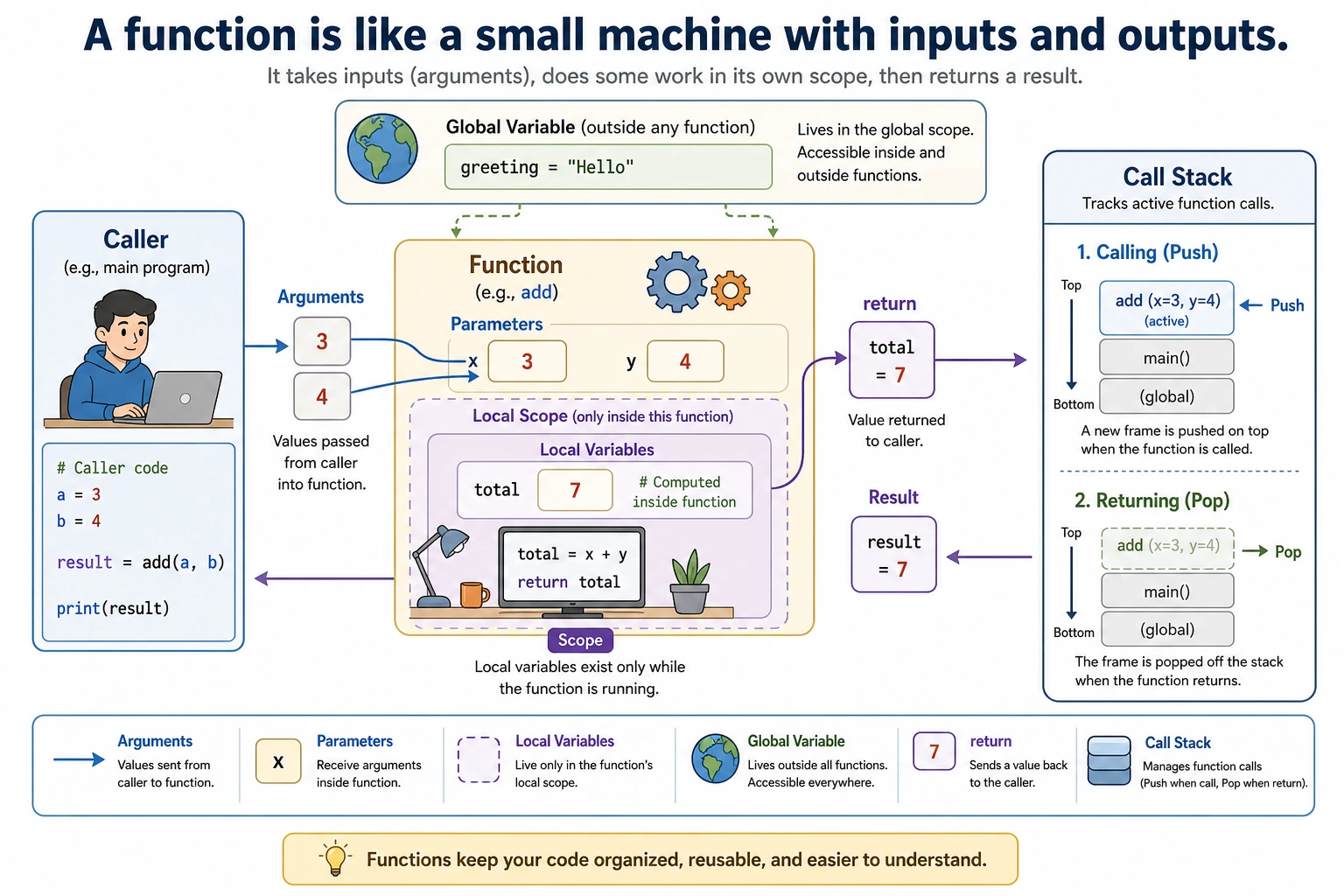
This section teaches you how to package repeated logic into functions. Functions are the key step from “writing scripts” to “writing maintainable programs,” and they are also the foundation for organizing data processing pipelines, model training workflows, and Web API logic later on.
Learning Objectives
- Understand what functions are and why we need them
- Master function definition and calling
- Understand parameters (positional parameters, default parameters, keyword parameters)
- Master the use of return values
- Understand variable scope
Why Do We Need Functions?
Suppose you are writing a data processing script and need to calculate averages multiple times:
# First calculation
scores1 = [85, 92, 78, 95, 88]
total1 = sum(scores1)
avg1 = total1 / len(scores1)
print(f"Average score: {avg1:.1f}")

# Second calculation (writing the exact same logic again)
scores2 = [90, 85, 92, 88, 95, 87]
total2 = sum(scores2)
avg2 = total2 / len(scores2)
print(f"Average score: {avg2:.1f}")

# Third calculation (writing it again...)
scores3 = [75, 80, 68, 72, 88]
total3 = sum(scores3)
avg3 = total3 / len(scores3)
print(f"Average score: {avg3:.1f}")
The same logic is written 3 times. If you later need to change the calculation method (for example, remove the highest and lowest scores), you would have to change it in 3 places.
Use a function instead:
def calculate_average(scores):
    """Calculate the average score"""
    return sum(scores) / len(scores)

# Now it can be done in one line
print(f"Average score: {calculate_average([85, 92, 78, 95, 88]):.1f}")
print(f"Average score: {calculate_average([90, 85, 92, 88, 95, 87]):.1f}")
print(f"Average score: {calculate_average([75, 80, 68, 72, 88]):.1f}")
The core value of functions:
| Benefit | Description |
|---|---|
| Reuse | Write once, use many times |
| Abstraction | Hide complex logic behind a function name; when calling it, you only need to know “what it does,” not “how it does it” |
| Maintainability | Change the logic in one place only |
| Readability | The function name acts like a comment; calculate_average(scores) is immediately clear |
Defining and Calling Functions
Basic Syntax
def greet(name):
    """Greet someone"""  # Docstring, describes what the function does
    print(f"Hello, {name}! Welcome to learning Python!")

# Call the function
greet("Xiao Ming")     # Hello, Xiao Ming! Welcome to learning Python!
greet("Xiao Hong")     # Hello, Xiao Hong! Welcome to learning Python!
Syntax breakdown:
- The
defkeyword means “define a function” greetis the function name (naming rules are the same as variables: lowercase with underscores)(name)is the parameter list- Don’t forget the
:colon - The function body must be indented
"""..."""is a docstring, used to describe the function’s purpose
Functions with No Parameters
def say_hello():
    print("Hello, World!")

say_hello()  # Hello, World!
Functions with Multiple Parameters
def add(a, b):
    result = a + b
    print(f"{a} + {b} = {result}")

add(3, 5)    # 3 + 5 = 8
add(10, 20)  # 10 + 20 = 30
Return Values
A function can use return to send a result back to the caller:
def add(a, b):
    return a + b

# The function's return value can be assigned to a variable
result = add(3, 5)
print(result)       # 8

# You can also use the return value directly
print(add(10, 20))  # 30

# Use it inside an expression
total = add(1, 2) + add(3, 4)
print(total)  # 10
Returning Multiple Values
def get_min_max(numbers):
    """Return the minimum and maximum values in a list"""
    return min(numbers), max(numbers)

# Receive them with tuple unpacking
smallest, largest = get_min_max([3, 1, 4, 1, 5, 9])
print(f"Minimum: {smallest}, Maximum: {largest}")
# Minimum: 1, Maximum: 9
Functions Without return
If a function has no return statement, or return has no value after it, the function returns None:
def greet(name):
    print(f"Hello, {name}!")
    # No return

result = greet("Xiao Ming")   # Prints: Hello, Xiao Ming!
print(result)                 # None
Another Use of return: Exiting Early
def divide(a, b):
    if b == 0:
        print("Error: The divisor cannot be 0!")
        return None   # Exit the function early
    return a / b

print(divide(10, 3))   # 3.333...
print(divide(10, 0))   # Error: The divisor cannot be 0! Then returns None
Parameter Details
Positional Parameters
Parameters passed in order:
def describe_pet(animal, name):
    print(f"I have a {animal} named {name}")

describe_pet("cat", "Mimi")   # I have a cat named Mimi
describe_pet("Mimi", "cat")   # I have a Mimi named cat — the order is wrong!
Keyword Parameters
Pass values using parameter names, so order does not matter:
def describe_pet(animal, name):
    print(f"I have a {animal} named {name}")

# With keyword parameters, order does not matter
describe_pet(name="Mimi", animal="cat")   # I have a cat named Mimi
describe_pet(animal="dog", name="Wangcai")   # I have a dog named Wangcai
Default Parameters
Give a parameter a default value so it can be omitted when calling the function:
def train_model(epochs=10, lr=0.001, batch_size=32):
    print(f"Training parameters: epochs={epochs}, lr={lr}, batch_size={batch_size}")

# Use all default values
train_model()
# Training parameters: epochs=10, lr=0.001, batch_size=32

# Change only some parameters
train_model(epochs=50)
# Training parameters: epochs=50, lr=0.001, batch_size=32

train_model(epochs=100, lr=0.01)
# Training parameters: epochs=100, lr=0.01, batch_size=32
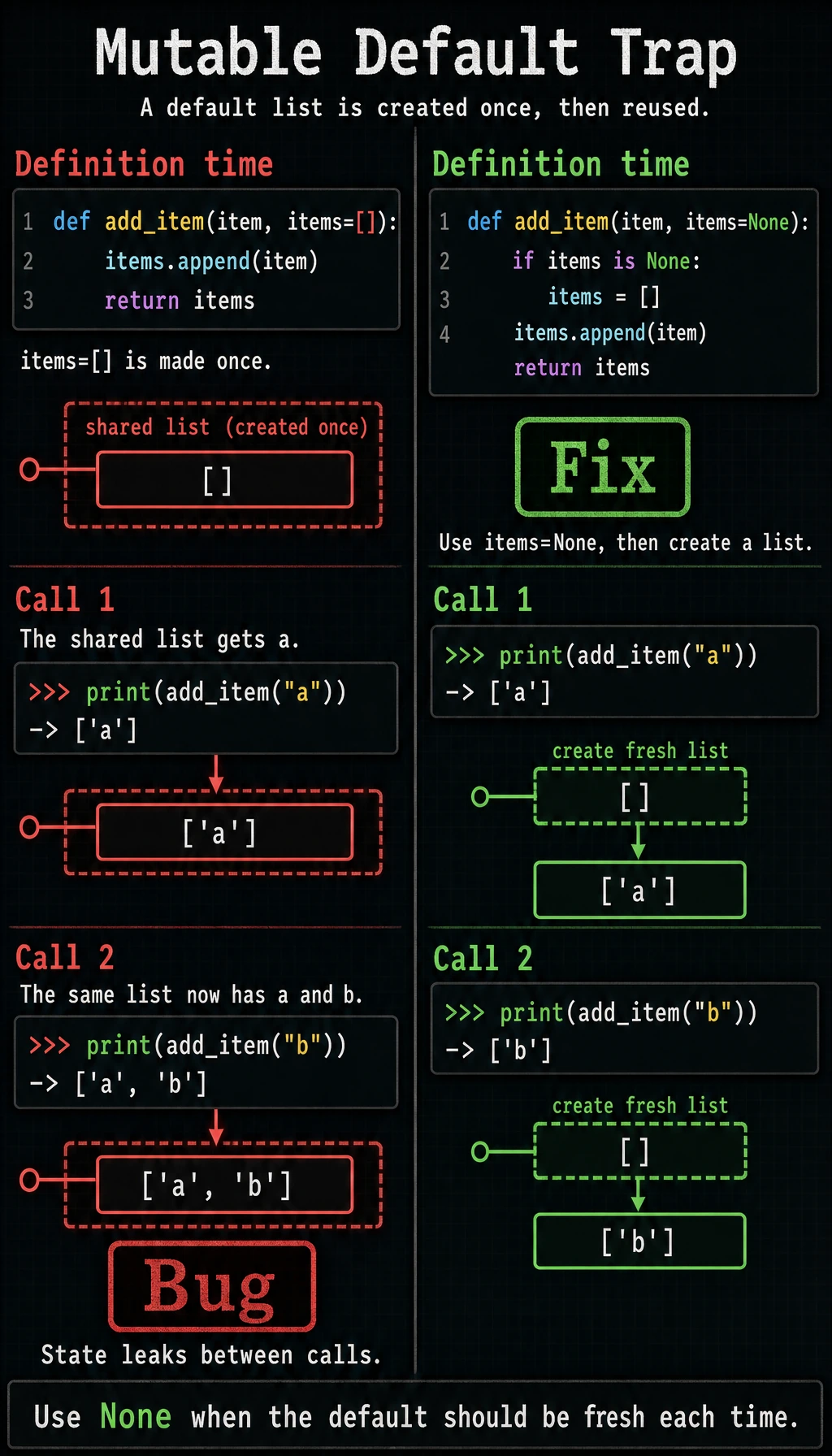
Default parameter values are determined when the function is defined. Do not use mutable objects (such as lists or dictionaries) as default values:
# Wrong ❌
def add_item(item, items=[]):
    items.append(item)
    return items

print(add_item("a"))  # ['a']
print(add_item("b"))  # ['a', 'b'] — bug! The previous 'a' is still there

# Correct ✅
def add_item(item, items=None):
    if items is None:
        items = []
    items.append(item)
    return items
*args: Accept Any Number of Positional Arguments
def calculate_sum(*numbers):
    """Calculate the sum of any number of values"""
    total = 0
    for num in numbers:
        total += num
    return total

print(calculate_sum(1, 2))           # 3
print(calculate_sum(1, 2, 3, 4, 5))  # 15
print(calculate_sum(10))             # 10
**kwargs: Accept Any Number of Keyword Arguments
def print_info(**info):
    """Print any number of pieces of information"""
    for key, value in info.items():
        print(f"{key}: {value}")

print_info(name="Xiao Ming", age=20, city="Beijing")
# name: Xiao Ming
# age: 20
# city: Beijing
Parameter Order Rules
When mixing different kinds of parameters, the order is:
def func(pos_arg, default_arg=10, *args, **kwargs):
    print(f"pos_arg={pos_arg}")
    print(f"default_arg={default_arg}")
    print(f"args={args}")
    print(f"kwargs={kwargs}")

func(1, 2, 3, 4, name="test")
# pos_arg=1
# default_arg=2
# args=(3, 4)
# kwargs={'name': 'test'}
Variable Scope
A variable’s “scope” is its range of validity.
Local Variables vs Global Variables
# Global variable: defined outside the function
message = "I am a global variable"

def my_function():
    # Local variable: defined inside the function
    local_var = "I am a local variable"
    print(message)      # Can read the global variable
    print(local_var)    # Can read the local variable

my_function()
print(message)          # Can access the global variable
# print(local_var)      # Error! The local variable does not exist outside the function
Variables with the Same Name
x = 10  # Global variable

def my_function():
    x = 20  # This is a new local variable, not a modification of the global variable
    print(f"x inside the function: {x}")  # 20

my_function()
print(f"x outside the function: {x}")    # 10 (the global variable was not modified)
The global Keyword
If you really need to modify a global variable inside a function (generally not recommended):
count = 0

def increment():
    global count   # Declare that we want to use the global variable count
    count += 1

increment()
increment()
increment()
print(count)  # 3
Try not to use global variables. Functions should receive data through parameters and output results through return values. Such functions are easier to test and easier to understand.
Docstrings
Good functions should have clear documentation:
def calculate_bmi(weight, height):
    """
    Calculate Body Mass Index (BMI).

    Parameters:
        weight (float): weight in kilograms
        height (float): height in meters

    Returns:
        float: BMI value

    Example:
        >>> calculate_bmi(70, 1.75)
        22.857142857142858
    """
    return weight / (height ** 2)

# View the function's documentation
help(calculate_bmi)
Comprehensive Examples
Example 1: Score Analysis Tool
def analyze_scores(scores, subject="Unknown Subject"):
    """
    Analyze a list of scores and return statistics.

    Parameters:
        scores: list of scores
        subject: subject name
    Returns:
        A dictionary containing statistics
    """
    if not scores:
        return {"error": "The score list is empty"}

    avg = sum(scores) / len(scores)
    passed = [s for s in scores if s >= 60]
    failed = [s for s in scores if s < 60]

    return {
        "subject": subject,
        "count": len(scores),
        "average": round(avg, 1),
        "max": max(scores),
        "min": min(scores),
        "pass_rate": f"{len(passed) / len(scores):.1%}",
        "passed": len(passed),
        "failed": len(failed)
    }

def print_report(stats):
    """Print a formatted score report"""
    print(f"\n{'='*30}")
    print(f"  {stats['subject']} Score Analysis Report")
    print(f"{'='*30}")
    print(f"  Number of students: {stats['count']}")
    print(f"  Average score:      {stats['average']}")
    print(f"  Highest score:      {stats['max']}")
    print(f"  Lowest score:       {stats['min']}")
    print(f"  Pass rate:          {stats['pass_rate']}")
    print(f"  Passed:             {stats['passed']}")
    print(f"  Failed:             {stats['failed']}")
    print(f"{'='*30}")

# Use it
math_scores = [85, 92, 45, 78, 95, 55, 88, 72, 60, 98]
english_scores = [70, 55, 88, 45, 92, 78, 65, 82, 90, 58]

math_stats = analyze_scores(math_scores, "Mathematics")
english_stats = analyze_scores(english_scores, "English")

print_report(math_stats)
print_report(english_stats)
Example 2: A Simple Password Generator
import random
import string

def generate_password(length=12, use_upper=True, use_digits=True, use_special=True):
    """
    Generate a random password.

    Parameters:
        length: password length, default 12
        use_upper: whether to include uppercase letters
        use_digits: whether to include digits
        use_special: whether to include special characters
    """
    chars = string.ascii_lowercase  # Lowercase letters

    if use_upper:
        chars += string.ascii_uppercase
    if use_digits:
        chars += string.digits
    if use_special:
        chars += "!@#$%^&*"

    password = ''.join(random.choice(chars) for _ in range(length))
    return password

# Generate different kinds of passwords
print(f"Default password: {generate_password()}")
print(f"Letters only:   {generate_password(length=8, use_digits=False, use_special=False)}")
print(f"Strong password: {generate_password(length=20)}")
Hands-On Exercises
Exercise 1: Temperature Conversion Functions
Write two functions to convert between Celsius and Fahrenheit:
def celsius_to_fahrenheit(celsius):
    """Celsius → Fahrenheit: F = C × 9/5 + 32"""
    return celsius * 9 / 5 + 32

def fahrenheit_to_celsius(fahrenheit):
    """Fahrenheit → Celsius: C = (F - 32) × 5/9"""
    return (fahrenheit - 32) * 5 / 9

# Test
print(celsius_to_fahrenheit(100))  # Should output 212.0
print(fahrenheit_to_celsius(32))   # Should output 0.0
Exercise 2: List Statistics Function
Write a function that accepts a list of numbers and returns the maximum value, minimum value, average, and median:
def list_stats(numbers):
    """
    Return statistics for a list.
    Do not use the built-in functions max(), min(), sum(); implement them yourself!
    """
    if not numbers:
        return None

    maximum = numbers[0]
    minimum = numbers[0]
    total = 0
    for value in numbers:
        if value > maximum:
            maximum = value
        if value < minimum:
            minimum = value
        total += value

    sorted_numbers = sorted(numbers)
    n = len(sorted_numbers)
    if n % 2 == 1:
        median = sorted_numbers[n // 2]
    else:
        median = (sorted_numbers[n // 2 - 1] + sorted_numbers[n // 2]) / 2

    average = total / len(numbers)
    return {
        "max": maximum,
        "min": minimum,
        "average": average,
        "median": median,
    }

# Test
stats = list_stats([3, 1, 4, 1, 5, 9, 2, 6, 5])
print(stats)
Exercise 3: Number Guessing Game (Function Version)
Rewrite the previous number guessing game as a function-based version:
def guess_number_game(min_val=1, max_val=100, max_attempts=7):
    """Number guessing game"""
    import random

    target = random.randint(min_val, max_val)
    print(f"Guess a number between {min_val} and {max_val}")
    for attempt in range(1, max_attempts + 1):
        raw = input(f"Attempt {attempt}/{max_attempts}: ")
        if not raw.isdigit():
            print("Please enter an integer.")
            continue

        guess = int(raw)
        if guess == target:
            print("Correct!")
            return True
        if guess < target:
            print("Too small")
        else:
            print("Too large")
    print(f"Game over. The answer was {target}.")
    return False

# Run the game
guess_number_game()
guess_number_game(1, 50, 5)  # Smaller range, fewer attempts
If you want deterministic testing, temporarily replace target = random.randint(min_val, max_val) with target = 42. After confirming the function works, change it back to the random version.
Summary
| Concept | Description | Example |
|---|---|---|
| Define a function | def function_name(parameters): | def add(a, b): |
| Return value | return value | return a + b |
| Default parameters | Parameters with default values | def f(x=10): |
| Keyword arguments | Pass arguments by name | f(x=5, y=10) |
*args | Accept any number of positional arguments | def f(*args): |
**kwargs | Accept any number of keyword arguments | def f(**kwargs): |
| Local variables | Defined inside a function, not available outside | — |
| Global variables | Defined outside a function, readable inside | — |
Functions are the basic building blocks of programming. Good code should be made up of small functions, and each function should do one thing and do it well. If your function is longer than 20 lines, consider splitting it into smaller functions.