2.1.4 Input and Output
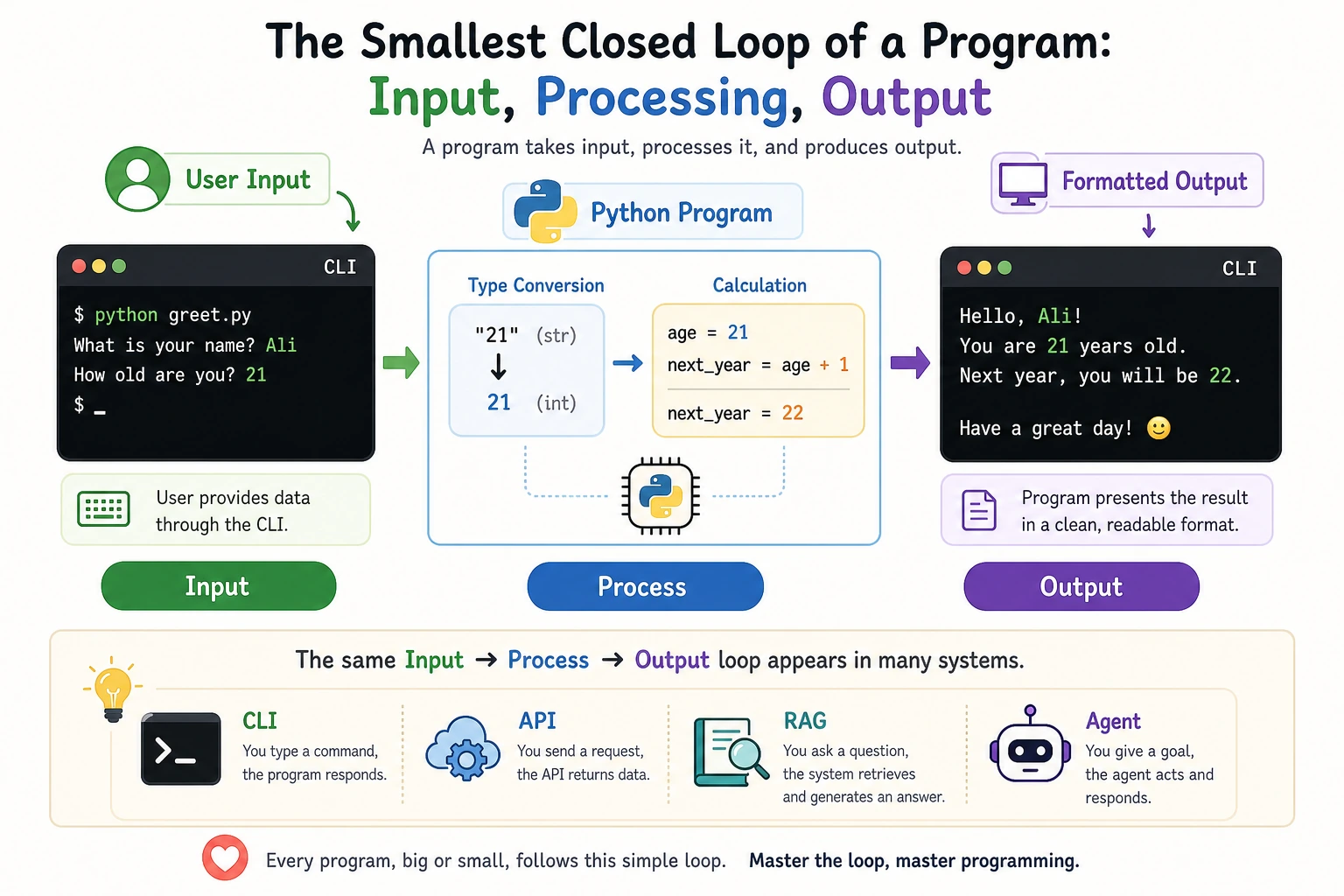
Where this section fits
This section is where your program starts interacting with the user. You’ll learn how to use input() to receive information, print() to display results, and f-string formatting to lay the foundation for command-line tools, API debugging, and result presentation later on.
Learning objectives
- Master different uses of
print()and formatted output - Learn how to use
input()to get user input - Understand advanced f-string formatting
- Write simple interactive programs
When beginners learn Python, this is the one line to focus on first: the program gets input, does a bit of processing, and then outputs the result. CLI, API, RAG, and Agent later on all repeat this same pattern in essence.
Let’s look at a small program first
name = input("Please enter your name: ")
age = int(input("Please enter your age: "))

print(f"Hello, {name}!")
print(f"You were born around {2026 - age}")
print(f"In 10 years, you will be {age + 10} years old")
Example output:
Please enter your name: Xiaoming
Please enter your age: 25
Hello, Xiaoming!
You were born around 2001
In 10 years, you will be 35 years old
This is the most basic input/output pattern: input() is responsible for receiving data, and print() is responsible for displaying the result.
Detailed look at print()
print() is the function you will use most often, without question.
Basic usage of print()
# Print a string
print("Hello, World!")

# Print numbers
print(42)
print(3.14)

# Print a variable
name = "Python"
print(name)

# Print the result of an expression
print(1 + 2 + 3)   # 6
Printing multiple values
# Separate with commas; print will automatically join them with spaces
print("Name:", "Xiaoming", "Age:", 25)
# Output: Name: Xiaoming Age: 25

# Custom separator
print("2026", "01", "15", sep="-")
# Output: 2026-01-15

print("apple", "banana", "cherry", sep=" | ")
# Output: apple | banana | cherry
Controlling line breaks
# By default, every print ends with a newline
print("Line 1")
print("Line 2")
# Output:
# Line 1
# Line 2

# Use the end parameter to change the ending character
print("Hello", end=" ")
print("World")
# Output: Hello World (on the same line)

# Use end to create a simple progress display
print("Loading", end="")
print(".", end="")
print(".", end="")
print(".", end="")
print(" Done!")
# Output: Loading... Done!
Printing special characters
# Newline character \n
print("Line 1\nLine 2\nLine 3")
# Output:
# Line 1
# Line 2
# Line 3

# Tab character \t (used for alignment)
print("Name\tAge\tCity")
print("Zhang San\t25\tBeijing")
print("Li Si\t30\tShanghai")
# Output:
# Name    Age    City
# Zhang San    25      Beijing
# Li Si    30      Shanghai

# Backslash itself \\
print("File path: C:\\Users\\Desktop")

# Raw string (does not process escape sequences)
print(r"File path: C:\Users\Desktop")  # The r prefix means a raw string
f-string formatting (key point)
f-string is the string formatting style introduced in Python 3.6, and it is also the most recommended method at present.
Basic usage of f-string
name = "Xiaoming"
age = 25
score = 92.567

# Add f before the string, and put variable names inside curly braces
print(f"My name is {name}, and I am {age} years old")
# Output: My name is Xiaoming, and I am 25 years old

# You can put any expression inside the curly braces
print(f"Next year I will be {age + 1}")
print(f"The name has {len(name)} characters")
print(f"Did I pass? {'Yes' if score >= 60 else 'No'}")
Number formatting
This is one of the most powerful features of f-strings:
# Control decimal places
pi = 3.141592653589793
print(f"π = {pi:.2f}")     # 3.14 (keep 2 decimal places)
print(f"π = {pi:.4f}")     # 3.1416 (keep 4 decimal places)

# Percentage
accuracy = 0.8734
print(f"Accuracy: {accuracy:.1%}")   # 87.3%
print(f"Accuracy: {accuracy:.2%}")   # 87.34%

# Thousands separator
population = 1400000000
print(f"Population: {population:,}")      # 1,400,000,000
print(f"Population: {population:_}")      # 1_400_000_000

# Scientific notation
speed_of_light = 299792458
print(f"Speed of light: {speed_of_light:.2e} m/s")  # 3.00e+08 m/s

# Pad integers with zeros
for i in range(1, 4):
    print(f"Episode {i:03d}")  # Episode 001, Episode 002, Episode 003
Alignment and padding
# Left align, right align, center
name = "Python"
print(f"|{name:<20}|")   # |Python              |  left aligned
print(f"|{name:>20}|")   # |              Python|  right aligned
print(f"|{name:^20}|")   # |       Python       |  centered

# Pad with a specific character
print(f"|{name:*<20}|")  # |Python**************|
print(f"|{name:*>20}|")  # |**************Python|
print(f"|{name:*^20}|")  # |*******Python*******|

# Practical use: print a simple table
print(f"{'Name':<10}{'Score':>10}")
print("-" * 20)
print(f"{'Zhang San':<10}{95:>10}")
print(f"{'Li Si':<10}{87:>10}")
print(f"{'Wang Wu':<10}{92:>10}")
Output:
Name            Score
--------------------
Zhang San          95
Li Si              87
Wang Wu            92
Formatting cheat sheet
| Format | Meaning | Example | Result |
|---|---|---|---|
:.2f | Keep 2 decimal places | f"{3.14159:.2f}" | 3.14 |
:.1% | Percentage (1 decimal place) | f"{0.873:.1%}" | 87.3% |
:, | Thousands separator | f"{1000000:,}" | 1,000,000 |
:.2e | Scientific notation | f"{12345:.2e}" | 1.23e+04 |
:03d | Pad with zeros to 3 digits | f"{5:03d}" | 005 |
:<10 | Left aligned, width 10 | f"{'hi':<10}" | hi________ |
:>10 | Right aligned, width 10 | f"{'hi':>10}" | ________hi |
:^10 | Centered, width 10 | f"{'hi':^10}" | ____hi____ |
Getting user input with input()
input() pauses the program, waits for the user to type something, and then returns the input as a string.
Basic usage of input()
# input() always returns a string!
name = input("Please enter your name: ")
print(f"Hello, {name}!")
print(type(name))  # <class 'str'>
Important: input() returns a string
# Common pitfall
age = input("Please enter your age: ")  # User enters 25
print(type(age))                       # <class 'str'>, not int!

# If you do math directly, there will be a problem
# print(age + 1)  # Error! You can't add a number to a string

# Correct approach: convert the type first
age = int(input("Please enter your age: "))   # Convert to int while reading input
print(f"Next year you will be {age + 1} years old")

# If you need a floating-point number
height = float(input("Please enter your height (m): "))
print(f"Your height is {height} meters")
Handling invalid input
Users may enter something other than what you expected:
# The user entered "abc" instead of a number
# age = int(input("Please enter your age: "))  # This will raise a ValueError!

# Safer approach (we will cover exception handling later, which is more elegant)
user_input = input("Please enter a number: ")
if user_input.isdigit():
    number = int(user_input)
    print(f"The number you entered is: {number}")
else:
    print("This is not a valid number!")
Comprehensive examples
Example 1: Simple calculator
print("=== Simple Calculator ===")
num1 = float(input("Please enter the first number: "))
num2 = float(input("Please enter the second number: "))

print(f"\nResults:")
print(f"{num1} + {num2} = {num1 + num2}")
print(f"{num1} - {num2} = {num1 - num2}")
print(f"{num1} × {num2} = {num1 * num2}")
if num2 != 0:
    print(f"{num1} ÷ {num2} = {num1 / num2:.2f}")
else:
    print("The divisor cannot be 0!")
Example 2: AI training report generator
# Simulated training result data
model_name = "ResNet-50"
total_epochs = 100
train_accuracy = 0.9534
val_accuracy = 0.9187
train_loss = 0.1245
val_loss = 0.2891
training_hours = 2.5

# Generate a formatted report
print("=" * 40)
print(f"{'Model Training Report':^40}")
print("=" * 40)
print(f"Model name:     {model_name}")
print(f"Training epochs:{total_epochs}")
print(f"Training accuracy:{train_accuracy:.2%}")
print(f"Validation accuracy:{val_accuracy:.2%}")
print(f"Training loss:   {train_loss:.4f}")
print(f"Validation loss: {val_loss:.4f}")
print(f"Training time:   {training_hours:.1f} hours")
print("-" * 40)

# Judge model status
gap = train_accuracy - val_accuracy
if gap > 0.05:
    print(f"⚠️  Overfitting risk: training/validation gap {gap:.2%}")
else:
    print(f"✅  Model looks good: training/validation gap {gap:.2%}")
print("=" * 40)
Output:
========================================
          Model Training Report
========================================
Model name:     ResNet-50
Training epochs:100
Training accuracy:95.34%
Validation accuracy:91.87%
Training loss:   0.1245
Validation loss: 0.2891
Training time:   2.5 hours
----------------------------------------
⚠️  Overfitting risk: training/validation gap 3.47%
========================================
Hands-on practice
Exercise 1: Self-introduction generator
Write a program that asks for the user’s name, age, city, and hobby, and then generates a formatted self-introduction:
name = input("Your name: ")
age = int(input("Your age: "))
city = input("Your city: ")
hobby = input("Your hobby: ")

# Generate the self-introduction below
print("=" * 30)
print(f"Hello, my name is {name}.")
print(f"I am {age} years old and I live in {city}.")
print(f"My hobby is {hobby}.")
print("=" * 30)
Exercise 2: Shopping receipt
# Input product information
item1 = "Python textbook"
price1 = 59.9
qty1 = 2

item2 = "Notebook"
price2 = 15.5
qty2 = 3

# Print a shopping receipt, with these requirements:
# 1. Product names left aligned, prices right aligned
# 2. Show the subtotal for each item
# 3. Show the total at the end
# Hint: use f-string alignment features
subtotal1 = price1 * qty1
subtotal2 = price2 * qty2
total = subtotal1 + subtotal2

print("=" * 46)
print(f"{'Item':<18}{'Price':>8}{'Qty':>6}{'Subtotal':>12}")
print("-" * 46)
print(f"{item1:<18}{price1:>8.2f}{qty1:>6}{subtotal1:>12.2f}")
print(f"{item2:<18}{price2:>8.2f}{qty2:>6}{subtotal2:>12.2f}")
print("-" * 46)
print(f"{'Total':<32}{total:>14.2f}")
Exercise 3: Unit converter
Write a program that lets the user enter kilometers, then outputs the corresponding miles and meters:
km = float(input("Please enter the number of kilometers: "))
# 1 kilometer = 0.621371 miles
# 1 kilometer = 1000 meters
miles = km * 0.621371
meters = km * 1000
print(f"{km:.2f} km = {miles:.2f} miles")
print(f"{km:.2f} km = {meters:.2f} meters")
Summary
| Function/Syntax | Purpose | Key point |
|---|---|---|
print() | Output information | sep changes the separator, end changes the ending |
input() | Get user input | The return value is always a string |
f"..." | Format strings | {variable:format} controls how values are displayed |
int() / float() | Type conversion | You usually need to convert after input() |
Input and output are the window through which a program interacts with the outside world. input() makes a program flexible (different inputs lead to different results), and print() plus f-string formatting makes output look professional and clear. When writing code, use print() often to inspect intermediate results; this is the most basic debugging method.