2.1.6 Data Structures
Section Overview
In this section, you will learn how to organize a group of data. Lists, tuples, dictionaries, and sets will appear throughout later topics such as web scraping, data analysis, machine learning sample processing, and parsing API responses. The key is to know what each structure is suitable for storing, and when to use which one.
Learning Objectives
- Master creating lists and common list operations
- Understand the features and use cases of tuples
- Master key-value operations in dictionaries
- Learn about deduplication and set operations with sets
- Choose the right data structure based on the scenario
Why Do We Need Data Structures?
So far, the variables you have learned can only store one value at a time. But in real-world scenarios, you often need to handle a collection of data:
- Scores of 100 students
- All the parameters of a model
- A user's personal information (name, age, email, ...)
Data structures are containers used to organize and store multiple pieces of data.
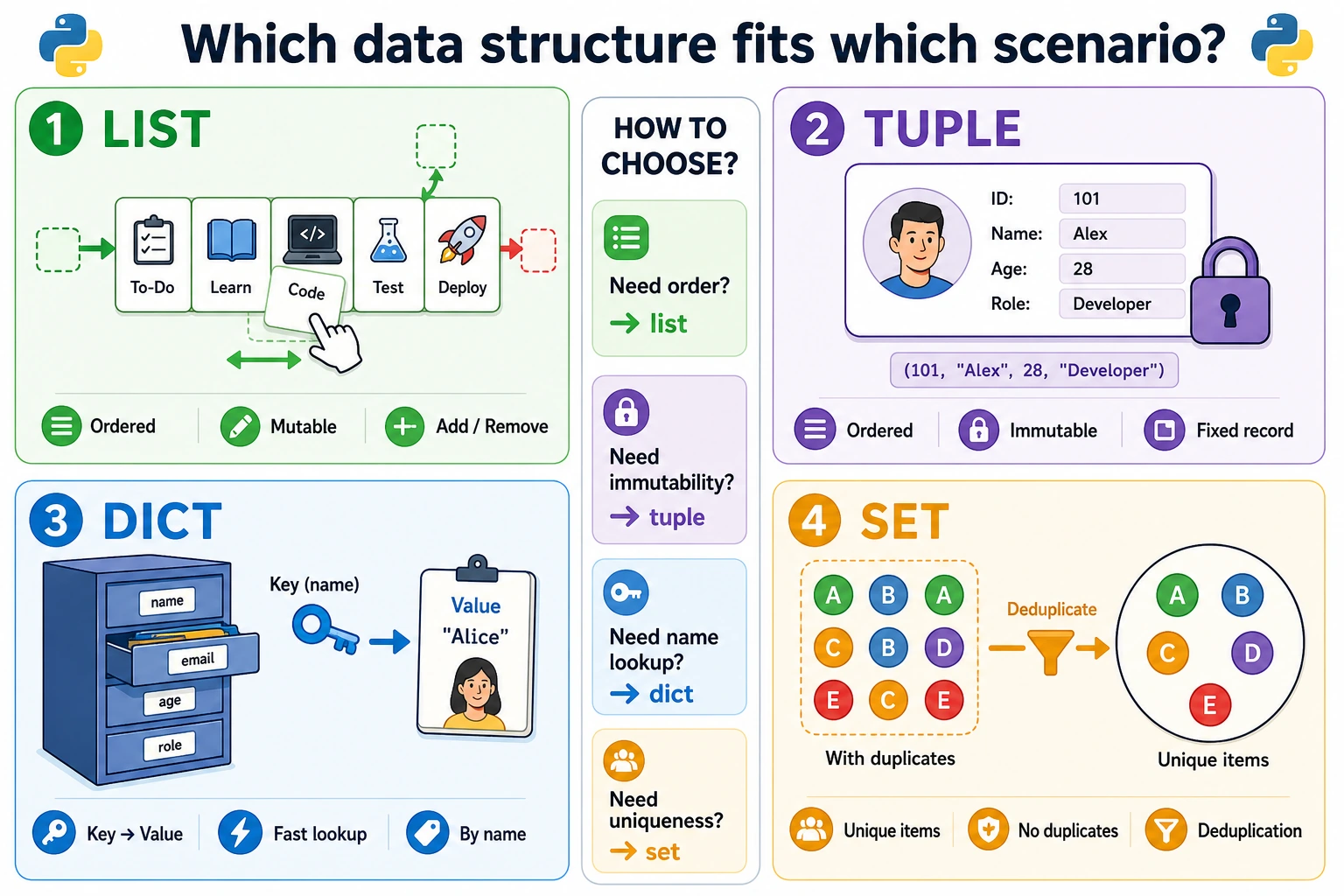
Python has 4 built-in data structures:
| Data Structure | Symbol | Ordered | Mutable | Allows Duplicates | Typical Use |
|---|---|---|---|---|---|
| List list | [] | ✅ | ✅ | ✅ | Ordered collection of data |
| Tuple tuple | () | ✅ | ❌ | ✅ | Immutable data |
| Dictionary dict | {} | ✅ | ✅ | Keys cannot be duplicated | Key-value mapping |
| Set set | {} | ❌ | ✅ | ❌ | Deduplication, set operations |
List — The Most Common Data Structure
A list is like a stretchable cabinet: you can put anything in it, and you can add, remove, or modify items at any time.
Creating Lists
# Create lists
scores = [85, 92, 78, 95, 88]
names = ["Zhang San", "Li Si", "Wang Wu"]
mixed = [1, "hello", 3.14, True]   # Mixed types are allowed (but not recommended)
empty = []                         # Empty list

print(type(scores))  # <class 'list'>
print(len(scores))   # 5
Accessing Elements (Indexing)
fruits = ["apple", "banana", "orange", "grape", "watermelon"]
#          0        1         2         3         4
#         -5       -4        -3        -2        -1

print(fruits[0])     # apple (the first one)
print(fruits[2])     # orange (the third one)
print(fruits[-1])    # watermelon (the last one)
print(fruits[-2])    # grape (the second to last one)
Slicing
numbers = [0, 1, 2, 3, 4, 5, 6, 7, 8, 9]

print(numbers[2:5])    # [2, 3, 4] (indices 2 to 4)
print(numbers[:3])     # [0, 1, 2] (first 3 items)
print(numbers[7:])     # [7, 8, 9] (from index 7 to the end)
print(numbers[::2])    # [0, 2, 4, 6, 8] (take every other item)
print(numbers[::-1])   # [9, 8, 7, 6, 5, 4, 3, 2, 1, 0] (reverse)
Modifying Elements
scores = [85, 92, 78, 95, 88]

# Modify a single element
scores[2] = 80
print(scores)  # [85, 92, 80, 95, 88]

# Modify multiple elements (via slicing)
scores[1:3] = [90, 85]
print(scores)  # [85, 90, 85, 95, 88]
Adding Elements
fruits = ["apple", "banana"]

# Add to the end
fruits.append("orange")
print(fruits)  # ['apple', 'banana', 'orange']

# Insert at a specific position
fruits.insert(1, "grape")
print(fruits)  # ['apple', 'grape', 'banana', 'orange']

# Add multiple elements
fruits.extend(["watermelon", "strawberry"])
print(fruits)  # ['apple', 'grape', 'banana', 'orange', 'watermelon', 'strawberry']
Removing Elements
fruits = ["apple", "banana", "orange", "grape", "watermelon"]

# Remove by value (removes the first matching item)
fruits.remove("orange")
print(fruits)  # ['apple', 'banana', 'grape', 'watermelon']

# Remove by index
deleted = fruits.pop(1)    # Remove the element at index 1 and return it
print(deleted)             # banana
print(fruits)              # ['apple', 'grape', 'watermelon']

# Remove the last one
last = fruits.pop()
print(last)    # watermelon

# Remove by index (no return value needed)
del fruits[0]
print(fruits)  # ['grape']
Common List Operations
numbers = [3, 1, 4, 1, 5, 9, 2, 6, 5]

# Sort
numbers.sort()
print(numbers)  # [1, 1, 2, 3, 4, 5, 5, 6, 9]

# Sort in descending order
numbers.sort(reverse=True)
print(numbers)  # [9, 6, 5, 5, 4, 3, 2, 1, 1]

# Sort without modifying the original list
original = [3, 1, 4, 1, 5]
sorted_list = sorted(original)
print(original)    # [3, 1, 4, 1, 5] (original list unchanged)
print(sorted_list) # [1, 1, 3, 4, 5]

# Reverse
numbers = [1, 2, 3, 4, 5]
numbers.reverse()
print(numbers)  # [5, 4, 3, 2, 1]

# Search
print(numbers.index(3))    # 2 (index of element 3)
print(numbers.count(5))    # 1 (number of times element 5 appears)
print(3 in numbers)        # True

# Statistics
scores = [85, 92, 78, 95, 88]
print(len(scores))    # 5
print(sum(scores))    # 438
print(max(scores))    # 95
print(min(scores))    # 78
print(sum(scores) / len(scores))  # 87.6 (average score)
List Comprehensions (Very Pythonic!)
List comprehensions are a concise way to create new lists:
# Traditional way
squares = []
for i in range(1, 6):
    squares.append(i ** 2)
print(squares)  # [1, 4, 9, 16, 25]

# List comprehension (done in one line!)
squares = [i ** 2 for i in range(1, 6)]
print(squares)  # [1, 4, 9, 16, 25]

# List comprehension with a condition
even_squares = [i ** 2 for i in range(1, 11) if i % 2 == 0]
print(even_squares)  # [4, 16, 36, 64, 100]

# Real-world use: batch data processing
names = ["  Alice  ", "BOB", "  charlie "]
clean_names = [name.strip().lower() for name in names]
print(clean_names)  # ['alice', 'bob', 'charlie']
[expression for variable in iterable if condition]
In plain English: for each element that meets the condition, compute the expression and put it into a new list.
Tuple — An Immutable List
Tuples are almost the same as lists, except for one difference: tuples cannot be modified after they are created.
Creating Tuples
# Create with parentheses
point = (3, 4)
colors = ("red", "green", "blue")
single = (42,)          # When there is only one element, you must add a comma!
empty = ()

# In fact, the parentheses can be omitted
coordinates = 3, 4      # This is also a tuple
print(type(coordinates)) # <class 'tuple'>
Tuple Operations
colors = ("red", "green", "blue", "yellow", "purple")

# Access (same as lists)
print(colors[0])     # red
print(colors[-1])    # purple
print(colors[1:3])   # ('green', 'blue')

# Iterate
for color in colors:
    print(color)

# Search
print(len(colors))          # 5
print("red" in colors)      # True
print(colors.count("red"))   # 1
print(colors.index("blue"))  # 2

# But you cannot modify it!
# colors[0] = "black"  # Error! TypeError: 'tuple' object does not support item assignment
Tuple Unpacking
# Assign tuple values to multiple variables
point = (10, 20)
x, y = point
print(f"x={x}, y={y}")  # x=10, y=20

# When a function returns multiple values, it actually returns a tuple
def get_name_and_age():
    return "Xiao Ming", 25

name, age = get_name_and_age()
print(f"{name}, {age} years old")  # Xiao Ming, 25 years old

# Use * to collect extra values
first, *rest = [1, 2, 3, 4, 5]
print(first)  # 1
print(rest)   # [2, 3, 4, 5]
When Should You Use a Tuple?
- When the data should not be modified (for example, coordinates, RGB color values)
- As dictionary keys (lists cannot be dictionary keys, but tuples can)
- When a function returns multiple values
Dictionary — Key-Value Storage
A dictionary is one of the most important data structures in Python. It uses a key to look up a value, just like a real dictionary uses a word to find its definition.
Creating Dictionaries
# Create with curly braces
student = {
    "name": "Xiao Ming",
    "age": 20,
    "city": "Beijing",
    "scores": [85, 92, 78]
}

# Empty dictionary
empty = {}

# Create with dict()
config = dict(learning_rate=0.001, epochs=100, batch_size=32)
print(config)  # {'learning_rate': 0.001, 'epochs': 100, 'batch_size': 32}

print(type(student))  # <class 'dict'>
Accessing Values
student = {"name": "Xiao Ming", "age": 20, "city": "Beijing"}

# Method 1: Access with []
print(student["name"])   # Xiao Ming
# print(student["phone"])  # Error! KeyError: 'phone'

# Method 2: Access with .get() (safer)
print(student.get("name"))    # Xiao Ming
print(student.get("phone"))   # None (returns None if it does not exist, no error)
print(student.get("phone", "not provided"))  # not provided (returns default value if it does not exist)
When you are not sure whether a key exists, .get() is safer than [] and will not crash the program.
Adding and Modifying
student = {"name": "Xiao Ming", "age": 20}

# Add new key-value pairs
student["city"] = "Beijing"
student["email"] = "[email protected]"

# Modify an existing value
student["age"] = 21

print(student)
# {'name': 'Xiao Ming', 'age': 21, 'city': 'Beijing', 'email': '[email protected]'}

# Update in bulk
student.update({"age": 22, "phone": "13800000000"})
print(student)
Deleting
student = {"name": "Xiao Ming", "age": 20, "city": "Beijing"}

# Delete a specific key
del student["city"]
print(student)  # {'name': 'Xiao Ming', 'age': 20}

# pop: delete and return the value
age = student.pop("age")
print(age)      # 20
print(student)  # {'name': 'Xiao Ming'}
Iterating Through a Dictionary
scores = {"Chinese": 85, "Math": 92, "English": 78}

# Iterate over keys
for subject in scores:
    print(subject)

# Iterate over values
for score in scores.values():
    print(score)

# Iterate over key-value pairs (most common)
for subject, score in scores.items():
    print(f"{subject}: {score} points")

# Output:
# Chinese: 85 points
# Math: 92 points
# English: 78 points
Dictionary Comprehensions
# Create a mapping from numbers to squares
squares = {x: x**2 for x in range(1, 6)}
print(squares)  # {1: 1, 2: 4, 3: 9, 4: 16, 5: 25}

# Filter a dictionary
scores = {"Zhang San": 85, "Li Si": 45, "Wang Wu": 92, "Zhao Liu": 58}
passed = {name: score for name, score in scores.items() if score >= 60}
print(passed)  # {'Zhang San': 85, 'Wang Wu': 92}
Real Example: Counting Character Frequency
text = "hello world"
char_count = {}

for char in text:
    if char in char_count:
        char_count[char] += 1
    else:
        char_count[char] = 1

print(char_count)
# {'h': 1, 'e': 1, 'l': 3, 'o': 2, ' ': 1, 'w': 1, 'r': 1, 'd': 1}
Set — The Deduplication Tool
A set is an unordered collection of unique elements.
Creating Sets
# Create with curly braces
fruits = {"apple", "banana", "orange", "apple"}  # duplicates are removed automatically
print(fruits)  # {'banana', 'orange', 'apple'} (order may differ)

# Create from a list (deduplicates!)
numbers = [1, 2, 2, 3, 3, 3, 4, 4, 4, 4]
unique = set(numbers)
print(unique)  # {1, 2, 3, 4}

# Note: an empty set must be created with set(), not {}
empty_set = set()     # empty set
empty_dict = {}       # this is an empty dictionary!

print(type(fruits))   # <class 'set'>
Set Operations
a = {1, 2, 3, 4, 5}
b = {4, 5, 6, 7, 8}

# Intersection (items in both)
print(a & b)          # {4, 5}
print(a.intersection(b))

# Union (combined, duplicates removed)
print(a | b)          # {1, 2, 3, 4, 5, 6, 7, 8}
print(a.union(b))

# Difference (items in a but not in b)
print(a - b)          # {1, 2, 3}
print(a.difference(b))

# Symmetric difference (items unique to each set)
print(a ^ b)          # {1, 2, 3, 6, 7, 8}
Real-World Use
# Scenario: find students who took both courses
math_students = {"Zhang San", "Li Si", "Wang Wu", "Zhao Liu"}
english_students = {"Li Si", "Wang Wu", "Qian Qi", "Sun Ba"}

both = math_students & english_students
print(f"Students who took both courses: {both}")  # {'Li Si', 'Wang Wu'}

only_math = math_students - english_students
print(f"Only took math: {only_math}")  # {'Zhang San', 'Zhao Liu'}

all_students = math_students | english_students
print(f"All enrolled students: {all_students}")
Data Structure Selection Guide
| Requirement | Recommended | Reason |
|---|---|---|
| Ordered collection that needs add/remove/modify | List | The most versatile container |
| Data should not be modified | Tuple | Immutable, safer |
| Find a value by key | Dictionary | O(1) lookup speed |
| Deduplication | Set | Automatically removes duplicates |
| Count occurrences | Dictionary | Keys are elements, values are counts |
| Check whether an element exists | Set/Dictionary | Much faster than a list |
Hands-On Practice
Exercise 1: Score Statistics
scores = [85, 92, 78, 95, 88, 76, 90, 82, 97, 73]

# 1. Calculate the highest score, lowest score, and average score
# 2. Find all scores above 90 (use a list comprehension)
# 3. Sort the scores from high to low
Exercise 2: Address Book
Use a dictionary to implement a simple address book:
contacts = {}

# 1. Add 3 contacts (name -> phone number)
# 2. Look up a contact's phone number
# 3. Modify a contact's phone number
# 4. Delete a contact
# 5. Print all contacts
Exercise 3: Word Frequency Count
text = "the quick brown fox jumps over the lazy dog the fox"

# Count how many times each word appears
# Hint: first use split() to turn it into a list, then count with a dictionary
Exercise 4: Remove Duplicates from a List (Keep Order)
numbers = [3, 1, 4, 1, 5, 9, 2, 6, 5, 3, 5]

# Remove duplicate elements while keeping the original order
# Expected output: [3, 1, 4, 5, 9, 2, 6]
# Hint: use a set to record elements that have already appeared
Summary
| Data Structure | Creation | Features | Common Use |
|---|---|---|---|
| List | [1, 2, 3] | Ordered, mutable, allows duplicates | Store a group of similar data |
| Tuple | (1, 2, 3) | Ordered, immutable | Coordinates, return multiple values |
| Dictionary | {"a": 1} | Key-value pairs, keys cannot be duplicated | Configuration, mapping relationships |
| Set | {1, 2, 3} | Unordered, unique | Deduplication, set operations |
Choosing a data structure is like choosing a storage tool: a list is like a drawer (ordered items), a dictionary is like a labeled cabinet (find things by label), a set is like a sieve (automatically removes duplicates), and a tuple is like a sealed bag (once put in, it cannot be changed). Pick the right tool, and you get twice the result with half the effort.