2.1.2 Data Types and Variables
Where This Section Fits
This section helps you understand how Python represents and stores data. Variables, numbers, strings, booleans, and type conversion are the foundation for writing conditionals, processing tabular data, and calling model APIs later on. First, get familiar with these “smallest units of data.”
Learning Objectives
- Understand what variables are and learn the rules for naming them
- Master Python’s basic data types: integers, floating-point numbers, strings, and booleans
- Learn how to convert between data types
- Understand what dynamic typing means
What Is a Variable?
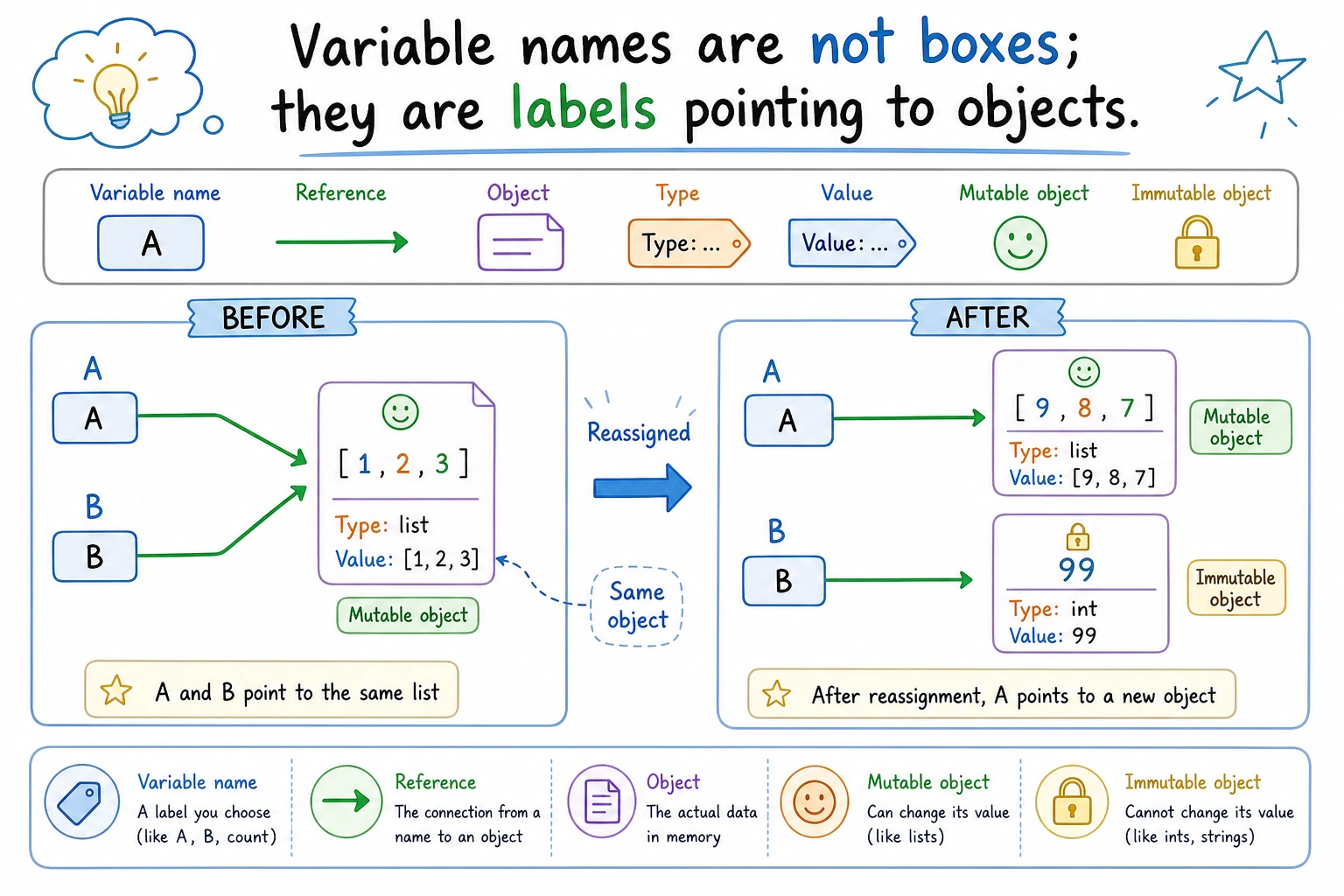
Think of a variable as a labeled box. You can put something inside it and use the label to find it later.
name = "Xiao Ming"       # The box has a "name" label, and inside is "Xiao Ming"
age = 20                 # The box has an "age" label, and inside is 20
height = 1.75            # The box has a "height" label, and inside is 1.75
In Python, = does not mean “equal to” — it means assignment. It puts the value on the right into the box on the left.
# Assignment direction: from right to left
x = 10      # Put 10 into the box named x

# You can change the contents of the box
x = 20      # Now x contains 20 (10 is gone)

# You can use a variable’s value to calculate something
y = x + 5   # y = 20 + 5 = 25
print(y)    # Output: 25
Variable Naming Rules
Python has a few rules for variable names:
| Rule | Correct Examples | Incorrect Examples |
|---|---|---|
| Can only contain letters, numbers, and underscores | user_name, age2 | user-name, age! |
| Cannot start with a number | name1 | 1name |
| Cannot use Python keywords | my_class | class, if, for |
| Case-sensitive | Name and name are different variables | — |
Naming Conventions (Not Required, but Widely Used)
# Good names ✅ — use lowercase letters with underscores (snake_case)
student_name = "Xiao Ming"
learning_rate = 0.001
max_epochs = 100

# Poor names ❌ — not invalid, just unclear
a = "Xiao Ming"        # You can't tell what a means
x1 = 0.001             # What does x1 represent?
SN = "Xiao Ming"       # Too abbreviated to understand easily
A variable name should let people know what it is at a glance. It is better to use a slightly longer name (student_count) than a confusing abbreviation (sc).
Numeric Types
Integers (int)
Integers are numbers without decimal points. They can be positive, negative, or zero.
age = 25
temperature = -10
count = 0
big_number = 1_000_000  # Underscores improve readability; same as 1000000

print(type(age))  # <class 'int'>
type() Functiontype() lets you check the type of any value. You’ll use it often while learning to confirm a variable’s type.
Python integers have no size limit (unlike int in C/Java, which has a fixed range):
huge = 99999999999999999999999999999999
print(huge + 1)  # No problem at all
Floating-Point Numbers (float)
Floating-point numbers are numbers with decimal points.
pi = 3.14159
weight = 65.5
negative = -0.001

print(type(pi))  # <class 'float'>
Be careful about floating-point precision — this is a problem in all programming languages:
>>> 0.1 + 0.2
0.30000000000000004    # Not exactly 0.3!
This is not a Python bug. It is an inherent issue caused by storing decimals in binary form on computers. In AI development, this tiny error usually does not affect the result. But if you need exact results for financial calculations, use the decimal module.
Operations with Integers and Floats
a = 10
b = 3

print(a + b)    # 13    addition
print(a - b)    # 7     subtraction
print(a * b)    # 30    multiplication
print(a / b)    # 3.333... division (result is always float)
print(a // b)   # 3     floor division
print(a % b)    # 1     remainder
print(a ** b)   # 1000  exponentiation (10 to the 3rd power)
A common pitfall:
# The result of / is always float, even when division is exact
>>> 10 / 2
5.0         # Not 5, but 5.0

# If you want an integer result, use //
>>> 10 // 2
5
Strings (str)
A string is text — a sequence of characters. It is wrapped in quotes.
Creating Strings
# Single and double quotes both work; they are equivalent
name = 'Xiao Ming'
greeting = "Hello"

# If the string contains quotes, wrap it with the other kind
sentence = "He said: 'Hello'"
sentence2 = 'The English name is "Tom"'

# Triple quotes: can write multi-line text
poem = """
Quiet Night Thought
Before my bed, the bright moonlight,
I suspect it is frost on the ground.
"""
print(poem)

print(type(name))  # <class 'str'>
String Concatenation
first_name = "Zhang"
last_name = "San"

# Method 1: use + to concatenate
full_name = first_name + last_name
print(full_name)  # Zhang San

# Method 2: use f-string (recommended! Python 3.6+)
age = 20
intro = f"My name is {full_name}, and I am {age} years old"
print(intro)  # My name is Zhang San, and I am 20 years old

# Method 3: use format()
intro2 = "My name is {}, and I am {} years old".format(full_name, age)
print(intro2)  # My name is Zhang San, and I am 20 years old
f-strings (f"...{variable}...") are the most commonly used way to format strings in modern Python. They are concise and intuitive. We will use them a lot in later lessons.
Common String Operations
text = "Hello, Python!"

# Length
print(len(text))         # 14

# Case conversion
print(text.upper())      # HELLO, PYTHON!
print(text.lower())      # hello, python!

# Find a substring
print(text.find("Python"))  # 7 (starts at position 7)
print("Python" in text)     # True

# Replace
print(text.replace("Python", "AI"))  # Hello, AI!

# Strip whitespace from both ends
messy = "  hello  "
print(messy.strip())    # "hello"

# Split
csv_line = "Zhang San,20,Beijing"
parts = csv_line.split(",")
print(parts)  # ['Zhang San', '20', 'Beijing']
String Indexing and Slicing
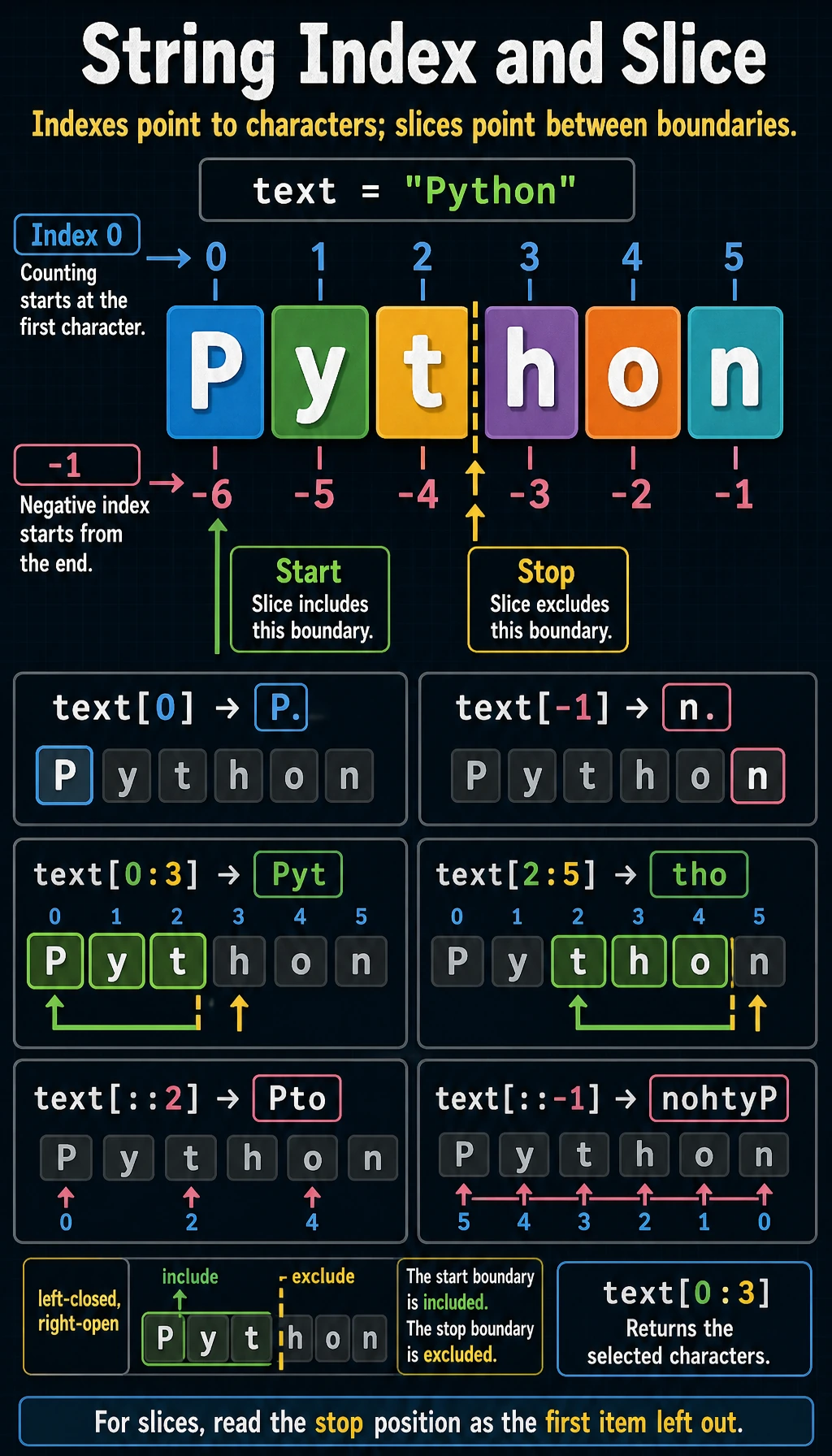
Each character in a string has a position number (index) starting from 0:
text = "Python"
#       P y t h o n
# index: 0 1 2 3 4 5
# negative index: -6 -5 -4 -3 -2 -1

print(text[0])    # P (first character)
print(text[5])    # n (sixth character)
print(text[-1])   # n (last character)
print(text[-2])   # o (second to last character)
Slicing lets you extract a substring:
text = "Python"

print(text[0:3])   # Pyt (from index 0 to index 3, excluding 3)
print(text[2:5])   # tho
print(text[:3])    # Pyt (from the start; 0 can be omitted)
print(text[3:])    # hon (to the end; the stop position can be omitted)
print(text[:])     # Python (a copy of the whole string)
print(text[::2])   # Pto (take every other character)
print(text[::-1])  # nohtyP (reverse the string!)
text[start:stop:step] — start at start, stop at stop (not included), and take one item every step. Remember: left-closed, right-open (includes the start, excludes the end).
Strings Are Immutable
text = "Hello"
# text[0] = "h"  # Error! TypeError: 'str' object does not support item assignment

# If you want to modify it, create a new string
text = "h" + text[1:]  # "hello"
Booleans (bool)
A boolean has only two values: True and False. Note the capital first letter.
is_student = True
is_raining = False

print(type(is_student))  # <class 'bool'>
Booleans often come from comparison operations:
print(5 > 3)          # True
print(5 < 3)          # False
print(5 == 5)         # True (note the two equals signs; one equals sign is assignment)
print(5 != 3)         # True (`!=` means not equal)
print("abc" == "abc")  # True
Booleans will be used heavily later when you learn control flow (if/else).
Truthy and Falsy Values
In Python, many things can be used as boolean values. The following are considered “false”:
# All of the following are "falsy" values
bool(0)        # False
bool(0.0)      # False
bool("")       # False (empty string)
bool([])       # False (empty list)
bool(None)     # False

# Everything else is "truthy"
bool(1)        # True
bool(-1)       # True (any non-zero number is true)
bool("hello")  # True (any non-empty string is true)
bool([1, 2])   # True (any non-empty list is true)
None Type
None is a special value in Python that means “nothing here”.
result = None
print(result)        # None
print(type(result))  # <class 'NoneType'>
None is often used to mean “no value yet” or “no result”:
# When a function has no return value, it returns None by default
def say_hello():
    print("Hello!")

result = say_hello()   # Prints Hello!
print(result)          # None
Type Conversion
Sometimes you need to convert one type into another.
# String → number
age_str = "25"
age = int(age_str)      # Convert string to integer
print(age + 1)          # 26

price_str = "99.9"
price = float(price_str)  # Convert string to float
print(price)             # 99.9

# Number → string
score = 95
score_str = str(score)   # Convert integer to string
print("Score: " + score_str)  # Score: 95

# Integer ↔ float
x = int(3.7)    # 3 (directly truncates the decimal part, not rounding)
y = float(5)    # 5.0
Common mistake: strings and numbers cannot be concatenated directly with +
age = 20
# print("Age: " + age)  # Error! TypeError

# Correct method 1: convert to string
print("Age: " + str(age))

# Correct method 2: use an f-string (recommended)
print(f"Age: {age}")

# Correct method 3: separate with commas (print will add spaces automatically)
print("Age:", age)
Quick Reference for Type Conversion
| Conversion | Function | Example | Result |
|---|---|---|---|
| → Integer | int() | int("25") | 25 |
| → Float | float() | float("3.14") | 3.14 |
| → String | str() | str(100) | "100" |
| → Boolean | bool() | bool(0) | False |
Dynamic Typing
Python is a dynamically typed language — you do not need to declare a variable’s type in advance, and the same variable can change types at any time.
x = 10          # x is an integer
print(type(x))  # <class 'int'>

x = "hello"     # now x is a string
print(type(x))  # <class 'str'>

x = True        # now x becomes a boolean
print(type(x))  # <class 'bool'>
This is flexible, but be careful — do not accidentally change a variable that was supposed to store a number into a string.
Compare this with Java, a statically typed language:
int x = 10;       // Declare x as an integer
x = "hello";      // Error! Java does not allow changing the type
Multiple Assignment
Python supports some convenient assignment patterns:
# Assign values to multiple variables at once
a, b, c = 1, 2, 3
print(a, b, c)  # 1 2 3

# Swap the values of two variables (a concise Python-only style)
a, b = b, a
print(a, b)  # 2 1

# Assign the same value to multiple variables
x = y = z = 0
print(x, y, z)  # 0 0 0
This way of swapping variables is very Pythonic, and in other languages you usually need a temporary variable:
# Other languages
temp = a
a = b
b = temp

# Python
a, b = b, a  # Done in one line!
Hands-On Exercises
Exercise 1: Personal Information Card
Create variables to store your information, then print them with f-strings:
name = "Your Name"
age = 25
city = "Your City"
is_student = True

print(f"Name: {name}")
print(f"Age: {age}")
print(f"City: {city}")
print(f"Are you a student: {is_student}")
print(f"Next year I will be {age + 1} years old")
Exercise 2: Temperature Converter
Formula for converting Celsius to Fahrenheit: F = C × 9/5 + 32
celsius = 37.5
fahrenheit = celsius * 9 / 5 + 32
print(f"{celsius}°C = {fahrenheit}°F")
Try changing the value of celsius and calculate a few different temperatures.
Exercise 3: String Operations
email = "  [email protected]  "

# 1. Remove leading and trailing spaces
# 2. Convert to lowercase
# 3. Find the position of @
# 4. Extract the username part (the part before @)
Hint: You can combine .strip(), .lower(), .find(), and slicing.
Exercise 4: Type Detective
Use type() to check the type of each value below. Guess first, then verify:
print(type(42))
print(type(3.14))
print(type("3.14"))
print(type(True))
print(type(None))
print(type(1 + 2))
print(type(1 + 2.0))    # Integer + float = ?
print(type("1" + "2"))  # String + string = ?
Summary
| Type | Keyword | Example | Use |
|---|---|---|---|
| Integer | int | 42, -10, 0 | Counting, indexing |
| Float | float | 3.14, -0.5 | Precise values, scientific computing |
| String | str | "hello", 'world' | Text data |
| Boolean | bool | True, False | Conditional logic |
| Null value | NoneType | None | Represents “no value” |
In Python, everything is an object. Numbers are objects, strings are objects, and even True and None are objects. Every object has a type (type), and that type determines what operations you can perform on it.