2.1.3 Operators and Expressions
What this section is about
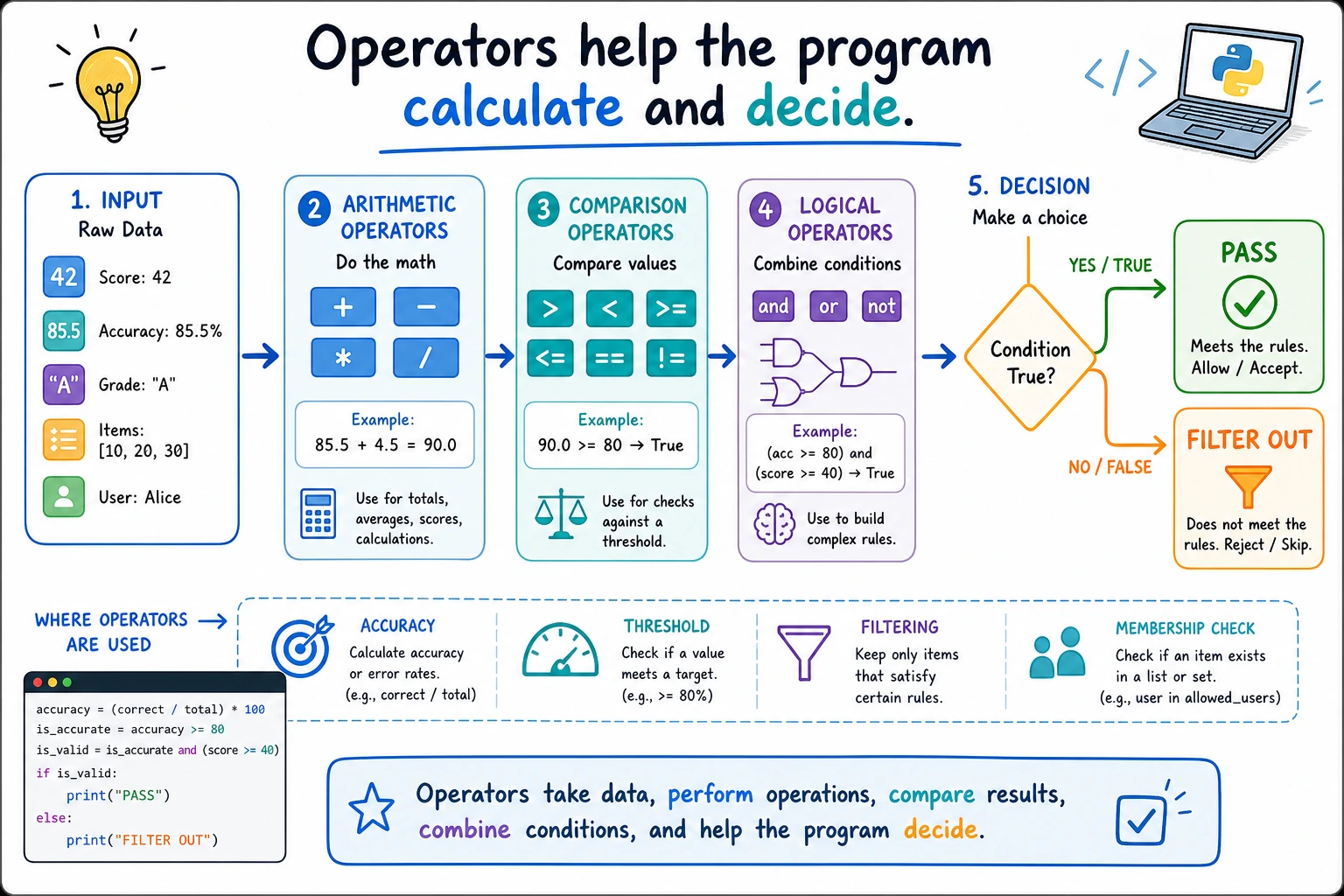
In this section, you’ll learn how to calculate and make decisions with data. Operators are not only used in math calculations; they also appear in model metric calculations, conditional filtering, loop decisions, and data cleaning logic. They are the first step in combining variables into program logic.
Learning goals
- Master arithmetic operators, comparison operators, and logical operators
- Understand operator precedence
- Learn how to use assignment operators and membership operators
- Be able to write correct conditional expressions
| What you want to do | Common operators |
|---|---|
| Calculate values | +、-、*、/ |
| Compare values | >、>=、==、!= |
| Combine conditions | and、or、not |
| Check whether something is included | in、not in |
Let’s look at a scenario first
You are developing an AI data processing script and need to:
- Calculate model accuracy:
correct / total * 100 - Check whether it passes:
accuracy >= 60 - Check two conditions:
accuracy >= 60 and loss < 0.5
All of these operations depend on operators. Operators are the symbols that tell Python “what to do with the data.”
Arithmetic operators
The most basic mathematical operations:
| Operator | Meaning | Example | Result |
|---|---|---|---|
+ | Addition | 5 + 3 | 8 |
- | Subtraction | 5 - 3 | 2 |
* | Multiplication | 5 * 3 | 15 |
/ | Division | 5 / 3 | 1.6667 |
// | Floor division | 5 // 3 | 1 |
% | Remainder | 5 % 3 | 2 |
** | Exponentiation | 5 ** 3 | 125 |
Real-world example
# Scenario: calculate some metrics for AI model training

total_samples = 1000     # Total number of samples
correct = 873            # Number of correct predictions
epochs = 50              # Number of training epochs
batch_size = 32          # Batch size

# Calculate accuracy
accuracy = correct / total_samples * 100
print(f"Accuracy: {accuracy}%")  # 87.3%

# Calculate how many batches are needed to finish one epoch
batches_per_epoch = total_samples // batch_size
remaining = total_samples % batch_size

print(f"There are {batches_per_epoch} full batches in each epoch")  # 31
print(f"The last batch has {remaining} samples")                    # 8

# Calculate an exponentially decayed learning rate
initial_lr = 0.01
decay = 0.95
current_lr = initial_lr * (decay ** epochs)
print(f"Learning rate at epoch {epochs}: {current_lr:.6f}")  # 0.000769
- epoch: one full pass through the training data. If you have 1,000 samples, one epoch means the model has seen all 1,000 samples once.
- batch: a small group of samples processed together. With
batch_size = 32, the model learns from 32 samples at a time instead of all samples at once. - learning rate (
lr): the step size used when updating model parameters. Too large may make training unstable; too small may learn very slowly. - decay: gradually shrinking a value, often used to reduce the learning rate as training progresses.
Two forms of division
This is a common point of confusion for beginners:
print(7 / 2)    # 3.5   ← Normal division, result is float
print(7 // 2)   # 3     ← Floor division, drops the decimal part
print(-7 // 2)  # -4    ← Note! Rounds down, not toward zero

# A useful trick with remainder
print(10 % 3)   # 1    ← 10 divided by 3 leaves remainder 1
print(15 % 5)   # 0    ← Remainder is 0 when evenly divisible

# Check whether a number is odd or even
number = 42
if number % 2 == 0:
    print(f"{number} is an even number")  # 42 is even
Comparison operators
The result of comparison operators is always a Boolean value (True or False):
| Operator | Meaning | Example | Result |
|---|---|---|---|
== | Equal to | 5 == 5 | True |
!= | Not equal to | 5 != 3 | True |
> | Greater than | 5 > 3 | True |
< | Less than | 5 < 3 | False |
>= | Greater than or equal to | 5 >= 5 | True |
<= | Less than or equal to | 5 <= 3 | False |
# Scenario: judge model performance
accuracy = 87.3
loss = 0.35

print(accuracy > 90)      # False —— accuracy did not exceed 90
print(accuracy >= 80)      # True  —— accuracy is at least 80
print(loss < 0.5)          # True  —— loss is below 0.5
print(accuracy == 87.3)    # True  —— accuracy is exactly 87.3
=is assignment:x = 5assigns 5 to x==is comparison:x == 5checks whether x equals 5
The most common mistake beginners make is writing = instead of == when making a decision.
Chained comparisons (Python-specific)
Python allows chained comparisons, which is not possible in many other languages:
age = 25

# Check whether age is between 18 and 65
print(18 <= age <= 65)   # True

# Equivalent to
print(18 <= age and age <= 65)   # True, but the version above is more concise

# More examples
x = 5
print(1 < x < 10)      # True
print(1 < x < 3)       # False
Logical operators
Logical operators are used to combine multiple conditions:
| Operator | Meaning | Explanation |
|---|---|---|
and | And | Only both true is true |
or | Or | At least one true is true |
not | Not | Negates the value: true becomes false, false becomes true |
age = 25
has_id = True
has_ticket = False

# and: both conditions must be satisfied
can_enter = age >= 18 and has_id
print(f"Can enter: {can_enter}")   # True (old enough and has ID)

# or: at least one condition is satisfied
has_pass = has_id or has_ticket
print(f"Has access pass: {has_pass}")  # True (having an ID is enough)

# not: negate
is_minor = not (age >= 18)
print(f"Is a minor: {is_minor}")   # False
Real-world example: AI model evaluation
accuracy = 92.5
loss = 0.15
training_time = 3.5  # hours

# Standard for a good model: accuracy > 90 and loss < 0.3
is_good_model = accuracy > 90 and loss < 0.3
print(f"Is it a good model: {is_good_model}")  # True

# Need retraining: accuracy too low or loss too high
need_retrain = accuracy < 80 or loss > 1.0
print(f"Needs retraining: {need_retrain}")  # False

# Practical model: good model and training time is reasonable
is_practical = is_good_model and not (training_time > 24)
print(f"Is it practical: {is_practical}")  # True
Short-circuit evaluation
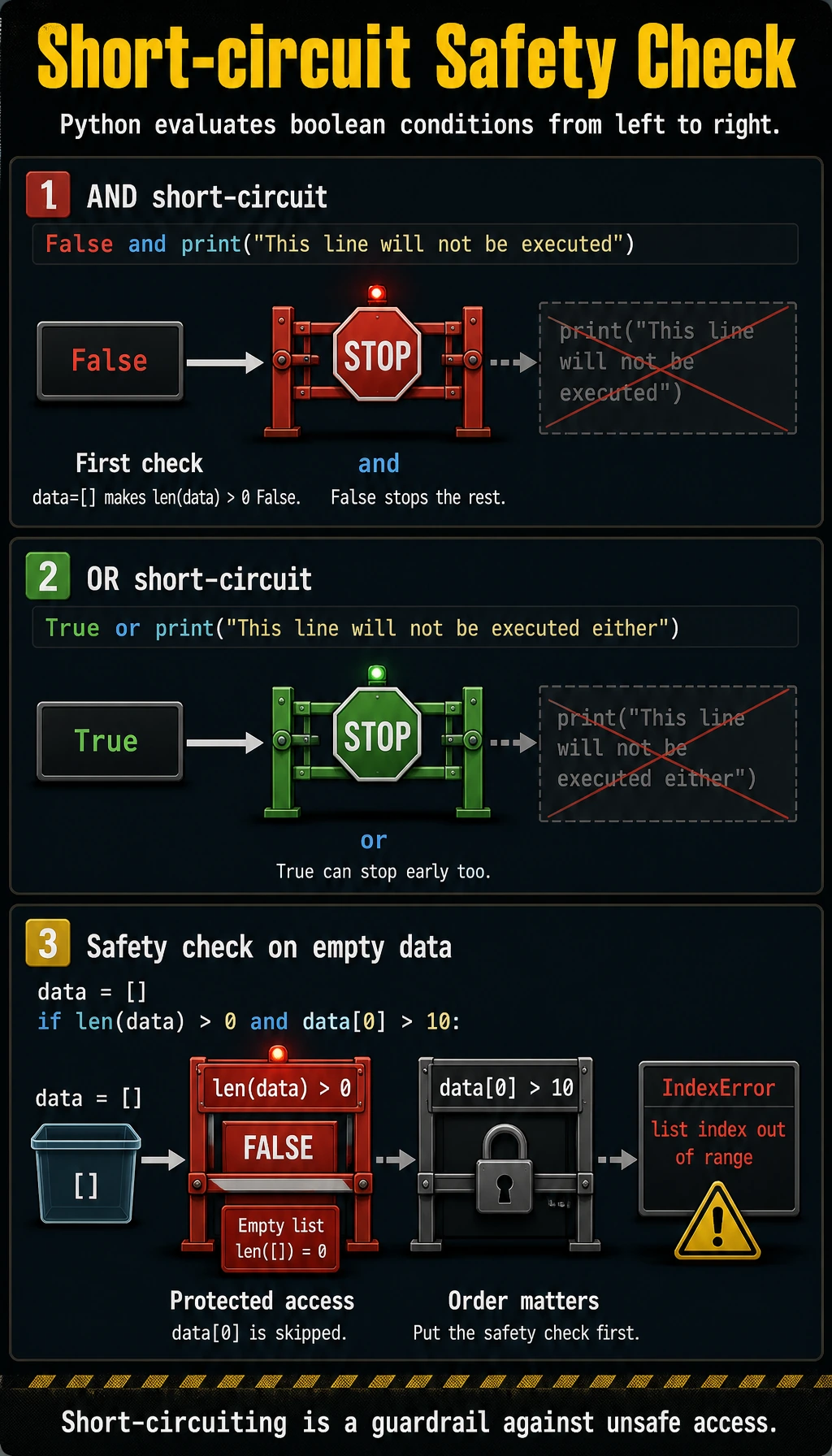
Python’s and and or have a smart feature called short-circuit evaluation:
# and: if the first condition is False, the second condition is not checked
# because the result is already guaranteed to be False
False and print("This line will not be executed")

# or: if the first condition is True, the second condition is not checked
# because the result is already guaranteed to be True
True or print("This line will not be executed either")
This feature is often used in real programming for safety checks:
# Check whether the list is empty before accessing an element (to avoid errors)
data = []
# If data is empty, len(data) > 0 is False, and the following part will not run
if len(data) > 0 and data[0] > 10:
    print("The first element is greater than 10")
Assignment operators
In addition to the basic =, there are some shorthand forms:
| Operator | Equivalent to | Example |
|---|---|---|
+= | a = a + b | a += 5 |
-= | a = a - b | a -= 3 |
*= | a = a * b | a *= 2 |
/= | a = a / b | a /= 4 |
//= | a = a // b | a //= 3 |
%= | a = a % b | a %= 2 |
**= | a = a ** b | a **= 3 |
score = 0

score += 10   # score = 0 + 10 = 10
score += 20   # score = 10 + 20 = 30
score -= 5    # score = 30 - 5 = 25
score *= 2    # score = 25 * 2 = 50

print(f"Final score: {score}")  # 50
These shorthand forms are especially common in loops:
# Add up numbers from 1 to 100
total = 0
for i in range(1, 101):
    total += i
print(f"The sum of 1 to 100 is: {total}")  # 5050
Membership operators
in and not in are used to check whether a value is in a collection:
# Search in a string
print("Python" in "I love Python")     # True
print("Java" in "I love Python")       # False
print("Java" not in "I love Python")   # True

# Search in a list
fruits = ["apple", "banana", "orange"]
print("apple" in fruits)      # True
print("watermelon" in fruits)      # False

# Real-world application: check file extension
filename = "model.py"
if ".py" in filename:
    print("This is a Python file")
Identity operators
is and is not are used to check whether two variables are the same object (not just equal in value, but the same thing in memory):
a = None

# Check whether it is None (recommended to use is, not ==)
print(a is None)       # True
print(a is not None)   # False

# The difference between is and ==
x = [1, 2, 3]
y = [1, 2, 3]
z = x

print(x == y)    # True  —— values are equal
print(x is y)    # False —— not the same object (two different lists)
print(x is z)    # True  —— z points to x, so they are the same object
In 99% of cases, == is enough. is is mainly used to compare with None:
- Good:
if x is None: - Not ideal:
if x == None:
Operator precedence
When an expression contains multiple operators, Python evaluates them according to precedence from high to low:
| Priority (high → low) | Operator |
|---|---|
| 1 (highest) | ** exponentiation |
| 2 | +x, -x positive/negative sign |
| 3 | *, /, //, % |
| 4 | +, - |
| 5 | ==, !=, >, <, >=, <= |
| 6 | not |
| 7 | and |
| 8 (lowest) | or |
# Without parentheses
result = 2 + 3 * 4      # Multiply first, then add: 2 + 12 = 14
result = 2 ** 3 ** 2     # Exponentiation is right-to-left: 2 ** 9 = 512

# Parentheses make it clearer (recommended)
result = (2 + 3) * 4     # 20
result = (2 ** 3) ** 2   # 64
When you are unsure about precedence, add parentheses! Parentheses not only ensure the correct order of calculation, they also make code easier to read. No one will laugh at you for using too many parentheses.
Comprehensive example: BMI calculator
Let’s combine the operators we learned today:
# BMI calculator
name = "Xiao Ming"
weight = 70      # kilograms
height = 1.75    # meters

# Calculate BMI: weight / height squared
bmi = weight / height ** 2  # First calculate height**2, then divide
print(f"{name}'s BMI: {bmi:.1f}")  # 22.9

# Determine weight range
is_underweight = bmi < 18.5
is_normal = 18.5 <= bmi < 24
is_overweight = 24 <= bmi < 28
is_obese = bmi >= 28

print(f"Underweight: {is_underweight}")  # False
print(f"Normal weight: {is_normal}")     # True
print(f"Overweight: {is_overweight}")    # False
print(f"Obese: {is_obese}")              # False

# Combined judgment
is_healthy = is_normal and not is_underweight
print(f"Healthy: {is_healthy}")          # True
Hands-on exercises
Exercise 1: Grade level check
Use comparison operators and logical operators to determine grade level:
score = 85

is_excellent = score >= 90               # Excellent
is_good = score >= 80 and score < 90     # Good
is_pass = score >= 60 and score < 80     # Pass
is_fail = score < 60                     # Fail

# Print results
print(f"Score: {score}")
print(f"Excellent: {is_excellent}")
print(f"Good: {is_good}")
print(f"Pass: {is_pass}")
print(f"Fail: {is_fail}")
Change the value of score and try different results.
Exercise 2: Leap year check
Leap year rule: divisible by 4 but not by 100, or divisible by 400.
year = 2024

# Hint: use % to check divisibility, and combine conditions with and, or
is_leap = ___  # Complete this expression

print(f"Is {year} a leap year? {is_leap}")
Exercise 3: Triangle check
Determine whether three sides can form a triangle (the sum of any two sides is greater than the third side):
a, b, c = 3, 4, 5

# Complete the condition
is_triangle = ___

print(f"Can sides {a}, {b}, {c} form a triangle? {is_triangle}")
Summary
| Operator type | Common symbols | Purpose |
|---|---|---|
| Arithmetic | +, -, *, /, //, %, ** | Mathematical calculation |
| Comparison | ==, !=, >, <, >=, <= | Conditional checks, result is True/False |
| Logical | and, or, not | Combine multiple conditions |
| Assignment | =, +=, -=, *= etc. | Assign values to variables |
| Membership | in, not in | Check whether an element is in a collection |
| Identity | is, is not | Check whether two references point to the same object |
Operators are the basic “verbs” of programming. Variables and data are “nouns,” and operators are “verbs.” Put them together, and you get an “expression” — that is, what you tell the computer to do.