5.2.3 Logistic Regression
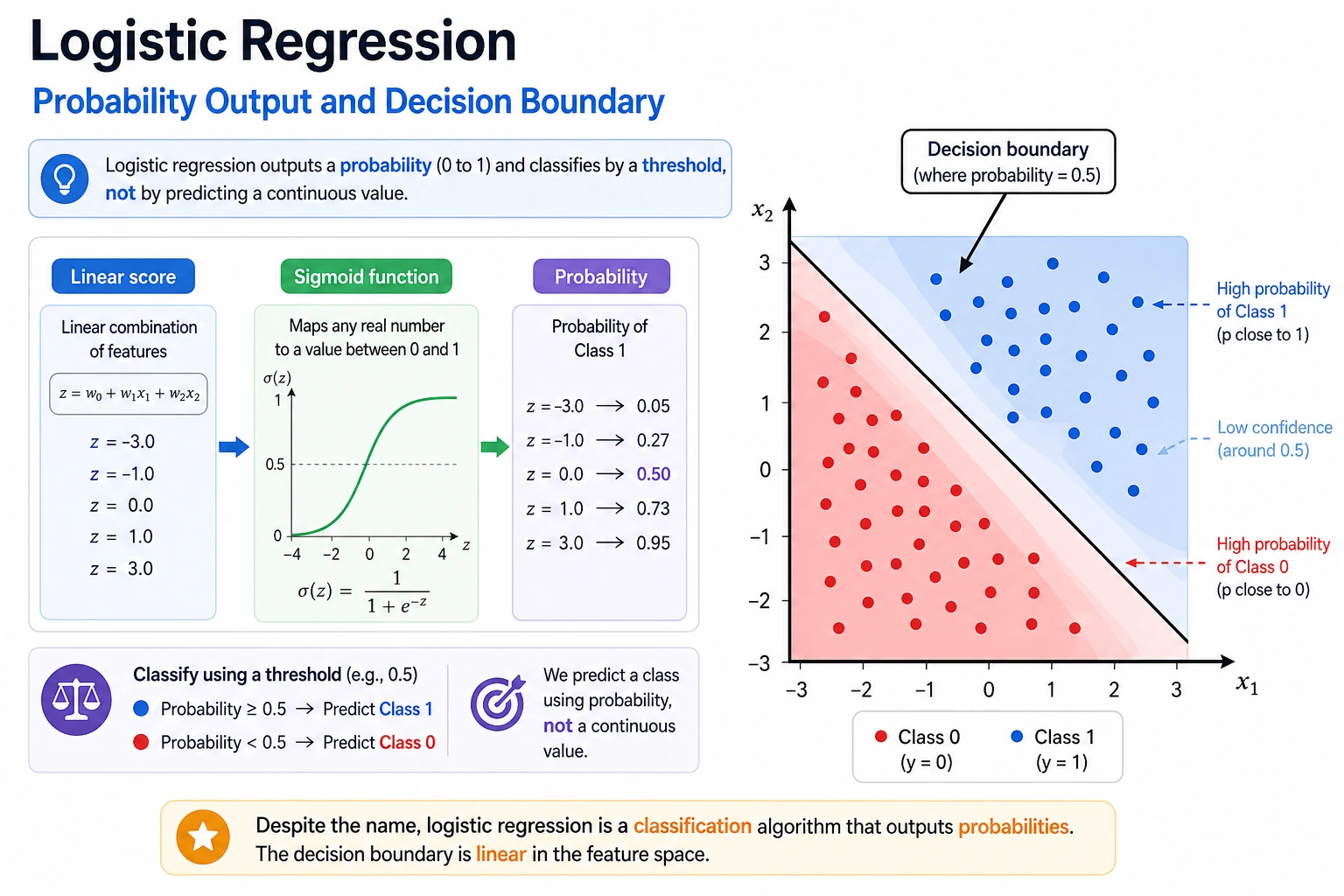
Logistic regression has "regression" in its name, but in practice it is a classification model. It learns a linear score, turns that score into a probability, and then uses a threshold to make a class decision.
What You Will Build
By the end of this lesson you will have a runnable classification workflow that can:
- train a binary classifier with
Pipeline,StandardScaler, andLogisticRegression; - print accuracy, precision, recall, F1, false positives, and false negatives;
- change the classification threshold instead of blindly using
0.5; - inspect which standardized features matter most;
- compare regularization strength with
C; - run the same model pattern on a multi-class dataset.
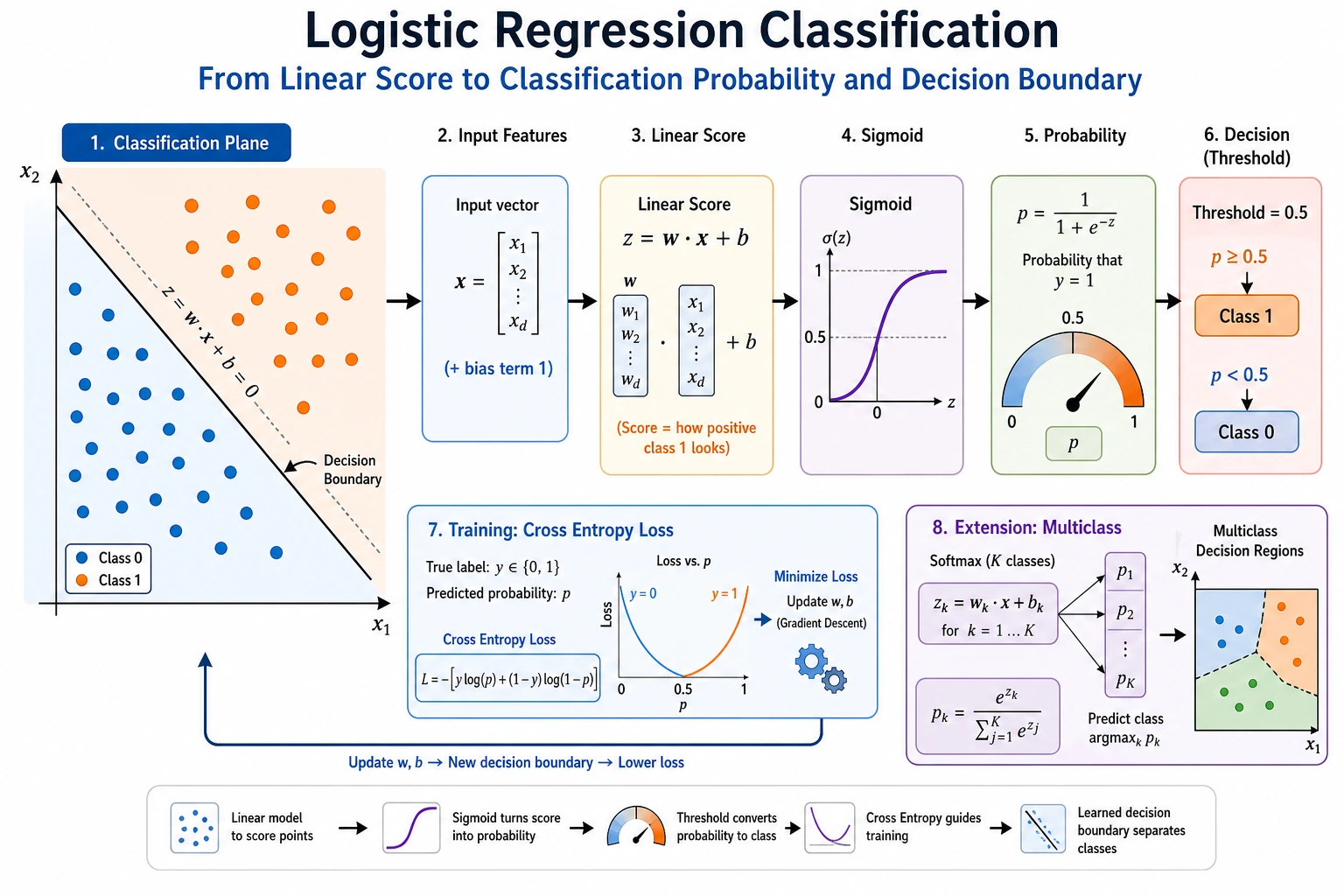
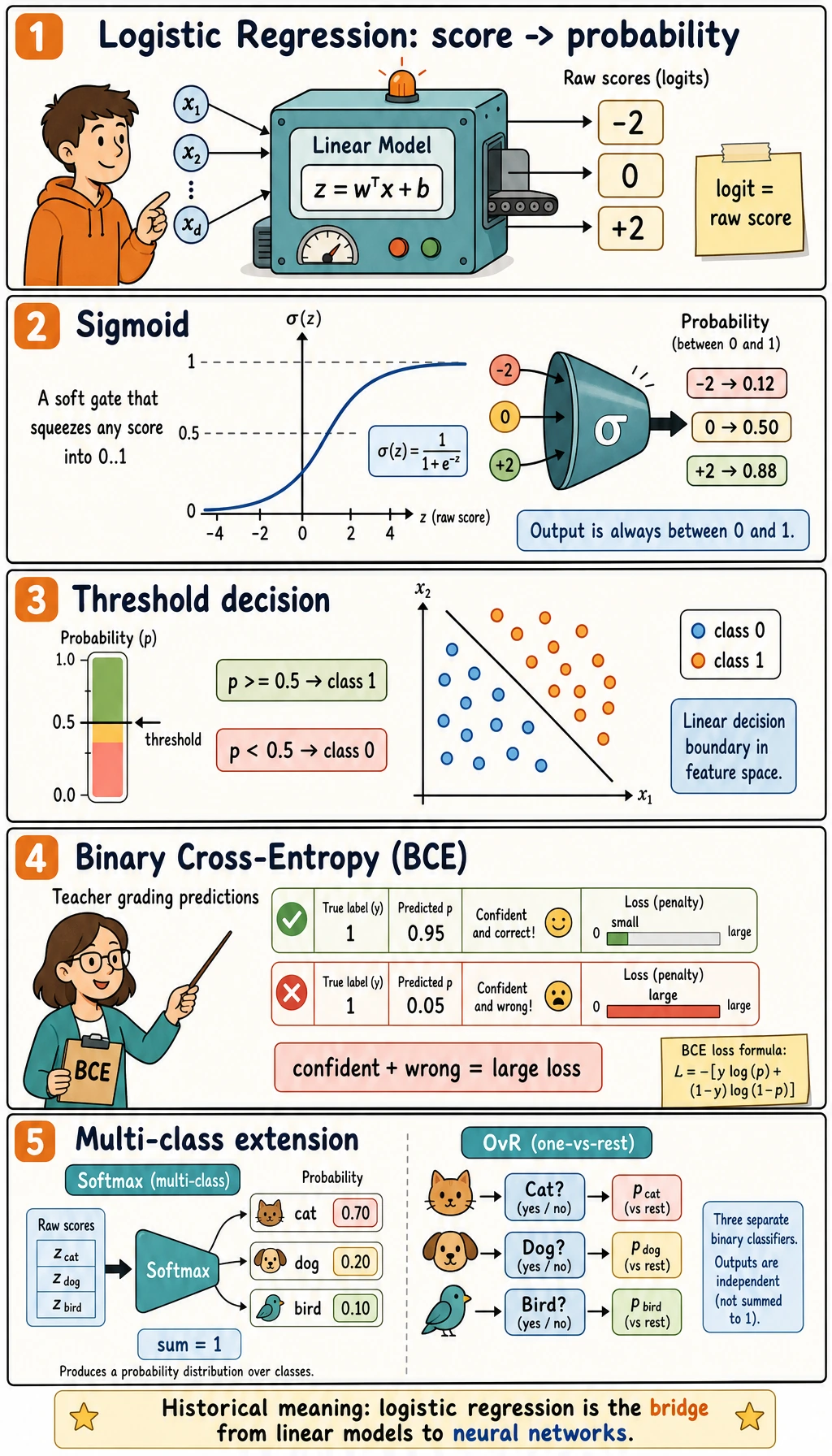
First read the two maps, then run the code. The details below will make much more sense after you see real output.
Setup
Run this in a clean virtual environment:
python -m pip install -U scikit-learn numpy
This lesson uses the current stable scikit-learn API style: Pipeline for safe preprocessing, StandardScaler for numeric feature scaling, and LogisticRegression without deprecated multi-class flags.
Run the Complete Lab
Create logistic_lab.py:
import numpy as np
from sklearn.datasets import load_breast_cancer, load_iris
from sklearn.linear_model import LogisticRegression
from sklearn.metrics import accuracy_score, confusion_matrix, f1_score, precision_score, recall_score
from sklearn.model_selection import train_test_split
from sklearn.pipeline import Pipeline
from sklearn.preprocessing import StandardScaler


def make_model(C=1.0):
    return Pipeline([
        ("scale", StandardScaler()),
        ("clf", LogisticRegression(max_iter=2000, C=C, random_state=42)),
    ])


# Part 1: binary classification and threshold tuning.
cancer = load_breast_cancer()
X_train, X_test, y_train, y_test = train_test_split(
    cancer.data,
    cancer.target,
    test_size=0.25,
    random_state=42,
    stratify=cancer.target,
)

model = make_model(C=1.0)
model.fit(X_train, y_train)
prob = model.predict_proba(X_test)[:, 1]

print("binary_threshold_lab")
for threshold in [0.3, 0.5, 0.7]:
    pred = (prob >= threshold).astype(int)
    tn, fp, fn, tp = confusion_matrix(y_test, pred).ravel()
    print(
        f"threshold={threshold:.1f} "
        f"accuracy={accuracy_score(y_test, pred):.3f} "
        f"precision={precision_score(y_test, pred):.3f} "
        f"recall={recall_score(y_test, pred):.3f} "
        f"f1={f1_score(y_test, pred):.3f} "
        f"fp={fp} fn={fn}"
    )

clf = model.named_steps["clf"]
top = np.abs(clf.coef_[0]).argsort()[-3:][::-1]
print("top_scaled_coefficients")
for idx in top:
    print(f"- {cancer.feature_names[idx]}: {clf.coef_[0][idx]:.3f}")

print("regularization_check")
for C in [0.1, 1.0, 10.0]:
    candidate = make_model(C=C)
    candidate.fit(X_train, y_train)
    pred = candidate.predict(X_test)
    coef_norm = np.linalg.norm(candidate.named_steps["clf"].coef_)
    print(f"C={C:<4} accuracy={accuracy_score(y_test, pred):.3f} coef_norm={coef_norm:.2f}")

# Part 2: multi-class probability output.
iris = load_iris()
X_train, X_test, y_train, y_test = train_test_split(
    iris.data,
    iris.target,
    test_size=0.25,
    random_state=42,
    stratify=iris.target,
)

multi = make_model(C=1.0)
multi.fit(X_train, y_train)
print("multiclass_lab")
print("accuracy=", round(accuracy_score(y_test, multi.predict(X_test)), 3))
for row in multi.predict_proba(X_test[:3]):
    pairs = [f"{name}:{value:.2f}" for name, value in zip(iris.target_names, row)]
    print(" | ".join(pairs))
Run it:
python logistic_lab.py
Expected output:
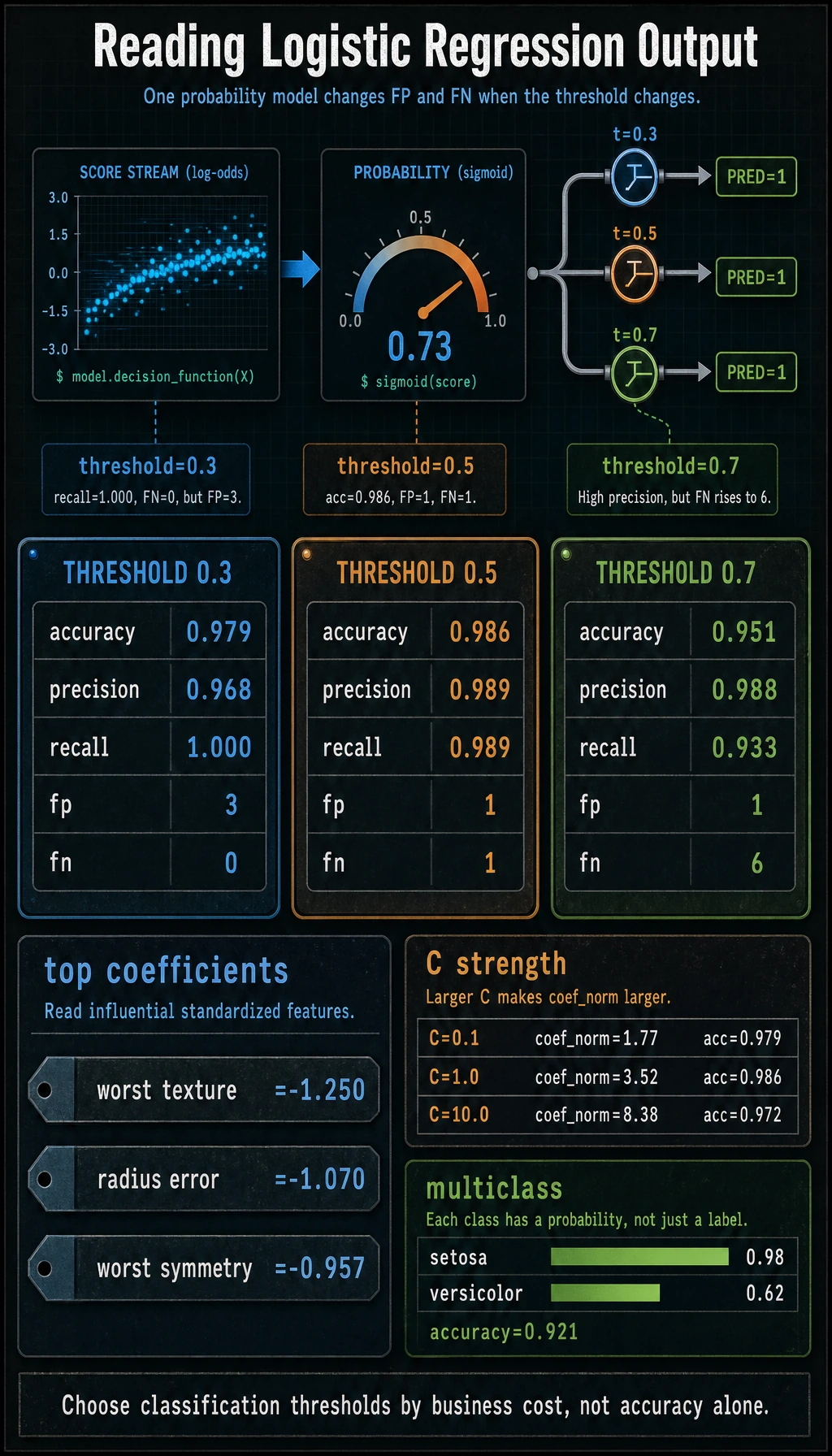
binary_threshold_lab
threshold=0.3 accuracy=0.979 precision=0.968 recall=1.000 f1=0.984 fp=3 fn=0
threshold=0.5 accuracy=0.986 precision=0.989 recall=0.989 f1=0.989 fp=1 fn=1
threshold=0.7 accuracy=0.951 precision=0.988 recall=0.933 f1=0.960 fp=1 fn=6
top_scaled_coefficients
- worst texture: -1.250
- radius error: -1.070
- worst symmetry: -0.957
regularization_check
C=0.1  accuracy=0.979 coef_norm=1.77
C=1.0  accuracy=0.986 coef_norm=3.52
C=10.0 accuracy=0.972 coef_norm=8.38
multiclass_lab
accuracy= 0.921
setosa:0.98 | versicolor:0.02 | virginica:0.00
setosa:0.03 | versicolor:0.62 | virginica:0.35
setosa:0.05 | versicolor:0.88 | virginica:0.07
Read the Pipeline
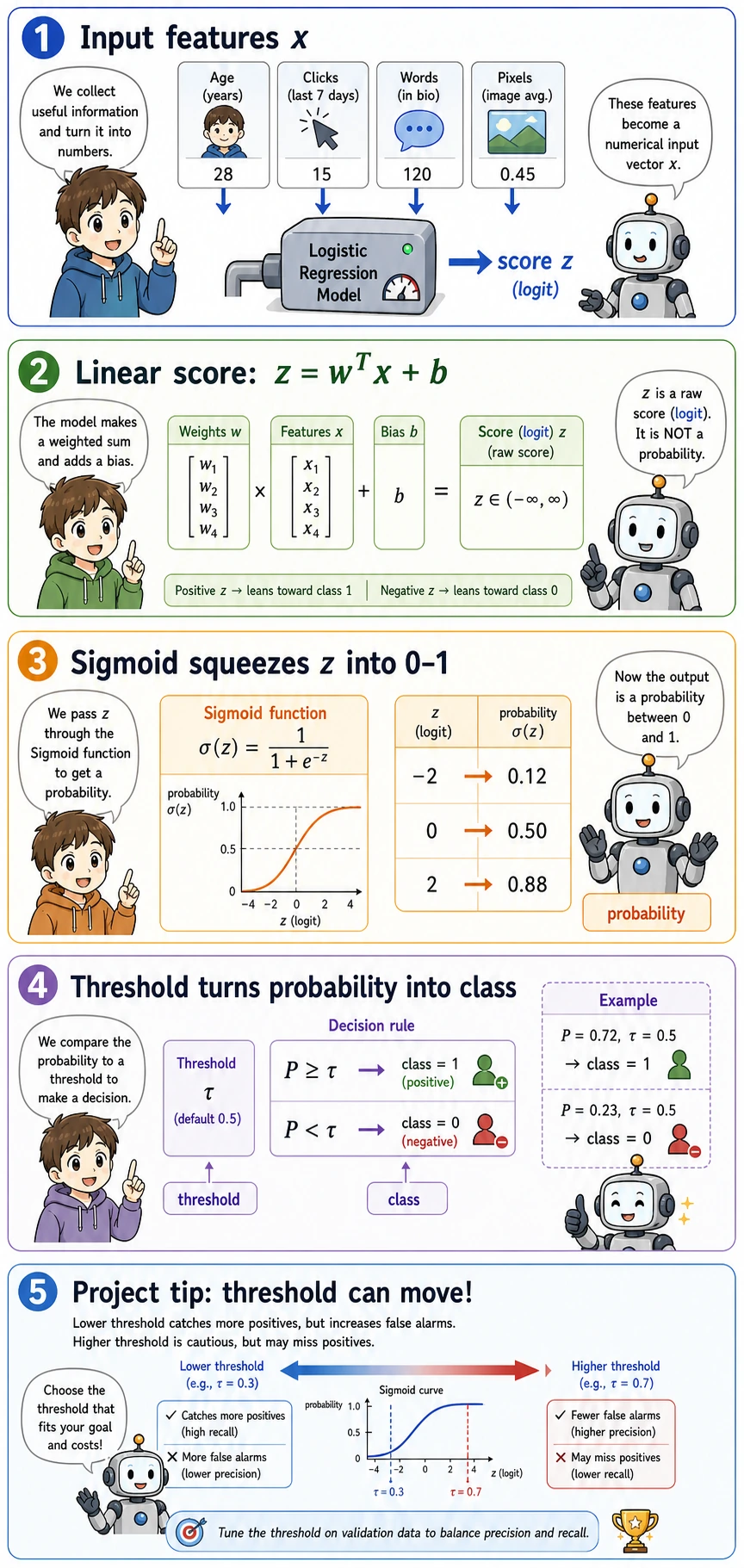
The model is doing three different jobs:
| Step | Code | Meaning |
|---|---|---|
| Score | z = wT x + b inside LogisticRegression | A raw linear score, not yet a probability |
| Probability | predict_proba() | The score is converted to a value between 0 and 1 |
| Decision | prob >= threshold | The business rule turns probability into class 0 or 1 |
The most common beginner mistake is to mix these layers together. In real projects, the model can stay the same while the threshold changes.
The Minimum Theory You Need
Sigmoid is the function that squeezes any real score into (0, 1):
sigmoid(z) = 1 / (1 + exp(-z))
When z = 0, the probability is 0.5. That is why the default decision boundary for binary logistic regression is the line or hyperplane where the raw score equals zero.
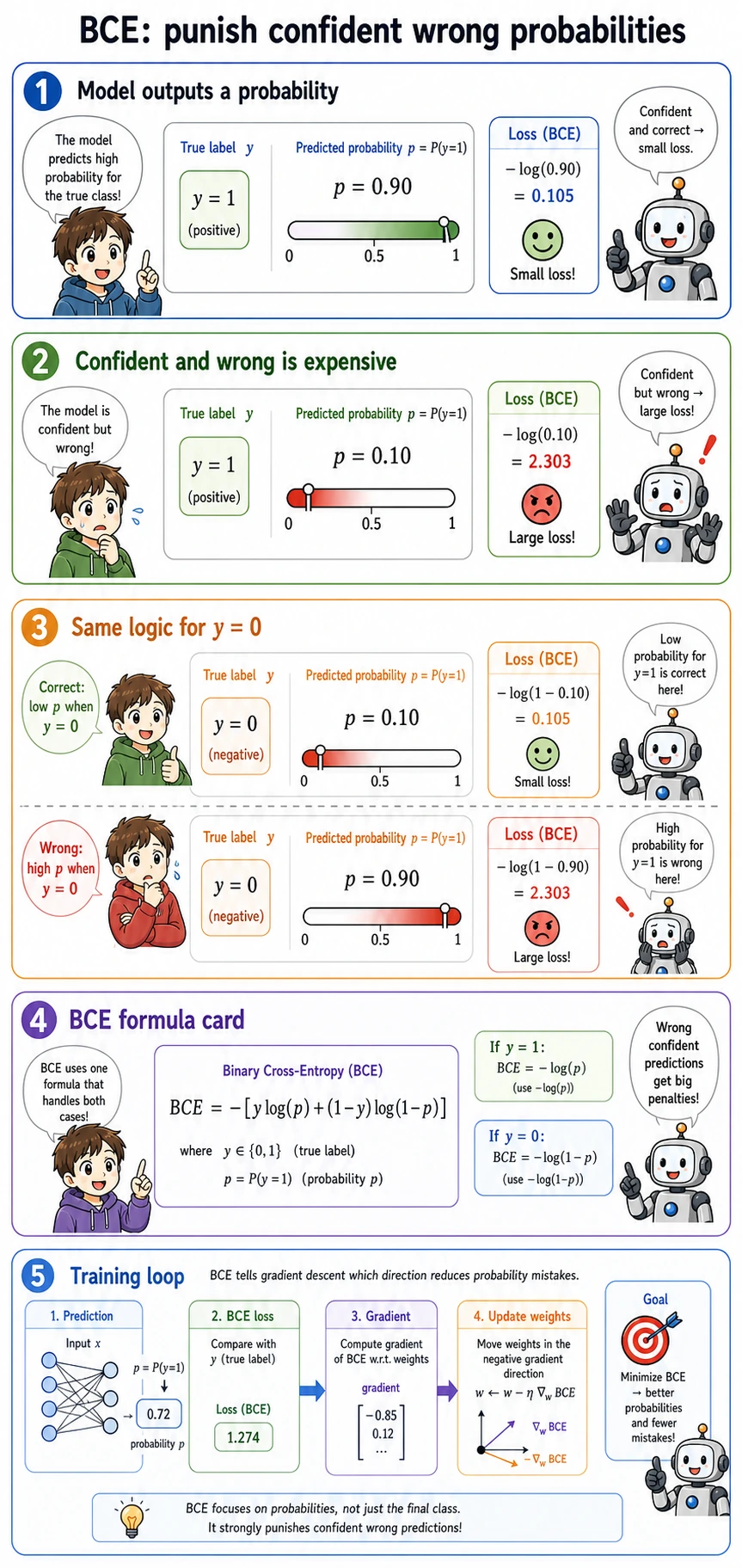
BCE means Binary Cross-Entropy. It is the loss used for binary probability prediction. Its practical rule is simple:
- if the correct answer is
1, predicting0.99is excellent and predicting0.01is terrible; - if the correct answer is
0, predicting0.01is excellent and predicting0.99is terrible; - confident wrong predictions are punished much more than uncertain wrong predictions.
That is why logistic regression learns probabilities better than forcing linear regression to predict 0 and 1.
Threshold Is a Product Decision
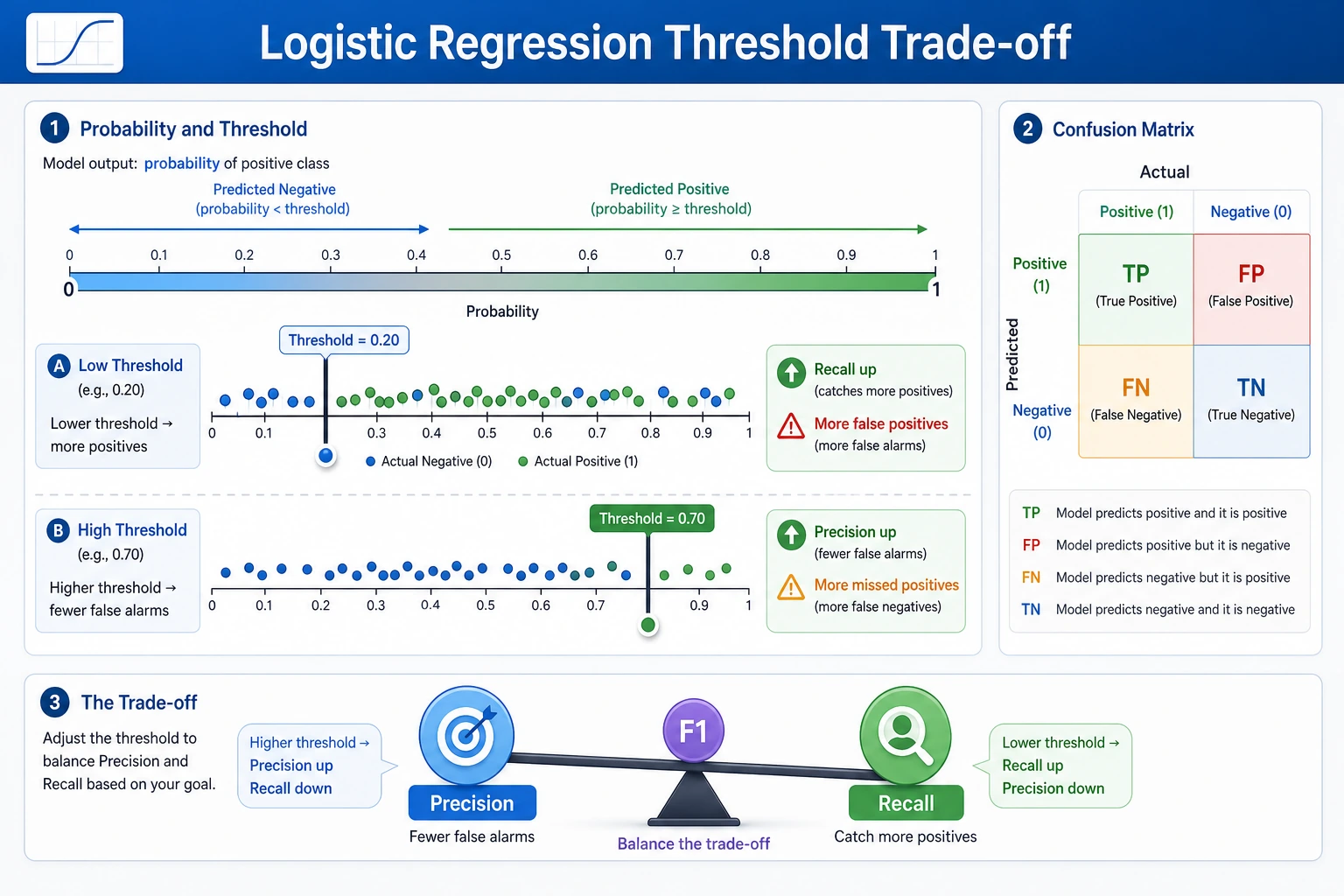
In the output, changing the threshold changes the type of mistake:
| Threshold | What happened | When it may be useful |
|---|---|---|
0.3 | recall reached 1.000, but false positives increased | Screening, alerting, first-pass filtering |
0.5 | best balanced score in this split | General default when costs are unknown |
0.7 | fewer false positives, more false negatives | Expensive manual review, strict confirmation |
For experienced readers: do not choose the threshold only from accuracy. Check the cost of fp and fn, then compare precision-recall curves or ROC curves.
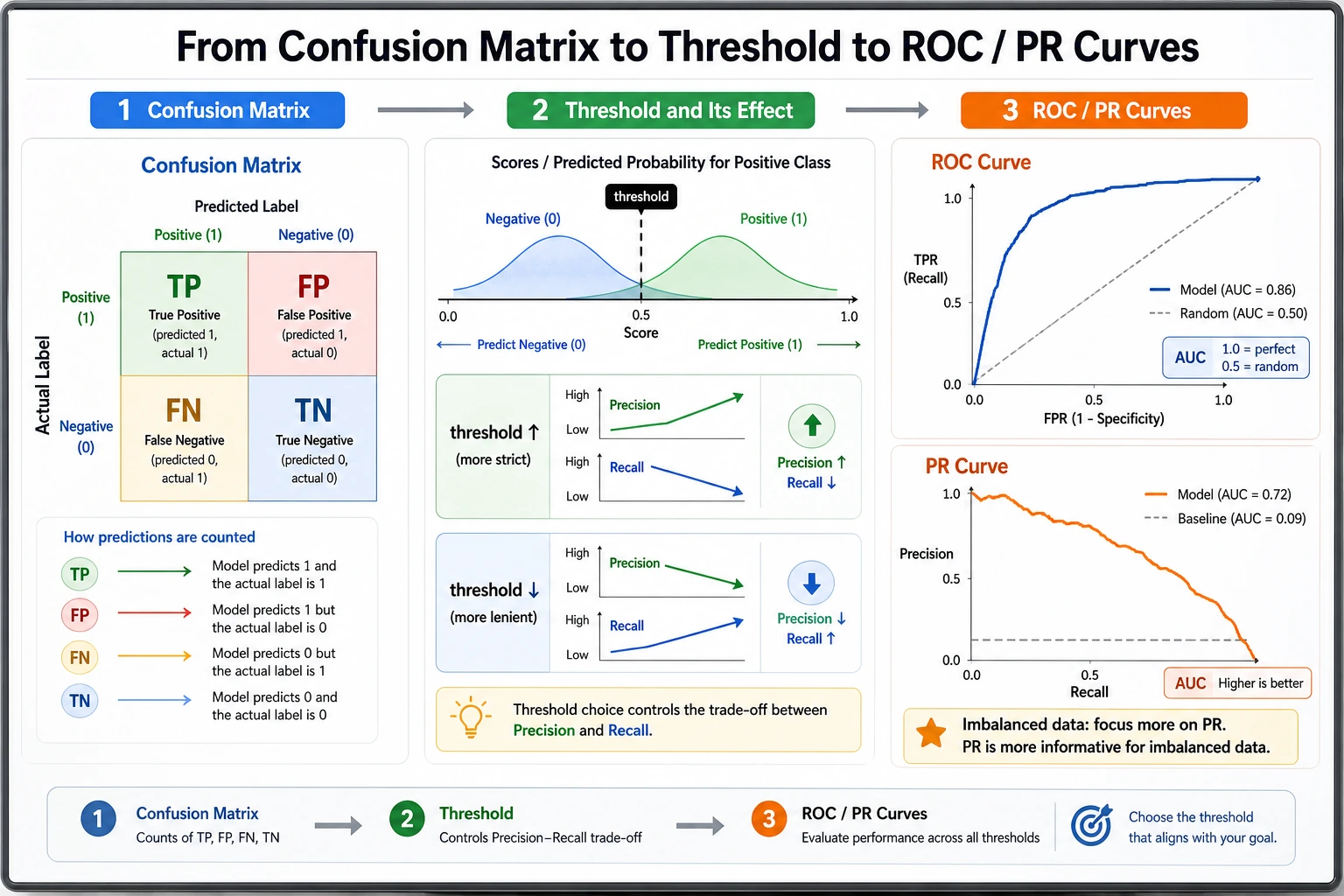
Regularization and C
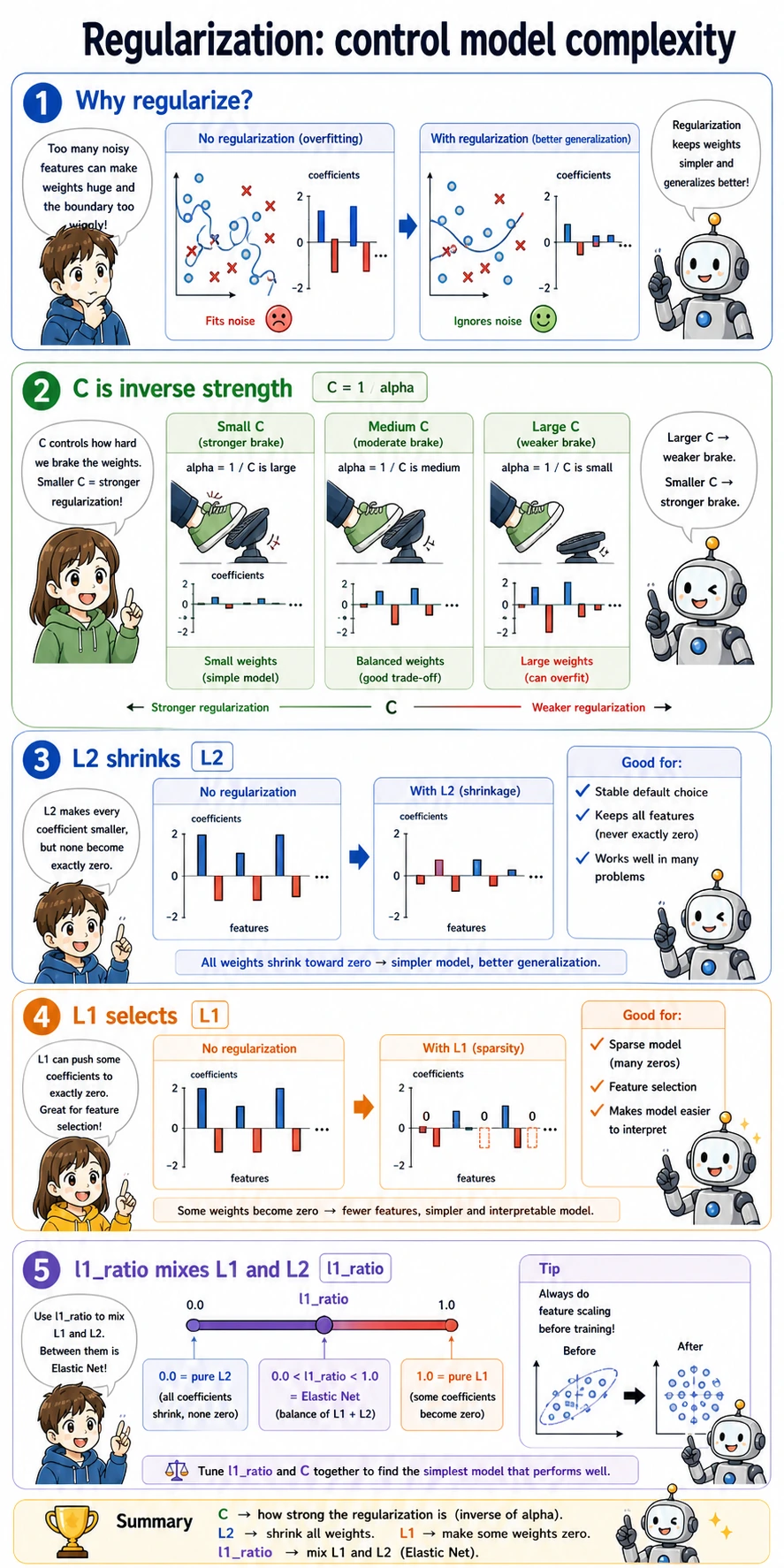
C is the inverse regularization strength in sklearn:
- smaller
Cmeans stronger regularization; - stronger regularization usually creates smaller coefficients;
- very large coefficients can mean the model is trying too hard to fit noise.
The lab output shows this pattern:
C=0.1  accuracy=0.979 coef_norm=1.77
C=1.0  accuracy=0.986 coef_norm=3.52
C=10.0 accuracy=0.972 coef_norm=8.38
The highest coefficient norm is not the best model here. For a production baseline, prefer a model that is accurate, stable, and easy to explain.
Multi-Class Classification
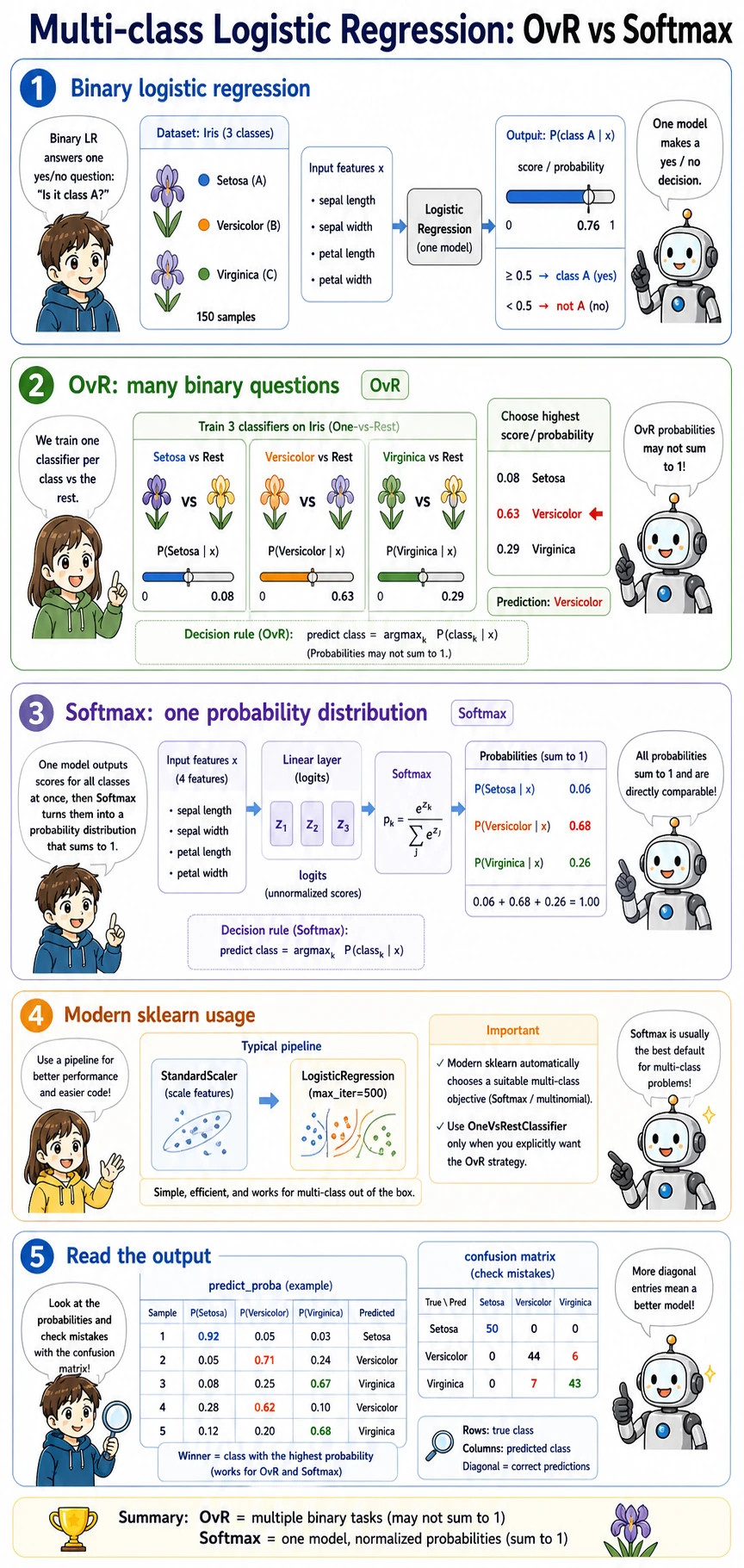
For more than two classes, logistic regression still returns probabilities. In the Iris output, each row sums to about 1.0:
setosa:0.03 | versicolor:0.62 | virginica:0.35
That means the model prefers versicolor, but it is not completely sure. This uncertainty is useful for review queues, active learning, and human-in-the-loop workflows.
Practical Debugging Checklist
| Symptom | Likely cause | Fix |
|---|---|---|
| Training does not converge | features are not scaled, or max_iter is too small | use StandardScaler in a Pipeline; increase max_iter |
| Accuracy looks high but recall is poor | class imbalance or wrong threshold | print confusion matrix, precision, recall, F1 |
| Coefficients are hard to compare | features have different units | scale numeric features first |
| Test score is suspiciously perfect | preprocessing was fitted before the train-test split | keep preprocessing inside Pipeline |
| Multi-class code warns about old flags | using deprecated multi_class arguments | use the default sklearn behavior unless you need a specific solver |
Practice
- Change the threshold list to
[0.2, 0.4, 0.6, 0.8]. Which threshold has the fewest false negatives? - Change
Cto[0.01, 0.1, 1, 10, 100]. When does accuracy stop improving? - Print the three smallest coefficients as well as the three largest absolute coefficients. What changes after feature scaling?
- Replace the breast cancer dataset with your own CSV. Keep the same structure: split first, fit the pipeline, print metrics, tune the threshold.
Pass Check
You have finished this lesson when you can explain these four sentences without looking:
- Logistic regression is a classifier that predicts probabilities.
predict_proba()gives probabilities; a threshold turns them into labels.Ccontrols regularization, and smallerCmeans stronger regularization.- Accuracy alone is not enough when false positives and false negatives have different costs.