9.5.5 MCP Client Integration
So far, we have looked at MCP from the server side. In this section, let’s switch perspectives and look at it from the client side:
How does the client discover, choose, and call the capabilities exposed by an MCP Server?
This step is very important, because in real usage, the one that actually uses the tools is often not the server, but the client.
Learning Objectives
- Understand the core responsibilities of an MCP Client
- Learn to think about “discovering tools” and “calling tools” as two separate steps
- Understand a minimal MCP Client call flow
- Understand why the client side still needs selection strategies, failure handling, and caching
How are the responsibilities of Client and Server divided?
The Server provides capabilities
The Server is more like a “tool warehouse manager.” It is responsible for:
- Listing tools
- Exposing capabilities
- Executing calls
The Client consumes capabilities
The Client is more like the “person actually doing the work.” It is responsible for:
- Discovering tools
- Deciding which tool to call
- Organizing arguments
- Receiving results
So one very important point is:
An MCP Client is not a passive relay. It usually still has its own decision-making logic for calls.
What should the Client learn first? Discover tools first
Why not hard-code everything?
If the client hard-codes all tools from the beginning:
- When server tools change, the code must change too
- If you switch to a different server, you must rewrite the client
That is the exact opposite of what MCP is trying to solve.
A minimal discovery example
class MockMCPServer:
    def list_tools(self):
        return [
            {"name": "search_docs", "description": "Search course documents"},
            {"name": "get_weather", "description": "Query the weather"}
        ]

server = MockMCPServer()
tools = server.list_tools()

for tool in tools:
    print(tool)
Expected output:
{'name': 'search_docs', 'description': 'Search course documents'}
{'name': 'get_weather', 'description': 'Query the weather'}
What is this step teaching you?
It is teaching you this:
The client must first know “what is available” before thinking about “how to use it.”
That is the value of the discovery phase.
After discovery, what else does the client need to do?
Choose a tool
Not every tool needs to be called. The client usually needs to judge first:
- Whether the current problem needs a tool
- If it does, which tool to call
Organize arguments
Even if the correct tool is chosen, the arguments still need to be organized properly.
Handle errors
If:
- The server times out
- The tool does not exist
- Argument validation fails
the client cannot just crash. It also needs to decide:
- Whether to retry
- Whether to fall back
- Whether to switch tools
A minimal Client example
Runnable code
class MockMCPServer:
    def list_tools(self):
        return [
            {"name": "search_docs", "description": "Search course documents"},
            {"name": "get_weather", "description": "Query the weather"}
        ]

    def call_tool(self, name, arguments):
        if name == "search_docs":
            return {"result": f"Search result: {arguments['query']}"}
        if name == "get_weather":
            return {"result": f"{arguments['city']} is sunny, 22 degrees right now"}
        return {"error": "unknown_tool"}

class MockMCPClient:
    def __init__(self, server):
        self.server = server
        self.tools = []

    def discover(self):
        self.tools = self.server.list_tools()
        return self.tools

    def call(self, name, arguments):
        return self.server.call_tool(name, arguments)

server = MockMCPServer()
client = MockMCPClient(server)

print(client.discover())
print(client.call("search_docs", {"query": "refund policy"}))
Expected output:
[{'name': 'search_docs', 'description': 'Search course documents'}, {'name': 'get_weather', 'description': 'Query the weather'}]
{'result': 'Search result: refund policy'}
What is this code already showing?
It already shows the client’s two main functions:
- Discovery
- Calling
This is the minimal closed loop of an MCP Client.
The Client actually has a “strategy layer”
Why say the client is not just a protocol caller?
Because in real systems, the client often still needs to decide:
- Whether the current problem should go through MCP
- If so, which server / which tool has priority
- How to fall back after a failure
A simple tool selector
Continue in the same Python file or interpreter session after the previous client example, because this snippet reuses client.
def choose_tool(user_query, tools):
    tool_names = [t["name"] for t in tools]

    if "refund" in user_query and "search_docs" in tool_names:
        return {"name": "search_docs", "arguments": {"query": "refund policy"}}

    if "weather" in user_query and "get_weather" in tool_names:
        return {"name": "get_weather", "arguments": {"city": "Beijing"}}

    return None

tools = client.discover()
decision = choose_tool("What is the refund policy?", tools)
print(decision)
print(client.call(decision["name"], decision["arguments"]))
Expected output:
{'name': 'search_docs', 'arguments': {'query': 'refund policy'}}
{'result': 'Search result: refund policy'}
This shows that the client often also takes on a lightweight scheduling role.
Why is error handling especially important for the client?
Because the client is the first one to feel the failure
The server side may return:
- unknown_tool
- invalid_arguments
- timeout
And the client must decide what to do next.
A minimal error handling example
Continue in the same file or session so client is already defined.
def safe_call(client, name, arguments):
    result = client.call(name, arguments)
    if "error" in result:
        return {"ok": False, "fallback": "This tool is currently unavailable. Please try again later."}
    return {"ok": True, "data": result["result"]}

print(safe_call(client, "search_docs", {"query": "refund policy"}))
print(safe_call(client, "bad_tool", {}))
Expected output:
{'ok': True, 'data': 'Search result: refund policy'}
{'ok': False, 'fallback': 'This tool is currently unavailable. Please try again later.'}
This step turns the system from:
- “Crash on the first error”
into:
- “Absorb errors gracefully”
Why do clients sometimes need caching too?
A very practical question
If you call list_tools() again for every request, wouldn’t that be wasteful?
In many cases:
- The tool list does not change that often
- Rediscovering every time adds latency
A minimal caching idea
Continue in the same file or session so MockMCPClient and server are already defined.
class CachedMCPClient(MockMCPClient):
    def discover_once(self):
        if not self.tools:
            self.tools = self.server.list_tools()
        return self.tools

cached_client = CachedMCPClient(server)
print(cached_client.discover_once())
print(cached_client.discover_once())
Expected output:
[{'name': 'search_docs', 'description': 'Search course documents'}, {'name': 'get_weather', 'description': 'Query the weather'}]
[{'name': 'search_docs', 'description': 'Search course documents'}, {'name': 'get_weather', 'description': 'Query the weather'}]
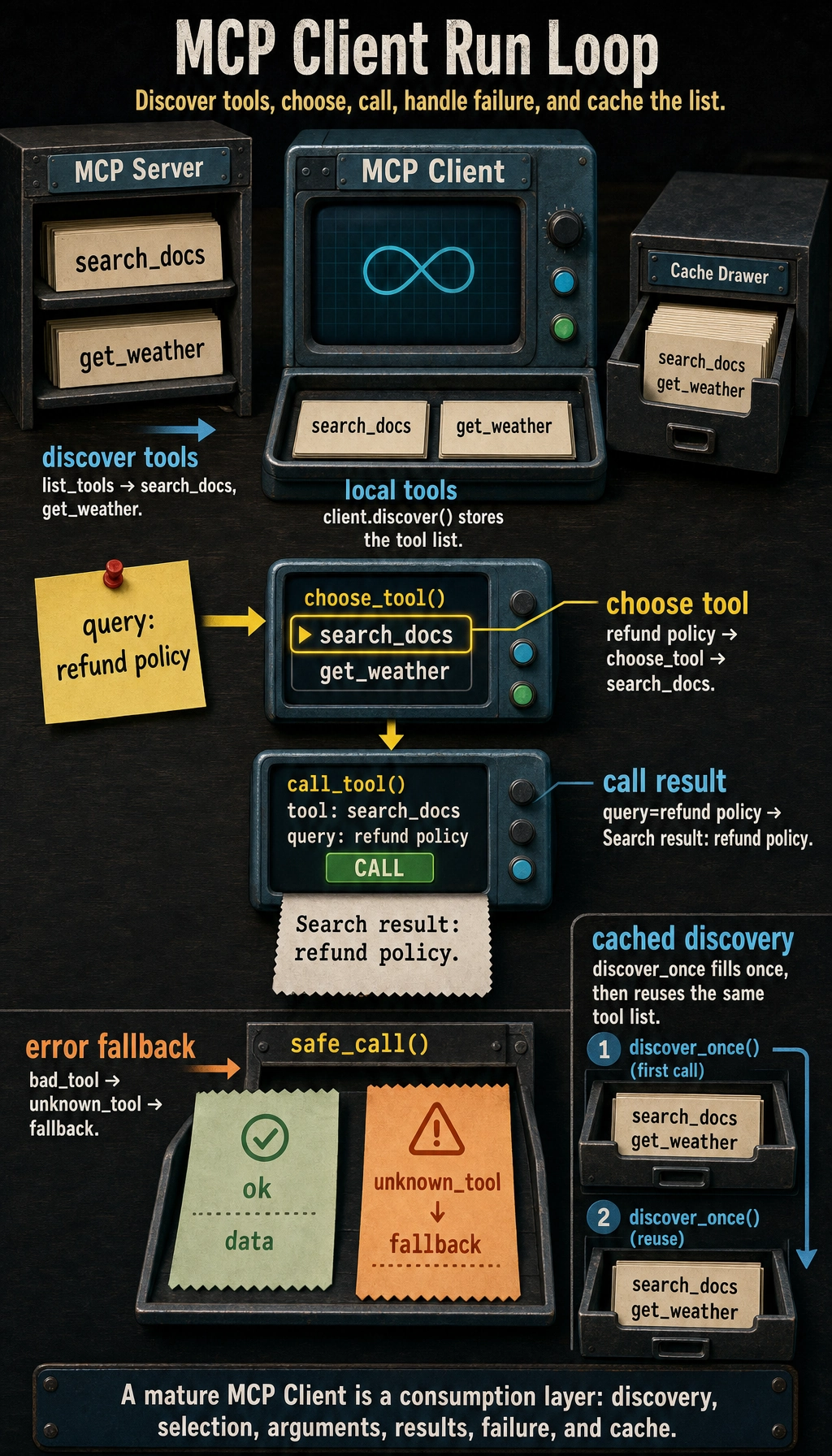
Although simple, it already shows:
The client is not just a “relay”; it also has state and room for optimization.
Common pitfalls in client integration
Being able to call, but not choose
If the client does not do selection strategy, it is easy to end up with:
- Many tools, but no idea how to use them
Looking only at success, not at failure paths
Once the server fails, the system experience can suddenly get much worse.
Rediscovering tools every time
This may waste a lot of unnecessary overhead.
Summary
The most important thing in this section is not to write a class that can call the server, but to understand:
The core of an MCP Client is not just “sending requests,” but turning “tool discovery, tool selection, argument organization, and result handling” into a stable consumption layer.
The more mature the client is, the easier it becomes for the capabilities on the server side to be truly used by upper-layer systems.
Exercises
- Add a
read_filetool toMockMCPServer, then extend the client’s selection logic. - Think about this: why are some systems suitable for rediscovering tools on every request, while others are better with caching?
- Add a “retry once after failure” behavior to
safe_call(). - Explain in your own words: why does an MCP Client usually also need a “strategy layer”?