10.5.2 Face Detection and Recognition [Elective]
Face tasks may look like “just detecting a special object,” but a real system usually includes at least:
- finding the face
- alignment
- feature extraction
- similarity comparison
So the most important thing in this section is to understand:
A face system is often a pipeline, not a single model.
Learning Objectives
- Understand the differences between face detection, alignment, and recognition
- Build intuition for feature matching through runnable examples
- Understand why face systems pay special attention to misidentification and privacy
- Build an overall pipeline mindset for face tasks
First, Build a Map
The best way for beginners to understand face tasks is not “one model recognizes faces,” but to first see the full pipeline clearly:
Once this line is clear, you won’t mistake a face system for “just detecting a special category.”
A Better Overall Analogy for Beginners
You can think of a face system like the three steps of airport check-in:
- First find out who the traveler is
- Then straighten and align the ID document
- Only then compare it with the records in the system
With this understanding, face recognition no longer feels like:
- a mysterious “person-recognition model”
and instead feels more like:
- a pipeline that first organizes the input and then compares it
What Steps Does a Face Recognition System Usually Have?
- Detection: first find where the face is
- Alignment: standardize the angle and pose as much as possible
- Representation: extract a face vector
- Matching: compare vector similarity
Why Is the “Alignment” Step Often Underestimated?
Because many beginners naturally think:
- As long as the face is boxed in, that’s enough
But in real systems, if the face angle, pose, or crop range differs too much, the later embedding is often much less stable.
So the role of alignment is more like:
First bring the input back to a more comparable state.
First, Look at a Minimal Similarity Matching Example
from math import sqrt

face_a = [0.9, 0.2, 0.1]
face_b = [0.88, 0.22, 0.12]
face_c = [0.1, 0.8, 0.9]


def cosine(a, b):
    dot = sum(x * y for x, y in zip(a, b))
    na = sqrt(sum(x * x for x in a))
    nb = sqrt(sum(x * x for x in b))
    return dot / (na * nb)


print("a vs b:", round(cosine(face_a, face_b), 4))
print("a vs c:", round(cosine(face_a, face_c), 4))
Expected output:
a vs b: 0.9994
a vs c: 0.3034
face_a and face_b are extremely close, while face_c is far away in embedding space. In a real system, this score still needs a threshold and a rejection policy.
The Most Important Intuition from This Example
Face recognition is often not directly classifying a name, but rather:
- checking whether the representations of two faces are close enough
What Should Beginners Remember First in This Section?
The most important things to remember are:
- Detection is responsible for “finding the face first”
- Alignment is responsible for “bringing the pose back to a more comparable state”
- Recognition is often about comparing embeddings, not directly outputting a name
Why Does the Threshold Directly Affect the User Experience?
Because the threshold is essentially deciding:
- how similar is similar enough to count as the same person
If the threshold is too loose:
- misidentification becomes more likely
If the threshold is too strict:
- missed recognition becomes more likely
This kind of issue is often not just a model problem, but a system configuration problem.
Another Minimal Example: How a Threshold Changes the Result
similarities = [0.93, 0.81, 0.68]
threshold = 0.8


def match_results(scores, threshold):
    return ["same_person" if score >= threshold else "different_person" for score in scores]


print(match_results(similarities, threshold))
Expected output:
['same_person', 'same_person', 'different_person']
With threshold 0.8, the first two scores are accepted as the same person and the last one is rejected. If you raise the threshold, the middle case may change from accepted to rejected.
This example is small, but it helps beginners build a system-level intuition:
- Face recognition is often not “the model tells you the answer”
- It is more like “the model gives scores, and the system makes decisions based on a threshold”
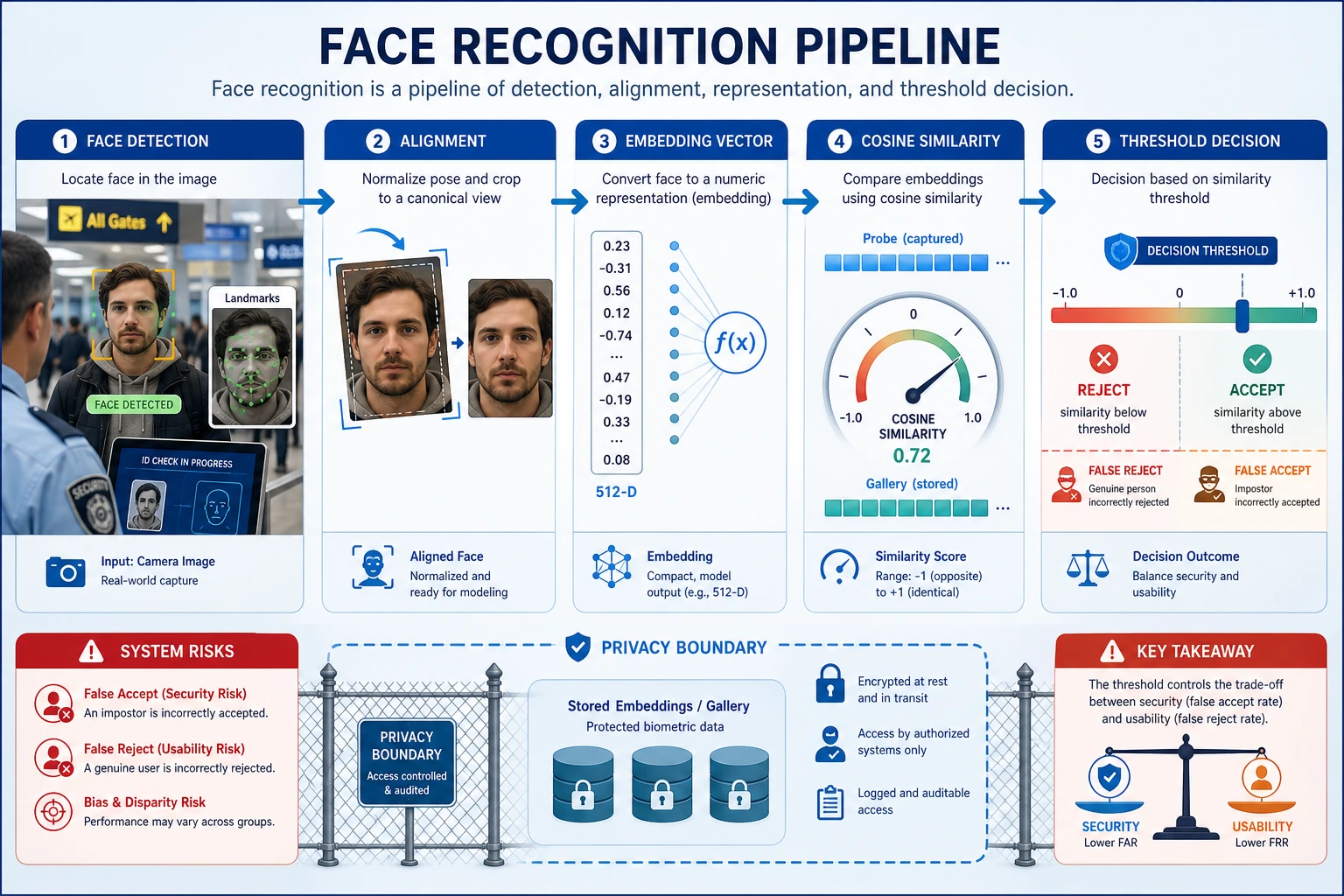
A face system is not one model: detection finds the face first, alignment makes the input comparable, embedding represents similarity, and the threshold decides same / different. A threshold that is too loose causes misidentification; one that is too strict causes missed recognition.
Most Common Misconceptions
Only Looking at Detection, Not Alignment
Alignment often directly affects the stability of later recognition.
Only Looking at Similarity, Not Threshold Risk
A threshold that is too loose makes misidentification more likely, while a threshold that is too strict makes missed recognition more likely.
Ignoring Privacy and Compliance
Face tasks almost inherently come with higher compliance requirements.
Only Showing Successful Recognition, Not Misidentification or Rejection
If you only show:
- who was successfully recognized
then the project is more like a demo than a system. A display that is closer to a real project should include:
- correct recognition
- wrong matches
- examples that should have been rejected but were accepted because the threshold was too loose
- examples that should have been recognized but were rejected by the threshold
Why Is This Section Especially Good for Training “System Thinking”?
Because it forces you to realize that:
- the result of a single model is not the same as the ability of a complete system
- thresholds, misidentification, missed recognition, and compliance all affect the final judgment
This is very similar to many real-world CV systems.
A Learning Order Beginners Can Copy Directly
A safer order is usually:
- First understand detection
- Then understand alignment
- Then understand embedding similarity
- Finally look at thresholds and system risks
If you start by focusing only on the recognition model, it is actually easier to lose sight of the whole chain.
If You Turn It into a Project, What Is Most Worth Showing First
A display that is closer to a real project usually follows this order:
- Detection boxes on the original image
- Comparison before and after alignment
- Embedding similarity between two faces
- Matching results under different thresholds
- Misidentification / missed recognition / rejection cases
This way, readers can instantly see:
- whether the problem is in detection
- or alignment
- or the threshold itself
If You Turn It into a Project, What Is Most Worth Showing?
- Detection results
- Comparison before and after alignment
- Embedding similarity comparison
- Changes in misidentification / missed recognition under different thresholds
This will feel more like a real project than only posting a “successful recognition screenshot.”
Summary
The most important thing in this section is to build a system-level judgment:
Face detection and recognition are not a single-model problem, but a complete pipeline from detection to matching.
What You Should Take Away
- A face system is essentially a pipeline
- Embeddings and thresholds determine the later matching experience
- This kind of system naturally requires more attention to risk and compliance than ordinary vision tasks
Exercises
- Construct several sets of vectors yourself and see how the similarity threshold affects matching decisions.
- Why is it said that face systems depend especially on threshold settings?
- Why does alignment affect recognition quality?
- Think about it: why do face systems need to pay special attention to privacy?