10.5.3 Video Analysis [Elective]
Video analysis is most easily misunderstood as:
- Running a bunch of images one frame at a time
That is of course the starting point, but not the whole story. The real new problem video brings is:
The same target changes continuously over time, and time itself carries information.
So this section focuses on making the “time dimension” clear.
Learning objectives
- Understand the fundamental difference between video tasks and single-image tasks
- Understand what frame sampling, tracking, and temporal modeling each solve
- Build a minimum intuition for video analysis through runnable examples
- Understand why many video systems are actually a combination of “image models + temporal logic”
Why is video more complex than a single image?
Because the same target appears across frames
In a single image, you only need to answer what is in the current scene. In video, you also need to consider:
- Where it was just now
- Where it will go next
Because “change” itself is information
In many video tasks, what matters most is not what a single frame looks like, but:
- How an action happens
- How a trajectory moves
An analogy
Single-image analysis is like looking at a photo. Video analysis is more like watching a security camera replay, where you naturally care about:
- Cause and effect over time
- The process of an event
The most common ways to process video
Frame sampling + single-frame model
The simplest method:
- Sample frames at intervals
- Analyze each frame separately
Advantages:
- Simple
Disadvantages:
- Easy to lose temporal information
Detection + tracking
Suitable for:
- Pedestrian trajectories
- Vehicle trajectories
Its core idea is:
- Detect objects in each frame first
- Then associate the same object across time
Temporal modeling
For example:
- Action recognition
- Event recognition
These tasks depend more on:
- Multiple frames jointly expressing one pattern
The safest order when you first do video analysis
When beginners first work on video tasks, it is easy to immediately think, “Should I go straight to a temporal network?” But a more reliable order is usually:
- First confirm whether a single frame is enough for the task
- If not, do frame sampling + aggregation
- If that is still not enough, do detection + tracking
- Only then move on to true temporal modeling
This order is very valuable, because many real video systems are not heavy models from the start. Instead, they first clarify:
- Frame sampling strategy
- Tracking logic
- Event definition
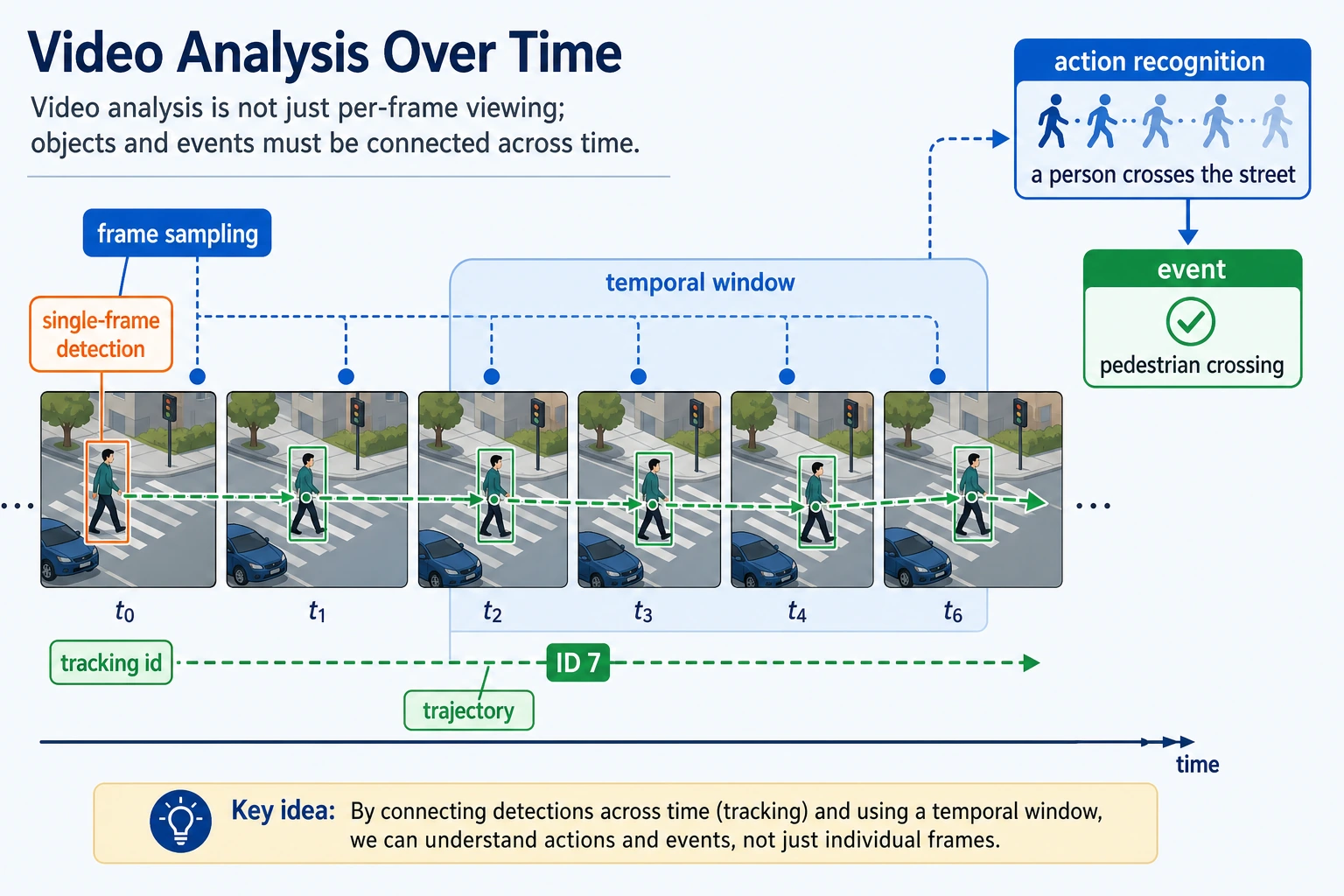
Video is not “many images stacked together.” When reading this diagram, first look at frame sampling, then how detection + tracking link the same target across frames, and only then look at how the temporal window judges an action or event.
First, run a minimal trajectory tracking example
frames = [
    [{"id": None, "x": 10, "y": 10}],
    [{"id": None, "x": 12, "y": 11}],
    [{"id": None, "x": 15, "y": 13}],
]


def assign_track_ids(frames, max_distance=5):
    next_id = 1
    prev_objects = []

    for frame in frames:
        for obj in frame:
            matched_id = None
            for prev in prev_objects:
                distance = abs(obj["x"] - prev["x"]) + abs(obj["y"] - prev["y"])
                if distance <= max_distance:
                    matched_id = prev["id"]
                    break

            if matched_id is None:
                matched_id = next_id
                next_id += 1

            obj["id"] = matched_id

        prev_objects = [dict(item) for item in frame]

    return frames


tracked = assign_track_ids(frames)
for frame in tracked:
    print(frame)
Expected output:
[{'id': 1, 'x': 10, 'y': 10}]
[{'id': 1, 'x': 12, 'y': 11}]
[{'id': 1, 'x': 15, 'y': 13}]
The same target keeps ID 1 because its movement between neighboring frames is small enough. If the movement becomes larger than max_distance, this simple tracker may assign a new ID by mistake.
What is this example mainly trying to show?
In video analysis, the first step in many systems is not a complex temporal network, but rather:
- Linking the same target across frames
Why is this important for business use cases?
If you cannot associate the same target across different frames, many tasks simply cannot be done:
- Counting
- Behavior analysis
- Boundary-crossing alerts
One more minimal example: using a sliding window to observe action
Tracking solves the problem of whether the same target is still the same target, but many video tasks also care about:
- What exactly happened over a short time period
The small example below helps you feel that:
- Video analysis often does not look at just one frame
- It looks at a short time window
sequence = [0, 0, 1, 1, 1, 0, 0]  # 0=stationary, 1=moving
window_size = 3

windows = []
for i in range(len(sequence) - window_size + 1):
    window = sequence[i:i + window_size]
    windows.append(window)

for idx, window in enumerate(windows):
    motion_ratio = sum(window) / len(window)
    label = "moving_event" if motion_ratio >= 0.67 else "static_or_unclear"
    print(idx, window, label)
Expected output:
0 [0, 0, 1] static_or_unclear
1 [0, 1, 1] static_or_unclear
2 [1, 1, 1] moving_event
3 [1, 1, 0] static_or_unclear
4 [1, 0, 0] static_or_unclear
Only the window with three continuous moving frames is labeled as a moving event. This is the key difference between a single-frame label and a temporal event label.
The key point in this example is:
- Video tasks often naturally need a short time span
- A correct single-frame judgment does not necessarily mean the whole event judgment is correct
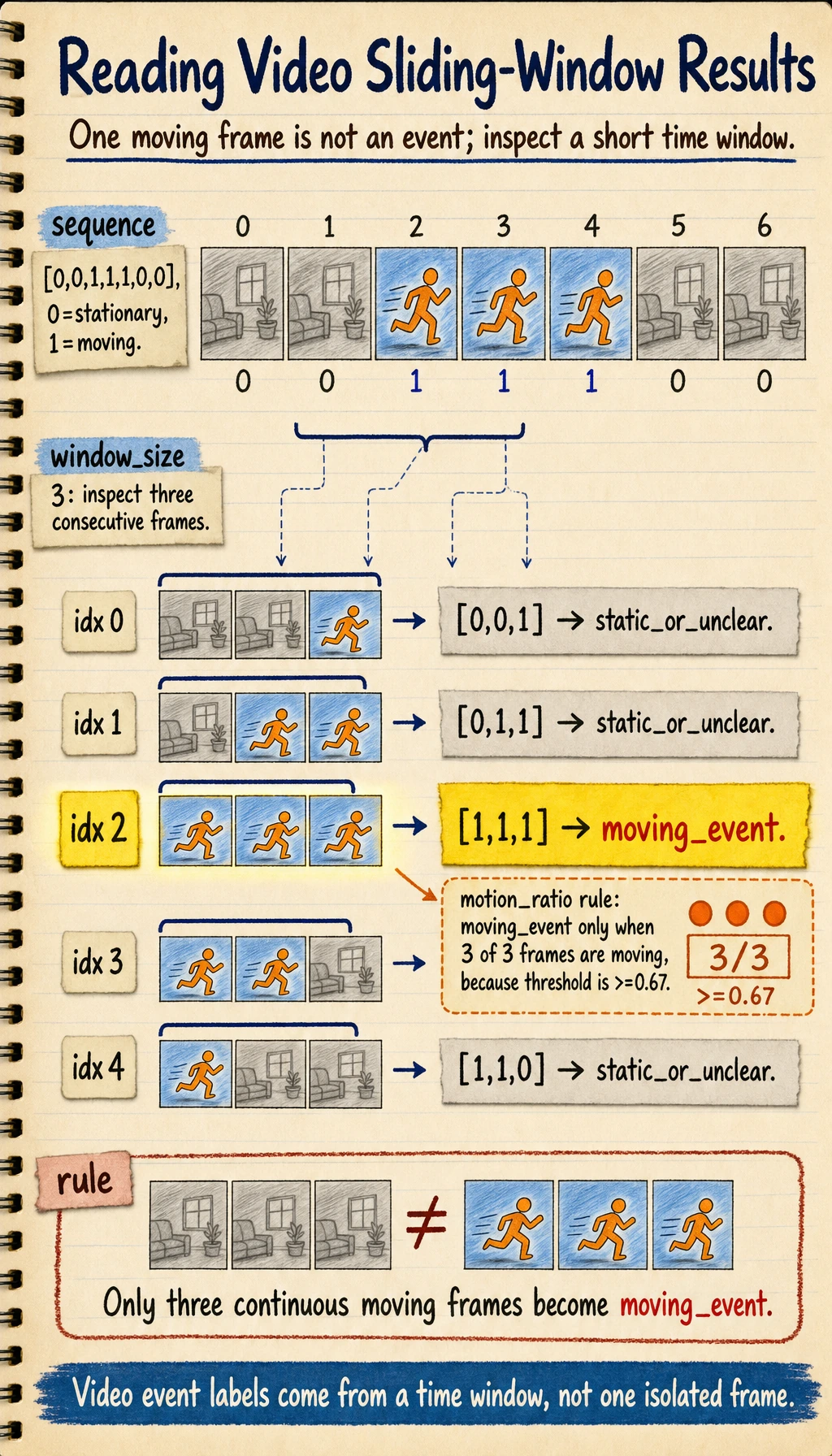
A frame state is only an observation. An event label should come from a time window plus a rule. In this example, 1 means "moving in this frame", while moving_event means "enough neighboring frames are moving to count as an event."
Define the event before choosing the model
A video project becomes much easier to reason about when the event is written as a small contract.
| Decision | Beginner-safe definition | Deeper project definition |
|---|---|---|
| What is observed | Each frame is moving or not moving | Frame state includes object ID, region, confidence, and timestamp |
| When the event starts | Three continuous moving frames | A start rule, an end rule, minimum duration, and allowed interruption |
| What the system outputs | moving_event or static_or_unclear | start_time, end_time, track_id, confidence, and evidence frames |
| What the product can tolerate | Occasional wrong or late labels | False-alarm cost, missed-event cost, maximum alert latency, and review workflow |
The model is only one part of the system. The event rule often decides whether the product feels reliable.
window_sizecontrols how much history the system uses. A larger window is usually steadier, but it reacts later.stridecontrols how often the window moves. A smaller stride reduces delay, but costs more compute.thresholdcontrols how strict the event rule is. A higher threshold reduces false alarms, but may miss short actions.- Smoothing or hysteresis can keep the label from flipping back and forth when the signal is noisy.
For experienced learners, the useful habit is to keep the event definition separate from the model code. Then you can test the same detections with different window sizes, thresholds, and latency budgets without retraining the model.
Evaluate temporal behavior, not only frame accuracy
Single-frame accuracy answers "was this frame recognized correctly?" A video system also needs to answer "was the event recognized at the right time, for the right target, and without unstable flicker?"
| Symptom | What to inspect | Common fix |
|---|---|---|
| ID switches | Track ID timeline around occlusion or crossing | Tune association distance, add appearance features, or use a stronger tracker |
| Label jitter | Frame labels before and after the event boundary | Add smoothing, hysteresis, or a stricter window rule |
| Missed short event | Sampling interval versus shortest event duration | Sample more densely, shorten the window, or add a fast trigger path |
| Late alert | Difference between true start time and predicted start time | Reduce stride, reduce buffering, or use a lighter model |
| False event from one noisy frame | Raw frame states inside the window | Require consecutive evidence instead of accepting one strong frame |
When you report a video project, include at least one temporal metric, such as event precision/recall, start-time error, end-time error, ID-switch count, or alert latency. This is what separates a demo from an actual video system.
The easiest pitfalls to fall into
Treating video as a collection of independent images
This easily loses:
- Trajectory
- Motion
- Event order
Sampling frames too coarsely
If you sample too sparsely, you may miss critical moments. A simple sanity check is to compare the sampling interval with the shortest event you care about. If the event lasts 0.4 seconds and you sample once per second, the system can miss it even when the model is accurate.
Only looking at single-frame accuracy, not temporal stability
Real video systems should care more about:
- Jitter
- Missed tracking
- ID switches
- Event start and end error
- Alert latency
If you turn video analysis into a project, what is most worth showing?
If you want to turn this kind of topic into a portfolio page, what is most worth showing usually is not a list of model names, but these 6 things:
- An overall flowchart of frame sampling or temporal modeling
- A clear event definition table
- A sample target trajectory or event window illustration
- A small temporal metric table
- A set of typical failure cases, including false alarms and missed events
- Why you finally chose the route of “frame sampling / tracking / temporal model”
This makes it easier for others to see:
- That you are building a video system
- Not just stacking many images together
Summary
The most important thing in this section is to build one judgment:
The difficulty of video analysis is not just “more frames,” but the need to incorporate the time dimension into modeling and understand how targets and events happen continuously across frames.
What you should take away from this section
- The most important new dimension in video tasks is not pixels, but time
- Many video systems are actually built as a combination of “single-frame models + temporal logic”
- When you first do a video project, clarifying the task’s time requirements is more valuable than immediately chasing complex models
Exercises
- Modify the example to let two targets move at the same time, and see whether the simple tracking logic becomes confused.
- Why do we say many video systems are actually a combination of “single-frame models + temporal logic”?
- What risks can arise if frame sampling is too sparse?
- Think about this: which video tasks must explicitly model time rather than only looking at single frames?
- Change
window_sizefrom3to5. What happens to false alarms and alert delay? - Add a rule that only fires when the event lasts at least two windows. What kind of noisy case does this rule reduce, and what kind of short event might it miss?