7.1.2 Tokenization and Tokenizer
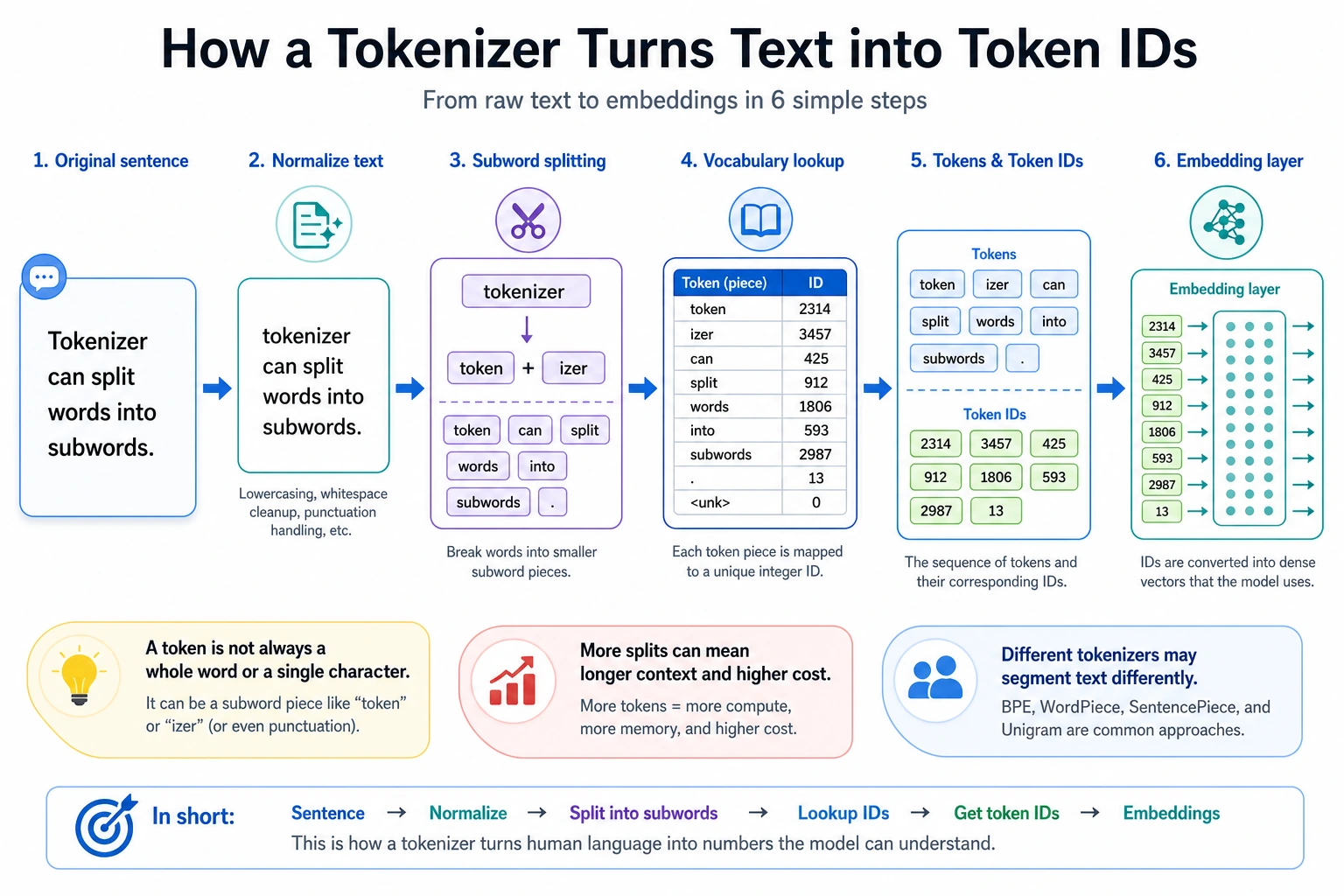
After this lesson, you should be able to look at any prompt and answer four practical questions:
- How will this text be split into tokens?
- Which integer IDs will the model receive?
- Which positions are real content and which positions are padding?
- Will this prompt waste or exceed the context window?
The Mental Model
A neural network does not read strings directly. It receives tensors. A tokenizer is the contract between human text and model tensors:
raw text -> tokens -> input_ids -> model
Most LLM issues that look mysterious become easier once you inspect this contract:
- a word may become several tokens;
- punctuation, casing, Chinese, code, and emojis may change token count a lot;
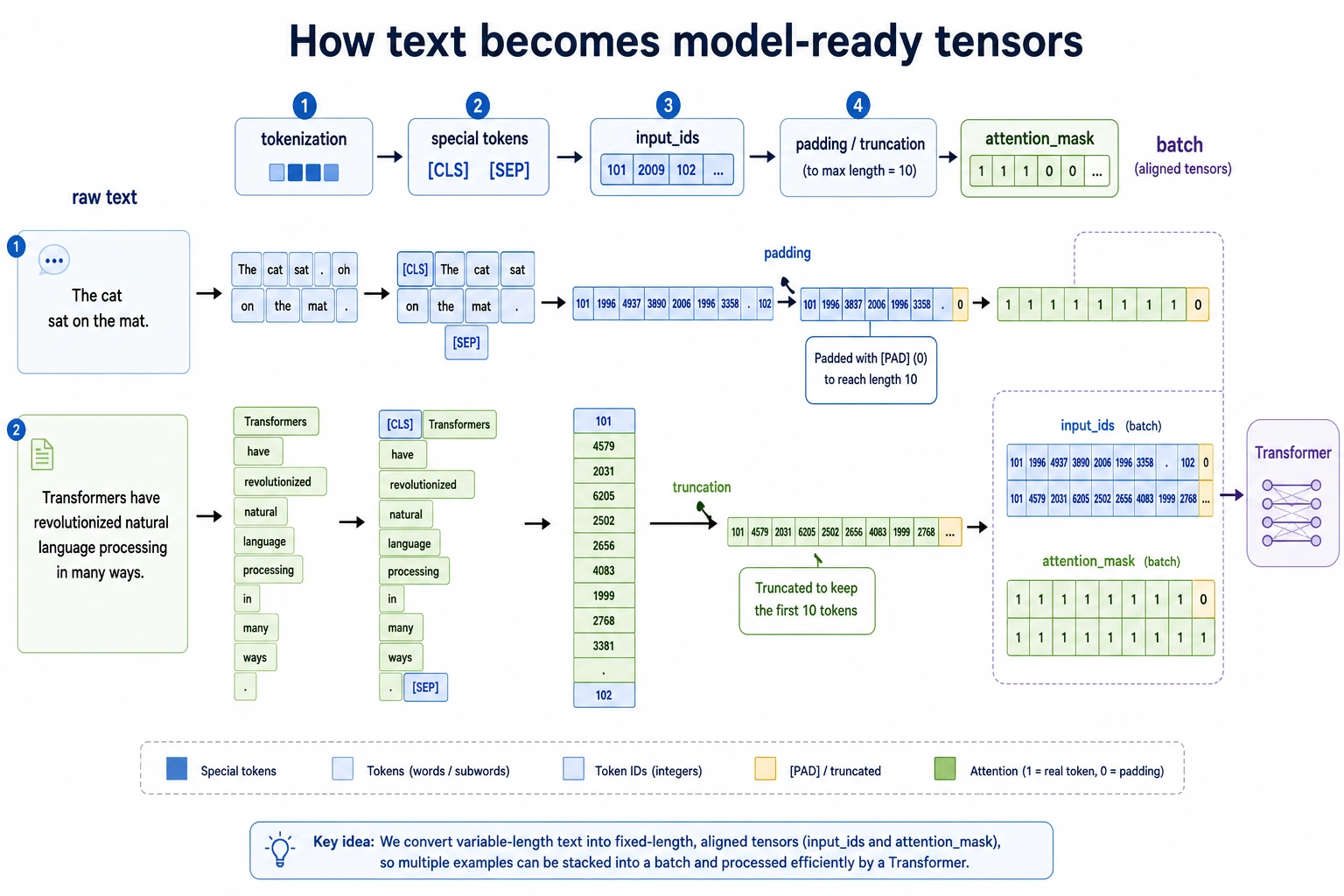
- padding makes examples in one batch the same length;
- truncation silently removes content if the sequence is too long;
- chat templates add hidden structure tokens around system, user, and assistant messages.
Split Size Trade-Off
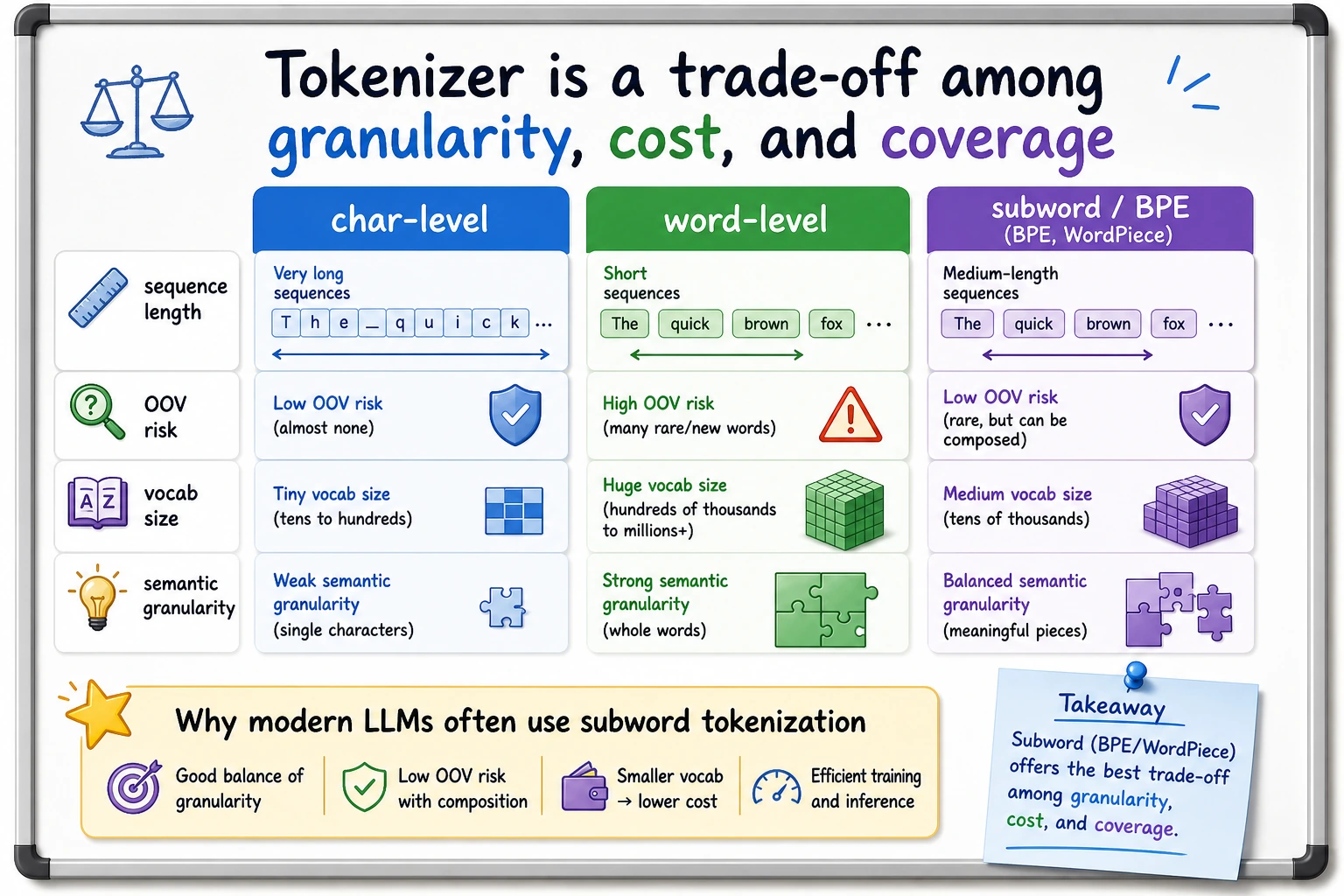
There are three common choices:
| Method | Example | Strength | Weakness |
|---|---|---|---|
| Character-level | r e f u n d | almost no unknown words | very long sequences |
| Word-level | refund policy | intuitive meaning units | many out-of-vocabulary words |
| Subword-level | token ##ization | practical balance | harder to read by eye |
Modern LLMs usually use subword tokenization. BPE, WordPiece, and SentencePiece are different ways to learn reusable fragments from a corpus. The important idea is the same: frequent fragments get stable IDs, rare words can still be composed from smaller pieces.
Lab 1: Build a Tiny WordPiece-Style Tokenizer
Run this first. It is small enough to understand line by line, but it contains the same objects you see in real model APIs.
import re

VOCAB = {
    "[PAD]": 0,
    "[UNK]": 1,
    "[CLS]": 2,
    "[SEP]": 3,
    "refund": 4,
    "policy": 5,
    "reset": 6,
    "password": 7,
    "transform": 8,
    "##er": 9,
    "##s": 10,
    "token": 11,
    "##ization": 12,
    "please": 13,
    "help": 14,
    "need": 15,
    "evidence": 16,
}


def words(text):
    return re.findall(r"[A-Za-z]+", text.lower())


def split_wordpiece(word):
    if word in VOCAB:
        return [word]

    pieces = []
    start = 0
    while start < len(word):
        match = None
        for end in range(len(word), start, -1):
            piece = word[start:end] if start == 0 else "##" + word[start:end]
            if piece in VOCAB:
                match = piece
                break
        if match is None:
            return ["[UNK]"]
        pieces.append(match)
        start = end
    return pieces


def encode(text, max_length=10):
    tokens = ["[CLS]"]
    for word in words(text):
        tokens.extend(split_wordpiece(word))
    tokens.append("[SEP]")

    original_len = len(tokens)
    if len(tokens) > max_length:
        tokens = tokens[:max_length]
        tokens[-1] = "[SEP]"

    input_ids = [VOCAB.get(token, VOCAB["[UNK]"]) for token in tokens]
    attention_mask = [1] * len(input_ids)

    while len(input_ids) < max_length:
        tokens.append("[PAD]")
        input_ids.append(VOCAB["[PAD]"])
        attention_mask.append(0)

    return {
        "text": text,
        "original_len": original_len,
        "tokens": tokens,
        "input_ids": input_ids,
        "attention_mask": attention_mask,
    }


for example in [
    "Please help reset password",
    "Transformers refund policy",
    "Tokenization needs evidence",
]:
    row = encode(example, max_length=10)
    print("-" * 64)
    print("text:", row["text"])
    print("original_len:", row["original_len"])
    print("tokens:", row["tokens"])
    print("input_ids:", row["input_ids"])
    print("attention_mask:", row["attention_mask"])
Expected output:
----------------------------------------------------------------
text: Please help reset password
original_len: 6
tokens: ['[CLS]', 'please', 'help', 'reset', 'password', '[SEP]', '[PAD]', '[PAD]', '[PAD]', '[PAD]']
input_ids: [2, 13, 14, 6, 7, 3, 0, 0, 0, 0]
attention_mask: [1, 1, 1, 1, 1, 1, 0, 0, 0, 0]
----------------------------------------------------------------
text: Transformers refund policy
original_len: 7
tokens: ['[CLS]', 'transform', '##er', '##s', 'refund', 'policy', '[SEP]', '[PAD]', '[PAD]', '[PAD]']
input_ids: [2, 8, 9, 10, 4, 5, 3, 0, 0, 0]
attention_mask: [1, 1, 1, 1, 1, 1, 1, 0, 0, 0]
----------------------------------------------------------------
text: Tokenization needs evidence
original_len: 7
tokens: ['[CLS]', 'token', '##ization', 'need', '##s', 'evidence', '[SEP]', '[PAD]', '[PAD]', '[PAD]']
input_ids: [2, 11, 12, 15, 10, 16, 3, 0, 0, 0]
attention_mask: [1, 1, 1, 1, 1, 1, 1, 0, 0, 0]
Read the output like this:
[CLS]and[SEP]are structure tokens.transformersbecomestransform,##er,##sbecause the whole word is not inVOCAB.input_idsare the integer values the model actually receives.attention_mask=0marks[PAD]positions so the model can ignore them.
Lab 2: See Truncation as a Product Risk
Now force the same tokenizer into a small context window.
row = encode("Please help reset password refund policy evidence", max_length=6)
print("original_len:", row["original_len"])
print("tokens:", row["tokens"])
print("input_ids:", row["input_ids"])
print("attention_mask:", row["attention_mask"])
Expected output:
original_len: 9
tokens: ['[CLS]', 'please', 'help', 'reset', 'password', '[SEP]']
input_ids: [2, 13, 14, 6, 7, 3]
attention_mask: [1, 1, 1, 1, 1, 1]
The words refund policy evidence disappeared. In a real support assistant, that could remove the user’s actual intent. This is why tokenization is not a small preprocessing detail; it affects cost, retrieval size, prompt design, and failure modes.
Lab 3: Inspect a Real Hugging Face Tokenizer
Use this when you have internet access for the first model download.
python -m pip install "transformers>=4.0" torch
from transformers import AutoTokenizer

tokenizer = AutoTokenizer.from_pretrained("bert-base-uncased")

batch = tokenizer(
    ["Please help reset password", "Tokenization needs evidence"],
    padding="max_length",
    truncation=True,
    max_length=10,
    return_tensors="pt",
)

print(batch.keys())
print(batch["input_ids"].shape)
print(tokenizer.convert_ids_to_tokens(batch["input_ids"][1]))
print(batch["attention_mask"][1].tolist())
Expected shape-level output:
dict_keys(['input_ids', 'token_type_ids', 'attention_mask'])
torch.Size([2, 10])
['[CLS]', 'token', '##ization', 'needs', 'evidence', '[SEP]', '[PAD]', '[PAD]', '[PAD]', '[PAD]']
[1, 1, 1, 1, 1, 1, 0, 0, 0, 0]
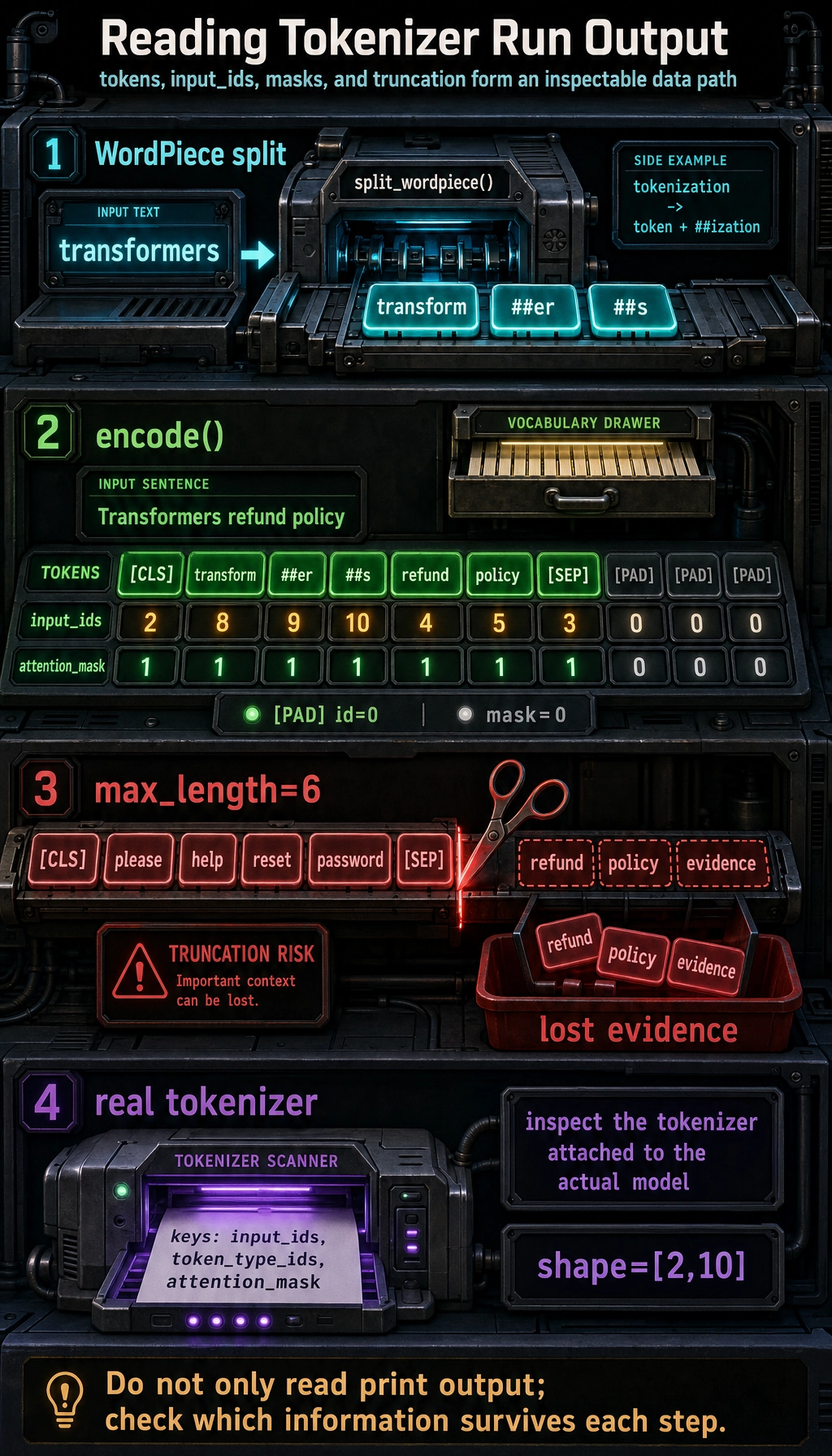
The exact split can differ across tokenizers. That is the point: always inspect the tokenizer that belongs to the model you actually use.
Terms Worth Knowing
| Term | Meaning in practice |
|---|---|
vocab | token-to-ID dictionary learned during tokenizer training |
| OOV | out-of-vocabulary; often handled by [UNK] or subword composition |
| BPE | merges frequent character pairs into reusable subwords |
| WordPiece | similar subword idea, common in BERT-style tokenizers |
| SentencePiece | treats text as a raw stream; useful for multilingual and no-space languages |
padding_side | whether pads are added on the left or right; important for some decoder models |
| context length | maximum token budget for input plus generated output |
| chat template | tokenizer-level formatting that adds role and boundary tokens |
Debugging Checklist
When a prompt behaves strangely, inspect the tokenizer before blaming the model:
- Print tokens and token IDs for the exact prompt.
- Count tokens after the chat template, not just raw user text.
- Check whether truncation removed instructions, retrieved evidence, or the latest user question.
- Verify padding side and
attention_maskwhen batching decoder models. - Compare Chinese, English, code, and emoji-heavy inputs; their token counts can differ sharply.
Exercises
- Remove
transformfromVOCAB. What happens toTransformers refund policy? - Change
max_lengthfrom10to5. Which useful tokens disappear first? - Add
"##ing"and testresetting password. Can your tokenizer represent it? - Run Lab 3 with another model tokenizer and compare token counts for Chinese, English, and code.
- For a RAG prompt, decide how many tokens you reserve for system instructions, retrieved evidence, user question, and answer space.
Summary
A tokenizer is not just a text splitter. It defines the model’s visible world:
text boundary -> token boundary -> ID sequence -> attention mask -> context budget
If you can inspect that path, you can explain many practical LLM problems before touching model architecture.